Malware News Proxyware Malware Disguised as Notepad++ Tool Leverages Windows Explorer Process to Hijack Systems

Parkinsond

Level 56
Thread author
Verified
Well-known
Dec 6, 2023
4,531
11,857
5,469
A sophisticated malware campaign targeting unsuspecting users has emerged, disguising malicious proxyware as legitimate Notepad++ installations.

This attack exploits users seeking cracked software through deceptive advertisement pages and fake download portals.

The malware hijacks victims’ internet bandwidth without consent, allowing attackers to profit by sharing network resources with external parties.

This method, known as proxyjacking, mirrors cryptojacking but monetizes network bandwidth instead of computing power.

 
Indicators of Compromise (IOCs)
The following artifacts indicate a potential infection based on the analyzed report

File Names

TextShaping.dll (Malicious DLL)

Setup.msi / Setup.zip (Droppers)

DPLoader (Loader script)

Scheduled Tasks

Notepad Update Scheduler

Injected Processes

AggregatorHost.exe

explorer.exe

Installed Software/Payloads

Infatica

DigitalPulse

Remediation Plan
If you suspect infection, execute the following steps immediately.

Sever Network Connection
Disconnect the device from the internet to stop bandwidth hijacking and C2 communication.

Terminate Malicious Processes
Open Task Manager (Ctrl + Shift + Esc).

Look for suspicious instances of AggregatorHost.exe or high network usage by explorer.exe. Terminate if confirmed anomalous.

Remove Persistence
Open Task Scheduler (taskschd.msc).

Locate and delete the task named "Notepad Update Scheduler".

Audit Windows Defender Exclusions
Go to Settings > Update & Security > Windows Security > Virus & threat protection.

Check Manage settings > Exclusions. Remove any unauthorized paths added by the malware.

Purge Files
Delete the directory containing TextShaping.dll and the fake installer.

Uninstall "Infatica" or "DigitalPulse" via Add or Remove Programs if visible.

Official Reinstallation
Download Notepad++ only from the official domain (notepad-plus-plus.org) to ensure file integrity.

References

ASEC Analysis

Identified the Larva-25012 campaign and transition from .NET to C++/Python variants.

MITRE ATT&CK T1574.002
Hijack Execution Flow: DLL Side-Loading.

MITRE ATT&CK T1053
Scheduled Task/Job.
 
  • Like
Reactions: Zartarra
These are currently the most recent malware programs that exploit the Github platform:

httxx://urlhaus.abuse.ch/browse.php?search=raw

Don't wait too long to check your defenses... because they may be offline tomorrow.

1.png
 
These are currently the most recent malware programs that exploit the Github platform:

httxx://urlhaus.abuse.ch/browse.php?search=raw

Don't wait too long to check your defenses... because they may be offline tomorrow.

View attachment 294911
I'm a little bit incompetent regarding Italian language; which filter is here?
 
I'm a little bit incompetent regarding Italian language; which filter is here?

It is a $document rule that @LinuxFan58 also uses to block downloads of executables from the GitHub platform.
Obviously, it also blocks legitimate executables.

But if YOU download a legitimate executable from GitHub, for example, the Paint.net software, you can proceed to the web page and then check after downloading if the exe is not infected.

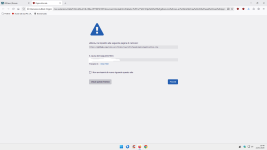
However, if a block pop-up appears like the one I inserted without you having done anything......:rolleyes:
 
@Parkinsond

On Linux it is possible to limit the updates to official repositories. So for me there is no risk blocking Linux executable formats from popular coding platforms like github, bitbucket or sourceforge. On Windows you can achieve the same by blocking Windows executable formats (and compressed file fomats like @Sampei.Nihira does) from popular coding platforms and file sharing services.

On my wife's laptop I have installed Hard_Configurator (which is a legitimate and signed program). With those rules updates of Hard_Configurator would be blockked also, so when you use such a program. you have to write an allow rule in uBO or AdGuard for Andy's repository (e.g. @@||github.com/AndyFul/^).

I know Sampei-san also blocks first party, but I use the $document rule in combination with third-party blocks to limit the Top Level Domains. In this forum @Jan Willy also posted regularly on easy-medium mode blocking using uBlockOrigin (Mv2 only) and AdGuard (Mv2 and Mv3).
 
On my wife's laptop I have installed Hard_Configurator
I prefer WHHL (by the same developer) as it is easier to use.
you have to write an allow rule in uBO or AdGuard for Andy's repository (e.g. @@||github.com/AndyFul/^).
Too advanced for me; I'm just an average user who relies on limited knowledge fortified by the ability to think logically.
 
  • Like
Reactions: Sorrento
I can, but I prefer more simple solutions, less time-consuming, less liable to bugs or breaking things, more adoptable by the mass-users.

After applying dynamic rule (1 rule) to uBo and you don't want to find the exception rule, you can switch back to Easy Mode (filter lists only) for that website with a simple click of the mouse.

It's super simple.;)
Trust me.
 
  • Like
Reactions: Parkinsond