Quickly Restart Chrome in One-Click

Status
Not open for further replies.

Ink

Administrator
Thread author
Verified
Jan 8, 2011
22,318
2
55,055
8,379
Quick and Easy Guide to RESTARTING Google Chrome from your Bookmarks Bar - in one-click!
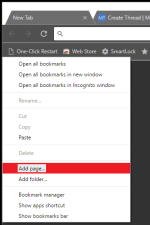
  1. Open a new tab and right-click in an empty space on the Bookmarks Bar.
  2. Click on Add page...
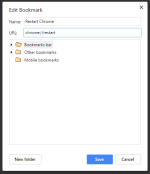
  3. Select Bookmark Bar folder
  4. Change name to Restart Chrome (or something of your choice)
  5. Change URL to chrome://restart
  6. Then Save
  7. Pro Tip: Hide/Show the Bookmarks bar: Ctrl + Shift + B
upload_2016-12-14_20-27-9.png upload_2016-12-14_20-28-28.png
 
Help!
I made this cool bookmark, but then I deleted it, because it caused Chrome to restart with all the tabs that were open before.
Now that I deleted it, Chrome has adopted the behavior of always starting with previous tabs, even though it is set to open to "new tab".
How do I fix this?

EDIT: never mind, a restart fixed it. I must be a genius to have figured that out by myself...
 
Last edited:
Status
Not open for further replies.

You may also like...