Expired Sticky Password Premium - 1 year free license

Disclaimer: We cannot guarantee that all promo codes will remain active. Some offers have a short validation period and expire.

Sundaram999

Level 6
Thread author
Verified
Well-known
Jun 11, 2014
273
1,588
470
Sticky Password Premium - 1 year free

  • Version is v8.0.8.116
  • Download size is 28.8 MB
  • Supports Windows (XP, Vista, 7, 8/8.1, and 10 [32-bit and 64-bit]), Mac OS X 10.8 and up, Android (2.3 and up), and iOS (8.0 and up); you must register your license on Windows or Mac before you can use it with Android and iOS apps
Sticky Password Free VS Premium
 
Last edited:
If anyone has problems with excessive CPU usage, turn off UIAutomation. All this does is disable AutoFill for IE x64. You can find it under the menu which is located on the UI (not extension - the desktop software) at the top right. Click "Settings" > "Miscellaneous" (at the bottom) > at the bottom you should see "Turn off UIAutomation"

Source: Sticky Password forum • Sticky Password UI Automation Manager 10% or greater CPU use

I may not use this to replace LastPass (at least not yet) but importing data from LastPass was painless. The autofill feature on every site that I've been on has worked as advertised. It seems this can also log you into applications such as iTunes if you input the information under "App Accounts" (tab on the main UI). I could see myself using that for sure.
 
There's a new giveaway.

Free License Sticky Password Premium
The offer is valid until 09:00 (Moscow time), September 15, 2016.

To receive a free license Sticky Password Premium for 1 year, follow these steps:

1. Go to the promotions page and click "DOWNLOAD STICKY PASSWORD PREMIUM NOW".

2. Select a share to social networks, or click "I do not use Facebook, Twitter, or Google+!", To create without sots.setey.

3. After registration you will receive an activation code (YOUR CODE).

4. Download the Sticky Password 8 for Windows. You can also install the applicationfor the Mac, and Android mobile devices and / or iOS.

5. Set Sticky Password, creating an account during installation.

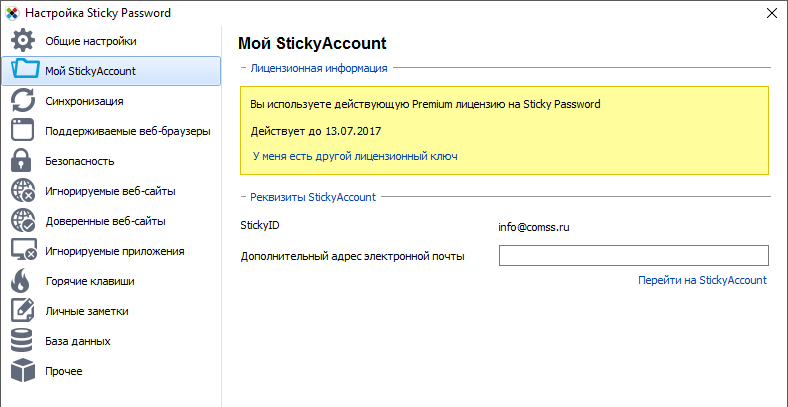
For programs already installed, you can activate the full version license key in "Menu> Settings> My StickyAccount".

2016-07-13_9-37-05.png


Terms of action

- This is the annual license for 1 user for home and commercial use
- Activate license is required before October 30, 2016.
- The license can be used for all of your devices, including PCs, laptops, smartphones and tablets
- available free updates and technical support for life The license
 
  • Like
Reactions: Sundaram999

You may also like...