
Troubleshoot SVChost.exe detect as suspicious

suma

Level 4
Thread author
Verified
Feb 18, 2013
204
183
268
India
HitMan pro detect SVChost.exe detected as suspicious. under C:\WINDOWS\system32\svchost.exe

Product . . . . . : Microsoft® Windows® Operating System
Publisher . . . . : Microsoft Corporation
Description . . . : Host Process for Windows Services
Version . . . . . : 10.0.14393.0
Copyright . . . . : © Microsoft Corporation. All rights reserved.
RSA Key Size . . . : 2048
Process Type . . . : Critical
LanguageID . . . . : 1033
Authenticode . . . : Valid.

Should I delete It.
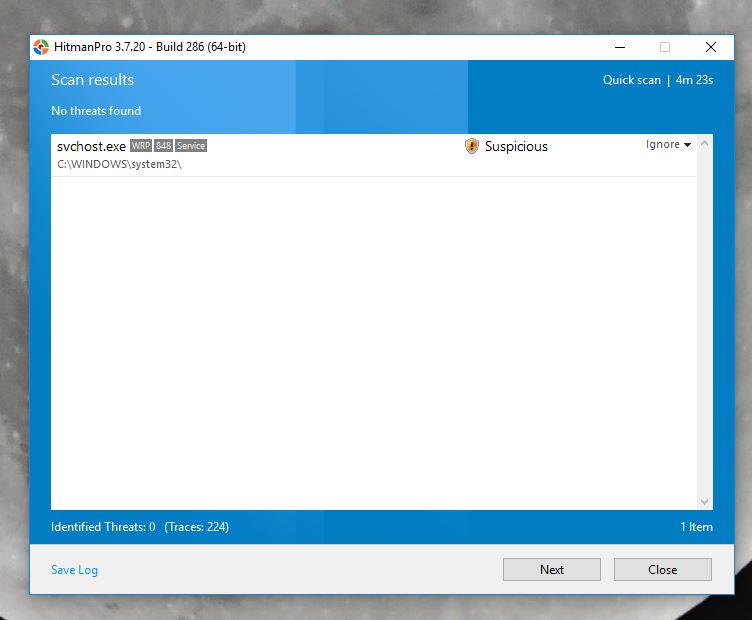
suspicious.JPG
 
I have been wondering about a service host process for 3 or 4 weeks (spikes in processor and memory load). Scanned it with everything, all clean. If you get to the bottom of this please post back here.

Thanks Suma.
 
  • Like
Reactions: frogboy
Upvote 0
There's definitely something fishy going on if HMP is flagging it. Could be that malware has injected itself into svchost.
I suggest running a few other second opinion scans with different solutions and seeing if any of those come up with the same conclusion.
 
Upvote 0
Pc runs very well but surprisingly Hitman SVChost.exe detected as suspicious. Should I Ignore or delete?
 
Upvote 0
There's definitely something fishy going on if HMP is flagging it. Could be that malware has injected itself into svchost.
I suggest running a few other second opinion scans with different solutions and seeing if any of those come up with the same conclusion.
Its cleaned after
scanned by KIS2017.
 
Upvote 0
Pc runs very well but surprisingly Hitman SVChost.exe detected as suspicious. Should I Ignore or delete?
Check it on VirusTotal. The real SVChost.exe is a legitimate windows process, of course. The question is whether this particular file that calls itself "SVChost.exe" was perhaps modified, or maybe it is malware with a fake name.

You can also do a right click on the file, choose "properties", and then go to the digital signature tab, and do a double click on the sig that is displayed. Should be a Microsoft sig. Windows will then tell you if the sig is valid. If the sig is valid, then the file can be considered legit.
 
Upvote 0
Pc runs very well but surprisingly Hitman SVChost.exe detected as suspicious. Should I Ignore or delete?

Here is an excellent overview of "svchost.exe"

What Is the Service Host Process (svchost.exe) and Why Are So Many Running?

What Is the Service Host Process (svchost.exe) and Why Are So Many Running?

Could this Process Be a Virus?
The process itself is an official Windows component. While it’s possible that a virus has replaced the real Service Host with an executable of its own, it’s very unlikely. If you’d like to be sure, you can check out the underlying file location of the process. In Task Manager, right-click any Service Host process and choose the “Open File Location” option.

If the file is stored in your Windows\System32 folder, then you can be fairly certain you are not dealing with a virus.
 
Upvote 0
Check it on VirusTotal. The real SVChost.exe is a legitimate windows process, of course. The question is whether this particular file that calls itself "SVChost.exe" was perhaps modified, or maybe it is malware with a fake name.

You can also do a right click on the file, choose "properties", and then go to the digital signature tab, and do a double click on the sig that is displayed. Should be a Microsoft sig. Windows will then tell you if the sig is valid. If the sig is valid, then the file can be considered legit.
Its clean here the details .
VirusTotal
 
  • Like
Reactions: XhenEd and shmu26
Upvote 0
You can run a system scan with Zemana Antimalware portable and ESET Powerliks Cleaner (the latter suggested by MT Blog) to find out a possible svchost infection.

There's also this process explorer tool - CrowdInspect that offers (Experimental) Code Injection detection I'll suggest you to have a look at. It occasionally has FPs, but try it if you can.
If some svchost process is being shown as "injected", that "might" need some investigation and cleanup. You can also see if that svchost process is connected to some unknown remote host, and if yes, you can verify that remote domain on Virustotal etc. for their safety rating. MHR score will also be intuitive. Post a screenshot of the tool here for us, if an injection is detected.

Screenshot (8) - Copy.png


You can also do a right click on the file, choose "properties", and then go to the digital signature tab, and do a double click on the sig that is displayed. Should be a Microsoft sig. Windows will then tell you if the sig is valid. If the sig is valid, then the file can be considered legit.
While this method is useful in general, HitmanPro could have analysed and found something suspicious (==not usual) about some service (the HMP detection points out an "svchost" service and not process itself) running under one of the svchost processes in memory. May or may not be an FP?
 
Upvote 0
You can run a system scan with Zemana Antimalware portable and ESET Powerliks Cleaner (the latter suggested by MT Blog) to find out a possible svchost infection.

There's also this process explorer tool - CrowdInspect that offers (Experimental) Code Injection detection I'll suggest you to have a look at. It occasionally has FPs, but try it if you can.
If some svchost process is being shown as "injected", that "might" need some investigation and cleanup. You can also see if that svchost process is connected to some unknown remote host, and if yes, you can verify that remote domain on Virustotal etc. for their safety rating. MHR score will also be intuitive. Post a screenshot of the tool here for us, if an injection is detected.

View attachment 169407


While this method is useful in general, HitmanPro could have analysed and found something suspicious (==not usual) about some service (the HMP detection points out an "svchost" service and not process itself) running under one of the svchost processes in memory. May or may not be an FP?
Interesting. So it might indicate the presence of a different malware source, which HMP did not detect on its own. But in such a case, quarantining scvhost.exe will not help.
 
  • Like
Reactions: Parsh
Upvote 0
Interesting. So it might indicate the presence of a different malware source, which HMP did not detect on its own. But in such a case, quarantining scvhost.exe will not help.
Possible.. on the other hand, I've seen some FPs with HMP related to the "suspicious" detections.
@suma run the HitmanPro scan again and double-click on the detection entry. It should show some generic info (attributes etc.) on basis of which the detection was made. Please post a screenshot of the same if possible.
 
Upvote 0
You can run a system scan with Zemana Antimalware portable and ESET Powerliks Cleaner (the latter suggested by MT Blog) to find out a possible svchost infection.

There's also this process explorer tool - CrowdInspect that offers (Experimental) Code Injection detection I'll suggest you to have a look at. It occasionally has FPs, but try it if you can.
If some svchost process is being shown as "injected", that "might" need some investigation and cleanup. You can also see if that svchost process is connected to some unknown remote host, and if yes, you can verify that remote domain on Virustotal etc. for their safety rating. MHR score will also be intuitive. Post a screenshot of the tool here for us, if an injection is detected.

View attachment 169407


While this method is useful in general, HitmanPro could have analysed and found something suspicious (==not usual) about some service (the HMP detection points out an "svchost" service and not process itself) running under one of the svchost processes in memory. May or may not be an FP?

Thanks I have just checked by ZAM and Eset tools that u mentioned in here and nothing found in suspicious. I am not pro user thts why Cowdlnspect is not much useful to me but its very true suspicious thing worried to anyone. Mailed to Hitman Pro assistance and waiting for their reply.
 
Upvote 0