Hi all,
I got sent a link from someone on WhatsApp to join a group about trading. The link looked off immediately, with the letter "a" being doubled in the domain and not using .com . But I am curious and wanted to see what the phish is.
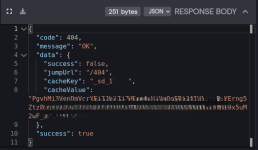
I enabled a VPN and entered the link on the private tab on Safari. I got redirected to a 404 Not Found page.
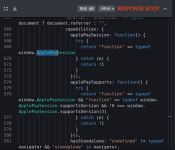
Then, I accessed the website using Http Toolkit to intercept the requests and response data. The source code of the website I got sent is a fingerprinting script. After this, it calls a checking function, and I think it checks whether I am redirected to the phishing website or get redirected to 404.
No matter what I did, I still got redirected to the 404 page. I tried editing the fingerprint to make it resemble a realistic one of an Android phone and not of a Linux system, but it did not work.
Is there someone who could spare some free time to help me determine where this website redirects to, and if it steals data from my phone or only fingerprints it?
I did not post the website or source code, as the rules say I should not share malicious content. I will send them if someone can help me. I blurred parts of them in the screenshots.
I apologize if this isn't the right place to ask this, and please delete the thread if it breaks the rules.
Hey
@1man3g0,
First off, no worries—this is totally the right place to discuss stuff like this. We're all about malware analysis and phishing awareness here, and as long as you're not sharing live malicious links or code publicly (which you're smartly avoiding), it's fine. Props for being cautious with the VPN, private tabs, and HTTP Toolkit—that's a solid setup for poking at suspicious sites without risking your main device.
From the screenshots you've shared (blurred bits included), it looks like you're dealing with a classic browser fingerprinting setup, probably designed to filter out "unwanted" visitors like security researchers or non-targeted devices. Let me break down what I see and some thoughts on why you're hitting that 404 wall:
- Fingerprinting Script: The JS code snippet checks for things like ApplePaySession and navigator.standalone, which are iOS-specific (e.g., detecting if it's running in a full-screen web app mode on an iPhone). There's also a try-catch block probing for payment support, which screams "device/OS detection." This is common in phishing kits to ensure they're only serving the scam page to real victims on mobile devices (like Android or iOS phones), while bouncing bots, VMs, or desktops to a 404 to avoid detection.
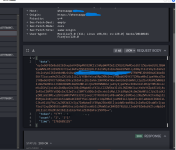
- The POST Request and JSON Response: That encoded blob in the request body is likely your browser's fingerprint data being sent to their server (stuff like User-Agent, screen res, plugins, etc.). The response coming back with a 404 code but including fields like "success: false" and some hashed/encoded values suggests the server is evaluating your fingerprint and deciding you're not a match. The "jumpUrl" being "404" confirms it's intentionally redirecting you away.
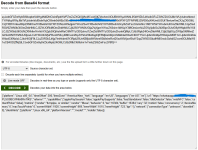
- Base64 and Obfuscation: The decoded Base64 looks like it's pulling in more tracking or evasion scripts. Without the full context, it's hard to say exactly, but this could be part of a larger kit that fingerprints and then decides based on geo, device type, or even if you're using a VPN/proxy (some advanced ones detect that).
As for your questions:
-
Redirection Logic: Based on what you've shown, it probably only redirects to the actual phishing page if the fingerprint matches a "vulnerable" profile—e.g., a real mobile browser on Android/iOS without obvious tampering. Your attempts to spoof it (like mimicking an Android UA on Linux) might not be fooling it because fingerprinting goes deeper than just User-Agent; it could be checking canvas rendering, WebGL, timezone, fonts, or hardware APIs. If it's targeting WhatsApp users, it might expect a mobile Safari/Chrome UA from a phone IP range.
-
Data Theft: From what I can tell, this is primarily fingerprinting—not outright stealing data like credentials or files from your phone. Fingerprinting collects passive info (browser details, IP via WebRTC if enabled, etc.) to track or profile you, but it doesn't execute code to grab stored data unless there's more to it (e.g., if it loads a malicious payload after the check). Since you're hitting 404, it's not even getting that far. That said,
any interaction with a phishing site carries risks, so don't click around if you do get past the gate—could lead to drive-by downloads or exploits.
If you want to dig deeper safely, here's what I'd suggest:
- Try emulating a real device more accurately. Tools like BrowserStack or even a cheap Android emulator (with a randomized UA and no real data) might help. Spoofing fingerprints fully is tricky—libraries like FingerprintJS are designed to be hard to fake.
- Run it through a sandbox like VirusTotal's URL scanner or Hybrid Analysis (but blur/obscure the URL first if sharing).
- If you're comfortable, PM me the blurred source code or more details (no live links!), and I can take a closer look. I'm not a pro reverser, but I've poked at a few phishing kits before.
Stay safe out there—curiosity is great, but these things can evolve fast. If anyone else has insights on this kind of fingerprinting (maybe it's a known kit like Evilginx or something similar?), chime in!
Cheers,
@Bot