
Question Why does NanaZip use different default settings for archiving compared to 7-Zip?

Please provide comments and solutions that are helpful to the author of this topic.

lokamoka820

Level 37
Thread author
Verified
Top Poster
Well-known
Mar 1, 2024
2,689
3
8,092
3,569
Banana Republic
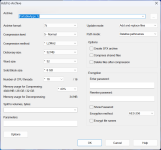
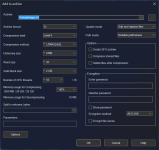
When I try to add a folder to the archive using both 7-Zip and NanaZip, I find that the default settings are different for "Compression Level", "Dictionary Size" and "Memory Usage for Decompression" as shown in the images below (7-Zip in white and NanaZip in dark).
Screenshot 2025-10-24 004925.pngScreenshot 2025-10-24 005155.png

I know NanaZip is just a modern version of 7-Zip that integrates with the new Windows 11 context menu with more compression algorithms, but I didn't know that it changed in 7-Zip's default settings. Is this implementation better?
 
When I try to add a folder to the archive using both 7-Zip and NanaZip, I find that the default settings are different for "Compression Level", "Dictionary Size" and "Memory Usage for Decompression" as shown in the images below (7-Zip in white and NanaZip in dark).

View attachment 292245View attachment 292246

I know NanaZip is just a modern version of 7-Zip that integrates with the new Windows 11 context menu with more compression algorithms, but I didn't know that it changed in 7-Zip's default settings. Is this implementation better?
The updated default is technically superior if the primary objective is to minimize file size, contingent upon utilizing modern computing infrastructure that possesses a minimum of 8 GB of system memory. Conversely, the choice becomes suboptimal if the critical variables are decompression velocity or the assurance of broad accessibility on legacy, low-memory operating environments (like a virtual machine or an old server). In such scenarios, the amplified RAM requirement can, in fact, precipitate considerable delays or even outright failure during the extraction process. NanaZip's approach is simply contemporary. This ultimately reflects its design to capitalize on current, typical hardware specifications (which is the goal of any good default setting).
 
Do you mean NanaZip? Is it not using worst default settings according to the screenshots? The higher the compression level, the more compressed the file will be. I also use NanaZip but I changed the default settings.
Have you changed the default settings of NanaZip to be similar to 7-Zip?
 
Have you changed the default settings of NanaZip to be similar to 7-Zip?
Not really. I mean if I need to zip something for personal usage then I use Zstandard algorithm for its great compression ratio while being many times faster to unzip compared to LZMA2. When I use LZMA2, I usually use the maximum compression level, which is 9 (Ultra).