


In the beggining, I thought I should make a tutorial for more advanced users (meaning more tweaking), but then I found very simple steps you could take to make SAP inpenetrable. Actually, configuring it the way I'm gonna show, it would make SAP behave like an anti-executable with a real-time AV. So, here we go...
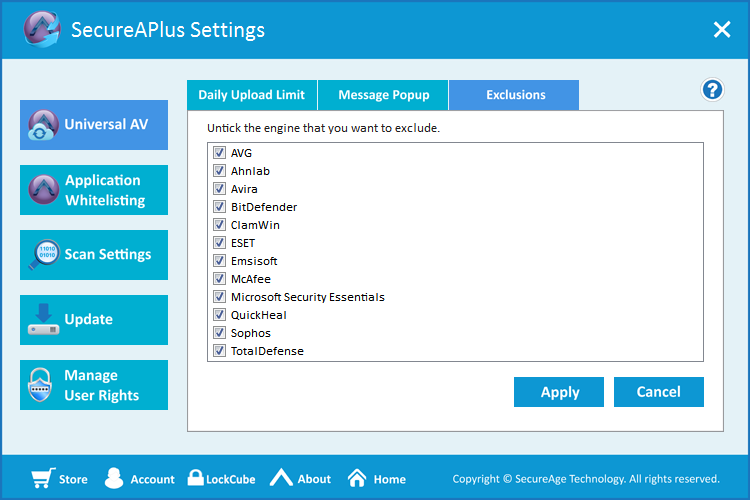
1. In Settings>Universal AV>Exclusions make sure that all engines are enabled
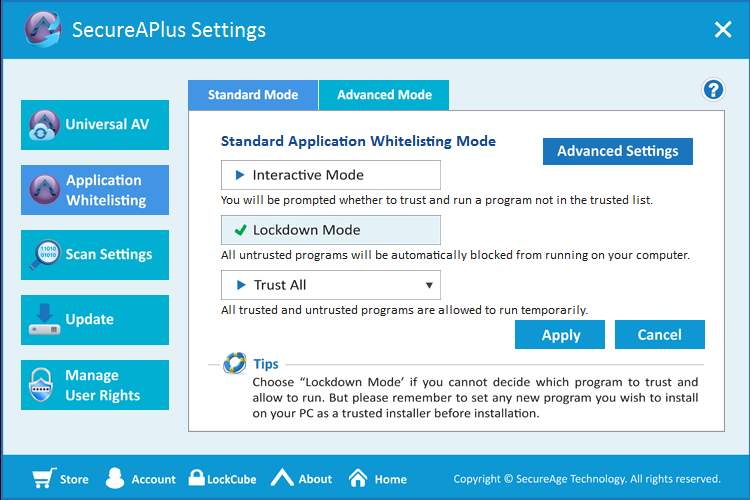
2. On Settings>Application Whitelisting>Standard Mode check Lockdown Mode
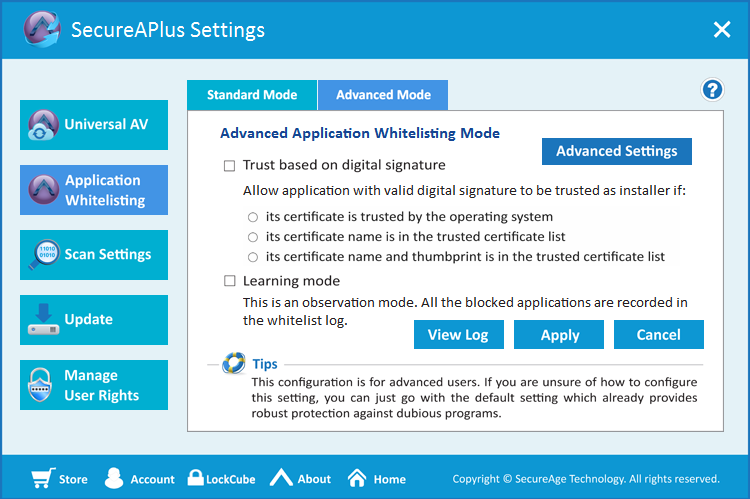
3. On Settings>Application Whitelisting>Advanced Mode uncheck Trust based on digital signature
That's all, folks! So simple! I could dig a bit deeper into the settings, but no need, really!
With the aforementioned settings, no program will be able to execute, unless it's in your whitelist.
Note: SAP scans your system the first time you install it and creates a whitelist of the already installed programs. Since there is still the possibility of malware escaping detection, make sure your PC is completely clean.
Thanks for reading, mates! Suggestions are welcome.
1. In Settings>Universal AV>Exclusions make sure that all engines are enabled
2. On Settings>Application Whitelisting>Standard Mode check Lockdown Mode
3. On Settings>Application Whitelisting>Advanced Mode uncheck Trust based on digital signature
That's all, folks! So simple! I could dig a bit deeper into the settings, but no need, really!
With the aforementioned settings, no program will be able to execute, unless it's in your whitelist.
Note: SAP scans your system the first time you install it and creates a whitelist of the already installed programs. Since there is still the possibility of malware escaping detection, make sure your PC is completely clean.
Thanks for reading, mates! Suggestions are welcome.
Last edited:


