Guide | How To [How To] protect your USB from getting infected

  • Thread starter Thread starter Deleted member 178
  • Start date Start date
The associated guide may contain user-generated or external content.
raxa707 said:
@umbra corp it is the usb av dat means the sytem is protected but wat abt the usb how can the usb be protected so that the viruses dont enter it from an infected pc?

Write Protection, in order to infect the usb , the malware must be wrote in it, if it cant be so you are not infected (in theory)
 
:) You can use Sandboxie software which will give you the option to copy the file from usb and paste into real system.

Like this you can use the software by pasting into real system without infecting USB. ;)
 
mohitpatel09 said:
:) You can use Sandboxie software which will give you the option to copy the file from usb and paste into real system.

Like this you can use the software by pasting into real system without infecting USB. ;)

What if internet connected is blocked by a rootkit or Sandboxie is blocked by a malware?
 
Here is a new product for those who may like to try it.
I have not tried it because I have no idea how well it will preform.

infblockerpro.png


InfBlocker Shield 4.0 PRO Edition.

This Free Software protects the computer against virus from infected USB flash drive. It has an ability to lock autorun.inf files and its associate executable files in a multiple instance of plugging USB flash drive. It also removes or disables the suspicious files in a USB flash drive. InfBlocker can immunize any drive to prevent virus infection.

This program is free for personal and non-commercial use. Distributed exclusively by RCPsoft.net

v.4.0.0.0 English - OS: Microsoft Windows© XP/2003/Vista/Windows 7/Windows 8
Build PRO 1.0 RCPsoft.net 2013 - Requires Microsoft .NET Framework

Homepage
Download (Softpedia)

Softpedia guarantees that InfBlocker PRO Edition 2013 4.0.0.0 Build 1.0 is 100% CLEAN, which means it does not contain any form of malware, including spyware, viruses, trojans and backdoors.

Enjoy!!:D
 
Here is another freeware program that I forgot to mention:

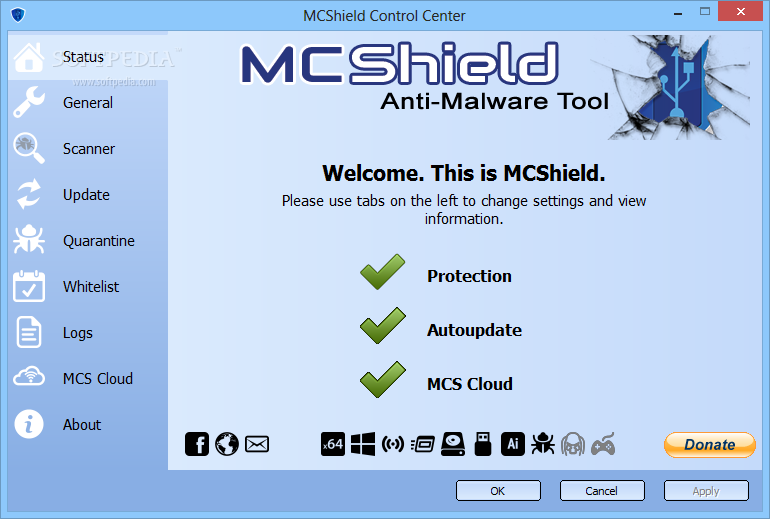
MCShield_1.png

Screenhots

MCShield is a handy application that was created in order to provide you with a means of securing your USB drives, scanning and quarantining malware.

The software comes equipped with a powerful heuristic engine that will help you detect and neutralize threats in real-time.

softpedia_clean_award_f.gif


System requirements:
Any PC running 32/64 bit Windows XP, Vista, Windows 7, Windows 8.

Homepage
Download (default)
Download (Softpedia)

Enjoy!!:D
 
  • Like
Reactions: yigido
Hello, I am the member of MCShield developing team.

I can assure you that current FPs are minimal, and they are connected to McAfee or Comodo, that is unimportant, becuse these AV's always have bunch of FPs...

Before releasing any new version, every component is scanned on VT, and FPs are reported to AV companies, so when we finally release it, it is 99% clean of any false positive detection...

If you need any question, just ask :)
 
  • Like
Reactions: yigido
no , you didn't understood me, i meant MCshield detects many safe programs (at the time i used it) as FPs ;)
 
Umbra Corp. said:
no , you didn't understood me, i meant MCshield detects many safe programs (at the time i used it) as FPs ;)

Sorry, I misunderstood you :)

Yes, there is a big chance for FPs, but better to have more FPs, than to give malware chance to stay undetected :D

I created the thread for MCShield --> http://malwaretips.com/Thread-MCShield?pid=115571#pid115571

If you come across any FP, give me the logs, and I'll forward it to authors, so they can whitelist detection...
 
Windows Autorun Disable by SecurityXploded v.1.0 released:

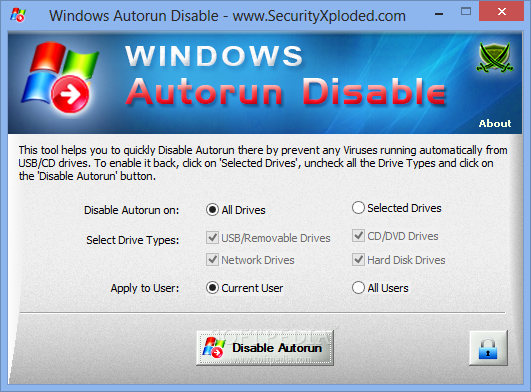
Windows-Autorun-Disable_1.png


Advanced tool to enable or disable autorun on Windows
Windows Autorun Disable is a very useful application that will allow you to deactivate autorun, a Windows feature that may allow malware to infiltrate you system through removable devices, like USB storage devices, or via CD/DVD optical drives that contain infected discs.

The program is quite easy to use since all you have to do is choose the drives on which autorun should be disabled, as well as the users for which this restriction applies.

You can also try out the portable version of the application.

Homepage
Download
Softpedia
Softpedia portable

Commit: This is the first release of this product, testing welcome.