By Staff Post Your Security and Tech Tips Here

Jack

Administrator
Thread author
Verified
Staff Member
Well-known
Forum Veteran
Jan 24, 2011
9,380
1
24,873
8,379
malwaretips.com
Hello everyone,
We've added a new section on the site that shows tips from our community.

32.jpg


So, in this thread, members can post Security Tips, Performance Tips, or Maintenance Tips, and (if valid) they will be added to the block. The tip can be for Windows, Android, iOS, or macOS and about anything that you think it's helpful to know for the other members.

Basic requirements are:

- Keep it short. Because the space where the tips are displayed is limited, you need to keep the tip short.
- Must be in English with proper spelling and punctuation.


You can post any tip you have below, and if valid, we'll add it and be displayed in the dedicated section. 🤓
 
Last edited:
Well, I'd posted this tiny thing earlier within a thread but might as well re-post it. If you ever look at Event Viewer, esp. after you've reinstalled your Windows, you might find certain yellow DCOM "warnings" in the System logs--usually in clusters of 4.

They do no harm. Let me stress that first and foremost. But if you like a clean (er) EV, there is one way you can easily get rid of this DCOM warning 10016, with GUID ending B6F3A001407E specifically. You will remove this GUID from the registry 4 times. The first time--the video doesn't show it but you hit Enter on your keyboard. Then in the registry for the next 3 times, you click Find Next.


OK, someone please post after me--lol. Don't leave me hanging here all by myself. 🙏
 
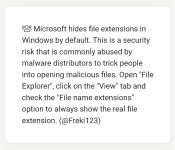
Since windows 10 default settings are not showing known file extensions it's best to make them visible. So you can see that a file named movie.mkv.exe isn't a movie (and more likely something bad).
@plat So you don't feel alone here :D
 
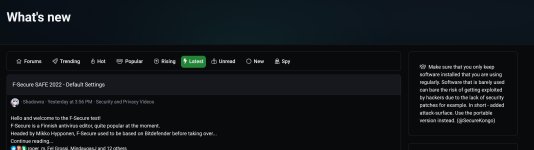
Make sure that you only keep software installed that you are using regularly. Software that is barely used can bare the risk of getting exploited by hackers due to the lack of security patches for example. In short - added attack-surface. Use the portable version instead.
 
For people who use online software a lot.
To sum up the difference between each alert, smart screens are security guards and defenders are cops. If you are sure of your identity, tell the smart screen confidently.
Could you redo this? Is unclear about what exactly this is?
Well, I'd posted this tiny thing earlier within a thread but might as well re-post it. If you ever look at Event Viewer, esp. after you've reinstalled your Windows, you might find certain yellow DCOM "warnings" in the System logs--usually in clusters of 4.

They do no harm. Let me stress that first and foremost. But if you like a clean (er) EV, there is one way you can easily get rid of this DCOM warning 10016, with GUID ending B6F3A001407E specifically. You will remove this GUID from the registry 4 times. The first time--the video doesn't show it but you hit Enter on your keyboard. Then in the registry for the next 3 times, you click Find Next.


OK, someone please post after me--lol. Don't leave me hanging here all by myself. 🙏

Can you redo this to take less space? I want to avoid adding links or videos.

Make sure that you only keep software installed that you are using regularly. Software that is barely used can bare the risk of getting exploited by hackers due to the lack of security patches for example. In short - added attack-surface. Use the portable version instead.
Since windows 10 default settings are not showing known file extensions it's best to make them visible. So you can see that a file named movie.mkv.exe isn't a movie (and more likely something bad).
@plat So you don't feel alone here :D
Both of these were added.
32.jpg

323.jpg


Keep posting here, and I'll review them. 1 tip per post, try to be clear and avoid using too many sentences.
 
Do not use several antivirus suites at once. They will fight each other, thinking the signature patterns, vaccines and defense mechanisms of the other AV are malware. You will end up having a slower computer and worse security.
 
Don't be paranoid. It's good to know and practice privacy and security related topics, but don't go too deep into the rabbit hole.

Teach yourself what to do after the fallout (because there is a chance in your lifetime something bad will happen: ransomware, hardware failure, people spreading and misusing your personal info via email, chat, phone and so on).

Take a break, go on vacation, it's sometimes good to clear your mind from tech related stuff. :emoji_beer:
 

You may also like...