Troubleshoot Windows 7 taking longer than expected to boot on new PC

  • Thread starter Thread starter SkyJP
  • Start date Start date
S

SkyJP

Thread author
Briefly explain your current issue(s)
As above
Steps taken to resolve, but have been unsuccessful
Many startup applications have been disabled.
Only "Google Drive", "Bluetooth LE Services Control Program" and "Intel PROSet/Wireless Bluetooth" run on boot. Kaspersky 2015 is on the new PC as well, but is set to "Concede resources to OS".
 
  • Like
Reactions: FreddyFreeloader
Upvote 0
Apparently, the KB update was something to do with the upcoming upgrade to Windows 10.

I looked at the boot logs for the first couple of boots on this pc which took approx 150 000ms (approx 2.5 mins).
 
Upvote 0
Thanks:
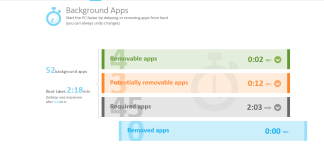
upload_2015-5-26_8-58-0.png
Turns out that boot time is ~2 mins but it takes 5 minutes for desktop to become responsive (there is a black screen with a cursor for a while after login).
 
Upvote 0
Why is my screen black when I start Windows 7?

Reinstall your video driver
  1. Right-click the taskbar, and then click Start Task Manager.

  2. Click the Processes tab, click explorer.exe, and then click End Process.

  3. Click File, and then click New Task (Run).

  4. In the Open text box, enter explorer.exe, and then click OK.

  5. Click the Start button
    4f6cbd09-148c-4dd8-b1f2-48f232a2fd33_818.jpg
    , enter device manager in the search box, and then, in the search results, click Device Manager.
  6. Double-click Display adapters, right-click your display device, click Update Driver Software, and then follow the steps in the wizard that appears.
Note
  • After the driver is reinstalled, you might need to restart your computer again to complete the installation. You might also need to adjust the screen resolution to its previous setting.

If these steps solved the problem, you're done. If not, go on to the next set of steps.

Check for registry issues
  1. Right-click the taskbar, and then click Start Task Manager.

  2. Click the Processes tab, click explorer.exe, and then click End Process.

  3. Click File, and then click New Task (Run)

    In the Open text box, enter explorer.exe, and then click OK.

  4. Click the Start button
    4f6cbd09-148c-4dd8-b1f2-48f232a2fd33_818.jpg
    , enter regedit in the search box, and then, in the search results, click regedit.exe.
  5. Browse to the following registry key: HKEY_LOCAL_MACHINE\SOFTWARE\Microsoft\Windows NT\CurrentVersion\Winlogon

  6. Click to select the WinLogon key, and then, in the right pane, click Shell. The value of Shell in the Data column should beexplorer.exe. If the value of Shell isn't explorer.exe, double-click Shell, and then, in the Value data text field, enterexplorer.exe, and then click OK.

  7. Close the registry editor, and then restart your PC.

Read more at the source: http://windows.microsoft.com/en-GB/windows7/why-is-my-screen-black-when-i-start-windows-7
 
  • Like
Reactions: Venustus
Upvote 0
Thanks. I checked on Intel and my graphics driver is up to date. The registry is also the same as in the article. I also uninstalled my WiFi and Bluetooth drivers to see if the problem persisted (then reinstalled them)

I looked at logs in Event Viewer and I found a continuous error log that happened on every boot:

"The following boot-start or system-start driver(s) failed to load:
adgnetworkwfpdrv"

I assume this is to do with Adguard's WFP filter driver (which was actually disabled) and I uninstalled Adguard, with Revo Uninstaller, but the same error gets logged anyway.
 
Upvote 0
Thanks. I checked on Intel and my graphics driver is up to date. The registry is also the same as in the article. I also uninstalled my WiFi and Bluetooth drivers to see if the problem persisted (then reinstalled them)

I looked at logs in Event Viewer and I found a continuous error log that happened on every boot:

"The following boot-start or system-start driver(s) failed to load:
adgnetworkwfpdrv"

I assume this is to do with Adguard's WFP filter driver (which was actually disabled) and I uninstalled Adguard, with Revo Uninstaller, but the same error gets logged anyway.
Can you please install Adguard and uninstall it via the Control Panel?
 
Upvote 0
Thanks. I checked on Intel and my graphics driver is up to date. The registry is also the same as in the article. I also uninstalled my WiFi and Bluetooth drivers to see if the problem persisted (then reinstalled them)

I looked at logs in Event Viewer and I found a continuous error log that happened on every boot:

"The following boot-start or system-start driver(s) failed to load:
adgnetworkwfpdrv"

I assume this is to do with Adguard's WFP filter driver (which was actually disabled) and I uninstalled Adguard, with Revo Uninstaller, but the same error gets logged anyway.
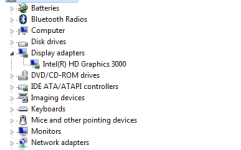
Just one question do you only have a dedicated intel graphics card?Or does your laptop/desktop use AMD/Nvidia gpu as well?
Could you please show us a screenshot from device manager!
 
  • Like
Reactions: Koroke San
Upvote 0
Just one question do you only have a dedicated intel graphics card?Or does your laptop/desktop use AMD/Nvidia gpu as well?
Could you please show us a screenshot from device manager!
My laptop only has Intel HD Graphics 3000 (integrated)
upload_2015-5-26_11-8-49.png


find the file manually and remove it by force. (make a system backup before of course :D )

Can you please install Adguard and uninstall it via the Control Panel?

I installed Adguard, enabled WFP driver, rebooted (error didn't come up in event logger), uninstalled Adguard, then deleted the adgnetworkwfp driver in C:\windows\system32\drivers
 
  • Like
Reactions: Venustus
Upvote 0
Thanks. I checked on Intel and my graphics driver is up to date. The registry is also the same as in the article. I also uninstalled my WiFi and Bluetooth drivers to see if the problem persisted (then reinstalled them)

I looked at logs in Event Viewer and I found a continuous error log that happened on every boot:

"The following boot-start or system-start driver(s) failed to load:
adgnetworkwfpdrv"

I assume this is to do with Adguard's WFP filter driver (which was actually disabled) and I uninstalled Adguard, with Revo Uninstaller, but the same error gets logged anyway.
I have installed Adguard to perform a check.

Please download Autoruns from the following URL: https://technet.microsoft.com/en-us/sysinternals/bb963902
After it's completed downloading, extract the files to your Desktop.

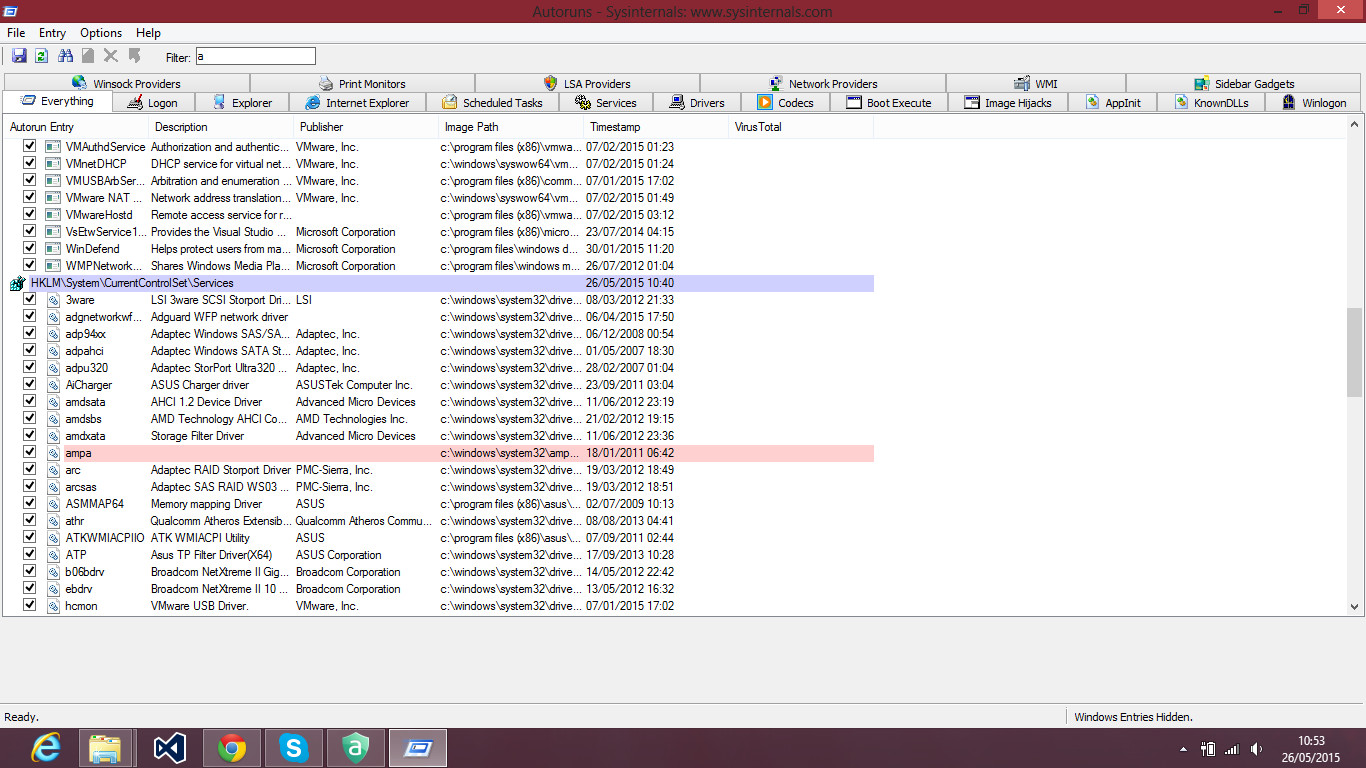
After extraction is complete, ope Autoruns.exe. Accept the license agreement which will be displayed. Afterwards, you should see a window like the following:

eBITE.jpg


There will be a difference in the entries between our systems*

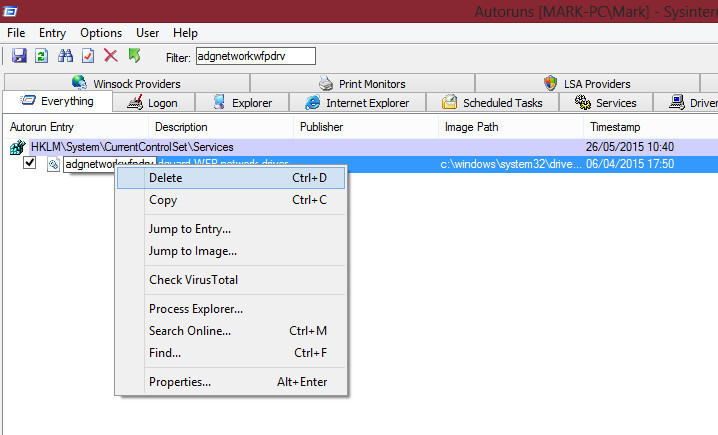
Use the filter at the top and search for: adgnetworkwfpdrv

Once you've found it, right click > Delete

KZGMs.jpg

Accept the confirmation for this action. The entry will be removed, it should no longer attempt to startup at boot time.

Please can you go to the following path: c:\windows\system32\drivers\adgnetworkwfpdrv.sys

Delete that driver (*.sys file) if it exists. DO NOT DELETE ANYTHING ELSE.

Then check if the issue has been fixed (Event Viewer driver error).
 
Last edited by a moderator:
Upvote 0
Can't really tell to be honest. The error doesn't come up in the logs anymore, though, but the logs also says that boot time is approx 240 000ms (4 minutes) with ESS 8, Google Drive, ELAN touchpad, Bluetooth and Soluto on boot (I don't really know whether this is a slow or fast boot time...)
 
Last edited by a moderator:
Upvote 0
4 minutes is a extreme slow boot time. Which software u r using to measure boot time? U can download & run bootracer to know ur boottime too & if u not full scan ur PC yet then do it see any malware infection.


Edit : lol wut a joke, Soluto says my PC is responsive after 2:45 minutes & bootracer says 45 seconds. This program is a joke. I think u measured ur PC boot/startup time with soluto too?
 
Last edited:
Upvote 0