

With nearly 650 locations across 47 states, Crumbl Cookies has taken the nation by storm, becoming one of the most popular gourmet cookie companies in just a few short years. Their weekly rotating menu featuring specialty flavors like Milk Chocolate Chip, Cornbread, Cookies & Cream, and many more have gained a cult-like following.
It’s no wonder scammers are taking advantage of Crumbl’s popularity and rapid growth by advertising fake $100 Crumbl gift card giveaways on scammy websites, shady ads, and across social media. They trick users into handing over personal information and credit card details under the guise of claiming their “prize”.
If you’ve seen ads for a $100 Crumbl gift card recently, read on to uncover exactly how this scam operates and most importantly, how to protect yourself from falling victim to it.
Scam Overview
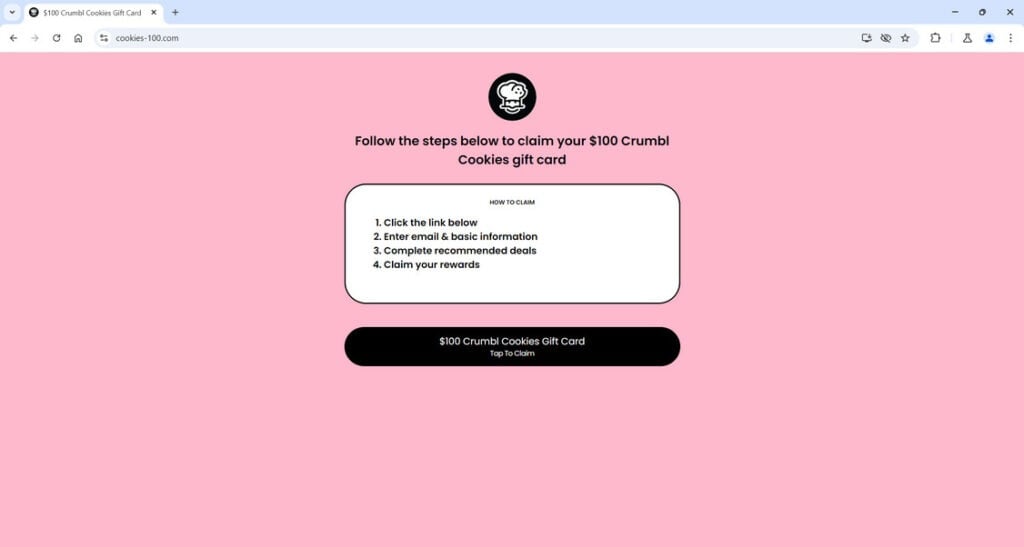
The $100 Crumbl Cookies gift card scam starts innocuously enough through an ad on social media, a pop-up on a streaming site, or text message. The ad leads to a website like “crumblcookiespromo.com” or “cookies-100.com” promising easy access to a $100 Crumbl gift card.
At first glance, the website looks official – using Crumbl’s logos, images, and branding strategically placed to build trust and credibility. Scam sites even go as far as copying content directly from Crumbl’s official pages to seem more legitimate.
After entering some basic personal information like your name and email address, you are prompted to complete a few short offers to unlock your gift card. Sounds easy enough right? Just download a couple apps, sign up for trial subscriptions, submit some surveys.
Unfortunately, this is all a facade. The apps and offers are designed to collect your billing information and subscribe you to services you don’t want. Worse – you’ll never receive that coveted $100 gift card.
By the time you realize it’s a scam, the damage has already been done. The scammers behind the fake Crumbl gift card ads now have your personal information, credit card details, and have signed you up for recurring monthly fees you’ll have to take time to cancel.
Some versions of the scam even go as far as directly asking for an upfront $3 – $5 “shipping fee” for the gift card that will obviously never arrive. Others simply pocket advertising revenue through their shady affiliate offers and surveys without charging users.
Either way, these schemes prey on people’s desire to get something for nothing and leverage the trusted Crumbl brand to seem more legitimate. Based on the scale this scam is operating at currently, it has likely affected thousands of victims and conned them out of millions in stolen personal information and fraudulent charges.
Common Places You May Encounter the Scam
While the scam websites themselves change frequently to avoid being shut down, here are some of the most common places you’re likely to see ads or links promoting the fake $100 Crumbl Cookies gift cards:
- Facebook feed ads and sponsored posts
- Instagram feed ads and influencer posts
- TikTok video ads
- Text messages containing links
- Pop-up ads and redirects on free movie/streaming sites
- Banner ads on torrent sites
- YouTube video ads
- Scam coupon sites like “crumblcookiespromo.com”
- Website pop-ups and notifications
The people behind these campaigns are targeting a wide net across multiple platforms, knowing many social media users and streamers will take the bait without doing further research. They disguise the scam under the cover of “limited time deals”, “flash giveaways”, and other high-pressure tactics urging users to act fast.
Who’s Behind the Scam?
The fake Crumbl Cookies gift card scam is likely run by an organized group of cybercriminals proficient in affiliate marketing fraud and lead generation schemes.
They are able to operate at such a large scale by utilizing stolen credit cards to purchase social media advertising, domain names, web hosting – keeping their own identities and locations concealed.
Affiliate marketing schemes like this allow the masterminds at the top to remain hands-off. They simply build a network of shady affiliate marketers who do the dirty work of promoting the offers in exchange for a cut of the profits. This gives the leaders plausible deniability and distance from the day-to-day scam operations.
By recruiting affiliates to share their scam links across social platforms, they gain wide reach while keeping risk low for themselves. If one of their affiliates gets caught or has accounts shut down, they simply recruit new ones.
The use of stolen credit cards also allows them to have new scam websites up and running within hours if one gets taken down. They simply buy new domains, clone scam templates, launch new social campaigns – and continue the endless cycle of ripping people off.
How the $100 Crumbl Cookies Gift Card Scam Works
Now that you understand the landscape, let’s break down step-by-step exactly how scammers leverage the Crumbl name to rip people off through this deceptive gift card offer:
Step 1 – Baiting The Hook Via Ads
Whether on social media, streaming sites, or other platforms – the scam starts with an enticing advertisement promoting an unbelievable deal.
“Get a $100 Crumbl Gift Card For Free!” the ads proclaim. Many even use Crumbl’s real logos and cookie imagery to appear more legitimate.
The ads urge users to “click here now” or “claim this offer” before it expires, creating a false sense of scarcity and urgency to entice engagement.
Step 2 – Landing on The Scam Website
Once clicked, the ads redirect users to a scam website url like “crumblcookiespromo.com” styled to look like an official Crumbl promotion portal.
These scam sites steal images, content, and branding directly from Crumbl’s real website to confuse visitors into thinking the offer is legitimate.
The page reiterates details about claiming your $100 gift card – promising an easy process of completing “2 short surveys” or “4 fun offers” to qualify.
Step 3 – Providing Personal Information
Before getting access to complete the supposed surveys and offers, users must first provide personal information to “verify their identity.”
Scam sites convince victims this is required to ship the gift card or comply with promotional rules around age and location eligibility requirements.
Information collected includes full name, home address, phone number, email address, and date of birth.
Step 4 – Completing “Offers”
After handing over their personal data, users are redirected to an offer wall filled with download links, trial subscriptions, survey forms, and other traps.
Scammers earn affiliate commissions and referral fees when victims complete these offers by providing credit card and payment information.
The offers often have sneaky recurring billing and difficult cancellation processes concealed in their fine print.
Step 5 – No $100 Gift Card
Upon completing the required number of “offers”, instead of being rewarded with a Crumbl gift card users receive another message.
This message explains that due to “high demand” all gift cards are currently out of stock. It provides an option to be notified once they receive more.
In reality, there were never any gift cards to begin with. Users get ghosted after completing the credit card offers that earn scammers their affiliate commissions.
Step 6 – Stolen Data and Fraudulent Charges
In addition to affiliate profits, scammers now have all the personal information users submitted in Step 3 to sell on the dark web, use for identity theft, or target with additional scams.
The credit card details provided for the “offers” also enable scammers to make fraudulent purchases online or sell the numbers to other cybercriminals.
Victims soon find themselves dealing with a nightmare of unauthorized charges, accounts opened in their name, data exposed on the dark web, and the need to update all compromised logins.
And of course, with no $100 Crumbl gift card compensation for their troubles.
Variations of the Scam Process
While the above covers the most common scam flow, here are some other variations to be aware of:
- Asking for a small $3 – $5 shipping/handling fee upfront before delivering the gift card code. This allowing scammers to profit immediately from victims’ credit cards directly in addition to affiliate offers.
- Use pop-up notifications about “invalid” information instead of the out of stock gift cards message to get users to complete more offers.
- Request credit card information upfront before accessing the offer wall claiming it is needed to “verify eligibility”. Gifting the scammers direct payment data before even completing other offers.
- On scam coupon sites, use fine print disclaimers that gift cards are dependent on completing a certain number of affiliate offers while capping the maximum possible value at $5 – $20. Allowing them to profit from offers while reducing expectations of victims actually receiving a $100 reward.
The core elements of baiting users with a too-good-to-be-true gift card offer and leveraging Crumbl’s brand remain consistent throughout. But scammers do continuously test and refine their tactics to maximize profit.
What to Do if You’ve Fallen Victim to the Scam
If you believe you may have fallen for the Crumbl gift card scam, stay calm but act swiftly to limit damages. Here are the key steps experts recommend:
1. Call Your Bank Immediately
Your first priority is contacting your bank to block any debit or credit card you provided to the scammers. This will prevent or limit any fraudulent charges.
Financial institutions can monitor your accounts more closely for suspicious activity and potentially help dispute unauthorized transactions.
2. Change Online Login Credentials
Any personal information like passwords or security questions/answers given to scammers should be considered compromised.
Swiftly reset your passwords, security questions, and PIN numbers on all online accounts. Enable two-factor authentication anywhere possible for added protection.
3. Place Fraud Alert on Credit Reports
Contact Equifax, Experian and TransUnion to place an initial 90-day fraud alert on your credit file. This flags any suspicious new activity for further scrutiny.
You can also enroll in free credit monitoring to track any accounts fraudulently opened in your name.
4. Scrutinize Statements for Suspicious Charges
Carefully review all bank and credit card statements for any unknown recurring charges, even small dollar amounts.
Dispute anything unfamiliar with your provider as unauthorized right away.
5. Cancel Compromised Accounts
For any trial subscription services you signed up for under the scam offers, immediately cancel to avoid being charged after any initial free period.
If any accounts appear opened without authorization, take steps to close them.
6. Report the Scam
You can file complaints with:
- Federal Trade Commission
- Internet Crime Complaint Center
- State Attorney General’s Office
- Social media platforms running scam ads
- Domain registrars scam websites use
While unlikely to recover losses, reporting helps authorities track and shut down scams.
Frequently Asked Questions
1. How can I tell if a Crumbl gift card offer is a scam?
Be wary of any promotion claiming to provide free or highly discounted Crumbl gift cards in exchange for completing offers. Crumbl rarely provides gift cards directly to customers, so unconditional $100 offers are highly suspicious. Scam sites use urgency, pressure tactics, and fake authority branding. Do not trust ads or sites using terms like “free”, “exclusive”, “limited time”, etc. Verify an offer’s legitimacy by contacting Crumbl customer service directly before providing any personal information.
2. Where are these Crumbl gift card scams found?
On social platforms like Facebook, Instagram and TikTok via ads or sponsored influencer posts. Also through pop-ups and redirects on free streaming sites, torrent sites, YouTube ads, or scam coupon portal sites. Scam websites frequently change but mimic Crumbl’s branding like “crumblcookiespromo.com”.
3. What’s the purpose behind the $100 Crumbl gift card scam?
To generate illicit profit for scammers through stealing personal information, affiliate marketing offers, and fraudulent credit card charges. Scammers earn referral fees when victims sign up for subscription services and profit selling data on the dark web. The appealing gift card bait convinces users to hand over information voluntarily.
4. What personal information do these scammers acquire?
Full name, home address, phone number, email address, date of birth and any security question data used to “verify” eligibility. Credit card details are also harvested from the scam offers users complete after handing over initial info, enabling additional financial fraud.
5. What are common scam offer types used to trick victims?
Surveys, app downloads, free trial subscriptions to products/services that recur monthly charges thereafter, submitting email addresses for spam lists, browser extensions or toolbar downloads, IQ quizzes. Offers require credit card information enabling unauthorized recurring billing.
6. How much could falling for the Crumbl gift card scam cost victims?
Potential costs include: Any upfront shipping fees charged (usually $3 – $5), monthly recurring charges from “free trial” subscriptions victims forgot to cancel, fraudulent purchases made on stolen payment card data, and costs to replace compromised documents like licenses or passports. Difficult to quantify the impact of compromised personal data being sold on the dark web.
7. What steps should be taken if I suspect I fell for the scam?
Immediately contact your bank to block affected cards/accounts. Reset all online account passwords and enable two-factor authentication. Place fraud alerts on credit reports and scrutinize statements for suspicious charges. Cancel any services signed up for. Report the scam to authorities like the FTC, IC3, and social networks that hosted misleading ads.
8. How can I avoid falling for gift card and coupon scams in the future?
Don’t trust offers too good to be true or claiming you “won” something unconditionally. Verify legitimacy directly with brands before providing info. Research websites making outrageous claims. Understand scams rely on pressuring users into fast action. Bookmark real brand sites you frequent. Use an ad blocker to reduce scam risk on shady sites.
9. Is Crumbl Cookies responsible or liable for these gift card scams?
No, Crumbl is an innocent victim itself in these scams. Scammers operate independently to illegally abuse the brand’s popularity and trust for profit. Crumbl encourages users to report any unauthorized use of trademarks or branding to help combat scams.
10. What should I do if I see a scam Crumbl gift card offer online?
Refrain from clicking or engaging with the content. Report it to the platform it’s hosted on immediately. Share details with Crumbl via their customer service channels to aid prevention efforts. Warn others in your social community who may be vulnerable to the scam offer.
The Bottom Line
The promise of free gift cards from trendy national brands like Crumbl Cookies is always going to be a tantalizing lure for scammers to exploit. Don’t let the desire for something get in the way of your better judgment.
When encountering offers that seem too good to be true, always invest a few minutes to scrutinize things further before providing your information. Search for reviews of the website, look up details on the company running the promotion, try to verify the offer directly with the brand.
Legitimate marketers don’t make outlandish promises without extensive fine print and limitations. There are always strings attached – so if an offer claims to gift you hundreds in value unconditionally, it’s likely a fraudulent ploy.
Stay vigilant for common scam telltale signs like pressure to act now before the opportunity expires, requests for personal data upfront, or links that redirect oddly. Don’t believe claims that promotions are exclusive or invite-only either.
While Crumbl continues its rapid growth, scammers will look for ways to profit under cover of the brand’s success. Arm yourself with awareness of how these gift card scams operate so you can enjoy Crumbl’s cookies yourself – not hand them out $100 at a time to schemers.
Is Your Device Infected? Run a Free Malware Scan
Slow performance, constant pop-ups, or strange behavior? These are classic signs of a malware infection. The fastest way to find out is to scan your device with Malwarebytes Free — one of the most trusted malware removal tools available.
The free version detects and removes the most common threats, including:
- Adware — the cause of those annoying pop-ups
- Browser hijackers — unwanted redirects and changed homepages
- Trojans and spyware — hidden programs stealing your data
- Potentially unwanted programs (PUPs) — software you never asked for
👉 Select your device below — Windows, Mac, or Android — then follow the simple steps to download Malwarebytes, scan your system, and remove any threats it finds. The scan usually takes 5 to 20 minutes.
Run a Malware Scan with Malwarebytes for Windows
Malwarebytes is one of the most popular and trusted anti-malware tools for Windows — and it’s completely free for removing infections. It catches threats that many antivirus programs miss, including adware, browser hijackers, and trojans. Follow the steps below to scan and clean your PC in just a few minutes.
Download Malwarebytes
Click the button below to download the latest version of Malwarebytes for Windows from the official source. The free version is all you need — it will scan your computer and remove adware, browser hijackers, and other malicious software at no cost.
Download MalwarebytesOfficial installer for Windows 11 and 10. Your download starts right away.Want real-time protection? See Malwarebytes Premium Malwarebytes Free for WindowsScans and removes malware at no cost
-
Install Malwarebytes
When the download finishes, open your Downloads folder and double-click the MBSetup file. If Windows shows a User Account Control pop-up, click “Yes” to allow the installation.
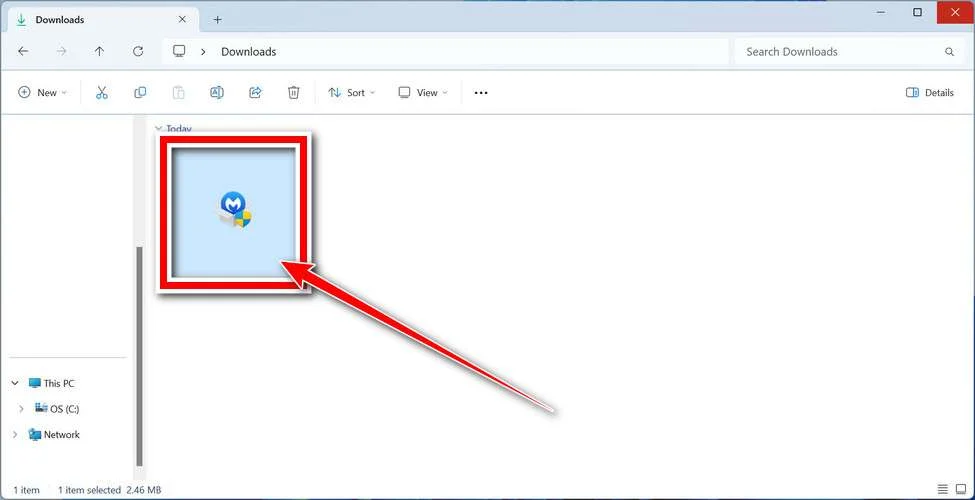
Follow the On-Screen Prompts to Install Malwarebytes
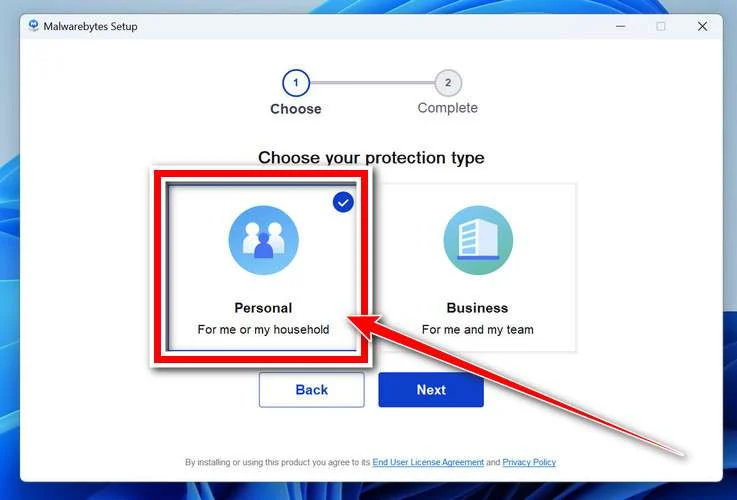
The setup wizard will walk you through a few quick screens:
-
Choose where you’re installing the program — “Personal Computer” or “Work Computer” — then click Next.
-
Malwarebytes will now install on your device. This usually takes under a minute.

-
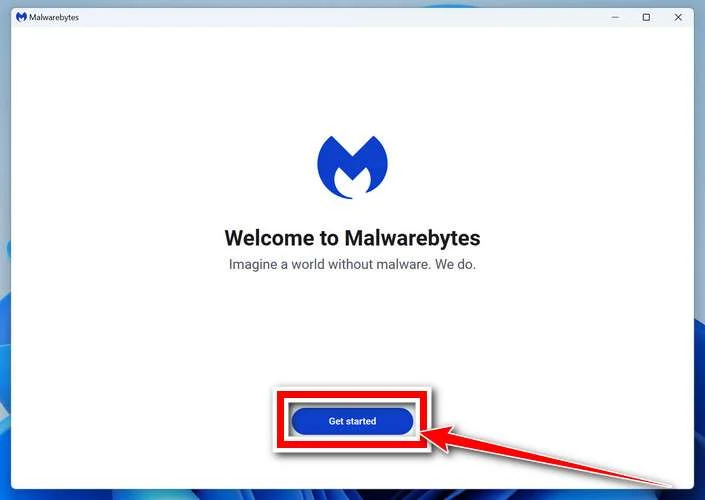
When installation is complete, the “Welcome to Malwarebytes” screen will open automatically.
-
On the final screen, click Open Malwarebytes to launch the program.

-
Enable “Scan for Rootkits”
Before scanning, turn on rootkit detection so Malwarebytes can find even the most hidden threats. Click the Settings gear icon on the left side of the screen.
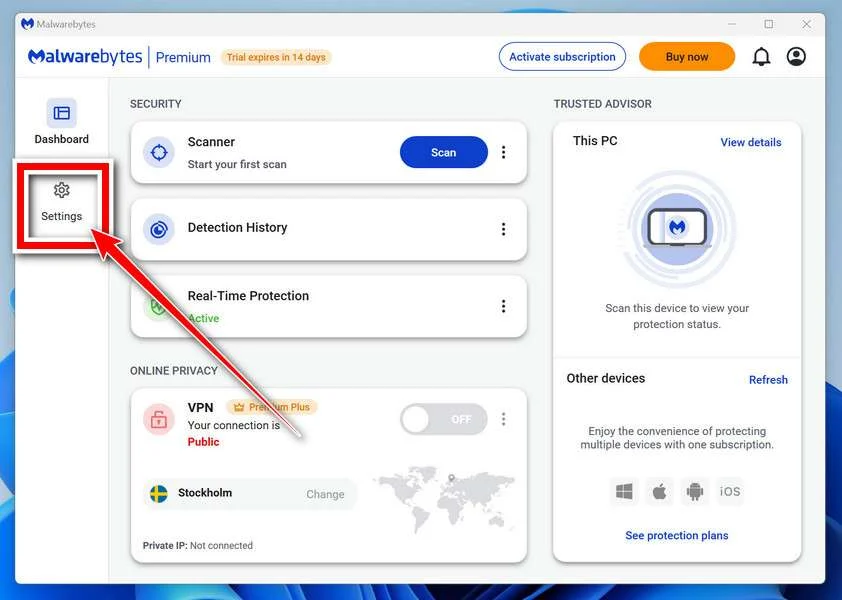
In the settings menu, find “Scan for rootkits” and click the toggle so it turns blue.

Done? Click “Dashboard” in the left pane to return to the main screen.
Start the Scan
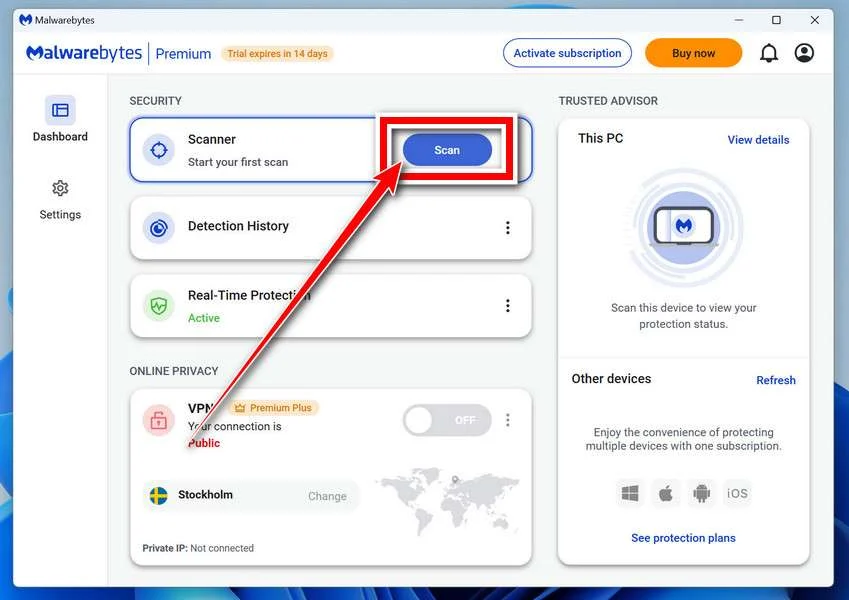
Click the blue Scan button. Malwarebytes will automatically update its virus database and start checking your computer for malware.
-
Wait for the Scan to Finish
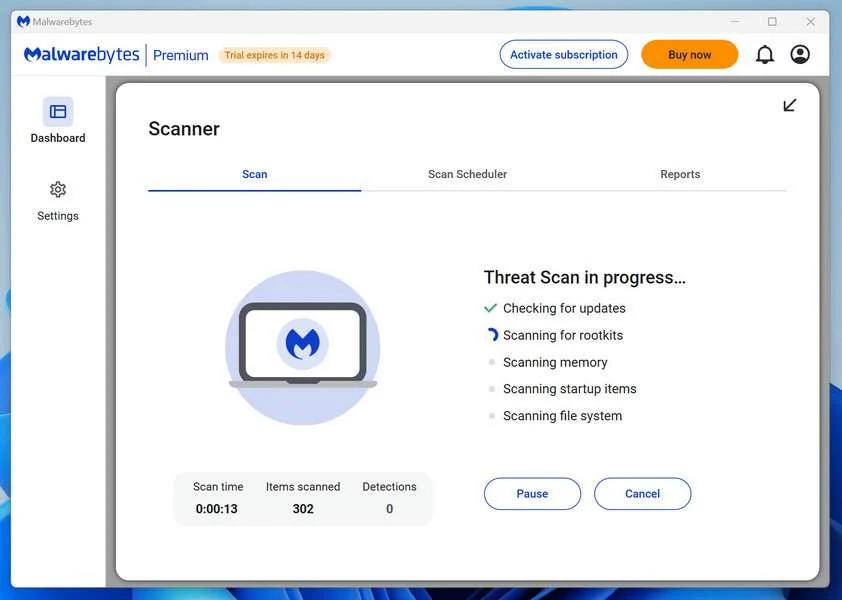
The scan checks your entire system for browser hijackers and other malicious programs, so it can take 5 to 20 minutes depending on your computer. Feel free to do something else — just check back occasionally to see the progress.
-
Quarantine the Detected Threats
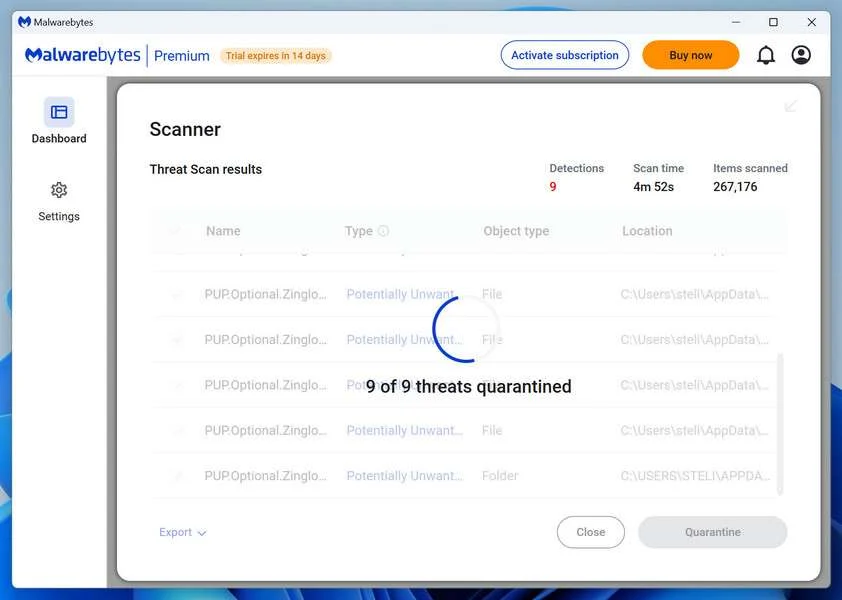
When the scan is done, you’ll see a list of everything Malwarebytes found — malware, adware, and potentially unwanted programs. Click the “Quarantine” button to remove all of them at once.
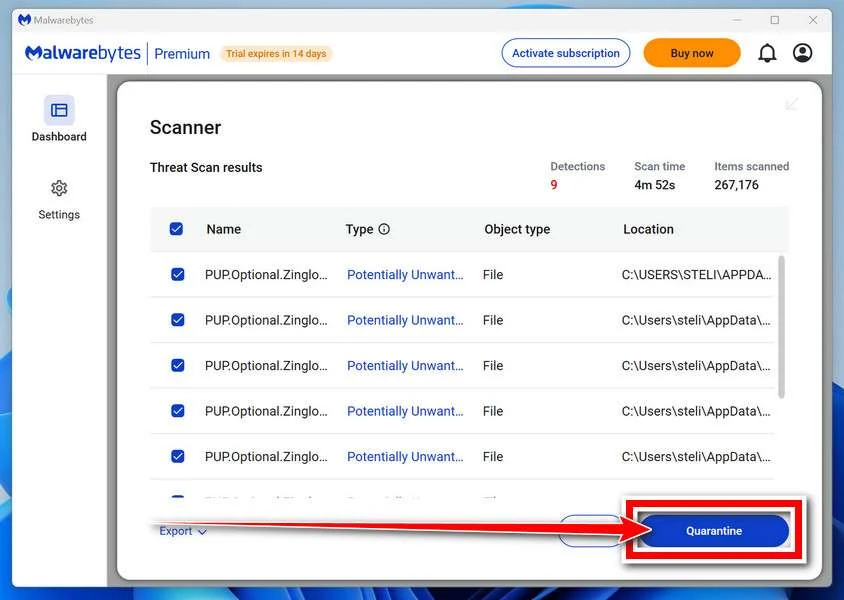
Malwarebytes will now remove the malicious files and registry entries and move them safely into quarantine.
-
Restart Your Computer
Some threats can only be fully removed after a reboot. If Malwarebytes asks you to restart, click Yes. Once you’re logged back in, Malwarebytes has finished removing the threats it found.
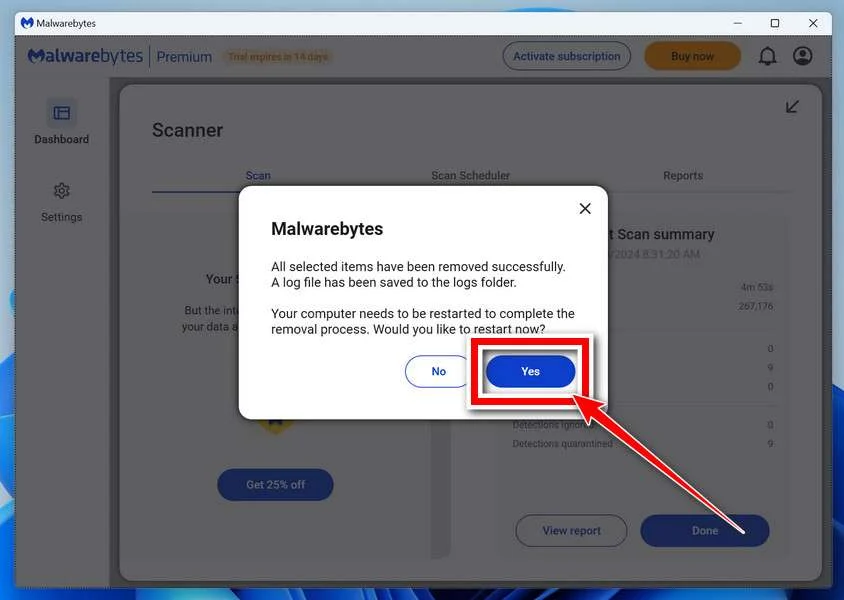
That’s it — your Windows PC is now clean of trojans, adware, and other malware, and should be back to running smoothly.
If you are still having problems with your computer after completing these instructions, then please follow one of the steps:
- Run a computer scan with ESET Online Scanner
- Ask for help in our Windows Malware Removal Help & Support forum.
Run a Malware Scan with Malwarebytes for Mac
Malwarebytes for Mac is a free on-demand scanner that removes the malware other security software tends to miss — adware, browser hijackers, and unwanted programs included. Cleaning an infected Mac with Malwarebytes has always been completely free, and it’s our go-to recommendation. Follow the steps below to scan and clean your Mac in just a few minutes.
-
Download Malwarebytes for Mac
Click the button below to download the latest version of Malwarebytes for Mac.
Download MalwarebytesOfficial installer for macOS. Your download starts right away.Want real-time protection? See Malwarebytes PremiumMalwarebytes Free for MacScans and removes malware at no cost -
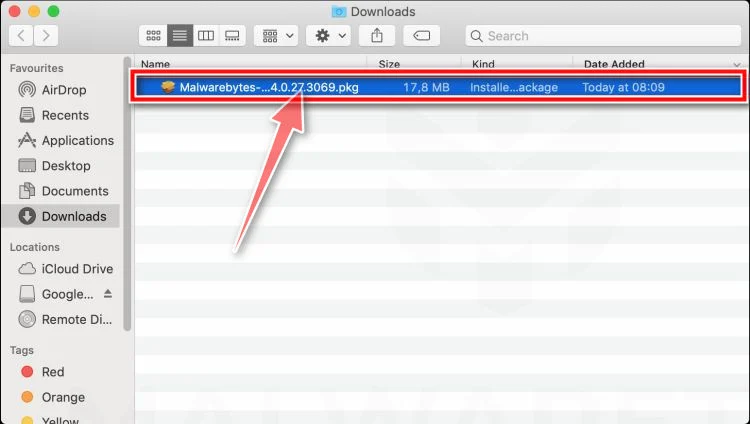
Open the Malwarebytes setup file
When the download finishes, open your Downloads folder and double-click the setup file to begin the installation.
-
Follow the On-Screen Prompts to Install Malwarebytes
The Malwarebytes for Mac Installer will guide you through a few quick screens. Click “Continue” and keep following the prompts until the installation completes.
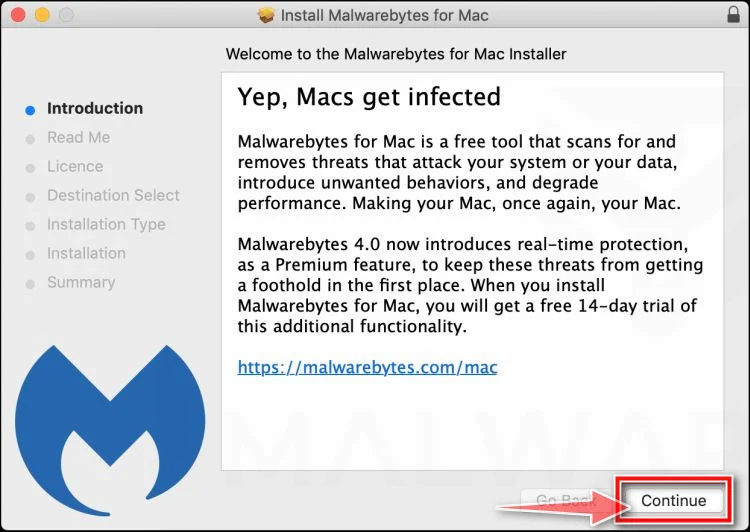
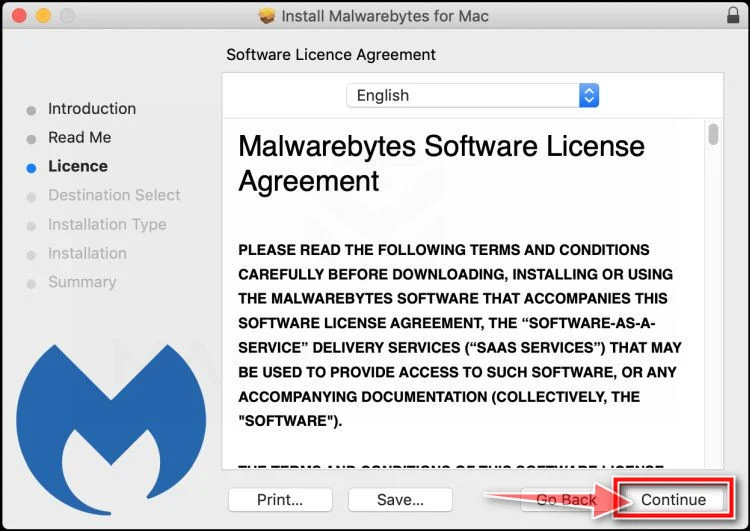
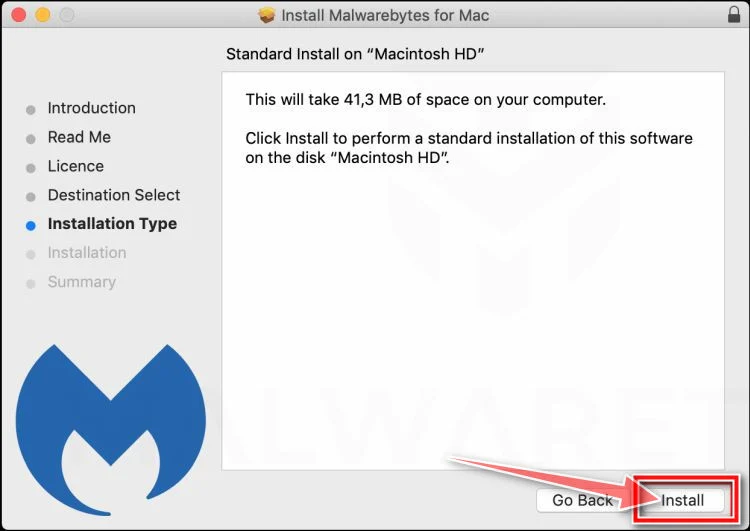
When the installation is complete, Malwarebytes opens to the Welcome to Malwarebytes screen. Click “Get started“.
-
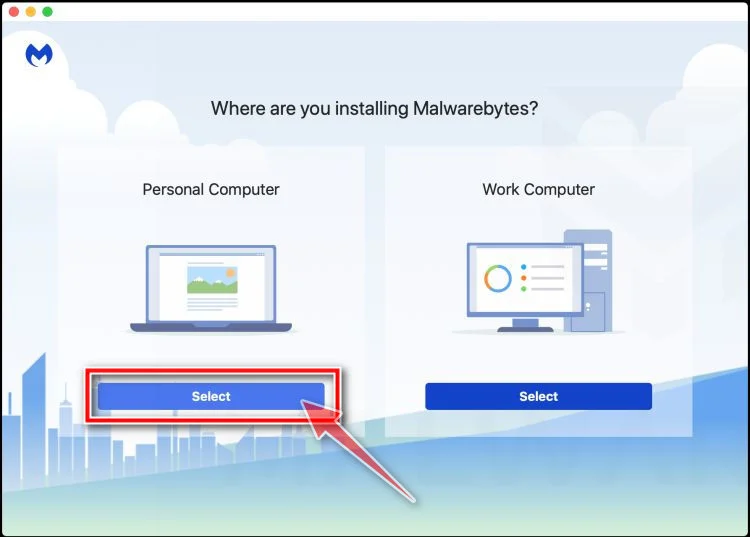
Select “Personal Computer” or “Work Computer”
Malwarebytes will ask what type of computer you’re installing it on. Click either Personal Computer or Work Computer, whichever applies.
-
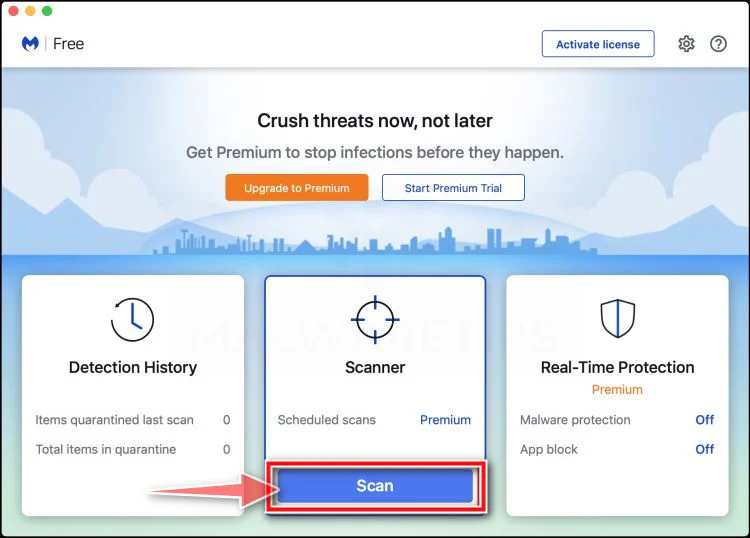
Start the Scan
Click the “Scan” button. Malwarebytes will automatically update its detection database and begin checking your Mac for malware.
-
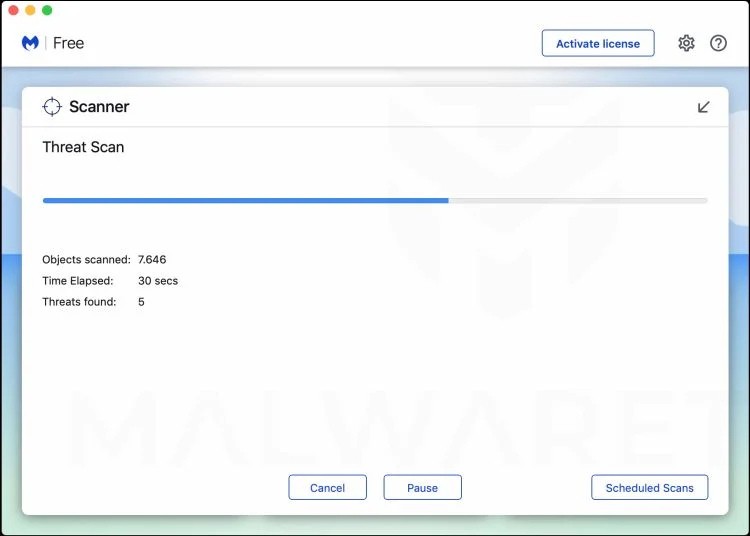
Wait for the Scan to Finish
Malwarebytes will scan your Mac for adware, browser hijackers, and other malicious programs. This can take a few minutes, so feel free to do something else — just check back occasionally to see the progress.
-
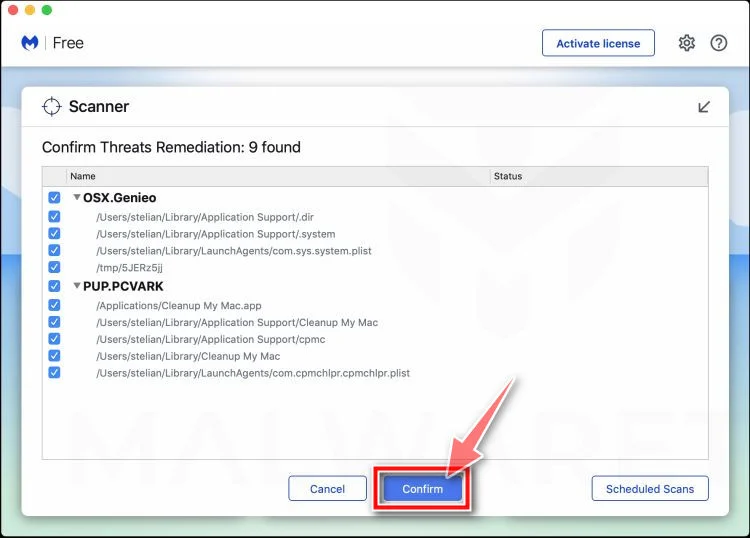
Quarantine the Detected Threats
When the scan is done, you’ll see a list of everything Malwarebytes found. Click the “Quarantine” button to remove all the threats at once.
-
Restart Your Mac
Malwarebytes will now remove all the malicious files it found. Some threats can only be fully removed after a reboot — if Malwarebytes asks you to restart, allow it. Once you’re logged back in, your Mac is clean.
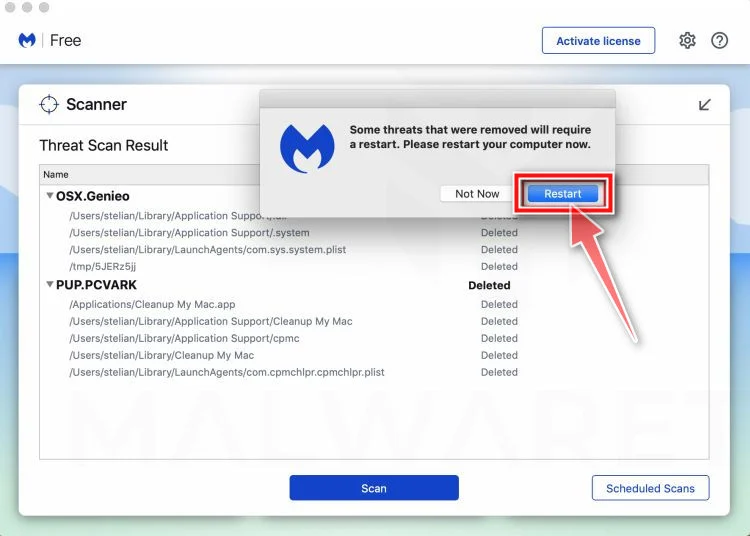
That’s it — your Mac is now free of adware, rogue browser extensions, and other potentially harmful software.
If you are still experiencing problems while trying to remove a malicious program from your computer, please ask for help in our Mac Malware Removal Help & Support forum.
Run a Malware Scan with Malwarebytes for Android
Malwarebytes for Android automatically detects and removes dangerous threats like malware and ransomware so you don’t have to worry about your most-used device being compromised. Aggressive detection of adware and potentially unwanted programs keeps your Android phone or tablet running smooth.
-
Download Malwarebytes for Android.
You can download Malwarebytes for Android by clicking the link below.
Get Malwarebytes for AndroidOpens Google Play in a new tab.Want real-time protection? See Malwarebytes Premium for AndroidMalwarebytes for AndroidScans your phone and removes malware at no cost -
Install Malwarebytes for Android on your phone.
In the Google Play Store, tap “Install” to install Malwarebytes for Android on your device.

When the installation process has finished, tap “Open” to begin using Malwarebytes for Android. You can also open Malwarebytes by tapping on its icon in your phone menu or home screen.

-
Follow the on-screen prompts to complete the setup process
When Malwarebytes will open, you will see the Malwarebytes Setup Wizard which will guide you through a series of permissions and other setup options.
This is the first of two screens that explain the difference between the Premium and Free versions. Swipe this screen to continue.
Tap on “Got it” to proceed to the next step.
Malwarebytes for Android will now ask for a set of permissions that are required to scan your device and protect it from malware. Tap on “Give permission” to continue.
Tap on “Allow” to permit Malwarebytes to access the files on your phone.
-
Update database and run a scan with Malwarebytes for Android
You will now be prompted to update the Malwarebytes database and run a full system scan.

Click on “Update database” to update the Malwarebytes for Android definitions to the latest version, then click on “Run full scan” to perform a system scan.

-
Wait for the Malwarebytes scan to complete.
Malwarebytes will now start scanning your phone for adware and other malicious apps. This process can take a few minutes, so we suggest you do something else and periodically check on the status of the scan to see when it is finished.

-
Click on “Remove Selected”.
When the scan has been completed, you will be presented with a screen showing the malware infections that Malwarebytes for Android has detected. To remove the malicious apps that Malwarebytes has found, tap on the “Remove Selected” button.

-
Restart your phone.
Malwarebytes for Android will now remove all the malicious apps that it has found. To complete the malware removal process, Malwarebytes may ask you to restart your device.
That’s it — your Android phone is now clean — no more malicious apps, adware, or browser redirects.
If you are still having problems with your phone after completing these instructions, then please follow one of the steps:
- Restore your phone to factory settings by going to Settings > General management > Reset > Factory data reset.
- Ask for help in our Mobile Malware Removal Help & Support forum.
Stay Protected: Block Ads and Malicious Sites
Now that your device is clean, keep it that way. Most infections start with a malicious ad or a fake download button — so blocking them at the source is your best defense.
We recommend AdGuard, which blocks malicious ads, phishing pages, and dangerous redirects before they can reach you.

Join the discussion
0 commentsShare your experience or ask a question about this article.
Discussion
Start the conversation
Have a question or something useful to share? Add the first comment.