

An 844 number pops up on your phone and it looks… official.
It is toll-free. It is the kind of number big companies use for billing, fraud alerts, password resets, and customer support. So even if you do not recognize it, your brain quietly files it under “might be important.”
That is exactly why scammers love it.
An 844 area code scam is not about geography. 844 is a toll-free code, not tied to any city or state. The number can belong to a bank, an airline, a pharmacy, a cable provider, a debt collector, a hospital, or a legitimate customer service center. It can also belong to a scammer running a cheap call operation that looks polished on the surface.
And to make it worse, the number on your screen may not even be the real source of the call. Scammers can use caller ID spoofing to make a call appear to come from a real company or a familiar toll-free number.
If you have ever thought, “Maybe I should answer, just in case,” you are not alone.
This article explains the most common 844 phone scam calls and 844 text message scam tactics, why they work, how the operation unfolds step by step, and what to do if you already engaged.
Scam Overview
An 844 area code scam is best understood as a set of fraud patterns that use toll-free numbers to look legitimate.
Sometimes scammers obtain a real 844 number and build a fake “support line” around it. Sometimes they spoof an 844 number on caller ID. Either way, the purpose is the same: get you to do something that benefits them quickly.
Usually that means one of these outcomes:
- You send money you cannot easily get back
- You share sensitive information (login, one-time codes, Social Security number, card details)
- You give remote access to your phone or computer
- You approve a transaction you do not fully understand
- You get pulled into an ongoing payment arrangement (subscription, recurring charge, “monthly monitoring”)
Why toll-free numbers are so effective for scams
Toll-free numbers feel different from regular calls.
When people see 844, they often assume:
- “This is a real company.”
- “This is customer service.”
- “This might be important.”
- “If it is toll-free, it must be safe.”
None of that is guaranteed.
The FCC explains toll-free numbers use distinct codes such as 800, 888, 877, 866, 844, 844, and 833, and they are not interchangeable. They exist mainly so callers can contact organizations without being charged for the call.
Scammers take advantage of the same trust cues businesses benefit from.
They also benefit from the way toll-free numbers can be configured:
- Calls can be routed to any device or call center
- An automated phone tree can be created in minutes
- Voicemails can sound professional
- Caller queues, “agents,” and “supervisors” can be faked
To a victim, it can sound like a real support department.
The biggest misconception: “844 is an area code location”
This matters because a lot of people try to judge risk by geography.
With toll-free numbers, geography is not the point. An 844 number is non-geographic, and it can be used from anywhere inside the North American numbering system.
So the right question is not “Where is 844 located?”
The right question is: “Is this contact verifiable, and does the request make sense?”
Caller ID spoofing makes 844 scams harder to spot
Caller ID spoofing is when the caller deliberately falsifies what appears on your caller ID.
The FCC warns that if a number is blocked or labeled as spam, it is possible the number has been spoofed, meaning the displayed number may not be the real source.
This is how scams get extra credibility:
- They spoof a known brand’s toll-free line
- They spoof a real bank fraud number
- They spoof a number that previously called you legitimately
So you think, “This looks like the same number from my bank,” and you answer.
Common 844 scam themes you will see again and again
There are many variations, but most 844 phone scam calls fall into a few big buckets.
1) “Fraud department” calls that push you to “verify” your account
This scam often starts with a calm, professional voice.
They claim:
- Your card has suspicious activity
- Your account is locked
- Your payment was flagged
- A large purchase is pending
- Someone tried to change your password
Then they ask for “verification.” That usually means:
- Your login credentials
- A one-time passcode (OTP) that your real bank texts you
- Your card number or security code
- Your online banking password reset link
This is not verification. It is takeover.
A real bank may verify identity, but they do not need you to read them an OTP that was sent to you. That code is designed to prove you are the account owner. Handing it over defeats the entire security system.
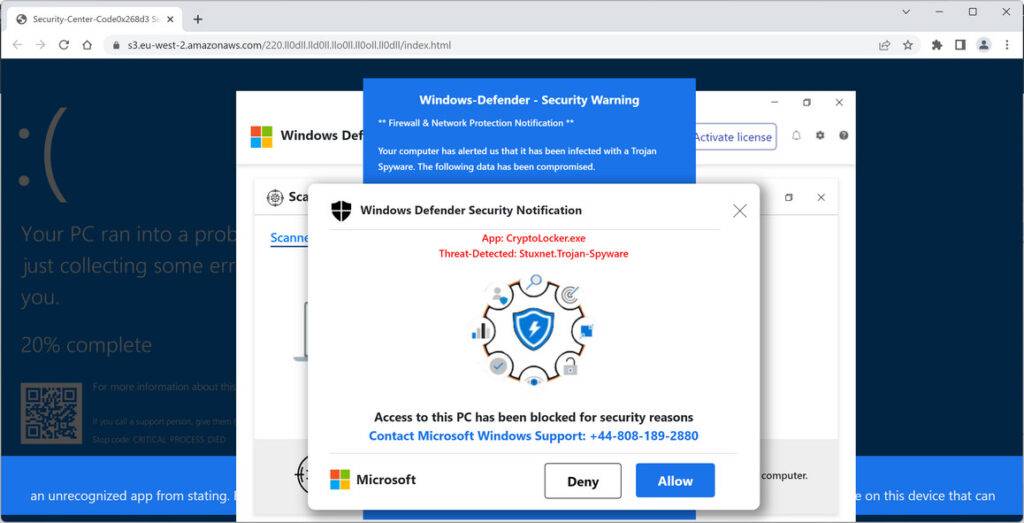
2) Tech support scams using toll-free call-back numbers
This can come as:
- A pop-up warning on your computer
- A text saying your phone is infected
- An email claiming there is a security issue
- A robocall telling you your device is compromised
Then they push you to call an 844 number for “support.”
The FTC describes tech support scams as operations where scammers pretend to be from a trusted company and try to get money or remote access.
Once you call, they may:
- Ask you to install remote access software
- “Scan” your device and show fake threats
- Demand payment to “fix” the problem
- Offer a fake subscription plan with recurring charges
This category is one of the most expensive for victims because it often combines payment with account access.
3) IRS and government impersonation, often tied to gift cards or wire transfers
Scammers use fear and authority.
They claim:
- You owe back taxes
- Your Social Security number is “suspended”
- You will be arrested if you do not pay today
The IRS states clearly it will never demand immediate payment using a specific method like a gift card, prepaid card, or wire transfer, and it will not threaten arrest.
If an “IRS” caller pushes urgency plus gift cards, you can treat it as confirmed fraud.
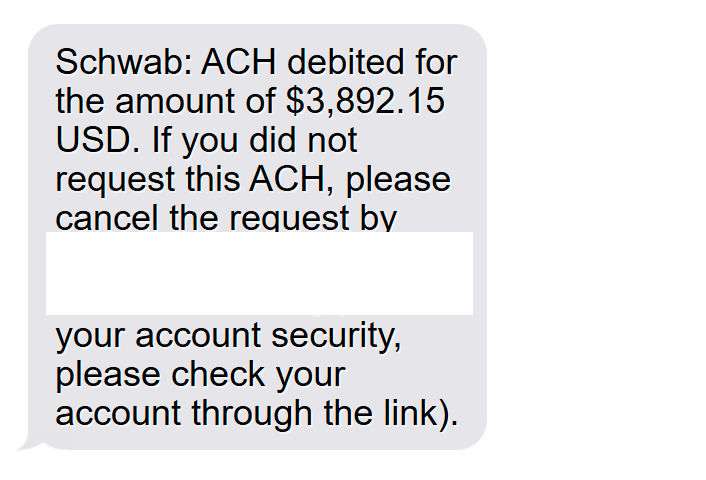
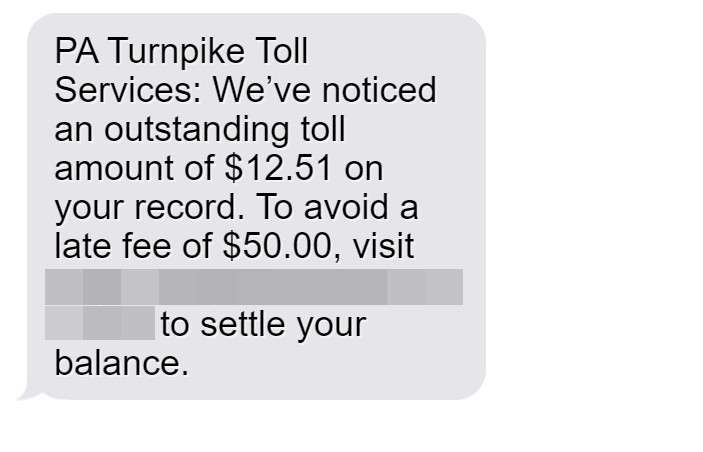
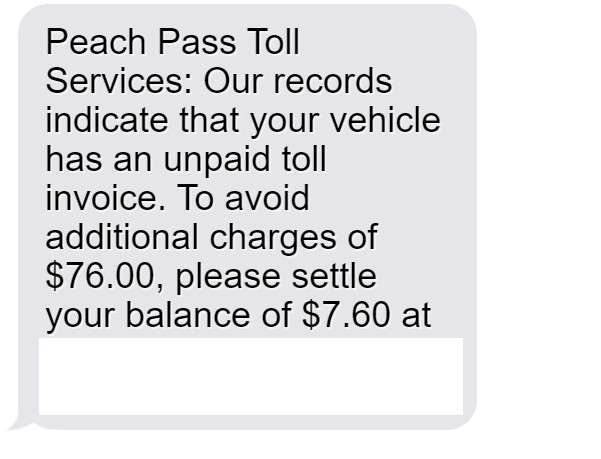
4) Delivery and “account alert” smishing texts that use 844 numbers
An 844 text message scam often looks like a simple service message:
- “Package held. Confirm delivery.”
- “Your account is on hold. Verify now.”
- “Payment failed. Update billing.”
The text includes:
- A link to a fake site, or
- A callback number (often toll-free) to “resolve the issue”
The FTC advises people to report spam texts, including forwarding them to 7726 (SPAM), and to report to the FTC’s fraud reporting site.
Smishing is effective because it feels routine. People are used to shipping updates and account notifications.
5) Refund and chargeback scams
These are sneaky because they start with “good news.”
They claim:
- You are owed a refund
- Your account has been credited
- A payment was made by mistake
- You can get money back for a service
Then they pressure you to:
- “Confirm” banking details
- Install remote software
- Log in while they “assist”
- Send money back after they fake a deposit screen
This is the classic setup for a fake overpayment and reversal trap.
6) Debt relief, medical insurance, and “benefits” offers
These calls often sound like a sales call, but they can turn into fraud.
They may request:
- Social Security number
- Medicare number
- Date of birth
- Banking info “for eligibility”
- Upfront fees
Even when there is a real product behind the call, the risk is that your sensitive information is being harvested, resold, or used for identity theft.
How to tell if an 844 call is legitimate
Because many legitimate businesses use toll-free numbers, you need a practical system.
Start with this mindset:
- A real company can be verified independently.
- A scammer will try to keep you inside their script.
Here are the strongest legitimacy checks:
- Do not trust the number displayed. Spoofing is common.
- Verify using an official source you find yourself, like the number on your card, your bill, or the company’s official website.
- If the caller creates urgency, treat it as suspicious.
- If they ask for OTP codes, passwords, or gift cards, end the call immediately.
Quick list: the most common 844 scam requests
If an 844 caller asks for any of the following, pause and verify independently:
- One-time passcodes (from text or authenticator apps)
- Your online banking password
- Remote access to your device
- Payment by gift card
- Payment by crypto or wire transfer
- “Keeping you on the line” while you log in or transfer funds
- Reading back a code “to confirm identity”
The requests are the giveaway. Scams do not fail because they look fake. They fail when victims refuse the request.
Why scam calls keep getting through even with modern protections
You may wonder: “Shouldn’t carriers stop spoofed calls by now?”
There has been progress. The FCC has pushed call authentication frameworks designed to reduce illegal spoofing, including STIR/SHAKEN call authentication.
But it is not a perfect shield.
Scammers adapt by:
- Spoofing numbers that still slip through
- Using real numbers they control
- Moving between voice calls and text messages
- Using multiple carriers and overseas infrastructure
The result is what you experience as a consumer: waves of calls that feel random and hard to stop.
How The Scam Works
Most 844 area code scam operations follow a predictable playbook.
The script may be “bank fraud,” “tech support,” “IRS,” or “package delivery,” but the mechanics are consistent.
Below is the step-by-step structure, including the psychological pressure points scammers rely on.
Step 1: They pick a story that fits toll-free credibility
844 numbers are perfect for stories that sound corporate.
Scammers choose themes where a toll-free number feels normal:
- “Fraud department calling”
- “Billing support”
- “Account security team”
- “Technical support”
- “Shipping and delivery center”
- “Benefits verification”
If the same story came from a random local number, many people would ignore it.
From 844, it feels like a call center.
Step 2: They deliver the hook by call, text, or a combo
There are three common delivery models.
Model A: Call first, then a follow-up text
This is popular for bank and account takeovers.
- You answer a call from an 844 number.
- They tell you a “fraud alert” story.
- They say they will send a text “for verification.”
- The text contains a real OTP from your bank, because they are trying to log in right now.
- They ask you to read the OTP to them.
At that point, the scam is already in motion.
Model B: Text first, call second
This is common with tech support and delivery scams.
- You get a text that looks like an alert.
- It includes an 844 number to call.
- When you call, you reach an automated greeting that sounds official.
- A live “agent” joins and takes control.
Because you called them, it feels safer, even though it is not.
Model C: Pop-up or email drives you to call 844
This is the classic tech support funnel.
- You see a pop-up warning, often claiming malware or account compromise.
- It gives an 844 number.
- When you call, they keep you engaged and escalate fear.
The FTC’s tech support guidance exists for a reason: this pattern repeatedly leads to remote access and financial loss.
Step 3: They create urgency before you can verify
Urgency is the engine.
They want action before reflection.
Common urgency lines:
- “This is time sensitive.”
- “If we do not fix this now, the charge will go through.”
- “Your account will be locked for 24 hours.”
- “A case has been opened in your name.”
- “Your device is actively compromised.”
If you slow down and verify, the scam often collapses.
So they push speed.
Step 4: They build authority using scripts, structure, and fake professionalism
A good scam call does not sound like chaos.
It sounds organized.
Scammers use:
- Case numbers
- Ticket numbers
- “Supervisor transfer” rituals
- Recorded disclaimers
- Hold music
- Department names
- Calm, confident tone
They are trying to trigger your “this feels real” instinct.
This matters most with toll-free numbers, because many real businesses do sound exactly like this.
Step 5: They isolate you from outside verification
This is a critical moment.
You might say, “I will call my bank back.”
A scammer will respond with something like:
- “If you hang up, the system will close your case.”
- “You must stay on the line for compliance.”
- “Call-back will route you to general support and delay the freeze.”
- “This is a secure line. Other lines are not.”
This is manipulation.
A legitimate organization does not fear you calling the official number on your card.
A scammer does.
Step 6: They move you to the target action
This is where the scam becomes measurable loss.
The target action depends on the scam type.
Target action A: OTP theft and account takeover
This is the cleanest, fastest path to money.
They attempt login, trigger OTP, then ask you to read it to them.
Once they have access, they may:
- Add a new payee
- Change contact details
- Initiate transfers
- Apply for new cards or loans
- Drain rewards points
Target action B: Remote access installation
This is common in tech support scams.
They ask you to install tools like remote desktop software.
Then they can:
- See your screen and intercept passwords
- Open your banking in a browser
- Change settings
- Install additional malware
- Pressure you into paying for “repairs”
The FTC warns that tech support scams often involve pressure, remote access, and demands for payment.
Target action C: Payment by irreversible methods
Many scam operations prefer money that is hard to reverse.
The FTC is blunt about gift cards: only scammers tell you to pay with gift cards and no real business or government agency will demand it.
The IRS similarly states it will not demand payment via gift cards or wire transfers and will not threaten arrest.
If an 844 caller pushes gift cards, that is not “unusual billing.” It is fraud.
Target action D: Sensitive data collection for later fraud
Not every scam takes money immediately.
Some are harvesting:
- Social Security numbers
- Dates of birth
- Driver’s license numbers
- Banking details
- Security questions
- Account recovery info
That data can be used later for:
- Identity theft
- New account fraud
- SIM swap attempts
- Targeted phishing that feels personal
Step 7: They escalate if you resist
This is where many people get pulled back in.
If you hesitate, scammers pivot.
They may:
- Offer to “prove” identity by reading partial info (like the last 4 digits of your card)
- Transfer you to a “manager”
- Lower the requested payment (“Just $99 today to stop the charge”)
- Increase fear (“The police will be notified” or “Your account will be frozen”)
They are testing your boundaries.
If you keep engaging, they keep trying.
Step 8: They add a second scam if they sense vulnerability
A common follow-up is the “recovery” angle.
After a victim loses money, they get contacted by someone claiming they can:
- Recover funds
- Trace crypto
- Reverse transfers
- Get refunds
They often ask for an upfront fee.
It is a second scam layered on the first.
Realistic examples of 844 scam messages and calls
These are short examples you can recognize quickly.
Bank fraud call
- “This is the fraud department. We detected a $1,249 charge.”
- “I am sending a code for verification. Read it back to stop the charge.”
Tech support pop-up
- “Your device is infected. Call support immediately.”
- “Toll-free help line: 1-844-xxx-xxxx.”
IRS impersonation
- “You owe back taxes. Pay today to avoid enforcement.”
- “Purchase gift cards and provide the numbers to confirm payment.”
Delivery smishing
- “Package held due to address issue. Confirm here.”
- “Or call 844 support to verify delivery.”
Refund scam
- “Your refund is approved.”
- “We need remote access to finalize the transfer.”
If you see the same structure, treat it as a pattern, not a one-off.
A simple rule that breaks most 844 scams
Use this every time:
Never trust inbound contact. Verify using outbound contact.
Inbound contact means:
- The number that called you
- The link that texted you
- The email address that contacted you
Outbound verification means:
- The number on the back of your card
- The number on your monthly statement
- The company’s official website (typed manually)
- Your app, opened directly, not through a link
This one habit defeats most toll-free scams because it removes the scammer’s control.
Real-World Examples of 844 Scam Messages and Call Scripts
Use this section as a copy-paste block in your article. These examples are written to match the most common 844 area code scam patterns, including phone calls, voicemails, and text messages.
Example 1: “Bank Fraud Department” Call (OTP Code Trap)
What you hear on the call
“This is the fraud department. We detected a suspicious charge for $1,249. We need to verify your identity to block it.”
What happens next
- They say they are sending a “verification code.”
- You receive a real code from your bank.
- They tell you to read the code back “to stop the charge.”
Why it’s a scam
- That one-time code is meant to prove you are the account owner.
- If you read it to them, you may be approving a login or a transfer.
Safe response
- Hang up.
- Call the number on the back of your card or open your bank’s official app and check alerts there.
Example 2: “Your Account Is Locked” Text With an 844 Call-Back Number
Text message example
“Security Alert: Your account has been locked due to suspicious activity. Call 1-844-xxx-xxxx to restore access.”
What it tries to make you do
- Call the 844 number and “verify” your identity.
- Provide personal details, login info, or a code sent to your phone.
Why it’s a scam
- Real companies do not require you to respond to a random inbound text to keep your account safe.
- Scammers use the call-back number to pull you into a controlled script.
Safe response
- Do not call the number in the text.
- Go to the official website by typing it yourself, or call the official number from your statement.
Example 3: Delivery Smishing (Link + Urgency)
Text message example
“Delivery failed due to missing address details. Confirm within 12 hours to avoid return: [link]”
What it tries to make you do
- Click the link and enter personal information or payment details.
Why it’s a scam
- These pages are often fake “tracking” sites designed to harvest data.
- They commonly ask for a small fee, like $1.99, then reuse your card later.
Safe response
- Do not click.
- Check delivery status through the retailer’s official app or website.
Example 4: Tech Support Scam Voicemail (Remote Access Push)
Voicemail example
“This is security support. We detected malware activity connected to your device. Call our toll-free support line now at 1-844-xxx-xxxx.”
What it tries to make you do
- Call back and install remote access software.
- Pay for “protection” or a “clean-up plan.”
Why it’s a scam
- Real security companies do not cold-call you about malware on your personal device.
- Remote access is how scammers take control and pressure you into payments.
Safe response
- Do not call back.
- Run a reputable security scan yourself and update your device.
Example 5: IRS or Government Threat Call (Payment Pressure)
What you hear
“This is an urgent matter. You owe back taxes and must pay today to avoid legal action. Stay on the line.”
What it tries to make you do
- Pay immediately, often via gift cards, wire transfer, or crypto.
Why it’s a scam
- Threats plus immediate payment demands are classic fraud signals.
- No legitimate agency demands gift card payments.
Safe response
- Hang up.
- If you are concerned, contact the IRS or relevant agency using an official website number you find independently.
Example 6: Refund Scam Call (Fake Overpayment Trick)
What you hear
“You are approved for a refund of $399.99. I just need to confirm your banking details to deposit it.”
What happens next
- They ask for your bank login or remote access “to process the refund.”
- They may show a fake “deposit” screen, then claim they overpaid you.
- They pressure you to send money back quickly.
Why it’s a scam
- Refunds do not require remote access to your computer.
- Overpayment and “send it back” pressure is a known fraud pattern.
Safe response
- End the call.
- Contact the company using the official number from your account or invoice.
Example 7: Subscription Trap Text (Small Charge, Bigger Problem)
Text message example
“Your trial expires today. To avoid a $49.95 charge, call 1-844-xxx-xxxx to cancel.”
What it tries to make you do
- Call the number, then provide card details to “cancel.”
- They may upsell, stall, or enroll you in a different recurring plan.
Why it’s a scam
- Scammers use fear of a small recurring fee to get your payment details.
- The “cancel” call is often the sales funnel.
Safe response
- Check your real subscriptions through your app store, your bank statement, or the merchant listed on the charge.
- Cancel only through official account settings, not a random call-back number.
Quick Checklist: How to Handle Any 844 Call or Text Safely
If you want a simple rule set readers can act on immediately, use this.
If it’s a call from 844
- Let unknown 844 calls go to voicemail.
- Never share passwords, PINs, or one-time codes.
- Never stay on the line while you log in.
- If they claim to be your bank, hang up and call the number on your card.
- If they claim “fraud,” verify through your official app, not the caller.
If it’s a text from 844 (or any number)
- Do not click links in unexpected texts.
- Do not call back numbers provided in suspicious messages.
- Open the official app or type the website yourself.
- Report the text as junk and delete it.
Red flags that mean “end the call now”
- Threats of arrest, lawsuits, or immediate penalties
- Payment demands using gift cards, crypto, wire transfer, or “urgent fees”
- Requests for remote access or screen sharing
- Requests for a one-time passcode sent to your phone
- Pressure to act “within minutes” or “today”
What To Do If You Have Fallen Victim to This Scam
If you responded to an 844 phone scam or 844 text message scam, focus on fast containment.
Do not waste energy arguing with the scammer or trying to “get them back.”
Your goal is to protect accounts, stop payments, and document what happened.
1) Stop all contact and preserve evidence
- Hang up immediately, even if they sound professional.
- Do not reply to any follow-up texts.
- Screenshot texts, numbers, links, and call logs.
- Write down what you shared and what you paid, including timestamps.
This makes it easier for your bank, carrier, and fraud teams to act.
2) If you shared a one-time passcode, assume your account is compromised
Treat OTP sharing like you handed over a house key.
Do this immediately:
- Log into your account directly from the official app or website
- Change your password
- Enable stronger multi-factor authentication if available
- Review recent logins, devices, and account recovery settings
- Remove unknown devices or phone numbers
Then call the institution’s fraud department using the number on your card or official site.
3) If you shared card details, call your bank or card issuer now
Ask for the fraud department and request:
- Card cancellation and replacement
- Transaction review and dispute initiation
- A note added to your profile for enhanced verification
- A freeze on certain transaction types if needed
If you gave your PIN or CVV to a scammer, do not wait.
4) If you gave remote access to your phone or computer, treat it as a serious breach
Remote access changes everything.
Do the following:
- Disconnect from the internet (Wi-Fi and cellular, if possible)
- Uninstall remote access tools you do not recognize
- Run a reputable security scan
- Change passwords from a different, trusted device
- Consider professional help if you are not confident you can clean the device
- Watch for new forwarding rules in email, new bank payees, and unusual settings
If the scammer watched you log in, assume they captured credentials.
5) If you paid, take action based on payment type
The FTC provides clear “what to do next” steps for many payment methods.
Use this checklist.
If you paid with a gift card
- Contact the gift card company immediately
- Keep the gift card and receipt
- Report that it was used in a scam
The FTC is explicit that gift card payments are a scam signal, and it provides reporting steps.
If you paid by wire transfer
- Contact your bank or wire service immediately
- Ask for a wire recall and fraud review
If you paid by debit or credit card
- Contact the card issuer and dispute the charge
- Ask about chargeback timelines
- Cancel the card if details were exposed
If you paid with cryptocurrency
- Report the wallet address and transaction details
- Contact the platform you used (exchange or wallet provider)
- Understand recovery is difficult, but reporting still matters
6) Lock down your identity if sensitive data was shared
If you shared Social Security number, date of birth, or government IDs:
- Place a fraud alert or freeze with major credit bureaus
- Monitor credit reports for new accounts
- Watch for mail or email about accounts you did not open
This is not overreacting. It is basic damage control.
7) Report the scam in the right places
Reporting helps track patterns and can support enforcement.
At minimum:
- Report at the FTC’s fraud reporting site
- If it was a text scam, report it to your carrier by forwarding to 7726 (SPAM) and report it in your messaging app
- Consider filing an FCC complaint for spoofing-related issues, especially if impersonation was involved
If money loss is significant, also consider reporting to law enforcement.
8) Tighten your phone defenses for future attempts
Because scammers may try again, reduce repeat exposure.
On your phone:
- Silence unknown callers (if that fits your situation)
- Enable spam call filtering offered by your carrier
- Turn on “filter unknown senders” for texts if available
- Avoid calling back unknown toll-free numbers
And most important:
- Stop treating an 844 number as automatically safe
- Treat the request as the real signal
9) Use a safe script the next time you get an 844 “fraud” call
If you want a simple line you can stick to:
- “Thanks. I am going to call the official number on my statement and follow up.”
- “I do not verify anything on inbound calls.”
- “If this is real, there will be a record in my account when I log in.”
Then hang up.
A legitimate company will not punish you for verifying through official channels.
Is Your Device Infected? Run a Free Malware Scan
Slow performance, constant pop-ups, or strange behavior? These are classic signs of a malware infection. The fastest way to find out is to scan your device with Malwarebytes Free — one of the most trusted malware removal tools available.
The free version detects and removes the most common threats, including:
- Adware — the cause of those annoying pop-ups
- Browser hijackers — unwanted redirects and changed homepages
- Trojans and spyware — hidden programs stealing your data
- Potentially unwanted programs (PUPs) — software you never asked for
👉 Select your device below — Windows, Mac, or Android — then follow the simple steps to download Malwarebytes, scan your system, and remove any threats it finds. The scan usually takes 5 to 20 minutes.
Run a Malware Scan with Malwarebytes for Windows
Malwarebytes is one of the most popular and trusted anti-malware tools for Windows — and it’s completely free for removing infections. It catches threats that many antivirus programs miss, including adware, browser hijackers, and trojans. Follow the steps below to scan and clean your PC in just a few minutes.
Download Malwarebytes
Click the button below to download the latest version of Malwarebytes for Windows from the official source. The free version is all you need — it will scan your computer and remove adware, browser hijackers, and other malicious software at no cost.
Download MalwarebytesOfficial installer for Windows 11 and 10. Your download starts right away.Want real-time protection? See Malwarebytes Premium Malwarebytes Free for WindowsScans and removes malware at no cost
-
Install Malwarebytes
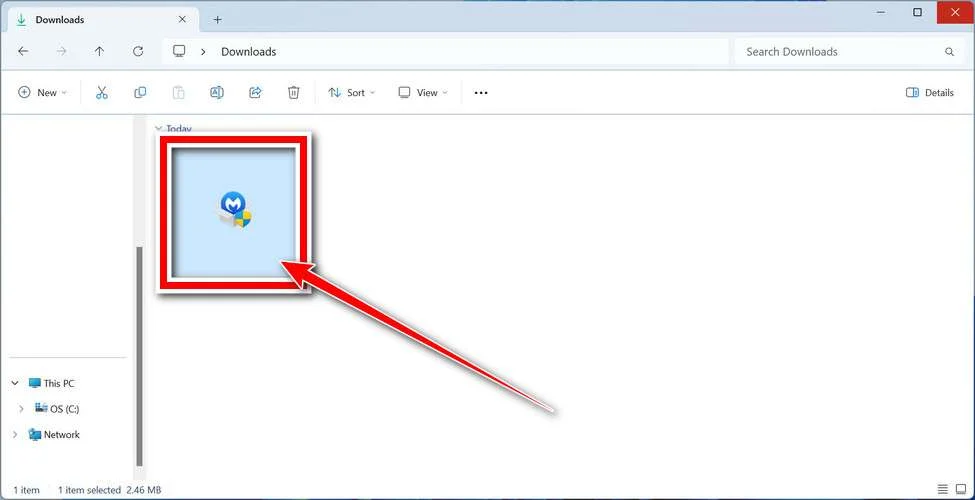
When the download finishes, open your Downloads folder and double-click the MBSetup file. If Windows shows a User Account Control pop-up, click “Yes” to allow the installation.
Follow the On-Screen Prompts to Install Malwarebytes
The setup wizard will walk you through a few quick screens:
-
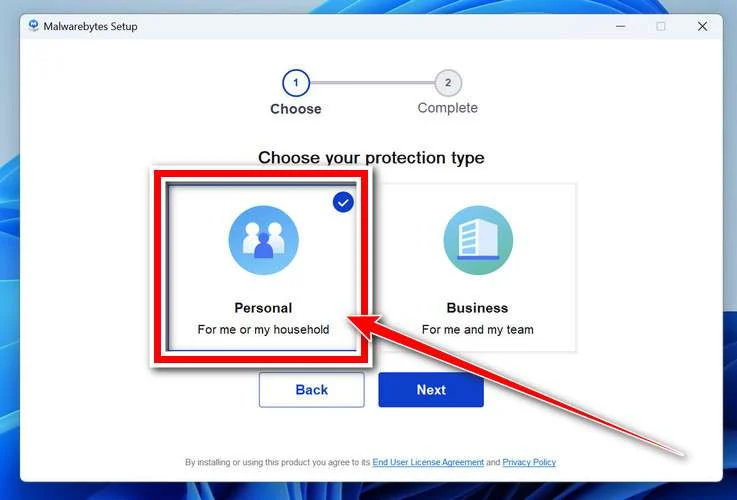
Choose where you’re installing the program — “Personal Computer” or “Work Computer” — then click Next.
-
Malwarebytes will now install on your device. This usually takes under a minute.

-
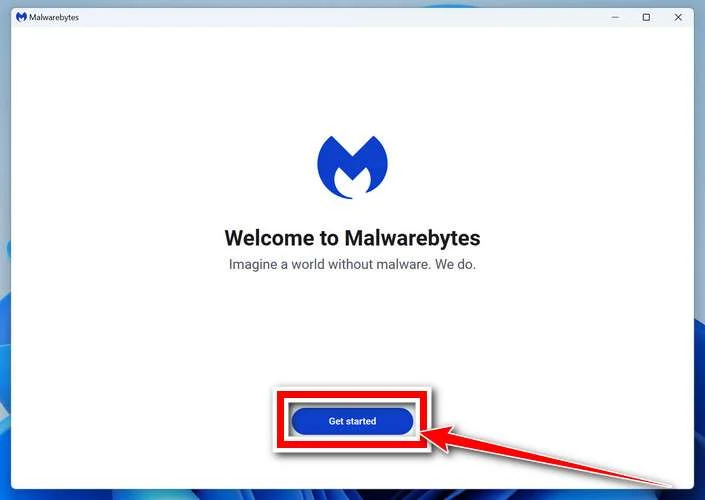
When installation is complete, the “Welcome to Malwarebytes” screen will open automatically.
-
On the final screen, click Open Malwarebytes to launch the program.

-
Enable “Scan for Rootkits”
Before scanning, turn on rootkit detection so Malwarebytes can find even the most hidden threats. Click the Settings gear icon on the left side of the screen.
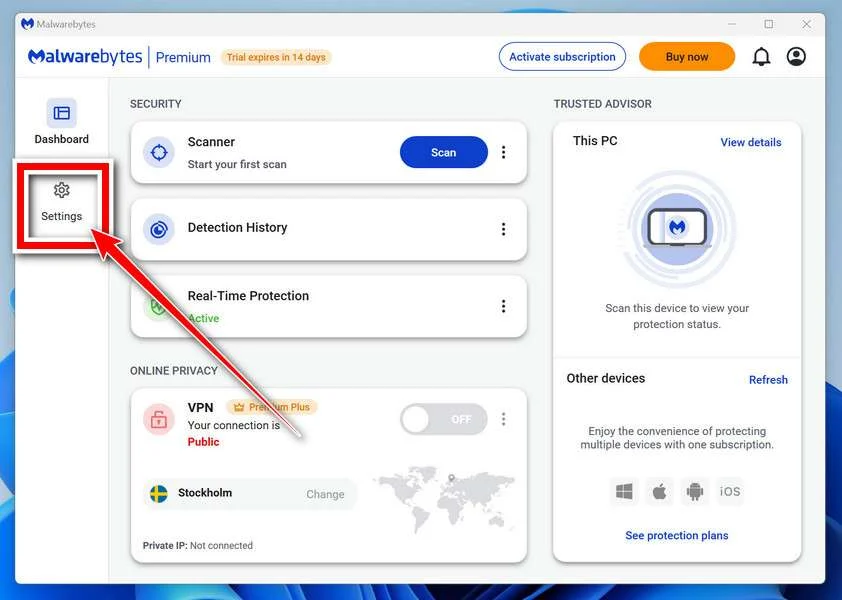
In the settings menu, find “Scan for rootkits” and click the toggle so it turns blue.

Done? Click “Dashboard” in the left pane to return to the main screen.
Start the Scan
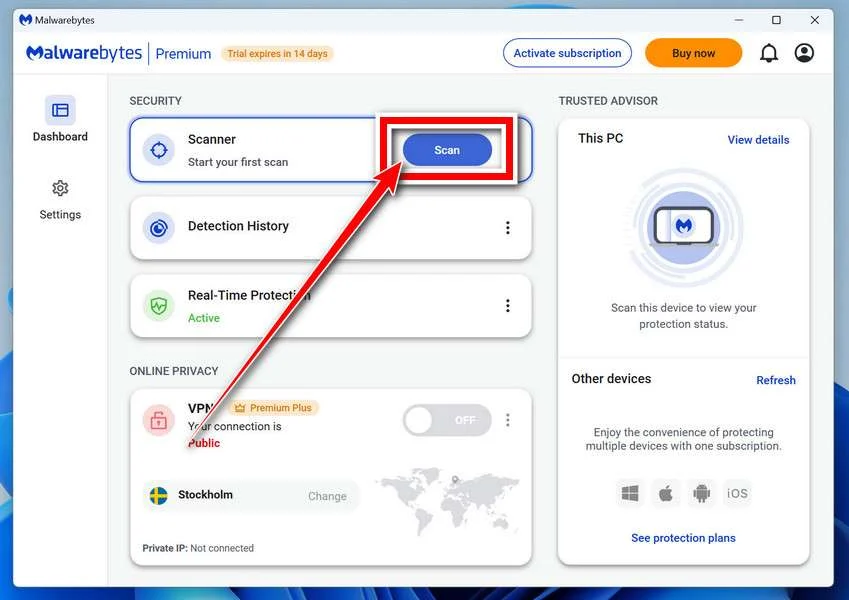
Click the blue Scan button. Malwarebytes will automatically update its virus database and start checking your computer for malware.
-
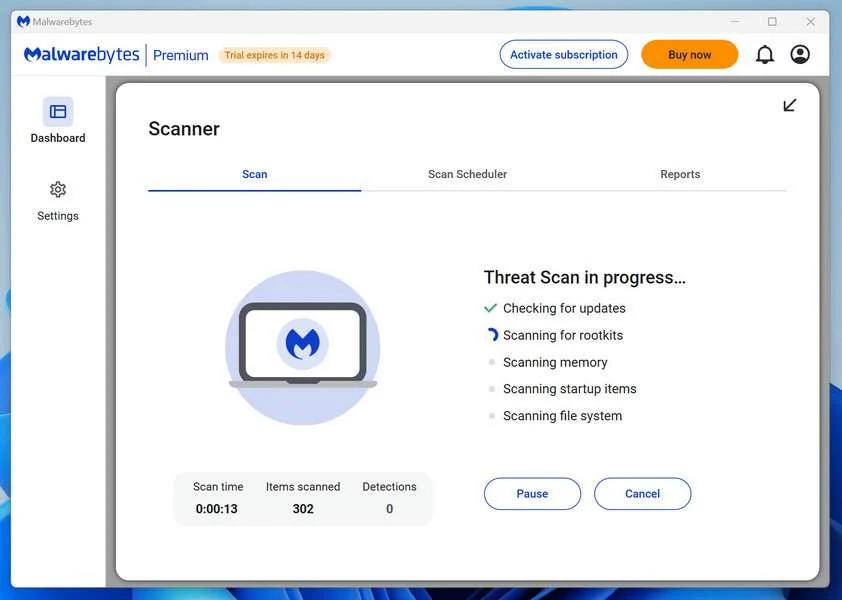
Wait for the Scan to Finish
The scan checks your entire system for browser hijackers and other malicious programs, so it can take 5 to 20 minutes depending on your computer. Feel free to do something else — just check back occasionally to see the progress.
-
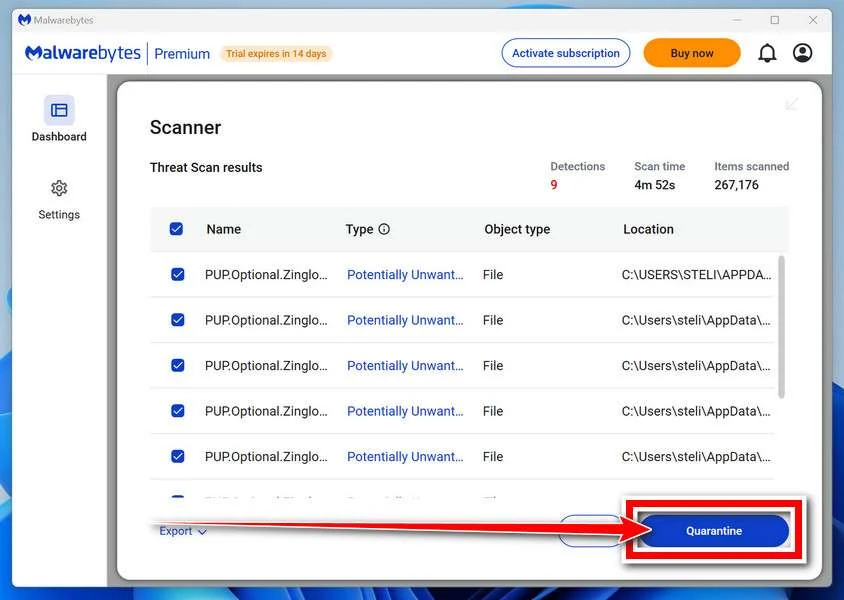
Quarantine the Detected Threats
When the scan is done, you’ll see a list of everything Malwarebytes found — malware, adware, and potentially unwanted programs. Click the “Quarantine” button to remove all of them at once.
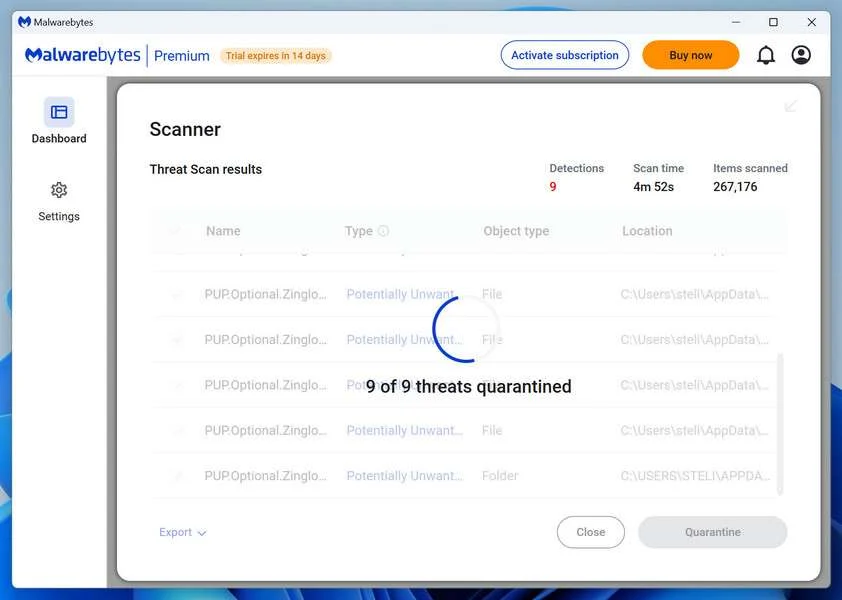
Malwarebytes will now remove the malicious files and registry entries and move them safely into quarantine.
-
Restart Your Computer
Some threats can only be fully removed after a reboot. If Malwarebytes asks you to restart, click Yes. Once you’re logged back in, Malwarebytes has finished removing the threats it found.
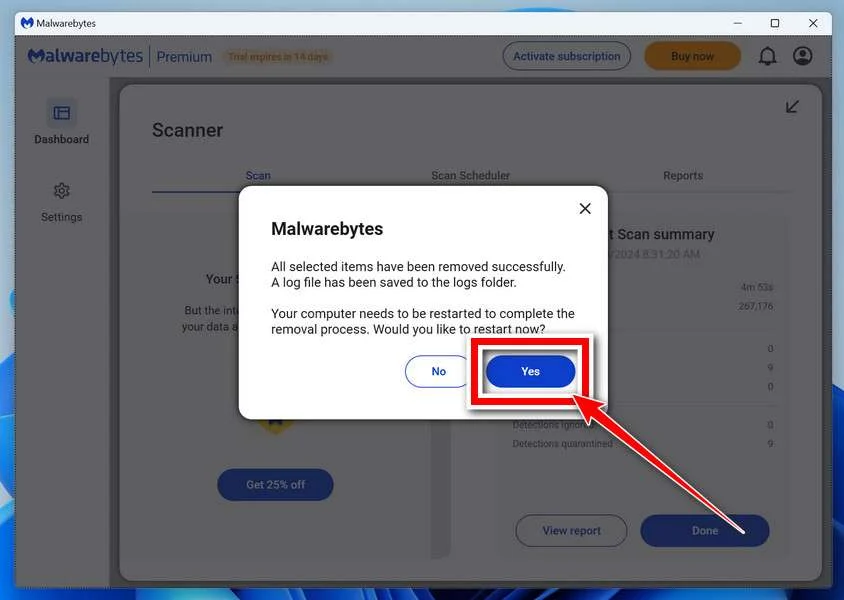
That’s it — your Windows PC is now clean of trojans, adware, and other malware, and should be back to running smoothly.
If you are still having problems with your computer after completing these instructions, then please follow one of the steps:
- Run a computer scan with ESET Online Scanner
- Ask for help in our Windows Malware Removal Help & Support forum.
Run a Malware Scan with Malwarebytes for Mac
Malwarebytes for Mac is a free on-demand scanner that removes the malware other security software tends to miss — adware, browser hijackers, and unwanted programs included. Cleaning an infected Mac with Malwarebytes has always been completely free, and it’s our go-to recommendation. Follow the steps below to scan and clean your Mac in just a few minutes.
-
Download Malwarebytes for Mac
Click the button below to download the latest version of Malwarebytes for Mac.
Download MalwarebytesOfficial installer for macOS. Your download starts right away.Want real-time protection? See Malwarebytes PremiumMalwarebytes Free for MacScans and removes malware at no cost -
Open the Malwarebytes setup file
When the download finishes, open your Downloads folder and double-click the setup file to begin the installation.
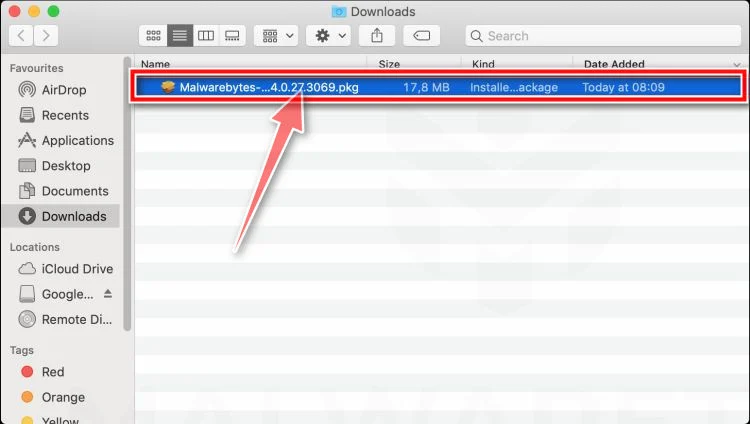
-
Follow the On-Screen Prompts to Install Malwarebytes
The Malwarebytes for Mac Installer will guide you through a few quick screens. Click “Continue” and keep following the prompts until the installation completes.
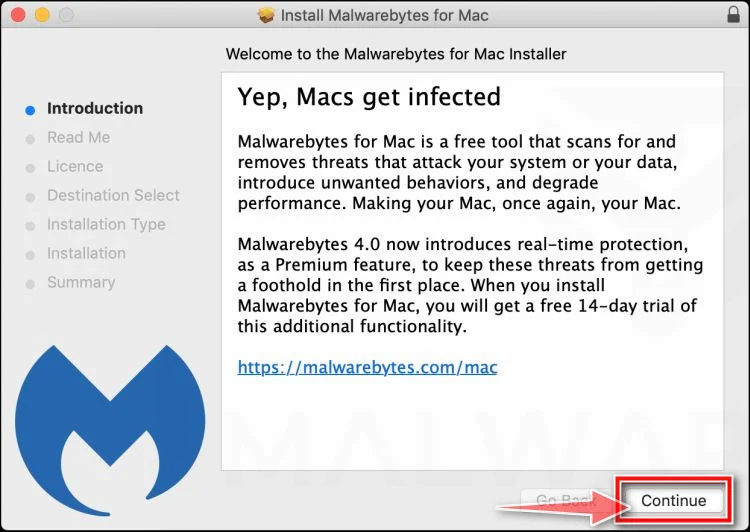
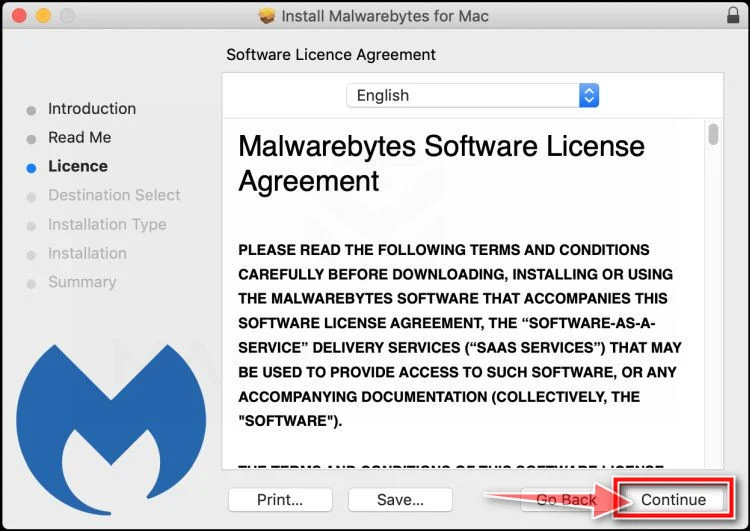
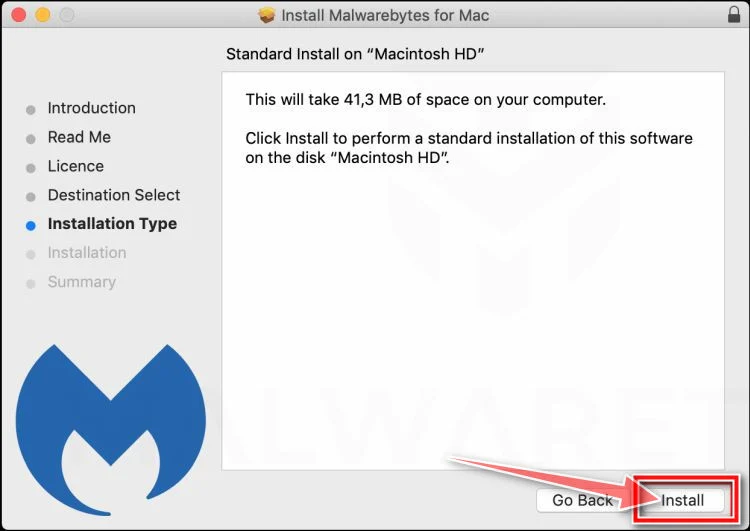
When the installation is complete, Malwarebytes opens to the Welcome to Malwarebytes screen. Click “Get started“.
-
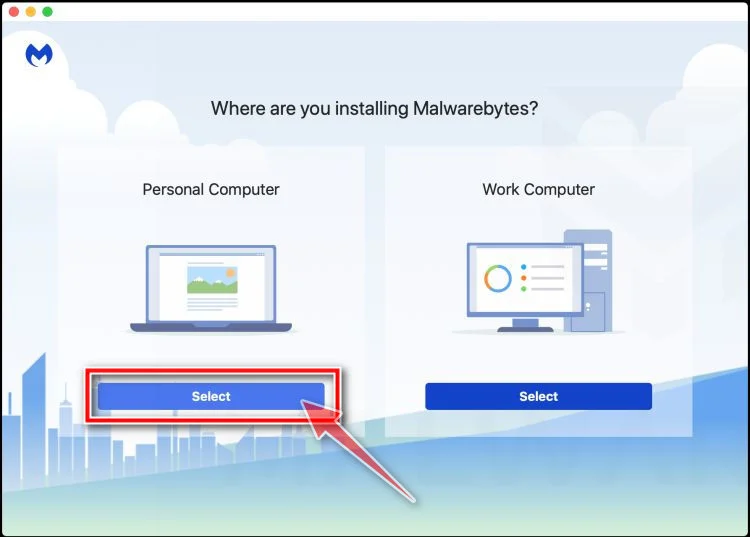
Select “Personal Computer” or “Work Computer”
Malwarebytes will ask what type of computer you’re installing it on. Click either Personal Computer or Work Computer, whichever applies.
-
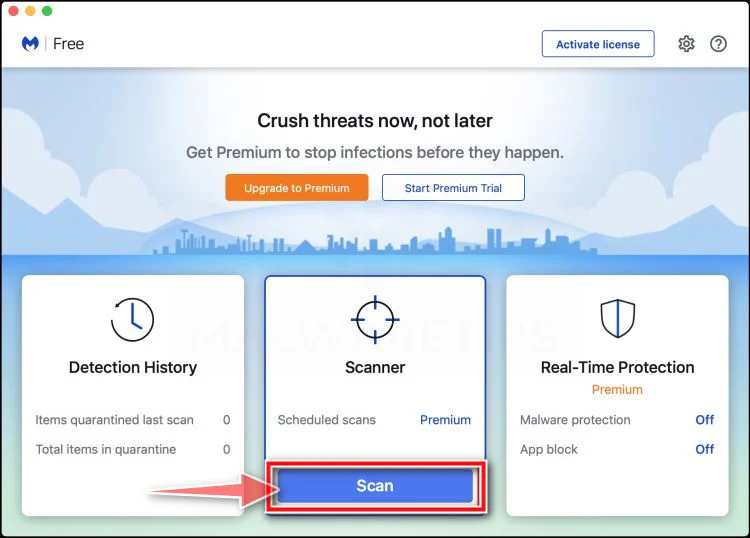
Start the Scan
Click the “Scan” button. Malwarebytes will automatically update its detection database and begin checking your Mac for malware.
-
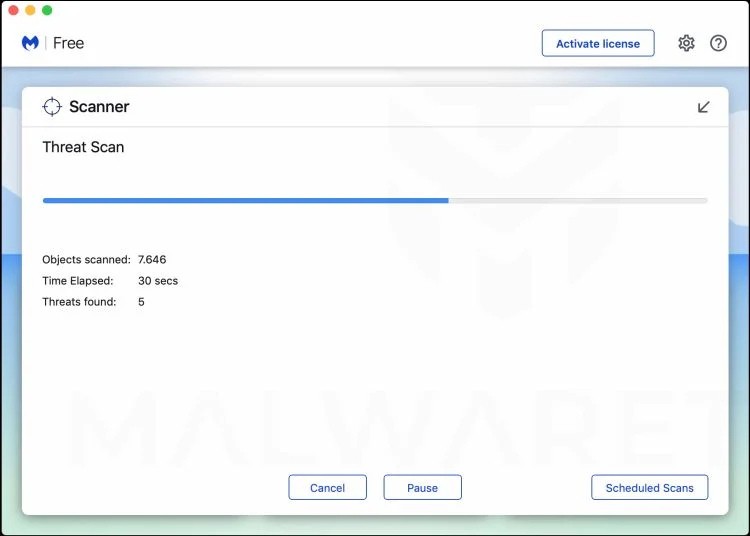
Wait for the Scan to Finish
Malwarebytes will scan your Mac for adware, browser hijackers, and other malicious programs. This can take a few minutes, so feel free to do something else — just check back occasionally to see the progress.
-
Quarantine the Detected Threats
When the scan is done, you’ll see a list of everything Malwarebytes found. Click the “Quarantine” button to remove all the threats at once.
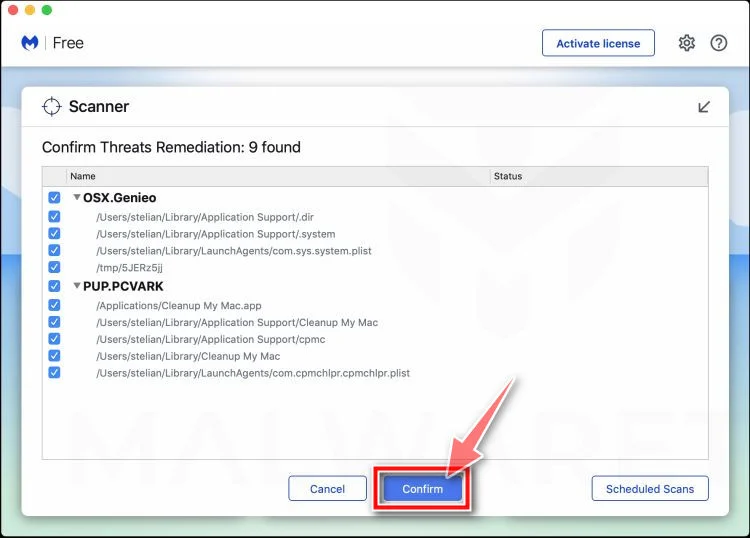
-
Restart Your Mac
Malwarebytes will now remove all the malicious files it found. Some threats can only be fully removed after a reboot — if Malwarebytes asks you to restart, allow it. Once you’re logged back in, your Mac is clean.
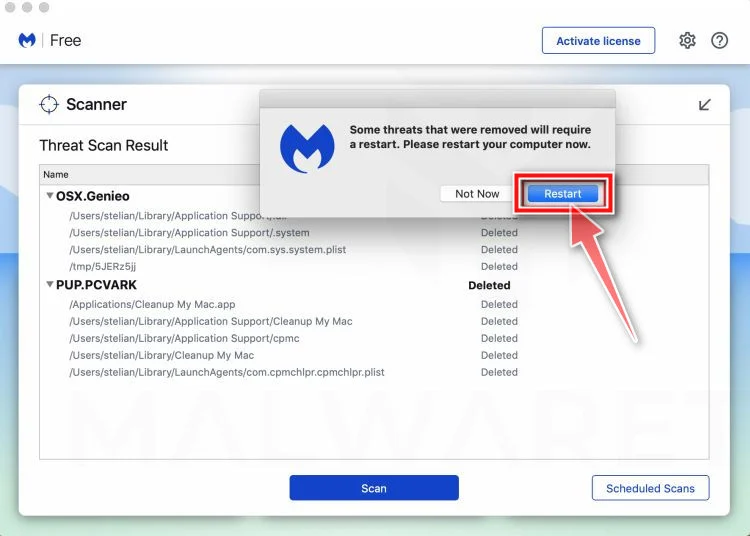
That’s it — your Mac is now free of adware, rogue browser extensions, and other potentially harmful software.
If you are still experiencing problems while trying to remove a malicious program from your computer, please ask for help in our Mac Malware Removal Help & Support forum.
Run a Malware Scan with Malwarebytes for Android
Malwarebytes for Android automatically detects and removes dangerous threats like malware and ransomware so you don’t have to worry about your most-used device being compromised. Aggressive detection of adware and potentially unwanted programs keeps your Android phone or tablet running smooth.
-
Download Malwarebytes for Android.
You can download Malwarebytes for Android by clicking the link below.
Get Malwarebytes for AndroidOpens Google Play in a new tab.Want real-time protection? See Malwarebytes Premium for AndroidMalwarebytes for AndroidScans your phone and removes malware at no cost -
Install Malwarebytes for Android on your phone.
In the Google Play Store, tap “Install” to install Malwarebytes for Android on your device.

When the installation process has finished, tap “Open” to begin using Malwarebytes for Android. You can also open Malwarebytes by tapping on its icon in your phone menu or home screen.

-
Follow the on-screen prompts to complete the setup process
When Malwarebytes will open, you will see the Malwarebytes Setup Wizard which will guide you through a series of permissions and other setup options.
This is the first of two screens that explain the difference between the Premium and Free versions. Swipe this screen to continue.
Tap on “Got it” to proceed to the next step.
Malwarebytes for Android will now ask for a set of permissions that are required to scan your device and protect it from malware. Tap on “Give permission” to continue.
Tap on “Allow” to permit Malwarebytes to access the files on your phone.
-
Update database and run a scan with Malwarebytes for Android
You will now be prompted to update the Malwarebytes database and run a full system scan.

Click on “Update database” to update the Malwarebytes for Android definitions to the latest version, then click on “Run full scan” to perform a system scan.

-
Wait for the Malwarebytes scan to complete.
Malwarebytes will now start scanning your phone for adware and other malicious apps. This process can take a few minutes, so we suggest you do something else and periodically check on the status of the scan to see when it is finished.

-
Click on “Remove Selected”.
When the scan has been completed, you will be presented with a screen showing the malware infections that Malwarebytes for Android has detected. To remove the malicious apps that Malwarebytes has found, tap on the “Remove Selected” button.

-
Restart your phone.
Malwarebytes for Android will now remove all the malicious apps that it has found. To complete the malware removal process, Malwarebytes may ask you to restart your device.
That’s it — your Android phone is now clean — no more malicious apps, adware, or browser redirects.
If you are still having problems with your phone after completing these instructions, then please follow one of the steps:
- Restore your phone to factory settings by going to Settings > General management > Reset > Factory data reset.
- Ask for help in our Mobile Malware Removal Help & Support forum.
Stay Protected: Block Ads and Malicious Sites
Now that your device is clean, keep it that way. Most infections start with a malicious ad or a fake download button — so blocking them at the source is your best defense.
We recommend AdGuard, which blocks malicious ads, phishing pages, and dangerous redirects before they can reach you.
👉 Download AdGuard and browse safely
The Bottom Line
An 844 number can be legitimate customer service, or it can be the front door to a scam.
Because 844 is a toll-free code used by real organizations, scammers use it to blend in. And because caller ID can be spoofed, the number on your screen is not proof of anything.
The safest approach is consistent and simple:
- Do not trust inbound calls or links
- Verify through official numbers you find yourself
- Never share one-time passcodes, passwords, or remote access
- Treat gift card payment demands as immediate proof of fraud
If you already engaged, act quickly. Cancel, secure, dispute, and report.
Most victims are not careless. They are rushed, pressured, and given a story that sounds just plausible enough. Once you know the playbook, 844 scams lose their power.
FAQ
Is 844 a real area code or a scam code?
844 is a real toll-free code, like 800, 888, 877, 866, 844, and 833. It is not tied to any city or state. Many legitimate companies use 844 for customer support, billing, and account services. Scammers also use it because it looks official.
Where is the 844 area code located?
It is not a geographic area code. 844 is toll-free, which means calls to that number are typically free for the caller, and the business pays the cost.
Are all 844 calls legitimate customer service?
No. Some are real, but many scam operations use 844 numbers or spoof them. The number alone is not proof. What matters is whether the caller can be verified and whether the request is reasonable.
Can scammers spoof an 844 number on caller ID?
Yes. Caller ID spoofing can make it look like a call is coming from a real 844 number, including a legitimate company’s published support line. That is why you should not trust caller ID by itself.
Why do I keep getting calls from 844 numbers?
Common reasons include:
- Robocall campaigns dialing large lists of numbers
- Your number appearing on marketing lists or leaked lists
- Scammers testing which numbers answer so they can target them later
- A legitimate company trying to reach you, but using an outsourced call center
If you are unsure, let it go to voicemail and verify independently.
What are the most common 844 phone scam types?
The most common patterns include:
- Bank or card “fraud department” calls that ask for verification codes
- Tech support scams that demand remote access and payment
- IRS or government impersonation threatening arrest or penalties
- Delivery or account alerts that push a link or callback number
- Refund scams claiming you are owed money but requiring “verification”
What is the biggest red flag with 844 fraud calls?
The biggest red flags are requests for:
- One-time passcodes (OTP) sent to your phone
- Passwords or login credentials
- Remote access to your device
- Payment by gift cards, crypto, or wire transfer
- Pressure to stay on the phone while you log in or transfer money
I got a text with an 844 number and a link. What should I do?
Do not click the link. Instead:
- Screenshot the message
- Delete it
- Report it as junk/spam in your messaging app
- If it claims to be your bank or a known company, open your official app or type the real website yourself and check there
Should I call back an 844 number that left a voicemail?
Only after verification. Safe steps:
- Look up the company’s official number from their real website, your bill, or the back of your card
- Call that official number, not the voicemail number
- Ask if they attempted to contact you and what the issue is
If the voicemail is vague, urgent, or threatening, it is likely a scam.
How can I verify if an 844 number is real?
Use a simple verification rule:
- Do not trust inbound contact
- Verify through an official channel you control
Examples:
- For a bank issue, call the number on the back of your card
- For a utility issue, use the number on your bill
- For an online account alert, log in through the official app, not a link
I answered an 844 call but did not share anything. Am I still at risk?
Usually the risk is low if you did not click links, give information, or follow instructions. But answering can confirm your number is active, which may increase future calls. If you start getting more spam, use call filtering and avoid engaging.
I shared a one-time verification code. What should I do immediately?
Act as if the scammer can access your account:
- Log in from the official app or website
- Change your password right away
- Enable multi-factor authentication (prefer an authenticator app if available)
- Review recent logins and remove unknown devices
- Call the company’s fraud department using the official number
I paid money after an 844 call. Can I get it back?
It depends on the payment method:
- Credit card: often the best chance via dispute/chargeback
- Debit card: possible, but act fast
- Wire transfer: sometimes recall is possible if reported immediately
- Gift cards and crypto: recovery is difficult, but report immediately anyway
The faster you contact your bank or payment provider, the better the odds.
How do I report 844 scam calls and texts?
Good reporting steps:
- Report to the FTC (fraud reporting)
- If it is a text, forward it to 7726 (SPAM) and use “report junk”
- Report spoofing-related issues to the FCC if relevant
- Report significant losses to local law enforcement
What is the best way to stop 844 scam calls long-term?
You cannot stop all calls, but you can reduce exposure:
- Let unknown calls go to voicemail
- Enable carrier spam blocking and call labeling
- Use “silence unknown callers” if it fits your needs
- Never click links in unexpected texts
- Never share OTP codes or passwords on inbound calls

Join the discussion
0 commentsShare your experience or ask a question about this article.
Discussion
Start the conversation
Have a question or something useful to share? Add the first comment.