


Aartemis Portal Site is a browser hijacker, which is promoted via other free downloads, and once installed it will change your browser homepage to aartemis.com and default search engine to search.yahoo.com.
This in itself is not considered malicious as there are many legitimate programs that change these settings as well. What is considered malicious, though, is that it will also append the argument http://aartemis.com to random Windows shortcuts on your desktop and your Windows Start Menu.
![[Image: Aartemis Portal Site virus]](https://malwaretips.com/blogs/wp-content/uploads/mwt-media/ef/efc88681a69dfbed07972bbad58a56c2135132d4de82937c365759b8af7b574c/a328fc38821c39d4efebf392307d8105ee15f857b898a0de06f16b727e3a02fc-1067.webp "Aartemis Portal Site virus")
The Aartemis Portal Site homepage will display advertisements and sponsored links in your search results, and may collect search terms from your search queries. The Aartemis Portal Site hijack is used to boost advertising revenue, as in the use of blackhat SEO, to inflate a site’s page ranking in search results.
Aartemis Portal Site it’s technically not a virus, but it does exhibit plenty of malicious traits, such as rootkit capabilities to hook deep into the operating system, browser hijacking, and in general just interfering with the user experience. The industry generally refers to it as a “PUP,” or potentially unwanted program.
Aartemis Portal Site is an ad-supported (users may see additional banner, search, pop-up, pop-under, interstitial and in-text link advertisements) cross web browser plugin for Internet Explorer (BHO) and Firefox/Chrome (plugin) and distributed through various monetization platforms during installation. The browser extension includes various features that will modify the default or custom settings of the browser including the home page, search settings and in some cases will modify Internet Explorer’s load time threshold, place a lock file within Firefox to prevent competing software from changing its settings as well as disable the browser’s Content Security Policy in order to allow for cross site scripting of the plugin.
Aartemis Portal Site homepage got on your computer after you have installed a freeware software (video recording/streaming, download-managers or PDF creators) that had bundled into their installation this browser hijacker.
For example, when you install VPlay, you will also agree to change your browser homepage to aartemis.com and default search engine to search.yahoo.com
![[Image: Aartemis Portal Site redirect]](https://malwaretips.com/blogs/wp-content/uploads/mwt-media/b2/b2eccb9b7ca10cae6be76222a288a95ef34661dc8f99ac1ac9a400523bfa5276/0fbf4630109520dbcf07263106a9f5e51676fe369277903106482ceeb52957a9-1067.webp "Aartemis Portal Site redirect")
However when you uninstall VPlay from your computer, your web browser’s default settings will not be restored. This means that you’ll have to remove Aartemis Portal Site homepage from your favorite web browser manually.
You should always pay attention when installing software because often, a software installer includes optional installs, such as this Aartemis Portal Site browser hijacker. Be very careful what you agree to install.
Always opt for the custom installation and deselect anything that is not familiar, especially optional software that you never wanted to download and install in the first place. It goes without saying that you should not install software that you don’t trust.
Aartemis Portal Site Homepage – Virus Removal Guide
This page is a comprehensive guide, which will remove Aartemis Portal Site from your Internet Explorer, Firefox and Google Chrome.
Please perform all the steps in the correct order. If you have any questions or doubt at any point, STOP and ask for our assistance.
STEP 1: Remove Aartemis Portal Site browser hijacker from your computer with AdwCleaner
STEP 2:Clean up the various Windows shortcuts that have been hijacked by Aartemis Portal Site virus
STEP 3: Remove Aartemis Portal Site malicious files with Malwarebytes Anti-Malware Free
STEP 4: Double-check for the Aartemis Portal Site infection with HitmanPro
STEP 1: Remove Aartemis Portal Site browser hijacker with AdwCleaner
The AdwCleaner utility will scan your computer for Aartemis Portal Site malicious files that may have been installed on your computer without your knowledge.
- You can download AdwCleaner utility from the below link.
Download AdwCleanerFree official download. Nothing to install. - Before starting AdwCleaner, close all open programs and internet browsers, then double-click on the AdwCleaner icon.
![[Image: AdwCleaner Icon]](https://malwaretips.com/blogs/wp-content/uploads/mwt-media/ae/ae54421358390681d3945c646380e19b34d03e4827a53073e49cc8cb31911a4e/99f0dd93a9d513cc4b0c7955a0c5f93786f74d9bcc472950819fe74af1d6f342-123.webp "AdwCleaner Icon")
If Windows prompts you as to whether or not you wish to run AdwCleaner, please allow it to run. - When the AdwCleaner program will open, click on the Scan button as shown below.
![[Image: Adwcleaner Scan]](https://malwaretips.com/blogs/wp-content/uploads/mwt-media/1d/1d7a61e03e9b975ca506c46364844867f265a178724d30e4ed025f8533673b08/e92584319c6274f525f060b4e0428fff8a5610ea04170027fd89556c5dc718b7-530.webp "Click on Scan button to search for Aartemis Portal Site infection")
AdwCleaner will now start to search for Aartemis Portal Site malicious files that may be installed on your computer. - To remove the Aartemis Portal Site malicious files that were detected in the previous step, please click on the Clean button.
![[Image: AdwCleaner removing infections]](https://malwaretips.com/blogs/wp-content/uploads/mwt-media/f1/f153068da4256c4a86039c0d8bf75f9853f3e0615a05e30315dcb4e6c64f3c1f/3e94c26efa83f0b307a8ede30a8e1c2ca514d5a57523aa57e04b282a88c163e8-530.webp "Click on the Clean button to remove Aartemis Portal Site virus")
AdwCleaner will now prompt you to save any open files or data as the program will need to reboot the computer. Please do so and then click on the OK button.
STEP 2: Clean up the various Windows shortcuts that have been hijacked by Aartemis Portal Site virus
- Search for your browser shortcut (Desktop, Taskbar or Start Menu Shortcut), then right click on it and select Properties.
![[Image: Firefox Shortcut properties]](https://malwaretips.com/blogs/wp-content/uploads/mwt-media/b9/b909540514ecf1468a55cb20f0f9ee4416497951c8ef10129320b3d45ee25d23/ae75bb52a120cc2c070a4d04435ba80b72a7f08a2599017691d760a0a2a88f47-377.webp "Desktop Shortcut properties")
![[Image: taskbar shortcut hijacker]](https://malwaretips.com/blogs/wp-content/uploads/mwt-media/dd/ddcf00cc83483df320a3145361fbe21f2ae76662838bc5328d006ea67d1a4f01/5bd18818485ae58c414e02f99ff3be7a1d5f003f38ab1c314fc09b1c599cb1d9-423.webp "Right click on browser icon from Taskbar and select Properties")
- In the Shortcut tab, in the Target field, remove the http://www.aartemis.com argument. Basically, there should be only the path to browser executable file. Nothing more.
![[Image: Aartemis Portal Site shortcut hijack]](https://malwaretips.com/blogs/wp-content/uploads/mwt-media/1d/1d69749ac8ee6fa2d208812b34567d4ad56f300ebdc4d66968c5dcedf04062cf/6ea482dacbfe51fba809038e553d8d3869eaf214bbeb80f08f7a415a6c7cd776-657.webp "Aartemis Portal Site hijack")
These are the default shortcut path that should be in your Target box, if the Aartemis Portal Site argument is in there, then you should remove it.
- For Internet Explorer: “C:\Program Files\Internet Explorer\iexplore.exe” for Windows 32-bit or “C:\Program Files\Internet Explorer (x86)\iexplore.exe” for Windows 64-bit.
- For Mozilla Firefox: “C:\Program Files\Mozilla Firefox\firefox.exe” for Windows 32-bit or “C:\Program Files (x86)\Mozilla Firefox\firefox.exe” for Windows 64-bit.
- For Google Chrome: “C:\Program Files\Google\Chrome\Application\chrome.exe”
STEP 3: Remove Aartemis Portal Site malicious files from your computer with Malwarebytes Anti-Malware Free
Malwarebytes Anti-Malware Free utilizes Malwarebytes powerful technology to detect and remove all traces of malware including worms, trojans, rootkits, rogues, dialers, spyware and more.
- You can download Malwarebytes Anti-Malware Free from the below link,then double click on it to install this program.
Download MalwarebytesFree official installer. Your download starts right away. - When the installation begins, keep following the prompts in order to continue with the setup process.
Do not make any changes to default settings and when the program has finished installing, click on the Finish button.
![[Image: Malwarebytes Anti-Malware final installation screen]](https://malwaretips.com/blogs/wp-content/uploads/mwt-media/47/471448d4dd5aa1d55ea545effccf0ac9c8ccb5a29622da4e38ac677b5d8c37b5/9f473303c15a00262451cc5a56b904de929157b59e19e3cfb2c03ec88f643390-402.webp "Malwarebytes Anti-Malware final installation screen")
- On the Scanner tab, select Perform quick scan and then click on the Scan button to start scanning your computer.
![[Image: Malwarebytes Anti-Malware Quick Scan]](https://malwaretips.com/blogs/wp-content/uploads/mwt-media/1e/1eb209597ca2f06e596fd060345ac7e3100355f1ec8fc8ea2d9dec7abbb05ea0/3afba9b0b97b56945ffc33817ac48f7433c799241a22e422966180b76473a906-521.webp "Run a Quick Scan with Malwarebytes Anti-Malware")
- Malwarebytes’ Anti-Malware will now start scanning your computer as shown below.
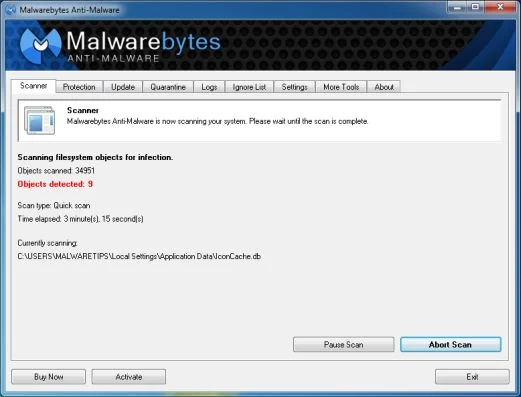
- When the Malwarebytes scan will be completed,click on Show Result.
![[Image: Malwarebytes Anti-Malware scan results]](https://malwaretips.com/blogs/wp-content/uploads/mwt-media/84/84c62dd46289424dbc686abc53672cb0810111920c8c0bbd69e973844d0a9ab0/a4c04aa700e641f47afec9965f79ff346740668e5952955ccbe5b4c3658b5897-521.webp "Malwarebytes when the system scan has completed")
- You will now be presented with a screen showing you the malware infections that Malwarebytes’ Anti-Malware has detected.Please note that the infections found may be different than what is shown in the image.Make sure that everything is Checked (ticked) and click on the Remove Selected button.
![[Image:Malwarebytes removing malware]](https://malwaretips.com/blogs/wp-content/uploads/mwt-media/d8/d86b6a8bac0e4ece9fd2d259a83db71487943f6b04b567edb0e9adcc3200f492/4eb94651b0e34cc99689c56dc71cd0a49444498ed05c5803ea55fda1cfee1b1f-521.webp "Click on Remove Selected to get rid of malware")
STEP 4: Double check for the Aartemis Portal Site infection with HitmanPro
HitmanPro is a second opinion scanner, designed to rescue your computer from malware (viruses, trojans, rootkits, etc.) that have infected your computer despite all the security measures you have taken (such as anti virus software, firewalls, etc.).
- You can download HitmanPro from the below link, then double click on it to start this program.
Download HitmanProOfficial Sophos download. Free scan, free 30-day trial to remove threats. - HitmanPro will start and you’ll need to follow the prompts (by clicking on the Next button) to start a system scan with this program.
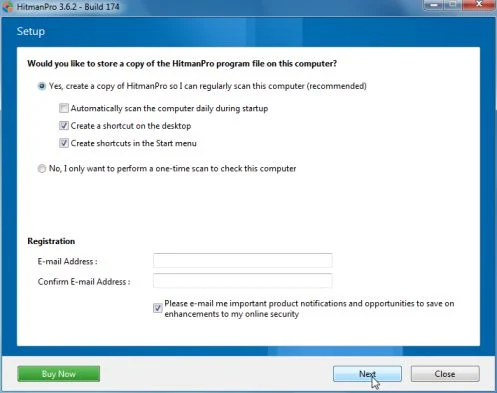
- HitmanPro will start scanning your computer for malware, as seen in the image below.
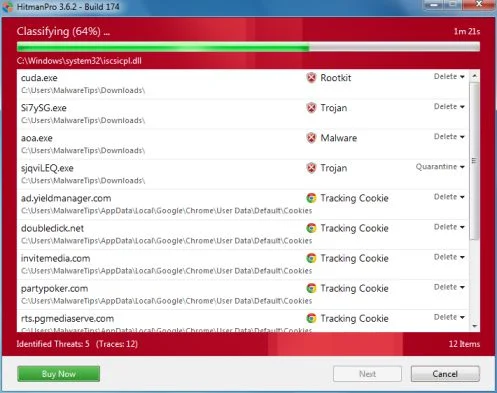
- Once the scan is complete,you’ll see a screen which will display all the infected files that this utility has detected, and you’ll need to click on Next to remove these malicious files.
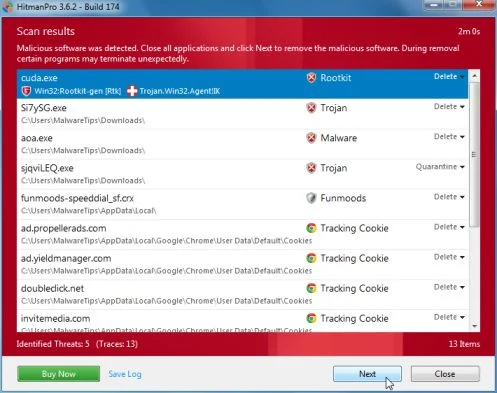
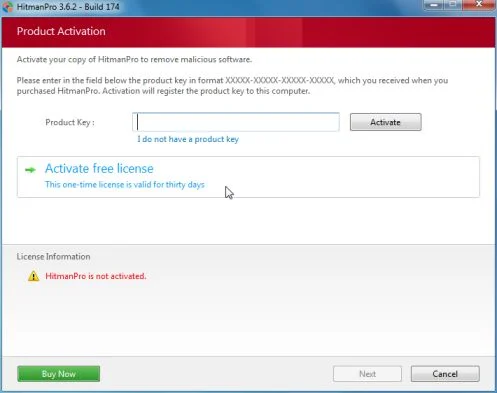
- Click Activate free licenseto start the free 30 days trial and remove all the malicious files from your computer.
Your computer should now be free of the Aartemis Portal Site infection. If your current anti-virus solution let this infection through, you may want to consider purchasing the PRO version of Malwarebytes Anti-Malware to protect against these types of threats in the future.
If you are still experiencing problems while trying to remove Aartemis Portal Site hijacker from your machine, please start a new thread in our Malware Removal Assistance forum.

Join the discussion
26 commentsShare your experience or ask a question about this article.
Your progress
Did these steps help?
Let us know how the guide worked for you.
Describe what you see and the step you reached. Keep passwords and other private information out.
Discussion
THANK YOU!! for taking the time of figuring this out and sharing the solution with us all!
Thank you I think it worked… But I am afraid about the info that I could lose by having this :(
In reply to julitaba
Hello,
You should not lose any kinda of info as this infection it’s easy to remove, and it’s not really that dangerous. :)
my savior of the night! Was very upset with the aartemis but the steps suggested clean it.
Thank You very much…. problem solved !!! ^ _ ^
Thank you for the simple + effective instructions!
Thank you!
Somebody needs to start a class action lawsuit, or the Government needs to make this illegal with huge $$$ fines to any and all companies that allow this to go on. And finally the people who made aartemis need to be forced to help 80+ year olds with free and kind computer tech support to repay there debt to society.
thank you sooo much !!
wow it really worked :D really good job !!! I couldn’t find an effective solution at other websites and this one was the best one !! To everyone who are not sure to try this method: I really recommend to do it it really works :) thank you so much
definitely gonna donate sumthin when i get paid..thank u very much
You are my hero… Will you marry me? :)
Wonderful! Thank you so much. I write work instructions in an automotive plant for a living and this step by step instruction was extremely well done. I did it all and it cleaned my cpu right up. I have Norton Antivirus and it did not see the Aartemis at all. Keep up the good work!
You are awesome! After a few hours surfing geekspeak sites I finally found this domain that was a simple, step by step to eradicate the problem. Good Karma, cheers Mate!
Thank you very much! You’re my hero of the day :]
Thank you!!! I spent hours trying to get this off my computer. None of the other websites worked–this was the only website that actually gave the steps that worked to remove it. Thanks soo much!
Thanks!!!!! i have tried several sites bevore i saw this one…and this is the only one that worked!!!!!!
Thanks again!!!!!
This did the trick, as advertised. No problems, all the links worked and malware is gone!
Thank you!!!
This was a GREAT step by step tool and got rid of the “nasties ” that hit my browser…….Thank-ou, Thank-You and Thank-You!!!!! I highly recommend!!!!!
Thanks for all the help!! I already had the malware bytes tool but the other software was awesome… Thanks Again..
thank you so much for helping me and everyone else out..your intensely appreciated..