

A heavily discounted Malwarebytes Premium license can look like an easy way to protect several devices for very little money. Fake promotions promise 70% or 80% off, “lifetime” protection, or a multi-year plan at a price that appears available for only a few hours.
These offers can lead to unauthorized sellers, invalid product keys, phishing checkout pages, and fake renewal centers. In the most dangerous version, an alarming invoice pushes the recipient to call a scammer who asks for remote access to the computer.
Overview
The Malwarebytes Premium discount scam is not one single website or email. It is a group of related sales, phishing, and tech support schemes that borrow the Malwarebytes name to gain trust.
One version advertises a cheap “lifetime” license through social media, sponsored search results, email, or a coupon site. The customer may receive a key that is already used, purchased with stolen payment information, limited to a different region, or later deactivated.
Another version claims a costly Malwarebytes subscription has renewed automatically. The supposed charge is often several hundred dollars. The message includes a telephone number for canceling or disputing it, but the number connects to a fraudulent support center.
Malwarebytes has publicly warned about fake renewal notices sent by email and calendar invitations. Its guidance says genuine annual renewal reminders are normally sent before expiration through authorized payment processors such as Cleverbridge or 2Checkout.
Malwarebytes also states that its email and support representatives will not ask for passwords, PINs, verification codes, Social Security numbers, or credit card information. A caller requesting those details is not following the company’s legitimate renewal process.
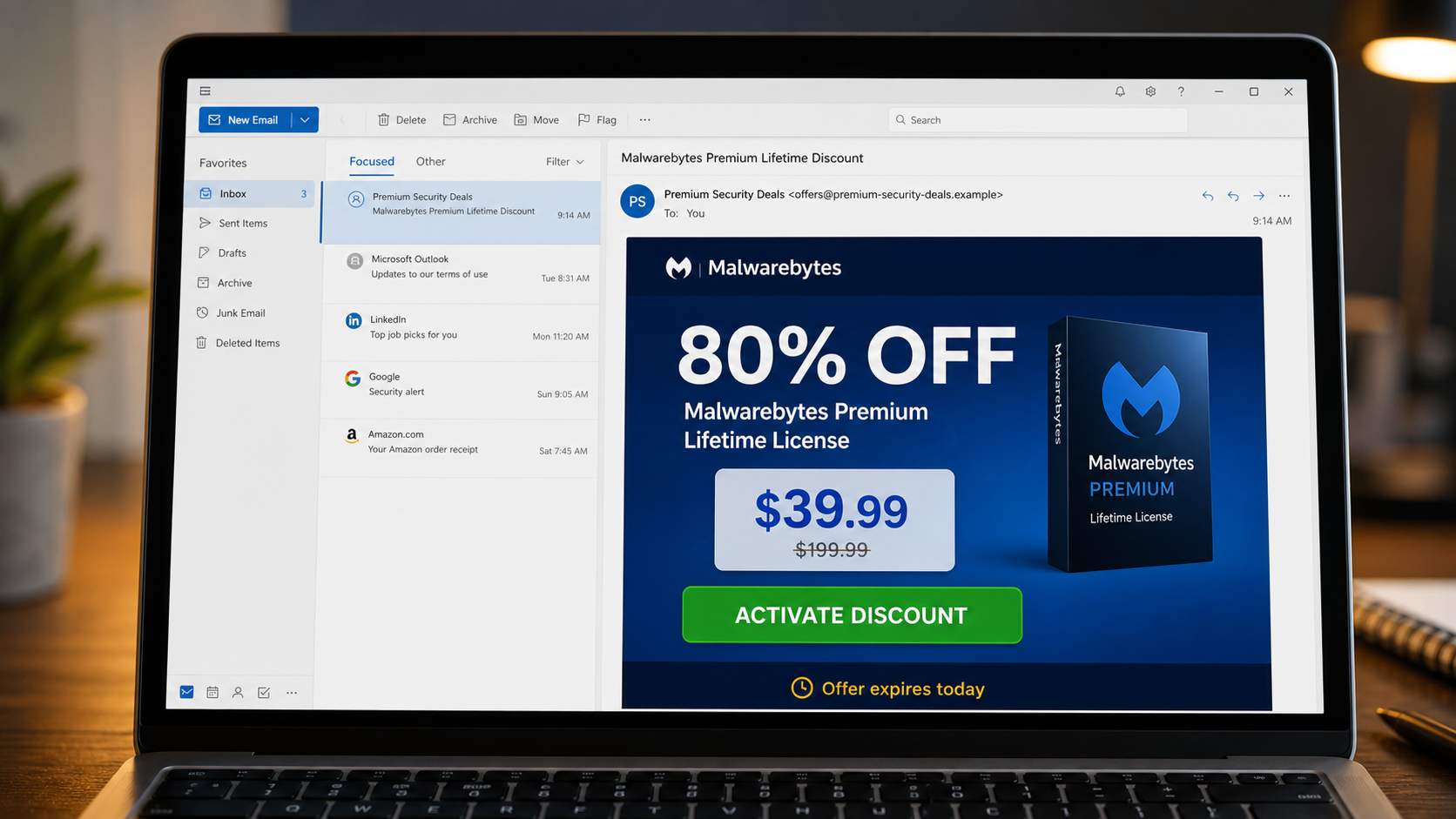
What the fake discount email may say
Subject: Malwarebytes Premium Lifetime Discount
80% OFF
Get Malwarebytes Premium protection for all your devices with a one-time payment. No annual renewal.
Lifetime License: $39.99
ACTIVATE DISCOUNT
Offer expires today.
The wording is designed to resemble a retail promotion rather than an obvious security warning. A product box, award badge, fake review count, crossed-out price, and countdown timer can make the page look commercially established.
What the fake renewal invoice may say
Subject: Your Malwarebytes Protection Has Been Renewed
Your order for Malwarebytes Ultimate Protection has been confirmed.
License term: 3 years
Devices: 3
Total: $276.50Your license is now active and will renew automatically. Call the billing number below if you did not authorize this purchase.
The exact amount, plan name, invoice number, and telephone number change constantly. The phone number is the important lure. The email does not need a malicious link because the fraud continues after the frightened recipient calls.
Common variations of the email
- “Malwarebytes Premium Lifetime License, 80% Off”
- “Malwarebytes Ultimate Protection Order Confirmed”
- “Your Malwarebytes Subscription Has Expired”
- “Automatic Renewal Completed for $399.99”
- “Last Chance to Renew Malwarebytes Premium”
- “Exclusive Antivirus Discount for Windows Users”
- “Your Security Plan Will Renew for Three Years”
- “Refund Available: Contact Malwarebytes Billing”
- “Malwarebytes Invoice Attached”
- “Calendar Reminder: Premium Security Renewal Today”
Calendar spam is particularly deceptive because an unwanted event can appear directly in a calendar and trigger reminders. The event description looks like an invoice and gives a number to call, even though no purchase occurred.
Warning signs of an unauthorized offer
- The seller is not Malwarebytes or an authorized retailer. The domain may have security words in its name but no verifiable relationship with the company.
- The offer promises a lifetime subscription. Treat unusually cheap permanent access as a major warning sign, especially when the official product is sold on a recurring term.
- The page uses artificial urgency. Timers, “only three licenses left,” and one-day discounts prevent comparison and verification.
- The checkout asks for unusual payment. Gift cards, cryptocurrency, bank transfers, and peer-to-peer payments offer weak consumer protection.
- The invoice describes a purchase you cannot find. A real charge should appear in the relevant account or card statement, not only in an email.
- The only cancellation method is a telephone number in the message. That number was supplied by the person making the claim and cannot independently verify it.
- The sender uses a free or unrelated address. A polished display name does not make the underlying domain authentic.
How The Operation Works
1. Scammers place the promotion where buyers are searching
Fraudulent offers are promoted through social ads, video descriptions, coupon pages, email, and paid search placements. A person searching for a Malwarebytes discount may see the scam before reaching the official website.
The ad often uses product logos, interface screenshots, review stars, and claims of an authorized partnership. Those design elements can be copied in minutes and do not prove the seller can legally issue a license.
2. A low price removes normal caution
The seller displays a high crossed-out price beside a much lower “today only” price. Multi-device protection and lifetime access are bundled together to make comparison with an ordinary subscription difficult.
Some pages claim the discount exists because of overstock, a company anniversary, a special corporate license, or a secret partnership. Software licenses are not physical inventory that must be cleared from a warehouse, so an overstock story deserves skepticism.
3. The checkout captures payment and identity details
A fake checkout requests the buyer’s name, email, address, telephone number, and card information. Even if a key is delivered, the operator now holds data that can be used for unauthorized charges, targeted phishing, or resale.
The small initial payment can also hide recurring billing. Fine print may enroll the buyer in a club, technical support plan, or monthly software service that was not obvious in the advertisement.
4. The key may work briefly or never work
Unauthorized keys sometimes activate at first. That does not make the transaction legitimate. A key can come from a stolen card, an abused business account, a regional pricing scheme, or a volume license that the seller had no right to resell.
When the legitimate owner disputes the purchase or the vendor identifies abuse, the key can be canceled. The discount site may disappear, refuse support, or blame the customer’s computer.
5. The fake-renewal branch starts with a frightening invoice
Instead of offering a bargain, the callback version claims money has already been taken. A charge of $276, $399, or more is large enough to cause alarm while remaining plausible for several years of security software.
The scammer expects the recipient to call before checking a bank statement. The number changes from campaign to campaign, which is why searching only the number is less useful than recognizing the invoice pattern.
6. The fake agent requests remote access
The person answering introduces themselves as billing, cancellation, or refund support. They may instruct the victim to install AnyDesk, TeamViewer, Zoho Assist, or another legitimate remote-control application.
Remote access lets the caller view files, observe passwords, manipulate the screen, and open online banking. A legitimate company does not need unrestricted control of a customer’s computer to cancel a charge that does not exist.
7. A fake refund creates a second emergency
The scammer may ask the victim to sign in to online banking while the remote session is active. By editing page contents or moving money between the victim’s own accounts, they create the appearance that too much money was refunded.
The caller then demands the “excess” be returned through gift cards, cryptocurrency, cash, or a wire transfer. The victim is paying the scammer with real money to correct an error that was fabricated on the screen.
8. Pressure continues after the first payment
Once someone pays, the operator may invent taxes, activation problems, recovery charges, or another accidental refund. Victim details can also be sold to other scammers who pose as investigators or recovery specialists.
This is why disengaging quickly matters. A caller who becomes angry, prevents the victim from contacting the bank, or insists on secrecy is attempting control, not customer service.
How to verify a real renewal
Do not call the number in the notice. Open Malwarebytes through a known bookmark or type its official address. Review the subscription in the account portal, look at the actual bank or card statement, and contact support using details obtained from the official site.
A genuine renewal reminder should correspond to a real subscription and known payment processor. It should not require remote access, a security code, or repayment with gift cards.
How to evaluate a discount before buying
Start by identifying the merchant of record. A product name at the top of a page is not the merchant. The checkout should clearly state which legal business takes payment, where it is located, how refunds work, and how the license will be supported.
Compare the exact product, device count, and subscription term with Malwarebytes’ official offers. A reseller can advertise a lower price, but an unexplained lifetime term, enormous discount, and countdown timer together create a risk that ordinary price comparison cannot resolve.
Search the seller’s legal name and domain, not only the product name. Look for independent reports about invalid keys, surprise renewals, and support failures. Recently created storefronts can disappear before a dispute is complete.
Read the checkout total and recurring terms immediately before submitting. Take a screenshot of the price, license term, cancellation policy, and confirmation page. This evidence helps if the delivered product differs or a recurring charge appears.
Why a working key may still be risky
Activation only shows that the vendor’s server accepted the key at that moment. It does not prove the seller acquired it lawfully, can transfer it, or will support it. Keys associated with fraud, chargebacks, or abused volume accounts can be invalidated later.
A third-party installer creates an additional risk. A genuine key should not require a modified setup package, disabled antivirus protection, or a “crack.” Download the application from Malwarebytes itself and avoid executables supplied by a discount page.
What To Do If You Bought or Called
- Stop contact with the seller or caller. Do not accept further troubleshooting, refund forms, or recovery offers. Block the number after preserving useful evidence.
- Check the real transaction. Review the card, bank, PayPal, and Malwarebytes account directly. A scary invoice without a matching charge is only a lure.
- Contact the payment provider. If you paid an unauthorized seller, explain that the product was misrepresented or the charge was fraudulent. Ask about a dispute, card replacement, and recurring-payment blocks.
- Remove remote-access software. Uninstall any application the caller asked you to install. Revoke unattended-access permissions and change its access password if it must remain for legitimate use.
- Disconnect and get help if the caller still has control. Turn off network access, close the remote tool, and use a different trusted device to contact the bank.
- Change exposed passwords. Prioritize email, banking, payment, and password-manager accounts. Use unique passwords and enable multifactor authentication.
- Run a complete security scan. Use trusted software downloaded from the official vendor. Remove unknown programs, browser extensions, and startup items.
- Review financial activity carefully. Look for new payees, transfers, card purchases, wallet transactions, and changes to contact details. Keep monitoring after the obvious incident ends.
- Preserve evidence. Save the email, invoice, calendar event, seller URL, receipts, chat logs, remote-session details, and payment records.
- Report the impersonation. Send details to Malwarebytes through its official support channel and report financial fraud to the relevant consumer-protection or law-enforcement service.
If you received a key but have not noticed an unauthorized charge, do not assume the matter is resolved. Confirm that the license is legitimate through official Malwarebytes support and avoid installing software packages supplied by the third-party seller.
The Bottom Line
Fake Malwarebytes discounts trade on a trusted security name. The offer may deliver an invalid key, steal checkout details, hide recurring billing, or lead into a remote-access refund scam.
Buy through Malwarebytes or a verified authorized seller, confirm renewals inside the official account, and never call a number simply because it appears on an unexpected invoice. A real cancellation does not require remote control of your computer, a password, or payment by gift card.








