

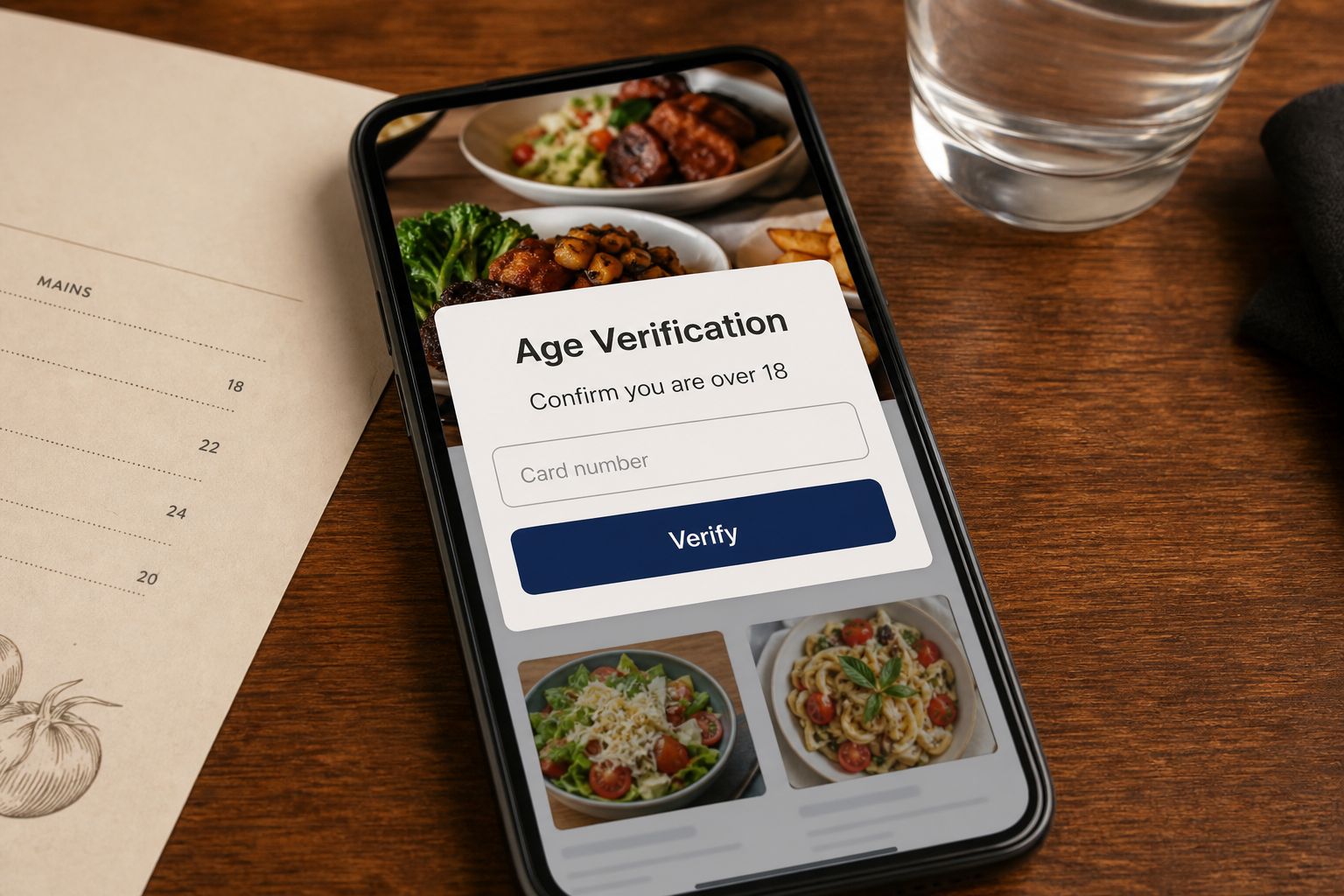
The little square on the table looks like part of the restaurant. You scan it expecting tapas, prices, and drinks. Instead, the page asks for your card to prove you are over 18.
That strange request is the turning point in a restaurant QR code scam, where a fake sticker can sit directly on top of the real menu code.
A recent traveler described finding exactly this setup at a busy restaurant in Barcelona. The scanned page reportedly copied the restaurant’s branding and requested card details for an age-verification check.
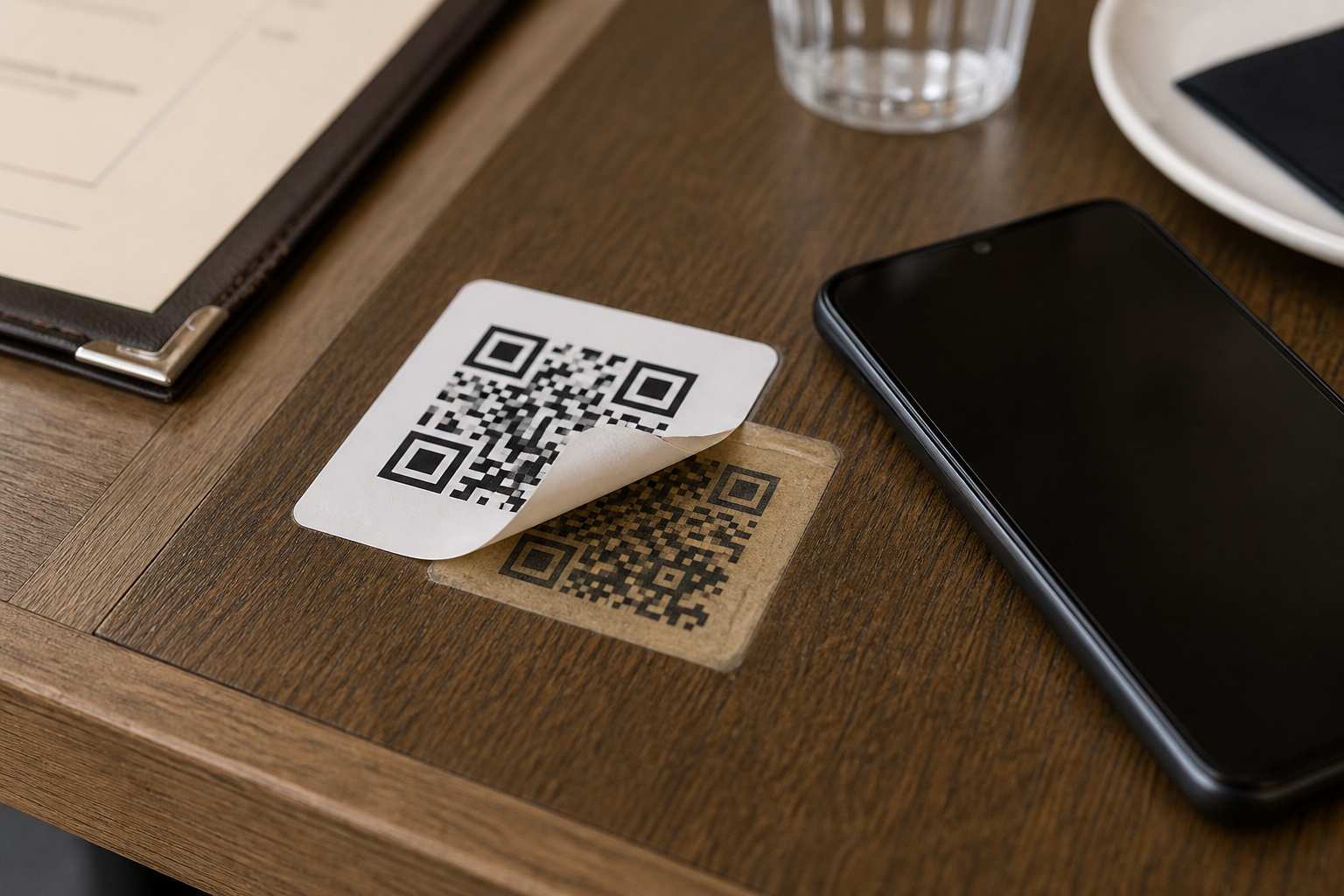
The customer peeled back the sticker and found another QR code printed underneath. The lower code opened the normal menu. According to the report, a waiter said thieves had been placing fraudulent stickers over legitimate codes.
The restaurant was not named, and the account is an anonymous consumer report rather than an independently verified incident record. The method itself is credible and matches an explicit warning from the US Federal Trade Commission.
Overview
A physical sticker redirects trust to the wrong website
Customers trust a QR code on a restaurant table because the restaurant controls the table. A criminal only needs a few seconds to place a matching sticker over the original. The victim then transfers that physical trust to whatever website opens.
The FTC has warned that scammers may cover legitimate QR codes with their own codes. The replacement can lead to a phishing site that steals payment or login information, or to a page that tries to install malware.
The fake page invents a reason to request card data
A menu does not need a card number to prove that someone is 18. A genuine age check might ask for a birth date or require staff verification before alcohol is served. Card details do not reliably prove age.
The excuse is designed to make a strange payment form feel procedural. Other versions may call it a table deposit, reservation hold, Wi-Fi verification, loyalty signup, or a small menu-access fee.
The scam can be stopped before any details are entered
Pause when a menu asks for information unrelated to reading a menu. Inspect the code for a raised edge, mismatched sticker, unusual laminate, or another code underneath. Then ask a staff member for the printed menu or official website.
Immediate warning signs include:
- A card is required only to view food or drink options.
- The page asks for a PIN, one-time code, or banking login.
- The domain does not match the restaurant’s real website.
- The QR label appears newer, crooked, raised, or layered.
- Staff members do not recognize the page that opened.
Why Fake Menu Stickers Are Hard to Notice
QR codes are visually unreadable to most people. A customer cannot glance at the pattern and know where it leads. The destination remains hidden until the phone interprets it, and some camera apps display only a shortened preview.
Restaurants also use different menu platforms, shortened links, ordering services, Wi-Fi portals, and payment providers. An unfamiliar domain may be legitimate, which gives a fraudulent page room to look plausible.
A busy dining room adds pressure. People are talking, staff are moving, and the customer wants to order quickly. Few diners expect to perform a security inspection before reading the menu.
The replacement sticker benefits from its surroundings. Branded table cards, laminated stands, and professionally printed labels make the entire object look official even when the topmost QR code was added later.
Why “Age Verification” With a Card Makes No Sense
A payment card can belong to an adult, be shared with a family member, be stolen, or be used by an authorized younger user. Entering its number does not establish the age of the person holding the phone.
A restaurant may legally need to verify age before serving alcohol. That check is normally performed by staff using an accepted identity document under local rules. It is not achieved by sending card data to an unknown website before the menu appears.
The scammer chooses this excuse because it connects loosely to alcohol on a menu. It sounds less alarming than “enter your card so we can charge it,” while collecting the same valuable information.
The form may ask for card number, expiry date, security code, name, billing address, and phone number. Together, those details can support unauthorized online purchases or convincing calls from fake bank staff.
How the Restaurant QR Code Scam Works
Step 1: The criminal chooses a trusted physical location
Restaurant tables, menu stands, parking meters, payment terminals, and public posters all carry codes people expect to scan. The attacker looks for a location where a replacement sticker will not be examined closely.
Busy venues offer more potential victims and make it harder for staff to watch every table continuously.
Step 2: A fake QR sticker covers the real code
The fraudulent code can be printed at the same size and placed neatly over the original. It may use matching colors or a transparent background. From normal viewing distance, the layered edge may be the only clue.
Do not peel or alter property unless staff are present. Point out the suspected sticker and let the venue preserve it as evidence.
Step 3: The destination copies the restaurant’s appearance
The page may use the restaurant name, colors, food photos, or a copied logo. Those elements are easy to reproduce from public websites and social-media accounts.
Branding proves nothing about ownership of the domain. Read the entire web address before interacting with the page.
Step 4: A false verification step collects data
The site claims a card is needed for age, a temporary hold, or access to ordering. The amount may be shown as $0 or a tiny fee so the customer expects no meaningful charge.
Some pages go further and request an email login, bank credentials, or a one-time code. Each additional request increases the potential damage.
Step 5: The card is tested or charged
Stolen details may be used immediately, sold, or tested with a small authorization. A later charge can use an unfamiliar merchant name, making the restaurant appear responsible even when it never received the data.
If the bank sends an approval request for a transaction you did not start, decline it. Never approve it simply because you are standing inside a real restaurant.
Step 6: Follow-up impersonation extracts more
A scammer with your phone and card details may call as “fraud prevention.” They can reference the failed charge and ask for a one-time code to cancel it. The code may actually authorize a new payment or wallet enrollment.
End the call and contact the issuer through its official app or the number on the card.
Step 7: The sticker and website are replaced
Once discovered, the physical label can be removed and the domain can disappear. Another code may return with a different URL, verification story, or payment processor.
That rotation is why restaurants need routine physical inspections rather than a one-time domain block.
Company, Address, and Fulfillment Checks
The restaurant brand is not proof of page ownership
A copied logo or menu photo can make the site look official. Confirm the destination with staff and compare it with the website linked from the restaurant’s verified map listing or social profile.
The restaurant may be a victim too. A criminal sticker placed on its property does not establish that the venue created or approved the phishing page.
The table location is not the operator’s address
The scam page may be hosted in another country and registered using privacy services. The physical restaurant address tells investigators where the sticker appeared, not who operated the website.
Record the table or stand location and notify management. Staff can check other codes before more customers scan them.
Real restaurant support should recognize its menu flow
Ask a waiter or manager whether the page is correct. Staff should know whether customers need an app, reservation number, or table code. A request they do not recognize is enough reason to stop.
Do not rely on a chat box or phone number displayed by the suspicious page. It belongs to the same unverified destination.
The payment chain must be traceable
A legitimate order or table-payment page should identify the restaurant or authorized processor and display a clear amount before authorization. An unexplained “verification” charge provides no useful traceability.
If a charge appears, save the merchant descriptor exactly as shown. It may help the issuer identify the acquiring bank or payment account behind the transaction.
How to Inspect a QR Code Safely
First inspect the physical label without touching it. Look from the side for two layers, a raised border, bubbles, mismatched corners, different gloss, or a sticker that covers printed text.
Next read the destination preview before opening it. Expand shortened links only through a trusted security tool, not by visiting them casually. Watch for misspellings, added words, unusual endings, or an address unrelated to the restaurant.
After the page opens, treat every request as a separate decision. A menu may need a table number or language choice. It does not need your banking password, card PIN, one-time code, or email password.
When in doubt, ask for a paper menu. Accessibility, dead batteries, poor signal, and security concerns are all reasonable reasons for a restaurant to offer another way to view its products.
What Restaurants Can Do to Prevent Sticker Swaps
Managers should include QR labels in opening and shift-change inspections. Staff can compare each code with a reference image, feel for an added layer, and scan a sample through a dedicated device.
Tamper-evident materials, custom shapes, printing directly under a protective layer, and visible destination text make replacement harder. The page should also display a recognizable domain customers can type manually.
Restaurants should train staff to treat reports seriously and remove affected stands from service. Customers who entered card details need a clear explanation that the restaurant did not require the form and should contact their issuer.
If a malicious sticker is found, preserve it safely, capture the URL, check surveillance footage, notify the platform or host, and report the incident to local law enforcement. Do not continue sending customers to the page for testing.
Warning Signs on a Digital Menu
- Payment details are required before prices or menu items appear.
- The site says a card is the only way to prove age.
- The displayed restaurant name is slightly misspelled.
- A countdown threatens to close the table or reservation.
- The page asks for browser notifications, downloads, or an unknown app.
- The checkout amount is blank, hidden, or described only as verification.
- The domain differs from the one staff or official profiles provide.
A well-designed phishing page may have perfect spelling and realistic branding. The mismatch between purpose and information is more revealing. Reading a menu should not require surrendering financial secrets.
What to Do if You Have Fallen Victim to This Scam
- Stop submitting information. Close the page and do not approve any payment or authentication prompt. Disconnect from the site without returning to investigate it.
- Tell restaurant management immediately. Show the table or stand, the layered sticker, and the destination without letting additional customers scan it. Ask staff to inspect every matching code.
- Contact your card issuer. Use the official app or number printed on the card. Lock or replace the card, report the phishing page, and dispute unauthorized charges.
- Change any password you entered. Start with email and banking accounts. Use a trusted device, choose unique passwords, sign out other sessions, and enable two-factor authentication.
- Preserve evidence. Save screenshots, the full URL, time, restaurant location, table number, bank alerts, and merchant descriptor. Do not remove the sticker yourself unless management or police direct you.
- Scan the device if the page downloaded anything. Run a full Malwarebytes scan after suspicious apps, files, or pop-ups. This can detect common mobile or desktop threats that a card replacement will not address.
- Add web protection. AdGuard can block many known phishing domains, malicious redirects, and harmful ads before they load. Continue inspecting physical codes because no filter can identify every new sticker immediately.
- Report the incident and reject recovery scams. Notify the QR or hosting provider, local police, your national fraud authority, and the bank. Anyone demanding an upfront fee or code to recover your card funds is creating a second risk.
Frequently Asked Questions
Can a QR code steal money just by being scanned?
Usually the scan opens a destination, and further interaction causes the damage. Risk increases if you enter card details, approve a payment, install an app, or grant permissions. Close unexpected pages immediately.
Is every sticker placed over a QR code malicious?
No. Businesses sometimes update links with replacement labels. A layered sticker is a reason to ask staff, not proof by itself. An unrelated payment or login request makes the situation much more suspicious.
Can a card verify that I am over 18?
A card does not reliably prove the holder’s age. Restaurants normally verify age for alcohol through staff and accepted identity documents under local law, not by collecting card data before displaying a menu.
What if the restaurant says the page is legitimate?
Ask why the information is needed, which company processes it, and whether a paper menu is available. You can decline to provide unnecessary financial data even when a business recognizes the page.
Should I peel off a suspicious sticker?
Alert management first. The label may be evidence, and removing it could damage property or erase fingerprints. Staff can secure the stand and involve police when appropriate.
What if I entered card details but saw no charge?
Contact the issuer anyway. The information may be tested later or sold. Replacing the card early is safer than waiting for a visible transaction.
The Bottom Line
A restaurant QR code scam turns a trusted table into a doorway to an untrusted site. The physical location makes the code feel official, but the destination still has to earn your trust.
If a menu asks for card details merely to show food, stop. Inspect the label, ask staff, use the restaurant’s known website, or request a paper menu. A meal should not begin with a financial identity check.








