

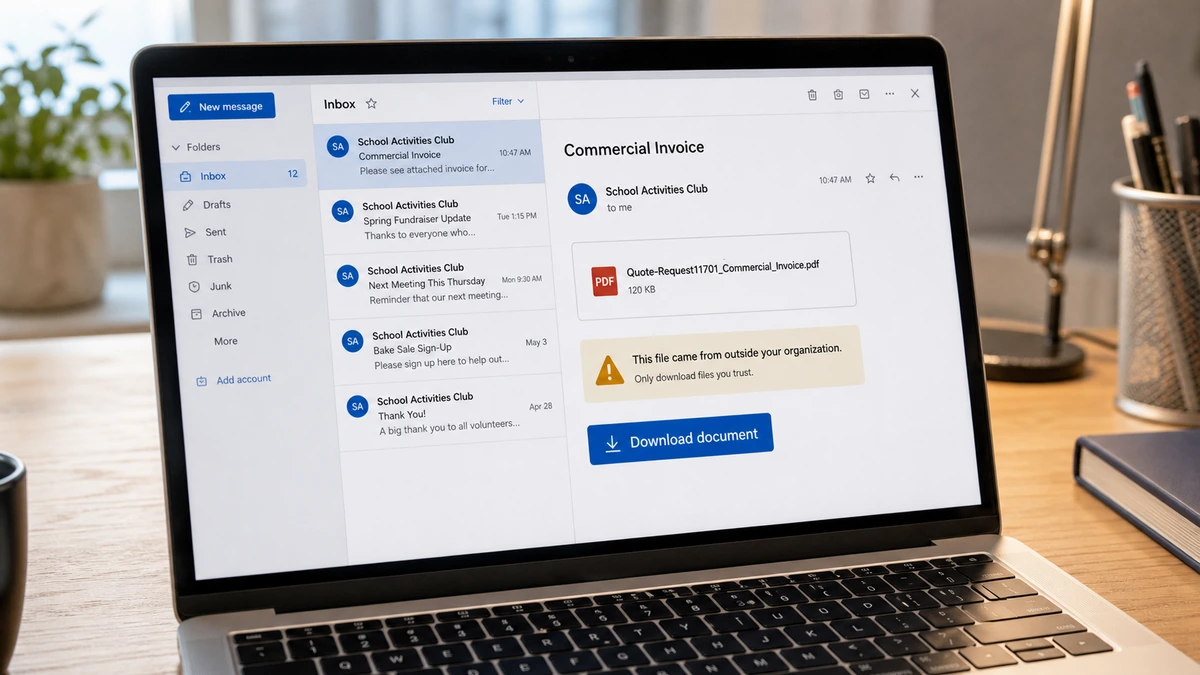
The School Club Invoice Email came from a club the recipient genuinely knew. The inbox even contained older messages from the same address, so the new email did not look like ordinary spam.
Its subject, however, described a commercial invoice that made no sense for a former student. One prominent download button turned that small inconsistency into a decision with much larger consequences.
Overview
A real relationship makes the message feel safe
A recent consumer report describes an unexpected email from a club at the recipient’s former Canadian high school. The address was not completely unfamiliar. The inbox showed earlier messages connected to that club.
The new subject referred to a quote request and commercial invoice. Its body contained little useful context and directed the recipient to download an attachment through a file-sharing panel.
That combination is more dangerous than a random invoice from a stranger. People naturally give extra weight to an address with genuine history, especially when the organization behind it once belonged to their daily life.
The previous emails do not authenticate this one
An old conversation proves only that the address was used before. It does not prove who sent the current message. The club mailbox could be compromised, the visible sender could be spoofed, or a third-party mailing account could have been abused.
The public screenshot cannot distinguish among those possibilities. Email headers, administrator logs, and the school’s IT team are needed for that determination. Calling the account hacked without those checks would go beyond the evidence.
What can be established is that the message did not match the recipient’s role. A graduate who had not recently worked with the club had no normal reason to receive a commercial invoice request.
The download is where uncertainty becomes risk
The displayed file used a PDF-like name and the sharing panel showed a download control. A familiar extension or professional filename does not make a remote file safe.
The destination could deliver a genuine but misdirected document, a credential page, a malicious archive, an executable disguised as a document, or a PDF containing a dangerous link. The screenshot alone does not reveal the payload, so the safe response is to avoid opening it and let the school investigate.
Warning signs in the fake school club invoice email include:
- The recipient had no current commercial relationship with the club.
- The subject combined a quote request with a commercial invoice without explanation.
- The body did not identify a project, buyer, amount, purchase order, or deadline.
- The message was reportedly sent through Bcc rather than to a clearly named participant.
- A file-sharing download carried the entire purpose of the email.
- The filename attempted to look like an administrative record.
- Prior legitimate messages encouraged trust in the current sender.
- No known club officer confirmed the request through a separate channel.
What the Public Report Does and Does Not Prove
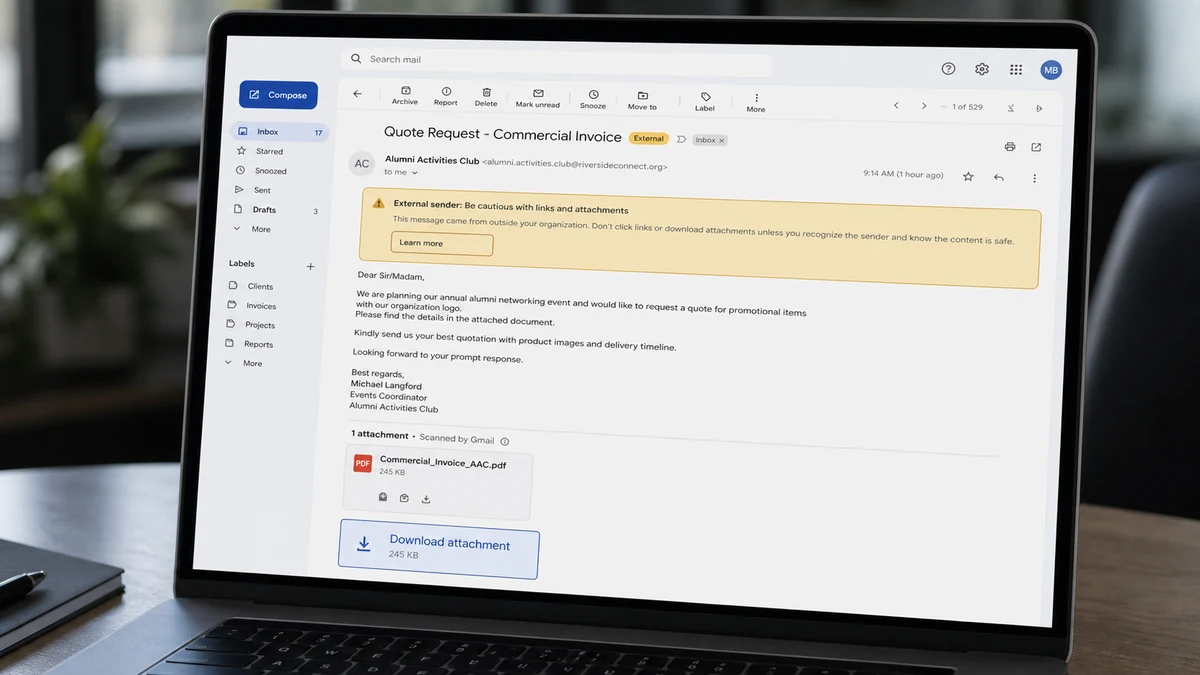
The report proves that the recipient saw a message associated with a known club address, that the subject described a commercial invoice, and that a download was offered. It also shows why the recipient hesitated instead of dismissing the email immediately.
It does not prove that the school, club, file-sharing provider, or person whose name appeared in the sender field created the message. Display names and visible From fields can be manipulated, while a compromised account can send from a technically genuine address.
The difference matters. If the address was spoofed, the school’s mailbox may still be safe, although its domain protections may need review. If the mailbox was compromised, old conversations, member lists, and other recipients may also be at risk.
A thread can also be hijacked after an attacker gains access to one participant’s mailbox. The criminal replies inside a real history so the new request inherits the credibility of earlier messages. In this case, the public report shows prior history in the inbox, not enough detail to confirm a thread hijack.
The Canadian Centre for Cyber Security warns that phishing can appear to come from a known contact and that compromised accounts may send malicious messages to people in the victim’s address book. Its phishing guidance recommends verifying unusual requests before opening links or attachments.
This story is closely related to the past-due invoice attachment trap. The details differ, but both use an administrative document to make a download feel like routine business.
How the Fake School Club Invoice Email Scam Works
Step 1: The operator obtains a trusted identity or lookalike
The campaign begins with a sender that carries history. That may be a compromised school mailbox, a spoofed address, a similar domain, a stolen mailing-service account, or an address copied from a public page.
A school club is useful because its contact list can include current students, graduates, parents, volunteers, staff, and local vendors. Those relationships may remain recognizable years after the recipient leaves.
Step 2: A generic business document is sent broadly
The subject mentions a quote, commercial invoice, order, shared file, or payment document. These labels are broad enough to interest several kinds of recipients without requiring a detailed story.
Using Bcc can hide the size of the mailing list. It may also prevent recipients from seeing that unrelated people received exactly the same supposed transaction.
Step 3: Familiarity replaces transaction details
The message does not need a convincing purchase order if the sender already looks trusted. The recipient may assume the club made a mistake, needs help, or is contacting alumni for an event.
That impulse to solve the mystery is the hook. The download promises an answer faster than calling the school.
Step 4: The attachment or link opens a second stage
The file can contain a phishing form, redirect to a fake Microsoft or Google sign-in page, ask the user to enable document content, or attempt to install malware. Some campaigns place a link inside an otherwise harmless PDF because email filters are less likely to block the first file.
A file-sharing page can also display a different payload depending on device, location, or time. That is another reason not to test a suspicious link on a normal work or personal computer.
Step 5: The victim is asked to cross one more boundary
A stolen login usually requires the recipient to type an email address and password. Malware may require opening a downloaded archive, running a file, approving a browser notification, or enabling macros.
The second request is often framed as routine document security. The page may claim the invoice is encrypted, shared only with the intended recipient, or expired unless identity is verified.
Step 6: Access is used against the next trusted contact
A stolen mailbox exposes real names, schedules, attachments, signature blocks, and active payment conversations. The operator can search for invoices and reply from an account colleagues already trust.
Malware can widen the incident further by stealing browser sessions, stored passwords, documents, or access to a school network. The actual reach depends on what was opened and what permissions were granted.
Step 7: The same identity sends the lure again
Once another mailbox is compromised, its address book becomes the next distribution list. Recipients see a familiar sender and the cycle repeats.
This explains why warning the organization matters even when you did not click. The email may be one visible part of a campaign targeting many people connected to the same community.
Why an Old Email History Is Not Enough
Email applications group messages by address, contact, or conversation, but the visual history is not a live identity check. It cannot tell the recipient whether the person currently controlling the account is the same person who wrote years ago.
Compromised accounts are especially effective because authentication checks may pass. The message can come from the real service and still be malicious. SPF, DKIM, and DMARC help evaluate domains and message handling, but they do not rescue a mailbox whose legitimate credentials were stolen.
Spoofing creates a different problem. The visible From field can name a real club even though the underlying routing information points elsewhere. Some mail systems flag this; others place the clue inside detailed headers most recipients never open.
A lookalike domain can replace one letter, add a word, or use a different ending. On a phone, the full address may be hidden behind the display name. Expanding the sender details is useful, but a perfect-looking address still does not resolve the compromised-account possibility.
The strongest check is independent confirmation. Find the school or club contact information from an old trusted record or the official school website. Do not reply to the suspicious message and do not call a number printed inside its attachment.
Ask a precise question: “Did the club send a commercial invoice file to alumni today?” A vague question such as “Is this your email?” may be answered yes even though the particular message is fraudulent.
What Could Happen After the Download
Nothing visible may happen immediately. A phishing page can record credentials and then show an error, an empty document, or a real school page. The redirect is designed to make the victim blame a broken file rather than suspect theft.
If a password was entered, attackers may create inbox rules that hide security alerts or forward selected mail. Changing the password without revoking sessions and reviewing rules can leave part of the compromise active.
If a file was executed, the risk extends beyond the mailbox. Information-stealing malware may collect browser cookies, saved logins, cryptocurrency wallet data, and local files. Remote-access malware can allow further actions from the device.
If only a webpage was opened and no file, credential, permission, or browser notification was accepted, the risk is generally lower. The site still receives technical information such as the visitor’s IP address and browser details, and an unpatched browser can carry additional risk.
Do not keep reopening the link to decide what it was. Preserve the original email and let a security team inspect it with appropriate tools.
The revised invoice email scam demonstrates another route in which a document label leads to a copied sign-in page. The password request, not the professional artwork, reveals the real transaction.
Safe Checks for Students, Alumni, and Staff
First, compare the request with your actual role. A graduate who does not buy products for a club should not receive a commercial invoice. A mismatch is reason to stop, not reason to open the document for clarification.
Second, expand the full sender and reply-to details without clicking the body. A different reply-to address or unrelated domain is a strong warning, although matching fields do not prove safety.
Third, contact the club through a known officer, the school’s published main number, or an established group channel. A quick independent message can protect the whole list.
Fourth, report the email using the institution’s phishing process. Forwarding it normally may preserve less technical information or accidentally expose others to the live link, so follow the school’s instructions.
Fifth, leave analysis to IT. Headers, authentication results, sign-in logs, mailing-system records, and endpoint alerts can show whether the account was spoofed, compromised, or simply misused.
The Canadian Centre for Cyber Security provides additional guidance for spotting malicious email. Its central lesson fits this case: urgency and familiarity should not replace verification.
Schools can reduce repeat incidents by separating public club mailboxes from administrator accounts, requiring multifactor authentication, and removing access when officers graduate. Shared passwords make it difficult to determine who sent a message and allow an old credential to survive several changes in leadership.
Mailing lists also need limits. A club should not expose alumni addresses to every volunteer or keep old recipients indefinitely without a purpose. If one account is compromised, a smaller and current list reduces the number of people who receive the trusted lure.
After an incident, the school should send a plain warning that identifies the subject, filename, and time range. Recipients need enough detail to recognize the message without being given a live download link.
Company, Address, and Fulfillment Checks
The named club is context, not a verified sender
The report connects the address to a real school club, but it does not establish that an authorized club representative sent this message.
The school should confirm the current owner of the mailbox and review recent sign-ins before attributing the email.
No commercial counterparty was identified
The message did not clearly name a supplier, customer, legal business, purchase order, or project that would explain a commercial invoice.
A document request without a defined transaction cannot be verified against normal records.
The address history does not validate the download
Earlier legitimate emails show a past relationship. They do not authenticate a new file-sharing destination or prove that the mailbox remains under the same control.
The destination domain and attachment should be examined by school IT, not by an alumni recipient on a personal device.
No legitimate fulfillment was expected
The recipient had not ordered goods, requested a quote, or agreed to review an invoice. There was therefore no known product or service waiting to be fulfilled.
An unexplained download cannot create a business obligation that did not exist before the email arrived.
What to Do if You Have Fallen Victim to This Scam
- Stop interacting with the email. Do not reopen the link, reply, or forward the live lure to friends.
- Disconnect if you ran an unknown file. Take the device off Wi-Fi and wired networking until it can be assessed.
- Notify school or workplace IT. Provide the original message, time received, visible sender, filename, and every action you took.
- Change any password entered on the page. Use a clean device, choose a unique password, and change reused versions on other accounts.
- Revoke active sessions. Sign out other email sessions, review recovery details, and remove unfamiliar connected applications.
- Inspect mailbox rules. Delete unknown forwarding addresses, filters, delegates, and automatic reply rules.
- Enable multifactor authentication. Prefer an authenticator app or security key when available.
- Warn contacts through a separate channel. Explain that invoice messages from the address may be unsafe until IT confirms control.
- Review financial activity. Contact the bank immediately if the file led to a payment or if card information was entered.
- Run a full Malwarebytes scan. Quarantine detections and share the result with the security team if a download was opened.
- Use AdGuard after cleanup. It can block many malicious destinations, but it cannot make an unknown attachment trustworthy.
- Report the incident. Canadian victims can contact the Canadian Anti-Fraud Centre, while organizations should follow their breach and notification procedures.
- Ignore recovery offers. Anyone demanding payment to trace the sender or restore a mailbox may be starting a second scam.
Frequently Asked Questions
Does an old email history prove the new message is real?
No. A sender can be spoofed, a mailbox can be compromised, or a third-party mailing account can be abused. Verify the specific request separately.
Is a PDF attachment automatically safe?
No. A PDF can contain malicious links, exploit code, or instructions leading to another dangerous download. The filename and icon are not security checks.
Can I get infected by only viewing the email?
Risk is usually much lower if you did not click, download, grant permission, or open a file. Keep the mail application updated and report the message rather than testing it.
Should I reply and ask whether the club sent it?
No. If the account is compromised, the attacker can answer. Contact a known officer or the school through a separate trusted route.
How can the school tell whether the account was hacked?
IT can review message headers, authentication results, account sign-ins, session history, mailbox rules, and mailing-service logs. The public screenshot cannot answer that question.
What if I downloaded the file but never opened it?
Delete it without opening, empty the recycle bin, run a security scan, and tell IT. Downloading alone is generally less serious than executing the file, but the exact risk depends on the device and software.
The Bottom Line
The fake school club invoice email succeeds by borrowing a relationship that is real. The club name and old inbox history make an unexplained commercial document feel like a harmless mistake worth opening.
Do not let familiarity authenticate a file. Confirm the request with the school through a known channel, preserve the email for IT, and treat every unexpected invoice download as untrusted until the transaction and sender are independently verified.








