

The Fake Cheating Claim arrived with a payment story from 2024 and a threat aimed at a university the recipient had never attended.
Minutes later, a second email appeared to show the accusation moving toward the provost. One small detail changed what that escalation really meant.
Overview
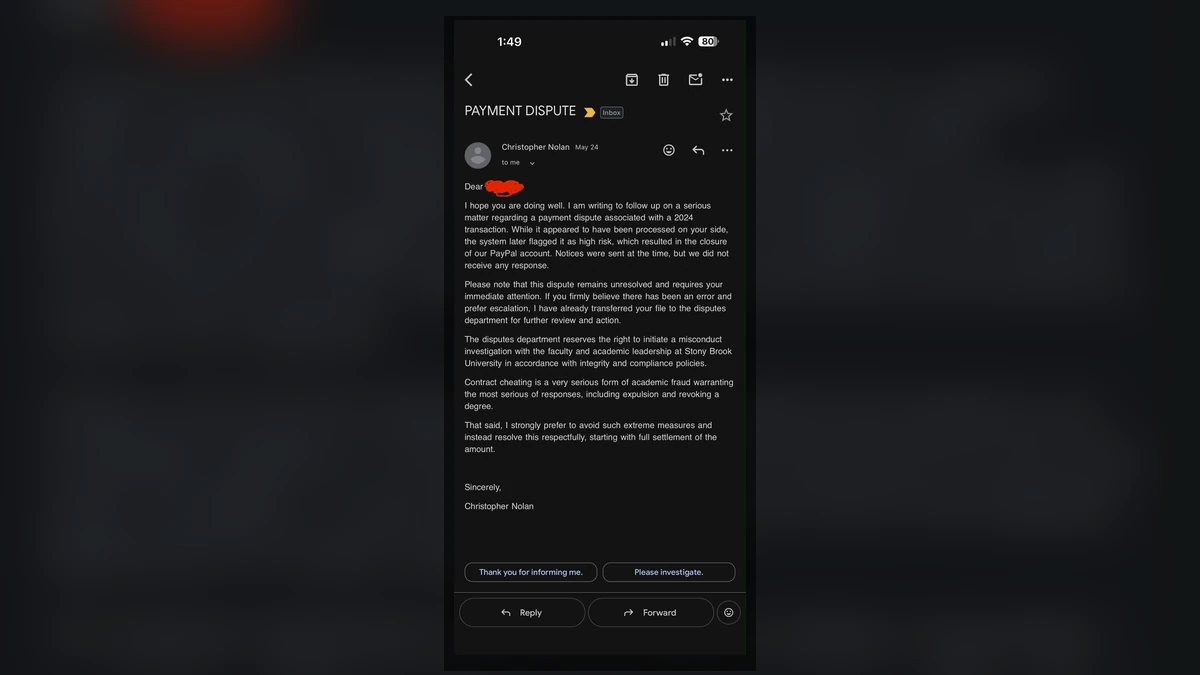
The first email tied a supposed debt to academic misconduct
A recent consumer report describes a private Gmail sender using the display name “Christopher Nolan.” The email referred to a 2024 PayPal transaction allegedly flagged as high risk and implied that payment for a service had failed.
The service was presented as academic contract cheating. The sender claimed the recipient had used it while connected to Stony Brook University and demanded money to “resolve” the matter.
The recipient had never attended Stony Brook. Someone with the same name had reportedly earned a doctorate there in 2024, making wrong-person targeting one plausible explanation.
The second email created the appearance of immediate escalation
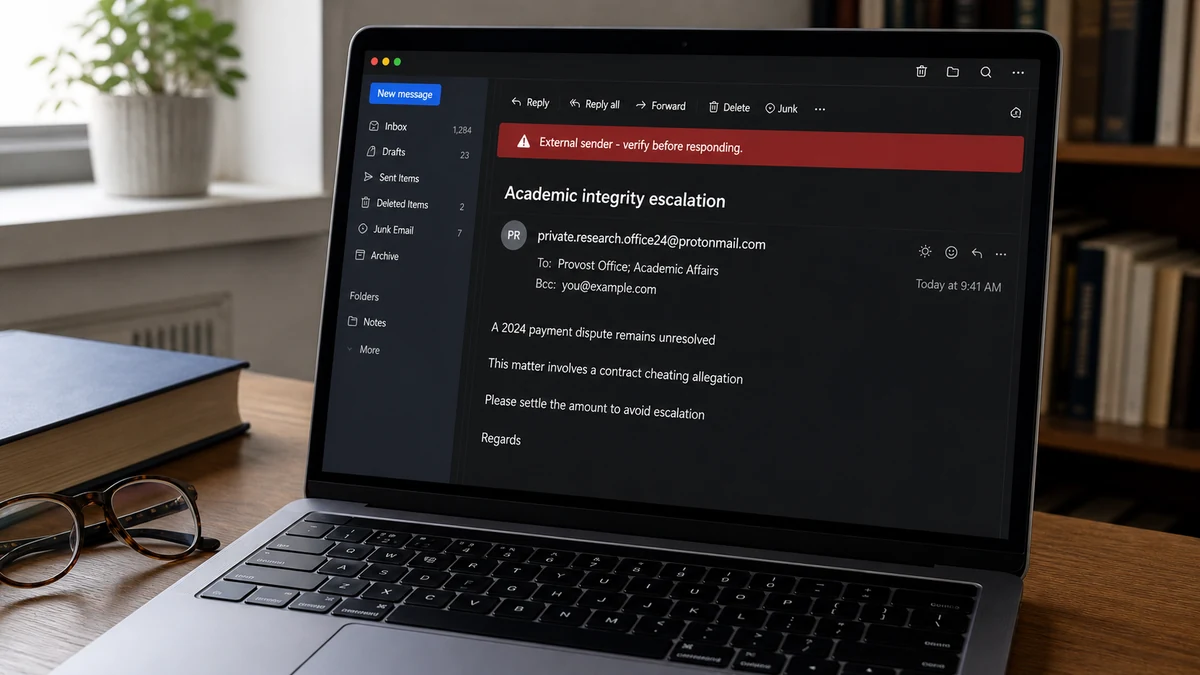
Minutes later, another message appeared to be addressed to the university provost and real administrators. It claimed evidence existed and asked how to proceed with a serious academic-integrity allegation.
At first glance, that move seemed irrational. If the sender had already reported everything to the school, what leverage remained for demanding money?
The answer was in the recipient line. The target was BCC’d, not openly copied as the accused person. The message could frighten the recipient while withholding the identifying detail that would supposedly complete the report.
The emails do not prove anyone cheated
The sender may have reached the wrong person, may have targeted a same-name graduate, or may have invented the entire PayPal and coursework story. The public evidence does not resolve which explanation is correct.
No academic work, transaction record, university case, client agreement, or authenticated evidence was published. A threat to report misconduct is not proof that misconduct happened.
Warning signs in the Fake Cheating Claim included:
- A private Gmail account made a serious university accusation.
- The sender used a celebrity display name with no verified identity.
- A two-year-old PayPal story appeared without a transaction record.
- Money was demanded to prevent or “resolve” an accusation.
- The recipient had never attended the named university.
- A same-name graduate created ambiguity the sender could exploit.
- The supposed escalation message used BCC.
- No evidence was provided before the payment pressure.
- Replying produced another threatening message rather than verification.
Why the BCC Field Changes the Story
CC and BCC can look similar to a hurried reader, but they create different information flows. A person listed in CC is visible to the other recipients. A person in BCC receives the message without their address appearing to everyone else.
In the reported email, the target could see an intimidating list of university administrators. The administrators, if the addresses were real and the message was actually delivered, would not necessarily see that the target had received it.
The sender could also use invalid administrator addresses. Bounce notices normally return to the sender, not the person in BCC. The target would see a polished escalation but not know whether anyone else received it.
This preserves leverage. The operator can imply, “The university knows and the next message will name you,” while still offering a payment route to stop that next step.
The body may include the target’s name, but that still does not prove the listed officials received a valid report, opened it, or began a case. It proves only what the target saw in one email copy.
BCC is not inherently suspicious. Businesses, newsletters, and ordinary users rely on it for privacy. The warning comes from how it was used alongside an unverified accusation and a demand for money.
Do not answer the sender to test whether the officials are real. Contact the university through a separately found address if notification is necessary, and forward the original with headers to its security or integrity office.
How the Fake Cheating Claim Scam Works
Step 1: A name is matched to an academic record
The operator finds a graduate name, thesis, commencement program, faculty page, professional profile, or public biography. A personal email for someone with the same or similar name becomes the target.
The match does not have to be accurate. Ambiguity itself can provoke a response that helps identify the correct person.
Step 2: An old payment story creates unfinished business
The sender refers to a PayPal transfer, high-risk payment, failed balance, or closed merchant account. The age of the transaction makes incomplete records seem plausible.
The target may search old statements, reveal whether they used PayPal, or explain where they studied. Each answer enriches the accusation.
Step 3: Academic cheating becomes the threat
The supposed service is essay writing, coursework help, dissertation editing, exam assistance, or contract cheating. The sender claims the payment proves misconduct.
For a real graduate, the threat can endanger reputation and career. For a wrong person, the seriousness can still create panic before the mismatch is fully considered.
Step 4: Money is offered as the way to stop escalation
The victim is told to settle a balance, pay a confidentiality fee, reimburse losses, or negotiate a resolution. The demand may be vague at first so the target begins the bargaining.
A legitimate debt does not become payable because a stranger threatens reputational harm. A genuine dispute has contracts, invoices, parties, dates, and lawful collection routes.
Step 5: A BCC message simulates a university report
The sender creates a second email addressed to administrators, with the target hidden in BCC. The subject and recipient list make the accusation feel active.
The target cannot see whether addresses were correct, whether the email delivered, or what the visible recipients saw. Fear fills those gaps.
Step 6: Replies are used to refine the pressure
If the recipient denies attending, the sender may claim identity theft or a same-name mix-up that still requires a fee. If the recipient admits a connection, the story becomes more specific.
Humor, anger, or a challenge also confirms that the mailbox is active. In the public report, a reply was followed by another threatening response.
Step 7: Payment can lead to repeated blackmail
Paying does not erase copied data, emails, or alleged evidence. The sender can demand another amount for deletion, legal release, administrator silence, or a final certificate.
PayPal’s own scam guidance warns that extortionists threaten to expose personal information and use deadlines to force payment. It advises blocking contact and reporting to authorities.
Three Plausible Explanations, None Yet Proven
The first explanation is a completely fabricated campaign. The sender may use public graduate records and random personal emails, hoping that fear will produce payment even when the academic connection is wrong.
The second is wrong-person targeting. Someone with the same name may have had a real or alleged interaction with an essay service, and the collector may have contacted the wrong mailbox.
The third is a real prior customer being blackmailed by a service or criminal who obtained customer records. Other reports describe cheating services threatening to disclose clients after a transaction.
The public post cannot determine which applies. The recipient’s nonattendance makes the first two explanations especially relevant, but it does not establish what happened to the same-name graduate.
That person should not be identified or accused. Sharing a name and graduation year is not evidence of contract cheating.
Likewise, the named university and its administrators should not be described as participants. Their publicly listed identities may have been copied into the email without their knowledge.
A responsible investigation preserves the possibilities until headers, transaction data, actual recipient addresses, and university records can be checked.
How to Verify a Claimed PayPal Transaction
Do not use links, phone numbers, transaction buttons, or attachments in the threatening email. Open PayPal from a saved bookmark or type PayPal.com yourself.
Search account activity for the stated year, amount, sender, and recipient. A real payment should produce a transaction ID and account record.
A screenshot, copied logo, or number written in an email is not a PayPal transaction. The sender can invent a reference in seconds.
If the account contains unfamiliar activity, report it through the Resolution Center and secure the account. Change the password, revoke sessions, and review connected payment methods.
If there is no matching transaction, preserve that fact. It does not by itself identify the sender, but it weakens the claim that the email reflects PayPal account history.
Forward PayPal impersonation material to the address on PayPal’s official reporting page. Do not alter the original or strip headers before preserving a copy.
The 2024 date may make a target believe the record was archived or deleted. Ask PayPal what history it can confirm instead of letting the sender define what is available.
Never pay through Friends and Family, crypto, gift card, or a new invoice simply to make the threat disappear. That payment becomes proof that pressure works.
How a Real University Process Differs
Universities have formal academic-integrity procedures. Rules vary, but a serious allegation normally moves through identifiable offices, written policies, notice, evidence review, and an opportunity to respond.
A private person demanding money does not gain authority by copying a provost’s name. The school does not collect a stranger’s debt by threatening a graduate on the sender’s behalf.
If the recipient never attended the institution, contact the university security office or registrar through its official website. Explain the identity mismatch and ask where the suspicious message should be forwarded.
Do not send unnecessary identity documents to prove nonattendance. Start with the original message, headers, dates, and the fact that the sender demanded money.
If someone did attend, they should still avoid negotiating with the sender. Seek advice from the relevant university office and an independently retained attorney if the accusation could have serious consequences.
A legitimate process can survive independent contact. A blackmail operation depends on keeping the target inside one email thread controlled by the accuser.
Do not forward the threat widely to colleagues or employers. Limit disclosure to people who need to help, because unnecessary circulation can amplify an unproven allegation.
Preserving Email Evidence Correctly
Save the original messages in their native format, such as EML or MSG, if the email provider allows it. A screenshot is useful but does not contain every routing field.
Preserve complete headers. They can show sending infrastructure, authentication results, return paths, timestamps, message IDs, and differences between visible and technical addresses.
Record the BCC context carefully. The copy received by the target may not reveal what other recipients received, so avoid claiming delivery that cannot be verified.
Save attached files without opening them. Let security staff or a trusted scanner inspect them in a controlled environment.
Take screenshots of the inbox, sender profile, demand, recipient fields, and threats. Redact personal data before sharing publicly.
Do not keep provoking the sender for more evidence. Additional conversation can reveal identity, work, family, school history, and emotional pressure points.
The FBI’s threat and intimidation guide advises preserving electronic evidence and reporting threats to law enforcement. Immediate danger should be reported to emergency services.
Keep a dated incident log. Include who was notified, report numbers, support responses, and any later email that repeats the allegation.
Ask the email provider to preserve account and delivery information through its normal abuse process. Providers may not disclose private subscriber data directly, but a timely report can help retain records that law enforcement can request through proper legal channels.
If the message names a real graduate, remove that name from copies shared outside the investigation. The goal is to document the extortion mechanism without turning an unverified allegation into a new search result attached to an innocent person.
Why Paying Makes the Problem Harder
A payment does not prove innocence or create a reliable confidentiality agreement. The recipient still does not know the sender’s legal identity, location, or control over any alleged evidence.
The operator may frame the first amount as a settlement of the old PayPal debt. A second amount can then appear as a deletion fee, administrator recall, legal release, or compensation for reputational risk.
A person who pays also confirms that the mailbox reaches someone worried about academic reputation. That profile has resale value to other extortionists.
The scammer may return under a new identity claiming to be a university investigator who discovered the first payment. The victim is then threatened for “bribery” or offered another route to suppress the case.
The allegation is different, but the pressure loop resembles the one described in MalwareTips guides to sextortion email scams and fake compromised-email blackmail: an unverifiable claim, a reputation threat, a deadline, and no reliable promise that payment ends contact.
If money has already been sent, contact the payment provider immediately. Explain that the payment was induced by a threat, preserve the demand, and ask what recall or dispute options exist.
Do not hire an unsolicited recovery hacker. A person promising to delete records or break into the sender’s account is likely creating another advance-fee loss.
Company, Address, and Fulfillment Checks
The Gmail display name is not a legal identity
Anyone can choose a celebrity or fictional display name. A free mailbox does not establish a company, academic service, debt owner, or authorized representative.
Preserve the full address and headers without treating the name as real.
The university identities may be copied
Provost and administrator names are public. Their appearance in a recipient list does not prove they sent, endorsed, or even received the message.
Verify through the university’s official directory and security office.
No physical business or collection address was established
The report did not identify an accountable legal company, contract, invoice address, court, or licensed collector connected to the alleged PayPal debt.
A Gmail thread is not a lawful debt-verification process.
No resolution or confidentiality service was fulfilled
The sender offered only pressure and escalation. There was no independently enforceable agreement proving that payment would stop contact or erase evidence.
Extortion cannot deliver the safety it sells.
What to Do if You Have Fallen Victim to This Scam
- Stop replying. Do not argue, joke, negotiate, or provide school and identity details.
- Do not pay. A settlement, deletion, confidentiality, or recall fee gives the sender more leverage.
- Preserve the originals. Save messages, complete headers, recipient fields, attachments, and screenshots.
- Check PayPal independently. Review the official account for the claimed 2024 transaction and report anything unauthorized.
- Notify the university. Use its official security or integrity contact, especially if administrator identities were copied.
- Report the mailbox. Use Gmail’s abuse tools after saving evidence.
- Contact law enforcement. Report credible threats, extortion demands, or ongoing harassment to local police and IC3.gov.
- Secure exposed accounts. Change reused passwords, revoke sessions, and enable strong multifactor authentication.
- Tell a trusted person. Isolation helps blackmail. Choose someone who can help document decisions without spreading the allegation.
- Run a Malwarebytes scan. Scan if any attachment, link, viewer, or downloaded file was opened.
- Use AdGuard as a supporting layer. It can block many malicious destinations but cannot judge an academic accusation.
- Ignore recovery and deletion services. Do not pay anyone who promises to hack the sender, remove university records, or guarantee silence.
Frequently Asked Questions
Does the Fake Cheating Claim prove someone used an essay service?
No. The messages contain an accusation, not authenticated evidence. The recipient did not attend the school, and the same-name graduate should not be blamed without proof.
Why was the recipient BCC’d?
BCC lets the target see a frightening escalation while remaining hidden from the visible recipient list. It can preserve the sender’s leverage for another message.
Should I contact the provost?
Use the university’s official security or integrity route and keep the report factual. Do not rely on addresses supplied only by the threatening sender.
What if the PayPal transaction is real?
Handle it through PayPal and qualified advice, not through a stranger’s threat. A real transaction does not authorize extortion or prove academic misconduct.
Can I pay once to make the emails stop?
Payment does not remove copied information or guarantee silence. It often produces additional demands because the sender learns that pressure works.
Could the administrators have received the email?
Possibly, but the target’s copy cannot prove delivery, address accuracy, or what each visible recipient received. The university can verify that independently.
The Bottom Line
The Fake Cheating Claim used a PayPal story, a same-name academic record, and an apparent message to senior university staff to make an unverified accusation feel immediate.
The BCC field reveals how the pressure could escalate without surrendering leverage. Preserve the evidence, verify PayPal and the university outside the thread, and never pay a stranger to keep an allegation private.








