

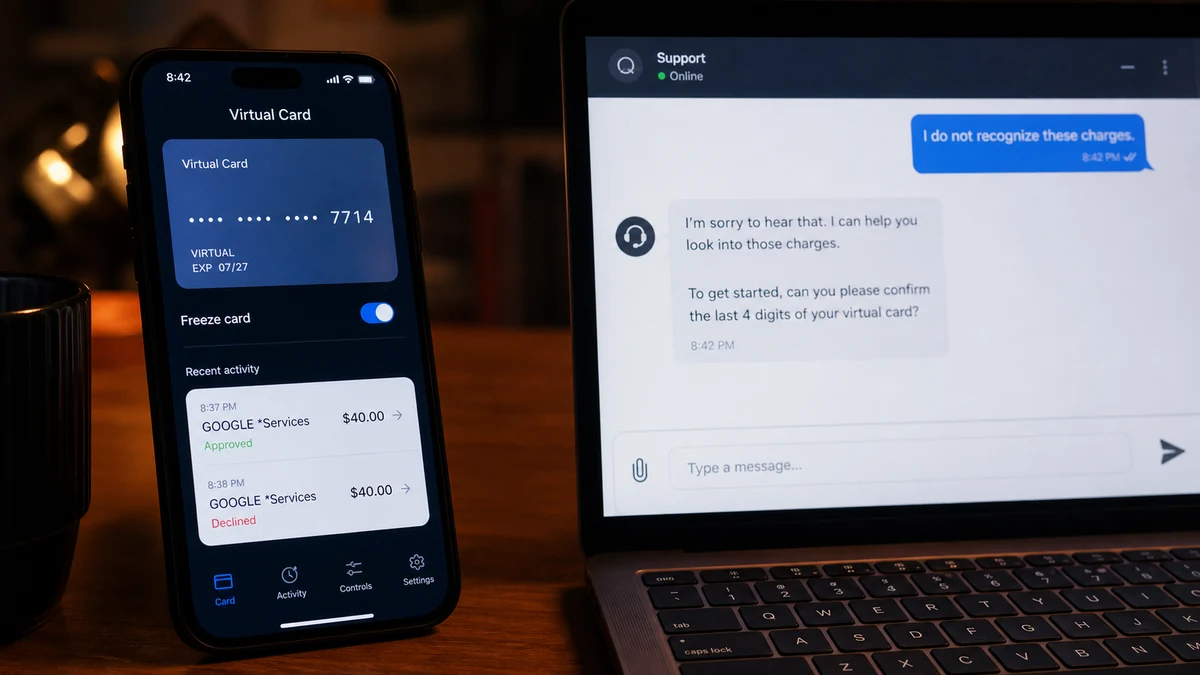
The Zinli Virtual Card showed two $40 Google charge attempts. One was approved, and the cardholder could not find a matching purchase in Google.
A legitimate Claude payment had been made only hours earlier. That timing made the source feel obvious, but the evidence did not.
Overview
Two matching attempts looked like a card test
A recent consumer report described two $40 Google-labeled attempts against a Zinli virtual Visa card. The cardholder said one attempt was approved.
Repeated same-value attempts can indicate a retried purchase, duplicate authorization, subscription issue, or unauthorized card use. The pattern alone does not identify which explanation applies.
The immediate problem is straightforward: an approved charge appeared that the cardholder did not recognize. The harder problem is determining who actually submitted it and where the card details were exposed.
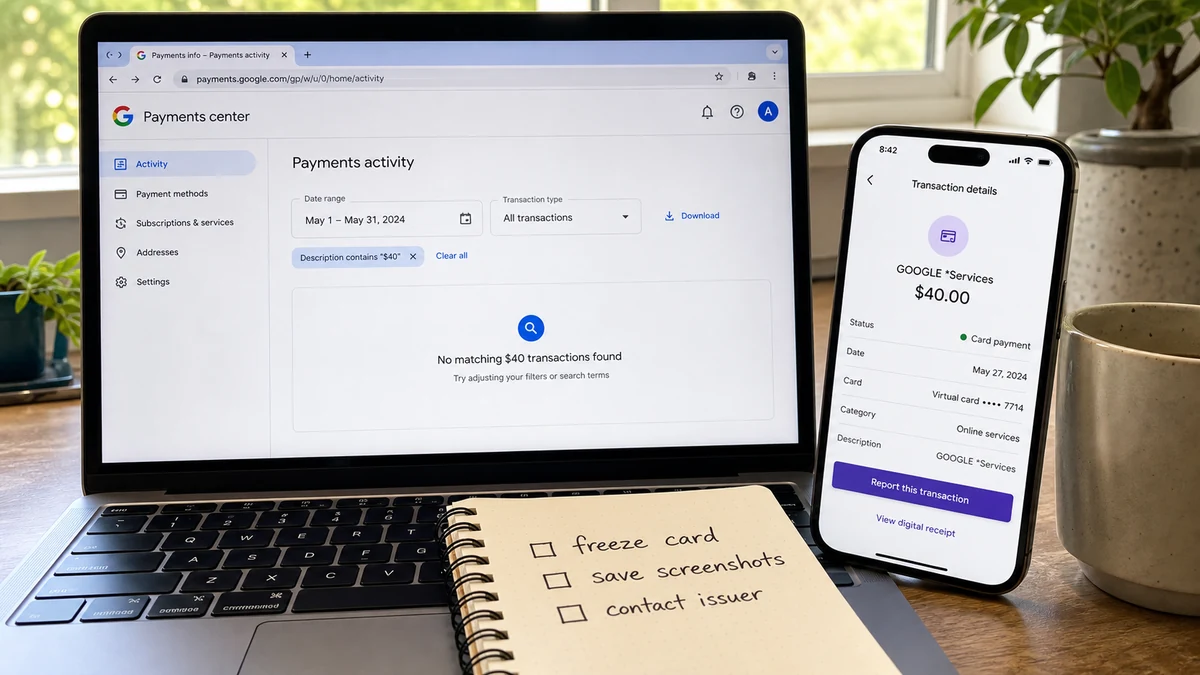
No matching Google purchase was visible
The user checked Google activity and found no corresponding transaction. Google says genuine charges for its products typically begin with `GOOGLE*` and advises users to compare card activity with Google purchase history and subscriptions.
If the transaction is not in an expected Google format or does not appear in the user’s Google account, Google advises contacting the payment provider. A card can be used on another person’s Google account, so absence from the cardholder’s own history does not prove the descriptor is fake.
A statement label is a starting point, not a complete investigation. It may show a merchant, processor, platform, abbreviated service, or information that the issuer can interpret more fully.
The recent Claude payment did not prove a leak
The cardholder had paid Claude only hours before noticing the attempts. The close timing naturally raised concern that the card details could have been exposed during that purchase.
The report contains no forensic result, breach notice, merchant record, token history, device log, or processor evidence connecting Anthropic, Claude, Google, or Zinli to the compromise.
Warning signs and important facts in the Zinli Virtual Card incident included:
- Two charge attempts used the same $40 amount.
- One attempt was reportedly approved.
- The cardholder did not recognize either purchase.
- No matching transaction appeared in the checked Google account.
- A legitimate online payment had occurred only hours earlier.
- The merchant descriptor alone did not identify the user or account.
- The exposure route remained unproven.
- A virtual card can still be misused if its details or token are obtained.
What the Statement Descriptor Can and Cannot Tell You
Card statements compress complex payment data into a short line. A descriptor may include the merchant’s registered name, product, app developer, payment facilitator, location, telephone number, or processor notation.
That line is designed to help recognition, not to prove the exact website, device, Google account, or person that initiated the transaction.
For Google products, the official unauthorized-charge guide lists common formats and tells users to check purchase history, subscriptions, family activity, duplicate holds, and recently added payment methods.
An authentic Google descriptor can still represent fraud. Someone else may have added the stolen card to another Google account or used it to buy an app, advertising, cloud service, or other product.
A descriptor can also be misunderstood. Pending authorizations may display differently before settlement, and payment facilitators sometimes place their own name in front of the underlying seller.
Do not call a phone number found in an unfamiliar statement description unless the issuer verifies it. Criminals can use confusing labels and fake support contacts to create a second social-engineering opportunity.
The issuer has richer transaction data. Ask for the full descriptor, merchant category, authorization time, country, card-present status, token or wallet indicator, recurring flag, and any available merchant contact.
How the Zinli Virtual Card Scam Works
Step 1: Card data or a payment token is obtained
The number may be exposed through phishing, malware, a compromised merchant, malicious browser extension, stolen session, insecure device, data breach, or account takeover. The public report does not identify the route.
A virtual card has no plastic to steal, but it still has credentials that can be copied or tokenized.
Step 2: A widely accepted merchant tests the card
Criminals may use digital goods, app stores, advertising, subscriptions, or other fast services to test whether a card is active. A familiar descriptor can blend into normal statements.
A $40 amount is large enough to have value but small enough that some users may initially mistake it for a subscription or forgotten purchase.
Step 3: The same amount is attempted again
A second attempt can occur after a decline, timeout, fraud challenge, or processor retry. It may also be a separate purchase using the same stored credentials.
The fact that one attempt was approved does not mean the second was harmless. Both should be included in the fraud report.
Step 4: The victim searches only their own Google account
The cardholder sees no matching order and becomes confused. A stolen card used on someone else’s account will not necessarily appear in the legitimate owner’s purchase history.
Checking the account is useful, but it cannot replace a card-issuer investigation.
Step 5: Recent legitimate activity becomes the suspected source
The victim remembers using the card earlier that day and connects the events. Sometimes recent use matters, but coincidence and delayed abuse are common.
Premature attribution can distract from other compromised devices, accounts, merchants, or old exposures.
Step 6: The operator tries more merchants or larger amounts
If the card remains active, successful credentials may be reused for subscriptions, digital goods, advertising, gift cards, or resale. Failed attempts can continue even after the first approved charge.
Locking the card stops future authorizations more reliably than waiting to identify the original leak.
Step 7: A fake support or recovery contact may follow
A message may claim to come from Google, Zinli, Visa, or the recent merchant. The victim is asked for a one-time code, login, card details, screen share, or refundable verification payment.
Contact every provider through its official app or website. Do not let knowledge of the $40 amount authenticate an incoming caller.
Why the Claude Payment Is a Clue, Not a Conclusion
Humans naturally connect nearby events. If a card is used for one service and fraudulent activity appears hours later, the new merchant becomes the first suspect.
Payment security does not work on timing alone. A card can be compromised weeks earlier and sold later. A criminal may wait before testing it to make source attribution harder.
The device used for the Claude purchase could also be relevant without the merchant being compromised. An infostealer, browser extension, clipboard monitor, or remote-access tool can capture information during any checkout.
An email or password compromise can expose saved payment methods and receipts. Reused credentials may let an attacker enter several services around the same time.
Payment processors and digital wallets can tokenize cards, so the merchant may never receive the raw number in the form the user imagines. The issuer can sometimes tell whether the unauthorized attempt used the original card number or a wallet token.
The report does not specify whether the Claude payment occurred on the official site, through an app store, or through another platform. That missing context limits attribution further.
Contact Anthropic only through an official support route if the legitimate transaction or account shows anything unusual. Ask for session and billing review without claiming the company caused the unrelated Google charge.
The goal is containment first and attribution second. Lock the card, dispute the approved transaction, secure accounts, and preserve logs before investigating the timing.
How to Check Whether a Google Charge Is Yours
Open payments.google.com from a typed address and review activity. Check every Google account used on the device, not just the primary email.
Review Google Play order history, subscriptions, YouTube purchases, Google One, Workspace, Ads, Cloud, and family activity where relevant.
Compare exact amounts, dates, currencies, and pending versus settled status. A duplicate authorization may disappear, while a settled unauthorized charge needs action.
Ask family members or anyone with legitimate access whether they used the card. Do not share full card details while asking.
Check whether the card was recently added to Google Payments and whether a temporary verification hold appeared. Google’s guide explains that small temporary authorizations can follow the addition of a new payment method, though two $40 attempts would not resemble a routine small test.
If the transaction appears in Google history but was not authorized, use Google’s official reporting form and secure the account.
If it does not appear, contact Zinli or the card provider. Google’s payment guidance says customers who suspect an unauthorized payment should contact their bank or card provider as soon as possible.
Do not search for Google support and call the first sponsored number. Fake support operations buy ads and use refund stories to steal additional information.
What to Ask Zinli About the Two $40 Attempts
Use the support route inside the official Zinli app or website. Do not rely on a number sent in an email, social-media reply, or private message.
Ask the provider to lock the virtual card and issue new credentials. A freeze is useful immediately, but replacement helps prevent attempts from resuming if the old number is later unlocked.
Request the complete merchant descriptor for both authorizations, including identifiers that distinguish one attempt from another.
Ask whether the approved $40 transaction is pending or settled. Dispute procedures and reversal timing may differ.
Ask whether the attempts used the card number directly, a recurring credential, a network token, Google Pay, or another wallet. That answer can narrow which account needs attention.
Request the merchant country, category code, authorization method, and any 3-D Secure or verification result. Do not publish those records unredacted.
Ask the provider to check for additional declined attempts. Fraud can be broader than the two notifications the user saw.
Obtain a case number and written confirmation. If the same merchant tries again, the earlier record helps the provider connect the events.
How to Inspect the Device and Account Chain
Start with email because it can reset Google, Zinli, and merchant accounts. Change the password from a trusted device, revoke unfamiliar sessions, and remove unknown recovery options.
Review browser extensions. Remove any that are unnecessary, sideloaded, or granted broad permission to read and change data on websites.
Scan the device for malware. Information stealers can collect browser cookies, saved cards, passwords, and cryptocurrency wallet data.
Check the phone for unknown accessibility services, device-management profiles, VPNs, remote-support apps, and applications installed outside the official store.
Review Google security activity and saved payment methods. Delete unknown devices and tokens after preserving screenshots.
Check the Claude or Anthropic account for unfamiliar sessions, billing changes, API keys, or usage. Secure it without treating normal activity as evidence of a breach.
Change any password reused across the services. Unique credentials and strong multifactor authentication prevent one exposed login from opening the full chain.
Monitor other cards used on the same device. If multiple payment methods show fraud, a device or account compromise becomes more plausible.
The MalwareTips article on a stolen card used for Google Workspace and a domain shows why card fraud can create accounts and infrastructure, not just one retail charge. Investigate welcome emails as well as statements.
Virtual Does Not Mean Disposable by Default
Some virtual cards generate a new number for each merchant or transaction. Others are persistent card credentials displayed only inside an app.
A persistent virtual card can be stored by merchants and reused like a physical card number. Its lack of plastic prevents physical theft, not online credential theft.
Merchant-locked or single-use cards can reduce risk, but their behavior depends on the provider. Users should understand whether Zinli rotates, locks, or tokenizes the number in their account.
Freezing the card may stop new authorizations while leaving subscriptions or already approved transactions in different states. Ask the issuer how its controls work.
A replaced virtual card may require legitimate subscriptions to be updated. Review those carefully so an old recurring merchant is not mistaken for continued theft.
Do not screenshot and store full card details in an unprotected photo library or chat. Images can sync to cloud accounts and remain in backups.
Use transaction alerts for every amount. Small or zero-value tests can precede larger use.
Keep the old card record after replacement. Deleting it from the app or clearing notifications too quickly can remove the easiest timeline for the dispute. Save only redacted copies outside the account and never expose the full number in a public post.
Review legitimate recurring payments before the old credential is closed completely. A subscription that fails after replacement may send a convincing update request. Open the merchant independently rather than using a payment-update link that arrives while the cardholder is already expecting billing trouble.
Virtual-card security is strongest when combined with a clean device, unique account password, strong multifactor authentication, and prompt issuer reporting.
Company, Address, and Fulfillment Checks
Google may be a merchant label, not the exposure source
The descriptor suggests a Google-related authorization, but it does not show which Google account, product, device, or person submitted it.
Verify through official Google activity and the card issuer.
Zinli issued the virtual card and holds the transaction record
The card provider can lock or replace credentials, interpret authorization data, and receive a dispute. Contact it through the official app or site.
A social-media “support agent” is not a substitute.
Claude was a recent purchase, not a proven leak
The timing deserves documentation, but the public report does not connect Anthropic or Claude to the two Google attempts.
Review the account and device while keeping attribution open.
The approved charge did not fulfill a recognized purchase
The cardholder could not identify a product, subscription, account benefit, receipt, or Google transaction matching the $40 charge.
That absence supports a fraud dispute even when the exposure route is unknown.
What to Do if You Have Fallen Victim to This Scam
- Lock the Zinli Virtual Card. Use the official app immediately and request replacement credentials.
- Report both $40 attempts. Include the approved and declined authorizations so the provider sees the pattern.
- Check every Google account. Review payments, Play, subscriptions, Ads, Cloud, Workspace, YouTube, and family activity.
- File the correct dispute. If the charge is not yours, report it through Google when applicable and through the card provider.
- Secure email first. Change the password, revoke sessions, remove unknown recovery details, and enable strong multifactor authentication.
- Review the recent merchant account. Check Claude or Anthropic billing and sessions without assuming it caused the fraud.
- Inspect devices and extensions. Remove unknown apps, remote-access tools, profiles, and broad browser extensions.
- Preserve evidence. Save notifications, descriptors, timestamps, Google history, legitimate receipts, and support case numbers.
- Monitor other payment methods. Watch for small tests, declined attempts, and unfamiliar subscriptions.
- Run a Malwarebytes scan. A full scan can help find information stealers or malicious extensions involved in card theft.
- Use AdGuard as a supporting layer. It can block many phishing pages and malicious ads but cannot reverse a card charge.
- Ignore refund callers. Google, Zinli, Visa, or Claude will not need a one-time code or transfer from an unsolicited call to return $40.
Frequently Asked Questions
Does a Google descriptor prove Google stole my card?
No. It may indicate a Google-related authorization, but it does not identify who used the card or where the credentials were obtained.
Why is the charge missing from my Google history?
The card may have been used on another Google account, the descriptor may belong to another product, or the authorization may still be pending. Ask the issuer for full data.
Did the Claude payment leak the Zinli Virtual Card?
The timing is a clue, not proof. Device compromise, an older exposure, another merchant, email takeover, or a processor issue are also possible.
Why were there two $40 attempts?
They could be a retry, duplicate authorization, two purchases, or repeated card testing. The provider can compare their authorization identifiers.
Should I wait for the approved charge to settle?
Lock the card and report it now. The provider can explain whether a formal dispute begins while pending or after settlement.
Is a virtual card safer than a physical card?
It reduces some risks, especially physical theft, but persistent virtual credentials can still be stolen online and used without the phone.
The Bottom Line
The Zinli Virtual Card incident contains two facts that demand action: two $40 attempts appeared and one reportedly succeeded without a recognized purchase.
Everything beyond that needs evidence. Lock and replace the card, investigate the Google descriptor through official records, secure the device and accounts, and do not turn a recent legitimate payment into a breach accusation based on timing alone.








