

The Unopened Store Job Scam looked like early hiring for a location that was not ready to welcome customers yet.
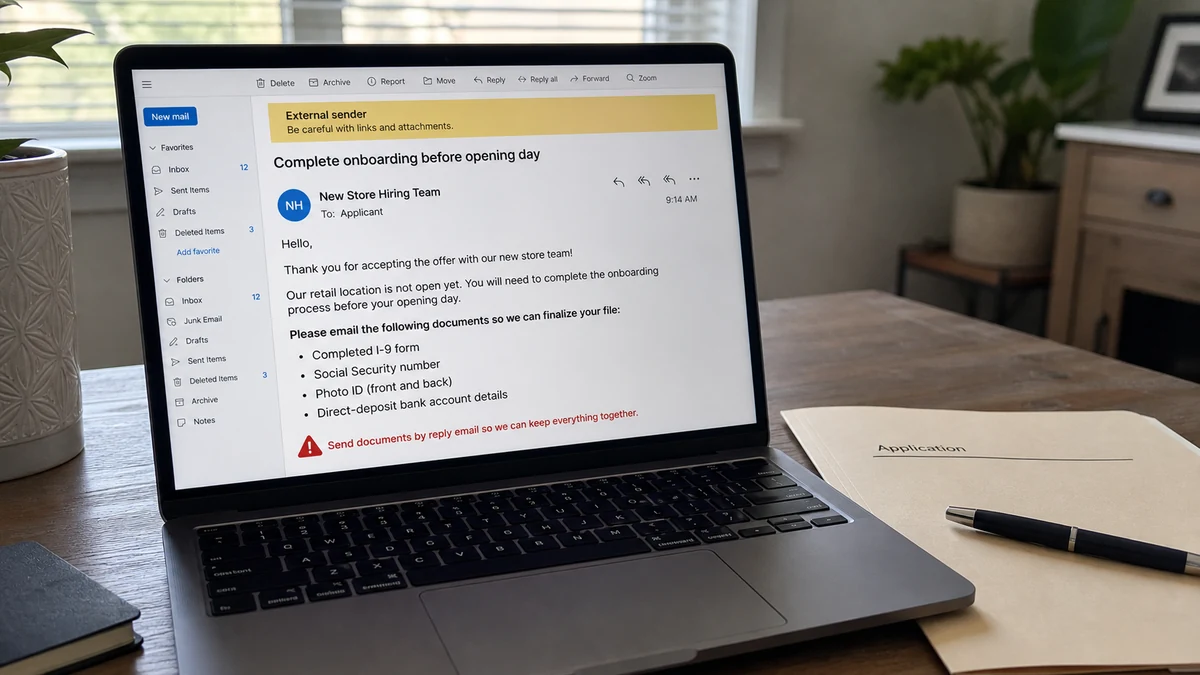
Then the onboarding request arrived by email: Form I-9 information, bank details, a Social Security number, and photo identification.
Overview
A future store opening gave the recruiter a useful explanation
A recent consumer report described a job connected to a retail location that had not opened. Pre-opening hiring is normal in retail, so an empty storefront or missing local staff did not automatically disprove the offer.
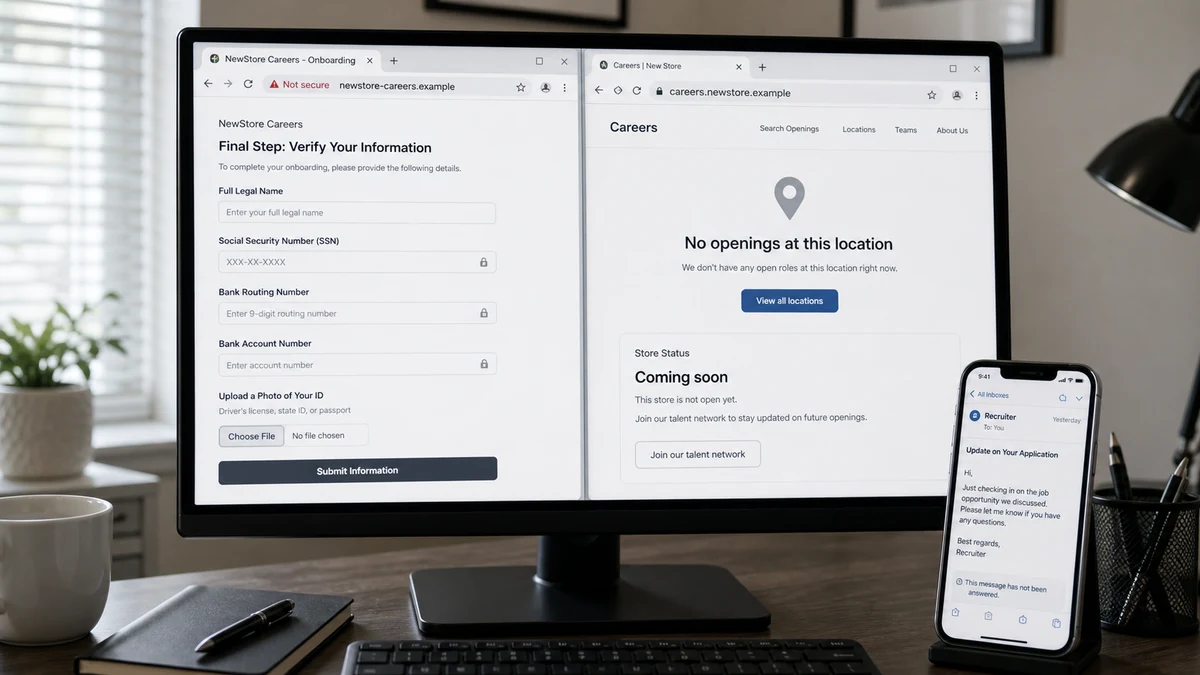
The same fact also made verification harder. The applicant could not walk into the store, ask a manager, compare uniforms, or speak with current employees at that location.
A fake recruiter can use construction, training, a soft opening, or a delayed launch to explain why the entire relationship happens through email and why payroll paperwork supposedly needs to be completed early.
The paperwork collected an unusually complete identity package
The applicant was asked to send sensitive onboarding material by email, including Form I-9 information, direct-deposit or bank details, a Social Security number, and a photo ID.
Real employers do need tax, work-authorization, and payment information after hiring. That truth makes employment-document theft much more convincing than a random request for the same data.
The safety question is not whether employers ever need the information. It is whether this employer, recruiter, offer, system, and timing have been independently verified before the documents leave the applicant’s control.
An unopened location is not proof either way
The public report did not provide enough independently verified company information to declare the retailer itself fraudulent. A real company can hire weeks before opening and can centralize onboarding through another office.
It also does not make an unsolicited email safe. A criminal can copy a real opening announcement, manager name, logo, job title, and address while substituting a mailbox that collects documents.
Warning signs in the Unopened Store Job Scam included:
- The location was not open for an in-person verification.
- Sensitive documents were requested through ordinary email.
- The packet combined SSN, photo ID, address, and bank details.
- The applicant could not confirm the recruiter with local staff.
- Paperwork became more specific than the job duties.
- No independently verified HR portal was established.
- The request could support identity theft and account fraud.
- A real brand or future address could be copied without authorization.
Why Real Hiring Paperwork Can Become the Perfect Trap
Job scams often fail when they ask for something no employer would ever need. This pattern is harder because the requested fields belong somewhere in legitimate onboarding.
An employer may need a Social Security number for payroll and tax reporting. A bank account can be used for direct deposit. Form I-9 verifies identity and authorization to work in the United States.
Those legitimate purposes do not authenticate the person asking. A burglar holding a real lease template does not become a landlord, and a scammer holding a real tax form does not become an employer.
The combined data is especially valuable. A government ID image, SSN, address, date of birth, signature, phone number, email, and bank account can support credit applications, account recovery attempts, tax fraud, employment fraud, and targeted impersonation.
Direct-deposit forms can reveal routing and account numbers. While those details alone do not normally provide complete online-banking access, they can support unauthorized debit attempts and more convincing calls to the bank.
Applicants are also emotionally invested. After applications, interviews, and an offer, the person begins behaving like an employee. Refusing a form feels like risking a needed job rather than protecting an identity.
The FTC’s current warning, Job scammers are looking to hire you, describes official-looking job paperwork that asks for a license, Social Security number, or bank details before a real interview and verified hire.
How the Unopened Store Job Scam Works
Step 1: A real or invented store opening supplies the opportunity
The recruiter advertises cashier, supervisor, stock, customer-service, or administrative roles for a location coming soon. News, permit filings, signs, and commercial listings can make the opening sound credible.
The criminal may not need a fake company. Impersonating a real chain creates better search results and recognizable branding.
Step 2: Remote contact is explained as pre-opening hiring
Because the site is under construction, applicants are told that interviews and paperwork are handled by a regional manager, corporate HR, or an outside staffing partner.
Email and text replace a staffed office. The absence of local verification is presented as temporary efficiency.
Step 3: A quick offer creates employee behavior
The applicant may complete a short questionnaire or text interview. Acceptance arrives quickly, sometimes with a start date, training schedule, hourly rate, or offer letter.
Logos and signatures make the decision feel finalized even when no independently confirmed employee has spoken with the applicant.
Step 4: Onboarding requests a complete identity file
The supposed HR contact sends Form I-9, tax, direct-deposit, background-check, and emergency-contact documents. The applicant is instructed to email scans or upload them to a link.
The forms may be authentic government documents. The danger is the unverified destination and the person receiving them.
Step 5: Bank information becomes “payroll setup”
A voided check or direct-deposit form is requested before the applicant has access to a known employee portal. The recruiter may insist the opening date will be delayed unless payroll is finalized.
Later, a fake deposit, unauthorized debit, or payroll-change story can use the same account details.
Step 6: A second financial request may follow
The new hire may receive a check for uniforms, equipment, store supplies, or training. They are instructed to buy from a designated vendor or return an excess amount.
The check can appear available before the bank discovers it is counterfeit. The applicant sends real money and remains responsible when the deposit is reversed.
Step 7: The fake office disappears before opening day
The recruiter stops responding, the domain vanishes, or the real store opens with no record of the applicant. The stolen identity package remains useful long after the job story ends.
Another scammer may later call as corporate security, claiming the first recruiter was fraudulent and requesting more documents to “protect” the applicant.
What Form I-9 Does and Does Not Prove
Form I-9 is a real federal employment-eligibility form. Every US employer must complete and retain it for employees covered by the requirement.
USCIS says the employee completes Section 1 at the time of hire, and the employer or authorized representative completes Section 2 after examining acceptable documents.
The current USCIS I-9 Central explains the official process, acceptable documents, deadlines, and employer responsibilities. Applicants should use the government page, not a version that arrives only through an unverified message.
An employer cannot demand one specific document if the employee presents valid choices from the official lists. A recruiter insisting on a passport, SSN card, and driver license together may be collecting more than the form requires.
Remote verification can be lawful in certain circumstances and under current procedures. That does not mean sending documents to any email address is a recognized remote process.
The employer should identify the legal entity, authorized representative, secure system, privacy handling, and exact offer before the documents are examined.
Form I-9 stays with the employer. It is not normally filed with USCIS by the employee. A scammer who says the government needs a fee or separate transfer to accept the form is inventing a step.
Do not use the form itself as proof that the job exists. Downloading a government PDF is free and requires no relationship with the company whose logo appears beside it.
How to Verify a Store That Has Not Opened
Start with the retailer’s official corporate website. Search its careers section for the exact city, location, and job title. Do not rely on the link in the recruitment email.
Call corporate HR using a number from the official site or a public company filing. Ask whether the location is planned, whether the recruiter works there, and which platform handles onboarding.
Visit the future location during safe business hours. A construction sign, leasing office, neighboring tenant, or property manager may confirm the incoming business, although none of them alone authenticates the recruiter.
Inspect the email domain letter by letter. A lookalike may add careers, jobs, retail, HR, a hyphen, or a different ending to the real brand.
Ask for a live video or telephone conversation with a manager whose identity appears in the official corporate directory. Then contact that manager through a separate route.
Confirm the legal employer shown on the offer. A store can be operated by a franchisee, subsidiary, or staffing company, but that relationship should be explained and verifiable.
Ask where the records will be stored and who can access them. A real employer should have a privacy notice and a secure method for sensitive onboarding.
Do not let an opening deadline erase these checks. Hiring before launch is planned activity. A legitimate company can tolerate a short verification pause.
Email Is the Weakest Part of the Onboarding Chain
Ordinary email can be sent to the wrong address, forwarded, compromised, or stored indefinitely. Sensitive attachments may remain in both sent and received mailboxes.
A verified onboarding portal should use an official domain, encrypted connection, access controls, and a process the employer independently confirms. The padlock alone is not proof of company ownership.
If a recruiter sends a portal link, type the company address separately and navigate to careers. Ask HR whether the same system and invitation ID are real.
Do not send an ID by replying with an attachment simply because the request contains an offer letter. A copied signature and brand logo are easy to reuse.
Check the reply-to address and full headers. A message may display the company’s name while replies go to free webmail or a recently created lookalike domain.
If the employer insists on email, ask for a secure alternative and a written explanation. Then confirm the instruction with corporate HR through a known number.
The MalwareTips article about fake Mercer recruiters shows how a real employer identity can be copied to collect information. The same rule applies to a retailer that has not opened: verify the sender, not merely the brand.
What Criminals Can Do With the Data
A Social Security number and ID image can support new-credit applications, tax fraud, fraudulent employment, utility accounts, mobile accounts, and attempts to pass weak identity checks.
A bank routing and account number can support unauthorized debits or fake-check stories. Criminals may also use the bank name and balance information in a follow-up impersonation call.
A signature copied from tax or employment forms can be placed on other documents. A home address helps connect credit records and deliver counterfeit checks.
A photo ID can be shown to other victims as proof that a fake seller or landlord is real. The identity theft therefore may harm strangers as well as the applicant.
The combined package can also be sold. A later caller who knows the store, interview date, salary, SSN fragment, and bank will sound more informed than the first recruiter.
Not every misuse will succeed. Banks, employers, and identity services use additional verification and fraud detection. The exposure is still serious enough for immediate protective steps.
Do not wait for an unauthorized account to appear before freezing credit or contacting the bank. Preventive action is easier than proving a later application was fraudulent.
A Safer Onboarding Checklist
Verify the legal company, job, recruiter, location, and portal separately. Each one can be real while another link in the chain is false.
Require a written offer that identifies the employer, title, pay, work site, manager, start date, and conditions. Then confirm it with corporate HR.
Submit only the information required at the correct stage. A background-check provider should identify itself and explain its privacy practices before collecting data.
Choose from the official I-9 document lists. Ask why an extra passport or SSN image is needed if the selected documents already satisfy the process.
Use a dedicated job-search email and unique password. This reduces the impact if a recruiter or platform is compromised.
Set transaction alerts on the bank account used for payroll. Some applicants prefer a separate account with limited funds for direct deposit, but that does not replace employer verification.
Keep copies of the offer, forms, privacy notice, portal address, and support confirmation. If something changes, the original record shows what the applicant was told.
Ask when the employee will receive a payroll account and handbook. A legitimate pre-opening team should have a way to schedule training, record hours, identify supervisors, and answer policy questions before collecting the most sensitive data.
Tell the recruiter that identity documents will be provided only after corporate HR confirms the offer. The reaction is informative. A real hiring team can explain the secure process, while a document thief is more likely to threaten that the position will disappear within minutes.
Never buy gift cards, send crypto, pay for training, or return part of a check for an employer. A job pays the worker.
Company, Address, and Fulfillment Checks
Verify the legal employer behind the store
A retail brand may use a corporation, franchisee, or staffing firm. The offer should name the entity that hires, pays, and retains the records.
Confirm that entity through the retailer’s official HR channel.
Confirm the unopened address independently
Check the corporate store locator, careers page, property manager, permits, and signage. A real future address supports the story but does not authenticate the email sender.
Ask who will supervise the location and how to reach them.
Audit the onboarding domain and document route
Inspect the sender, reply-to, portal domain, privacy notice, and support contact. Ordinary email attachments should not be accepted as the only secure option.
Open the employer’s site yourself and confirm the platform.
Define job fulfillment before sharing data
A real job has duties, supervision, schedule, pay, workplace, and a start process. A pile of forms without those operational details may exist only to collect identity information.
Do not let paperwork substitute for employment.
What to Do if You Have Fallen Victim to This Scam
- Stop sending documents. Do not complete another form or “verification” selfie.
- Contact the real retailer. Notify corporate HR and security through the official website and ask whether the recruiter and location are genuine.
- Create an identity-theft plan. Use IdentityTheft.gov and record every field and document disclosed.
- Freeze your credit. Contact Equifax, Experian, and TransUnion and review current reports for unfamiliar inquiries or accounts.
- Call the bank. Report exposure of routing and account details and ask about monitoring, account replacement, and unauthorized debit procedures.
- Secure email and phone accounts. Change reused passwords, revoke sessions, and add strong multifactor authentication and a carrier PIN.
- Preserve evidence. Save the listing, offer, email headers, forms, portal URLs, uploaded filenames, and recruiter contact.
- Report the recruiter. Notify the job platform, FTC, and local authorities when identity documents or money are involved.
- Monitor tax and employment records. Watch for notices involving unfamiliar wages, benefits, or tax filings.
- Run a Malwarebytes scan. Scan devices if onboarding involved downloads, attachments, remote software, or an unfamiliar portal.
- Use AdGuard as a supporting layer. It can reduce known malicious pages but cannot authenticate an employer or retract an SSN.
- Ignore identity-recovery sellers. Do not pay anyone who guarantees a new SSN, deleted application, or recovered job.
Frequently Asked Questions
Can a real store hire before it opens?
Yes. Pre-opening hiring is common. Verify the exact role, recruiter, legal employer, location, and onboarding platform through the retailer’s official channels.
Does a real Form I-9 prove the job is genuine?
No. Anyone can download the form. The employer and hiring relationship must be verified before sensitive information is provided.
Should an employer ask for my SSN?
A verified employer may need it for payroll and tax purposes after hiring. An unverified recruiter should not receive it through an ordinary email request.
Is direct deposit safe?
Direct deposit is normal after a real hire. The risk comes from giving bank details to a person or portal whose authority has not been independently confirmed.
What if I sent only a photo ID?
Preserve the evidence, report the exposure, monitor accounts, and follow official identity-theft guidance. The image can support impersonation even without the SSN.
Should I replace my bank account?
Ask the bank’s fraud team based on exactly what was exposed. It can advise whether monitoring, blocking debits, or issuing a new account number is appropriate.
The Bottom Line
The Unopened Store Job Scam hides inside a believable hiring window. A future retail location explains remote contact, but it does not explain why an unverified mailbox should receive an SSN, photo ID, bank details, and work-authorization records.
Verify the company, recruiter, location, offer, and portal separately. Real employers may need sensitive data after hiring; scammers depend on applicants confusing that eventual need with proof that the person asking is real.








