

An invoice lands in accounts payable for a service nobody clearly remembers ordering. Before anyone can investigate, a second message says the vendor changed banks and needs the wire released before today’s cutoff.
“Relay Wire” can appear in several different fraud stories. The name matters less than the payment behavior hiding behind it.
Overview
Relay Wire is an ambiguous label, not one proven scam company
The phrase “Relay Wire scam” is used for several schemes involving fake service invoices, fraudulent relay calls, or redirected wire instructions. These mechanisms should not be collapsed into a claim that every organization using the words relay or wire is fraudulent.
Telecommunications Relay Service is a legitimate accessibility service that enables people with hearing or speech disabilities to communicate with other telephone users. Wire transfers are also legitimate payment tools used by businesses every day.
The scam appears when an impersonator invents a bill, abuses a communication channel, uses stolen payment details, or tricks a finance employee into sending money to a criminal account.
Businesses are targeted because invoices look routine
An accounts-payable team may process hundreds of recurring services. A modest invoice for data archiving, fax relay, telecommunications, directory placement, or compliance support can blend into the queue.
The fraudster may send the same invoice to thousands of businesses, hoping that a small percentage pays without matching it to a purchase order or signed contract.
Common Relay Wire scam variations include:
- An invoice for a service the company never ordered
- A renewal notice designed to create a false existing relationship
- A demand to pay before data, phone, or fax service is suspended
- A changed-bank-details email inside a real or copied conversation
- An IP Relay order placed with a stolen card
- An overpayment followed by a request to wire the difference
- A fake supplier asking finance to keep the change confidential
- A malicious invoice attachment or payment portal
The final instruction is the strongest piece of evidence
A polished invoice can use a real address, executive name, and vendor logo. A message thread can be copied from a compromised mailbox. Those details create familiarity but do not validate new payment instructions.
Focus on what the recipient is being asked to do. An unexpected wire, changed beneficiary, unprotected payment, refund of an overpayment, or refusal to verify by a known number is more revealing than the design of the document.
The Federal Trade Commission advises businesses to verify unexpected payment changes through a trusted channel. A separate call to a known contact can prevent a convincing email from becoming an irreversible transfer.
The Fake Invoice Version
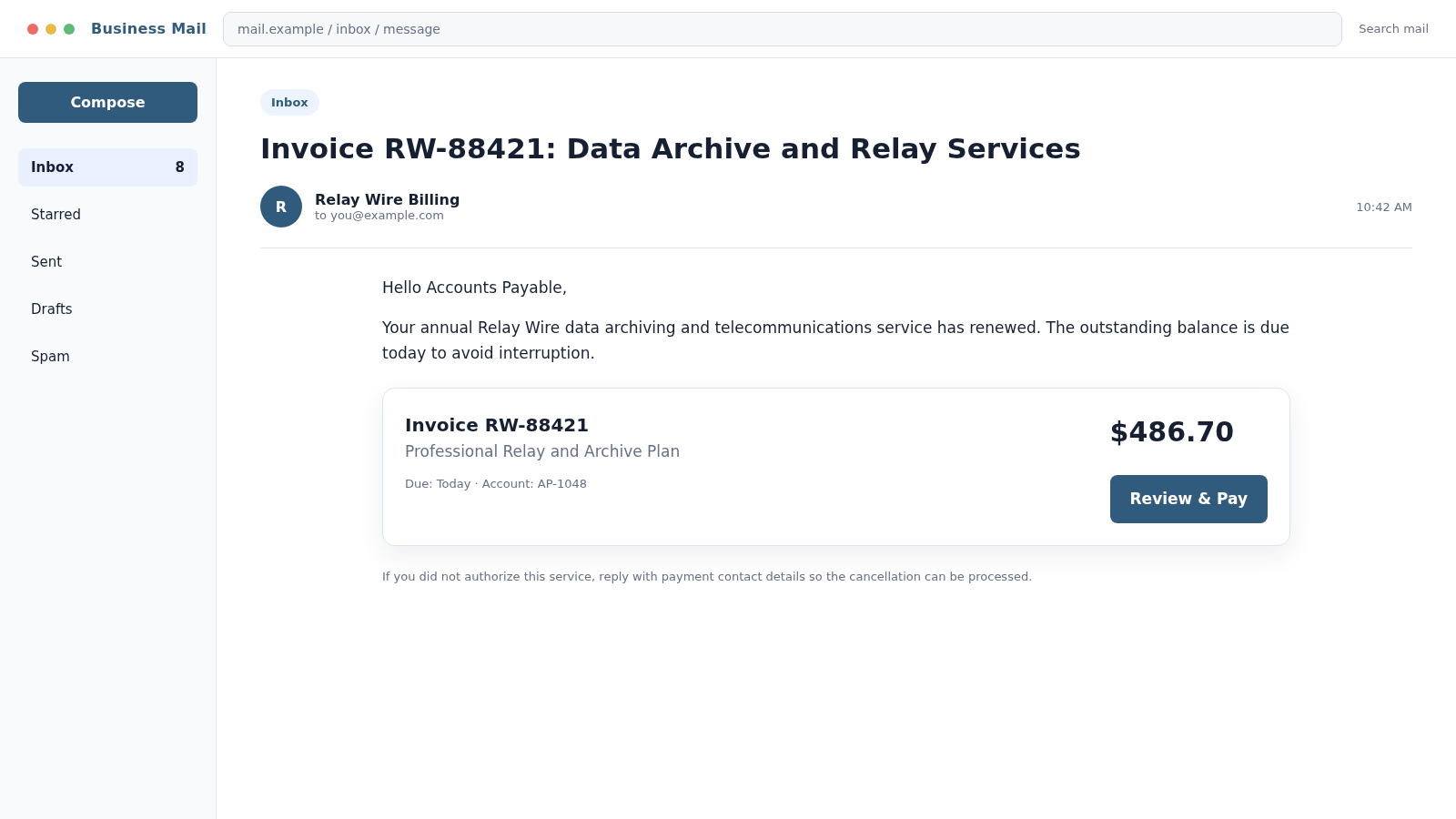
A fake invoice may describe “Relay Wire data services,” archiving, telecom relay, fax processing, or another technical service that sounds plausible but vague. The recipient is given an account number and a balance due immediately.
Some invoices are simple payment demands. Others are designed to make the business call a support number, confirm contact details, or open a malicious portal.
The amount may be deliberately ordinary. A $486.70 invoice can receive less scrutiny than a $48,670 request, particularly when the attacker sends it near a busy month-end close.
Never approve a bill because the amount seems too small for a sophisticated scam. Criminal campaigns are profitable when automation allows thousands of identical demands to be sent cheaply.
Match the invoice to a purchase order, contract, receiving record, and known vendor profile. If no business owner can identify the service, payment should stop until the sender is verified.
The Changed Wire Instructions Version
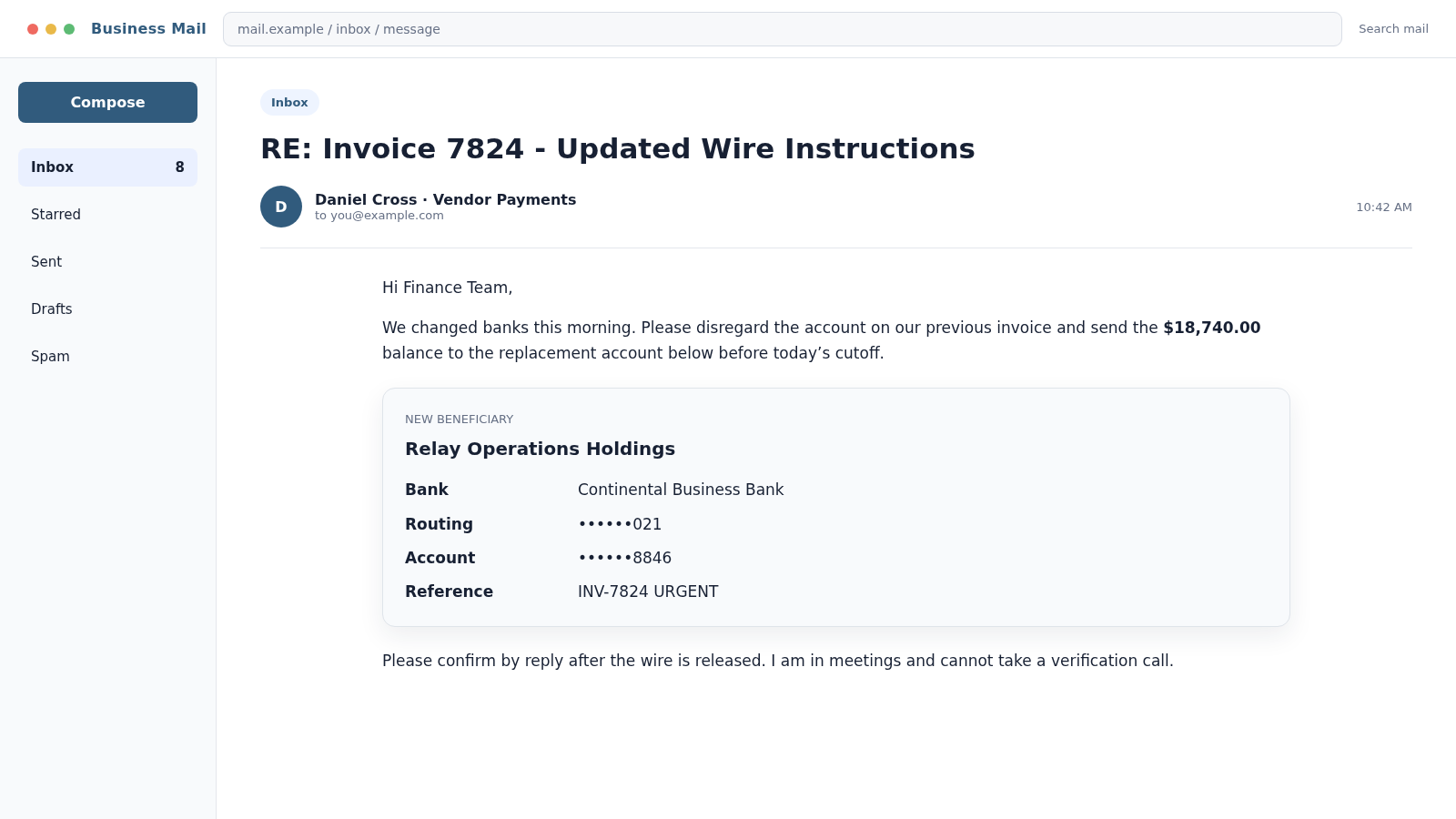
A more dangerous variation begins with a real invoice or genuine supplier relationship. The attacker compromises or impersonates one side of the conversation, then announces that bank details changed.
The message may arrive from a lookalike domain with one altered character. In a mailbox-compromise case, it can come from the supplier’s real account and appear in an existing thread.
Urgency and unavailability are paired together. The sender wants payment today but says they are traveling, in meetings, or unable to take a call.
A recipient who replies to the email is still talking to the attacker. Verification must use a phone number, supplier portal, or known contact route obtained before the change request.
Wire transfers can move quickly through intermediary and overseas accounts. Once the money is released, recovery becomes difficult. That is why a brief independent check is worth more than any apparent deadline.
How the Relay Wire Scam Works
Step 1: The attacker identifies a business payment process
Public websites, job descriptions, invoices exposed in breaches, email signatures, and social networks can identify finance staff, vendors, executives, and payment schedules.
In a broad fake-invoice campaign, detailed research may be unnecessary. The scammer simply sends a generic bill to common accounts-payable addresses.
Step 2: A familiar-looking document establishes a debt
The invoice includes a number, service period, due date, and professional formatting. A previous-balance line or renewal reference creates the impression that the relationship already exists.
A business email compromise version uses a genuine thread and may quote the correct invoice amount.
Step 3: Urgency shortens normal review
The message threatens service interruption, a late fee, loss of a discount, or failure to meet a closing deadline. The employee is encouraged to treat verification as the risky delay.
Attackers often time requests for Fridays, holidays, executive travel, and month-end periods when staff are busy or usual approvers are unavailable.
Step 4: The payment route changes
A new bank account, wire beneficiary, QR code, portal, or cryptocurrency address appears. The explanation may involve an audit, bank migration, frozen account, or confidential acquisition.
Even if every other invoice detail is correct, the destination change must be treated as a new high-risk instruction.
Step 5: The attacker blocks independent confirmation
The sender says a call is impossible, supplies a replacement telephone number, or asks the employee to keep the transaction private. Replies are answered quickly to create confidence.
If a verification call is placed using a number in the suspicious message, an accomplice can confirm the fraud.
Step 6: Funds, goods, or data are released
The business sends the wire, pays the invoice, ships goods purchased with a stolen card, or enters credentials into a fake payment portal.
In an overpayment version, the original check or card later fails while the money wired back to the scammer is gone.
Step 7: The fraud is hidden long enough to move the proceeds
Fake confirmation messages reassure the victim that payment posted. Mailbox rules may delete replies from the real supplier asking why an invoice remains unpaid.
By the time bank reconciliation or a supplier call exposes the mismatch, funds may have passed through multiple accounts.
When Telecommunications Relay Service Is Involved
Do not assume that a caller using a relay service is fraudulent. Relay services are essential accessibility tools, and rejecting legitimate relay users can cause harm and create legal concerns.
The Federal Communications Commission has warned merchants about criminals misusing Internet Protocol Relay with stolen or fake cards. The warning signs relate to the transaction, not the caller’s disability or use of relay.
Suspicious patterns can include ordering whatever is in stock, trying multiple declined cards, refusing normal card verification, changing shipment details, or directing goods to third-party or overseas addresses.
Apply the same payment and order controls to every customer. Verify the cardholder, shipping risk, transaction history, and authorization without discriminating against legitimate relay users.
Company, Address, and Fulfillment Checks
The invoice name must match a contracted legal entity
Compare the sender, invoice, tax record, purchase order, contract, and existing vendor master. “Relay Wire Billing” may be a display name rather than an identifiable company.
A real company name copied onto a fake invoice does not authenticate the payment request. Confirm directly with the known vendor.
The address should connect to the claimed service
Search the address independently. A virtual mailbox, shared office, residence, or unrelated business does not automatically prove fraud, but it may conflict with claims of a large telecom or data-services operation.
Do not update vendor records from an address or form contained only in the new email.
Support must survive independent verification
Call the established vendor contact already stored in your accounting system. If that person confirms a change, follow your organization’s documented callback and approval process.
Do not rely on a new signature block, caller ID, or reply within the possibly compromised email thread.
Payment and fulfillment records must align
An invoice should connect to an authorized purchase, delivered service, responsible department, and approved price. A product order should pass card and shipping validation before goods leave the business.
When no employee can identify what was purchased or received, the bill should be quarantined rather than paid “just in case.”
Controls That Stop Invoice and Wire Fraud
- Require purchase orders for new vendors and recurring services
- Separate payment creation from payment approval
- Use dual approval for new beneficiaries and large transfers
- Verify bank-detail changes through a known independent channel
- Place a cooling-off period on vendor master changes
- Train staff to report urgency, secrecy, and unavailable callers
- Protect email with multifactor authentication
- Monitor inbox forwarding and deletion rules
- Use domain-similarity and attachment scanning
- Reconcile invoices with contracts and proof of delivery
Controls should be designed so that an employee can pause a suspicious request without being punished for delaying payment. Attackers exploit workplaces where speed is rewarded and verification is treated as obstruction.
Create a written vendor-change procedure and practice it. A policy that exists only in a handbook may be forgotten during an urgent Friday transfer.
Keep the verification record with the payment approval. The record should show which known number was called, who answered, what was confirmed, and who approved the change. That simple trail makes rushed exceptions much harder to hide.
What to Do if You Have Fallen Victim to This Scam
- Contact the sending bank immediately. Ask the wire or fraud team to issue a recall, freeze remaining transactions, and contact the receiving bank. Do not wait for a completed internal investigation.
- Notify the receiving institution when instructed. Provide the transaction reference, beneficiary, amount, date, and fraud report. Follow your bank’s process so communications are authenticated.
- Preserve the evidence. Save emails with full headers, invoices, attachments, payment approvals, bank instructions, call notes, account numbers, and server logs. Do not alter the compromised mailbox before evidence is collected.
- Contact the real vendor. Use a known telephone number to warn them and determine whether either mailbox was compromised. Agree on a safe channel for future communication.
- Contain email access. Reset affected credentials, revoke sessions, remove malicious forwarding rules, review delegated access, and strengthen multifactor authentication.
- Scan affected systems. If an attachment, portal, or remote tool was opened, use endpoint controls and a complete Malwarebytes scan where appropriate. Businesses should follow their incident-response procedure.
- Review adjacent payments. Search for other vendor changes, unusual invoices, new beneficiaries, or transfers approved from the same conversation.
- Block malicious infrastructure. Report domains and sender accounts. AdGuard can help block known malicious web destinations, while enterprise teams should add indicators to email, DNS, and web controls.
- Report business email compromise. In the United States, file promptly with the FBI’s IC3 and appropriate local law enforcement. Fast reporting can improve the chance of a financial-fraud kill-chain response.
- Notify insurers and counsel. Follow cyber-insurance notice requirements and obtain legal guidance when customer data, employee accounts, or regulated information may be involved.
- Fix the process that was bypassed. Determine why the request passed. Update verification, approvals, vendor controls, and staff training without blaming the employee who was deceived.
Frequently Asked Questions
Is Relay Wire a real company?
The phrase alone does not identify one verified organization. Treat the specific invoice, legal entity, domain, contract, and payment destination as separate facts that must be confirmed.
Is Telecommunications Relay Service fraudulent?
No. TRS is a legitimate accessibility service. Criminals have misused relay channels, but businesses should assess transaction risk without treating legitimate relay users as scammers.
How can a fake invoice use a real vendor’s details?
Names, addresses, logos, and registration details are often public. A compromised mailbox can also expose genuine invoices and conversations that attackers reuse.
Should we reply to verify new bank instructions?
No. A reply stays in the same possibly compromised channel. Call a previously known contact or use an established supplier portal and documented callback procedure.
Can a wire transfer be recovered?
Sometimes, especially when the sending bank is contacted immediately, but recovery is not guaranteed. Request a recall and file official reports without delay.
What if the invoice amount is small?
Verify it anyway. Small invoices are often designed to bypass scrutiny and may also test whether a business is willing to pay larger fraudulent demands later.
The Bottom Line
The Relay Wire scam is not one tidy story. It can be a fake service bill, an abused relay order, or a changed-bank-details email aimed at diverting a legitimate payment.
The defense is consistent across every version: match invoices to real purchases, verify payment changes outside the email thread, and treat an urgent new beneficiary as a high-risk event. A two-minute callback can protect money that a bank may not be able to recover.








