

An unexpected party invitation feels personal, harmless, and time-sensitive. Curiosity often wins before the recipient pauses to inspect who actually sent it.
The Punchbowl invitation scam copies that familiar experience. A birthday, wedding, or private event becomes the doorway to something entirely different.
Overview
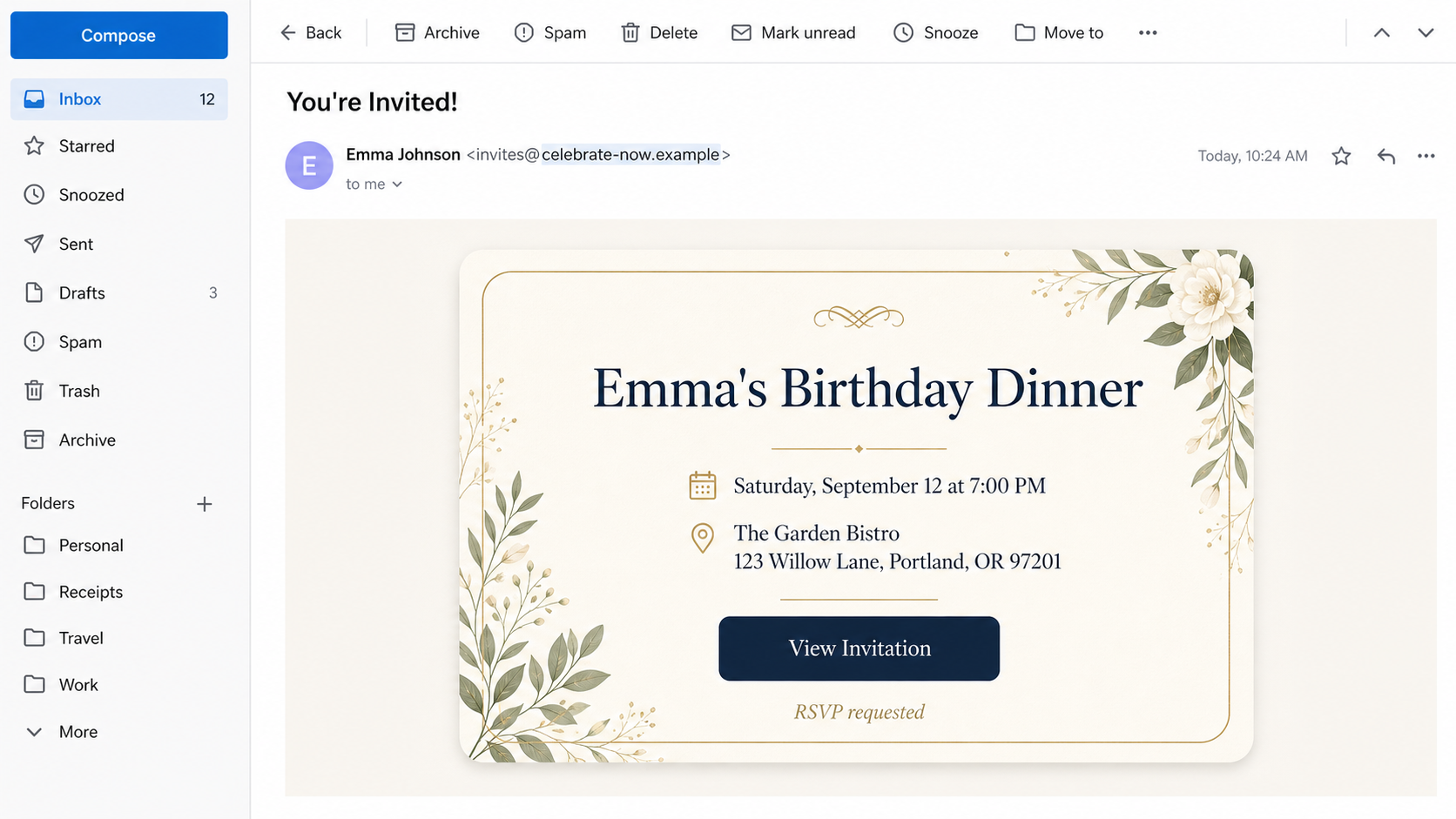
The email imitates a legitimate online invitation
The message looks like an invitation delivered through Punchbowl. It may name an event, display elegant artwork, and ask the recipient to view details or RSVP.
Attackers rely on curiosity and social pressure. Ignoring an invitation could feel rude, while asking the supposed host might spoil a surprise.
The design can closely resemble a genuine service email. The dangerous difference sits in the sender, destination link, or page opened after the click.
The RSVP button leads to credential theft or malware
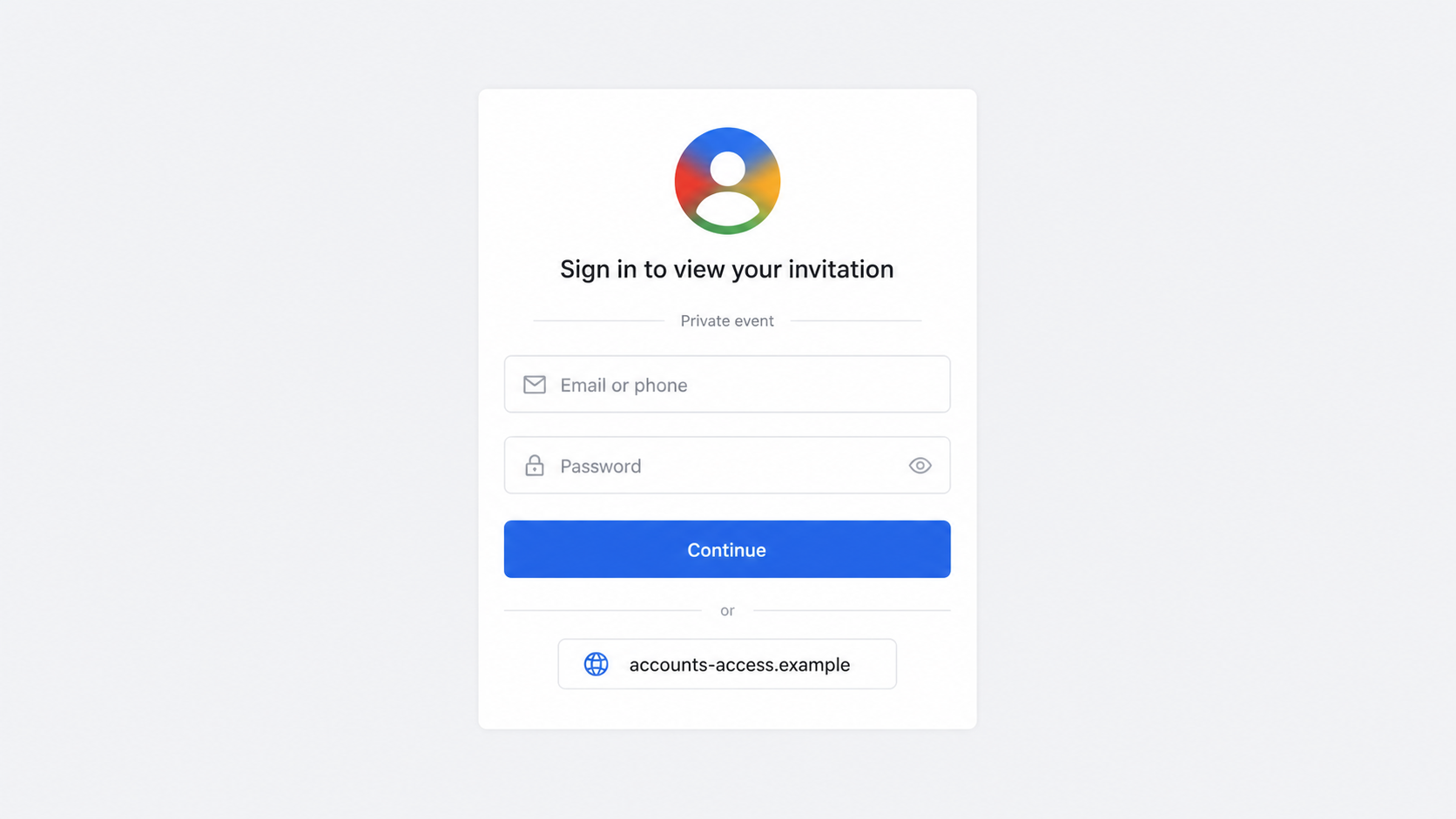
Observed campaigns send victims through an unrelated page before displaying a familiar-looking Google or Microsoft sign-in form.
The fake page asks for an email address and password to reveal the invitation. Punchbowl says genuine invitations can be viewed without signing into an account.
Some variants can also deliver malicious files or redirect through pages designed to evade automated security scanning.
- The sender address does not match an official Punchbowl mail domain.
- The invitation requires an email password before showing event details.
- The destination uses an unrelated free-hosting or newly created domain.
- A fake human-verification step appears before the login page.
- The email contains an attachment, which legitimate Punchbowl invitations do not require.
The safest verification happens outside the email
Do not click again to investigate. Contact the likely host through a telephone number, text thread, or social account you already know.
Genuine Punchbowl invitation links begin with the official punchbowl.com domain. Legitimate invitation email commonly comes from mail@mail.punchbowl.com.
Those details can change, so type the service address yourself and check its current help guidance. Never trust a displayed link label alone.
If the sender cannot confirm the event, delete the message and report it as phishing.
What the Fake Invitation Looks Like
The subject line often says someone sent an invitation or that an RSVP is waiting. Seasonal events, birthdays, graduations, weddings, and workplace gatherings all fit.
Inside, a large invitation card provides just enough detail to create interest. The host’s name may be familiar, generic, or missing entirely.
A prominent “View Invitation” or “RSVP” button becomes the natural next step. Mobile users may never see the underlying destination before tapping.
The sender name can say Punchbowl while the actual address belongs to another domain. Display names are easy to forge and prove nothing.
Some emails use a compromised legitimate mailbox. In that case, the sender domain may look ordinary, but the message still did not come through Punchbowl.
Attackers may include real footer text, privacy links, and branding copied from prior invitations. Those decorative details do not authenticate the central RSVP link.
A genuine message does not need your email password to display a card. That request is the clearest turning point in the scam.
Why Invitation Phishing Works So Well
Curiosity arrives before suspicion
A security alert invites caution. A birthday card invites emotion. Attackers choose the second wrapper because it feels socially safe.
Recipients want to know who invited them, where the event happens, and whether other friends are attending. The click promises all three answers.
The lack of detail becomes part of the hook. Instead of weakening the message, it creates an information gap the victim wants to close.
Shared accounts make the lure believable
A compromised mailbox can send invitations to real contacts. Names, signatures, and prior conversation context make the message difficult to dismiss.
After stealing one account, attackers can study contacts and calendar events. The next wave may be more personal than the first.
This explains why asking the sender through another channel matters. Replying to a compromised mailbox may reach the attacker.
Familiar login pages hide the domain
Many people see a Google-style or Microsoft-style form every day. A copied layout can trigger automatic password entry before the domain is checked.
Password managers sometimes protect users by refusing to fill credentials on the wrong site. Manually typing the password removes that warning.
A familiar icon, color palette, or button does not authenticate a page. The address bar is the decisive evidence.
How the Punchbowl Invitation Scam Works
Step 1: Attackers send a believable invitation email
The campaign may use purchased lists, scraped addresses, or contacts stolen from another mailbox. Messages are sent in enough volume to find curious recipients.
The event is usually ordinary rather than extravagant. A birthday dinner or private gathering sounds plausible for almost anyone.
The sender display name may reference Punchbowl or a person. The underlying address often reveals that the message came from somewhere else.
Step 2: The RSVP button hides an unrelated destination
The visible button says “View Invitation,” but the link can point to a free website, compromised page, tracking redirect, or newly registered domain.
Redirects help attackers separate the email from the final phishing site. They can also show different content to scanners and human visitors.
Hovering can reveal the destination on a computer, but a long tracking link remains difficult to interpret. Independent verification is safer.
Step 3: A fake verification page slows the victim down
Some campaigns display a human-check screen or Cloudflare-style challenge. This makes the visit feel protected and can block automated inspection.
The page may ask the visitor to click a checkbox, press buttons, or wait for redirection.
A security-looking step does not prove the next page is safe. Criminals can copy the appearance of protective services.
Step 4: A familiar sign-in form requests credentials
The victim sees a page styled like Google, Microsoft, or another email provider. It says authentication is required to view a private event.
The email field may already contain the address from the original link. That personalization makes the fake page appear connected to a real account.
The form sends anything typed directly to the attacker. No legitimate provider needs to receive credentials through an unrelated invitation domain.
Step 5: The attacker tests the password quickly
Automated tools or a human operator can try the stolen credentials within minutes. Reused passwords may expose several services at once.
If multifactor authentication is enabled, the attacker may trigger a code or approval prompt. The fake page can ask the victim to enter that too.
An unexpected verification prompt after an RSVP click is not confirmation. It is a signal to stop and secure the account.
Step 6: The mailbox is used for persistence and impersonation
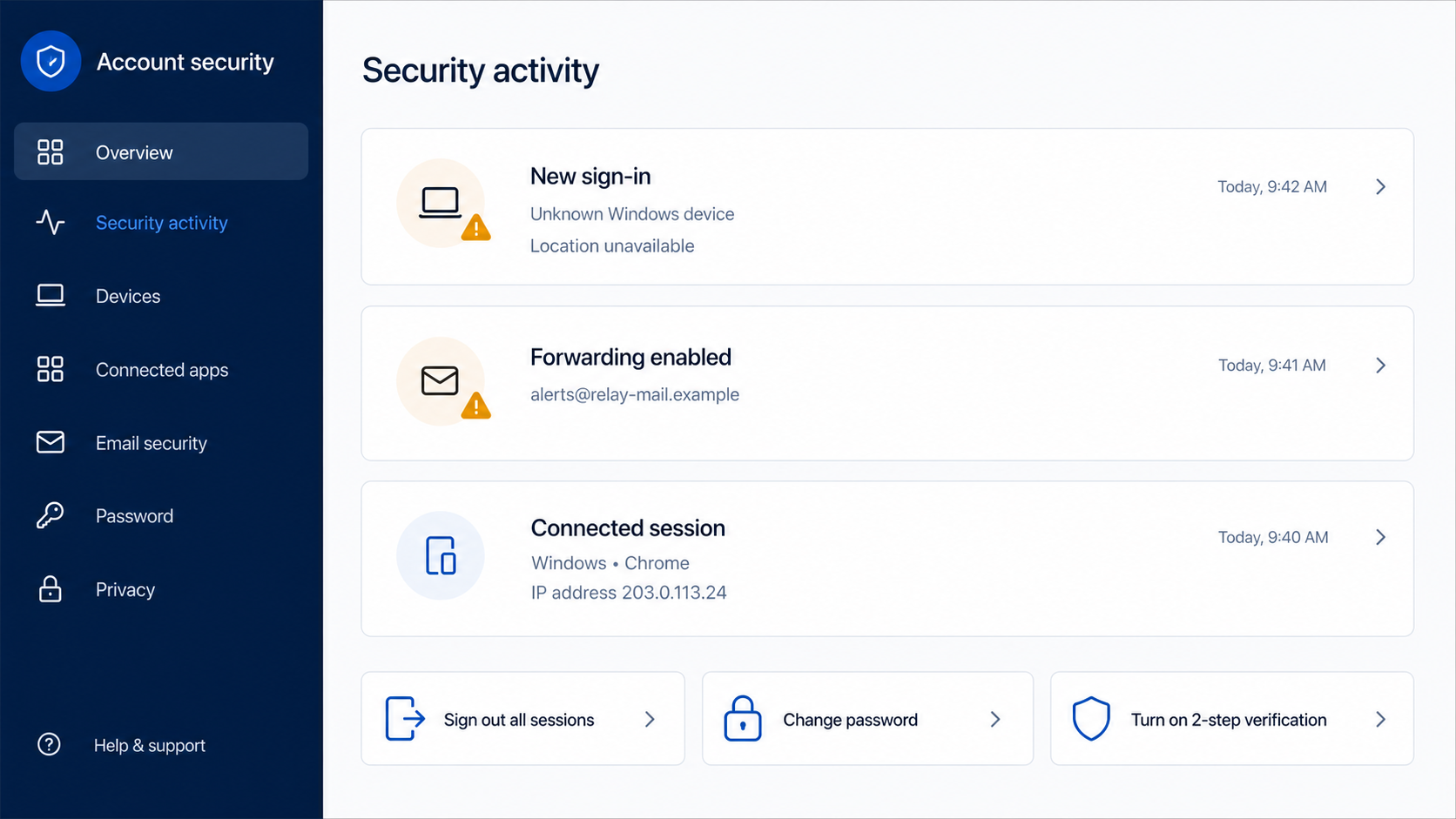
After access, attackers may create forwarding rules, add recovery methods, register connected applications, or preserve browser sessions.
They can search for invoices, password resets, tax documents, identity data, and conversations involving payments.
The compromised account can then send fresh invitations to trusted contacts, extending the campaign through real relationships.
Step 7: The stolen access leads to broader fraud
Email access can support password resets for shopping, social, cloud, banking, and workplace accounts.
Attackers may redirect invoices, request gift cards, change payroll details, steal private files, or launch targeted business-email compromise.
The invitation is only the opening. The real value lies in the mailbox and every account that trusts it.
What Punchbowl Says About Legitimate Invitations
Punchbowl’s own help guidance acknowledges phishing messages that imitate its brand. The company explains several practical differences.
Official invitations commonly arrive from mail@mail.punchbowl.com. Genuine links start with https://www.punchbowl.com rather than a lookalike or unrelated host.
Legitimate invitations and cards can be viewed without signing in. A page demanding credentials before revealing the event should be treated as hostile.
Punchbowl also says genuine invitations do not include attachments. An unexpected document, archive, or executable is not needed to RSVP.
These checks are stronger when used together. A copied sender name can fool one test, while the link, sign-in demand, and attachment expose the fraud.
Forwarding the suspicious message to official support can help the company investigate. Do this as an attachment when possible, preserving original headers.
Company and Checkout Checks
Read the full sender address, not the display name
Email clients emphasize friendly names and hide addresses on small screens. Expand the sender details before touching the invitation.
Look for extra words, misspellings, unusual country domains, free mail providers, or an address unrelated to Punchbowl.
A genuine friend can use another service, but then the message should not pretend to be an official Punchbowl delivery.
Inspect the destination domain before signing in
Read the hostname from right to left. The meaningful registered domain must be punchbowl.com for an official invitation page.
Names such as punchbowl.event-example.com belong to event-example.com. Putting a brand inside a subdomain does not give the brand control.
HTTPS only encrypts the connection. Criminals can obtain certificates for their own phishing domains.
Check the host through a separate communication channel
Call or text the supposed host using contact information already saved. Do not use a number printed in the questionable invitation.
Ask a specific question about the event. If the person’s email was compromised, this conversation alerts them quickly.
Do not reply to the suspicious message for confirmation. The attacker may control replies or forwarding from the compromised mailbox.
Treat attachments and login gates as decisive warnings
An online RSVP should not require a downloaded archive, installer, macro-enabled document, or browser extension.
It also should not require your email password. A service can identify a recipient through a unique invitation link without collecting provider credentials.
Close the page if either demand appears. No social obligation is worth surrendering an account.
What Attackers Do After Stealing an Email Password
Changing the password is essential, but it may not remove every foothold. Existing sessions, application passwords, OAuth connections, and recovery changes can survive.
Review recent sign-ins and sign out every unfamiliar session. Remove devices, app connections, and recovery addresses you do not recognize.
Inspect forwarding, filters, inbox rules, delegates, and automatic replies. Attackers often hide security messages or copy incoming mail elsewhere.
Check the Sent, Deleted, Spam, Archive, and Trash folders. Messages to contacts or payment departments reveal what the attacker attempted.
Search for password-reset notices and changed-security alerts. Then secure every service that reused the stolen password.
Work accounts require immediate reporting to the security or IT team. Administrators can inspect logs, revoke tokens, quarantine messages, and warn other recipients.
Personal users should tell contacts not to trust recent invitations, payment requests, file shares, or emergency messages from the compromised mailbox.
Monitor financial accounts and identity records when sensitive documents were stored in email. Consider a credit freeze if identity data was exposed.
Warning Signs in a Fake Punchbowl Invitation
- You did not expect an invitation from the named person.
- The sender address differs from official Punchbowl mail.
- The event details are vague until after a click.
- The link points outside punchbowl.com.
- A fake human-verification page interrupts the visit.
- The site asks for Google or Microsoft credentials.
- The invitation includes an attachment.
- The message pressures an immediate RSVP.
- The host cannot confirm the event by telephone or text.
- Your password manager refuses to fill the login form.
No single visual element proves authenticity. Attackers can copy logos, colors, fonts, footers, and invitation artwork easily.
Domain ownership and independent confirmation remain much harder to fake. Make those checks your routine.
A genuine host will understand a quick verification message. An attacker needs you to act before sending one.
What to Do if You Have Fallen Victim to This Scam
- Change the email password immediately. Use the provider’s official app or a manually typed address, not the phishing page.
- Sign out every session. Revoke unfamiliar devices, browser sessions, application passwords, and connected apps.
- Enable strong multifactor authentication. Prefer a security key or authenticator app, then save recovery codes securely.
- Remove persistence. Inspect forwarding, filters, delegates, recovery details, automatic replies, and mailbox rules.
- Secure reused passwords. Change every account that shared the stolen password, starting with financial and workplace services.
- Warn the impersonated host and your contacts. Use another channel and explain that recent invitations or requests may be fraudulent.
- Check financial exposure. Review saved receipts, tax files, banking notices, and password resets for signs of broader access.
- Scan the device. Run Malwarebytes if you downloaded anything, opened an attachment, installed an extension, or saw suspicious behavior.
- Block malicious pages. AdGuard can reduce dangerous advertising and phishing redirects, but account recovery remains essential.
- Report the message. Mark it as phishing, send it to official Punchbowl support, and notify your workplace security team when relevant.
- Preserve evidence. Save the original email, headers, phishing URL, screenshots, login alerts, and timeline before deleting anything.
Frequently Asked Questions
Is every unexpected Punchbowl invitation a scam?
No. Verify the sender, official domain, event host, and absence of credential requests before deciding the message is genuine.
Do I need a Punchbowl account to view an invitation?
Punchbowl says invitations and cards can be viewed without signing in. A password demand is a major phishing warning.
What sender does a legitimate invitation use?
Official guidance identifies mail@mail.punchbowl.com for legitimate invitation delivery. Still inspect the full destination link and event context.
Why did the fake page ask for my Google password?
The invitation was bait. The attacker wanted access to your mailbox and other accounts recoverable through email.
Is changing my password enough?
Not always. Sign out sessions, remove forwarding and connected apps, correct recovery details, and check for unauthorized activity.
Can the invitation install malware?
Some campaigns distribute malicious files or redirects. Do not open attachments, install extensions, or run software offered by an invitation page.
The Bottom Line
The Punchbowl invitation scam hides a serious account attack inside an ordinary social moment. Curiosity supplies the click, and familiarity supplies the password.
Real invitations do not need your email credentials. Verify the host independently, inspect the domain, and close any RSVP page that demands a login.
If you already entered a password, act immediately. Securing sessions, forwarding, recovery settings, and reused credentials matters as much as changing the password.








