

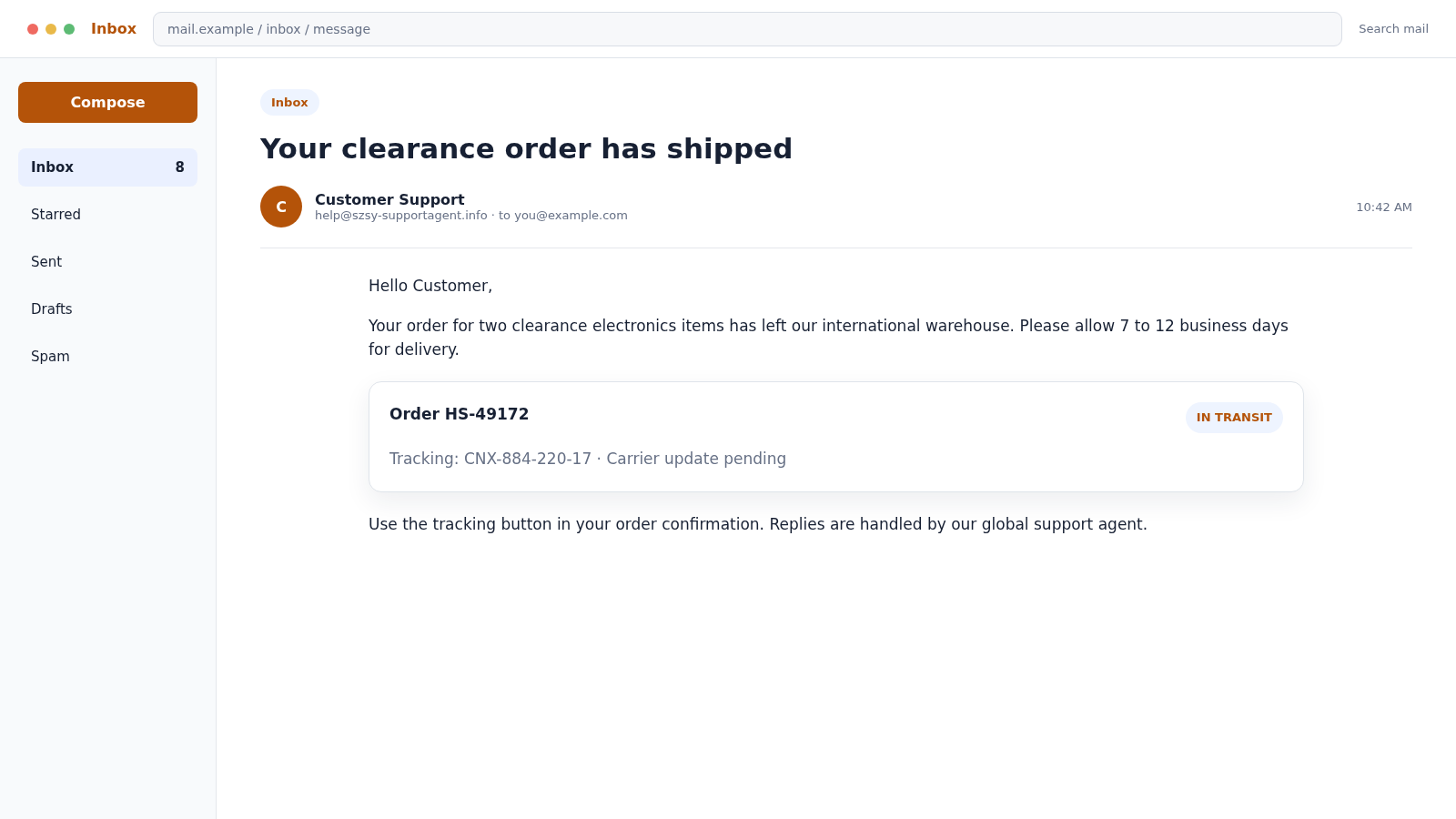
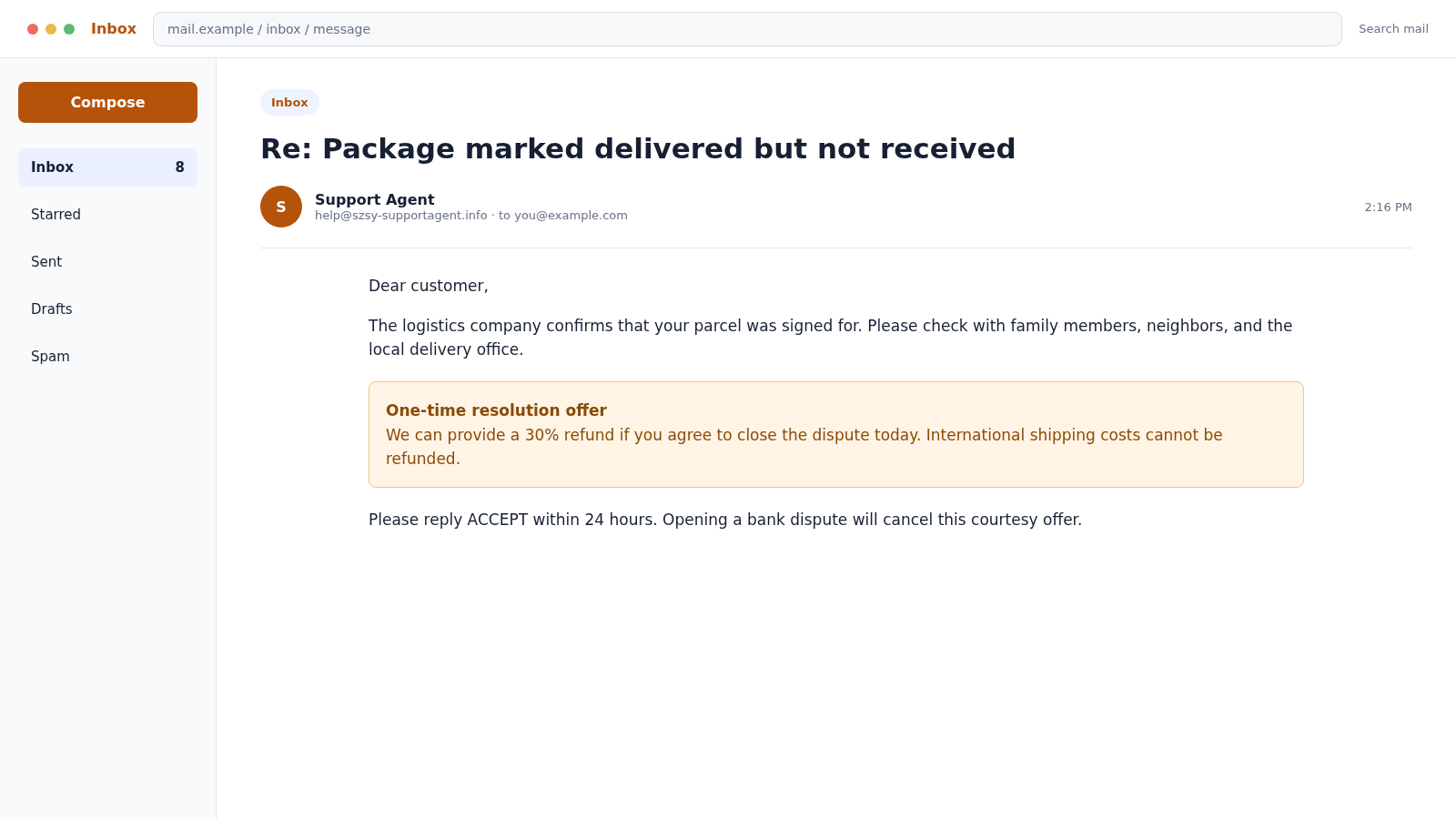
A parcel is shown as delivered, yet nothing is at the door. When the buyer asks for help, the seller replies from help@szsy-supportagent.info and offers only 30% back if the complaint is closed quickly.
The frustrating support exchange is not a routine shipping problem. It is often the final stage of a network of short-lived stores built to take payments, manufacture tracking updates, and resist full refunds.
Overview
One support address appears behind multiple unfamiliar stores
The address help@szsy-supportagent.info has been associated with customer-service messages for several generic online storefronts. A shopper may remember a store name from an advertisement but encounter the SZSY address only after paying.
That separation is useful to the operator. Store names and domains can be replaced while the same support workflow continues behind the scenes.
A support address serving several unrelated brands is not automatically proof of fraud. Combined with extreme discounts, copied content, non-delivery reports, and false tracking, however, it becomes an important connecting clue.
The tracking number buys the seller time
After checkout, the customer may receive a long international tracking number. Early events such as “label created,” “departed facility,” or “customs processing” make the order look active.
The tracking may be invalid, recycled, unrelated to the buyer, or supplied by a low-visibility carrier. Some numbers eventually show “delivered” in the correct city without identifying the street address.
While the customer waits, card-dispute deadlines get closer. The store may disappear, change its name, or continue blaming the carrier.
The refund conversation is designed to reduce the loss to the seller
When the package does not arrive, support may offer 10%, 20%, or 30% instead of returning the full payment. Each reply asks the buyer to wait longer, accept store credit, or close a dispute.
A legitimate merchant may investigate a delivery problem, but it should provide meaningful proof and follow its stated refund policy. A generic “signed for” statement is not proof that the order reached the buyer.
Common complaints in this pattern include:
- Products advertised at implausibly low clearance prices
- Store names that appeared only in recent social-media ads
- The same support address used by unrelated brands
- Tracking that updates slowly or points to another location
- Delivery claims without a photo, address, or recipient name
- Repeated requests to wait a few more business days
- Partial-refund offers instead of a full resolution
- Pressure to close a card or payment-platform dispute
How the Storefront Funnel Starts
The first contact is usually an advertisement, not the support email. A social-media post presents a warehouse closure, retailer liquidation, seasonal clearance, or limited inventory event.
Brand-name clothing, tools, electronics, furniture, or household products may be offered at 70% to 90% off. The page uses countdown timers and low-stock warnings to reduce comparison shopping.
The storefront can look polished because templates, product photos, reviews, and policy pages are easy to copy. Encryption only protects data in transit; the padlock does not certify the seller.
At checkout, the store collects a name, address, phone number, email, and payment details. Even when the payment processor is legitimate, the merchant can still be deceptive.
The confirmation message may use the store’s brand while shipping replies come from the SZSY support domain. That is often the first visible sign that the advertised shop and its customer-service operation are not what they appeared to be.
Why a Delivered Scan Does Not Settle the Question
Tracking systems are useful, but the public result may show only a city or ZIP code. It may not reveal the exact delivery address, parcel weight, or recipient.
Dishonest sellers can exploit that limitation by attaching another shipment’s valid tracking number to a buyer’s order. The number reaches the same general area and eventually says delivered.
A customer-service agent then points to the status as proof. The buyer is told to search the building, speak to neighbors, or contact the local carrier even when the parcel description does not match the order.
Ask the carrier whether the tracking number was addressed to your exact delivery address. The carrier may not disclose another customer’s information, but it may confirm whether the number belongs to your address.
Save that confirmation. It can be valuable when explaining the dispute to a card issuer or payment platform.
Company, Address, and Fulfillment Checks
Search the exact support address before paying
Look for the full help@szsy-supportagent.info address alongside store names, complaints, and refund terms. One generic support mailbox appearing behind unrelated storefronts is a strong reason to pause and investigate further.
Confirm who legally operates the store
A trustworthy seller should identify its registered company, physical address, and reliable contact method. Copy the details into a search engine and business registry rather than accepting a map, badge, or company number displayed on the store itself.
Read the delivery and return terms together
Check where returns must be sent, who pays postage, how quickly refunds are issued, and whether the policy contradicts the advertisement. Vague international fulfillment language can turn a simple return into an impractical and expensive process.
Ask the carrier what the tracking number proves
A tracking page may show movement without linking the parcel to your name and address. Ask the carrier to confirm whether the destination, shipment date, weight, and service level are consistent with your actual order.
How the SZSY Support Agent Email Scam Works
Step 1: A dramatic discount leads to a disposable store
The buyer sees a sponsored post promising heavily discounted merchandise. The store claims inventory is nearly gone, making immediate checkout feel sensible.
Little time is available to check the domain age, company registration, address, or independent reviews. The emotional focus remains on not missing the bargain.
Step 2: Checkout captures payment and personal details
The site collects the ordinary information needed for a purchase. That familiarity lowers suspicion, even though the company behind the store may be difficult to identify.
The customer receives a receipt, creating the impression of a completed retail transaction. The real test begins when fulfillment is required.
Step 3: A tracking number creates apparent movement
Support sends an international tracking reference or a link to a third-party tracker. Updates may remain vague for days or weeks.
The seller repeatedly asks the buyer to be patient. Each delay consumes time that could have been used to dispute the payment.
Step 4: The package is marked delivered without arriving
The tracking page eventually reports successful delivery. There may be no photo, signature name, parcel weight, or precise address.
In some cases, a very cheap item arrives instead of the advertised product. A delivered scan then exists, but the merchant has not fulfilled the actual order.
Step 5: SZSY support blames the carrier or customer
The buyer writes to help@szsy-supportagent.info and receives a scripted response. The agent suggests checking neighbors, family members, a mailbox, and the local delivery office.
These steps sound reasonable once. Repeating them after the carrier confirms the parcel was not addressed correctly is a stalling tactic.
Step 6: A partial refund is presented as a favor
Support offers a small percentage because “shipping costs cannot be recovered.” The buyer may be asked to accept quickly before a courtesy window closes.
The store keeps most of the payment and avoids a formal dispute if the buyer agrees. A 30% refund is not a fair resolution for merchandise never delivered as promised.
Step 7: The buyer is pressured to close the dispute
If a chargeback or platform claim is already open, support may promise a larger refund after the case is withdrawn. Closing the dispute can eliminate leverage and may prevent it from being reopened.
Do not cancel a buyer-protection case based solely on a merchant’s future promise. Confirm that any refund is final and settled first.
Step 8: The storefront disappears or changes identity
Negative reviews accumulate, advertising accounts are disabled, and the domain stops loading. A similar store may soon appear with a new name, the same products, and familiar policy wording.
The shared support address helps researchers and shoppers connect what otherwise looks like a series of unrelated retail failures.
How to Investigate the Seller Before Buying
Search the exact domain, support email, company name, phone number, and policy wording. Put distinctive sentences in quotation marks to see whether they appear on many stores.
Check whether the street address belongs to the claimed business. A residential home, vacant lot, unrelated office, or mailbox service does not match a large warehouse operation.
Look for a verifiable company registration, but remember that scammers can copy the name and registration number of a real business. Contact the real company independently if details appear borrowed.
Reverse-search product photos and compare prices with established retailers. A popular item offered everywhere else for $300 is unlikely to be genuine at $29 because of a sudden warehouse closure.
Read the return policy before paying. Watch for overseas return addresses, customer-paid shipping, short deadlines, restocking fees, and vague promises that returns require prior authorization.
Use a credit card when possible. The FTC notes that credit cards provide useful dispute protections when an online order is not delivered or arrives materially different from what was purchased.
Warning Signs Around help@szsy-supportagent.info
- The store name and support domain do not match
- Unrelated shops use the same customer-service address
- The sale depends on a closing-store or liquidation story
- Prices are far below every established seller
- Company ownership and location are unclear
- Tracking lacks an exact delivery address
- Support provides repetitive template replies
- A small refund replaces the promised product
- The buyer must close a dispute before receiving money
- The store domain becomes unavailable soon after purchase
What to Do if You Have Fallen Victim to This Scam
- Save the complete purchase record. Keep the advertisement, product page, checkout terms, receipt, tracking history, support emails, and screenshots. Record the advertised delivery date.
- Ask the carrier to verify the address. Provide the tracking number and ask whether it was destined for your exact address. Request written confirmation or a case number if possible.
- Send one clear refund demand. State that the goods were not delivered as agreed and request a full refund. Do not let endless scripted replies consume the dispute window.
- Open a payment dispute promptly. Tell the card issuer or payment platform whether the merchandise never arrived, was misrepresented, or used tracking unrelated to your address.
- Do not close the case for a promise. Keep the dispute open until an agreed refund has settled. Ask the provider before accepting a partial refund that could affect the remaining claim.
- Replace the card if necessary. If charges appear unauthorized or the card details were entered into a suspicious checkout, ask the issuer whether a new card number is appropriate.
- Secure reused credentials. Change any password used on the store that was also used elsewhere. Enable multi-factor authentication on email and financial accounts.
- Scan the device. If you downloaded an order app, attachment, or browser extension, remove it and run a full scan with Malwarebytes.
- Block malicious destinations. Report deceptive ads and domains. A service such as AdGuard can reduce known scam advertising and tracking, but it cannot reverse a completed payment.
- Report the seller. Submit evidence to the FTC, BBB Scam Tracker, the advertising platform, the domain registrar, and the relevant consumer authority in your country.
- Monitor for follow-up fraud. The order exposed your contact and delivery details. Be suspicious of customs-fee texts, redelivery links, refund agents, and calls referencing the purchase.
- Reject recovery scams. A stranger promising to retrieve the payment for an upfront fee is not a solution. Continue with the card issuer, payment provider, and official reporting channels.
How to Build a Strong Non-Delivery Dispute
A strong dispute explains the problem in a few verifiable sentences. State what you ordered, when the seller promised delivery, what actually happened, and why the tracking record does not prove delivery to your address.
Include the original product description and confirmation page. Disposable stores sometimes remove pages or change the advertised specifications after complaints begin, so an early screenshot may be the clearest evidence of what was promised.
Ask the carrier whether the parcel weight, destination city, or delivery address matches your order. The carrier may not disclose another person’s address, but it may confirm that the tracking number was not assigned to your shipment.
Show the payment provider that you attempted to resolve the matter. One concise refund request and the seller’s evasive replies are usually more useful than dozens of repetitive messages with an uncooperative support agent.
- The advertisement and complete product page
- The checkout receipt and payment statement
- The promised shipping and delivery dates
- The carrier’s written tracking clarification
- Every partial-refund offer and condition
- A photograph of any incorrect item received
Choose the dispute reason that matches the facts. An item that never arrived is different from counterfeit merchandise or a product that was substantially different from its description. Accurate wording helps the reviewer follow the evidence.
Watch all deadlines shown by the card issuer or payment service. A seller may keep promising a reshipment until the buyer loses the ability to dispute the original charge. A promise is not the same as a settled refund.
Frequently Asked Questions
Is help@szsy-supportagent.info a legitimate store address?
The address has been linked to complaints involving multiple unrelated storefronts, non-delivery, questionable tracking, and partial-refund tactics. Treat messages from it as high risk and verify the underlying merchant independently.
Does a delivered tracking status prove I received the order?
No. The number may belong to another parcel or show only a general area. Ask the carrier whether it was addressed to your exact delivery location and whether the parcel details match.
Should I accept the offered 30% refund?
Not automatically. If the merchant failed to deliver the goods, request a full refund and ask your payment provider how accepting a partial amount could affect your dispute rights.
Can I trust a store because its checkout uses HTTPS?
No. HTTPS encrypts the connection, but scammers can obtain certificates too. Evaluate the seller’s identity, history, prices, policies, support details, and independent reputation.
What if a cheap item arrived instead of my order?
Photograph the parcel, label, contents, and weight. Tell the payment provider that the merchandise was materially different from what was ordered, not merely that delivery occurred.
Will replying to support help recover my money?
One documented refund request can support a dispute. Endless exchanges usually help the seller run out the clock, so escalate promptly when the reply is scripted or refuses a full resolution.
The Bottom Line
The SZSY Support Agent pattern begins with a bargain and ends with vague tracking, a missing order, and pressure to accept a fraction of the payment. The support conversation is part of the funnel, not proof of a responsible merchant.
Preserve the evidence, verify tracking with the carrier, and dispute non-delivery before deadlines expire. Never close a payment case because an unknown seller promises that a refund will come later.








