

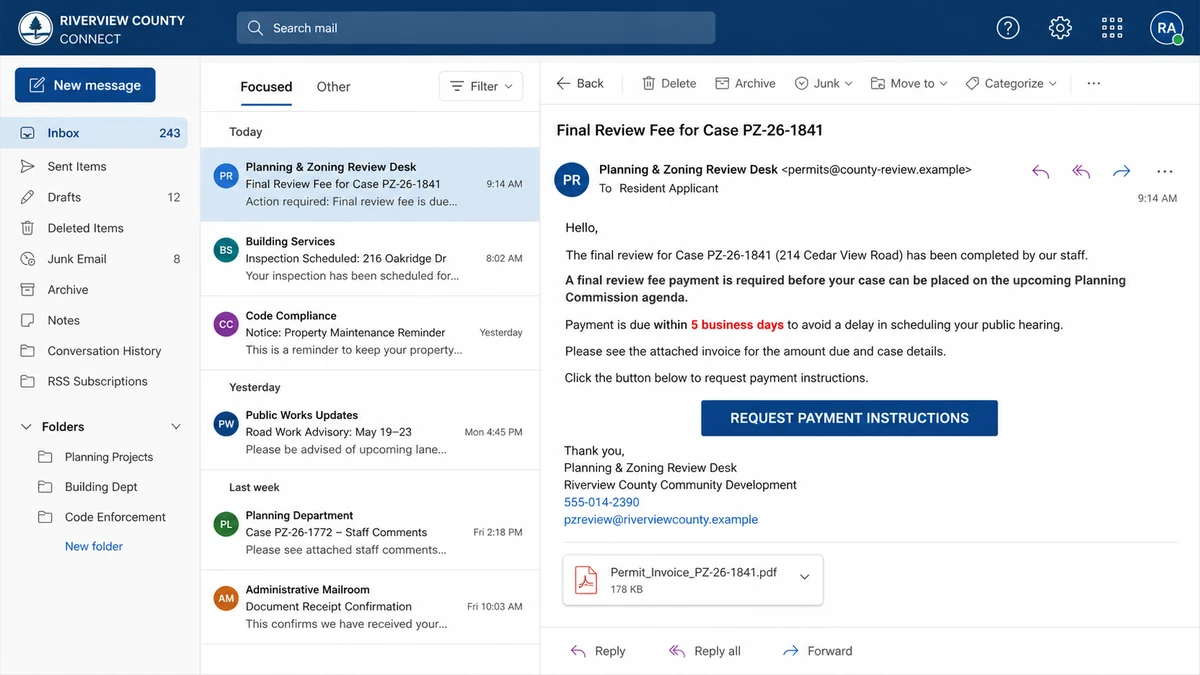
The email arrives while a real property project is moving through local government. It names the address, planning case, hearing, and official handling the application. The attached invoice looks like the next ordinary fee.
Payment is due quickly or the hearing may be delayed. The sender even asks for an email reply so the transaction has a written “audit trail.”
The fake planning permit invoice scam succeeds because the private-looking details are often public. Accuracy inside the message can be the bait, not proof.
Overview
The criminals target projects that are genuinely active
Planning commissions, zoning boards, building departments, and public hearing calendars publish information so residents can understand proposed development. Those records may include applicant names, parcel addresses, case numbers, project descriptions, hearing dates, staff contacts, and document files.
The FBI warned in March 2026 that criminals were using this material to impersonate city and county officials nationwide. Their phishing emails cited real permit information and arrived during active communications.
The victim is not being asked to believe in an invented project. The scammer steps into a real process and inserts a false fee.
The message imitates professional government correspondence
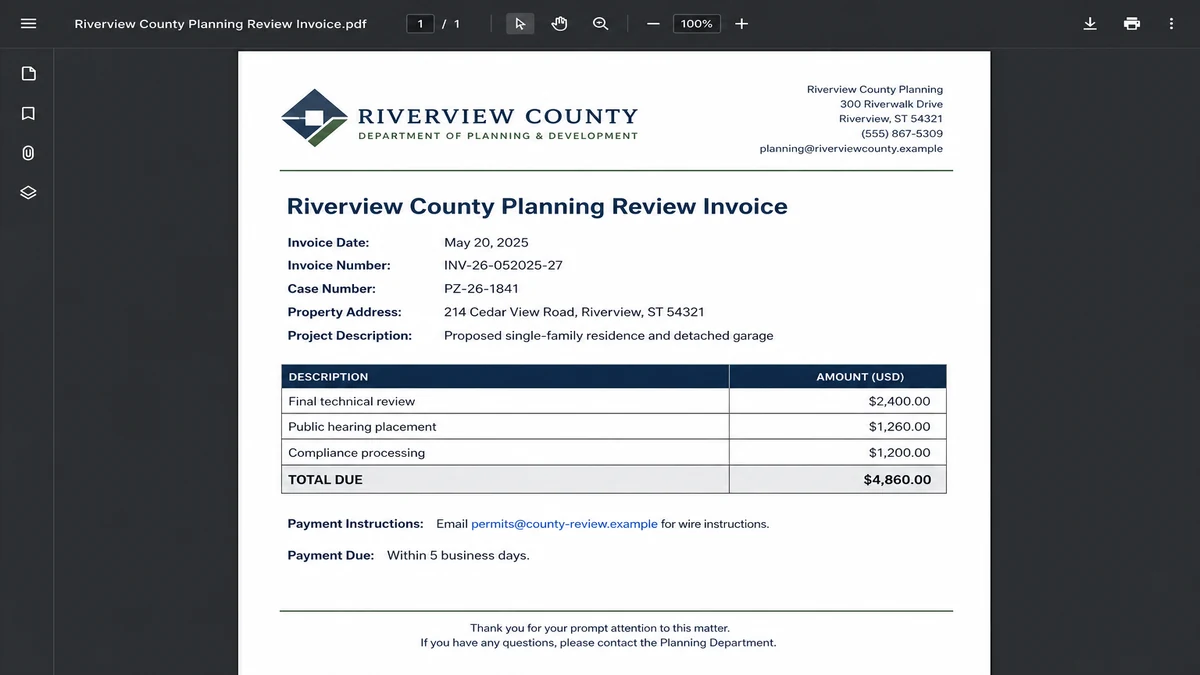
The email may use official names, department language, letterhead-style graphics, regulatory terms, and correct spelling. A PDF invoice can list technical review, compliance, hearing, or processing charges that sound appropriate for the application.
The sending address is the important break. The FBI notes that criminals may use a professional username on a non-governmental domain, including addresses ending in services such as @usa.com, instead of the jurisdiction’s official domain.
A display name can say Planning Department while the actual address belongs to anyone. The seal, staff name, and case number do not repair that mismatch.
The invoice moves payment outside the normal process
The attachment may tell the applicant to request wire instructions by replying to the email. That instruction keeps the conversation away from the city’s phone line, cashier, portal, and known staff contact.
Payment may be requested by wire, peer-to-peer app, or cryptocurrency. Urgency is tied to a real deadline: pay now or the hearing, review, certificate, or permit will be delayed.
Warning signs include:
- The sender uses a non-government domain.
- The invoice was not posted in the known permit portal.
- The recipient is told to request wire instructions by email.
- The beneficiary does not match the city or county.
- A payment app or cryptocurrency is offered for a government fee.
- The email threatens an immediate scheduling delay.
- The staff member cannot confirm the invoice by phone.
- Replying to the message is presented as independent verification.
Why Public Permit Records Make the Email Convincing
Planning and zoning processes are intentionally transparent. Agendas, notices, applications, staff reports, maps, and public comments can be searchable online.
A criminal can learn which projects are active, which applicant is waiting for review, and when a payment request would feel plausible. That research can be automated or performed manually.
The scammer may know more than the property owner. Developers, architects, engineers, attorneys, contractors, expediters, and consultants all exchange documents, giving the attacker several possible recipients.
If one mailbox is compromised, the criminal may also see private correspondence. A fake invoice can then match the timing, language, and people in a real thread.
The FBI described messages timed to coincide with ongoing government communications. That timing is powerful because the recipient expects activity and may treat a new address as another employee or automated system.
Public accuracy should therefore trigger a better question: which detail could only be known by the real agency? In many cases, the answer is not the case number. It is the agency’s authenticated payment record and independently confirmed instructions.
How the Fake Planning Permit Invoice Scam Works
Step 1: Criminals monitor public applications
The group searches municipal portals, hearing agendas, legal notices, planning packets, and property databases. Active cases reveal the people most likely to expect a fee.
Applicants facing expensive projects or tight schedules are especially attractive because a delay can cost far more than the fraudulent invoice.
Step 2: The real case is turned into a phishing profile
The scammer collects the property address, case number, project type, staff contact, applicant, and upcoming date. Logos and formatting can be copied from official documents.
Professional language is added about review procedures, regulatory compliance, ordinances, or commission placement. The result looks tailored because it is.
Step 3: A lookalike government email arrives at the right time
The display name resembles the planning department or a known official. The actual address uses a free, commercial, or lookalike domain.
The message may land shortly after a real filing, staff comment, resubmission, or hearing notice. That timing reduces suspicion.
Step 4: The PDF creates a new fee
An attached invoice itemizes final review, compliance, processing, publication, or hearing charges. The numbers may be plausible when compared with the overall project budget.
A formal invoice number, due date, and official’s name make the fee appear recorded even when it exists nowhere in the agency’s system.
Step 5: Urgency blocks a verification call
The applicant is told that failure to pay will delay the hearing or stop processing. The attachment may specifically direct questions back to email to preserve an audit trail.
That instruction is designed to keep the victim talking to the impersonator rather than the real department.
Step 6: Payment is redirected to the criminals
The wire beneficiary, payment-app account, or crypto address belongs outside government. If questioned, the scammer may describe it as a treasury processor, consultant, payment vendor, or special project account.
Only the real city or county can confirm whether that relationship exists. The email sender cannot verify itself.
Step 7: A second fee or refund story may follow
After a transfer, the criminal may claim that another charge is required or that the payment went to the wrong department. A fake refund process can request bank credentials or another transfer.
The project continues in the real government system, so the victim may not discover the fraud until the legitimate agency asks for an actual fee.
How Applicants and Businesses Should Verify a Permit Charge
Do not reply first. Open the city or county website from a known bookmark or independent search. Find the department’s published main number and call it.
Give the employee the case number and ask whether the exact invoice, amount, due date, and payment method exist in the official system. Request confirmation through the known portal or established email thread.
Compare the complete sender domain with prior correspondence. Do not inspect only the display name. One extra word, missing government suffix, or commercial email service can change the identity.
Check the payment portal independently. Government fees should connect to a documented cashier, treasury system, or contracted processor whose role the agency confirms.
Examine the beneficiary before approving a wire. A municipal fee sent to an individual, unrelated company, or unexplained out-of-state account requires a stop.
Use a two-person approval for changed or unusual payment instructions. One employee should verify through a known channel, while another compares the invoice with the permit record and vendor file.
Never treat a reply email as verification. If the sender account or thread has been compromised, every response returns to the attacker.
MalwareTips’ article about the Relay wire scam explains a related business pattern in which a credible invoice story redirects a real payment. The planning-permit version adds public government data and a scheduling threat.
Ask the agency whether it has posted a fraud notice. Local governments sometimes warn applicants after a wave of impersonation emails.
Controls for Applicants, Consultants, and Local Governments
Applicants should maintain one payment register for the project. Each charge should show the agency, case, purpose, amount, invoice date, official contact, approval, payment route, and receipt.
A new invoice should be compared with that register and the agency’s published fee schedule. A plausible amount is not enough when the payment method or beneficiary is new.
Consultants should define who is allowed to approve government fees. Architects, engineers, contractors, owners, and expediters may all receive project email, but not all should be able to redirect payment.
Use a known-contact rule. Any new bank account, processor, reply address, or urgent payment instruction must be confirmed through a phone number stored before the change.
Require a second employee to review unusual transfers. That person should see the original case record and make an independent call, not simply approve a forwarded email.
Protect public project contacts from unnecessary exposure. A jurisdiction may need to publish applicant information, but project teams can use role addresses and avoid posting private mobile numbers where rules permit.
Local governments can place clear payment instructions on every permit page. Applicants should know which portal, office, methods, and beneficiary names are authorized before a criminal contacts them.
Departments should also publish a simple warning that staff will not request wire, payment-app, or cryptocurrency fees by unsolicited email. Specific guidance is easier to act on than a generic phishing notice.
Digitally authenticated notices and portal messages can reduce reliance on ordinary email. The portal should show the balance and receipt independently of the link inside a message.
Staff directories should help applicants verify employees while limiting data criminals can reuse. A department can publish a central number and clear escalation path for suspicious invoices.
When an impersonation campaign is reported, the agency should preserve the sample, notify affected applicants, alert its finance and IT teams, and publish the fraudulent domains or addresses where appropriate.
Email security controls can detect some lookalike domains and failed authentication, but a well-written message from a new domain may still arrive. Payment process controls provide a second line of defense.
Projects involving several organizations should agree on an incident channel before a problem occurs. A known phone tree or secure project portal can replace frantic replies inside a compromised thread.
After any false invoice, review recent correspondence for related attacks. Criminals who found one public case may target other applicants, departments, consultants, or vendors listed in the same agenda.
What the Invoice May Reveal Before You Pay
Compare the terminology with the jurisdiction’s fee schedule. A criminal may use broad phrases such as final review or compliance processing that sound official but do not match the agency’s named charges.
Check the numbering format against prior invoices. Case numbers may be real while invoice numbers, department codes, dates, or fiscal-year labels use an unfamiliar pattern.
Look at the payment instruction, not just the header. An authentic-looking page can end with a request to email for wire details, moving the decisive information outside the document.
Review the math and timeline. A due date before the invoice date, a fee for a completed stage, or a hearing charge outside the normal schedule can expose the insertion.
Do not reject an invoice solely because one detail looks unusual. Local processes vary. Use the inconsistency as a reason to call the verified department and confirm the record.
Save a clean copy of every legitimate fee schedule and receipt as the project progresses. A criminal invoice becomes easier to recognize when the team can compare it with an established paper trail.
Ask the department how it announces a real change in banking or payment processors. A major change should not depend on one urgent email arriving from a domain the project has never used.
For long projects, repeat vendor and contact verification before each major phase. Staff, consultants, and payment systems can change, but every change should be confirmed through an earlier trusted channel.
If the agency cannot immediately confirm the invoice, wait. A genuine fee can be investigated and documented. A criminal deadline exists mainly to prevent that investigation.
Company, Address, and Fulfillment Checks
The department name is not sender identity
A city or county name in the display field, letterhead, PDF, or signature does not identify the account. Compare the domain and employee address with the official directory.
The genuine jurisdiction is being impersonated and should not be blamed for the criminal email unless evidence shows an internal compromise or error.
The address must match the official government office
Compare the invoice address with the jurisdiction’s website, permit portal, and prior documents. A copied civic address proves only that public information was available.
If the payment is supposedly handled elsewhere, call the agency and ask it to identify that office or contractor from its own records.
Support must answer outside the suspicious thread
Call the department’s published number or an established project contact. Ask for the named official and confirm whether that person sent the invoice.
A phone number or reply address printed inside the PDF belongs to the document being tested. It cannot serve as the independent check.
The permit and payment chain must be traceable
The case file, fee schedule, invoice, portal balance, receipt, and beneficiary should agree. Ask where the charge appears in the official record and which ordinance or schedule authorizes it.
A real payment processor should be named by the government before the invoice arrives. The beneficiary should not be introduced only by the party requesting the transfer.
What to Do if You Have Fallen Victim to This Scam
- Contact the sending bank immediately. Ask for the wire fraud or recall team and explain that a government impersonator redirected a permit payment.
- Notify the receiving institution. Provide the amount, date, reference, beneficiary, and any police or IC3 report. Use official contact details.
- Call the real city or county. Confirm the legitimate status of the case, warn the department about the impersonation, and ask whether other applicants were targeted.
- Stop additional fees. Do not pay a correction, release, tax, refund, or investigation charge sent by the same contact.
- Preserve complete evidence. Save the email in its original format with headers, PDF, URLs, invoice, payment instructions, phone numbers, portal screenshots, and bank records.
- Report the scheme. File with the FBI’s IC3, local police, the FTC at ReportFraud.ftc.gov, and the impersonated jurisdiction. Businesses should also alert internal legal, finance, and security teams.
- Check whether a mailbox was compromised. Review sign-ins, forwarding rules, app permissions, recovery methods, and sent mail for the applicant and project team.
- Change exposed credentials. If a page requested a password, secure the account from the official service and revoke unknown sessions or devices.
- Review other project payments. Search for changed bank details, unusual beneficiaries, and invoices introduced through the same conversation.
- Scan downloaded material. If the attachment contained active content, an archive, or software, run a full Malwarebytes scan. It can help detect malware delivered with the invoice lure.
- Block repeat infrastructure. AdGuard can reduce access to known malicious domains and deceptive advertising. It cannot confirm a permit fee, so payment verification must remain procedural.
- Warn partners without oversharing. Notify architects, engineers, contractors, and consultants using a clean channel. Share indicators, not sensitive project data.
- Ignore paid recovery guarantees. Work with banks and law enforcement. An advance-fee recovery promise may be another attempt to exploit the loss.
Frequently Asked Questions
How did the scammer know my permit case number?
Planning files and hearing records may be public. The detail can also come from a compromised mailbox. Knowing it does not prove government identity.
Do cities and counties ever charge review fees?
Yes, legitimate fees exist. Confirm the exact charge in the official system and pay only through a method verified directly with the jurisdiction.
Is a government seal proof that the PDF is real?
No. Logos, seals, staff names, addresses, and formatting can be copied from public documents.
Why does the invoice ask me to request wire instructions?
That may keep the conversation inside the attacker’s email channel. Call the agency through its public website before requesting or using instructions.
Should I reply and ask the official to confirm?
No. A reply goes back to the address being tested. Start a new call or message using contact information from an independent source.
Can the real project still be delayed?
Possibly, if a legitimate requirement remains unpaid. Tell the real department promptly so it can separate the fraud from the application’s actual obligations.
The Bottom Line
A fake planning permit invoice scam can quote the correct case, property, official, and hearing while sending the money entirely outside government.
Accuracy is not authentication. Confirm every new fee through the jurisdiction’s official phone number and permit system, then match the invoice and beneficiary before payment. A five-minute independent call can protect both the project schedule and the project budget.








