

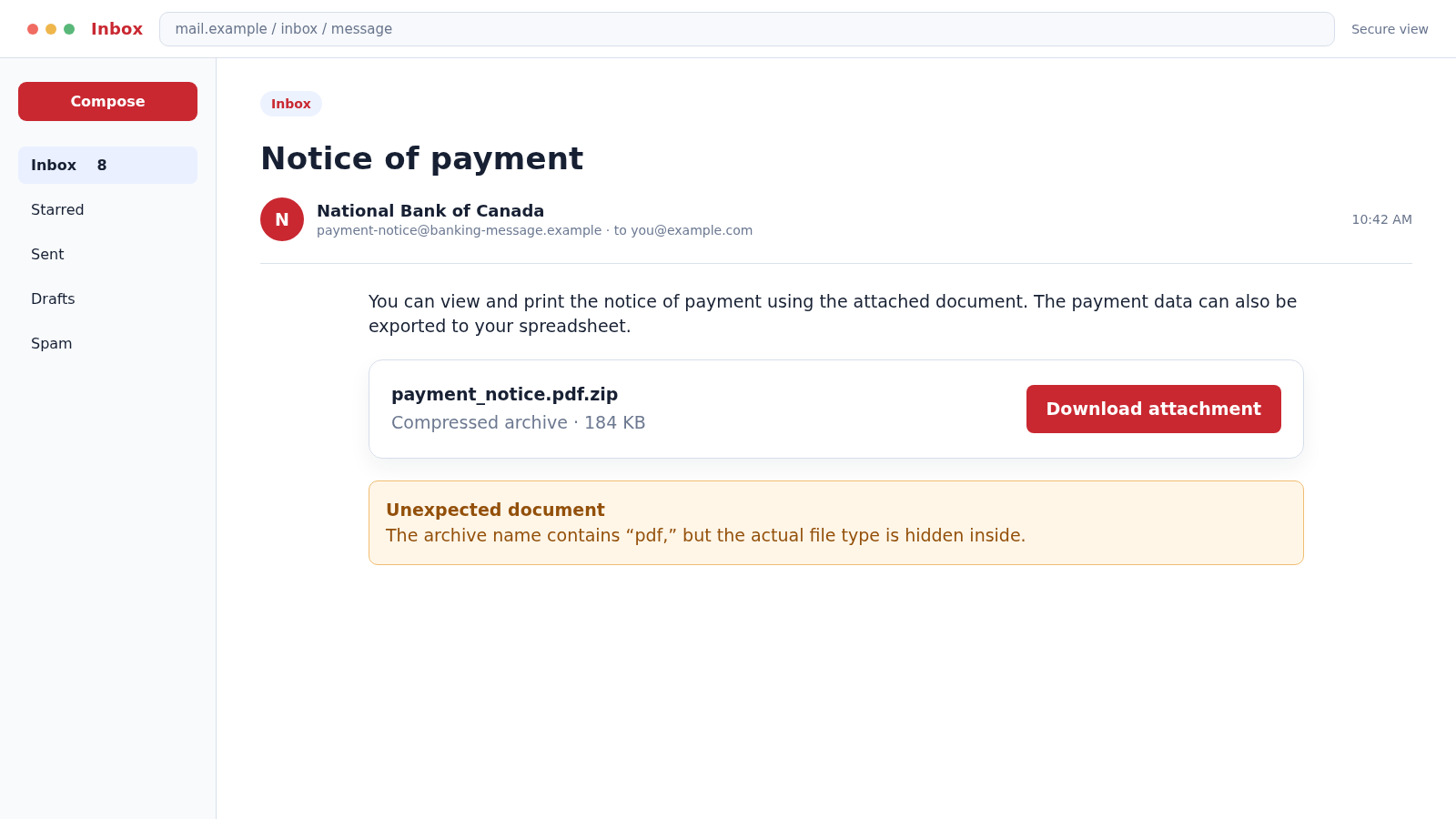
The subject line is ordinary: “Notice of payment.” The email says a document is ready to view, and the attachment appears to contain the details a customer or accounting employee would naturally want to inspect.
The danger in the National Bank of Canada scam email is hidden behind the filename. What looks like payment paperwork can be a program waiting for the recipient to open it.
Overview
The message impersonates a real Canadian bank
The National Bank of Canada scam email uses the name and contact details of a legitimate financial institution. The specific “Notice of payment” example presented a supposed payment document as an attachment.
The bank did not send the malicious file. Criminals can copy a company name, postal address, disclaimer, and employee-style language into an unrelated email without gaining access to the company’s systems.
A double extension hides an executable file
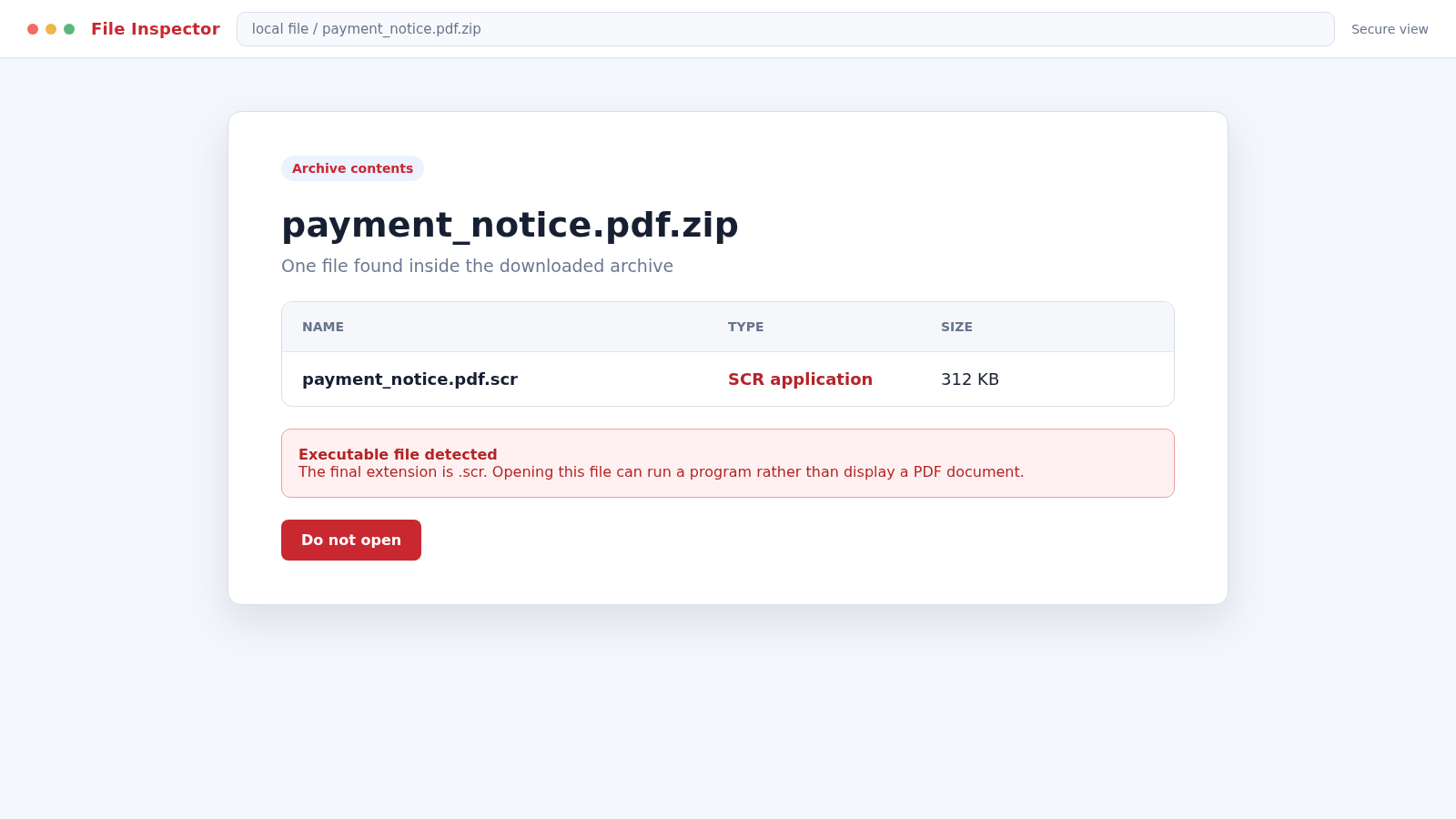
One reported version used an archive named payment_notice.pdf.zip. Inside was a file ending in .scr, a Windows executable format historically used for screen savers but capable of running code like any other program.
The word “pdf” appeared earlier in the name to create familiarity. The final extension, the part that determines the file type, was not a harmless document format.
The attachment may change while the social trick stays
The original example is old, and modern campaigns may use different filenames, archives, document formats, links, or cloud-sharing pages. The important pattern is an unexpected financial document that pressures the recipient to open or enable something.
Watch for these warning signs:
- An unexpected notice of payment, remittance advice, invoice, or transfer document.
- An archive containing a file with .scr, .exe, .js, .lnk, .iso, or another executable type.
- A filename with multiple extensions, such as document.pdf.zip or payment.pdf.scr.
- Instructions to enable macros, bypass a warning, or install a viewer.
- A sender domain that does not match the bank’s verified domain.
- Old browser references, awkward language, or details that do not match any real transaction.
Why Payment Notices Are Effective Malware Bait
Payment documents create curiosity and urgency without needing a dramatic threat. An individual may worry that money was taken from an account. An employee may believe a customer, supplier, or manager expects the attachment to be processed.
In a busy accounting inbox, opening remittance advice can feel routine. Attackers exploit that routine by sending many versions and hoping one reaches a person whose job includes handling financial attachments.
The message may include a real bank address or a return instruction to appear responsible. These copied details are easy to obtain from public pages and do not authenticate the sending system.
National Bank advises customers that it will not ask for confidential information such as a password or PIN by email or text. The bank also recommends avoiding links in suspicious messages and contacting it directly when information may have been exposed.
How the National Bank of Canada Scam Email Works
Step 1: The attacker chooses a believable financial subject
The email arrives with a subject such as “Notice of payment,” “Payment advice,” “Incoming transfer,” or “Remittance document.” These subjects are broad enough to interest both consumers and business recipients.
The body says the attachment can be viewed, printed, or exported. That small amount of instruction makes the file sound like a normal banking document rather than an unsolicited program.
Step 2: Real branding and addresses are copied
The sender adds the bank’s name, a public mailing address, and formal closing language. A logo may be embedded in the message, while the From field displays a recognizable institution.
None of these elements proves origin. Email display names and message content can be written by anyone, and addresses can be copied from a public contact page.
Step 3: The dangerous file is wrapped in a familiar name
The reported attachment used payment_notice.pdf.zip. A recipient scanning the name may notice “payment” and “pdf” but overlook that the downloaded item is actually a compressed archive.
Inside, the .scr extension marks an executable file. On a Windows system, opening it can run code rather than display a payment document.
Step 4: File-extension hiding reduces the visible warning
Some systems hide known file extensions by default. A file named payment_notice.pdf.scr may appear as payment_notice.pdf, making the executable look like a document.
Attackers also use document icons, long filenames, right-to-left characters, or archive passwords to interfere with automated scanning and visual inspection.
Step 5: The victim opens the payload or follows an instruction
If the executable runs, it may install a credential stealer, remote-access Trojan, downloader, ransomware component, or another payload. The exact behavior depends on the campaign and can change over time.
Modern variations may open a real-looking decoy document while malicious activity continues in the background. Seeing a payment page after clicking does not prove the file was safe.
Step 6: The malware establishes access or steals data
A credential stealer can collect browser passwords, cookies, cryptocurrency wallet data, email sessions, and system information. A remote-access tool can give the attacker ongoing control of the computer.
On a business device, email and accounting access can expose customer records, supplier conversations, invoices, and payment instructions. That information can support larger fraud.
Step 7: The compromised mailbox is used for believable follow-ups
An attacker who controls an email account can reply inside genuine payment threads. They may replace bank details on a real invoice or send the malicious attachment to trusted contacts.
Recipients are more likely to act when a message comes from a familiar mailbox and continues an existing conversation. This is one reason a single opened attachment can become an organization-wide incident.
Step 8: Additional payloads or payment fraud may follow
The first program may download more malware after checking the device. Criminals can also use stolen sessions to reset accounts, initiate transfers, or pressure employees into paying altered invoices.
Some infections remain quiet while attackers learn business routines. A delayed fraudulent payment can appear unrelated to the original email unless logs and message history are preserved.
How Modern Payment Malware Emails May Look Different
Attackers no longer need to attach an obvious executable directly. A message may link to a cloud-storage page, password-protected archive, fake document viewer, or compromised website that delivers the next stage.
Microsoft Office files can ask the recipient to enable editing, macros, or external content. PDF files can contain links that lead to credential phishing or downloads, even when the PDF itself is not the final payload.
HTML attachments may reproduce a sign-in page inside the browser. The form can collect an email address and password while appearing to open a secure payment portal.
Shortcut files and disk images can hide a command behind a document icon. Archives may be password protected so an email gateway cannot inspect the contents, with the password conveniently supplied in the message.
Some campaigns avoid malware and steal cloud credentials instead. Once the attacker enters a business mailbox, invoice manipulation and payment redirection can produce the same financial damage without installing a conventional Trojan.
The sender may also compromise a real supplier’s account. Correct grammar, an authentic signature, and a familiar conversation thread then coexist with a malicious attachment or altered bank details.
The defense remains the same: verify unexpected financial activity through a separate channel, inspect the true file type, and treat any request to bypass a security warning as a reason to stop.
Company, Address, and Fulfillment Checks
The display name is not the sending domain
Expand the From field and inspect the complete address. Look beyond a familiar display name and compare the domain with the bank’s verified website.
Even a matching-looking address can be spoofed, so authentication results and the context of the transaction still matter. Do not reply as a method of verification.
A copied bank address proves nothing
Scam emails frequently paste a real head-office address into the signature. The address may be accurate while the email itself has no connection to the organization.
Use the bank’s official website or your card to find contact details. Never rely on the address, phone number, or reply instructions contained only in the suspicious message.
The support route should not require the attachment
A genuine bank representative can review an account through established secure channels. You should not need to open an unknown archive, install software, or bypass a computer warning to learn whether a payment exists.
National Bank provides official fraud-contact information on nbc.ca. If you are a customer, use that independently located channel and describe the message without forwarding the attachment to an ordinary support mailbox.
The payment must exist in independent records
Check the official banking account, accounting platform, purchase order, supplier record, or transaction history. A real payment should connect to activity you recognize.
For a business, confirm with the known supplier using a previously verified number. Do not use new contact details introduced by the email requesting the payment review.
How to Inspect a Suspicious Payment Attachment Safely
Do not open the file to identify it. Save the message for the security team and inspect the displayed filename, size, and message headers without executing the attachment.
On Windows, enable the option to show file extensions. The final extension is critical. A name ending in .scr remains executable even if “.pdf” appears earlier.
Business users should follow their incident-response process. Security staff can analyze the file in an isolated environment and search email logs for other recipients without exposing ordinary workstations.
Do not upload confidential company documents to a public scanning service. If the file might contain real customer or payment data, use approved internal security tools or a trusted professional.
Check the message headers if you know how, but do not rely on one technical field. Attackers can compromise legitimate accounts, and forwarding systems can complicate authentication results.
The practical question is whether the transaction, sender, file type, and delivery method all make sense together. One correct detail cannot repair several serious inconsistencies.
What to Do if You Have Fallen Victim to This Scam
- Disconnect the affected device from the network. Turn off Wi-Fi and unplug Ethernet to limit command-and-control traffic and movement into other systems. Do not wipe the device before a business security team preserves evidence.
- Notify the bank and your security team. Contact National Bank through verified details if you disclosed banking information. At work, report the attachment immediately so other mailboxes and endpoints can be checked.
- Use a clean device to change passwords. Start with email, banking, password manager, and administrator accounts. Revoke active sessions and replace compromised multifactor recovery methods.
- Scan the affected computer. Run a full scan with Malwarebytes or your organization’s approved endpoint-security platform. Malwarebytes can identify many Trojans, stealers, downloaders, and remote-access tools.
- Check for persistence and unauthorized software. Review installed applications, startup items, browser extensions, remote-access tools, scheduled tasks, and recently created user accounts. Professional incident response may be necessary.
- Review financial and email activity. Search for new payees, altered supplier details, unusual forwarding rules, deleted messages, password-reset emails, and logins from unfamiliar locations.
- Warn contacts if the mailbox was compromised. Tell colleagues and suppliers not to trust recent attachments or payment changes from the account until the investigation is complete.
- Block repeat delivery paths. AdGuard can help block malicious sites and advertising domains used by later phishing stages. It cannot neutralize an attachment already opened, so scanning and account recovery remain essential.
- Preserve evidence. Keep the original email, full headers, attachment hash if available, screenshots, security alerts, and a timeline. These records help banks, investigators, and security teams connect later activity.
- Report the campaign. Forward suspicious messages according to National Bank’s current fraud instructions and report significant losses to the Canadian Anti-Fraud Centre or the appropriate authority in your country.
Frequently Asked Questions
Did National Bank of Canada send the Notice of Payment malware email?
No. The malicious campaign impersonated the legitimate bank. A copied name, logo, or mailing address does not mean the institution sent the attachment.
Is a file ending in .scr dangerous?
It can be. On Windows, .scr files are executable programs. An unexpected .scr file should never be opened merely because its name also contains “pdf.”
What does payment_notice.pdf.zip mean?
The final .zip indicates a compressed archive. The “.pdf” text is only part of the archive’s name. You must inspect the final extension of the file inside as well.
What if I opened the archive but not the file inside?
The risk is lower if nothing inside executed, but report the incident and scan the device. Do not reopen the archive to investigate it yourself.
Can a genuine bank email contain an attachment?
Policies vary, so an attachment alone is not proof of fraud. Unexpected archives, executable files, and instructions to bypass warnings require independent verification through the bank.
Is this exact campaign still active?
The named example is historical, but its technique remains relevant. Current malware emails may use different banks, filenames, document types, and delivery methods while keeping the same payment-notice lure.
The Bottom Line
The National Bank of Canada scam email hides executable code behind a routine payment story. Real branding and a familiar document word cannot make an unexpected archive safe.
Verify the transaction through independent records and treat the final file extension as decisive. If an attachment has already run, disconnect the device and begin account and incident recovery immediately.








