

The caller says a debt has appeared against your plan and support could be cancelled unless you confirm a few details. They sound patient, informed, and ready to fix it.
That helpful tone can hide a serious threat. NDIS scam calls use fear about essential support to reach money, identity details, and plan funding.
Overview
Scammers impersonate the NDIA, partners, and providers
NDIS scam calls, texts, and emails pretend to come from the National Disability Insurance Agency, an NDIS partner, a plan manager, support coordinator, provider, or another Australian government service.
The contact may claim there is a plan debt, funding review, payment error, new benefit, provider problem, or threat of cancellation.
The story changes, but the recipient is pushed to respond through a channel controlled by the scammer.
The requested details can unlock more than one account
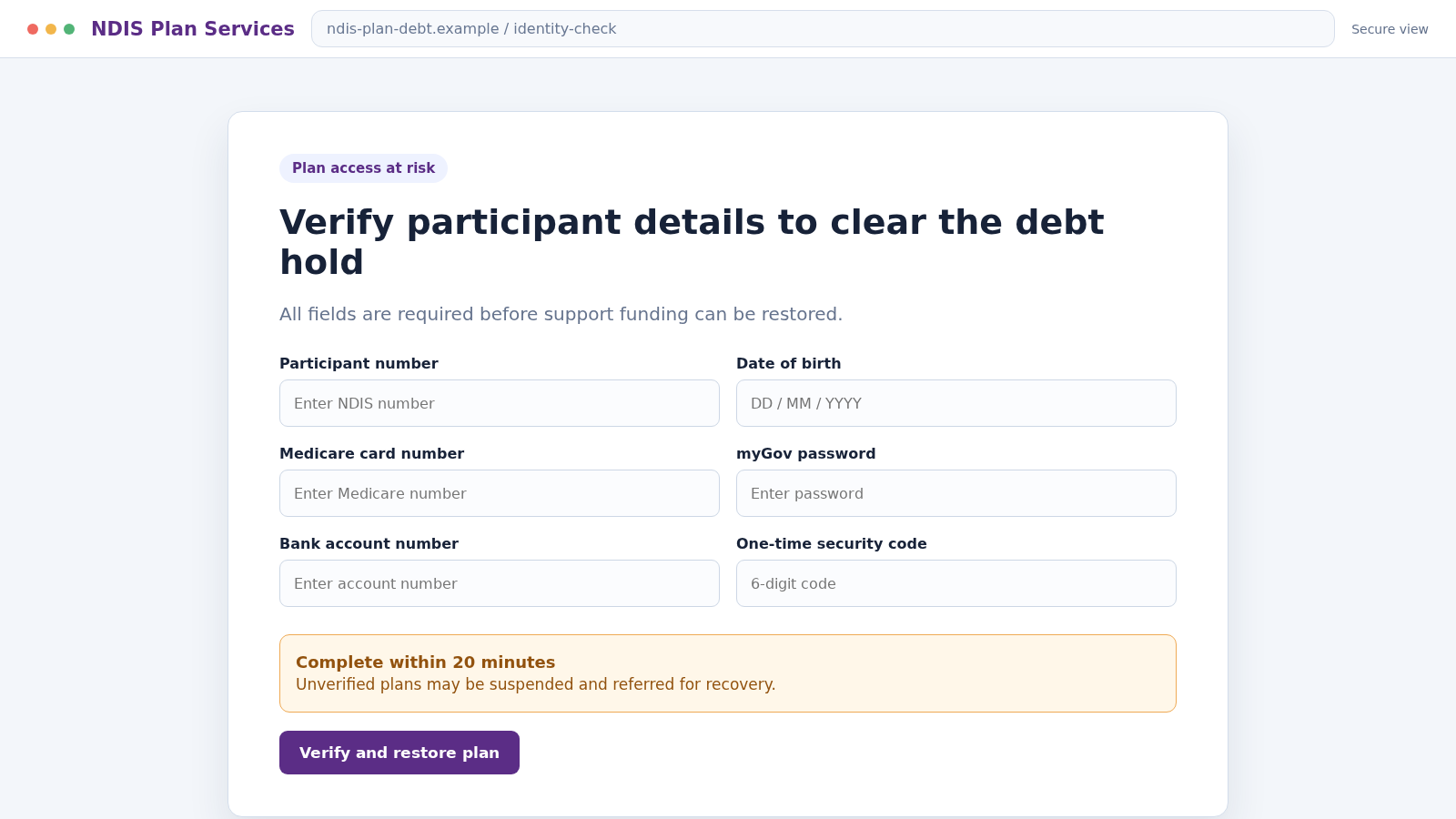
The caller may seek a participant number, Medicare details, date of birth, address, banking information, myGov login, card number, or one-time code.
A fake provider can also request invoices, service agreements, or plan-manager access.
These records can support identity theft, account takeover, fraudulent claims, and targeted follow-up calls. Information that seems administrative can expose a participant’s services and personal circumstances.
NDIS fraud also includes dishonest billing and plan misuse
The risk is broader than impersonation. The official NDIS guidance identifies several forms of fraud:
- Claiming for supports that were never delivered
- Charging for more time or service than was provided
- Submitting the same invoice more than once
- Overpricing supports or applying an unjustified NDIS markup
- Using stolen identities or participant information
- Creating fake evidence for access or eligibility
A participant may therefore be targeted by an unknown caller, a compromised provider account, or someone already involved in delivering services. Each route requires careful records and independent verification.
What the NDIA Says About Plan Debt Threats
The NDIA states that participants have reported callers pretending to represent the agency.
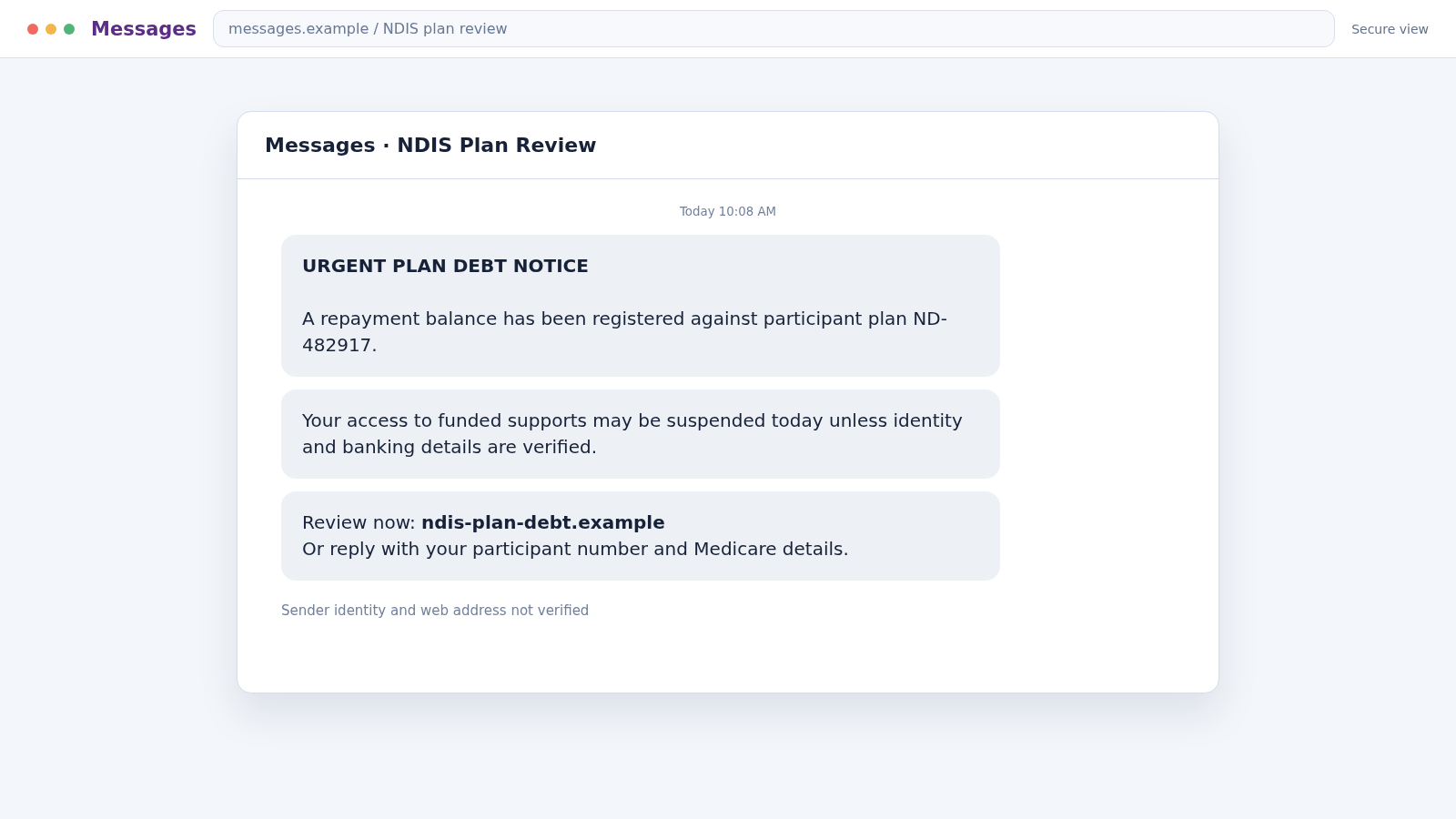
A common story claims there is a debt against the plan and that NDIS access will be lost unless personal or banking details are supplied.
The agency’s guidance is direct: it will not call and threaten to cancel access to the NDIS because of a debt. That threat should end the conversation, not accelerate it.
A real worker may need to discuss a participant’s plan, but identity and purpose should be verified through an established contact or the official NDIS number.
Caller ID alone cannot authenticate the person.
When a provider invoice looks different or directs payment to a new account, call the provider using details already on file.
Email accounts can be compromised, allowing a fake invoice to arrive inside a genuine conversation.
Participants should never be made to feel that asking a nominee, family member, or advocate to review a request will threaten their support.
A legitimate worker can explain the process, document the issue, and allow reasonable verification.
If an incoming contact names a real appointment or provider, treat that detail as something to verify rather than proof.
Information can be exposed through a compromised mailbox, shared calendar, discarded document, or breached third party.
Warning Signs of an NDIS Impersonation or Billing Scam
- An unexpected caller threatens to cancel your plan because of a debt.
- The person asks for a myGov password or one-time security code.
- Bank, Medicare, or card details must be confirmed immediately.
- A link opens a login page on a domain unrelated to the Australian government.
- A provider suddenly changes bank details only by email.
- An invoice lists sessions, hours, or supports you did not receive.
- The same service appears more than once in statements or invoices.
- A provider wants blank forms, false descriptions, or backdated signatures.
- You are told not to discuss the matter with a nominee, plan manager, or support person.
- The caller refuses to let you hang up and verify through the official NDIS line.
Some mistakes are administrative rather than criminal. Ask for a written explanation and reconcile it with your records, but never let uncertainty justify sharing credentials with an incoming caller.
How the NDIS Scam Calls Work
Step 1: The scammer obtains or guesses a connection to disability support
Calls may be sent broadly, but targeted campaigns can use leaked marketing lists, provider records, social media, or public information.
Knowing a name or support type makes the approach feel personal.
The criminal does not need a complete file. A few details can prompt the recipient to fill in the gaps during conversation.
Step 2: The caller adopts a trusted role
The person claims to work for the NDIA, an NDIS partner, plan manager, support coordinator, fraud unit, or payment team.
A spoofed Australian number or copied email logo supports the story.
They may use familiar terms such as plan review, service booking, participant number, portal, nominee, or funding category. Correct vocabulary is not proof of authorization.
Step 3: A plan problem creates urgency
The target is told that funding has been frozen, an invoice failed, identity verification expired, or a debt must be repaid.
Loss of essential services is presented as the immediate consequence.
This threat is especially powerful because delaying support can affect health, independence, transport, and daily routines. The scammer exploits that practical fear.
Step 4: Small confirmation questions become sensitive disclosure
The call begins with a name and postcode, then moves to a participant number, birth date, Medicare details, bank account, myGov email, or provider information.
Each answer is framed as a routine check.
The operator may already know one field and repeat it to establish credibility. That does not make requests for passwords or codes legitimate.
Step 5: A fake portal or document captures access
A text or email link opens a copied government or provider page. The victim signs in, enters identity details, or uploads an invoice and identification documents.
The site may display an error after collecting the data. A second screen then requests banking details to supposedly clear the debt or receive a refund.
Step 6: Money or plan access is redirected
An impersonator may demand a direct repayment, while a fake provider seeks payment for nonexistent services. An account takeover can alter contact or banking details and redirect genuine payments.
In provider fraud, the victim may be encouraged to approve inaccurate claims, sign blank service records, or allow charges for time that was not delivered.
Step 7: The victim is isolated from trusted helpers
The scammer says the case is confidential, warns that speaking to another provider will delay funding, or insists that the caller must remain on the line during payment.
Isolation prevents a nominee, carer, plan manager, or trusted person from noticing inconsistencies. Genuine processes should allow time to obtain support and clarification.
Step 8: Follow-up contacts exploit the exposed information
After the first call, another person may pretend to investigate the fraud, restore funding, or recover money. They can quote earlier details to sound like part of an official case.
The information may also support banking, Medicare, myGov, or identity scams unrelated to the NDIS. Recovery requires protecting the full identity, not only the plan.
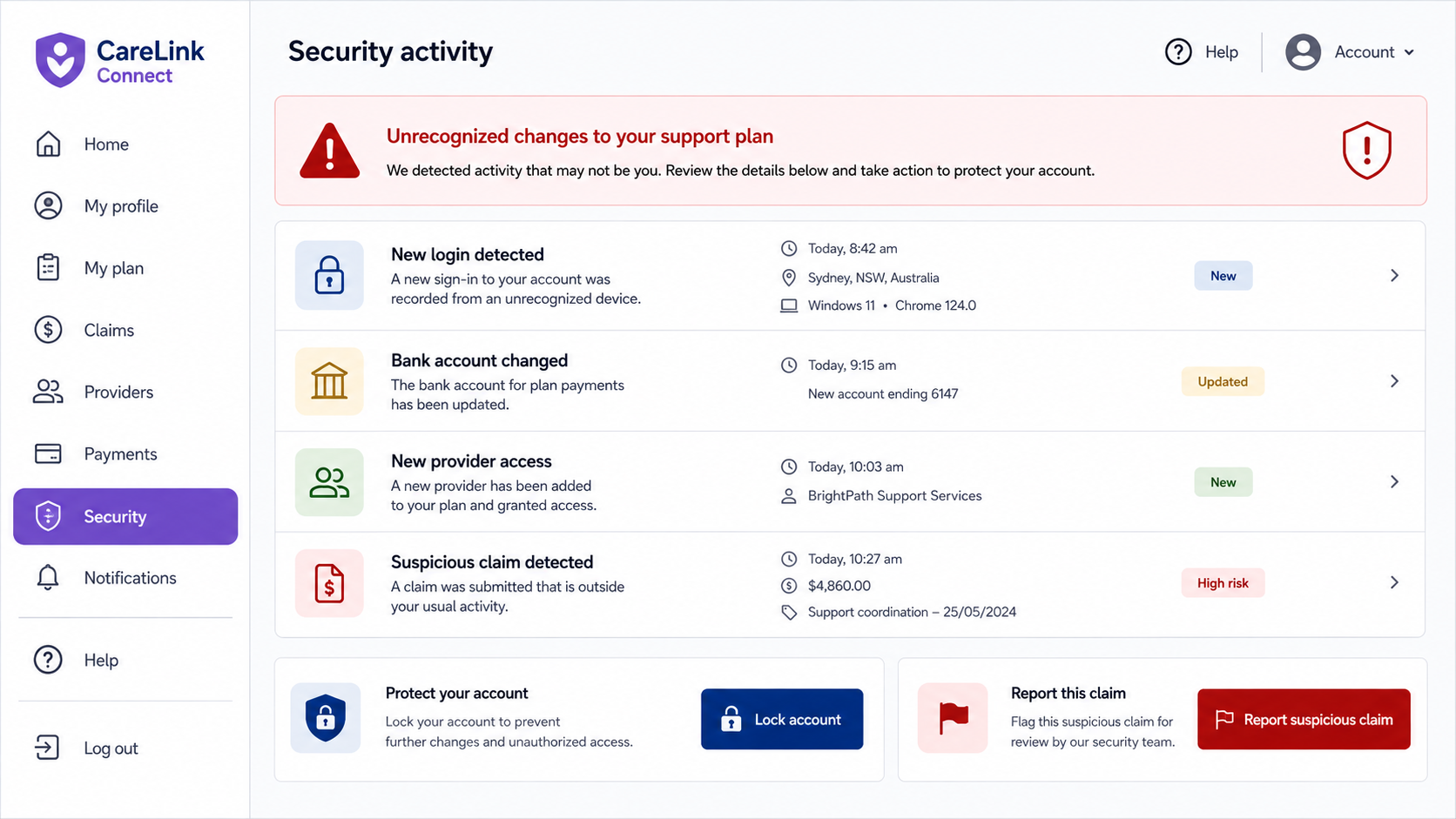
Account activity can show what the call was trying to unlock. Changed payment details, unfamiliar provider access, or new claims require immediate review.
Company, Address, and Fulfillment Checks
Verify the person through an official or existing channel
End the incoming call and use the official NDIS contact number, an established provider number, or a trusted plan-manager contact. Ask whether the named employee and issue are real.
Do not call a number supplied in the same suspicious message. Spoofed caller ID can make an incoming number look familiar.
Check the provider’s identity and registration status
Confirm the legal business name, Australian Business Number, address, service agreement, and people authorized to contact you. Where registration is required or claimed, verify it through the appropriate official register.
A real business name can still be impersonated. Compare the sender address and bank details with records from before the suspicious message.
Match every invoice to a delivered support
Keep a calendar or service log showing dates, times, workers, and supports received. Compare it with invoices and statements before approving payment.
Question duplicate line items, impossible times, unfamiliar workers, unexpected cancellation fees, and vague descriptions. Ask for correction in writing and retain both versions.
Confirm where payment and plan value actually went
Review plan-manager reports, participant portal information, bank records, and provider receipts. A promise that a billing error was fixed is not enough without matching records.
If bank details changed, confirm the change by calling a known contact. Never approve a new destination based solely on an email reply, even inside an old message thread.
How Participants, Nominees, and Families Can Reduce Risk
Create a small list of trusted contacts: the official NDIS number, plan manager, support coordinator, key providers, bank fraud line, and a trusted person who can help evaluate unexpected requests.
Use unique passwords for email, myGov, banking, and provider portals. Turn on multifactor authentication and keep recovery details current. A compromised email account can reset several other services.
Set a routine for reviewing invoices and statements. A short check each week can catch duplicate or unfamiliar claims before they become a pattern.
Tell providers that bank-detail changes require voice confirmation through a known number. Ask them not to discuss plan information with unlisted contacts.
Accessibility matters. Security instructions should match the participant’s communication needs and include a trusted support person where appropriate. Pressure to exclude that person is a warning sign.
Scam, Fraud, Mistake, or Poor Service?
A scam usually involves an outside person using deception to obtain money or information. Fraud involves intentional dishonesty for a benefit, such as billing for services never supplied.
An administrative mistake may produce an incorrect date or amount without deliberate deception. Poor service can breach an agreement or standard even when it is not fraud.
The distinction affects how an agency responds, but it should not stop a participant from speaking up.
Reporting a concern creates a record and gives the responsible organization a chance to compare the activity with other reports.
You do not need to determine the legal category before reporting a concern. Describe what happened, what records show, who was involved, and why the activity appears wrong.
Keep language factual. Dates, invoices, call recordings where lawful, screenshots, names, and account changes help the relevant agency assess the matter.
What to Do if You Have Fallen Victim to This Scam
- Stop contact and do not approve more claims. End the call, close the page, and pause payments that can safely be paused while the issue is verified.
- Contact the NDIA through its official channel. The NDIS lists a dedicated Fraud Reporting and Scams Helpline at 1800 650 717 and provides an online tip-off form.
- Tell a trusted support person. A nominee, family member, carer, support coordinator, or advocate can help document the incident and make calls without the scammer’s pressure.
- Notify the plan manager and affected providers. Ask them to flag the account, verify recent claims, and prevent unauthorized changes. Use known contact details.
- Contact the bank immediately if money moved. Ask about stopping transfers, replacing exposed cards, changing online banking access, and disputing unauthorized payments.
- Secure myGov and email accounts. Change exposed or reused passwords, enable multifactor authentication, sign out unknown sessions, and remove unfamiliar recovery details.
- Protect Medicare and identity information. Contact the relevant official service if Medicare details or identification documents were shared. Follow its instructions for compromised credentials.
- Review plan statements and invoices. Mark every unfamiliar provider, duplicate, impossible date, and support not received. Save copies before corrections are made.
- Scan affected devices. If you opened a suspicious attachment, installed an app, or granted remote access, disconnect the session and run a full Malwarebytes scan.
-
Block malicious destinations.
AdGuard can help block many phishing pages, deceptive advertisements, and tracking requests used in impersonation campaigns. - Report broader identity theft. Use ReportCyber and Scamwatch as appropriate, and keep official reference numbers with your evidence.
- Watch for recovery impersonators. A second caller claiming to restore the plan or refund losses may be using information from the first contact. Verify every new person independently.
Frequently Asked Questions
Will the NDIS cancel my plan over a debt during a surprise call?
The NDIA says it will not call and threaten to cancel NDIS access because of a debt. End the call and verify the issue through the official NDIS contact route.
What information should I never give an incoming caller?
Do not provide passwords, one-time codes, complete banking credentials, card details, or myGov access. Verify the caller before discussing participant, Medicare, or plan information.
Can a real provider email new bank details?
It can, but email accounts can be compromised. Confirm any change by calling a known provider number and compare the legal account name before sending payment.
What if an invoice is wrong but I am unsure it is fraud?
Ask for an itemized correction, compare it with service records, and report the concern factually. The agency can decide whether it reflects error, non-compliance, or intentional fraud.
Can someone report an NDIS scam for me?
Yes. Official guidance says a trusted person, including a family member, friend, nominee, provider, or NDIS contact, can help report suspected scams or fraud.
Where should suspected NDIS fraud be reported?
The NDIA provides an online tip-off form and the Fraud Reporting and Scams Helpline at 1800 650 717. Immediate danger should be reported to emergency services.
The Bottom Line
NDIS scam calls exploit fear that essential support will disappear.
A debt threat, familiar vocabulary, or local caller ID does not prove the person represents the NDIA or a trusted provider.
Pause, involve a trusted person, and verify through established channels. Careful invoice records and fast account security can stop one deceptive call from becoming plan fraud or wider identity theft.

Join the discussion
0 commentsShare your experience or ask a question about this article.
Discussion
Start the conversation
Have a question or something useful to share? Add the first comment.