

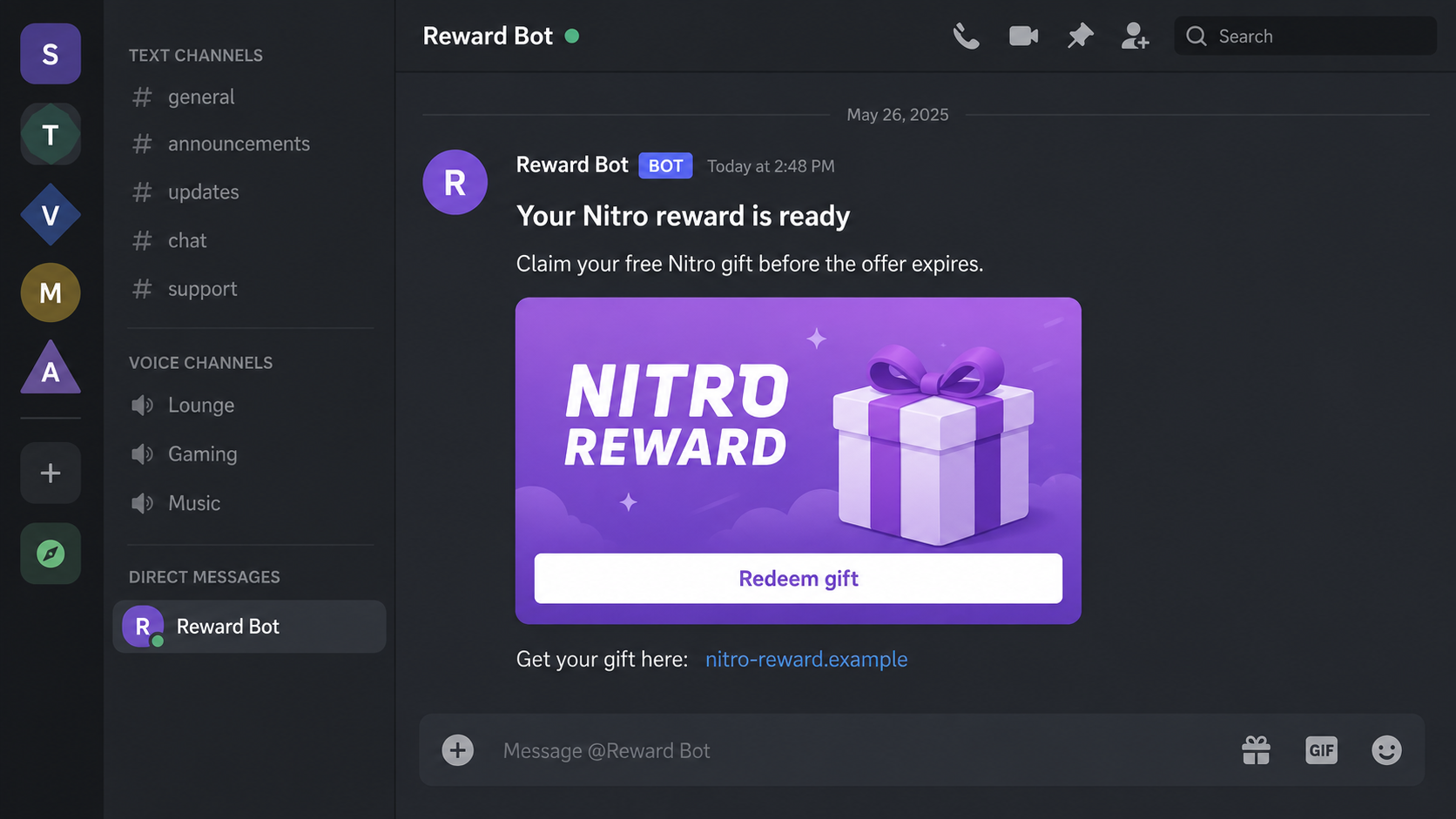
A friend sends a Nitro gift, or a giveaway bot says you have been selected for a reward. The message looks like a pleasant surprise, and there is a button waiting to be pressed.
The Discord Nitro scam hides behind that familiar gift exchange. A few details in the redemption process can tell you whether the offer deserves another second of your attention.
Overview
The reward is bait for account access
Discord Nitro is a real subscription, and legitimate gifts and promotions exist. The scam discussed here is an unauthorized message that borrows that product name to push you toward a fake login, suspicious approval, or unfamiliar download.
A stranger may deliver it through a bot account. It can also arrive from someone you recognize. If a friend’s account has already been compromised, the attacker can use the existing conversation to make a new message feel trustworthy.
The message does not need a complicated story. A free reward, a short expiry window, and a believable preview can be enough to move the conversation from ordinary chat into a redemption process controlled by someone else.
QR approval and password theft are different traps
Discord’s account-security guidance specifically warns about free-Nitro messages that ask users to scan a login QR code. The important issue is what the code authorizes, not whether the surrounding page describes it as a gift.
- Fake login: An imitation form asks you to type your credentials.
- QR login: The attacker tricks you into authorizing their session through your signed-in app.
- App authorization: An unfamiliar application requests permissions under a giveaway pretext.
- Malicious download: A claimed gift tool or verification program introduces a separate risk.
These are related tactics, not interchangeable explanations. Clicking a message, authorizing an app, and approving a login have different consequences. A useful response starts by identifying which action actually occurred.
Real promotions have their own verification route
Discord’s Share Nitro instructions describe an in-app trial flow and warn against substitute links, programs, and QR images. That specific trial should not be confused with every other gift or partner promotion.
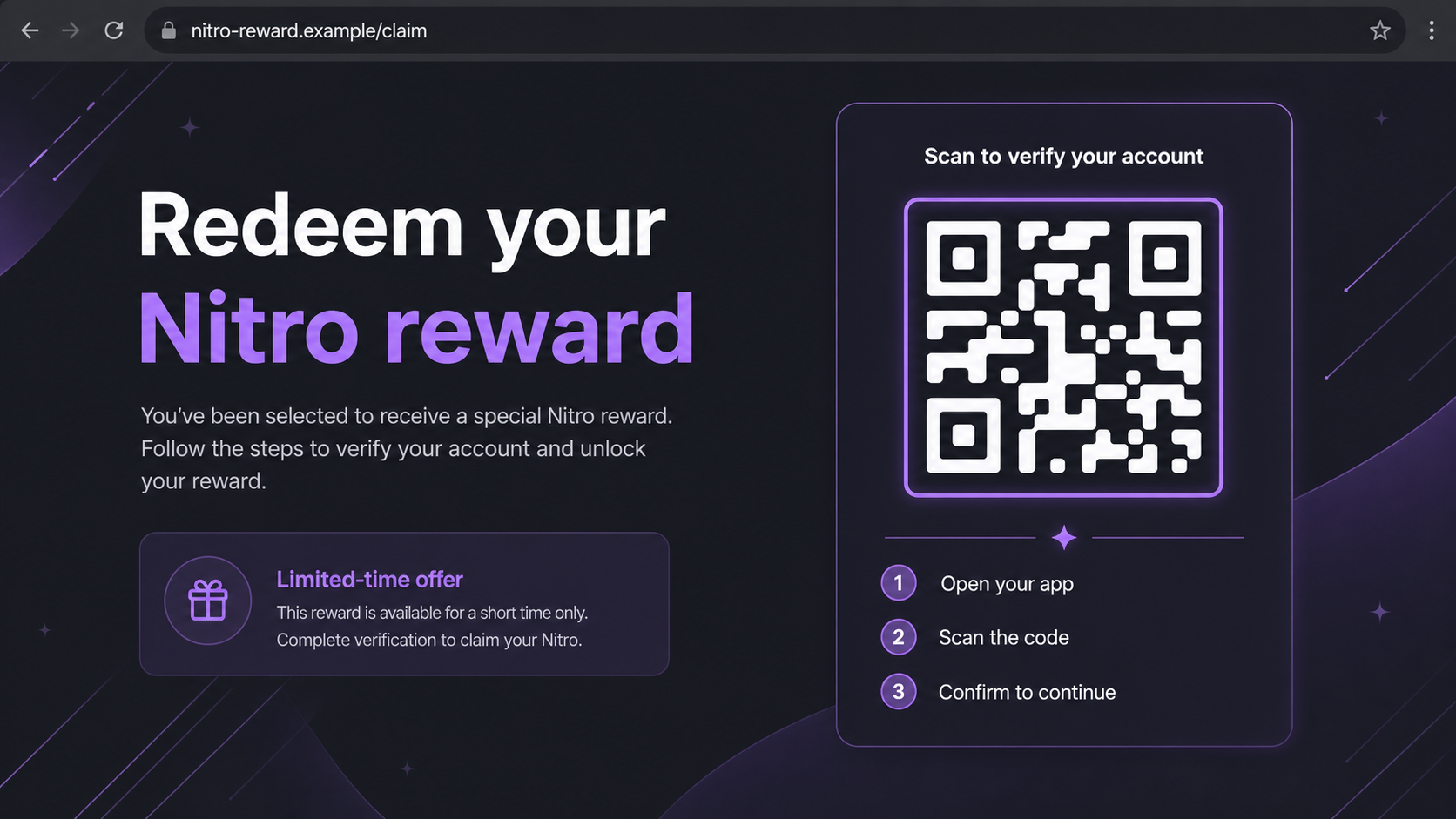
The illustrations here recreate possible scam screens with fictional addresses. They are not live redemption links or authentic attack captures. The QR-like artwork is illustrative, not a code readers should try to scan.
Why the Message From a Friend Is Not Enough
A familiar account removes one of the usual warning signs: an unknown sender. You may have played together for years, exchanged files before, or received a genuine gift previously. None of that proves who is using the account now.
A short message also gives you little writing style to evaluate. One line about spare Nitro can fit almost anyone. The copied preview may do most of the persuading while the actual link receives very little attention.
Use another established contact method to ask whether your friend sent it. A reply inside the same possibly compromised account does not independently confirm anything. If you cannot verify the sender, let the offer wait.
The cost of missing a doubtful promotion is small compared with losing access to private conversations or a server you manage. You do not owe a giveaway bot immediate cooperation.
How the Discord Nitro Scam Works
Step 1: A gift claim opens the conversation
The bait presents Nitro as something already available to you. It might describe a reward, spare gift, promotional trial, or limited giveaway. Instead of deciding whether to buy anything, you are encouraged to collect something supposedly yours.
A bot name or badge can make the message seem automated and official. A profile’s appearance does not establish that Discord operates it. Scammers can choose convincing names without obtaining authority to distribute subscription benefits.
Watch for a sudden change in an existing conversation. If a friend stops responding naturally and keeps directing you to the same claim page, verify their identity somewhere else.
Step 2: The preview makes the destination look familiar
A gift card preview, button, or thumbnail can draw your eye away from the destination address. The visible text may resemble Discord while the actual hostname uses a misspelling, extra word, or unrelated domain.
A genuine platform link can also lead to a user-created server containing a scam. The platform hosting the conversation is not the same thing as the operator making the offer. Do not treat every invitation as a platform endorsement.
That distinction works both ways. A domain’s appearance on an old warning list does not make every page on that legitimate platform fraudulent. Evaluate the destination and requested action together, rather than relying on a copied blacklist.
Step 3: Redemption turns into a request for access
A fake gift page can ask for an email address and password before revealing the supposed reward. The page may say the login is needed to check eligibility. Entering details there exposes them to the page operator.
Another version presents a QR code and asks you to use Discord’s scanner. Discord’s QR login explanation shows that this feature is for signing in to another session. It is not a generic proof that a visitor deserves Nitro.
Read the confirmation in your app. If it is asking you to approve a login you did not initiate, cancel. The harmless-looking promise on the web page does not change the meaning of that approval.
Step 4: An approval can bypass the need to know your password
In the QR version, the attacker wants your already authenticated app to authorize their session. This is why someone can face an account-access problem even though they never typed a password into the fake page.
Two-factor authentication does not make an approval harmless. The point of this trick is to persuade the account owner to authorize access. The attacker is exploiting trust in the prompt, not simply guessing a second-factor code.
Looking at a QR image is not the same as granting access. If you scanned something but canceled the confirmation, explain that distinction when seeking help. If you approved an unfamiliar login, treat the account as potentially exposed.
Step 5: The compromised account becomes another delivery channel
Once someone has access, they may send similar offers to your contacts or misuse the permissions your account holds. A moderator account can create risks for a community as well as its owner.
What changes are possible depends on permissions and the attack. Do not assume that every server has been taken over. Review recent activity, roles, integrations, and messages with other trusted administrators.
A friend may be the first person to notice. If they tell you that your account is sending strange gifts, take the report seriously even if you can still sign in. Continued access does not prove nobody else has a session.
Step 6: Extra verification can deepen the damage
A scam page may add an application permission request, payment step, or downloadable tool. Those are additional decisions, not requirements you should accept merely because you already started the process.
Permission grants have a scope. An app authorization is not automatically the same as full control of your account, but you should review and revoke unfamiliar access through genuine settings. Never assume a giveaway justifies every permission shown.
Do not run code, install an extension, or download a gift generator to unlock a subscription. A scam can move from account access to device compromise when the victim follows one more supposedly necessary instruction.
Company, Address, and Fulfillment Checks
A bot name is not a company identity
A profile calling itself Nitro Support or Reward Bot does not prove an official connection. The same applies to a copied help-center layout and an account using a staff-sounding title.
Use Discord’s own documentation to check a claimed promotion. Do not rely on testimonials posted in the giveaway server, since those messages can be controlled by the people running it.
Read the complete destination address
Pay attention to the domain rather than a familiar word somewhere in the URL. In nitro-reward.example, the product name is just part of a fictional address. It confers no relationship with Discord.
Shortened links and redirects make this harder to assess. You do not need to follow the chain to satisfy your curiosity. Look up the promotion independently through the service’s official channels.
Support should not demand secrets in a DM
A supposed support agent who asks for passwords, backup codes, a payment to remove a restriction, or remote access is introducing fresh risk. Their message is not validated by the fact that you recently had an account problem.
Start your own support request through Discord. Keep its reference and use that established channel for recovery rather than switching to a person who appears in your messages afterward.
The benefit must exist in the real account
A claim page saying success is not proof that Nitro was delivered. Check subscription or gift information inside the actual account. A screenshot of a promised reward is not a substitute for the account’s own state.
For a genuine trial, review renewal terms separately. A legitimate trial can have billing conditions; that does not make a lookalike claim page legitimate or justify sending payment information in an unsolicited chat.
Checking an Offer Without Redeeming It
Slow the process down before granting anything. A message can be left unread, a page can be closed, and a promised expiry can pass. None of those choices authorizes somebody else to use your account.
- Verify a friend’s message through another known contact method.
- Look for the offer in official Discord documentation or the advertised partner’s genuine site.
- Read whether a prompt is granting a login, app permissions, or billing authorization.
- Reject any demand to run a gift program or copy commands into your computer.
Discord’s safer shopping guidance is a useful reference for authorized purchase routes. Use it to check the type of offer you have, rather than applying rules for one promotion to every Nitro gift.
What to Do if You Have Fallen Victim to This Scam
- Close the claim page and identify the action you took.
Record whether you only clicked, entered a password, approved a QR login, authorized an app, or ran a download. If a login confirmation is still open, cancel it.
Keep the original message and available message link for reporting. Do not resend the active claim link to friends as a warning.
- Secure Discord through the genuine app or site.
If you entered credentials or approved an unfamiliar login, change your password promptly through Discord. Review available device and session controls and sign out sessions you do not recognize.
If access is lost, open an official account-recovery request. Do not pay someone in a DM who promises a faster route or claims to know an administrator.
- Inspect authorized applications and server access.
Remove unfamiliar application authorizations in account settings. Server owners should also inspect recently added bots, integrations, roles, and configuration changes with a trusted administrator.
Revoking an app does not replace resetting an exposed password or ending an unauthorized session. Address each type of access separately.
- Protect the connected email account.
Check that your email address and recovery settings remain correct. If the exposed password was reused for email, replace it there immediately from a trusted device.
Review mailbox activity if there are signs of intrusion. A secure mailbox helps preserve your route back into Discord and other services.
- Tell contacts and moderators what happened.
Use a different trusted channel to warn people if your account sent gift messages. Give them a clear instruction not to redeem the offer or approve its QR prompt.
Ask server administrators to review suspicious activity and temporarily restrict an exposed account where appropriate. Coordinating with them can reduce further messages while recovery is underway.
- Check the device if you installed anything.
If a gift tool, script, or unfamiliar extension was run, stop using that device for sensitive logins until it has been checked. Disconnect it from the network if an active compromise is suspected.
Malwarebytes can help locate malware or unwanted software from the download. Scanning does not undo an approved account login, so complete the account-recovery steps too.
- Handle payment exposure with the issuer.
If you entered card details or paid through the fake page, contact the issuer through a known number or app. Explain whether the concern is an actual transaction, exposed card data, or both.
Ask about blocking further use and disputing unauthorized charges. Do not send another payment to release a refund or cancel the supposed gift.
- Report the message and reduce repeat encounters.
Use Discord’s reporting tools for the original message and any malicious account activity. You can also consider AdGuard to filter unwanted advertising and known harmful websites.
Filtering is only one layer. A new domain, a direct message from a compromised friend, or a login you approve yourself may escape that protection. Keep verification prompts under your own control.
Frequently Asked Questions
Is every free Discord Nitro offer a scam?
No. Real gifts and promotions exist. Verify the particular offer through official documentation and its intended redemption flow. A claimed reward becomes dangerous when it pushes an unauthorized login, unfamiliar permissions, an untrusted download, or payment to a stranger.
Can a scam message come from my friend’s account?
Yes. A compromised account can send convincing messages to existing contacts. Ask your friend through another known channel before acting. A reply inside the same account may still be coming from the attacker.
Why would scanning a QR code affect my account?
A login QR can authorize another session through your signed-in app. The important moment is approving the login request. A page calling that action gift verification does not change the access it grants.
Does two-factor authentication make QR rewards safe?
No. Two-factor authentication is valuable, but it does not make it safe to approve someone else’s login. Reject unexpected approvals and read the app’s actual prompt instead of following the reward page’s description.
What if I only opened the gift link?
Close it and check whether anything downloaded or requested permission. Opening a page is not proof that the account was stolen. Take additional action if you submitted information, granted access, installed something, or notice unauthorized activity.
Can a security scan remove an attacker from Discord?
A scan may help identify malicious software, but account sessions and app permissions are separate. Secure Discord directly, review access, and change exposed credentials. Device cleanup and account recovery can both be necessary.
The Bottom Line
The Discord Nitro scam succeeds when a gift request quietly becomes an access request. A familiar sender, attractive preview, or official-looking bot cannot make that handover safe.
Check the offer independently and keep control of login approvals. If you already acted, recover the specific access you exposed and warn anyone who received the same bait from your account.

Join the discussion
0 commentsShare your experience or ask a question about this article.
Discussion
Start the conversation
Have a question or something useful to share? Add the first comment.