

A letter arrives with your website address printed in bold and a deadline that seems uncomfortably close. It looks like a renewal invoice, the kind of routine business expense someone might approve between more urgent tasks.
The Domain Name Services letter scam relies on that hurried glance. The document may be a disguised solicitation, an overpriced transfer offer, or a direct attempt to collect payment details from a business that mistakes it for its real registrar.
Overview
What the Domain Name Services letter claims
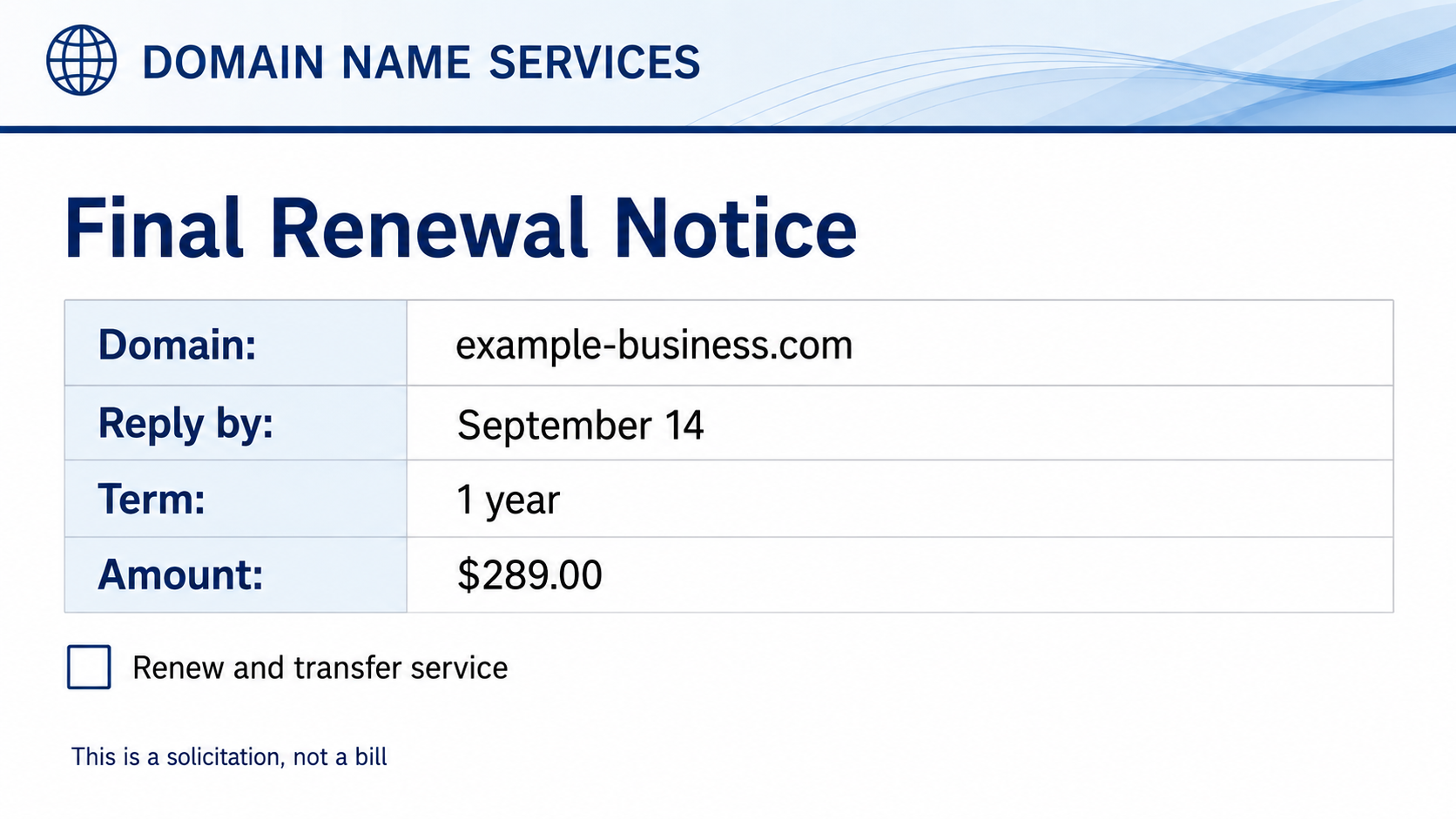
The notice says a company’s domain name is approaching expiration and must be renewed by a stated date. It lists the real domain, a one-year term, a payment amount, and instructions to return the form or pay online.
Words such as “final notice,” “renewal,” “expiration,” and “account” make the mailing resemble an existing obligation. The sender may use a generic name that sounds like an industry authority rather than a separate seller.
What may actually be offered
Some notices are solicitations to transfer a domain to another provider at a high price. A small disclosure may admit that the document is not a bill, even though the rest of the page is designed to be processed like one.
Other versions are fraudulent invoices or phishing attempts. They seek card information, account credentials, or a domain transfer authorization code that could help move control away from the legitimate owner.
Why businesses pay by mistake
Domain registration records, company websites, and public business listings give senders enough accurate information to personalize the notice. Seeing the correct domain can make the document feel connected to an existing vendor.
The person opening the letter may not manage the website. An accounts-payable employee sees an ordinary-looking renewal, while the technical employee who knows the real registrar never sees it.
- The sender is not the registrar shown inside your domain account.
- The document resembles an invoice but includes a small solicitation disclosure.
- The price is far higher than your normal renewal cost.
- Payment also authorizes a transfer to a different provider.
- The notice creates urgency before your actual expiration date.
- The form asks for login credentials or a transfer authorization code.
How the Domain Name Services Letter Scam Works
Step 1: Public domain data identifies a target
The sender compiles domains associated with businesses, professionals, charities, and local organizations. Even when registration contact data is private, the public website often reveals the company name, mailing address, and employee contacts.
Automated tools can build large mailing lists cheaply. A real domain name and plausible renewal window are enough to make a generic template feel specific.
The recipient may assume only the genuine registrar would know the domain. In reality, domain ownership, DNS records, websites, and business directories leave a visible operational footprint.
Step 2: The notice imitates an accounts-payable document
The layout uses a reference number, due date, service term, remittance section, and bold amount. Those features encourage staff to classify the letter as a bill before reading every line.
A generic sender name can add authority. “Domain Name Services,” “Domain Registry,” or “Web Listing Department” sounds official without clearly identifying the vendor relationship.
The FTC warns that fake invoices sent to businesses may bill for domain registration, search optimization, or other services never ordered. A “past due” label can add pressure.
Step 3: Fine print changes the meaning
Some mailings include a sentence such as “This is a solicitation, not a bill.” It may appear in small type, far from the price and deadline.
That disclosure matters because paying may accept a new service rather than renew the existing one. The visual hierarchy tells one story while the contract language tells another.
Read the entire document, including the reverse side. Look for transfer authorization, new-provider terms, cancellation limits, listing services, and language stating that no current account exists.
Step 4: Payment authorizes more than expected
A check or card payment may enroll the business in an overpriced service. The terms can authorize recurring billing or begin a domain transfer away from the present registrar.
If the form asks for an EPP code, transfer key, account password, or approval email, control of the domain may be at risk. Those credentials should be handled like keys to the website and business email.
A transfer can also complicate renewal timing. Staff may believe the domain is safe because a payment was made, while the actual registrar still shows an approaching expiration.
Step 5: The checkout captures financial details
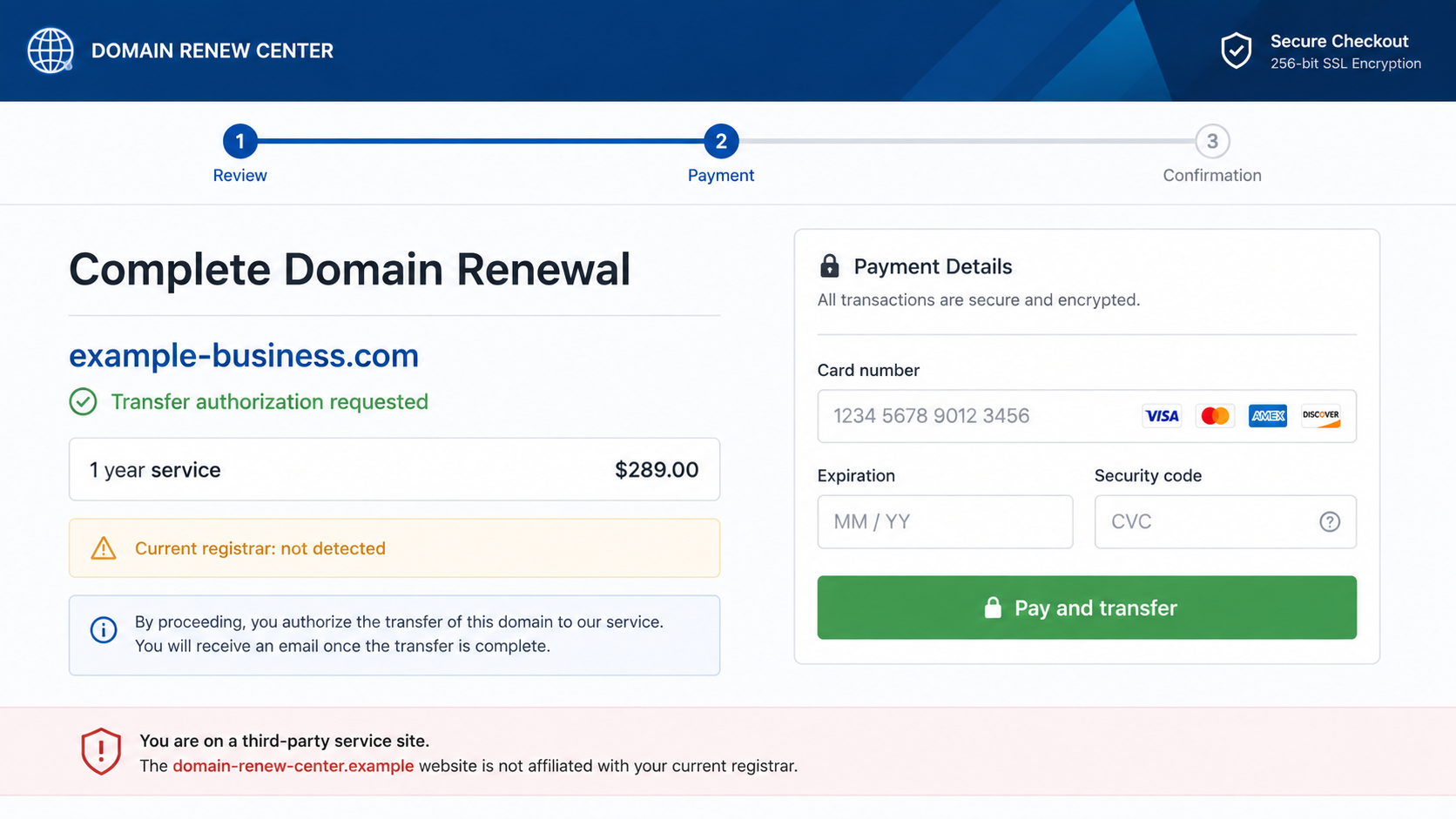
Online versions direct recipients to a payment portal that repeats the domain and amount. A professional form and encryption badge can make the page appear secure.
The site may collect card number, billing address, phone number, and security code. A purely fraudulent page can use those details for unauthorized charges or sell them to other criminals.
Even when a service exists, the checkout may conceal that the current registrar was not detected. Payment security does not resolve whether the seller is authorized or whether the service was requested.
Step 6: Follow-up notices preserve the pressure
If the first letter is ignored, later mail may say “final attempt,” “urgent,” or “expiration pending.” Repetition can make an unfamiliar vendor seem established.
After payment, support may be difficult to reach. Cancellation requests can lead to retention pressure, partial refunds, or claims that the business knowingly accepted transfer terms.
A second scammer may later offer to recover the domain or refund the charge for another fee. Verify any recovery claim through the registrar you already know.
Company, Address, and Fulfillment Checks
Identify your real registrar and renewal date
Sign in through the registrar account your organization already uses. Check the domain status, expiration date, auto-renew setting, payment method, and account contact without using anything from the letter.
ICANN maintains information about domain renewal and registration policies, but it does not send ordinary retail invoices to renew your domain. Your contractual relationship is with a registrar or reseller.
Compare the sender with vendor records
Match the legal name, postal address, support domain, and previous invoices against approved-vendor records. A similar-sounding name is not evidence of an existing account.
Call your known registrar using a number from its official site or past records. Do not use the notice’s phone number to ask whether the notice itself is genuine.
Check what the payment actually purchases
Look for words such as transfer, listing, directory, search submission, hosting, monitoring, or solicitation. A service can be real yet completely different from the renewal the recipient thought they were buying.
Compare the proposed price and term with the current registrar. A large difference should trigger review, especially when the new provider offers no clear management portal or support history.
Protect transfer and account controls
Keep the domain locked unless a planned transfer is underway. Restrict access to transfer codes, require multifactor authentication, and ensure approval messages go to a monitored company mailbox.
Use role-based approval for domain changes. The person paying an invoice should confirm the request with the employee responsible for DNS, hosting, and email continuity.
A Safer Domain Renewal Process
A small business can prevent most of these losses with a simple ownership record. Document where every domain is registered, who can approve changes, and when each renewal should occur.
- Keep registrar names, account IDs, expiration dates, and owners in one inventory.
- Enable auto-renew only with a monitored card and current contact information.
- Require two-person approval for registrar transfers and DNS changes.
- Route all domain invoices to a technical owner before accounts payable acts.
- Lock important domains and enable the strongest available multifactor authentication.
- Review contact addresses so genuine expiration notices reach the right employee.
- Renew from a saved registrar bookmark, never from an unsolicited letter or email.
The FTC’s small-business invoice warning recommends checking unfamiliar invoices and confirming that products or services were actually ordered. That control fits domain notices especially well.
Renewal ownership should not depend on one employee’s memory. Set calendar reminders before the expiration date and after the expected auto-renewal charge, then confirm the new date inside the registrar account.
Keep the domain’s administrative email separate from everyday public contact when practical. A closely guarded address receives fewer solicitations and makes genuine registrar messages easier to recognize.
Review card statements after each expected renewal. The merchant name and amount should match the registrar record, while an unfamiliar charge deserves immediate verification.
For valuable domains, consider registry-lock options and documented emergency contacts. These measures add friction to unauthorized transfers, but they still depend on secure email and careful account access.
Train staff to use a purchase-order number or named internal owner for recurring digital services. A notice that cannot be matched to either should pause in review instead of moving directly to payment.
Destroy discarded letters that contain account references, addresses, or employee names. The notice may be deceptive, yet the printed information can still help someone craft a more targeted follow-up.
Keep screenshots of the registrar dashboard after every important change. A dated record of the lock status, nameservers, contact email, and expiration date can shorten an investigation when a questionable notice arrives.
Businesses using an outside web agency should define who owns the registrar account. The domain should remain accessible to the organization even if a contractor changes or a commercial relationship ends.
What to Do if You Have Fallen Victim to This Scam
- Contact the real registrar immediately. Ask whether a transfer, nameserver change, renewal, or account modification is pending. Request a lock if anything unexpected appears.
- Change domain-account credentials. Replace the password, end unfamiliar sessions, rotate exposed transfer codes, and enable multifactor authentication from a clean device.
- Secure the associated email account. Domain approvals and password resets often reach email. Review recovery methods, forwarding rules, and recent sign-ins for unauthorized changes.
- Call the payment provider. Explain whether the charge was unauthorized or induced by a misleading invoice. Ask about blocking the card, stopping a check, and available dispute procedures.
- Cancel in writing. Send a clear cancellation and refund request using a traceable method. Keep the letter, envelope, checkout screenshots, terms, receipt, and every reply.
- Verify website and email operation. Check nameservers, DNS records, website destination, and company mail flow. Unauthorized changes can redirect visitors or intercept messages.
- Scan after using a suspicious portal. If the site prompted a download, browser extension, or remote-access tool, remove it and run a complete Malwarebytes scan.
- Block known malicious destinations. AdGuard can help stop access to recognized phishing and advertising domains. It cannot reverse a domain transfer or dispute a card payment.
- Report the sender. File the notice and payment details at ReportFraud.ftc.gov. Your state attorney general or postal authority may also accept deceptive-mail reports.
- Warn internal staff. Tell accounts payable and technical teams what happened. Add the sender to vendor-screening rules and require direct confirmation for future domain notices.
Frequently Asked Questions
Is a Domain Name Services letter always fake?
The generic wording can be used by different senders, so evaluate the exact document. Some notices may disclose a real solicitation, while others can be fraudulent invoices or phishing attempts.
The key question is whether the sender is your current registrar and whether your organization intentionally requested the offered service.
How did the sender know my domain and address?
Websites, business directories, DNS records, registration data, and marketing lists can connect a company with its domain and mailing address. Accurate details do not prove a vendor relationship.
Scammers use real information because it reduces suspicion and helps a mass-produced document pass as an account-specific notice.
Does “not a bill” mean the notice is harmless?
No. The disclosure may mean the document is a solicitation, but paying can still create a contract, authorize a transfer, or begin recurring charges.
Read what the service is, who provides it, and how cancellation works. Deceptive presentation remains a serious reason not to proceed.
Will ignoring the letter make my domain expire?
Ignoring an unrelated solicitation does not change the registration by itself. Your domain can still expire if you also neglect genuine notices from the actual registrar.
Verify the date directly inside your known account. Renew there if necessary, without using the letter’s form, site, or payment instructions.
What is a domain transfer authorization code?
It is a secret code used to approve moving a domain between registrars. Treat it like a sensitive account credential and share it only during a transfer you deliberately initiated.
If the code was exposed, contact the registrar, replace it if possible, and monitor for transfer emails that require immediate rejection.
Can a paid domain solicitation be refunded?
That depends on the seller’s terms, the payment route, the timing, and applicable law. Request cancellation promptly and ask the bank or card issuer about legitimate dispute options.
Do not pay a recovery service that contacts you unexpectedly. Upfront recovery fees can turn one business loss into another.
The Bottom Line
The Domain Name Services letter scam makes an unsolicited offer look like a familiar renewal obligation. Real domain details and official-looking formatting are used to move the document through a business before anyone checks the vendor.
Renew domains only from the registrar account your organization already controls. Verify the provider, date, price, service, and transfer language before approving any payment.
If the Domain Name Services letter scam already captured money or credentials, protect the domain first, then address the payment and reports. Website and email control are too important to leave waiting.

Join the discussion
0 commentsShare your experience or ask a question about this article.
Discussion
Start the conversation
Have a question or something useful to share? Add the first comment.