

Hip pain has a way of shrinking a person’s world, one stair, walk, or restless night at a time.
Halsten Stride arrives with red lights, impressive percentages, and a generous-looking guarantee. Understanding the offer requires reading several pages together.
Overview
What Halsten Stride appears to be
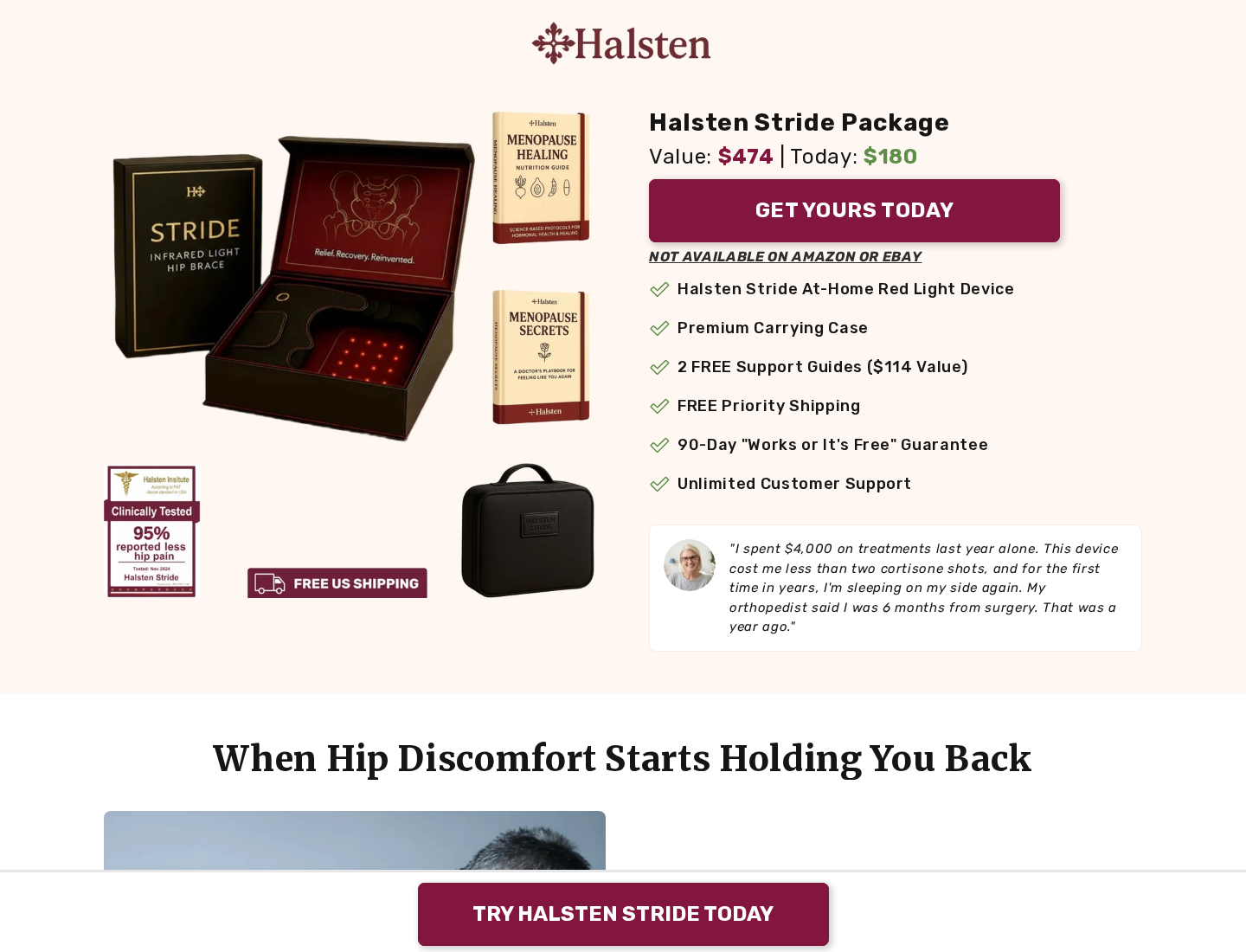
Halsten Stride is a wearable hip wrap containing red and near-infrared light emitters. The seller describes three wavelengths: 660nm, 830nm, and 940nm.
The wrap combines adjustable support with light exposure around the hip area. It is listed around $180 against a much larger stated value.
Photobiomodulation is a real research field. That fact does not automatically validate every result claimed for a particular retail device.
Why the presentation raises important questions
One sales page connects Stride with pain reduction, collagen, tendon recovery, mobility, menopause-related discomfort, and avoiding invasive treatment.
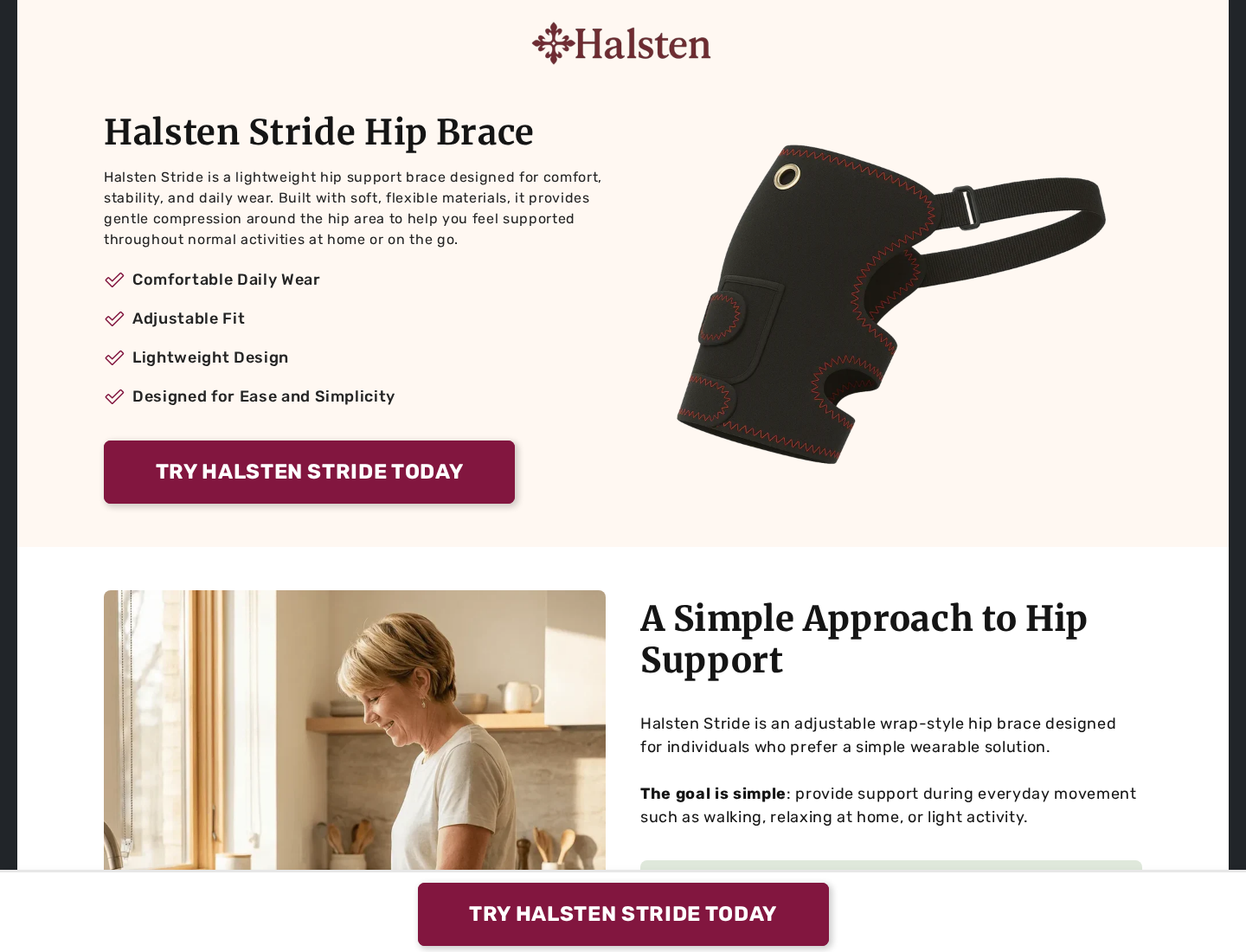
Another official Halsten page describes it much more modestly as a lightweight, non-medical support brace for comfort and everyday wear.
Those descriptions create materially different expectations. A buyer deserves to know whether the purchase is a simple support wrap or a clinically substantiated therapy device.
- A physical wearable product is being sold.
- The website makes broad therapeutic claims.
- A second official page uses non-medical language.
- The guarantee requires a return and inspection.
- Public complaints repeatedly discuss service and refunds.
- No recurring refill plan was established.
Our assessment of the offer
We cannot fairly label Halsten Stride nonexistent. The documented concerns instead involve contradictory positioning, unverified performance figures, product value, and refund execution.
Some customers may enjoy warmth, support, or temporary relief. That experience would not prove tissue repair or predictable clinical improvement.
Because published complaints describe difficult returns, buyers should secure written answers before relying on “works or it’s free.”
How the Halsten Stride Offer Works
Step 1: The advertisement meets the buyer at a vulnerable moment
The likely audience has already tried rest, stretching, pain medication, cushions, braces, or appointments without achieving dependable relief.
Advertising can then frame Stride as the overlooked technology capable of reaching deeper than ordinary surface treatments.
That story is persuasive because it offers control. The customer can wrap the hip at home rather than face another complicated decision.
Urgency grows when the page suggests continued pain may lead toward injections or surgery.
Step 2: Three wavelengths create a scientific narrative
Specific numbers sound precise. The page gives each wavelength a different role involving surface tissue, deeper structures, circulation, or cellular recovery.
Wavelengths alone do not establish delivered dose. Irradiance, distance, treatment area, session duration, heat, and device construction also matter.
Without complete technical measurements, consumers cannot compare the advertised protocol with research conducted on different equipment.
A study about red light generally is not automatically evidence for Halsten Stride’s exact output or promised outcomes.
Step 3: Large statistics make improvement look predictable
The promotional page uses strong percentages and clinical language, including a claim that users experienced substantially less hip pain.
Meaningful clinical evidence should identify the study design, sample size, participant conditions, comparator, measurement scale, duration, and adverse events.
A percentage floating on a sales page cannot answer those questions. It may refer to an internal survey, selected participants, or another undisclosed source.
Before accepting the figure, ask for the complete study and verify that researchers tested the exact commercial device.
Step 4: The same product receives a softer description elsewhere
Halsten’s simpler page calls Stride a non-medical support brace designed for comfort, stability, and normal activities.
That restrained language is easier to understand and carries fewer therapeutic implications.
The conflict matters because customers may arrive through the aggressive page while refund disputes are judged against narrower policy wording.
Save the exact advertisement you saw. Website copy can change after an order, but your purchasing record should not.
Step 5: A high reference value magnifies the deal
The page places a roughly $180 price beside a stated value of $474. That makes hesitation feel like missing a major reduction.
A reference value should reflect genuine market history, not merely a number selected to make the current price attractive.
Compare the device using measurable details: wavelength, verified output, coverage, controller, power source, timer, certifications, warranty, and return destination.
Do not compare only logos and crossed-out prices. Similar-looking light wraps can differ, but appearance cannot justify a premium by itself.
Step 6: The 90-day promise still requires a successful return
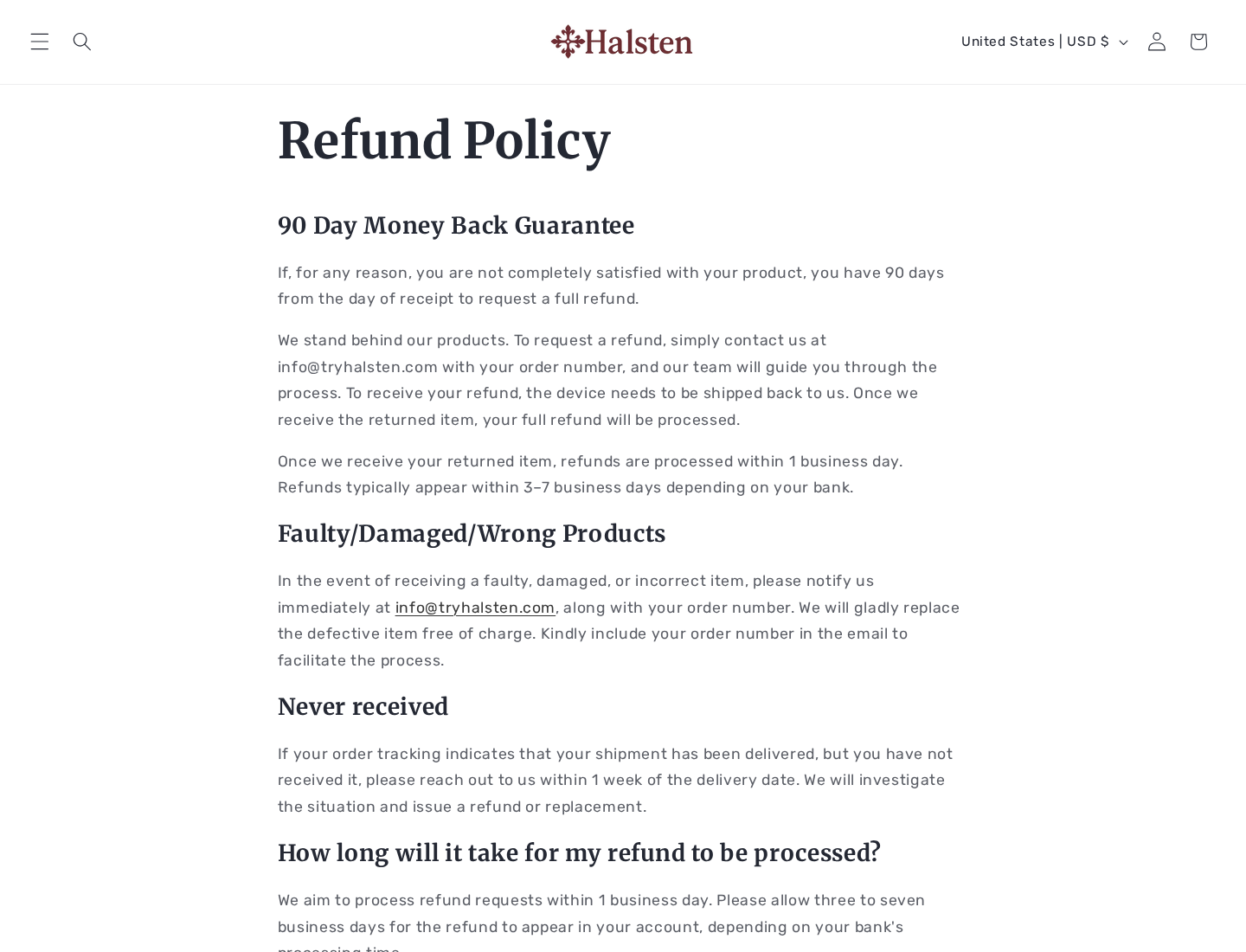
Halsten advertises a 90-day satisfaction promise. Its refund page says the request begins by emailing customer support.
The customer must return the product, and the refund follows receipt. The practical value therefore depends on authorization, instructions, shipping, tracking, and responsiveness.
Public complaints submitted to review and consumer-reporting platforms allege partial-refund offers, delayed replies, and costly returns to China.
Those are complainants’ accounts, not proof that every return fails. Their repetition makes pre-purchase clarification reasonable.
The Medical Claims Need Product-Specific Evidence
Red light research is not a universal approval stamp
Photobiomodulation has been studied for several applications, using different wavelengths, doses, treatment schedules, and devices.
Results from one protocol cannot simply be transferred to every consumer wrap containing red lights.
The relevant question is whether Halsten Stride itself was tested for the exact conditions, outcomes, and timeframes promoted to shoppers.
Ask for a paper or registration that names the device. General citations about light biology are not enough.
Hip pain is not one condition
Pain near the hip can originate from tendons, bursae, joints, muscles, nerves, the spine, or referred problems elsewhere.
A wrap cannot determine which structure is involved. Temporary comfort may coexist with a condition that still needs assessment.
Sudden inability to bear weight, fever, trauma, progressive weakness, or severe night pain requires timely medical attention.
Avoiding surgery is an especially serious implication
Some people appropriately avoid surgery through rehabilitation, medication, activity changes, or natural recovery.
That does not establish that a retail light wrap prevents an operation. Surgical decisions depend on diagnosis, severity, function, and response to evidence-based care.
A product advertisement should not frighten customers away from professional advice or imply a guaranteed substitute.
What Customer Feedback Can and Cannot Establish
The current ratings are notably mixed
At the time of review, the relevant Trustpilot profile showed both substantial positive feedback and a large share of one-star reviews.
Positive reviewers describe relief or helpful service. Critical reviewers discuss quality, delivery, effectiveness, and difficulty obtaining refunds.
Neither group can establish a universal outcome. The divided pattern suggests buyers should focus on recurring specifics rather than the average alone.
BBB complaints emphasize the post-purchase experience
Recent complaints listed by the Better Business Bureau describe disputed returns, unsatisfactory remedies, and communication problems.
A BBB Scam Tracker report also alleges a financial loss and an unexpected China return destination.
These are consumer allegations and should be presented as such. They do not prove that Zenara Commerce LLC intended to deceive every customer.
They do show why the return country and full process should be confirmed before payment.
Testimonials do not replace adverse-experience reporting
A sales page naturally highlights successful stories. It rarely gives equal space to people who felt nothing, disliked the fit, or experienced discomfort.
Clinical usefulness requires more than selected narratives. Buyers need typical results, failure rates, contraindications, and clear information about unwanted effects.
How to Test the Purchase Without Losing Control
Ask five questions before ordering
Request the exact model number, measured irradiance, recommended dose, regulatory status, and product-specific clinical evidence.
Then ask where a return from your country must be sent and whether normal testing changes refund eligibility.
Do not accept an answer that merely repeats “clinically proven” or links to research about unrelated devices.
Inspect the parcel before wearing the device
Photograph the unopened package, shipping label, device, controller, cable, manual, warning labels, and identifiers.
Check for damage, excessive heat, loose wiring, missing instructions, or electrical markings incompatible with your location.
Do not use damaged light or heating equipment. Contact support with photographs immediately.
Measure modest outcomes consistently
Track pain, walking tolerance, sleep interruption, medication, and activity using the same scale and time each day.
Do not interpret visible red light or warmth as proof of tissue repair. Those observations show operation, not clinical success.
Choose a return decision date well before day 90. Support exchanges and international shipping can consume a surprising amount of time.
Pricing and Return Questions to Resolve First
What exactly does “works or it’s free” mean?
That phrase sounds like a performance guarantee. The written policy requires the buyer to contact support and return the product.
Ask whether original packaging is mandatory, whether wear is permitted, who pays postage, and whether any deductions apply.
Request written confirmation that a lack of meaningful improvement qualifies, not only a manufacturing defect.
Will the return travel domestically or internationally?
The website lists a Wyoming business address, yet complainants allege being directed to China for returns.
A registration or mailing address does not necessarily operate as a returns warehouse.
International tracked postage can be expensive. The destination should be known before a shopper treats the guarantee as risk-free.
Is there a subscription hidden in the offer?
We did not establish an automatic refill or recurring product plan for Halsten Stride.
Because it is durable hardware, repeat shipments would be unusual. Still, review the final total for accessories, priority processing, or optional protection.
Technical and Regulatory Details Worth Requesting
Delivered light output matters
Wavelength describes color or penetration characteristics, but dose depends on power reaching the skin over a measured area and time.
Ask for irradiance in recognized units, treatment distance, programmed session length, and the resulting energy dose.
If the seller provides only nanometer figures, a meaningful comparison with published protocols remains impossible.
Electrical markings should match the market
The delivered controller, adapter, battery, and cable should carry clear model information and markings appropriate for the buyer’s country.
Check input voltage, charging requirements, timer behavior, operating temperature, and cleaning instructions.
A logo alone does not confirm independent testing. Ask which standard applies and which named laboratory assessed compliance.
Adverse-use guidance belongs in the manual
A responsible manual should address photosensitivity, relevant medications, pregnancy, cancer treatment, impaired sensation, active skin problems, and electronic implants.
That list is not a diagnosis or complete contraindication guide. It shows why a sales-page promise cannot be the only instruction.
Stop after unusual heat, rash, dizziness, increased pain, or another concerning response and obtain appropriate advice.
Registration and therapeutic clearance are different
A business registration, trademark application, or facility listing does not prove that health claims were reviewed by a medical regulator.
Ask the seller for the specific clearance, listing, or exemption connected with the exact model and advertised intended use.
Verify the identifier in the regulator’s own database rather than relying on a badge copied into the storefront.
Also compare the advertised intended use with the wording attached to that identifier. A different use cannot support every promotional promise.
If no product-specific record exists, evaluate Stride as a consumer wellness wrap and keep expectations correspondingly modest.
Company, Address, and Fulfillment Checks
Zenara Commerce LLC is the named company
The website identifies Zenara Commerce LLC in its business information. A federal trademark application also connects that company with the Halsten name.
This is more concrete than an anonymous storefront. It does not by itself validate the device’s medical claims or customer-service performance.
The legal entity on the receipt and payment statement should match or have an explained relationship to Zenara Commerce LLC.
The Wyoming address may be administrative
Halsten lists 30 N Gould St, Suite 40714, Sheridan, Wyoming 82801.
That address should not be assumed to be the manufacturer, clinic, product laboratory, or returns center.
Ask whether it accepts parcels. Never send a return there unless support provides written authorization.
The phone and email should be tested before payment
The site lists info@tryhalsten.com and +1 307 316 5197.
Call and ask about the exact Stride model, return country, postage, refund timing, and company identity.
A functioning presale answer is useful, but keep expectations realistic. Written confirmation remains easier to document during a dispute.
Fulfillment may involve international carriers
The shipping page lists several carriers, including services commonly used for cross-border fulfillment.
Overseas fulfillment does not make a product fake. It can create longer transit, harder returns, and limited visibility into the manufacturer.
Inspect the parcel’s sender, customs label, model code, and country of origin. Keep everything until the guarantee period ends.
What to Do if Your Halsten Stride Order Has a Problem
- Stop unsafe use immediately. Disconnect the wrap after overheating, skin injury, electrical odor, worsening pain, numbness, or damage to the cable or controller.
- Collect a complete record. Save the advertisement, checkout, guarantee, confirmation, parcel label, manual, device identifiers, and photographs of any defect.
- Email a precise request. State the order number, delivery date, problem, desired remedy, and policy deadline. Ask for a written response.
- Clarify the return before shipping. Obtain authorization, exact address, destination country, tracking standard, condition requirements, postage responsibility, and expected refund date.
- Reject endless partial offers. If you qualify for a full refund, restate the written promise and set a reasonable deadline rather than repeatedly renegotiating.
- Contact the payment provider. If the seller stops responding or materially changes the terms, ask about chargeback rights before the issuer’s deadline.
- Protect your browsing environment. Use Malwarebytes to inspect a device exposed to an unexpected download. AdGuard can suppress many harmful advertising routes.
- Report accurately. Submit documented problems to consumer authorities and review platforms, distinguishing your direct experience from assumptions about other orders.
Is Your Device Infected? Run a Free Malware Scan
Slow performance, constant pop-ups, or strange behavior? These are classic signs of a malware infection. The fastest way to find out is to scan your device with Malwarebytes Free — one of the most trusted malware removal tools available.
The free version detects and removes the most common threats, including:
- Adware — the cause of those annoying pop-ups
- Browser hijackers — unwanted redirects and changed homepages
- Trojans and spyware — hidden programs stealing your data
- Potentially unwanted programs (PUPs) — software you never asked for
👉 Select your device below — Windows, Mac, or Android — then follow the simple steps to download Malwarebytes, scan your system, and remove any threats it finds. The scan usually takes 5 to 20 minutes.
Run a Malware Scan with Malwarebytes for Windows
Malwarebytes is one of the most popular and trusted anti-malware tools for Windows — and it’s completely free for removing infections. It catches threats that many antivirus programs miss, including adware, browser hijackers, and trojans. Follow the steps below to scan and clean your PC in just a few minutes.
Download Malwarebytes
Click the button below to download the latest version of Malwarebytes for Windows from the official source. The free version is all you need — it will scan your computer and remove adware, browser hijackers, and other malicious software at no cost.
Download MalwarebytesOfficial installer for Windows 11 and 10. Your download starts right away.Want real-time protection? See Malwarebytes Premium Malwarebytes Free for WindowsScans and removes malware at no cost
-
Install Malwarebytes
When the download finishes, open your Downloads folder and double-click the MBSetup file. If Windows shows a User Account Control pop-up, click “Yes” to allow the installation.

Follow the On-Screen Prompts to Install Malwarebytes
The setup wizard will walk you through a few quick screens:
-
Choose where you’re installing the program — “Personal Computer” or “Work Computer” — then click Next.

-
Malwarebytes will now install on your device. This usually takes under a minute.

-
When installation is complete, the “Welcome to Malwarebytes” screen will open automatically.

-
On the final screen, click Open Malwarebytes to launch the program.

-
Enable “Scan for Rootkits”
Before scanning, turn on rootkit detection so Malwarebytes can find even the most hidden threats. Click the Settings gear icon on the left side of the screen.

In the settings menu, find “Scan for rootkits” and click the toggle so it turns blue.

Done? Click “Dashboard” in the left pane to return to the main screen.
Start the Scan
Click the blue Scan button. Malwarebytes will automatically update its virus database and start checking your computer for malware.

-
Wait for the Scan to Finish
The scan checks your entire system for browser hijackers and other malicious programs, so it can take 5 to 20 minutes depending on your computer. Feel free to do something else — just check back occasionally to see the progress.

-
Quarantine the Detected Threats
When the scan is done, you’ll see a list of everything Malwarebytes found — malware, adware, and potentially unwanted programs. Click the “Quarantine” button to remove all of them at once.

Malwarebytes will now remove the malicious files and registry entries and move them safely into quarantine.

-
Restart Your Computer
Some threats can only be fully removed after a reboot. If Malwarebytes asks you to restart, click Yes. Once you’re logged back in, Malwarebytes has finished removing the threats it found.

That’s it — your Windows PC is now clean of trojans, adware, and other malware, and should be back to running smoothly.
If you are still having problems with your computer after completing these instructions, then please follow one of the steps:
- Run a computer scan with ESET Online Scanner
- Ask for help in our Windows Malware Removal Help & Support forum.
Run a Malware Scan with Malwarebytes for Mac
Malwarebytes for Mac is a free on-demand scanner that removes the malware other security software tends to miss — adware, browser hijackers, and unwanted programs included. Cleaning an infected Mac with Malwarebytes has always been completely free, and it’s our go-to recommendation. Follow the steps below to scan and clean your Mac in just a few minutes.
-
Download Malwarebytes for Mac
Click the button below to download the latest version of Malwarebytes for Mac.
Download MalwarebytesOfficial installer for macOS. Your download starts right away.Want real-time protection? See Malwarebytes PremiumMalwarebytes Free for MacScans and removes malware at no cost -
Open the Malwarebytes setup file
When the download finishes, open your Downloads folder and double-click the setup file to begin the installation.

-
Follow the On-Screen Prompts to Install Malwarebytes
The Malwarebytes for Mac Installer will guide you through a few quick screens. Click “Continue” and keep following the prompts until the installation completes.



When the installation is complete, Malwarebytes opens to the Welcome to Malwarebytes screen. Click “Get started“.
-
Select “Personal Computer” or “Work Computer”
Malwarebytes will ask what type of computer you’re installing it on. Click either Personal Computer or Work Computer, whichever applies.

-
Start the Scan
Click the “Scan” button. Malwarebytes will automatically update its detection database and begin checking your Mac for malware.

-
Wait for the Scan to Finish
Malwarebytes will scan your Mac for adware, browser hijackers, and other malicious programs. This can take a few minutes, so feel free to do something else — just check back occasionally to see the progress.

-
Quarantine the Detected Threats
When the scan is done, you’ll see a list of everything Malwarebytes found. Click the “Quarantine” button to remove all the threats at once.

-
Restart Your Mac
Malwarebytes will now remove all the malicious files it found. Some threats can only be fully removed after a reboot — if Malwarebytes asks you to restart, allow it. Once you’re logged back in, your Mac is clean.

That’s it — your Mac is now free of adware, rogue browser extensions, and other potentially harmful software.
If you are still experiencing problems while trying to remove a malicious program from your computer, please ask for help in our Mac Malware Removal Help & Support forum.
Run a Malware Scan with Malwarebytes for Android
Malwarebytes for Android automatically detects and removes dangerous threats like malware and ransomware so you don’t have to worry about your most-used device being compromised. Aggressive detection of adware and potentially unwanted programs keeps your Android phone or tablet running smooth.
-
Download Malwarebytes for Android.
You can download Malwarebytes for Android by clicking the link below.
Get Malwarebytes for AndroidOpens Google Play in a new tab.Want real-time protection? See Malwarebytes Premium for AndroidMalwarebytes for AndroidScans your phone and removes malware at no cost -
Install Malwarebytes for Android on your phone.
In the Google Play Store, tap “Install” to install Malwarebytes for Android on your device.

When the installation process has finished, tap “Open” to begin using Malwarebytes for Android. You can also open Malwarebytes by tapping on its icon in your phone menu or home screen.

-
Follow the on-screen prompts to complete the setup process
When Malwarebytes will open, you will see the Malwarebytes Setup Wizard which will guide you through a series of permissions and other setup options.
This is the first of two screens that explain the difference between the Premium and Free versions. Swipe this screen to continue.
Tap on “Got it” to proceed to the next step.
Malwarebytes for Android will now ask for a set of permissions that are required to scan your device and protect it from malware. Tap on “Give permission” to continue.
Tap on “Allow” to permit Malwarebytes to access the files on your phone.
-
Update database and run a scan with Malwarebytes for Android
You will now be prompted to update the Malwarebytes database and run a full system scan.

Click on “Update database” to update the Malwarebytes for Android definitions to the latest version, then click on “Run full scan” to perform a system scan.

-
Wait for the Malwarebytes scan to complete.
Malwarebytes will now start scanning your phone for adware and other malicious apps. This process can take a few minutes, so we suggest you do something else and periodically check on the status of the scan to see when it is finished.

-
Click on “Remove Selected”.
When the scan has been completed, you will be presented with a screen showing the malware infections that Malwarebytes for Android has detected. To remove the malicious apps that Malwarebytes has found, tap on the “Remove Selected” button.

-
Restart your phone.
Malwarebytes for Android will now remove all the malicious apps that it has found. To complete the malware removal process, Malwarebytes may ask you to restart your device.
That’s it — your Android phone is now clean — no more malicious apps, adware, or browser redirects.
If you are still having problems with your phone after completing these instructions, then please follow one of the steps:
- Restore your phone to factory settings by going to Settings > General management > Reset > Factory data reset.
- Ask for help in our Mobile Malware Removal Help & Support forum.
Stay Protected: Block Ads and Malicious Sites
Now that your device is clean, keep it that way. Most infections start with a malicious ad or a fake download button — so blocking them at the source is your best defense.
We recommend AdGuard, which blocks malicious ads, phishing pages, and dangerous redirects before they can reach you.
👉 Download AdGuard and browse safely
Frequently Asked Questions
Is Halsten Stride a scam?
We found a real company identity and product offer, not proof that every sale is fraudulent. Contradictory claims and repeated refund complaints justify caution.
Is Halsten Stride a medical device?
One official page calls it a non-medical support brace, while promotional material uses therapeutic language. Ask the seller for its exact regulatory classification.
Does red light therapy repair hip tissue?
Research depends on the condition, device, wavelength, delivered dose, and protocol. General red-light studies do not prove Halsten’s specific repair promises.
Does Halsten Stride have a 90-day guarantee?
The website states a 90-day return period. The customer must contact support, return the item, and wait for receipt and processing.
Does Halsten Stride create recurring charges?
No automatic refill plan was identified in the reviewed offer. Confirm that the final checkout contains no added warranty or recurring service.
Where do Halsten returns go?
The public policy does not provide the return address upfront. Ask for the exact destination country and cost before purchasing or mailing anything.
The Bottom Line
Halsten Stride appears to be a real wearable light-and-support product. Its existence does not validate every medical-sounding statement or advertised percentage.
The sharpest concern is the distance between aggressive therapy claims, a separate non-medical description, and consumer allegations about difficult international returns.
Demand technical evidence and written refund details before spending $180. Treat any comfort as personal symptom relief, not proof that an underlying hip condition has healed.

Join the discussion
0 commentsShare your experience or ask a question about this article.
Discussion
Start the conversation
Have a question or something useful to share? Add the first comment.