

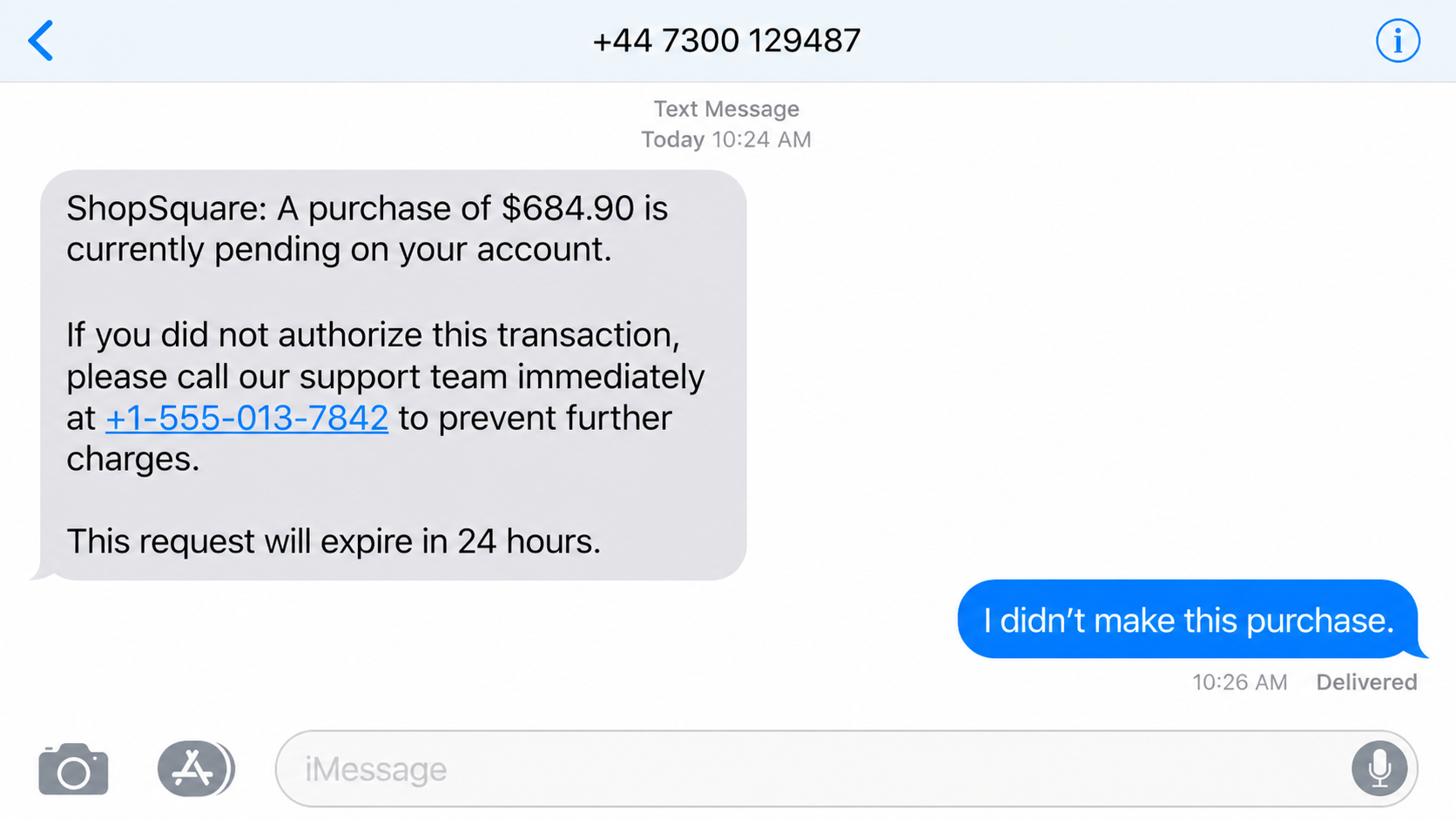
A fake pending purchase iMessage says an order is waiting for approval. If it was not yours, a support number promises to cancel it before the charge goes through.
The transaction is invented. The code that arrives during the call is real.
Overview
The fake purchase is designed to trigger a callback
The fake pending purchase iMessage scam starts with an alert about an order, card transaction, or e-commerce payment the recipient does not recognize. The message does not always include a clickable link. It may simply tell the person to call a telephone number to stop the charge.
That callback is the real opening. A criminal answers as a bank fraud investigator, retailer, or marketplace support agent and treats the invented purchase as an active emergency.
Singapore’s ScamShield warned in August 2026 about iMessages impersonating DBS and Shopee. Recipients were told that a pending transaction required verification and were directed to an unfamiliar hotline.
The agent asks for a one-time password
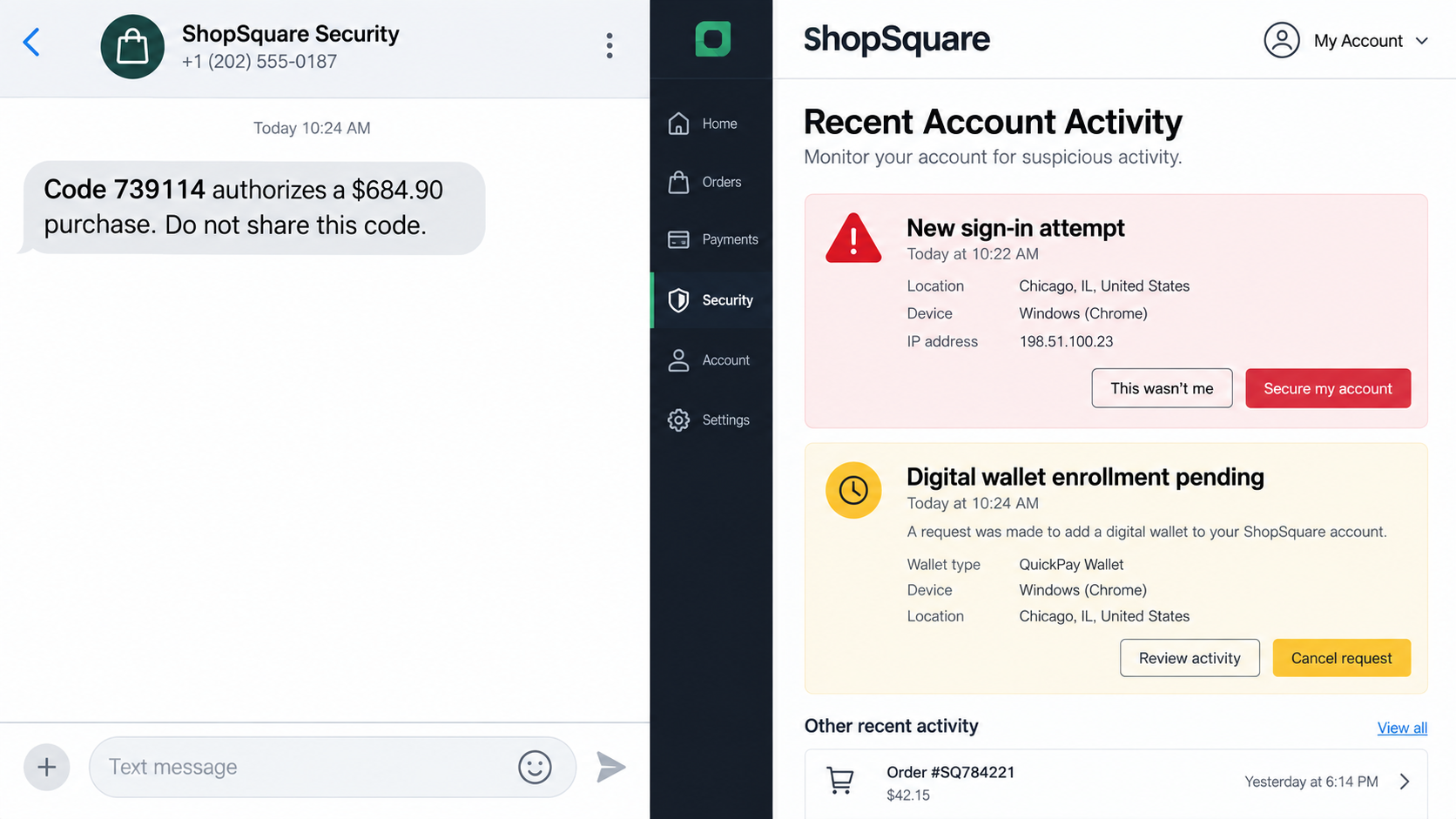
During the call, the scammer collects identity details and claims to begin a cancellation. The victim then receives a genuine one-time password from a bank or e-commerce service.
The caller says the OTP cancels, verifies, or blocks the purchase. In reality, it may authorize a password reset, login, new payee, card transaction, wallet addition, or purchase initiated by the criminal.
A real security code can complete a fake story. The text that delivers the code usually says what it is for and warns not to share it.
The brands are real, but neither sent the scam
DBS is a real bank and Shopee is a real e-commerce platform. Their names give the message immediate relevance to a large audience. The campaign works even when the recipient uses only one of them.
Warning signs include:
- an unexpected iMessage claims a purchase is pending or needs approval;
- the message comes from a foreign number or random email address;
- the only cancellation route is a telephone number inside the message;
- the number differs from the one in the official app or on the bank card;
- a caller asks for an OTP, PIN, password, or full card details;
- the supposed agent keeps the victim on the line while a code arrives;
- the code describes a login or payment rather than a cancellation;
- the caller says hanging up will allow the transaction to proceed.
Why Calling the Number Feels Safer Than Clicking
People have learned to be suspicious of links in text messages. A telephone number can seem like a safer alternative because it leads to a conversation instead of a web form.
The scam uses that assumption. The number is not an independent support channel. It was placed in the message by the same people who invented the transaction.
A live operator can answer questions, adjust the script, repeat account language, and sound calm while the recipient is worried. The caller may transfer the victim to a second person who claims to be a fraud supervisor or bank investigator.
Caller ID does not repair the problem. A callback reaches the number that was dialed. An incoming call can also be spoofed to display a familiar company or bank.
The independent check is simple: end the conversation, open the official bank or shopping app, and inspect recent activity. If help is needed, use the number printed on the card or published on the verified company website.
Do not ask the caller whether the number is genuine. A scammer can confirm their own false identity all day. Verification must leave the channel they control.
The operator may try to prevent that check by saying the transaction is still in a hidden authorization queue. Real providers can explain pending activity through an independently reached fraud team. A claim that only one unknown agent can see the charge is a reason to hang up.
Another pressure tactic is to read back information the victim just supplied and present it as account verification. Repeating a name, email address, or card digits does not prove access to the provider’s systems. It proves that the caller heard the answer.
Some calls use several voices. A supposed marketplace representative transfers the customer to a bank investigator, who then transfers the call to a security specialist. The handoffs create theater and keep the victim from making an outside call. All of the roles can be people working together or one operator changing tone.
A genuine fraud team will not object if a customer hangs up and calls the official number. It may place temporary protections on an account, but it does not need the customer to remain isolated on an unverified line.
How the Fake Pending Purchase iMessage Scam Works
Step 1: A high-volume iMessage creates a believable charge
The campaign sends alerts from foreign telephone numbers or email-based iMessage accounts. A familiar bank or marketplace name is combined with a realistic amount and recent time.
The criminal does not need access to the recipient’s account. Popular brands and ordinary purchase amounts ensure that some messages reach active customers.
Step 2: The recipient calls the supplied hotline
The message says immediate contact is required if the purchase was not authorized. Calling feels responsible because real fraud alerts also encourage quick action.
The key difference is how the number was obtained. A hotline inside an unsolicited message has not been verified independently.
Step 3: A fake investigator builds an account profile
The operator asks for a name, telephone number, email, card digits, username, identity number, or recent transaction. Questions are framed as identity checks.
Some details may already be known from breached data. Repeating accurate information can make the agent sound as if an account is open on their screen.
Step 4: The criminal starts a real account action
While speaking, the scammer attempts a login, password reset, purchase, wallet enrollment, or transfer using the data collected. The legitimate service sends an OTP to the real customer.
This is why the code can arrive from a genuine sender. The service is responding to the criminal’s action, not confirming the caller’s identity.
Step 5: The OTP is relabeled as a cancellation code
The operator asks the victim to read the number aloud or type it into a form. The script may call it a reversal, fraud case, cancellation, or verification code.
The instruction in the genuine OTP message matters more than the caller’s explanation. A code that says it approves a payment will not cancel that payment when shared.
Step 6: The account or payment is compromised
Once the code is entered, the attacker can complete the pending action. A successful login may provide saved cards, order history, addresses, loyalty balances, and a route into linked services.
If one action is blocked, the caller may request another code and claim the first expired. Each new OTP can correspond to a different theft attempt.
Step 7: The victim receives a false resolution
The agent announces that the purchase is canceled and supplies a case number. That reassurance delays the moment when the customer checks the real account.
Later calls may pretend to investigate the resulting fraud. The victim is then asked to move money to a safe account, install remote-access software, or provide another code.
The Government Warning Confirms the Campaign
ScamShield’s August 28, 2026 alert describes iMessages impersonating DBS fraud investigators and Shopee support. The messages allege a pending transaction, direct recipients to a fake hotline, and lead to requests for an OTP.
The agency advises recipients to verify transactions inside the genuine bank or e-commerce app and to use the official hotline published by the provider. That removes the scammer from both the information source and the contact route.
This is confirmed brand impersonation, not a complaint about DBS, Shopee, Apple, or iMessage. The criminals use those familiar names and services without authorization.
A similar script can substitute another bank, retailer, delivery platform, payment app, or streaming service. The durable warning is the sequence: unexpected purchase, message-supplied hotline, incoming OTP, and a caller who wants the code.
The amount and merchant in the opening message should be treated as bait until they appear in a genuine account. A detailed receipt number or time stamp is easy to generate and does not prove that a payment network has recorded anything.
Company, Address, and Fulfillment Checks
The company name must match the account you open yourself
Do not rely on the logo or sender label. Open the genuine app and look for the transaction. If the account shows nothing, the message did not create a charge simply by mentioning one.
If activity is visible, contact the provider through the app or known website. Do not return to the number in the iMessage.
The hotline must come from an independent source
Use the number on the physical bank card, inside the authenticated app, or on the company’s verified website. Compare it with the number in the message without dialing the latter.
Search results can contain fraudulent ads and support numbers. Prefer a saved app or typed official domain.
The OTP text reveals what is being authorized
Read the complete genuine code message. It may name a merchant, amount, device, login, payee, or password reset. That information is the strongest clue to what the criminal initiated.
No legitimate agent needs the customer to defeat a security warning by reading the protected number aloud.
The case number does not fulfill a cancellation
A verbal promise and invented reference number are not evidence that a purchase was reversed. The account’s transaction history and provider confirmation are what matter.
If the real account shows a completed charge, contact the provider and bank immediately. Do not wait for the fake agent’s promised refund.
What to Do if You Have Fallen Victim to This Scam
- End the call. Do not argue, wait for a supervisor, or share another code. The caller already controls the story and hotline.
- Open the real apps independently. Check the bank, card, and e-commerce accounts for logins, purchases, new payees, address changes, and password resets.
- Call the bank’s official fraud number. Use the card or verified website. Explain which OTP was shared and the exact wording of the code message.
- Freeze cards and transfers where necessary. Ask whether a digital wallet, device, beneficiary, or recurring payment was added and remove anything unfamiliar.
- Secure the shopping account. Change its password, sign out other sessions, remove unknown addresses and cards, and enable strong multifactor authentication.
- Protect the email account. It may control password resets for both services. Change a reused password and review sessions, recovery methods, forwarding rules, and connected apps.
- Preserve the evidence. Screenshot the iMessage, sender, hotline, OTP wording, call history, transaction details, and any case number before reporting and deleting.
- Report the sender in iMessage. Use Report Junk where available and block the sender after the record is preserved.
- Report the campaign. Singapore users can contact ScamShield and the police. Elsewhere, report to the impersonated company and national fraud service.
- Watch for a second-stage call. Criminals may impersonate the bank again using details learned during the first conversation. Use only the case route you opened independently.
- Check for remote access. If the caller made you install an app or share a screen, disconnect the device from sensitive accounts, remove the software, and run a Malwarebytes scan. AdGuard can help block known phishing pages and malicious ads, but it cannot cancel a transaction or invalidate a shared OTP.
- Reject paid recovery offers. A stranger who promises to recover the transfer for a fee, cryptocurrency deposit, or another OTP is continuing the scam.
Frequently Asked Questions
Can an iMessage sender name or number be spoofed?
Messages can arrive from unfamiliar numbers or email-based Apple accounts, and caller ID on follow-up calls can be manipulated. The safe check is inside the genuine service, not in the sender label.
Why did the OTP come from the real bank or platform?
The scammer initiated a real action with that service. The genuine system then sent the code to its customer. The code authenticates the action, not the person on the phone.
Can an OTP cancel a purchase?
A legitimate provider may use security checks in specific workflows, but an unsolicited caller should never ask you to read a protected code. Follow the description in the code message and verify in the app.
What if no pending purchase appears?
That strongly suggests the alert was invented. Do not call the message number. Report and delete it after preserving any evidence you need.
What if I called but shared no information?
Block the number and remain alert for follow-up attempts. The operator now knows the telephone number is active and that the purchase story produced a response.
Does this mean DBS or Shopee was hacked?
The official warning describes impersonation. A criminal can copy a brand name and send messages without breaching the company. Check official notices for any separate incident.
The Bottom Line
The fake pending purchase iMessage scam turns a cautious reaction into the attack. The victim calls to prevent fraud, but the supplied hotline leads directly to the people attempting it.
Never share an OTP with an unexpected caller. Open the real bank or shopping app, verify the transaction, and contact support through a number you found independently. If a code was shared, protect both accounts immediately and tell the bank exactly what the code authorized.

Join the discussion
0 commentsShare your experience or ask a question about this article.
Discussion
Start the conversation
Have a question or something useful to share? Add the first comment.