

BesynerSharp Pro looks like the kitchen shortcut everyone wants, a small machine that supposedly restores dull knives in seconds without practice.
The polished offer hides a more ordinary product story, and the differences become clearer when its price, policies, and specifications are compared.
Overview
The product behind the dramatic name
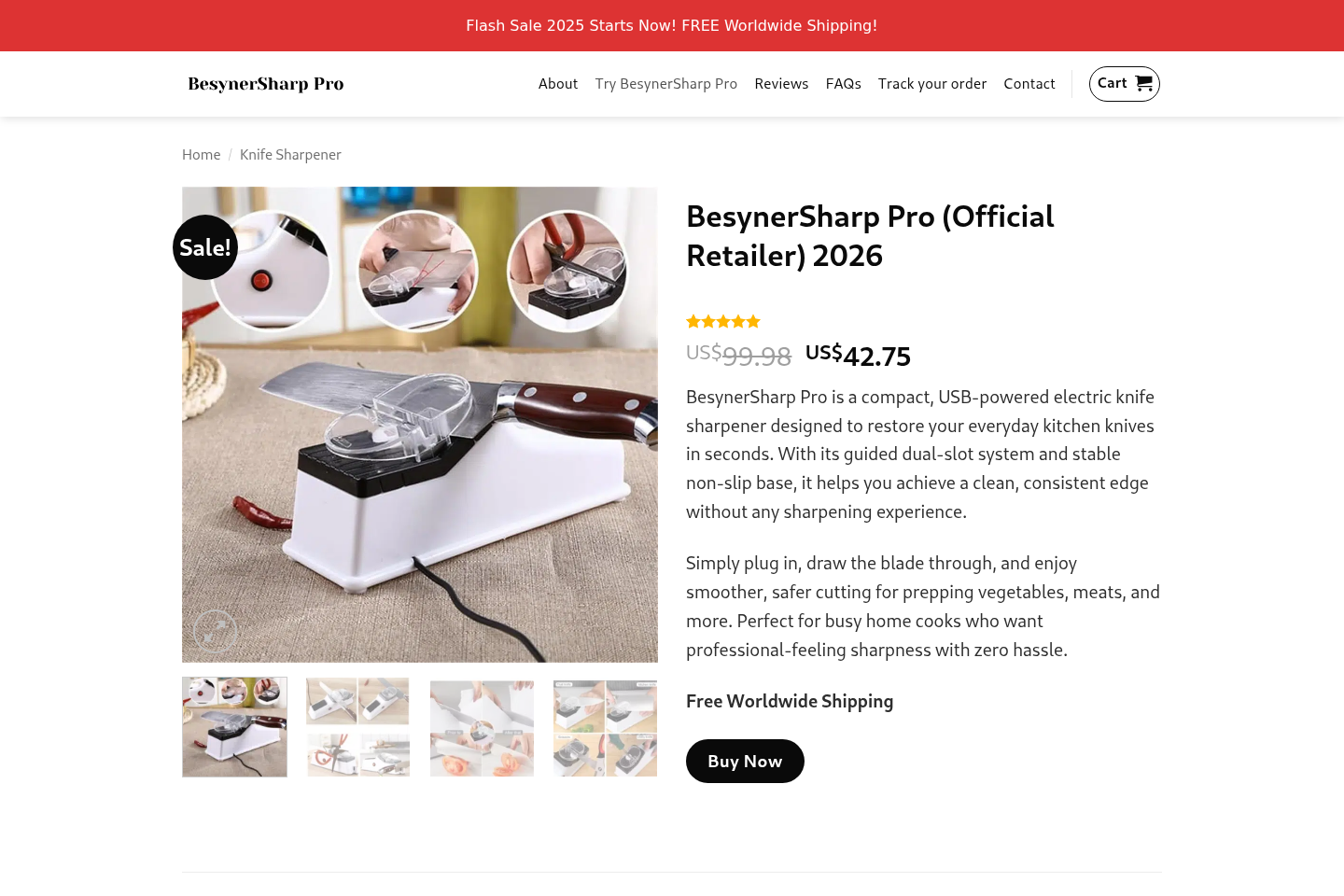
BesynerSharp Pro is a compact USB-powered electric sharpener with rotating abrasive components and slots intended for common kitchen knives.
The seller presents it as a professional solution that delivers fast, consistent edges with minimal effort.
A real gadget appears to exist, but visually matching devices are sold elsewhere under different names and at substantially lower prices.
That comparison changes the central question from whether something arrives to whether the promotion accurately represents its value and capabilities.
Where the sales pitch becomes questionable
The campaign uses a steep crossed-out price, near-perfect reviews, limited-time language, and performance claims that sound more precise than the evidence provided.
One promotional page has claimed blades become ten times sharper, yet no controlled test method accompanies that striking figure.
The seller also calls the result professional while providing little detail about abrasive grade, motor power, edge angle, or long-term material removal.
Those omissions matter because sharpening quality depends on more than moving a blade through a motorized slot.
Our assessment in plain language
BesynerSharp Pro appears to be an aggressively marked-up generic sharpener wrapped in a highly optimized direct-response campaign.
That does not mean every unit is useless or every customer receives nothing.
It means buyers should not assume the brand name, claimed discount, or seller-hosted rating proves professional performance.
The most important concerns are:
- Very similar sharpeners appear on mass-market websites for far less money.
- The claimed original price may exaggerate the apparent bargain.
- The seller displays an exceptionally positive review distribution with little criticism.
- Technical information is too limited to support several strong performance promises.
- The refund policy restricts ordinary change-of-mind returns.
- Cancellation rules can become unfavorable soon after an order is submitted.
- The published business address does not clearly identify a knife-tool company.
- Improper sharpening can remove excessive metal or damage valuable blades.
Why the Price Comparison Matters
The seller has displayed BesynerSharp Pro around $42.75 beside a much higher reference price approaching $100.
That layout makes the purchase feel like a rare premium-tool discount.
However, nearly identical USB sharpeners have appeared through large marketplaces around $17 to $19.
External listings use closely matching housings, dimensions, cable placement, slot arrangement, and product photographs.
Visual similarity does not prove every internal component is identical.
It does show that shoppers should demand evidence before paying a large brand premium.
A meaningful premium could cover better abrasives, stronger quality control, verified certification, dependable support, or a genuinely generous warranty.
The promotional pages do not clearly demonstrate those advantages.
Crossed-out prices are especially persuasive because buyers evaluate the discount before evaluating the product.
Ask whether the higher figure was a genuine, sustained selling price or simply an anchor designed to make today’s amount look attractive.
A countdown or “flash sale” does not answer that question.
Repeat visits often reveal that supposedly urgent discounts remain available.
What an Electric Sharpener Can Actually Do
Electric pull-through sharpeners trade control for convenience.
They can improve a dull everyday knife when the blade geometry suits the fixed slot.
They can also remove more metal than necessary, scratch the blade face, or create an uneven bevel when used carelessly.
High-quality knives, single-bevel blades, serrated knives, and unusual edge angles may require a different method.
A USB connection also limits the power available to a compact motor.
If the motor slows under light pressure, the abrasive action may become inconsistent.
The user might compensate by pushing harder, which can worsen control and heat the edge.
Professional sharpening involves edge inspection, angle selection, burr formation, refinement, and deburring.
A small automatic device may help maintain basic household knives, but “professional” should not be interpreted as proof of equivalent results.
Buyers should test inexpensive blades before placing a valuable chef’s knife into any unfamiliar sharpener.
Clean the unit as instructed because metal dust can accumulate around abrasive parts.
Never insert fingers, scissors, or unsuitable tools merely because an advertisement suggests broad versatility.
The Review Pattern Deserves a Second Look
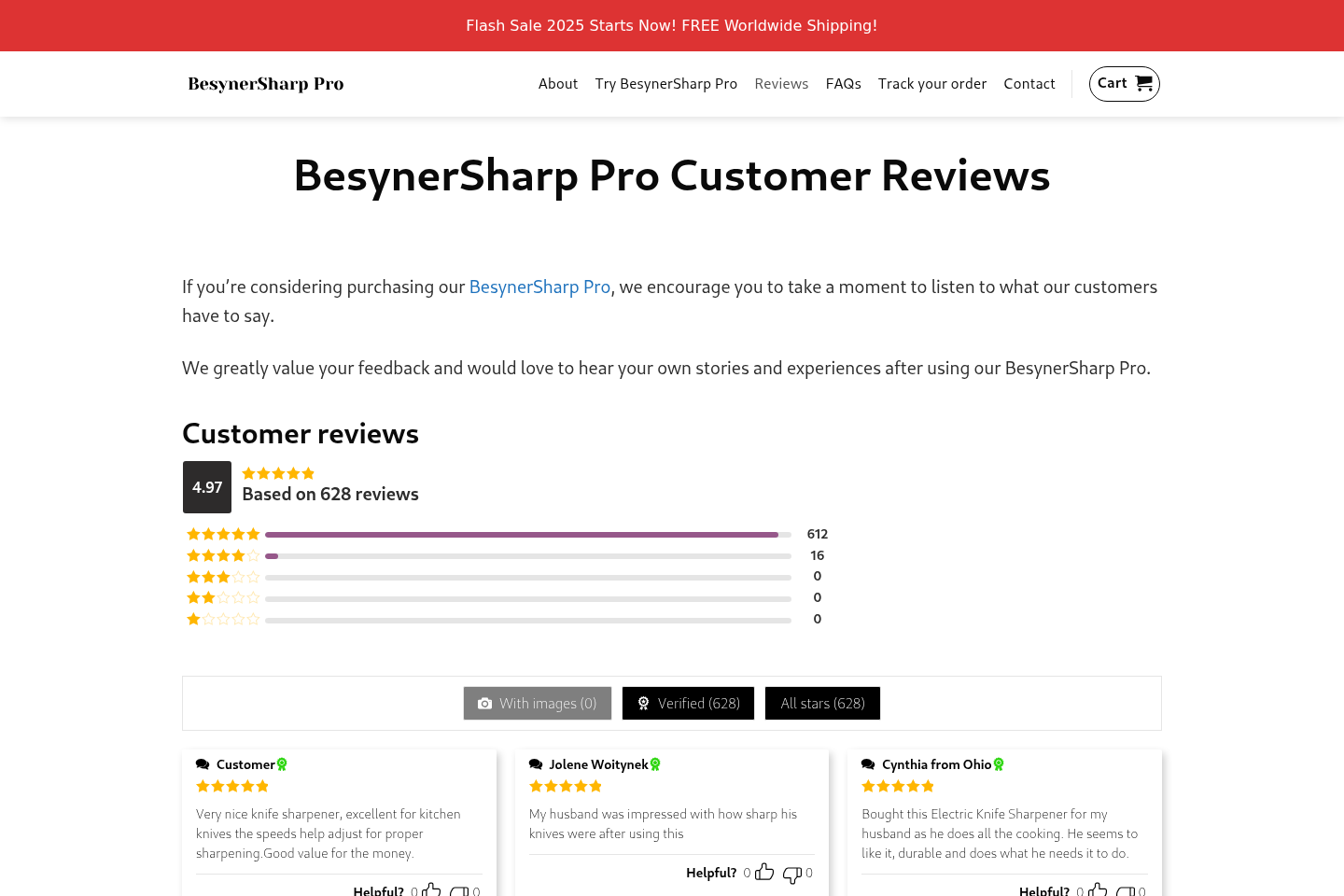
The seller’s review page reports a 4.97 score based on 628 reviews.
Its displayed breakdown includes 612 five-star reviews, 16 four-star reviews, and no ratings below four stars.
That immaculate profile would be unusual for almost any inexpensive electrical kitchen gadget.
Even successful products attract complaints about delivery, charging, noise, blade compatibility, durability, instructions, and customer expectations.
The absence of lower ratings does not automatically prove reviews are fabricated.
It does mean the website should explain how reviews are collected, authenticated, rejected, and published.
Labels such as “verified” are meaningful only when the verification method is transparent.
Some comments use broad praise without explaining the knife type, starting condition, number of passes, or edge longevity.
Those testimonials cannot substitute for a measured comparison against manual stones, established electric sharpeners, or professional service.
Look outside the seller’s pages and pay particular attention to repeated hardware complaints.
Marketplace reviews of similar units mention weak motors, scratched arrivals, used-looking products, and blades that did not become meaningfully sharper.
Those reports concern individual marketplace listings, not necessarily every BesynerSharp Pro unit.
They still reveal realistic failure modes hidden by a nearly flawless promotional profile.
How the BesynerSharp Pro Sales Funnel Works
Step 1: A frustrating kitchen problem gets a dramatic solution
The advertisement begins with crushed tomatoes, slipping blades, slow preparation, or the cost of professional sharpening.
Viewers are shown an effortless alternative that appears safer and faster.
The contrast is designed to make conventional sharpening feel unnecessarily difficult.
Step 2: Ordinary hardware receives premium positioning
A branded name and polished close-ups make the device appear specialized.
Technical terms such as tungsten carbide may appear without clear grades, component diagrams, or independent laboratory results.
The shopper sees the appearance of engineering detail without enough information to compare models properly.
Step 3: An inflated reference price creates urgency
The high crossed-out amount becomes the mental benchmark.
A selling price around $42 then feels inexpensive, even though close lookalikes can cost considerably less.
The buyer is encouraged to measure savings against the seller’s anchor instead of the wider market.
Step 4: Exceptional ratings remove the final doubt
Hundreds of positive reviews suggest that other households already tested the device successfully.
A 4.97 score leaves almost no visible room for normal product limitations.
That social proof can be more persuasive than the incomplete specifications.
Step 5: Bundle pricing raises the order value
Additional units may be framed as gifts or backups with a better per-item rate.
The apparent saving can cause shoppers to buy more before testing one machine.
Every added unit increases the amount exposed to return restrictions.
Step 6: Policy details appear after commitment forms
The headline guarantee sounds broad, but the written refund terms are more limited.
The policy says ordinary change-of-mind returns are generally not accepted and focuses on functional defects.
Original packaging, evidence, authorization, and return shipping can determine whether a refund proceeds.
Step 7: A disappointing buyer faces a narrow remedy
A customer who simply finds the product weak may not fit the seller’s definition of a defect.
Cancellations can also be restricted after a short period or when a discount was used.
This gap between a confident advertisement and a qualified remedy creates the strongest commercial risk.
The Guarantee Is Not the Same as a Free Trial
BesynerSharp Pro promotions have referenced a satisfaction period, but the refund page contains conditions every buyer should read first.
The policy distinguishes functional defects from changing one’s mind.
That difference matters when the sharpener operates electrically but fails to deliver the edge quality shown in advertisements.
A seller can argue that the product functions even when the customer considers its performance poor.
The policy also emphasizes original packaging and may place return postage on the buyer.
International or tracked shipping can erase much of a small refund.
Cancellation language is similarly important.
The available terms indicate a very short cancellation opportunity, with added restrictions around discounted purchases.
A shopper using the advertised sale may therefore receive less flexibility than expected.
Save the exact policy version shown on the purchase date.
Do not rely on a guarantee icon alone because icons omit exclusions.
Ask support in writing whether dissatisfaction with sharpening performance qualifies for return before placing the order.
What Independent Product Listings Reveal
Marketplace listings show the same basic product concept without the premium storytelling.
One highly similar model has appeared around $16.98 with a USB cable and nearly matching casing.
Another listing provides dimensions around 23.5 by 6.5 by 9 centimeters.
These comparisons do not establish that every motor, abrasive wheel, or battery component came from the same production batch.
They do establish that the physical design is not obviously exclusive.
Independent listings can also expose missing safety information.
At least one comparable marketplace entry states that no nationally recognized testing laboratory listing is provided.
That statement applies to the marketplace item and should not be automatically assigned to BesynerSharp Pro.
Nevertheless, it creates a direct question for the branded seller: which certification covers the exact unit being shipped?
A reliable answer should include a model and searchable file number, not a generic reassurance from customer service.
Look for the rated input, charger requirements, battery details if applicable, and disposal instructions.
Electrical kitchen equipment deserves clearer documentation than a sequence of promotional icons.
Company, Address, and Fulfillment Checks
The published address creates more questions than confidence
The seller lists 301 West Broadway Avenue in Enid, Oklahoma.
Public business references associate that location with Advance Pierre Foods rather than an obvious consumer knife-sharpener business.
An address mismatch can have an innocent explanation, but the seller should clearly explain its occupancy and legal relationship.
Do not send returns there without written authorization.
The responsible legal entity is difficult to identify
A brand website should name the company accepting payment and responsible for warranties.
Compare the terms, checkout, privacy notice, confirmation, card descriptor, and parcel label.
If different identities appear, request a written explanation before the dispute deadline.
A support email and product logo are not substitutes for accountable company details.
Fulfillment can be separate from customer support
A package may ship from a warehouse serving many unrelated online stores.
Warehouse employees can process inventory without knowing the advertisement, approving a return, or issuing a refund.
Sending a parcel to the origin label can therefore produce delivery without reimbursement.
Keep tracking and the authorization message together.
Generic manufacturing is plausible, but origin requires proof
Matching mass-market designs strongly suggest a widely distributed product platform.
They do not prove which factory produced the exact BesynerSharp Pro shipment.
Ask for manufacturer, importer, model, batch, electrical rating, and certification information.
Vague answers weaken claims that the branded version is uniquely engineered or quality controlled.
How to Shop More Safely
Start by deciding what knives need sharpening and whether their manufacturer permits a fixed-angle electric device.
Compare the branded offer with established sharpeners and local professional services.
Use exact photographs and dimensions when searching because names can change while the casing remains identical.
Read return exclusions before applying any discount code.
A reduced price is not valuable if it removes cancellation or dissatisfaction rights.
Ask the seller whether performance dissatisfaction qualifies for a refund.
Request the answer by email so it can support a later dispute.
Pay with a credit card and avoid bank transfer, cryptocurrency, or payment methods lacking meaningful purchase protection.
When the unit arrives, photograph the sealed package and inspect it before use.
Stop if it appears used, damaged, incorrectly wired, or inconsistent with the listing.
Test only on an inexpensive knife and follow the blade maker’s instructions.
Return packaging should remain intact until the product proves acceptable.
Measure the sharpness change with ordinary kitchen tasks rather than staged demonstrations using soft paper.
A blade that slices paper may still wedge in dense vegetables or lose its edge quickly.
Inspect both sides under bright light for scratches, uneven bevels, or a remaining burr.
Repeated passes should not become the answer to weak performance because every pass removes additional steel.
When results remain poor, stop and document the problem before the return deadline.
What to Do if You Have Fallen Victim to This Scam
- Preserve the original sales claims. Save screenshots of the price, discount, rating, performance promises, guarantee, and checkout before those pages change.
- Record the condition immediately. Photograph the parcel, labels, accessories, serial markings, scratches, damage, and anything that differs from the order.
- Contact support in writing. Identify the defect or mismatch precisely and request the remedy promised on the purchase date.
- Obtain return authorization. Confirm the correct address, deadline, refund total, deductions, and tracking requirements before mailing the sharpener.
- Challenge an unresolved payment. Provide the card issuer with evidence if the item never arrives, is materially misrepresented, or the seller ignores a valid claim.
- Monitor for additional charges. Review statements for added products, duplicate billing, or transactions that were not clearly approved.
- Check exposed devices. Run Malwarebytes if suspicious redirects or downloads occurred, and use AdGuard to reduce malicious advertising and tracking pages.
- Report deceptive advertising. Send the promotion and policy evidence to the appropriate consumer-protection authority and marketplace involved.
Is Your Device Infected? Run a Free Malware Scan
Slow performance, constant pop-ups, or strange behavior? These are classic signs of a malware infection. The fastest way to find out is to scan your device with Malwarebytes Free — one of the most trusted malware removal tools available.
The free version detects and removes the most common threats, including:
- Adware — the cause of those annoying pop-ups
- Browser hijackers — unwanted redirects and changed homepages
- Trojans and spyware — hidden programs stealing your data
- Potentially unwanted programs (PUPs) — software you never asked for
👉 Select your device below — Windows, Mac, or Android — then follow the simple steps to download Malwarebytes, scan your system, and remove any threats it finds. The scan usually takes 5 to 20 minutes.
Run a Malware Scan with Malwarebytes for Windows
Malwarebytes is one of the most popular and trusted anti-malware tools for Windows — and it’s completely free for removing infections. It catches threats that many antivirus programs miss, including adware, browser hijackers, and trojans. Follow the steps below to scan and clean your PC in just a few minutes.
Download Malwarebytes
Click the button below to download the latest version of Malwarebytes for Windows from the official source. The free version is all you need — it will scan your computer and remove adware, browser hijackers, and other malicious software at no cost.
Download MalwarebytesOfficial installer for Windows 11 and 10. Your download starts right away.Want real-time protection? See Malwarebytes Premium Malwarebytes Free for WindowsScans and removes malware at no cost
-
Install Malwarebytes
When the download finishes, open your Downloads folder and double-click the MBSetup file. If Windows shows a User Account Control pop-up, click “Yes” to allow the installation.

Follow the On-Screen Prompts to Install Malwarebytes
The setup wizard will walk you through a few quick screens:
-
Choose where you’re installing the program — “Personal Computer” or “Work Computer” — then click Next.

-
Malwarebytes will now install on your device. This usually takes under a minute.

-
When installation is complete, the “Welcome to Malwarebytes” screen will open automatically.

-
On the final screen, click Open Malwarebytes to launch the program.

-
Enable “Scan for Rootkits”
Before scanning, turn on rootkit detection so Malwarebytes can find even the most hidden threats. Click the Settings gear icon on the left side of the screen.

In the settings menu, find “Scan for rootkits” and click the toggle so it turns blue.

Done? Click “Dashboard” in the left pane to return to the main screen.
Start the Scan
Click the blue Scan button. Malwarebytes will automatically update its virus database and start checking your computer for malware.

-
Wait for the Scan to Finish
The scan checks your entire system for browser hijackers and other malicious programs, so it can take 5 to 20 minutes depending on your computer. Feel free to do something else — just check back occasionally to see the progress.

-
Quarantine the Detected Threats
When the scan is done, you’ll see a list of everything Malwarebytes found — malware, adware, and potentially unwanted programs. Click the “Quarantine” button to remove all of them at once.

Malwarebytes will now remove the malicious files and registry entries and move them safely into quarantine.

-
Restart Your Computer
Some threats can only be fully removed after a reboot. If Malwarebytes asks you to restart, click Yes. Once you’re logged back in, Malwarebytes has finished removing the threats it found.

That’s it — your Windows PC is now clean of trojans, adware, and other malware, and should be back to running smoothly.
If you are still having problems with your computer after completing these instructions, then please follow one of the steps:
- Run a computer scan with ESET Online Scanner
- Ask for help in our Windows Malware Removal Help & Support forum.
Run a Malware Scan with Malwarebytes for Mac
Malwarebytes for Mac is a free on-demand scanner that removes the malware other security software tends to miss — adware, browser hijackers, and unwanted programs included. Cleaning an infected Mac with Malwarebytes has always been completely free, and it’s our go-to recommendation. Follow the steps below to scan and clean your Mac in just a few minutes.
-
Download Malwarebytes for Mac
Click the button below to download the latest version of Malwarebytes for Mac.
Download MalwarebytesOfficial installer for macOS. Your download starts right away.Want real-time protection? See Malwarebytes PremiumMalwarebytes Free for MacScans and removes malware at no cost -
Open the Malwarebytes setup file
When the download finishes, open your Downloads folder and double-click the setup file to begin the installation.

-
Follow the On-Screen Prompts to Install Malwarebytes
The Malwarebytes for Mac Installer will guide you through a few quick screens. Click “Continue” and keep following the prompts until the installation completes.



When the installation is complete, Malwarebytes opens to the Welcome to Malwarebytes screen. Click “Get started“.
-
Select “Personal Computer” or “Work Computer”
Malwarebytes will ask what type of computer you’re installing it on. Click either Personal Computer or Work Computer, whichever applies.

-
Start the Scan
Click the “Scan” button. Malwarebytes will automatically update its detection database and begin checking your Mac for malware.

-
Wait for the Scan to Finish
Malwarebytes will scan your Mac for adware, browser hijackers, and other malicious programs. This can take a few minutes, so feel free to do something else — just check back occasionally to see the progress.

-
Quarantine the Detected Threats
When the scan is done, you’ll see a list of everything Malwarebytes found. Click the “Quarantine” button to remove all the threats at once.

-
Restart Your Mac
Malwarebytes will now remove all the malicious files it found. Some threats can only be fully removed after a reboot — if Malwarebytes asks you to restart, allow it. Once you’re logged back in, your Mac is clean.

That’s it — your Mac is now free of adware, rogue browser extensions, and other potentially harmful software.
If you are still experiencing problems while trying to remove a malicious program from your computer, please ask for help in our Mac Malware Removal Help & Support forum.
Run a Malware Scan with Malwarebytes for Android
Malwarebytes for Android automatically detects and removes dangerous threats like malware and ransomware so you don’t have to worry about your most-used device being compromised. Aggressive detection of adware and potentially unwanted programs keeps your Android phone or tablet running smooth.
-
Download Malwarebytes for Android.
You can download Malwarebytes for Android by clicking the link below.
Get Malwarebytes for AndroidOpens Google Play in a new tab.Want real-time protection? See Malwarebytes Premium for AndroidMalwarebytes for AndroidScans your phone and removes malware at no cost -
Install Malwarebytes for Android on your phone.
In the Google Play Store, tap “Install” to install Malwarebytes for Android on your device.

When the installation process has finished, tap “Open” to begin using Malwarebytes for Android. You can also open Malwarebytes by tapping on its icon in your phone menu or home screen.

-
Follow the on-screen prompts to complete the setup process
When Malwarebytes will open, you will see the Malwarebytes Setup Wizard which will guide you through a series of permissions and other setup options.
This is the first of two screens that explain the difference between the Premium and Free versions. Swipe this screen to continue.
Tap on “Got it” to proceed to the next step.
Malwarebytes for Android will now ask for a set of permissions that are required to scan your device and protect it from malware. Tap on “Give permission” to continue.
Tap on “Allow” to permit Malwarebytes to access the files on your phone.
-
Update database and run a scan with Malwarebytes for Android
You will now be prompted to update the Malwarebytes database and run a full system scan.

Click on “Update database” to update the Malwarebytes for Android definitions to the latest version, then click on “Run full scan” to perform a system scan.

-
Wait for the Malwarebytes scan to complete.
Malwarebytes will now start scanning your phone for adware and other malicious apps. This process can take a few minutes, so we suggest you do something else and periodically check on the status of the scan to see when it is finished.

-
Click on “Remove Selected”.
When the scan has been completed, you will be presented with a screen showing the malware infections that Malwarebytes for Android has detected. To remove the malicious apps that Malwarebytes has found, tap on the “Remove Selected” button.

-
Restart your phone.
Malwarebytes for Android will now remove all the malicious apps that it has found. To complete the malware removal process, Malwarebytes may ask you to restart your device.
That’s it — your Android phone is now clean — no more malicious apps, adware, or browser redirects.
If you are still having problems with your phone after completing these instructions, then please follow one of the steps:
- Restore your phone to factory settings by going to Settings > General management > Reset > Factory data reset.
- Ask for help in our Mobile Malware Removal Help & Support forum.
Stay Protected: Block Ads and Malicious Sites
Now that your device is clean, keep it that way. Most infections start with a malicious ad or a fake download button — so blocking them at the source is your best defense.
We recommend AdGuard, which blocks malicious ads, phishing pages, and dangerous redirects before they can reach you.
👉 Download AdGuard and browse safely
Frequently Asked Questions
Is BesynerSharp Pro a real knife sharpener?
A physical USB electric sharpener appears to be sold under this name.
The concern is whether its premium positioning, performance promises, review profile, and price accurately reflect the device delivered.
Is it worth $42.75?
Very similar models have appeared at much lower marketplace prices.
The seller should demonstrate better components, testing, support, or warranty service before a large premium makes sense.
Can it make a knife ten times sharper?
That phrase lacks a disclosed measurement method, blade standard, comparator, and independent test.
Consumers should treat it as advertising language rather than a reproducible technical result.
Are the 628 customer reviews independent?
They appear on the seller’s own website, which controls the platform.
The displayed 4.97 rating is not equivalent to independent laboratory testing or a transparent external review program.
Can I return it if I simply dislike it?
The written policy restricts ordinary change-of-mind returns and focuses on functional defects.
Read the current terms and obtain written confirmation before buying.
Could the sharpener damage expensive knives?
Any fixed-angle electric sharpener can remove excess material or conflict with a blade’s geometry.
Check the knife maker’s guidance and avoid testing an unfamiliar device on valuable cutlery.
The Bottom Line
BesynerSharp Pro looks like a real generic-style gadget sold through an exaggerated premium campaign, not a proven professional sharpening breakthrough.
The price gap, perfect-looking reviews, limited specifications, address questions, and restrictive refund language make careful comparison essential before ordering.

Join the discussion
0 commentsShare your experience or ask a question about this article.
Discussion
Start the conversation
Have a question or something useful to share? Add the first comment.