

A fake Student Finance alert says your payment has been blocked just as rent, travel, and course costs are due. One quick account check will supposedly release the money.
The timing makes the warning feel personal. The link is where the story changes.
Overview
The scam is timed for a real payment window
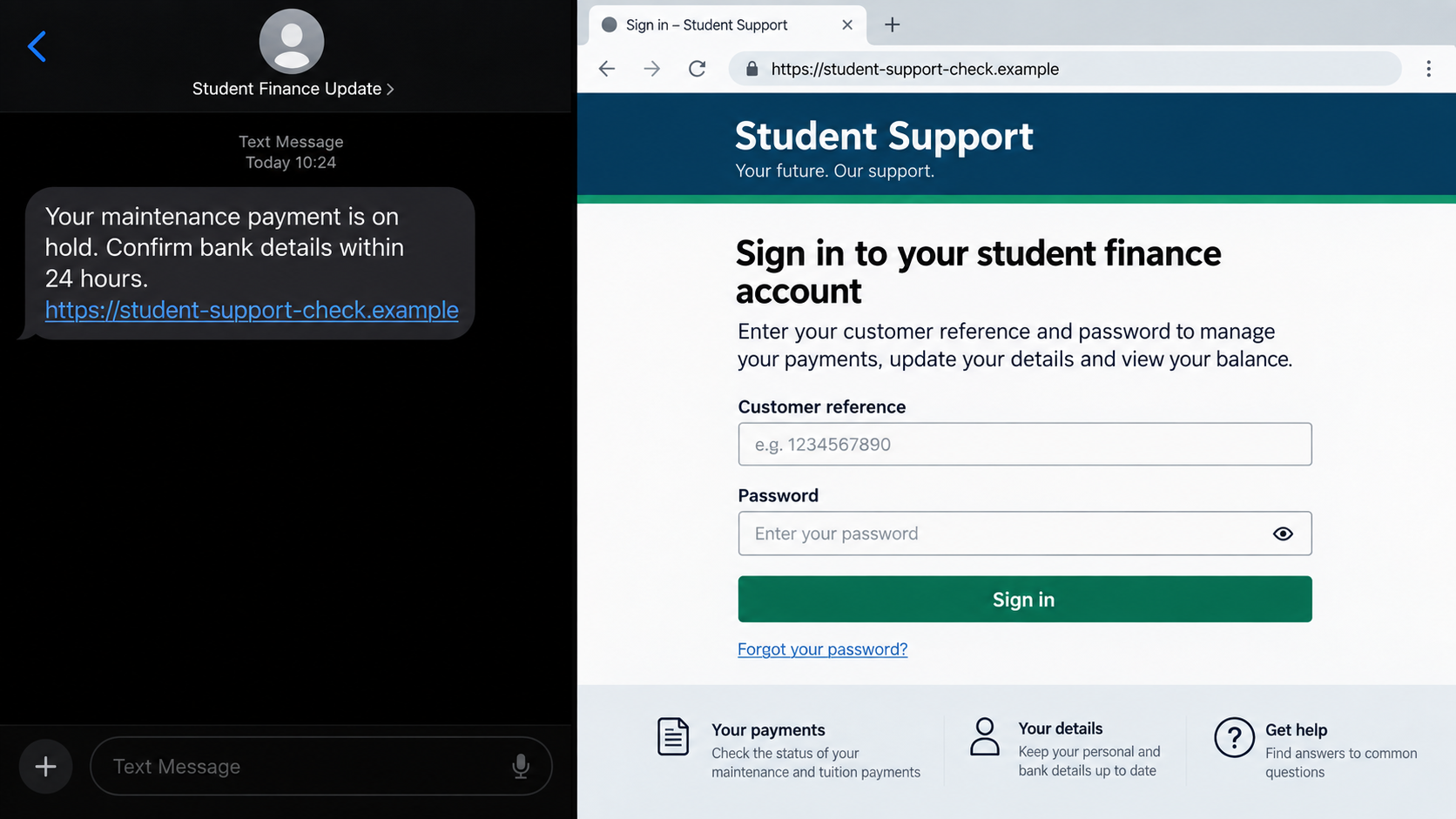
The fake Student Finance alert scam targets students around the start of an academic term, when maintenance payments are expected and a delay would cause immediate problems. Messages arrive by text, email, call, or social media and claim that a payment is blocked, bank details are incomplete, or an account will close.
The Student Loans Company warned students on September 1, 2026, as it prepared to distribute about £2.6 billion in maintenance support to 1.1 million students. Criminals know that even a generic warning can land in the inbox of somebody waiting for money that week.
A correct month or familiar phrase does not mean the sender can see an application. Mass phishing works by matching a common event with a large group of people.
The link leads away from the genuine account
The message asks the student to confirm bank details, update personal information, or unlock a payment through a supplied link. The destination can copy the design of GOV.UK, Student Finance England, or an online account page.
Anything typed into that copy is sent to the scammer. A first screen may collect login details, while later screens request a customer reference number, date of birth, address, bank account, card information, and a one-time security code.
A fake page can display HTTPS, accessibility links, official colors, and a convincing confirmation. None of those elements proves that the domain belongs to the government.
The goal can be payment theft or identity fraud
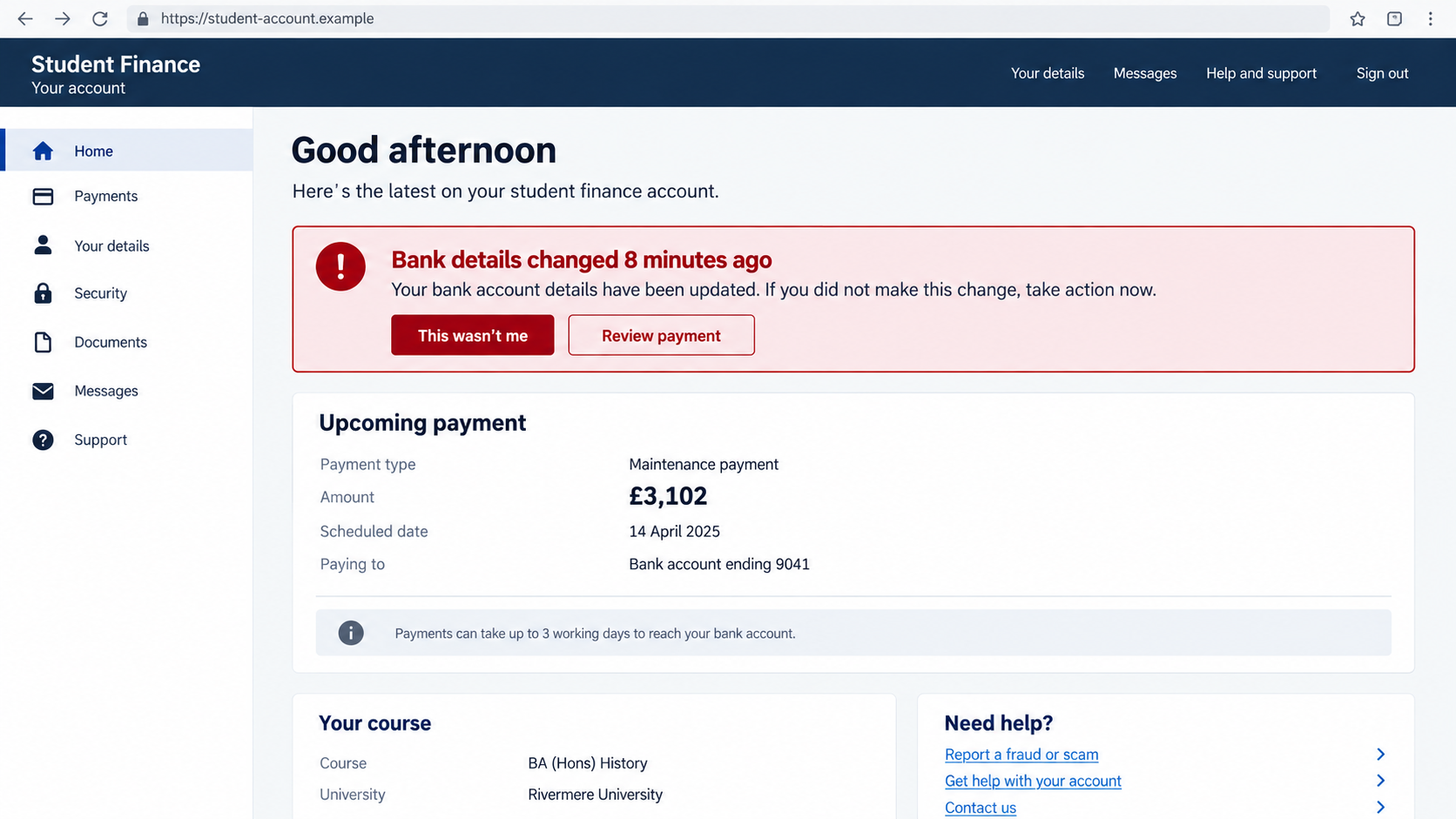
Changing the bank details attached to a genuine student finance account can redirect a maintenance payment. Stolen identity information can also support account takeover, credit applications, mobile contracts, or more convincing calls later.
Common warning signs include:
- an unexpected message says a maintenance payment is blocked or suspended;
- a 24-hour deadline threatens account closure or loss of funding;
- the student is told to verify bank details through a link;
- the message arrives through WhatsApp or an unsolicited social media account;
- the destination does not end in a genuine GOV.UK service domain;
- a page asks for a complete password, card PIN, or one-time code;
- the sender discourages logging in through the normal account;
- a caller knows public course or university details and treats them as proof.
Why the Timing Makes This Phishing So Convincing
Maintenance loans are connected to real deadlines. A student may be waiting to pay accommodation, replace a laptop, buy course materials, or cover food. The possibility of a delay is not abstract.
Criminals do not need a list of approved applicants to exploit that pressure. Academic calendars, public university dates, and government payment announcements show when millions of students are expecting contact.
Social media can make the targeting look even sharper. A public post about moving into halls, starting a course, or waiting for finance tells a scammer which story is likely to work. Details such as a university name or course can then be added to a message.
The Student Loans Company says a genuine text may be sent when a customer has asked to change bank details. That creates an important distinction. If you receive a change confirmation but did not request a change, do not use the message. Open the account independently and inspect the details.
Student Finance England and SLC do not provide services through WhatsApp and do not initiate social media contact to discuss a finance application or entitlement. A friendly direct message from a supposed adviser is not a shortcut into the official process.
The safest test does not depend on grammar or logos. Close the message, open a clean browser or known app, type the official address yourself, and check the account. A real payment issue should still exist after the phishing message is removed from the path.
Students may also receive genuine university messages about registration, attendance, or enrolment conditions tied to finance. The phishing message benefits from that busy background. Keep the systems separate: verify university status through the university portal and payment status through Student Finance.
A sender who combines both sets of credentials in one external form may be trying to compromise two accounts at once. Do not reuse a university password on Student Finance or email, and do not approve an email login simply because the page first mentioned a maintenance loan.
How the Fake Student Finance Alert Scam Works
Step 1: The message arrives near the start of term
The subject line or first sentence mentions a blocked payment, failed verification, incomplete application, or account review. A specific date is included so the student feels there is no time to ask for help.
The sender name may say Student Finance, SLC, GOV.UK, or Maintenance Support. Sender names and caller ID can be forged, so the label is only part of the message.
Step 2: A short deadline turns concern into action
The warning may say the account will close in 24 hours, the payment will return to the Treasury, or the next instalment will be cancelled. The consequence is chosen to feel more expensive than the risk of clicking.
Real account administration does not become safer because a stranger demands speed. A student can always verify through the independently opened account or official contact information.
Step 3: The link opens a copied government page
The first page may look almost identical to a familiar sign-in. Criminals can copy headers, buttons, cookies notices, Crown graphics, and explanatory text from public websites.
The address bar reveals ownership. Words such as student, finance, gov, support, or secure can appear inside an unrelated domain. Read the hostname from right to left and stop if it is not the official service.
Step 4: The form harvests identity details
The site asks for a customer reference number, email address, password, date of birth, current and previous address, university, and course. Each field may feel relevant to a finance application.
Together, those details create a valuable identity profile. The criminal can use them to answer security questions, impersonate the student, or tailor the next call.
Step 5: Bank information is presented as the solution
A second page says the payment cannot be released until an account number and sort code are confirmed. Some versions request card details for a small verification charge.
A government maintenance payment does not need a card payment to become available. If bank details genuinely require updating, the change should be made only inside the account reached through GOV.UK.
Step 6: A real security code completes the takeover
The scammer may immediately attempt to sign in or change account information. That action generates a genuine code, which the fake page requests as the final verification step.
The code is authentic, but the explanation is not. Entering it can approve the criminal’s session or payment rather than protect the student’s account.
Step 7: A confirmation screen hides the theft
After submission, the page says the payment was released or the account was verified. It may redirect to GOV.UK so a later glance appears normal.
The delay gives the attacker time to test credentials, change bank details, or contact the victim while pretending to be a fraud investigator.
What the Official Warning Confirms
The Student Loans Company warning describes criminals sending convincing texts, emails, and calls when term payments begin. The stated hooks include blocked payments, bank details that supposedly need updating, and threats that an account will close without immediate action.
SLC advises students to avoid links and verify by logging into the genuine online account. It also warns against sharing names, dates of birth, customer reference numbers, course information, and current or previous addresses publicly because those details can support impersonation.
The warning is about a recognized phishing pattern aimed at a large payment event, not a complaint about a legitimate loan servicer. Student Finance England and the Student Loans Company are real services whose identities are being copied by criminals.
A genuine notification and a scam can mention the same payment. The difference is control of the channel. An independently opened account is connected to the real service; a link chosen by the sender is connected to whatever destination the sender selected.
The warning also explains why social posts deserve care. A photograph of a timetable, finance letter, student card, or accommodation document can expose reference information that a criminal later repeats during a call. Remove identifying details before sharing a payment problem publicly.
Company, Address, and Fulfillment Checks
The sender name is not the Student Loans Company
A text label or email display name can be set by the sender. Expand the full email address and inspect the reply-to field, but do not treat a plausible address as final proof.
Compromised mailboxes and lookalike domains can pass a quick visual check. Verification should end in the official account, not in a reply to the warning.
The domain must belong to the genuine service
Open Student Finance through GOV.UK by typing the address or using a saved trusted bookmark. Do not search the phrase from the scam message and click an advertisement.
A padlock only encrypts the connection to the current website. It does not establish that the website is part of the government.
The bank change should exist inside the account
If the message concerns a requested update, the account should show that update after you sign in independently. If no change was requested, treat the text as a security warning and contact SLC through GOV.UK.
Do not confirm a bank account supplied by a caller. Read the details shown inside the trusted service and compare them with your own records.
The promised release must not require a new payment
A maintenance loan is not released by paying a card fee, buying a voucher, sending cryptocurrency, or transferring money to a verification account.
A page that accepts a small charge has not fulfilled a government service. It has created a separate payment to a recipient that must be identified and challenged.
What to Do if You Have Fallen Victim to This Scam
- Stop using the message and fake page. Do not submit another password, bank detail, code, or payment. Keep the tab address and message as evidence.
- Open your Student Finance account independently. Use the official GOV.UK route and check personal details, bank information, messages, and payment status.
- Contact the Student Loans Company. Use official contact information, explain exactly what was entered, and ask whether any bank or account changes are pending.
- Change a disclosed password. Use a new, unique password from a trusted device. Change it anywhere else the old password was reused.
- Secure the email account first. Remove unknown sessions, forwarding rules, recovery addresses, and connected applications. Enable strong multifactor authentication.
- Call the bank immediately. If account or card details were entered, ask the fraud team to protect the account, replace the card where necessary, and inspect new payees and transactions.
- Deny unexpected security prompts. A code or approval request after the incident may be the scammer attempting another login.
- Forward the phishing email. Send suspicious emails to report@phishing.gov.uk and suspicious texts to 7726, then retain your copy until the case is documented.
- Report stolen money. Contact Report Fraud and provide the domain, telephone number, payment details, dates, messages, and screenshots.
- Watch for identity misuse. Monitor credit files, mobile accounts, student accounts, and mail if a reference number, date of birth, address history, or identity document was disclosed.
- Check the device and block repeat attempts. Run a Malwarebytes scan if the fake page installed anything or prompted a download. AdGuard can help stop known phishing domains and malicious ads, but you must still secure every account whose details were entered.
- Tell the university if relevant. The student support or security team may help protect a university mailbox and warn others about the same campaign.
- Ignore recovery callers. Criminals may return claiming they can release the payment or recover stolen funds for a fee. Continue only through SLC, the bank, and official reporting channels.
Frequently Asked Questions
Does Student Finance ever send text messages?
Yes, genuine messages can exist, including confirmations after a customer requests a bank-detail change. The safe response is to open the account independently rather than use a link in an unexpected text.
Will Student Finance contact me through WhatsApp?
The Student Loans Company says SLC and Student Finance England do not provide services through WhatsApp and do not start social media conversations about an application or entitlement.
What if the message knows my university and course?
Those details may come from public posts, breached data, or an earlier form. Accurate personal information makes the lure more convincing but does not authenticate the sender.
Can a scammer redirect a real maintenance payment?
Account takeover or an unauthorized bank-detail change can put a payment at risk. Contact SLC and the bank immediately if credentials or security codes were exposed.
Is a GOV.UK logo proof that the page is genuine?
No. Logos and page designs are public and easy to copy. Verify the complete hostname and reach the service by navigating through GOV.UK yourself.
What if I clicked but entered nothing?
Close the page, keep the URL for reporting, and clear any download it started. Risk is lower if no information was entered, but change credentials if the browser filled or submitted them automatically.
The Bottom Line
The fake Student Finance alert scam borrows urgency from a real maintenance payment. A blocked-payment warning can reach thousands of students at the exact moment they are expecting money, even when the criminal knows nothing about their individual applications.
Do not solve an unexpected warning through the route it provides. Open the genuine account through GOV.UK, inspect bank details, and contact SLC independently. If information was entered, secure the email, finance account, and bank before the next payment is released.

Join the discussion
0 commentsShare your experience or ask a question about this article.
Discussion
Start the conversation
Have a question or something useful to share? Add the first comment.