

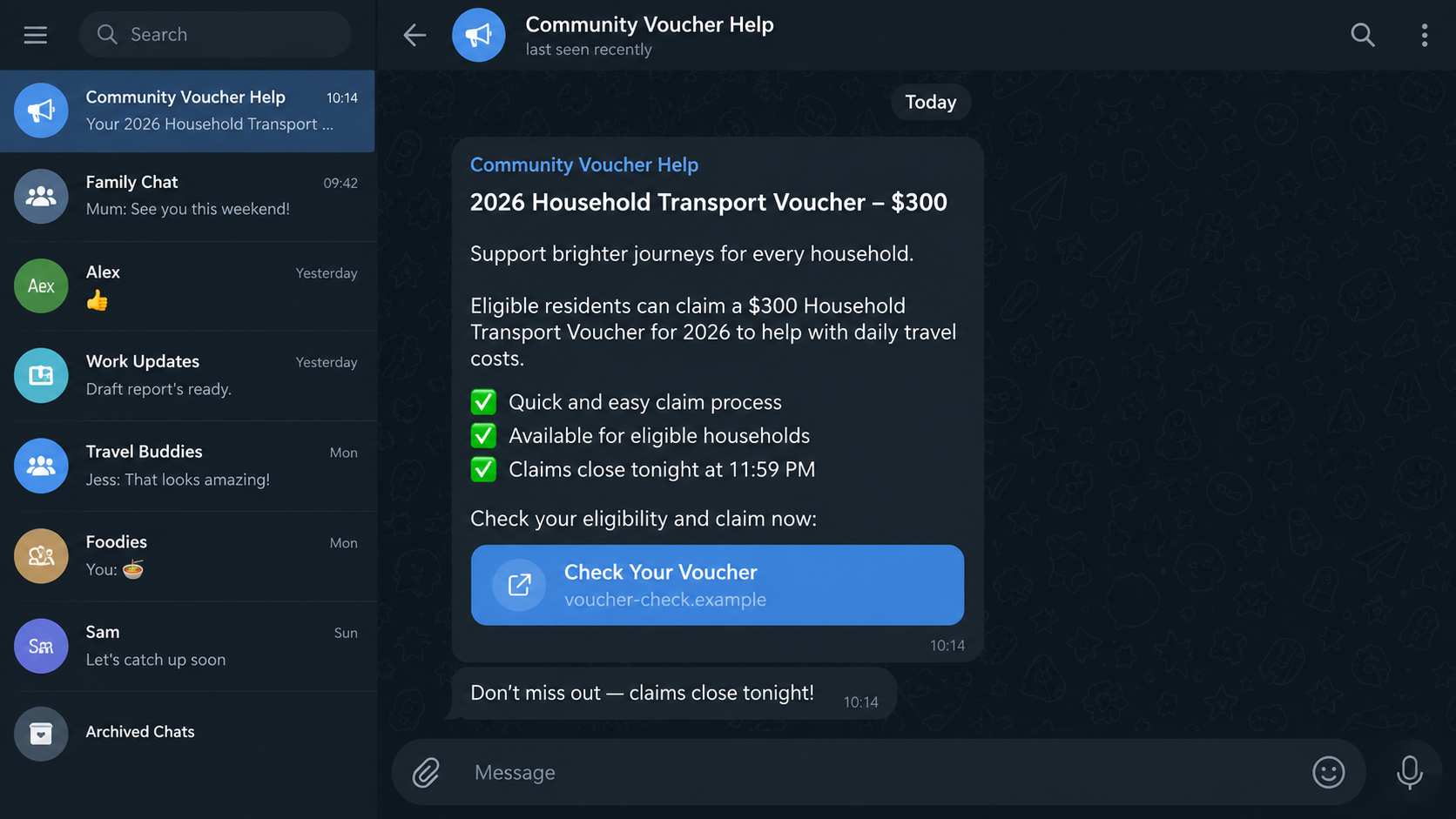
A fake government voucher arrives through Telegram and says money is ready to claim. The amount looks familiar, the deadline is close, and the link appears to open a simple eligibility form.
The offer is built around real public programs. One short code can turn it into something very different.
Overview
The voucher message impersonates a real public program
The fake government voucher Telegram scam uses messages about cost-of-living support, tax rebates, transport credits, or community benefits to draw recipients to a fraudulent form. The page may copy the name and design of a genuine government service.
Singapore’s ScamShield warned on August 31, 2026, that criminals were circulating Telegram messages that impersonated CDC, GST, and transport voucher programs. At least 52 cases had been reported since January.
The named programs are real. The unsolicited Telegram link is not made legitimate by borrowing their language.
The claim form is designed to obtain an account code
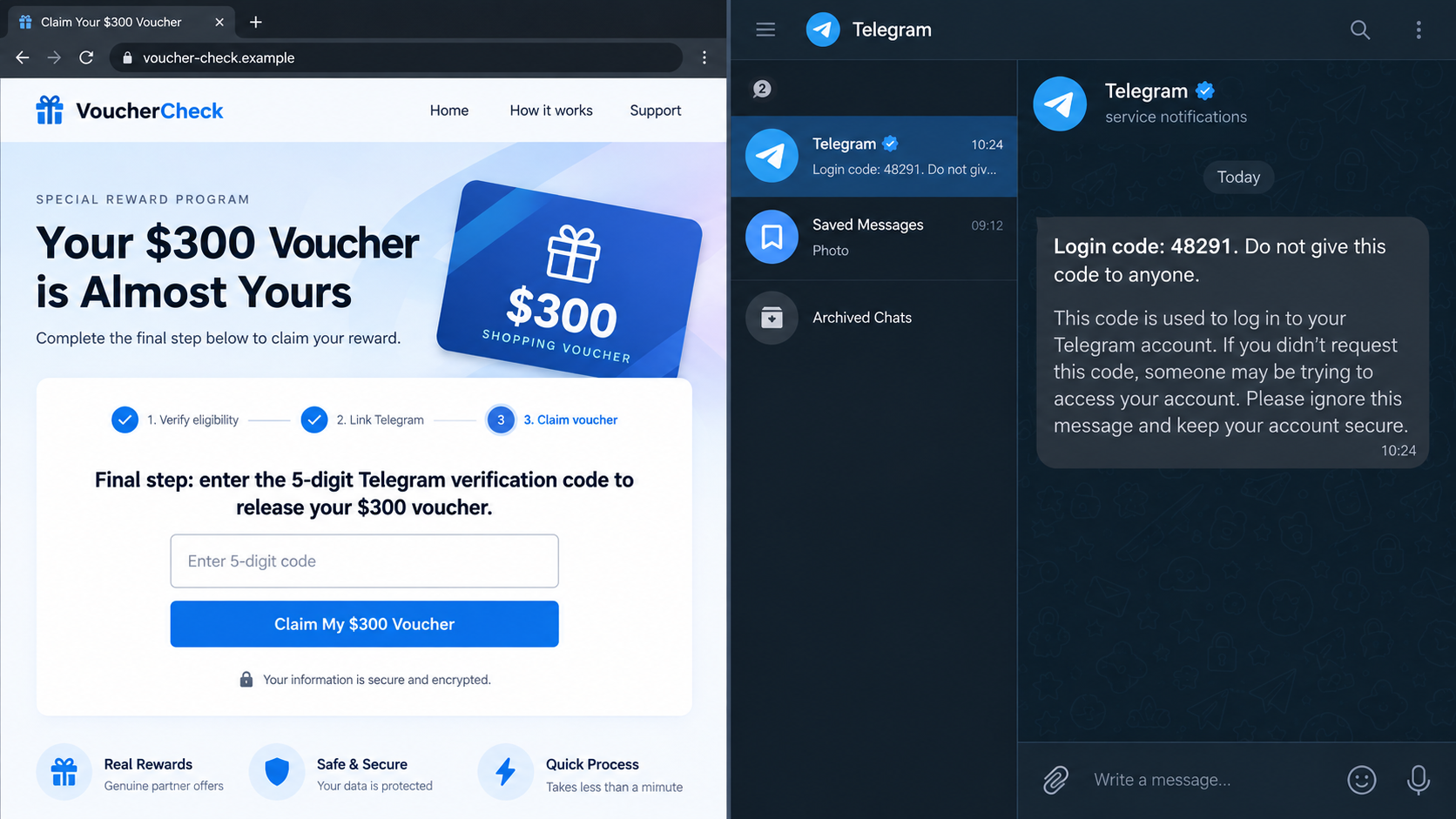
The first screen can request a name, national identity details, telephone number, address, and bank information. A later step asks for a Telegram one-time password, supposedly to verify the application or prevent duplicate claims.
A Telegram login code has nothing to do with government voucher eligibility. It authorizes access to the messaging account. Sharing it can let the criminal open the account on another device.
The genuine code may arrive in Telegram’s verified service-notification chat, which can confuse the victim. The delivery channel is real; the person asking for the code is not.
The stolen account becomes the next distribution channel
After taking control, criminals can message friends, relatives, coworkers, and groups from a familiar profile. They may resend the voucher link, request an emergency loan, or promote another investment or shopping scam.
Warning signs include:
- an unexpected Telegram message promises a government voucher or rebate;
- the link uses a commercial, shortened, or misspelled domain;
- a form asks for personal information before showing clear eligibility rules;
- the page requests a Telegram login code or one-time password;
- the sender says the code verifies a voucher rather than a new Telegram session;
- a countdown claims the benefit will expire within hours;
- a friend forwards the offer but cannot explain where it came from;
- the message discourages checking the program on an official government site.
Why a Real Telegram Code Can Complete a Fake Claim
One-time passwords are often described as proof that a user owns a phone number. That is only half the story. A code also belongs to a particular action initiated in another session.
The scammer begins a Telegram login using the victim’s telephone number. Telegram sends a code to the real account or phone. The fraudulent voucher page then asks the victim to copy that code into the form.
The victim sees a genuine message from Telegram and assumes the government page caused it for identity verification. In reality, the code connects the scammer’s device to the victim’s Telegram account.
Telegram’s official FAQ says account login codes are sent through the verified Telegram service-notification chat and should never be shared with anyone, including other services or apps.
A real code does not validate the story that triggered it. The code only proves that somebody tried to perform the action Telegram describes. Read that description and stop if you did not initiate it.
Two-step verification adds a separate password to the login. Without it, possession of a current login code may be enough to establish another session. With it, the criminal may still return and ask for the password or recovery email code.
The request may be disguised as a Telegram bot interaction. Bots can present menus, buttons, progress messages, and polished answers, but they do not receive special authority to inspect private login codes. A government logo inside a bot is an image selected by its creator.
Some victims notice that the code arrives in the same app where they are completing the claim. That proximity feels like a connected workflow. It is actually two conversations: the fraudulent claim asks for the secret, while Telegram warns about a login attempt. Treat the verified service message as the explanation of the code.
A criminal who meets two-step verification may claim that the voucher is stuck and ask for an additional password. The request can be followed by a fake recovery email, a QR code, or instructions to turn off security temporarily. Each extra step is an attempt to remove the barrier protecting the account.
Do not troubleshoot the voucher with the sender. Close the form and inspect Devices inside Telegram. An unrecognized session, recent login alert, or changed security setting is an account incident even if no money has left a bank.
How the Fake Government Voucher Telegram Scam Works
Step 1: A real benefit is chosen as bait
The operation copies the name of a current voucher, rebate, tax credit, transport benefit, or household support program. Public announcements provide amounts, dates, and eligibility language.
The message can therefore contain correct facts while sending the recipient to an unauthorized destination. Accuracy about the program is not proof of control over it.
Step 2: Telegram carries the urgent offer
The link arrives from an unknown account, a public channel, an advertisement, or somebody the recipient knows. A compromised friend’s account is especially persuasive because the profile and chat history may be genuine.
The message says applications close soon, unused funds will be returned, or only a limited number of claims remain. Government benefits are turned into a first-come race.
Step 3: A copied page collects personal information
The site may use official colors, seals, eligibility questions, privacy text, and progress bars. It asks for enough information to make the application feel individualized.
Personal data collected here can be retained even if the victim stops before the final code. It can support identity fraud and later impersonation calls.
Step 4: The telephone number starts a Telegram login
When the number is entered, the operator or automated kit attempts to add the account to a new device. Telegram then sends a genuine authentication code.
The speed of that code makes the fraudulent form look connected to Telegram in an official way. It is connected only because the criminal initiated a login in the background.
Step 5: The voucher page requests the code
The page calls it an eligibility PIN, claim confirmation, anti-fraud code, or final identity check. The victim types it into the form believing the payment is about to be released.
No voucher administrator needs the private login code for a messaging account. The mismatch between the promised service and requested secret is the clearest warning.
Step 6: The attacker establishes a Telegram session
The code is submitted to Telegram from the attacker’s device. If no additional password blocks the login, a new session can gain access to cloud chats, contacts, groups, and account controls.
The criminal may terminate the victim’s sessions, add a two-step verification password, or wait quietly while learning how the account is used.
Step 7: Trusted contacts receive the next scam
Messages sent from the stolen account inherit the victim’s name, profile photo, and relationships. A relative may trust a loan request because it appears inside an existing conversation.
The voucher campaign can then reproduce itself. Each compromised account supplies more recipients who recognize the sender.
The Campaign Is Confirmed, Not a Rumor
The Singapore government service ScamShield published a specific account-takeover alert about fraudulent Telegram messages impersonating CDC, GST, and transport vouchers. The warning recorded at least 52 cases during 2026.
The agency identified the operational purpose: criminals collect personal details and Telegram one-time passwords to seize accounts. That makes this a documented impersonation and account-takeover scheme, not criticism of a real voucher program.
Real government vouchers have official eligibility, payment, and contact routes. A person can learn about them by opening the relevant government website independently. Telegram is only the delivery channel used by the criminal campaign.
Telegram’s own security guidance matches the warning. Login codes should not be shared with people, websites, bots, or apps, and active sessions can be reviewed under Settings and Devices.
The number of known reports is a floor, not a forecast for every country. It documents that the tactic produced real cases in Singapore. The same mechanism can be copied with another country’s benefit name because the criminal objective is control of Telegram, not access to the public program.
Company, Address, and Fulfillment Checks
The government program must exist outside the message
Search for the program on the country’s official government domain without copying the link from Telegram. Check the eligibility dates, application process, and whether any action is needed.
A real program may pay automatically or use an authenticated portal. If the Telegram message describes a different process, follow the official page.
The Telegram sender is not a government office
A profile name, flag, seal, or verified-looking image can be selected by an ordinary account owner. Even a message from a friend may have been sent after an account takeover.
Government identity should be verified through a published agency domain and contact number, not through the account that delivered the offer.
The web address must match the responsible agency
Read the complete hostname before entering information. A familiar agency name placed before an unrelated ending, inside a subdomain, or after a hyphen does not create ownership.
Shortened links and QR codes hide that check. Do not expand them by visiting; find the benefit independently.
The voucher is not fulfilled by a Telegram login
A confirmation page, progress bar, or invented balance is not a payment. Check the official government account or bank record for the benefit.
If the only outcome is a new Telegram session, the process fulfilled the criminal’s goal, not the applicant’s claim.
What to Do if You Have Fallen Victim to This Scam
- Stop entering information. Close the voucher page and do not provide another code, password, identity document, or bank detail.
- Use any Telegram session you still control. Open Settings, then Devices or Active Sessions, and terminate unfamiliar sessions immediately.
- Enable Two-Step Verification. Add a strong, unique password and a recovery email that is itself protected by multifactor authentication.
- Secure the telephone number. Contact the mobile provider if service changed unexpectedly and add protection against unauthorized SIM replacement or number transfer.
- Warn contacts through another channel. Tell friends, family, work groups, and administrators not to trust recent voucher links or payment requests from the account.
- Delete fraudulent messages sent from the account. Where access permits, remove the scam from chats and groups after preserving screenshots for evidence.
- Protect exposed government identity data. Contact the relevant agency through its official site if an identity number, benefit account, or document was entered.
- Call the bank. If financial information was disclosed, ask the fraud team to protect accounts, cards, and digital wallets and to review recent transactions.
- Change reused passwords. A voucher form may collect more than the Telegram code. Replace any password entered there everywhere it was reused.
- Check the device and reduce repeat exposure. Run a Malwarebytes scan if the page prompted a download or installation. AdGuard can also help block known phishing domains and malicious advertising, but it cannot undo a shared login code.
- Preserve evidence. Save the Telegram username, phone number, message, domain, page screenshots, codes received, dates, and any transaction details.
- Report the campaign. Use Telegram’s reporting tools and the official cybercrime or anti-scam service in your country. Singapore users can contact ScamShield.
- Ignore recovery agents. Nobody needs another OTP or an upfront payment to remove a Telegram session. Follow the app’s security controls and official support information.
Frequently Asked Questions
Can a real friend send the scam message?
Yes. The friend’s account may already be compromised. Confirm through a call or another known channel before trusting a voucher link sent from a familiar profile.
Why did Telegram send a genuine code?
Because someone initiated a real login using your phone number. The code is not proof of voucher eligibility. It is the credential needed for that login.
Is the account safe if I shared only personal details?
The immediate account-takeover risk is lower if no Telegram login code or password was shared, but the personal data can still be used for identity fraud and tailored phishing.
Will changing my phone number remove an attacker?
Not by itself. Review and terminate active sessions. If you still control Telegram and must change numbers, use the in-app change-number process and secure the new number.
Can a government voucher require Telegram verification?
A genuine benefit may send its own confirmation through an official portal or service. It does not need the private login code that authorizes your Telegram account on another device.
What if the voucher program itself is real?
That is common in impersonation scams. Open the responsible agency’s official website independently and follow the process published there, not the process inside the unsolicited message.
The Bottom Line
The fake government voucher Telegram scam wraps an account takeover inside a familiar public benefit. The program name, payment date, and Telegram code can all be real while the claim page and person requesting the code are fraudulent.
No benefit application needs the login secret for your messaging account. Check vouchers on official government websites, keep every Telegram code private, and enable two-step verification. If a code was shared, remove unknown sessions and warn contacts before the stolen account can be used against them.

Join the discussion
0 commentsShare your experience or ask a question about this article.
Discussion
Start the conversation
Have a question or something useful to share? Add the first comment.