

A SIM swap scam can begin when your phone suddenly shows no service even though everyone around you is connected. Minutes later, password-reset alerts and unfamiliar bank activity may appear.
The problem may not be the handset or the network. Someone may have taken control of the number itself.
Overview
The scam moves your number to another SIM or eSIM
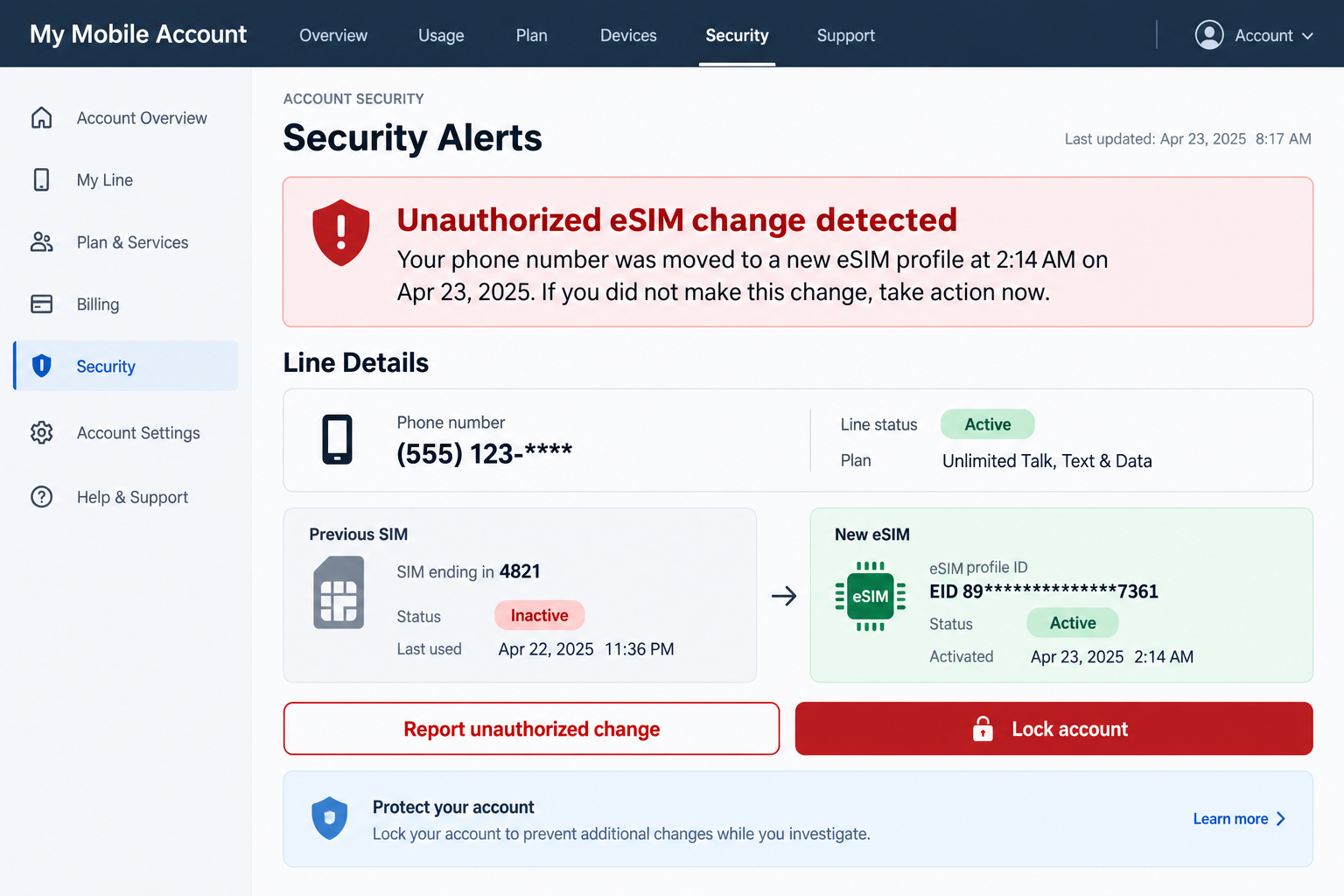
A SIM swap scam happens when a criminal convinces a mobile carrier to move a victim’s telephone number to a SIM card or eSIM profile controlled by the criminal. The victim’s original service stops, while calls and text messages begin arriving on the attacker’s line.
The criminal does not need the physical SIM. A stolen identity profile, compromised carrier login, bribed employee, or carefully prepared support call may be enough to authorize the change.
Because number transfers are a normal customer service function, the attack can look like a legitimate device upgrade inside the carrier’s system. The fraud becomes visible only when the real customer notices the loss of service.
The number unlocks accounts that trust text messages
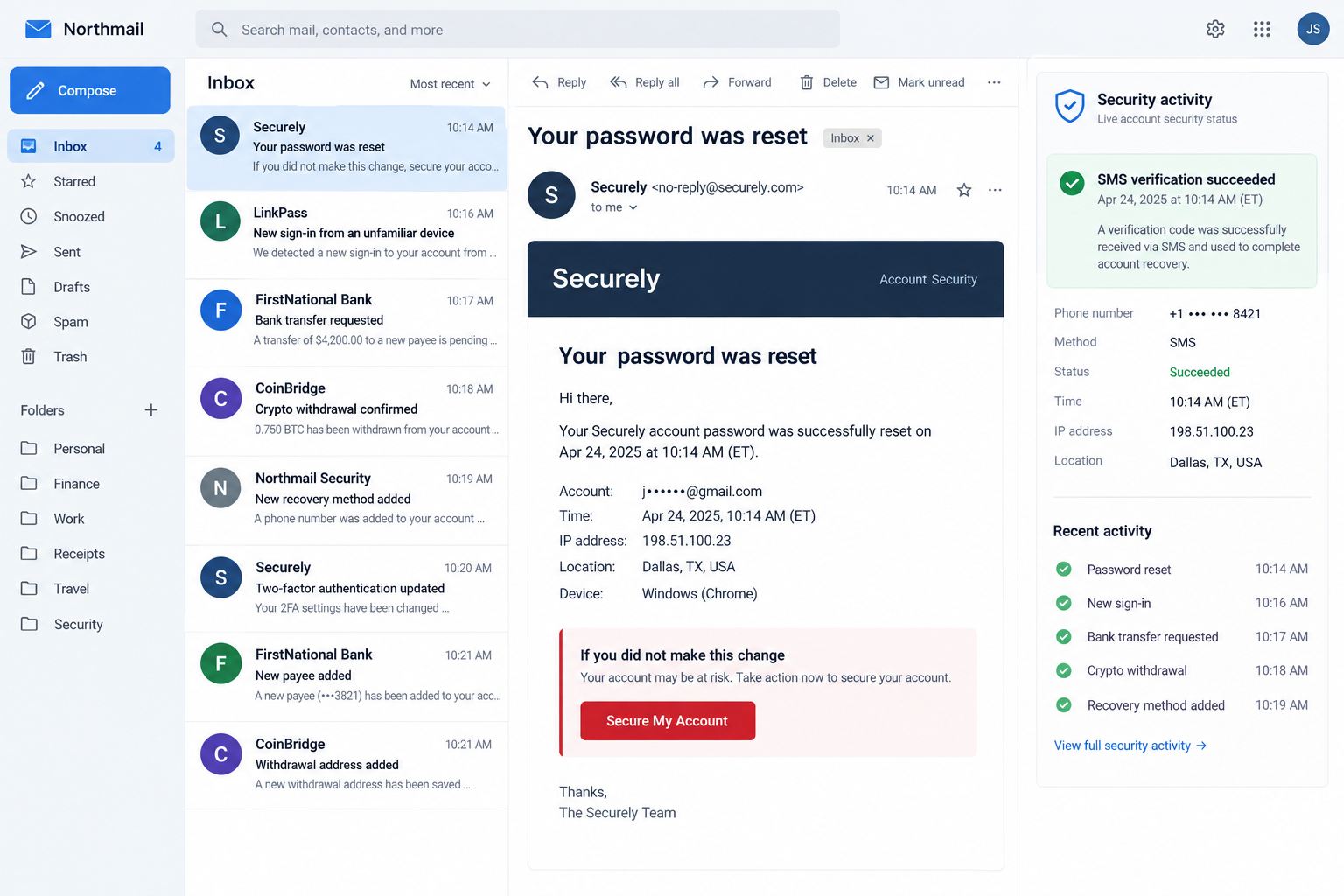
Once the swap is complete, the attacker requests password resets for email, banking, social media, payment, and cryptocurrency accounts. Security codes sent by text now go to the attacker.
Email is often the main target because it connects to so many other services. Control of the inbox lets the criminal search for financial accounts, delete alerts, reset more passwords, and learn enough personal history to impersonate the victim.
The attacker may also use the hijacked number to message relatives or coworkers. A request from the victim’s real number can make an urgent loan or access-code story unusually persuasive.
Authorities have recorded major losses
An FBI Internet Crime Complaint Center warning reported 1,611 SIM swapping complaints and more than $68 million in adjusted losses during 2021. The warning describes social engineering, insider threats, and phishing against carrier employees.
The Federal Trade Commission also warns that a sudden loss of calls, texts, and data can signal that a scammer activated the number on another device.
Common warning signs include:
- your line unexpectedly displays no service or emergency calls only;
- the carrier reports a SIM or eSIM activation you did not request;
- your carrier account password or PIN stops working;
- password-reset messages arrive for unrelated accounts;
- email alerts report a new device, recovery method, or forwarding rule;
- bank, payment, or crypto accounts show unfamiliar login attempts;
- friends receive unusual messages from your real number;
- a caller recently asked for carrier PINs, identity data, or verification codes.
Why One Telephone Number Can Open So Many Doors
A mobile number has become more than a contact detail. It can be a username, recovery route, identity clue, and authentication channel at the same time. That concentration makes the number valuable to criminals.
Text-message verification feels secure because the code arrives through a separate channel. A SIM swap changes who controls that channel. The code remains genuine, but it is delivered to the wrong person.
Many attacks begin before the number moves. The criminal gathers a name, address, date of birth, carrier, account number, PIN, and answers to likely security questions. Data breaches, phishing pages, social profiles, and purchased records can supply the pieces.
The attacker may call the victim first while pretending to be carrier security. A story about network upgrades or suspicious activity is used to collect a one-time code. That code may actually authorize access to the carrier account.
Another approach targets employees. A phishing email can steal a support worker’s credentials, while bribery or social engineering may persuade an insider to process the change. The customer may have used a strong password and still be affected.
eSIM has not created the crime, but it allows a number to move without inserting a physical card. A criminal who gains account control can try to activate a new profile remotely and begin account recovery immediately.
The first minutes matter because automated security systems send warnings through the same telephone number that was hijacked. If email is also compromised, the attacker can erase alerts and leave the victim with very little information.
How the SIM Swap Scam Works
Step 1: The criminal builds an identity profile
The attacker collects enough personal and carrier information to sound like the customer. A public telephone number, leaked address, account statement, phishing response, or reused password can become part of the profile.
People who publicly discuss cryptocurrency or valuable accounts can receive extra attention, but anyone whose number protects financial access can be targeted.
Step 2: The carrier account is approached or compromised
The scammer contacts support and claims a device was lost, damaged, or replaced. Another route uses stolen credentials to sign in to the carrier portal and request a SIM change.
The criminal may answer security questions, quote a leaked account number, or intercept a verification code through earlier phishing. The objective is to make the number transfer look like ordinary customer service.
Step 3: The number moves to the attacker’s profile
The carrier activates a physical SIM or eSIM controlled by the criminal. The victim’s line stops receiving calls and texts, often without a clear explanation on the screen.
The attacker tests the number and begins working through a prepared list of target accounts. Speed reduces the chance that the carrier can reverse the swap before money moves.
Step 4: Email is taken over first
A password-reset request sends a link or code to the stolen number. After entering it, the attacker changes the password, recovery address, trusted devices, and multifactor settings.
With the inbox open, the criminal searches for bank names, crypto exchanges, payment receipts, tax documents, identity records, and messages that reveal other usernames.
Step 5: Financial accounts are reset
The attacker repeats the process for banks, wallets, exchanges, payment apps, or brokerage accounts. A genuine SMS code can approve a login, add a payee, or confirm a withdrawal.
Some services impose waiting periods, so the criminal may also call support while impersonating the victim. Control of the number makes that story more convincing.
Step 6: Money and data leave the accounts
Funds may be wired, sent through instant payment systems, used for purchases, or converted to cryptocurrency. Valuable social accounts can be sold or used to promote more scams.
The attacker may download email and cloud files before the victim regains access. Recovery therefore requires more than restoring cellular service.
Step 7: The victim’s identity is reused
Friends may receive loan requests from the hijacked number. Stolen documents can support new credit or mobile accounts. The criminal may attempt another swap after the first one is reversed.
A durable recovery plan must close the carrier weakness, reset connected accounts, and replace SMS authentication where stronger options are available.
The Fastest Way to Confirm a Suspected Swap
Restarting the device is reasonable, but do not spend hours troubleshooting if service disappeared without warning. Use another telephone or the carrier’s trusted app to contact fraud support.
Ask whether a SIM replacement, eSIM activation, port-out request, PIN change, device upgrade, or authorized user was added. Request the exact time and channel used for any change.
If the carrier confirms a transfer you did not authorize, ask it to disable the fraudulent profile and restore the number. Add a stronger account PIN and request notes preventing further changes without enhanced verification.
Then move to email immediately. A restored number does not reverse password changes already made. Use a clean device, review recovery methods and sessions, and check for forwarding rules that silently copy future messages.
Financial institutions should be called even if no transfer is visible. Ask about attempted logins, new payees, wallet enrollments, contact changes, and pending withdrawals. Some transactions may not appear in the ordinary activity list yet.
Why a Strong Password May Not Be Enough
A unique password still matters, but a recovery flow can bypass it. If a service accepts an SMS code as proof of identity, control of the telephone number may let the attacker replace the password without knowing the old one.
The same weakness can affect accounts protected by two steps. The victim sees “multifactor authentication” enabled, yet both the password reset and second factor depend on channels the attacker has taken over.
Primary email deserves the strongest protection available because it receives recovery messages for other services. An authenticator, passkey, or security key separates that protection from the carrier account.
Backup methods also need review. An old telephone number, weak security question, or rarely used recovery mailbox can preserve a route that the attacker will test after the main password changes.
Security should not depend on one company making a perfect decision during a support call. Layer a carrier lock, strong email authentication, unique passwords, and transaction alerts so that one failure does not unlock everything.
Company, Address, and Fulfillment Checks
The carrier should confirm every recent line change
Review the account’s activity and ask support to identify SIM, eSIM, device, address, PIN, and authorized-user changes. Do not call a number from an unexpected text.
Record the fraud case number and the representative’s name. Ask for written confirmation of the unauthorized change for banks and identity reports.
The account needs a dedicated carrier PIN
A carrier PIN should be unique and unrelated to birthdays, address numbers, or PINs used elsewhere. Replace security questions whose answers are public or exposed.
Ask whether the carrier offers a number lock, port freeze, transfer lock, or in-person verification requirement. Names differ, but the goal is to block remote movement of the line.
Sensitive accounts should not depend only on SMS
Use an authenticator app, security key, passkey, or other stronger method when the service supports it. Keep backup codes offline and protect the email account with the strongest option first.
SMS can remain useful as an alert channel, but it should not be the only barrier protecting high-value accounts.
Recovery is complete only after every session is reviewed
Changing a password may leave an attacker’s existing session active. Sign out other devices, revoke app passwords and tokens, and remove unfamiliar recovery contacts.
Check email rules, banking payees, mobile wallets, social administrators, cloud sharing, and crypto withdrawal addresses. Each service has its own persistence points.
What to Do if You Have Fallen Victim to This Scam
- Contact the mobile carrier immediately. Use another line or trusted app. Report an unauthorized SIM change and ask the carrier to disable the attacker’s profile.
- Restore and lock the number. Set a new unique carrier PIN, remove unknown users, and enable any port or number lock the carrier offers.
- Secure email next. Change the password, sign out other sessions, remove forwarding rules, and replace unfamiliar recovery addresses or app passwords.
- Call every financial institution. Ask banks, payment services, brokerages, and crypto exchanges to freeze suspicious activity and review pending transfers.
- Replace weak authentication. Move sensitive accounts from SMS codes to an authenticator, passkey, or hardware security key where possible.
- Check account recovery settings. Remove unknown devices, telephone numbers, backup emails, API keys, connected apps, and trusted browsers.
- Preserve evidence. Save carrier alerts, case numbers, dates, loss-of-service time, bank activity, login emails, and messages sent from the hijacked number.
- Report identity theft. Use IdentityTheft.gov for a recovery plan and report financial cybercrime at IC3.gov.
- Review credit reports. Consider a fraud alert or security freeze if identity information was exposed or new accounts appeared.
- Warn contacts. Tell friends, family, and coworkers not to trust recent loan requests, codes, or links sent from your number.
- Check devices for related compromise. Malwarebytes can scan after suspicious downloads or phishing. AdGuard can block known malicious destinations, but neither replaces carrier and account recovery.
- Monitor for a repeat attempt. Watch carrier alerts and test the line. A criminal with the same identity data may try another swap.
Frequently Asked Questions
Does a SIM swap require stealing my phone?
No. The criminal targets the carrier’s number-transfer process and can activate the number on another SIM or eSIM remotely.
Why did my phone suddenly lose service?
Network faults happen, but an unexpected SIM activation is an emergency. Contact the carrier immediately if service loss coincides with security alerts.
Will a carrier PIN stop every SIM swap?
It adds protection but is not absolute. Use number locks where available and protect sensitive accounts with stronger authentication than SMS.
Can the attacker read old text messages?
A basic swap redirects new calls and texts, not the old messages stored on your device. Cloud backups or account takeover can expose additional history.
What account should I secure first?
Restore the telephone number and secure primary email immediately. Then contact financial services and review every account that used the number for recovery.
Can I recover stolen money?
Recovery depends on speed, payment method, and destination. Call the financial institution at once and report the unauthorized transaction while it may still be stopped.
The Bottom Line
A SIM swap scam turns an ordinary carrier function into a master key. Once the criminal receives your calls and codes, email and financial accounts can fall in rapid succession.
Treat unexplained loss of service as a security warning. Restore and lock the number, secure email, contact financial institutions, replace SMS-only authentication, and inspect every recovery setting. Quick action can limit both the immediate theft and the next impersonation attempt.








