

A Winter Fuel Payment text scam says the money must be claimed, confirmed, or repaid. It arrives when heating costs are on your mind and offers one simple link to settle the issue.
The message borrows a real payment and a real government process. The deadline belongs to the scammer.
Overview
The scam changes its story with the payment cycle
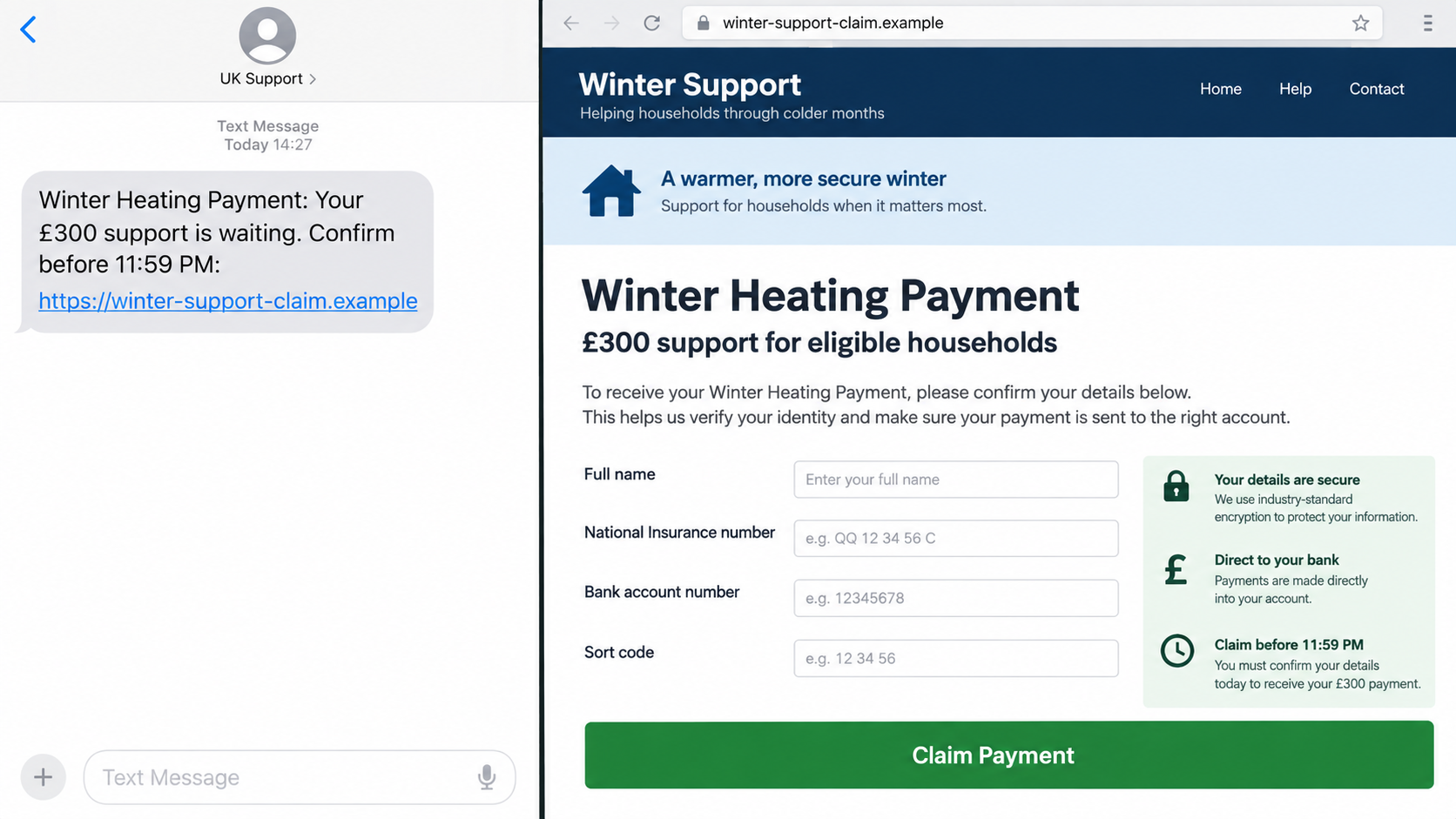
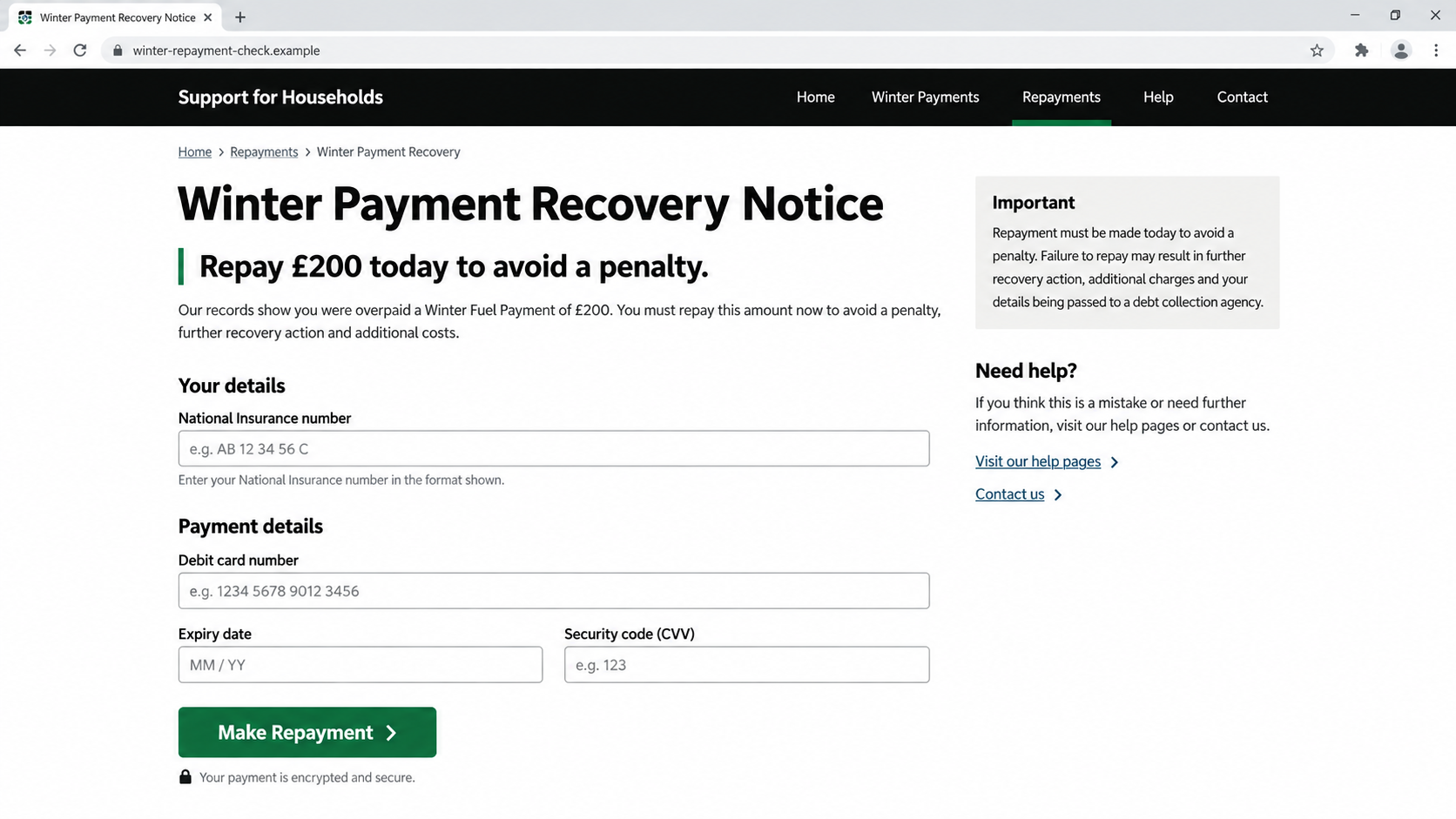
The Winter Fuel Payment text scam impersonates the Department for Work and Pensions, HM Revenue and Customs, or another government service. One version says an eligible pensioner must apply. Another says bank details need confirming. A newer variation claims an earlier payment must be repaid.
Those stories are timed around real announcements. Most Winter Fuel Payments are made automatically in November or December, while higher-income recipients can face an automatic recovery through tax. Criminals turn both processes into reasons for urgent contact.
HMRC reported more than 25,000 Winter Fuel Payment scam referrals in the 12 months before its April 2026 warning. An earlier government warning recorded a 153% weekly rise in related scam-text reports ahead of the payment period.
The link can steal identity and bank information
The message leads to a copied GOV.UK page that asks for a name, date of birth, National Insurance number, address, bank details, and card information. A small charge may be described as identity verification or application processing.
The page can look professional because government layouts, logos, and public explanations are easy to copy. The form is still controlled by whoever owns the destination domain.
Information collected there can support unauthorized card payments, bank impersonation, benefit fraud, identity theft, or a later call that sounds much more informed.
Eligible people usually do not need to apply by text
Official GOV.UK guidance says most payments are automatic and a letter explains the amount and bank account used. HMRC says it will not ask by text or email for repayment or bank details.
Warning signs include:
- an unexpected text says a Winter Fuel Payment will expire unless claimed;
- a link asks the recipient to apply even though payments are usually automatic;
- HMRC supposedly requests repayment by text or email;
- the destination imitates GOV.UK but uses a different domain;
- a processing or verification fee is required;
- the form asks for full card details, a PIN, or a one-time code;
- a short deadline threatens loss of the payment or a penalty;
- the sender says not to call DWP, HMRC, or the bank independently.
How the Real Payment and Recovery Processes Differ
A convincing scam often begins with one true fact. Winter Fuel Payment rules, dates, and recovery arrangements can change, which gives criminals fresh language for messages.
For the 2026 payment cycle, GOV.UK says most payments are made automatically in November or December. Recipients should receive a letter stating the amount and the bank account into which it will be paid, usually the account used for the State Pension or another benefit.
That means an unsolicited text asking for bank details to release the payment conflicts with the normal route. It should not be used as a substitute for checking eligibility on GOV.UK or contacting the Winter Fuel Payment Centre.
A separate recovery process applies to some higher-income pensioners. HMRC’s April 2026 warning explains that recovery of the winter 2025 payment is automatic for most affected people, commonly through a PAYE tax-code change. Online Self Assessment records may be pre-populated.
HMRC specifically says it will never contact people by text or email to ask them to repay a Winter Fuel Payment or provide bank details. A criminal may quote the correct income threshold or tax year while inventing a manual transfer.
The safest response to confusing rules is not to reply. Type GOV.UK into a new browser tab, find the current Winter Fuel Payment guidance, and use contact information published there.
A letter can also be imitated, so paper alone is not proof. Compare any demand with the tax account and official guidance before paying. A genuine notice should identify a process that can be confirmed without using a telephone number or bank account printed only on the letter.
Scammers may blend the two stories. A message first promises a new payment, then claims an earlier amount created a repayment balance. That contradiction is useful to the operator because either fear of missing money or fear of owing money can keep the recipient engaged.
Another version offers to check whether income is above the threshold. The form collects financial details before showing a result. Use the official GOV.UK calculator or tax account instead of giving salary, pension, and bank information to an advertiser or unsolicited sender.
Names differ across the UK. Scotland uses Pension Age Winter Heating Payment, while arrangements in Northern Ireland can involve DWP on behalf of the Northern Ireland Executive. Criminals can copy any of those names. Verify the process for the nation where the recipient lives.
How the Winter Fuel Payment Text Scam Works
Step 1: Criminals choose a timely government hook
Before winter, the message says applications have opened or a payment is waiting. During a recovery period, it says money must be returned. News coverage supplies the vocabulary and dates.
The same template can be sent to thousands of numbers. Older recipients are attractive targets because the benefit is age-related, but a wrong recipient does not make the campaign harmless.
Step 2: The text creates an artificial deadline
The payment will supposedly be canceled tonight, the application will close, or an unpaid balance will generate a fine. A shortened deadline discourages calls to family or government offices.
Government administration does not require a recipient to trust an unsolicited link. Current rules remain available after the text is deleted.
Step 3: A lookalike domain copies GOV.UK
The landing page can reproduce the Crown, black header, green buttons, accessibility wording, and official explanations. It may display a progress bar and a believable application reference.
Only the hostname shows who controls the site. Terms such as govuk, dwp, winter-fuel, hmrc, secure, or claim can be placed inside a criminal domain.
Step 4: Eligibility questions become identity harvesting
The form asks for age, name, address, National Insurance number, telephone number, and benefit information. Each question seems connected to eligibility.
The operator can store fields as they are typed. Closing the page before the final button may not prevent collection if sensitive information was already entered.
Step 5: Bank or card details are requested
A claim version says the account is needed for payment. A recovery version says a debit card will settle the balance. A small fee may appear to keep the amount believable.
Bank details also help the criminal impersonate the bank later. A follow-up caller can mention the fake application and claim a suspicious transaction was detected.
Step 6: A one-time code authorizes a real transaction
The fake page may request an OTP sent by the bank. It labels the number as identity verification, but the genuine message may say it approves a card purchase, new payee, or wallet.
Government benefit verification does not require a recipient to ignore the bank’s security warning and share a protected transaction code.
Step 7: A false confirmation delays the response
The page thanks the applicant, promises payment within days, or says the debt is cleared. It may then redirect to GOV.UK.
The victim waits for a benefit or receipt while criminals test the card, use the identity data, or prepare a second call.
The Scale Is Documented by Government Warnings
This is not a dispute about whether a legitimate benefit exists. The Department for Work and Pensions and HMRC have published repeated warnings about criminals impersonating government services around Winter Fuel Payments.
An October 2025 DWP warning said related scam-text reports had risen 153% in one week. It emphasized that payments were automatic and that the government would not ask for bank details by text.
In April 2026, HMRC warned about repayment impersonation after receiving more than 25,000 referrals over 12 months. Criminals were expected to exploit the real recovery process with texts, emails, and calls.
The details of eligibility and recovery can evolve. That is precisely why a current official page matters more than a message that quotes a rule. A scammer can copy yesterday’s accurate wording and attach today’s fraudulent bank form.
Warnings also distinguish contact about administration from a request for money. A genuine agency may send correspondence, but HMRC does not use a surprise text or email to collect this repayment or ask for bank details. The requested action, not just the sender name, exposes the scam.
Company, Address, and Fulfillment Checks
The sender label is not DWP or HMRC identity
A text thread can display an official-sounding sender name. Email display names and caller ID can also be spoofed. None of them replaces contact through GOV.UK.
Do not reply to test the sender. A response confirms the number is active and keeps verification inside the criminal’s channel.
The web address must be an official government domain
Type `gov.uk` into the address bar and navigate from there. Do not trust a padlock, copied Crown, or a domain that merely includes the letters gov.
Sponsored search results can also imitate government help. A known official bookmark is safer than searching the wording from the text.
The bank route should match the published process
Most payments use an account already connected with the State Pension or other benefits. Most affected repayments are handled through tax, not through a new card form sent by text.
If an account change is genuinely required, confirm the method with the Winter Fuel Payment Centre or HMRC using official contact information.
A confirmation page does not fulfill the payment
The real evidence is the official letter, tax record, and bank transaction. A reference number generated by an unverified website proves only that the page displayed one.
Do not wait for the promised money before reporting exposed information. The operator may use the delay to complete unauthorized transactions.
What to Do if You Have Fallen Victim to This Scam
- Close the page and stop contact. Do not submit another code, card, document, or repayment. Preserve the message and full domain first.
- Call the bank immediately. Use the number on the card or official app. Explain what information was entered and whether an OTP was shared.
- Freeze or replace exposed cards. Ask the bank to review pending payments, digital wallets, new payees, direct debits, and account-detail changes.
- Check the payment through GOV.UK. Use current Winter Fuel Payment guidance and the official contact centre, not the link or phone number in the message.
- Contact HMRC through its published route. If the message concerned repayment or tax, ask whether any genuine action is recorded.
- Protect government identity details. If a National Insurance number or document was disclosed, follow official identity-fraud guidance and monitor benefit and tax records.
- Secure email and online accounts. Change any password entered on the page, remove unfamiliar sessions and recovery methods, and enable multifactor authentication.
- Check the device and reduce repeat exposure. Run a Malwarebytes scan if the page installed anything or requested a download. AdGuard can help block known phishing domains and malicious ads, but it cannot protect bank details that were already submitted.
- Forward the suspicious text. Send it to 7726. HMRC-related texts can also be forwarded to 60599, and emails to phishing@hmrc.gov.uk.
- Report stolen money. Notify Report Fraud and provide the sender, domain, payment details, dates, screenshots, and a clear timeline.
- Save the fake page carefully. Record screenshots and the URL without revisiting it repeatedly or sending the live link to other potential victims.
- Tell trusted family members. Scammers use secrecy and urgency. A second person can help monitor calls, accounts, and official correspondence.
- Ignore recovery and refund callers. Anyone demanding a fee, transfer, card code, or remote access to recover the loss is attempting another scam.
Frequently Asked Questions
Do I need to apply for Winter Fuel Payment by text?
Most eligible people are paid automatically. Check the current GOV.UK rules because limited circumstances may require a claim, but an unsolicited text is not the safe route.
Will HMRC text me to repay the benefit?
HMRC says it will not ask by text or email for Winter Fuel Payment repayment or bank details. Verify recovery through your tax record and official GOV.UK guidance.
Why does the fake page look exactly like GOV.UK?
Public websites can be copied. Colors, logos, text, and HTTPS do not transfer ownership. The complete domain and independently opened official service are what matter.
What if I am not eligible for the payment?
The message can still be part of a mass campaign. Do not reply. Report and delete it after preserving any evidence you need.
Can a small verification charge be legitimate?
A Winter Fuel Payment claim or repayment is not validated through an unknown card charge. Stop and confirm the process with the government service directly.
What if I clicked but entered nothing?
Close the site, record the URL for reporting, and remove any download or permission it requested. Contact your provider if the browser filled and submitted saved information automatically.
The Bottom Line
The Winter Fuel Payment text scam succeeds because the benefit, dates, and repayment rules are real. Criminals place a false application or payment route on top of that public information and push recipients to act before checking.
Most payments are automatic, and HMRC does not request repayment or bank details by text or email. Use GOV.UK, the official contact centre, and your own bank app. If information was entered, report it and protect the account immediately rather than waiting for the promised confirmation.








