


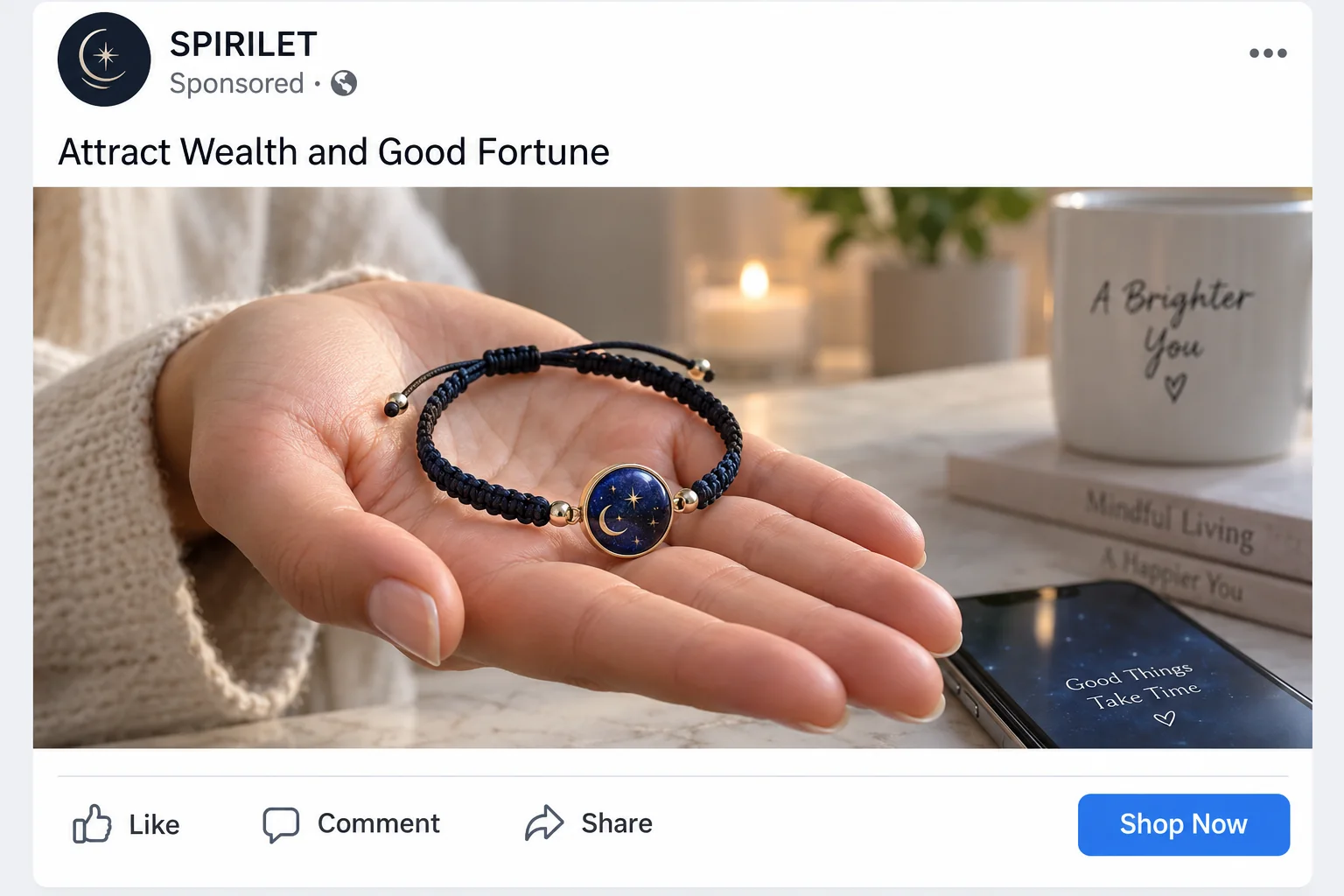
A dark blue bracelet appears beside stories about sudden luck, unexpected money, and relationships turning around at exactly the right moment.
Spirilet sells more than jewelry. It sells the possibility that one small object could quietly change whatever feels stuck in your life.
Overview
What Spirilet promises
Spirilet markets themed bracelets through emotional language about abundance, manifestation, protection, energy, love, and personal transformation.
Its Money Bracelet page has invited customers to “turn your body into a magnet” for wealth and fortune.
The object itself is wearable jewelry, but the advertised outcome reaches far beyond color, materials, fit, or craftsmanship.
No bracelet can be reliably tested as a mechanism for attracting lottery wins, income, romance, or favorable events.
Why the commercial setup matters
A buyer may initially focus on the $27 product and overlook the surrounding checkout, membership portal, guarantee conditions, or identity of the seller.
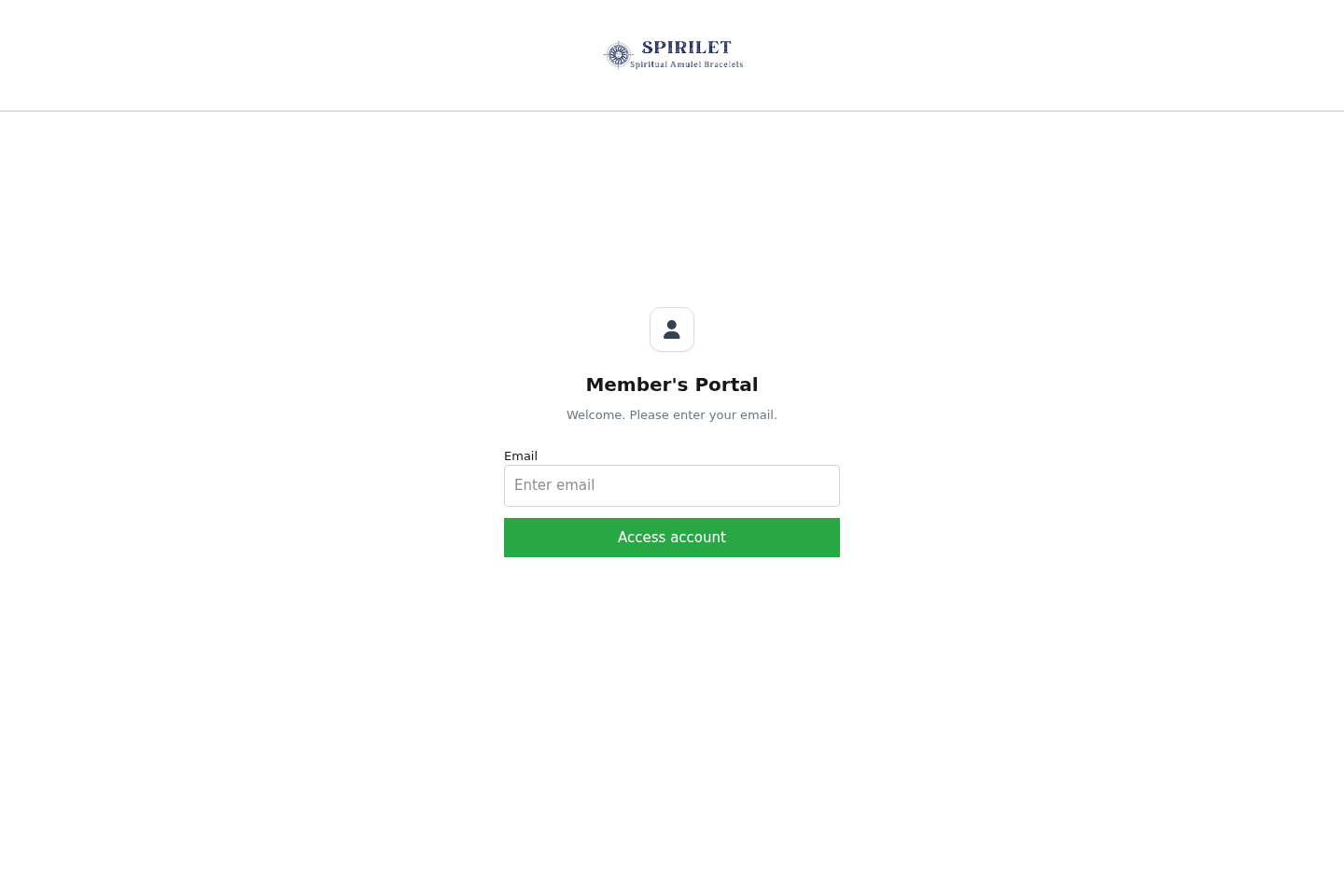
Spirilet’s website links to a separate cancellation login, showing that recurring or membership-related account management exists within the sales ecosystem.
Consumer complaints describe unexpected charges, disappointing quality, difficult support, and refunds that did not arrive as expected.
Those reports are individual allegations, not proof that every customer experiences the same outcome.
Our conclusion after checking the offer
Spirilet appears to sell real bracelets, yet its supernatural-style promises cannot justify the premium price or predict financial improvement.
Comparable designs are widely available for much less, while the company trail and recurring-payment complaints introduce additional risk.
The sensible approach is to value the item as costume jewelry and ignore any suggestion that it controls chance.
Key warning signs include:
- Claims that jewelry can attract money, luck, love, or favorable opportunities.
- Emotional testimonials that cannot verify cause and effect.
- Urgent offers such as buy one, get one promotions.
- A branded price far above visually similar mass-market bracelets.
- A separate membership or cancellation system that buyers may overlook.
- Complaints alleging extra charges and difficult refund experiences.
- Limited clarity about manufacturing, materials, and quality testing.
- Different business names or contact details appearing across the order journey.
The Advertisement Sells Hope Before It Sells Jewelry
Manifestation promotions are effective because they attach a product to problems that feel deeply personal.
A shopper may be worried about debt, loneliness, career stagnation, family conflict, or a long period of bad luck.
The advertisement does not need to promise one measurable result.
It can use broad language that allows any later positive event to feel connected to the bracelet.
If nothing changes, the customer may be told to remain patient, believe more strongly, or wear it differently.
That logic protects the claim from failure because every outcome can be reinterpreted.
A raise becomes proof the bracelet worked.
A lost opportunity becomes evidence that the wearer blocked its energy or abandoned the ritual too early.
This is not a fair way to evaluate a commercial product.
Jewelry can have sentimental value, support a personal ritual, or remind someone of a goal.
Those psychological meanings are real experiences, but they do not demonstrate that materials emit a force attracting money.
The distinction matters when a seller charges a premium for implied supernatural benefits.
Can Crystals or Bracelets Attract Wealth?
There is no reliable scientific evidence that a bracelet can alter financial probability, cause strangers to offer money, or direct favorable events toward its wearer.
Claims about vibrations and abundance often avoid specific measurements.
The advertisement may describe energy without naming a unit, mechanism, dose, or controlled result.
Scientific-sounding words do not make a statement scientific.
A testable claim must define what changes, how it is measured, and how competing explanations are excluded.
Wealth depends on many factors, including income, spending, debt, education, health, opportunity, discrimination, market conditions, and chance.
A bracelet cannot reasonably replace financial planning, employment assistance, medical care, or professional counseling.
People naturally remember coincidences that confirm a hopeful belief.
They may forget the many days when wearing the same object produced no unusual event.
This confirmation bias helps vague testimonials feel compelling.
A stranger’s story about receiving money after wearing jewelry cannot establish that the jewelry caused the payment.
The person may have expected income, taken new action, or simply experienced ordinary coincidence.
The Membership Portal Is an Important Clue
Spirilet maintains a dedicated portal where customers can log in to manage or cancel membership-related services.
That does not prove every bracelet purchase automatically creates a subscription.
It does prove shoppers should examine the checkout for recurring terms rather than assuming every price is a single purchase.
Recurring offers can appear as clubs, VIP discounts, protection plans, priority programs, or optional memberships.
A small checkbox or preselected upgrade may carry more financial importance than the bracelet itself.
Before submitting payment, search the page for “monthly,” “recurring,” “membership,” “renewal,” “cancel,” and “trial.”
Review the final total and compare it with the amount shown on the first promotional page.
After ordering, inspect the confirmation for a second product, club enrollment, or scheduled charge.
Consumer complaint pages include allegations of additional billing around $29.99.
That figure should not be assumed to apply universally, because offers and checkout paths can change.
It is still a strong reason to monitor the card and save the exact terms accepted.
A cancellation portal only helps when customers know an enrollment exists and can access the required account.
If no password arrives or support cannot locate the order, stopping a renewal becomes harder.
Written cancellation evidence is essential when a later charge must be disputed.
How the Spirilet Bracelet Funnel Works
Step 1: A social advertisement finds an emotional need
The video or post speaks to viewers who feel unlucky, financially strained, lonely, or spiritually blocked.
It may describe a surprising turnaround attributed to one simple bracelet.
The personal tone makes the content resemble advice rather than advertising.
Step 2: A vague energy story avoids measurable promises
The bracelet is associated with abundance, attraction, vibrations, or manifestation.
These words feel meaningful while remaining flexible enough to escape objective evaluation.
Customers fill the gaps with their own hopes.
Step 3: Testimonials turn coincidence into apparent proof
Stories describe unexpected money, better relationships, improved mood, or fortunate timing.
The sequence suggests the bracelet caused the result, even though no controlled evidence establishes that connection.
Emotional detail makes the conclusion feel stronger than the underlying facts.
Step 4: A low entry price reduces caution
A price near $27 may feel small compared with the life change being implied.
Buy one, get one language increases perceived value and encourages immediate action.
The buyer may spend less time checking materials or policies because the emotional reward seems enormous.
Step 5: The checkout can introduce additional commitments
Upsells, memberships, or recurring benefits may appear while the shopper focuses on completing the original order.
Any repeated payment should be disclosed clearly beside the acceptance control.
Never assume “free,” “VIP,” or “member price” lacks later billing.
Step 6: The delivered object resets expectations
A customer may receive ordinary-looking jewelry that resembles inexpensive marketplace products.
Disappointment becomes difficult to frame because spiritual outcomes are subjective and quality descriptions may remain vague.
The seller can point to delivery while avoiding the larger promise that motivated the purchase.
Step 7: Refund or cancellation friction extends the loss
Consumers have alleged slow responses, broken items, unapproved extra charges, and refunds that failed to appear.
Experiences vary, but recurring billing can continue while a customer argues about the first order.
Fast written action and bank monitoring are therefore more important than repeated telephone conversations.
The Price of the Bracelet Versus the Story
Spirilet’s Money Bracelet has been advertised around $27, sometimes with a comparison price near $49.99.
Visually similar zodiac and manifestation bracelets appear on major marketplaces around $9.
Some unbranded listings cost even less when purchased through overseas marketplaces.
Appearance alone cannot prove identical materials or a shared manufacturer.
However, a common design places the burden on the premium seller to explain what makes its version different.
Useful answers would identify metal composition, stone type, coating, clasp strength, dimensions, allergen information, and quality-control process.
Statements about energy or fortune do not answer those ordinary product questions.
A lifetime guarantee may also sound more valuable than the bracelet.
Its real worth depends on exclusions, replacement fees, shipping costs, response times, and whether the responsible business remains reachable.
When return postage approaches the product’s value, a theoretical guarantee may offer little practical relief.
Buyers should calculate the total cost after shipping, taxes, upgrades, and possible membership charges.
The final amount, not the introductory price, is the meaningful comparison.
What Customer Reviews Reveal
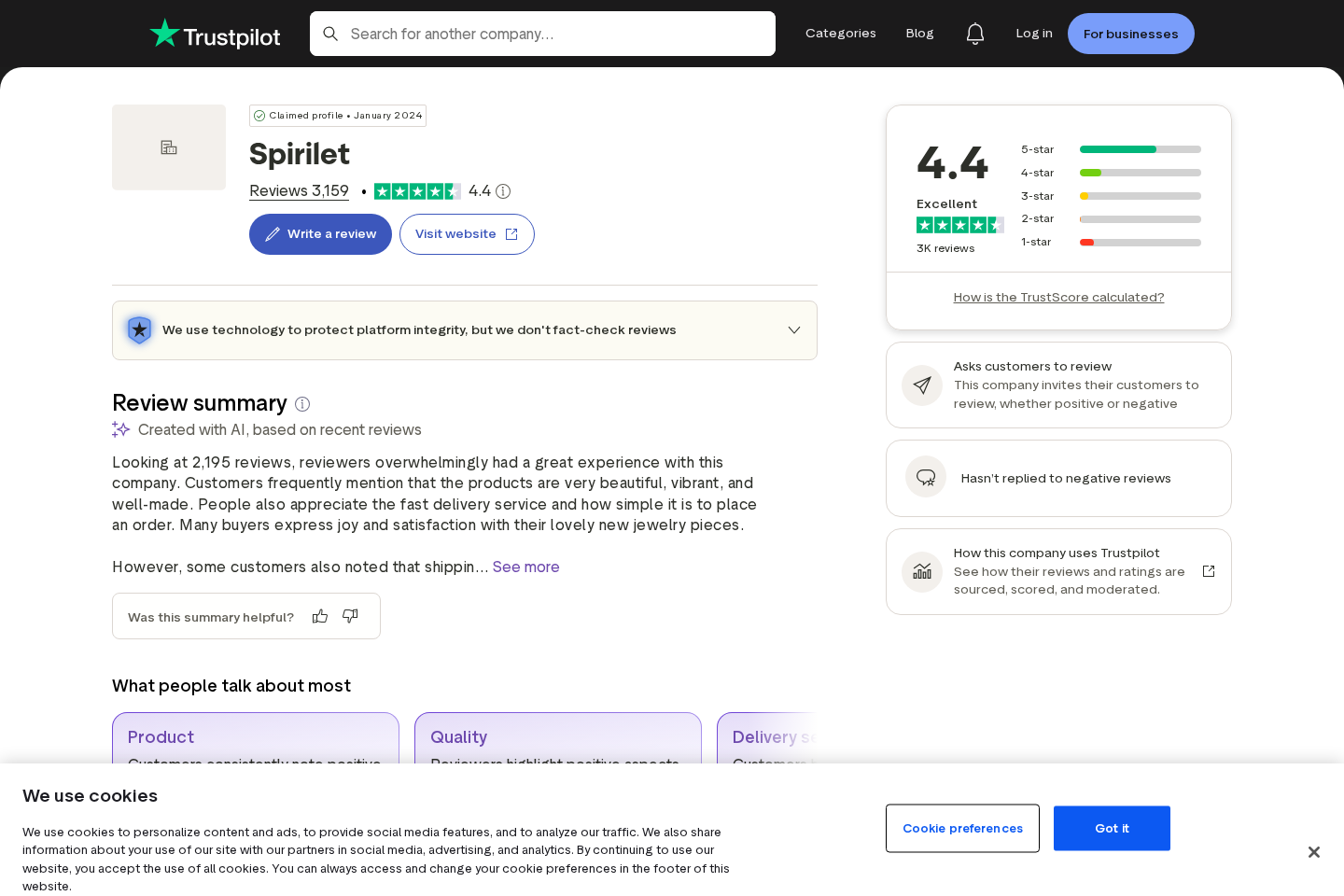
Spirilet has accumulated thousands of reviews on Trustpilot and currently shows a strong overall rating.
That positive total deserves acknowledgment because many customers report acceptable experiences.
The same profile also includes important context that a promotional screenshot might omit.
Trustpilot indicates that invited reviews are used, and the business has not consistently answered negative feedback.
Invited reviews are not automatically unreliable.
They can create sampling differences when satisfied or recently delivered customers are more likely to receive prompts.
Negative reports describe concerns about quality, unexpected charges, support, and reimbursement.
Those accounts should be read for recurring patterns rather than treated as verified facts about every transaction.
Pay attention to dates because a seller may change processors, policies, products, and support contractors.
Also distinguish complaints about mystical claims from complaints about concrete matters such as broken clasps or card billing.
The second category is easier to document and more useful during a dispute.
Ratings alone cannot tell you whether the bracelet will fit, last, or produce a timely refund.
Company, Address, and Fulfillment Checks
The brand and payment recipient must match clearly
Spirilet presents the storefront, while its pages also reference Reach USA as an international seller associated with completing orders.
Buyers should identify the exact legal entity taking payment.
Compare that name with the terms, privacy policy, receipt, card statement, and return authorization.
Unexplained changes make accountability and disputes harder.
Addresses may belong to logistics or mailbox operations
Complaint records have referenced a Montreal address, but that does not prove it is the company’s headquarters or manufacturing location.
A returns point can serve multiple merchants without managing customer support.
Search any address before shipping and ask the seller to confirm it in writing.
Never assume the label’s origin address accepts refunds.
Telephone and email support should work before purchase
The live site has displayed info@spirilet.com and a telephone number beginning with 404.
Contact details can change, so verify them directly on the current policy pages.
Ask whether the intended checkout includes recurring billing and request the cancellation method.
A vague or unanswered response is a warning to walk away.
Manufacturing claims remain insufficiently documented
Similar mass-market bracelets make generic sourcing plausible, but they do not prove an exact factory or country of origin.
Request material composition, responsible importer, production origin, and safety information.
Costume jewelry can contain metals or coatings that irritate sensitive skin.
Spiritual wording should never replace basic product disclosure.
How to Buy Jewelry Without Buying the Claim
Decide whether you would still want the bracelet if the luck story disappeared.
If the answer is no, the advertisement is selling expectation rather than craftsmanship.
Reverse-search product photographs and compare the clasp, bead arrangement, cord, emblem, dimensions, and packaging.
Read the current membership terms at the checkout, not a summary from an earlier advertisement.
Remove unwanted add-ons and take a screenshot of the final order page.
Use a credit card or another payment method with clear dispute procedures.
Avoid debit transfers or unfamiliar payment links when the responsible business is unclear.
Inspect the confirmation immediately for recurring charges and unexpected quantities.
When the package arrives, photograph its label and condition before opening.
Do not wear jewelry that causes itching, discoloration, swelling, or pain.
Keep every written promise until the chargeback and refund windows have closed.
A hopeful purchase should never require surrendering ordinary consumer caution.
Separate personal ritual from the seller’s commercial responsibility.
You may enjoy a symbolic object while still demanding accurate materials, transparent billing, dependable delivery, and an accessible refund route.
Do not let a seller suggest that questioning a charge reflects insufficient faith.
Billing authorization is a factual matter, and product quality can be documented with photographs and measurements.
Spiritual preference never removes ordinary consumer rights.
What to Do if You Have Fallen Victim to This Scam
- Save the promise and the payment terms. Capture the advertisement, checkout, membership language, guarantee, order confirmation, and card descriptor before requesting help.
- Cancel any recurring plan immediately. Use the official portal, send written notice, and retain timestamps or confirmation numbers showing when cancellation was requested.
- Ask for a specific remedy. State whether the item was damaged, misdescribed, missing, or accompanied by an unauthorized charge.
- Notify the card issuer quickly. Dispute charges that were not clearly authorized and explain any failed attempts to resolve the matter with the merchant.
- Replace exposed payment details when advised. Ask whether the bank recommends a new card number to prevent further transactions.
- Ignore recovery approaches. Anyone promising to retrieve money for an advance fee may be targeting previous victims again.
- Secure the device used for ordering. Malwarebytes can check suspicious downloads, while AdGuard can block many deceptive advertisements and tracking redirects.
- Report documented patterns. Provide billing records and correspondence to consumer-protection agencies, the advertising platform, and the payment processor.
Is Your Device Infected? Run a Free Malware Scan
Slow performance, constant pop-ups, or strange behavior? These are classic signs of a malware infection. A quick way to check is to scan your device with Malwarebytes Free, one of the most trusted malware removal tools available. If you only visited a scam page and didn’t download or install anything, this scan is optional.
The free version detects and removes the most common threats, including:
- Adware — the cause of those annoying pop-ups
- Browser hijackers — unwanted redirects and changed homepages
- Trojans and spyware — hidden programs stealing your data
- Potentially unwanted programs (PUPs) — software you never asked for
👉 Select your device below — Windows, Mac, or Android — then follow the simple steps to download Malwarebytes, scan your system, and remove any threats it finds. The scan usually takes 5 to 20 minutes.
Run a Malware Scan with Malwarebytes for Windows
Malwarebytes is one of the most popular and trusted anti-malware tools for Windows — and it’s completely free for removing infections. It catches threats that many antivirus programs miss, including adware, browser hijackers, and trojans. Follow the steps below to scan your PC and remove what Malwarebytes finds.
Download Malwarebytes
Click the button below to download the latest version of Malwarebytes for Windows from the official source. The free version is all you need — it will scan your computer and remove adware, browser hijackers, and other malicious software at no cost.
Download MalwarebytesOfficial installer for Windows 11 and 10. Your download starts right away.Want real-time protection? See Malwarebytes Premium Malwarebytes Free for WindowsScans and removes malware at no cost
-
Install Malwarebytes
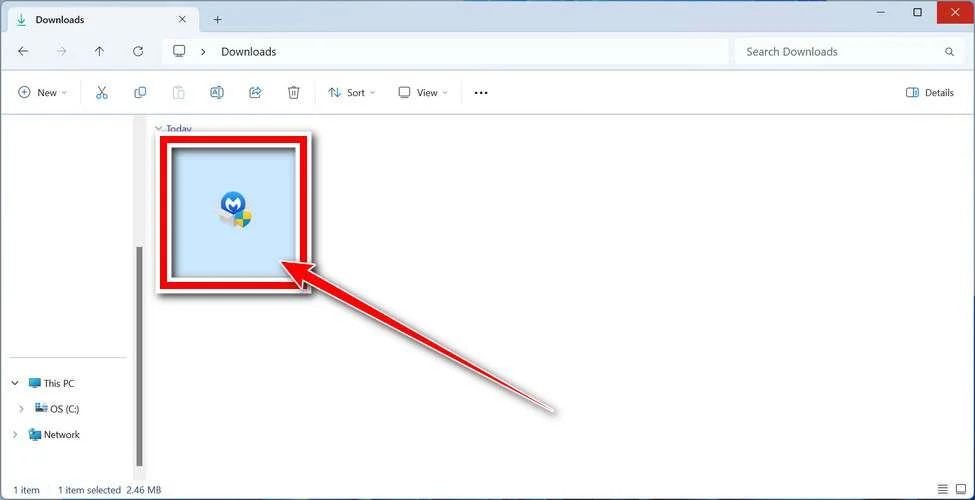
When the download finishes, open your Downloads folder and double-click the MBSetup file. If Windows shows a User Account Control pop-up, click “Yes” to allow the installation.
Follow the On-Screen Prompts to Install Malwarebytes
The setup wizard will walk you through a few quick screens:
-
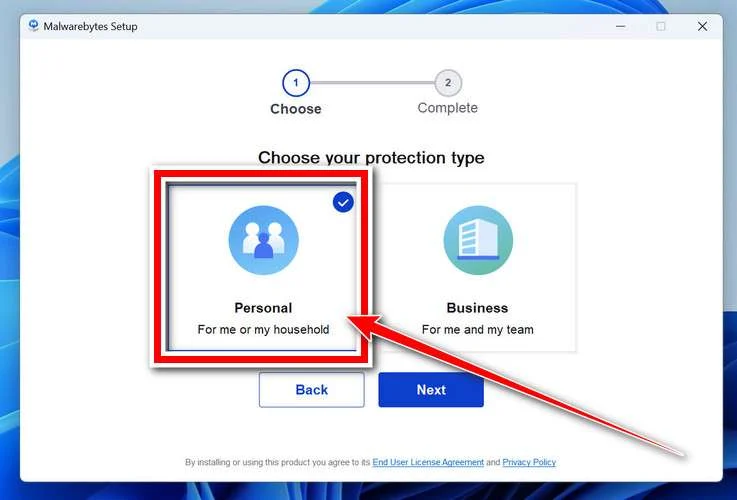
Choose where you’re installing the program — “Personal Computer” or “Work Computer” — then click Next.
-
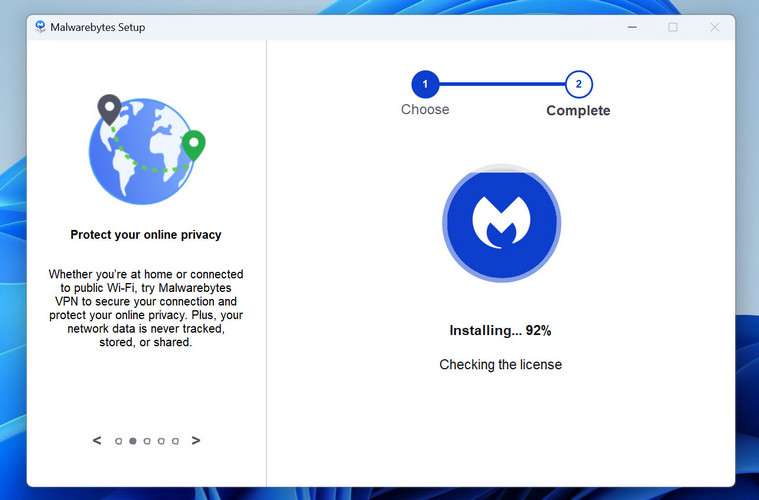
Malwarebytes will now install on your device. This usually takes under a minute.
-
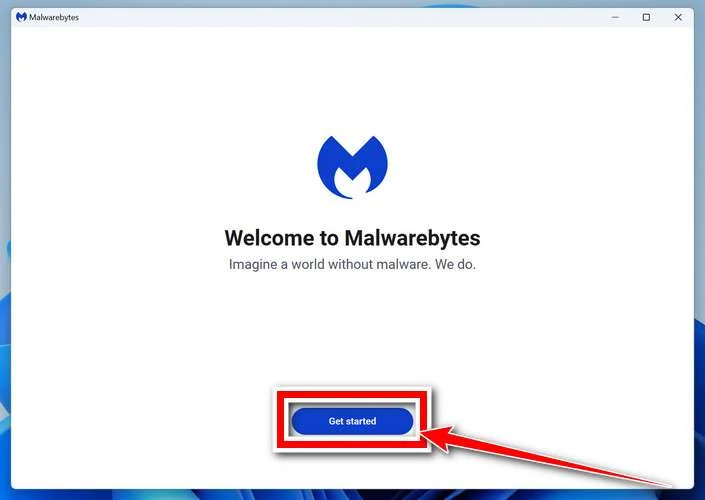
When installation is complete, the “Welcome to Malwarebytes” screen will open automatically.
-
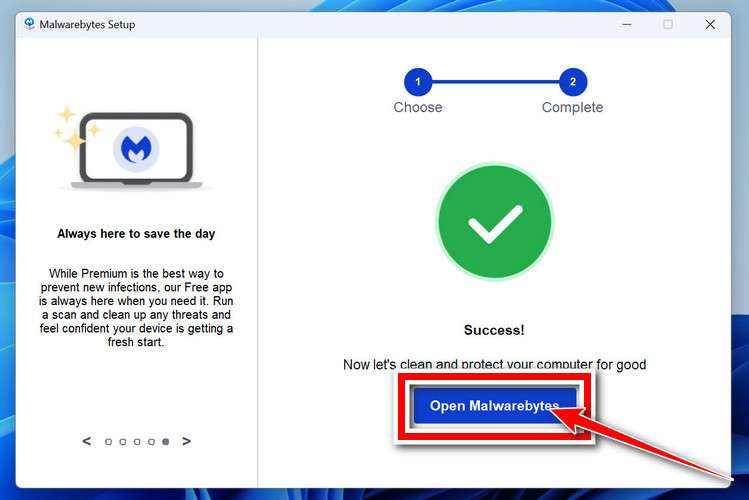
On the final screen, click Open Malwarebytes to launch the program.
-
Optional: Check for rootkits with a Custom Scan
You don’t need to change any settings for a normal scan. The standard Threat Scan in the next step is enough for most problems, so you can go straight to it.
If you also want to check for rootkits, use a Custom Scan. In current versions of Malwarebytes, rootkit scanning is only available there:
- On the Scanner tile, click the three-dot menu and select Advanced Scan.
- Choose Custom Scan. In its options, check Scan for rootkits.
- Select your system drive (usually C:\) as the location to scan, then start the scan. It takes longer than a Threat Scan.
- When it finishes, review and quarantine the results as described in the steps below.
Rootkit scanning isn’t available on Windows devices with ARM processors.
Start the Scan
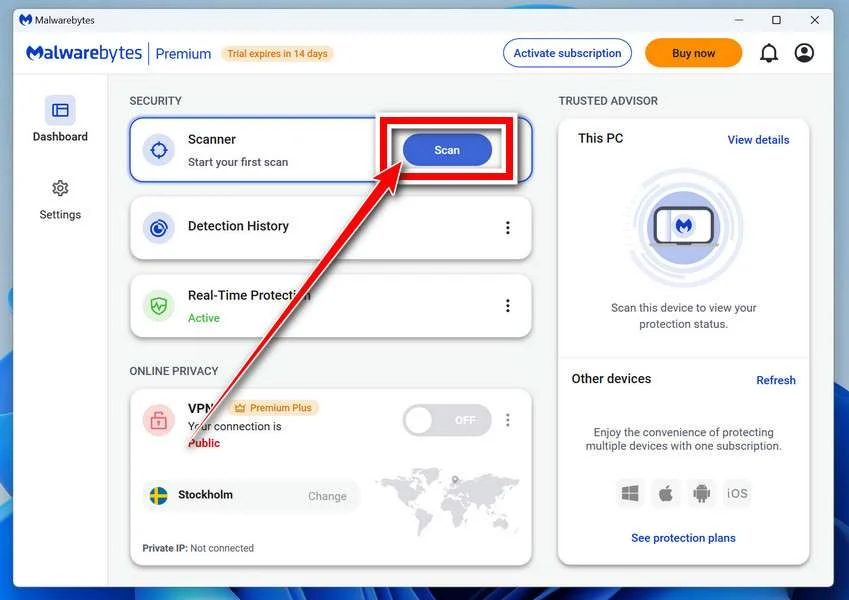
Click the blue Scan button. Malwarebytes will automatically update its virus database and start checking your computer for malware.
-
Wait for the Scan to Finish
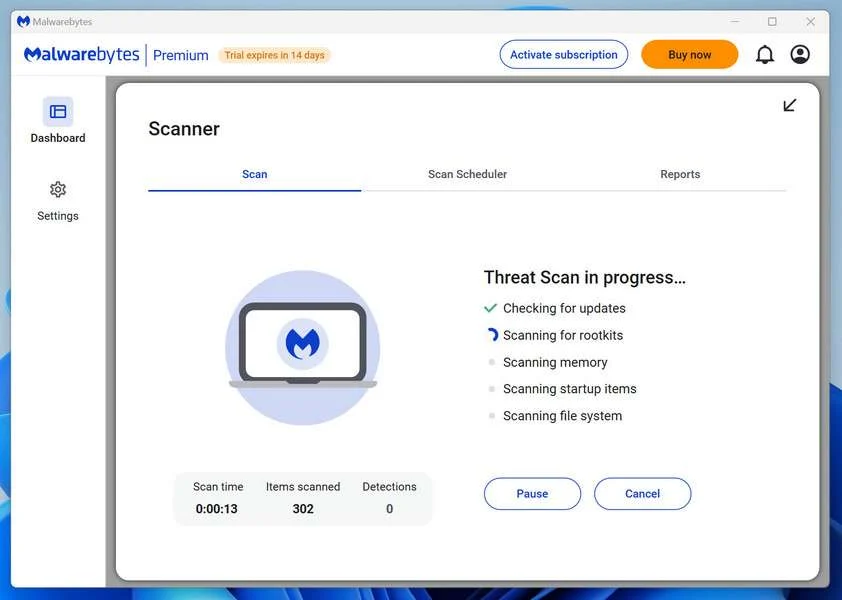
The scan checks your entire system for browser hijackers and other malicious programs, so it can take 5 to 20 minutes depending on your computer. Feel free to do something else — just check back occasionally to see the progress.
-
Quarantine the Detected Threats
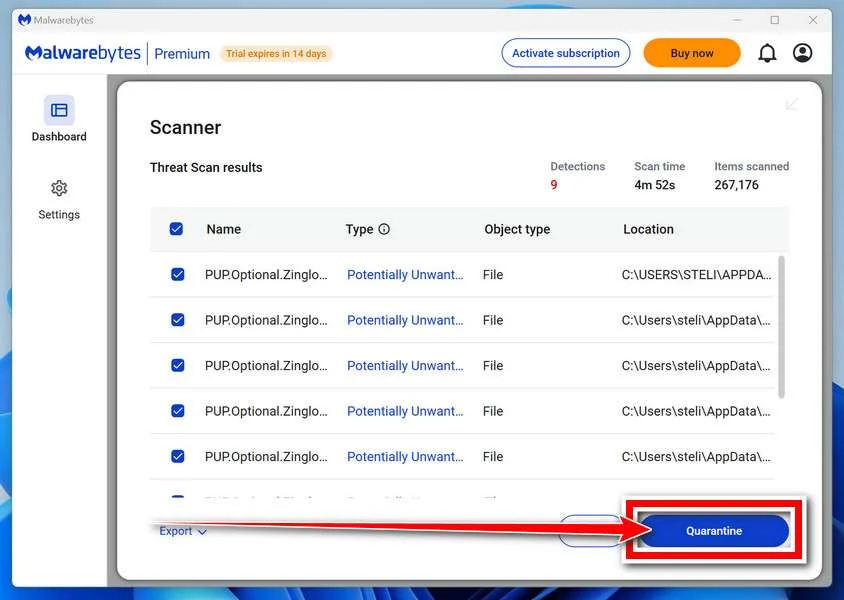
When the scan is done, you’ll see a list of everything Malwarebytes found — malware, adware, and potentially unwanted programs. Click the “Quarantine” button to remove all of them at once.
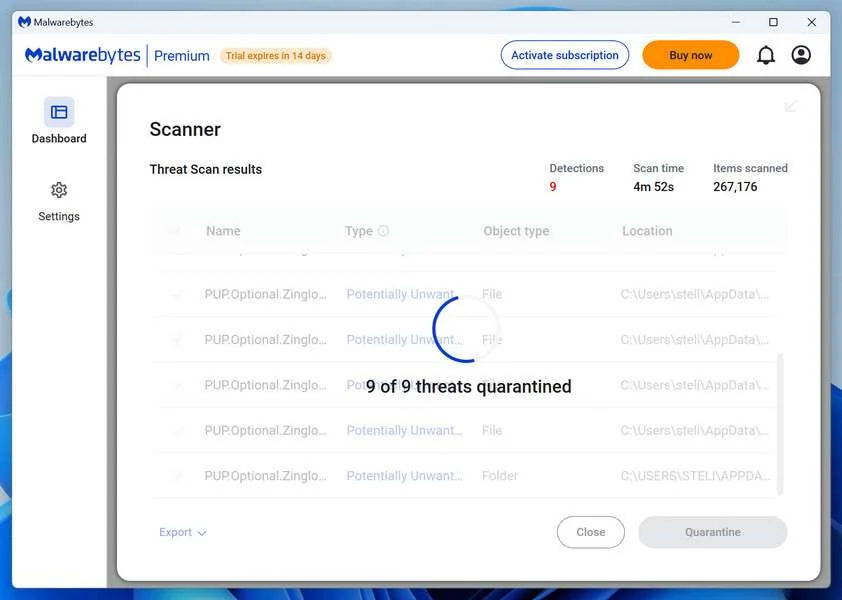
Malwarebytes will now remove the malicious files and registry entries and move them safely into quarantine.
-
Restart Your Computer
Some threats can only be fully removed after a reboot. If Malwarebytes asks you to restart, click Yes. Once you’re logged back in, Malwarebytes has finished removing the threats it found.
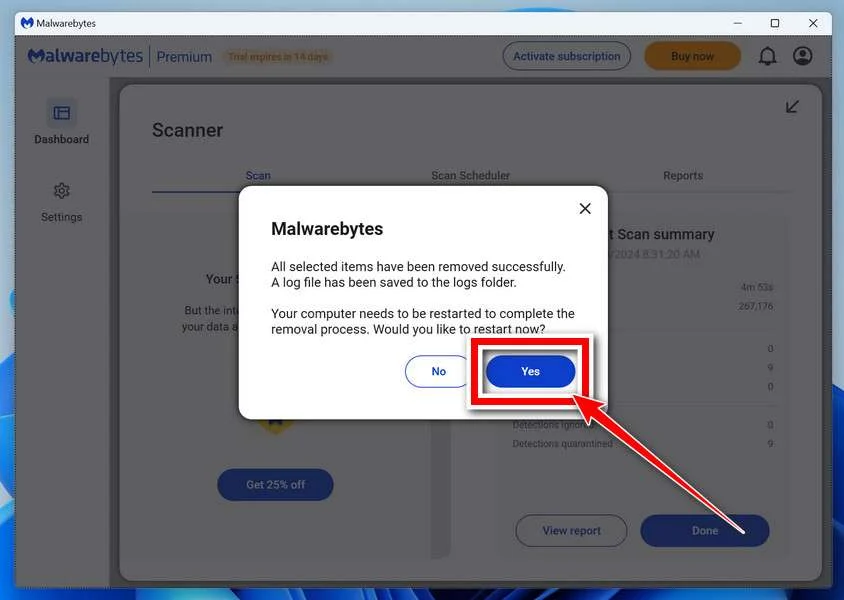
When the scan is done, check whether the problems you noticed have stopped. If they continue, see the options below.
If you are still having problems with your computer after completing these instructions, then please follow one of the steps:
- Run a computer scan with ESET Online Scanner
- Ask for help in our Windows Malware Removal Help & Support forum.
Run a Malware Scan with Malwarebytes for Mac
Malwarebytes for Mac is a free on-demand scanner that removes the malware other security software tends to miss — adware, browser hijackers, and unwanted programs included. Cleaning an infected Mac with Malwarebytes has always been completely free, and it’s our go-to recommendation. Follow the steps below to scan your Mac and remove what Malwarebytes finds.
-
Download Malwarebytes for Mac
Click the button below to download the latest version of Malwarebytes for Mac.
Download MalwarebytesOfficial installer for macOS. Your download starts right away.Want real-time protection? See Malwarebytes PremiumMalwarebytes Free for MacScans and removes malware at no cost -
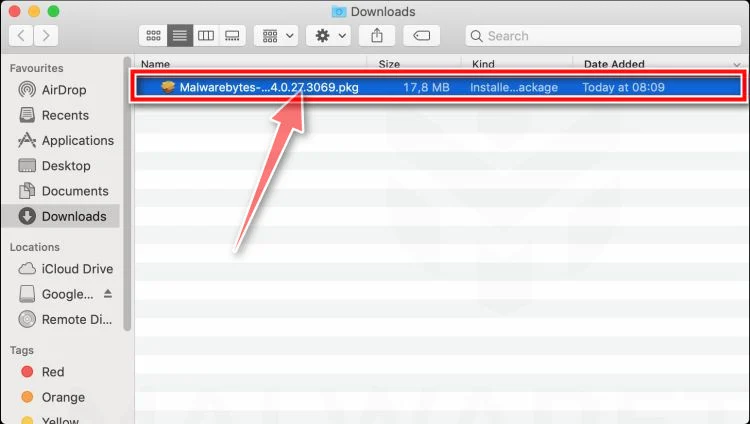
Open the Malwarebytes setup file
When the download finishes, open your Downloads folder and double-click the setup file to begin the installation.
-
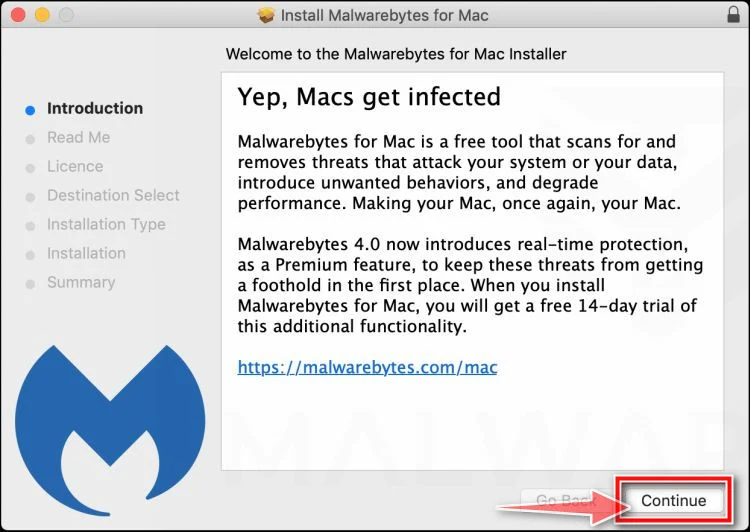
Follow the On-Screen Prompts to Install Malwarebytes
The Malwarebytes for Mac Installer will guide you through a few quick screens. Click “Continue” and keep following the prompts until the installation completes.
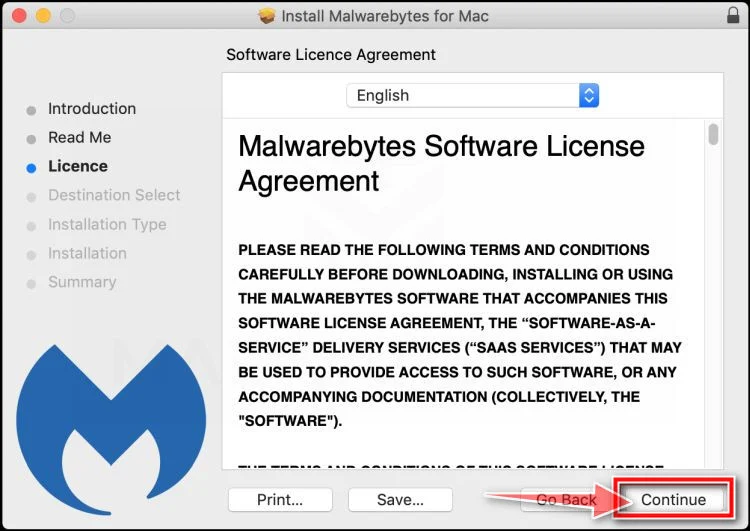
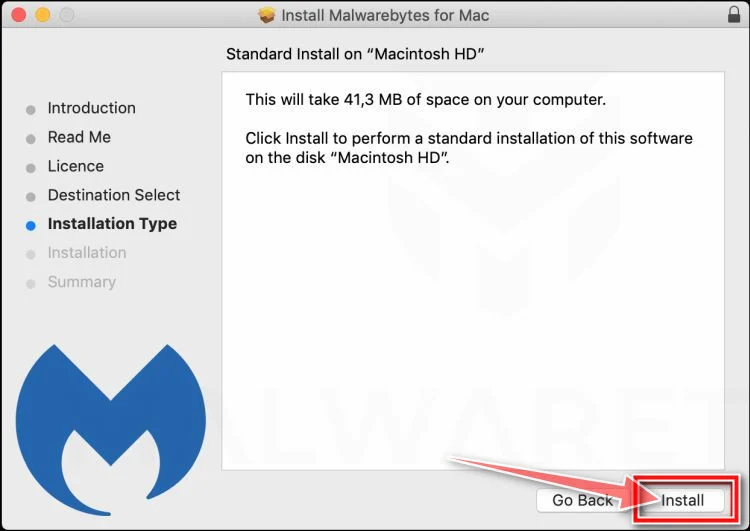
When the installation is complete, Malwarebytes opens to the Welcome to Malwarebytes screen. Click “Get started“.
Malwarebytes needs Full Disk Access to check your whole Mac. When it asks, open System Settings > Privacy & Security > Full Disk Access, turn on Malwarebytes (it may be listed as Malwarebytes Protection), and confirm with your password or Touch ID. Then return to Malwarebytes. On macOS Monterey and earlier, this setting is in System Preferences > Security & Privacy > Privacy.
-
Select “Personal Computer” or “Work Computer”
Malwarebytes will ask what type of computer you’re installing it on. Click either Personal Computer or Work Computer, whichever applies.
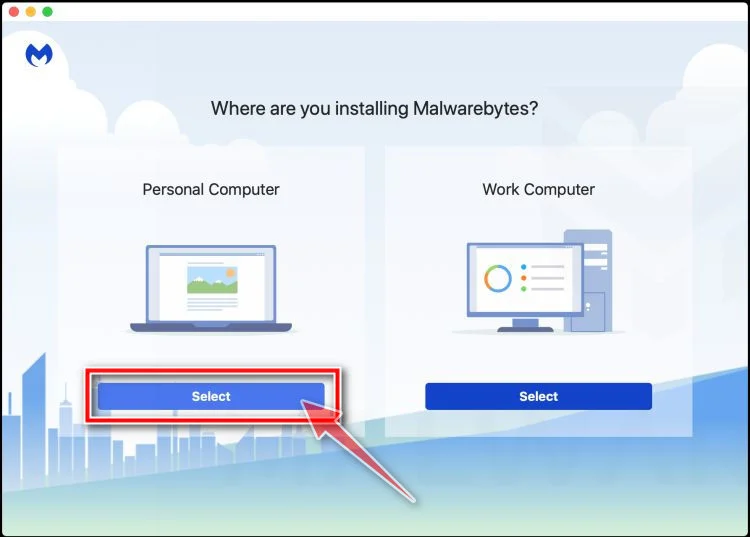
-
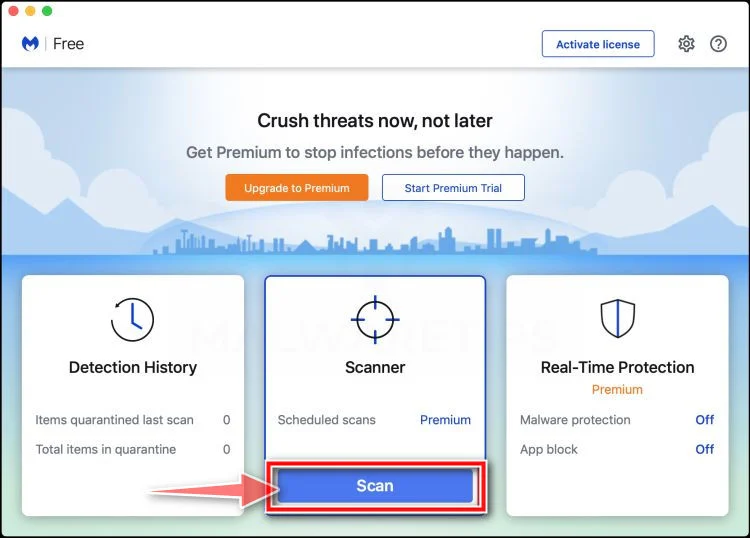
Start the Scan
Click the “Scan” button. Malwarebytes will automatically update its detection database and begin checking your Mac for malware.
-
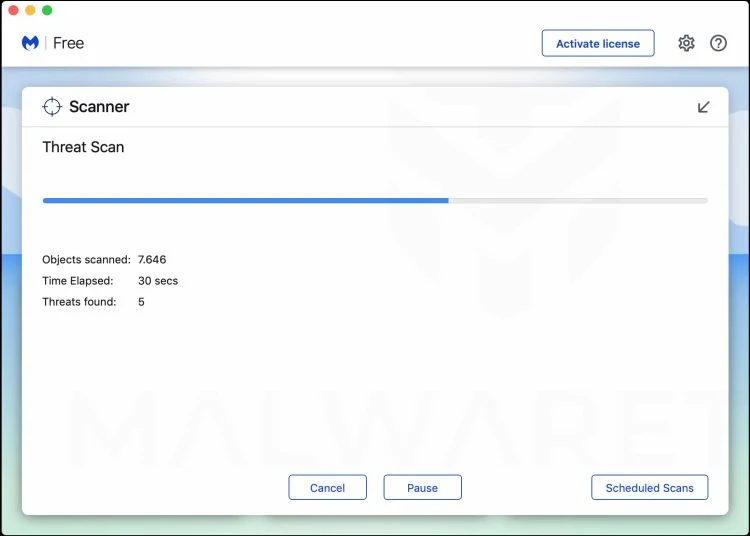
Wait for the Scan to Finish
Malwarebytes will scan your Mac for adware, browser hijackers, and other malicious programs. This can take a few minutes, so feel free to do something else — just check back occasionally to see the progress.
-
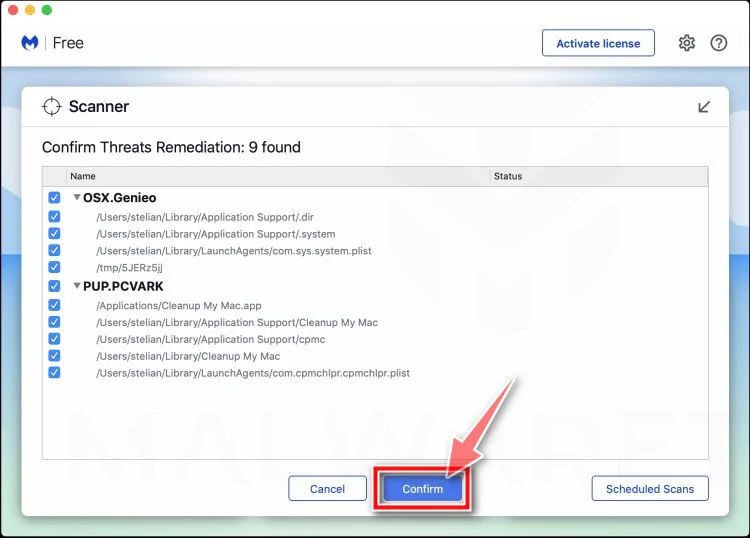
Quarantine the Detected Threats
When the scan is done, you’ll see a list of everything Malwarebytes found. Click the “Quarantine” button to remove all the threats at once.
-
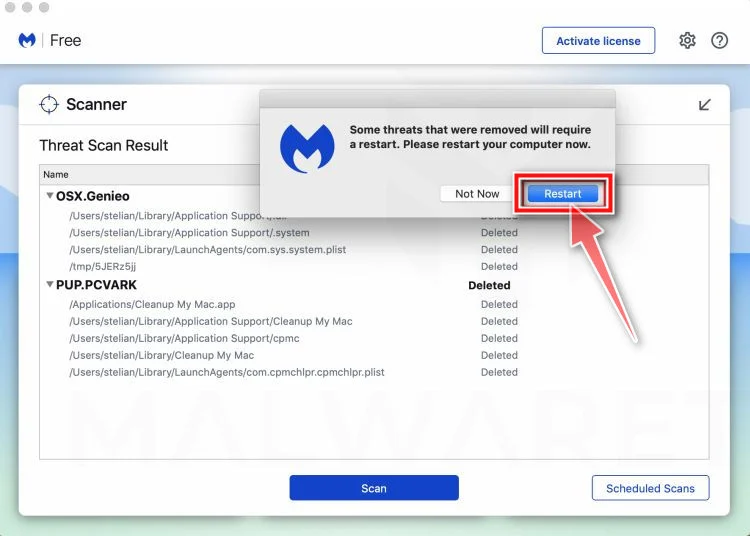
Restart Your Mac
Malwarebytes will now remove all the malicious files it found. Some threats can only be fully removed after a reboot — if Malwarebytes asks you to restart, allow it. Once you’re logged back in, check whether the problems you noticed have stopped. If they come back, save the scan report and ask for help in our forum.
If the problems you noticed continue after the scan, see the options below.
If you are still experiencing problems while trying to remove a malicious program from your computer, please ask for help in our Mac Malware Removal Help & Support forum.
Run a Malware Scan with Malwarebytes for Android
Malwarebytes for Android scans your phone or tablet for malware, adware, and potentially unwanted apps. The free version scans only when you start a scan. Real-time protection, which checks apps automatically, is part of the paid Premium version.
-
Download Malwarebytes for Android.
You can download Malwarebytes for Android by clicking the link below.
Get Malwarebytes for AndroidOpens Google Play in a new tab.Want real-time protection? See Malwarebytes Premium for AndroidMalwarebytes for AndroidScans your phone and removes malware at no cost -
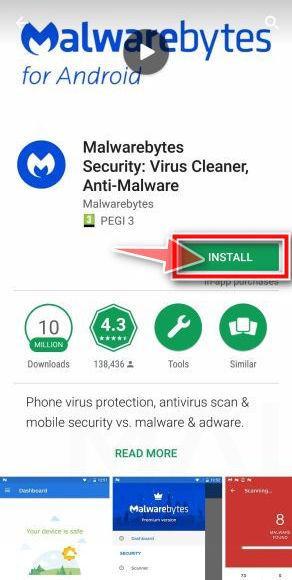
Install Malwarebytes for Android on your phone.
In the Google Play Store, tap “Install” to install Malwarebytes for Android on your device.
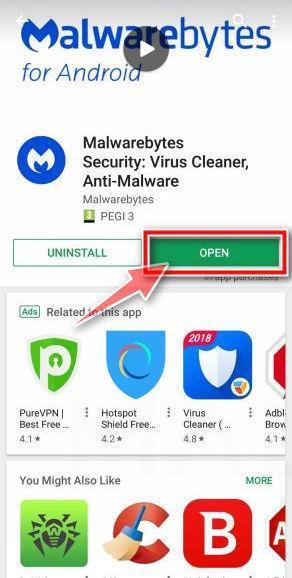
When the installation process has finished, tap “Open” to begin using Malwarebytes for Android. You can also open Malwarebytes by tapping on its icon in your phone menu or home screen.
-
Follow the on-screen prompts to complete the setup process
When Malwarebytes opens, it walks you through a short setup. Tap Get started and follow the prompts. If you see an offer for a trial or a paid plan, read it before you accept. You can skip it and keep using the free scanner.
Malwarebytes will ask for permission to access the files on your phone so it can scan them. Tap Allow, or turn on the permission in the Android screen that opens, then return to Malwarebytes.
-
Run a scan with Malwarebytes for Android
On the main screen, tap Scan now. In some versions, you open the menu, tap Scanner, and then tap Run a scan.
-
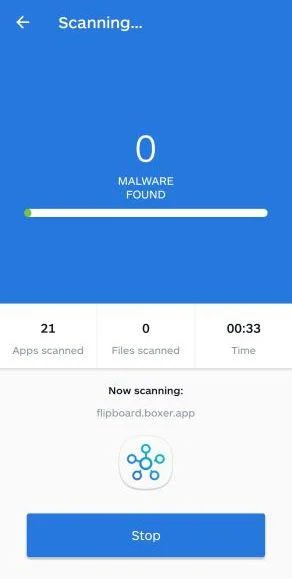
Wait for the Malwarebytes scan to complete.
Malwarebytes will now start scanning your phone for adware and other malicious apps. This process can take a few minutes, so we suggest you do something else and periodically check on the status of the scan to see when it is finished.
-
Remove the detected apps.
When the scan has been completed, you will see a list of the threats that Malwarebytes for Android has detected. Next to each detected item, tap the menu icon (three dots), then choose to uninstall the app or delete the file. Android then asks you to confirm. Tap OK or Uninstall to remove the app.
-
Restart your phone.
When the detected apps are removed, restart your phone if Malwarebytes asks you to. Then check whether the problems you noticed have stopped.
If the problems you noticed continue after the scan, see the options below.
If you are still having problems with your phone after completing these instructions, then please follow one of the steps:
- Ask for help in our Mobile Malware Removal Help & Support forum.
- Only as a last resort, reset your phone to factory settings. Read the warning below first.
- Back up your photos, videos, files, and messages, for example to your Google account or a computer.
- Make sure you know your Google account email and password. The phone asks for them after the reset. If you changed the password recently, Google recommends waiting 24 hours before you reset.
- On a Samsung phone, also make sure you know your Samsung account password.
- If you use an authenticator app for two-step verification, move your accounts to another device or save your backup codes first.
Stay Protected: Block Ads and Malicious Sites
No scan can prove a device is completely clean, so it helps to block threats before they reach you. Most infections start with a malicious ad or a fake download button — so blocking them at the source is your best defense.
We recommend AdGuard, which blocks malicious ads, phishing pages, and dangerous redirects before they can reach you.
👉 Download AdGuard and browse safely
Frequently Asked Questions
Is Spirilet a real company selling real bracelets?
A functioning storefront and delivered-product reports indicate that physical bracelets are sold.
That does not validate supernatural benefits or guarantee a trouble-free billing and refund experience.
Can the Money Bracelet attract wealth?
No reliable evidence shows that wearing jewelry changes financial probability or causes money to arrive.
Buy it only for appearance or personal symbolism, never as a financial strategy.
Are Spirilet bracelets cheaply sourced?
Very similar designs appear through mass-market sellers at lower prices.
The exact manufacturer and origin of every Spirilet unit cannot be confirmed from appearance alone.
Does Spirilet charge a subscription?
The company has a membership cancellation portal, and some consumers allege unexpected recurring charges.
Check the exact checkout terms because enrollment can vary by offer and date.
Are Spirilet’s positive reviews fake?
The strong rating includes many positive reports, but review collection context and negative complaints should also be considered.
A high score cannot prove mystical claims or guarantee an individual refund.
What should I do about an unknown Spirilet charge?
Save the statement, cancel through official channels, contact the merchant in writing, and notify the card issuer promptly.
Ask whether replacement card details are necessary.
The Bottom Line
Spirilet turns ordinary-looking jewelry into an emotionally powerful promise about wealth and luck, but those outcomes are not supported by reliable evidence.
Price the bracelet as costume jewelry, scrutinize membership terms, verify the seller, and never let hopeful storytelling override billing safeguards.

Join the discussion
0 commentsShare your experience or ask a question about this article.
Discussion
Start the conversation
Have a question or something useful to share? Add the first comment.