Helion Portable Heater Exposed: Fake or Real? Complete Scam Investigation
Written by: Lapain Epuran
Published on:
A tiny heater promises to warm an entire room while sharply cutting winter electricity costs. Helion presents that familiar idea with unusually polished confidence.
The product is real enough to order, yet the important questions begin after the advertisement has already made its strongest impression.
Overview
What Helion Portable Heater is
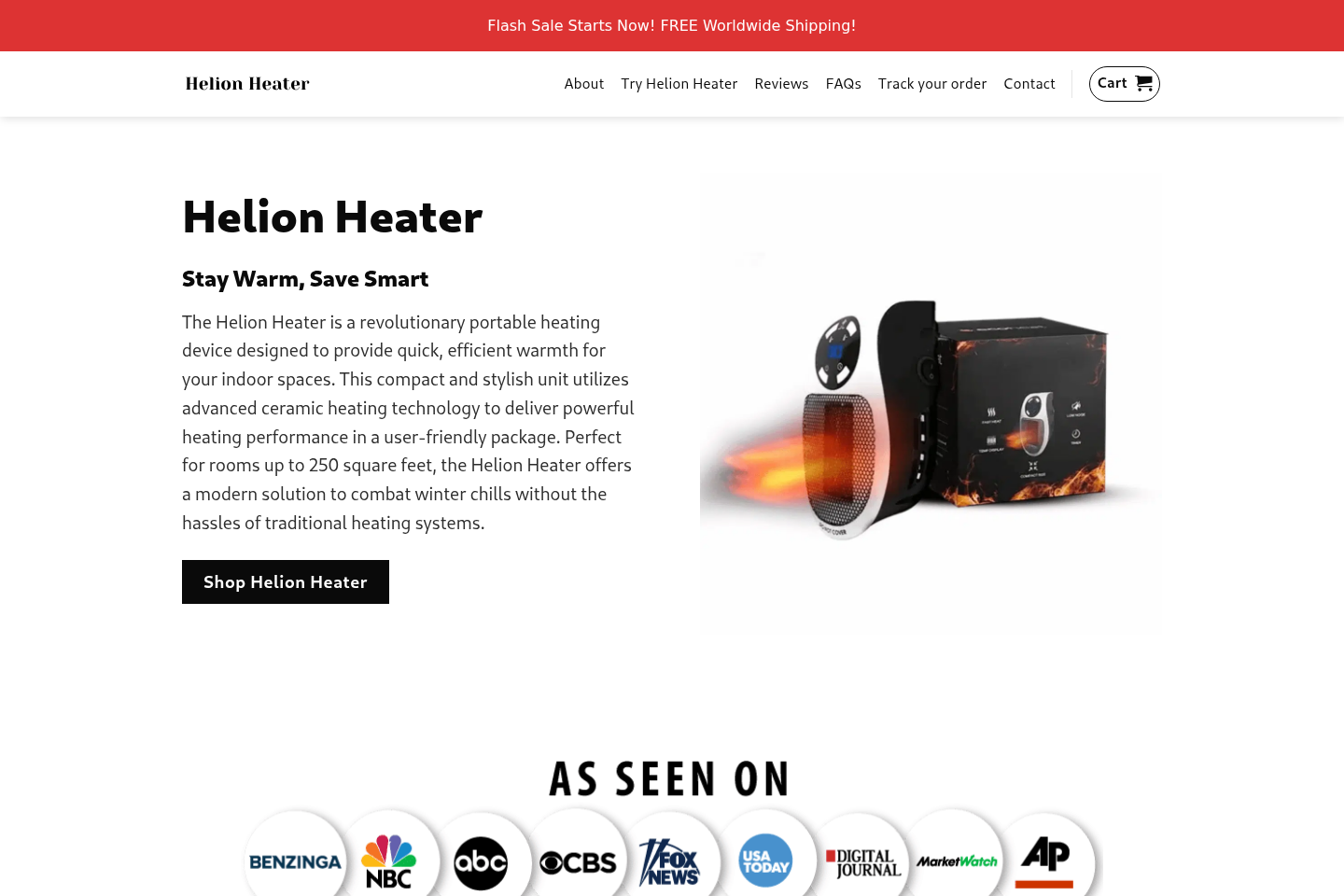
Helion Portable Heater is a compact electric space heater sold through a dedicated direct-response website.
The page describes ceramic heating, adjustable temperatures, a timer, anti-tip protection, and coverage for rooms measuring up to 250 square feet.
Those features sound practical, but they do not establish how much usable heat the device produces in an ordinary home.
A photograph and feature list cannot replace wattage, independent testing, certification details, and realistic operating guidance.
Why the promotion raises concern
The campaign combines urgent discounts, dramatic efficiency language, glowing testimonials, and a story suggesting an overlooked breakthrough.
This presentation encourages shoppers to compare Helion with expensive central heating, rather than with similar low-wattage plug-in devices.
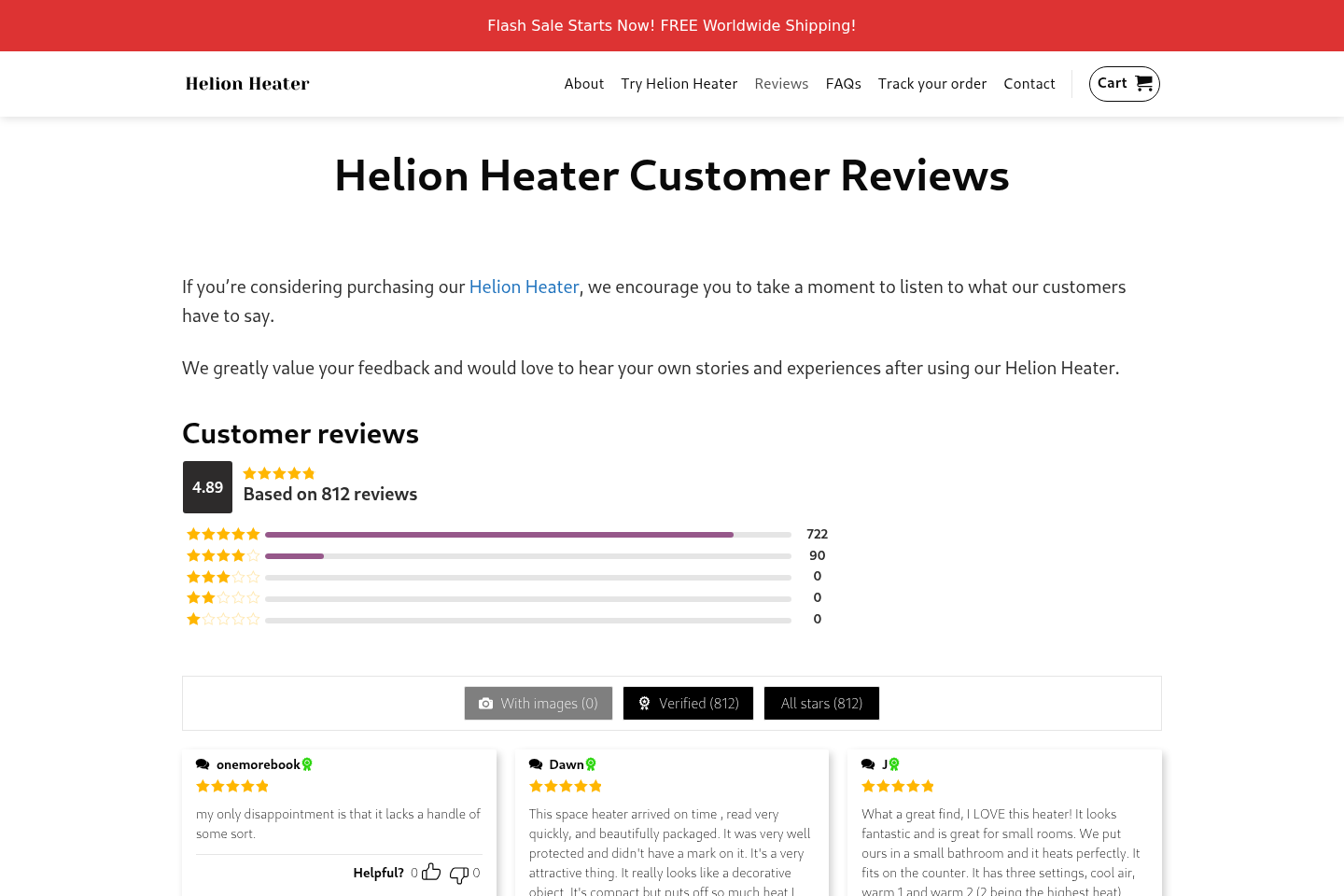
The seller’s review page displays an exceptional 4.89 rating from 812 reviews, with almost no meaningful criticism visible.
Such a remarkably clean distribution deserves scrutiny because normal consumer products usually attract varied experiences, even when buyers are broadly satisfied.
Our practical assessment
Helion appears to be a real physical heater, not an imaginary item that can never arrive.
However, the available evidence does not support treating the broad heating and savings promises as proven facts.
The main concerns are promotional exaggeration, generic-product characteristics, limited company transparency, and a return process that may be harder than the advertisement implies.
Important warning signs include:
Claims that a very small heater can comfortably handle a much larger room.
Savings language presented without a household-specific energy calculation.
A near-perfect seller-controlled review profile with little visible disagreement.
Pricing framed around a large temporary discount and artificial urgency.
A business address associated with flexible or virtual office services.
Few independently verifiable details about design, manufacturing, and laboratory testing.
Safety wording that may sound stronger than the documentation available to shoppers.
Why a Small Heater Can Feel More Powerful Than It Is
A compact heater can create a noticeable pocket of warmth when placed close to a person.
That immediate sensation is persuasive, especially in a chilly bathroom, home office, or small bedroom.
Feeling warm beside the outlet does not mean the device can raise the temperature throughout 250 square feet.
Room heating depends on wattage, insulation, ceiling height, outdoor temperature, drafts, door openings, and the starting indoor temperature.
A seller cannot calculate meaningful savings without knowing those variables and the customer’s existing heating system.
Electric resistance heaters convert electricity into heat at broadly similar rates at the point of use.
One small device may reduce total consumption only when it replaces heating elsewhere, such as warming one occupied room instead of an entire home.
That is a change in heating behavior, not evidence that a branded heater has discovered unusually efficient physics.
If central heating continues operating normally, adding a plug-in heater can increase the electricity bill rather than reduce it.
Advertisements often skip this distinction because the honest explanation is less dramatic than a percentage-style savings promise.
The Teen Inventor Story and Other Persuasive Devices
Some Helion promotions have used a young-inventor narrative to make the product feel rebellious, original, and unfairly ignored by established manufacturers.
That storyline gives the buyer an emotional hero before providing technical evidence.
It also suggests that high heating bills continue because powerful interests resist a cheaper solution.
Consumers should separate the story from the appliance placed in the shopping cart.
A credible engineering claim should survive without a dramatic biography, family struggle, or industry-conspiracy plot.
Look for a named model, rated wattage, electrical specifications, safety certification, test reports, and a traceable manufacturer.
If those facts remain vague, the inventor narrative adds atmosphere rather than verification.
Prominent television-style logos can create another layer of borrowed authority.
A logo strip does not prove that a broadcaster tested, endorsed, or even discussed the exact product.
Search the claimed outlet independently and confirm whether a real report exists on its own domain.
Do not treat an image displayed by the seller as equivalent to editorial coverage.
What the Reviews Do and Do Not Prove
Helion’s customer-review page gives the product an unusually strong score and shows hundreds of verified-looking entries.
The page reports 812 reviews, with 89% rated five stars and no visible one-star, two-star, or three-star reviews in its summary.
That pattern is possible, but it is not typical enough to accept without further context.
The website controls how reviews are collected, moderated, labeled, ordered, and displayed.
A “verified” badge may mean the reviewer used a particular email or order reference, but the site does not clearly explain its verification standard.
Seller-hosted testimonials can help identify claimed use cases, but they should not be treated as independent performance testing.
Notice whether reviews include exact room dimensions, measured temperatures, outdoor conditions, wattage readings, and photographs showing long-term use.
General remarks about fast warmth are much easier to produce than evidence about whole-room performance or energy savings.
Also search for experiences outside the sales ecosystem, including complaints about delivery, returns, noise, plug temperature, and customer support.
A balanced evaluation considers both successful orders and difficult outcomes.
How the Helion Portable Heater Promotion Works
Step 1: A dramatic advertisement identifies a painful problem
The campaign begins with high winter bills, cold rooms, or a household supposedly forced to choose between warmth and affordability.
This emotional frame makes viewers receptive before they see technical specifications.
The advertisement may imply that conventional heaters waste extraordinary amounts of energy.
It rarely compares equal heat output under controlled conditions.
Step 2: A breakthrough narrative makes the device seem unique
The product is introduced as an ingenious answer that large heating companies allegedly overlooked or opposed.
Words such as ceramic, rapid, intelligent, or revolutionary make ordinary components sound proprietary.
Buyers are encouraged to remember the story, not ask whether visually similar devices already exist.
The promotion connects compact size with large room coverage and major savings.
Yet energy cost depends on power draw, operating time, local rates, insulation, and what other heating is reduced.
Without those inputs, a universal savings figure is a marketing claim, not a forecast.
Step 4: Social proof lowers the shopper’s resistance
High ratings, enthusiastic quotations, stock-style lifestyle imagery, and media logos make the offer look widely validated.
Visitors may assume hundreds of other families independently confirmed the claims.
The evidence is less persuasive when nearly all of it appears inside pages controlled by the same seller.
Step 5: Scarcity pushes the decision ahead of research
A countdown, inventory warning, seasonal promotion, or steep crossed-out price suggests hesitation could cost the buyer.
This pressure discourages model comparisons and policy reading.
In reality, direct-response offers often repeat similar deadlines after the displayed timer expires.
Step 6: The checkout encourages a larger commitment
Quantity bundles can make each unit appear cheaper while substantially increasing the total charge.
Extra warranties, shipping upgrades, or related items may appear after the initial decision.
Shoppers should record every selected option and inspect the final amount before submitting payment.
Step 7: Returns depend on conditions outside the headline guarantee
A prominent guarantee can sound effortless, but the practical policy may require authorization, tracking, original packaging, and customer-paid return postage.
International routing or slow responses can consume much of the return window.
The important promise is not the badge near the buy button, but the written procedure the seller actually follows.
Heating Performance: A Reality Check
The first specification to locate is wattage because it limits the heater’s maximum electrical input.
A common wall outlet in North America can safely supply only a limited load, and compact plug-in designs operate within that boundary.
Small units can be suitable for personal comfort or a tightly enclosed area.
They should not be assumed to replace a properly sized furnace, heat pump, baseboard system, or certified full-room appliance.
Coverage claims deserve particular caution because “up to” describes a favorable ceiling, not a promise for every room.
An interior room in mild weather is very different from a drafty corner room during a hard freeze.
Noise also matters when the fan sits near a bed or desk.
Advertisements may show peaceful use without providing measured sound levels.
Temperature displays can look precise while the actual room temperature remains uneven.
A thermostat near the hot outlet may cycle differently from a sensor placed across the room.
Independent certification marks should be verified in the certifier’s database when possible.
A printed symbol alone is less reassuring than a searchable listing tied to the exact model.
Safety Questions Buyers Should Ask
Portable heaters deserve careful handling because heat, electricity, fabric, dust, children, and pets often share the same small area.
The United States Consumer Product Safety Commission advises keeping portable heaters at least three feet from combustible materials.
The agency also recommends plugging heaters directly into a wall outlet rather than an extension cord or power strip.
Turn the unit off when sleeping or leaving the room, even if the advertisement emphasizes automatic protections.
Anti-tip protection matters less for a device mounted directly at an outlet, but outlet stability and surrounding clearance become more important.
Stop using any heater if the plug, outlet, wall plate, or surrounding plastic becomes unusually hot.
Loose receptacles can create resistance and heat that a promotional video will not reveal.
Never place clothing over the device or use it where water can contact an unsuitable electrical product.
Read the actual manual before operation, not only the abbreviated feature icons on the order page.
If the seller does not provide clear safety instructions, that omission should affect the buying decision.
Company, Address, and Fulfillment Checks
The listed address does not prove an operating headquarters
Helion’s website lists 113 South Monroe Street in Tallahassee, Florida.
Independent office listings market that address for virtual-office and flexible-workspace services.
A virtual address can be used legally, but it does not show where products are designed, tested, stocked, or managed.
Customers should not mistake an impressive downtown location for evidence of a staffed heater company.
The legal seller should be named consistently
Compare the company named in the terms, privacy policy, checkout, order email, package label, and card statement.
If those identities differ, ask which entity is responsible for warranties and refunds.
A brand name alone may be difficult to pursue during a billing dispute.
Save the legal pages because direct-response websites can change after a campaign ends.
A returns warehouse may know nothing about the product
The parcel’s return address may belong to a logistics contractor that handles many unrelated online brands.
That location can receive boxes without providing customer service or authorizing refunds.
Never mail an item back solely because an address appeared on the package.
Obtain written return authorization and preserve delivery tracking.
Manufacturing and certification require traceable evidence
The available marketing does not clearly establish who manufactures the exact device or where each unit is produced.
Visually similar heaters appear across mass-market listings, but appearance alone cannot prove a shared factory.
Ask for the model number, rated power, certification file, importer, and responsible domestic business.
Missing answers matter because electrical safety cannot be evaluated from branding alone.
How to Evaluate the Offer Before Paying
Begin by taking a screenshot of the advertised price, bundle quantity, guarantee, and claimed delivery time.
Then compare the exact model with ordinary retail heaters that provide clear wattage and recognized safety listings.
Calculate operating cost using wattage, expected daily hours, and the electricity rate shown on your utility bill.
For example, a heater used many hours daily can add substantial consumption even when its purchase price is modest.
Check whether your intended outlet is tight, undamaged, and positioned with safe clearance.
A compact design does not make unsafe placement acceptable.
Read the refund terms before entering card details.
Look specifically for restocking charges, return-shipping responsibility, unopened-condition rules, and the country where returns must be sent.
Use a credit card when available because it generally offers stronger dispute rights than debit cards, transfers, or payment applications.
Avoid buying several units merely to unlock a lower per-item price.
Test one product first if the offer still makes sense after research.
What to Do if You Have Fallen Victim to This Scam
Document the complete offer. Save the advertisement, product page, checkout total, confirmation email, guarantee, tracking history, and all conversations with support.
Contact the seller in writing. State the order number, exact problem, requested remedy, and policy deadline, then keep copies of every response.
Request return authorization before shipping. Confirm the destination, required packaging, refund amount, and whether postage or deductions apply.
Watch the payment account. Check for duplicate charges, unexpected add-ons, or later transactions that were not clearly authorized.
Dispute an unresolved charge promptly. Give the card issuer your timeline and evidence, especially when goods never arrived or materially differed from the advertisement.
Stop using an unsafe unit. Disconnect it if the plug overheats, plastic deforms, sparks appear, burning odors develop, or the outlet feels loose.
Scan a device exposed to suspicious pages. Malwarebytes can check for unwanted software, while AdGuard can reduce malicious advertisements and deceptive redirects.
Report serious safety or advertising concerns. Contact the relevant consumer-protection agency and product-safety regulator in your country.
Is Your Device Infected? Run a Free Malware Scan
Slow performance, constant pop-ups, or strange behavior? These are classic signs of a malware infection. The fastest way to find out is to scan your device with Malwarebytes Anti-Malware Free — one of the most trusted malware removal tools available.
The free version detects and removes the most common threats, including:
Adware — the cause of those annoying pop-ups
Browser hijackers — unwanted redirects and changed homepages
Trojans and spyware — hidden programs stealing your data
Potentially unwanted programs (PUPs) — software you never asked for
👉 Select your device below — Windows, Mac, or Android — then follow the simple steps to download Malwarebytes, scan your system, and remove any threats it finds. The whole process takes about 5 minutes.
Malwarebytes for WindowsMalwarebytes for MacMalwarebytes for Android
Run a Malware Scan with Malwarebytes for Windows
Malwarebytes is one of the most popular and trusted anti-malware tools for Windows — and it’s completely free for removing infections. It catches threats that many antivirus programs miss, including adware, browser hijackers, and trojans. Follow the steps below to scan and clean your PC in just a few minutes.
Download Malwarebytes
Click the button below to download the latest version of Malwarebytes for Windows from the official source. The free version is all you need — it will scan your computer and remove adware, browser hijackers, and other malicious software at no cost.
(The link opens in a new page where your download will start)
Install Malwarebytes
When the download finishes, open your Downloads folder and double-click the MBSetup file. If Windows shows a User Account Control pop-up, click “Yes” to allow the installation.
Follow the On-Screen Prompts to Install Malwarebytes
The setup wizard will walk you through a few quick screens:
Choose where you’re installing the program — “Personal Computer” or “Work Computer” — then click Next.
Malwarebytes will now install on your device. This usually takes under a minute.
When installation is complete, the “Welcome to Malwarebytes” screen will open automatically.
On the final screen, click Open Malwarebytes to launch the program.
Enable “Scan for Rootkits”
Before scanning, turn on rootkit detection so Malwarebytes can find even the most hidden threats. Click the Settings gear icon on the left side of the screen.
In the settings menu, find “Scan for rootkits” and click the toggle so it turns blue.
Done? Click “Dashboard” in the left pane to return to the main screen.
Start the Scan
Click the blue Scan button. Malwarebytes will automatically update its virus database and start checking your computer for malware.
Wait for the Scan to Finish
The scan checks your entire system for browser hijackers and other malicious programs, so it can take several minutes. Feel free to do something else — just check back occasionally to see the progress.
Quarantine the Detected Threats
When the scan is done, you’ll see a list of everything Malwarebytes found — malware, adware, and potentially unwanted programs. Click the “Quarantine” button to remove all of them at once.
Malwarebytes will now remove the malicious files and registry entries and move them safely into quarantine.
Restart Your Computer
Some threats can only be fully removed after a reboot. If Malwarebytes asks you to restart, click Yes. Once you’re logged back in, your PC is clean and you can continue with the next steps in this guide.
When the scan finishes, click Quarantine to remove everything Malwarebytes found. That’s it — your Windows PC is now clean of trojans, adware, and other malware, and should be back to running smoothly.
If your current antivirus allowed this malicious program on your computer, you may want to consider purchasing Malwarebytes Premium to protect against these types of threats in the future. If you are still having problems with your computer after completing these instructions, then please follow one of the steps:
Malwarebytes for Mac is a free on-demand scanner that removes the malware other security software tends to miss — adware, browser hijackers, and unwanted programs included. Cleaning an infected Mac with Malwarebytes has always been completely free, and it’s our go-to recommendation. Follow the steps below to scan and clean your Mac in just a few minutes.
Download Malwarebytes for Mac
Click the button below to download the latest version of Malwarebytes for Mac.
When the download finishes, open your Downloads folder and double-click the setup file to begin the installation.
Follow the On-Screen Prompts to Install Malwarebytes
The Malwarebytes for Mac Installer will guide you through a few quick screens. Click “Continue” and keep following the prompts until the installation completes.
When the installation is complete, Malwarebytes opens to the Welcome to Malwarebytes screen. Click “Get started“.
Select “Personal Computer” or “Work Computer”
Malwarebytes will ask what type of computer you’re installing it on. Click either Personal Computer or Work Computer, whichever applies.
Start the Scan
Click the “Scan” button. Malwarebytes will automatically update its detection database and begin checking your Mac for malware.
Wait for the Scan to Finish
Malwarebytes will scan your Mac for adware, browser hijackers, and other malicious programs. This can take a few minutes, so feel free to do something else — just check back occasionally to see the progress.
Quarantine the Detected Threats
When the scan is done, you’ll see a list of everything Malwarebytes found. Click the “Quarantine” button to remove all the threats at once.
Restart Your Mac
Malwarebytes will now remove all the malicious files it found. Some threats can only be fully removed after a reboot — if Malwarebytes asks you to restart, allow it. Once you’re logged back in, your Mac is clean.
Once the scan is done, remove every threat it detected. Your Mac is now free of adware, rogue browser extensions, and other potentially harmful software.
If your current antivirus allowed a malicious program on your computer, you might want to consider purchasing the full-featured version of Malwarebytes Anti-Malware to protect against these types of threats in the future. If you are still experiencing problems while trying to remove a malicious program from your computer, please ask for help in our Mac Malware Removal Help & Support forum.
Run a Malware Scan with Malwarebytes for Android
Malwarebytes for Android automatically detects and removes dangerous threats like malware and ransomware so you don’t have to worry about your most-used device being compromised. Aggressive detection of adware and potentially unwanted programs keeps your Android phone or tablet running smooth.
Download Malwarebytes for Android.
You can download Malwarebytes for Android by clicking the link below.
In the Google Play Store, tap “Install” to install Malwarebytes for Android on your device.
When the installation process has finished, tap “Open” to begin using Malwarebytes for Android. You can also open Malwarebytes by tapping on its icon in your phone menu or home screen.
Follow the on-screen prompts to complete the setup process
When Malwarebytes will open, you will see the Malwarebytes Setup Wizard which will guide you through a series of permissions and other setup options. This is the first of two screens that explain the difference between the Premium and Free versions. Swipe this screen to continue. Tap on “Got it” to proceed to the next step. Malwarebytes for Android will now ask for a set of permissions that are required to scan your device and protect it from malware. Tap on “Give permission” to continue. Tap on “Allow” to permit Malwarebytes to access the files on your phone.
Update database and run a scan with Malwarebytes for Android
You will now be prompted to update the Malwarebytes database and run a full system scan.
Click on “Update database” to update the Malwarebytes for Android definitions to the latest version, then click on “Run full scan” to perform a system scan.
Wait for the Malwarebytes scan to complete.
Malwarebytes will now start scanning your phone for adware and other malicious apps. This process can take a few minutes, so we suggest you do something else and periodically check on the status of the scan to see when it is finished.
Click on “Remove Selected”.
When the scan has been completed, you will be presented with a screen showing the malware infections that Malwarebytes for Android has detected. To remove the malicious apps that Malwarebytes has found, tap on the “Remove Selected” button.
Restart your phone.
Malwarebytes for Android will now remove all the malicious apps that it has found. To complete the malware removal process, Malwarebytes may ask you to restart your device.
After the scan, tap Remove Selected to delete all detected threats. Your Android phone is now clean — no more malicious apps, adware, or browser redirects.
If your current antivirus allowed a malicious app on your phone, you may want to consider purchasing the full-featured version of Malwarebytes to protect against these types of threats in the future. If you are still having problems with your phone after completing these instructions, then please follow one of the steps:
Restore your phone to factory settings by going to Settings > General management > Reset > Factory data reset.
Now that your device is clean, keep it that way. Most infections start with a malicious ad or a fake download button — so blocking them at the source is your best defense.
We recommend AdGuard, which blocks malicious ads, phishing pages, and dangerous redirects before they can reach you.
A physical compact heater appears to be offered and customers may receive a device.
That does not independently validate every performance, efficiency, review, or savings claim used to sell it.
Can Helion heat 250 square feet?
Actual coverage depends on wattage and room conditions, including insulation, drafts, ceiling height, and outdoor temperature.
Treat “up to” coverage as a best-case marketing statement until independent testing demonstrates otherwise.
Will this heater reduce my electricity bill?
It may lower total use only if targeted heating allows another system to run less.
Adding it while maintaining the same central-heating schedule can increase consumption.
Are the customer reviews trustworthy?
The seller displays hundreds of overwhelmingly positive reviews, but the collection and moderation method is not sufficiently transparent for independent verification.
Use them as promotional material and compare them with external experiences.
Is the Tallahassee address fake?
The address exists, but independent listings associate it with virtual-office services.
That means it should not automatically be interpreted as Helion’s manufacturing, testing, support, or warehouse facility.
What is the safest way to buy a portable heater?
Choose a traceable retailer, verified certification, clear wattage, accessible instructions, realistic coverage guidance, and a workable local return policy.
Keep the heater three feet from combustible materials and plug it directly into a suitable wall outlet.
The Bottom Line
Helion Portable Heater appears to be a purchasable compact appliance, but its dramatic savings story and exceptional seller-controlled reviews deserve skepticism.
Judge it by verified electrical specifications, realistic room needs, safety documentation, and enforceable refund terms, not by urgency or an emotional inventor narrative.
10 Rules to Avoid Online Scams
Here are 10 practical safety rules to help you avoid malware, online shopping scams, crypto scams, and other online fraud. Each tip includes a quick “if you already got hit” action.
Stop and verify before you click, log in, download, or pay.
Most scams win by creating urgency. Verify using a trusted method: type the website address yourself, use the official app, or call a known number (not the one in the message).
If you already clicked: close the page, do not enter passwords, and run a malware scan.
Keep your operating system, browser, and apps updated.
Updates patch security holes used by malware and malicious ads. Turn on automatic updates where possible.
If you saw a scary “update now” pop-up: close it and update only through your device settings or the official app store.
Use layered protection: antivirus plus an ad blocker.
Antivirus helps block malware. An ad blocker reduces scam redirects, phishing pages, and malvertising.
If your browser is acting weird: remove unknown extensions, reset the browser, then run a full scan.
Install apps, software, and extensions only from official sources.
Avoid cracked software, “keygens,” and random downloads. During installs, choose Custom/Advanced and decline bundled offers you do not recognize.
If you already installed something suspicious: uninstall it, restart, and scan again.
Treat links and attachments as untrusted by default.
Phishing often impersonates delivery services, banks, and popular brands. If it is unexpected, do not open attachments or log in through the message.
If you entered credentials: change the password immediately and enable 2FA.
Shop safely: research the store, then pay with protection.
Be cautious with brand-new stores, “closing sale” stories, and prices that make no sense. Prefer credit cards or PayPal for dispute options. Avoid wire transfers, gift cards, and crypto payments.
If you already paid: contact your card issuer or PayPal quickly to dispute the transaction.
Crypto rule: never pay a “fee” to withdraw or recover money.
Common patterns include fake profits, then “tax,” “gas,” or “verification” fees. Another is a “recovery agent” who demands upfront crypto.
If you already sent crypto: stop paying, save evidence (wallet addresses, TXIDs, chats), and report the scam to the platform used.
Secure your accounts with unique passwords and 2FA (start with email).
Use a password manager and unique passwords for every account. Enable 2FA using an authenticator app when possible.
If you suspect an account takeover: change passwords, sign out of all devices, and review recent logins and recovery settings.
Back up important files and keep one backup offline.
Backups protect you from ransomware and device failure. Keep at least one backup on an external drive that is not always connected.
If you suspect infection: do not connect backup drives until the system is clean.
If you think you are a victim: stop losses, document evidence, and escalate fast.
Move quickly. Speed matters for disputes, account recovery, and limiting damage.
Stop payments and contact: do not send more money or respond to the scammer.
Call your bank or card issuer: block transactions, replace the card if needed, and start a dispute or chargeback.
Secure your email first: change the email password, enable 2FA, and remove unfamiliar recovery options.
Secure other accounts: change passwords, enable 2FA, and log out of all sessions.
Scan your device: remove suspicious apps or extensions, then run a full malware scan.
Save evidence: screenshots, emails, order pages, tracking pages, wallet addresses, TXIDs, and chat logs.
Report it: to the payment provider, marketplace, social platform, exchange, or wallet service involved.
These rules are intentionally simple. Most online losses happen when decisions are rushed. Slow down, verify independently, and use payment methods and account controls that give you recourse.
Hello! I'm Lapain Epuran, your go-to source for detailed and honest product reviews. From tech gadgets to miracle cures, I provide insights to help you make informed choices. Join me as we discover what's truly worth your time and money.