

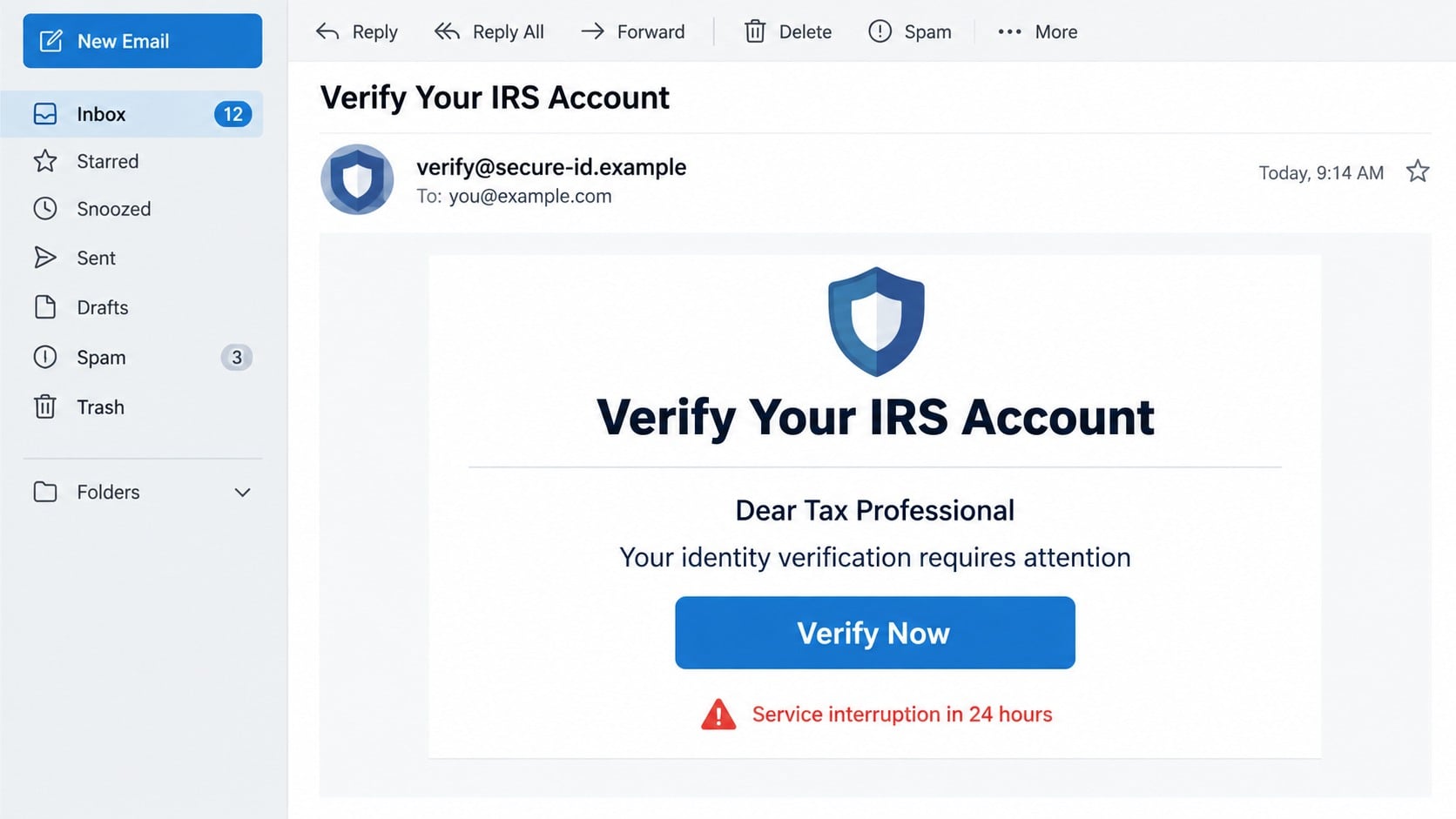
The email says your IRS access depends on one quick ID.me verification. It may address you as a taxpayer or tax professional, warn about interrupted service, and place a familiar “Verify Now” button beneath official-looking logos.
The request feels plausible because the IRS really does use ID.me for online identity verification. That true detail is exactly what makes the false email dangerous.
Overview
The scam copies a legitimate IRS sign-in relationship
ID.me is a real identity provider used to access many IRS online services. A legitimate verification process can involve an email address, password, multi-factor authentication, Social Security number or taxpayer identification number, government-issued ID, and identity checks.
A phishing email exploits that process by claiming the recipient must renew, restore, or verify an existing ID.me account for continued IRS access. The button leads to a site controlled by the attacker rather than the official IRS or ID.me flow.
The presence of real agency names does not authenticate the message. The important questions are whether the contact was expected, where the link actually goes, and whether the action was started through IRS.gov.
The target is a complete identity package
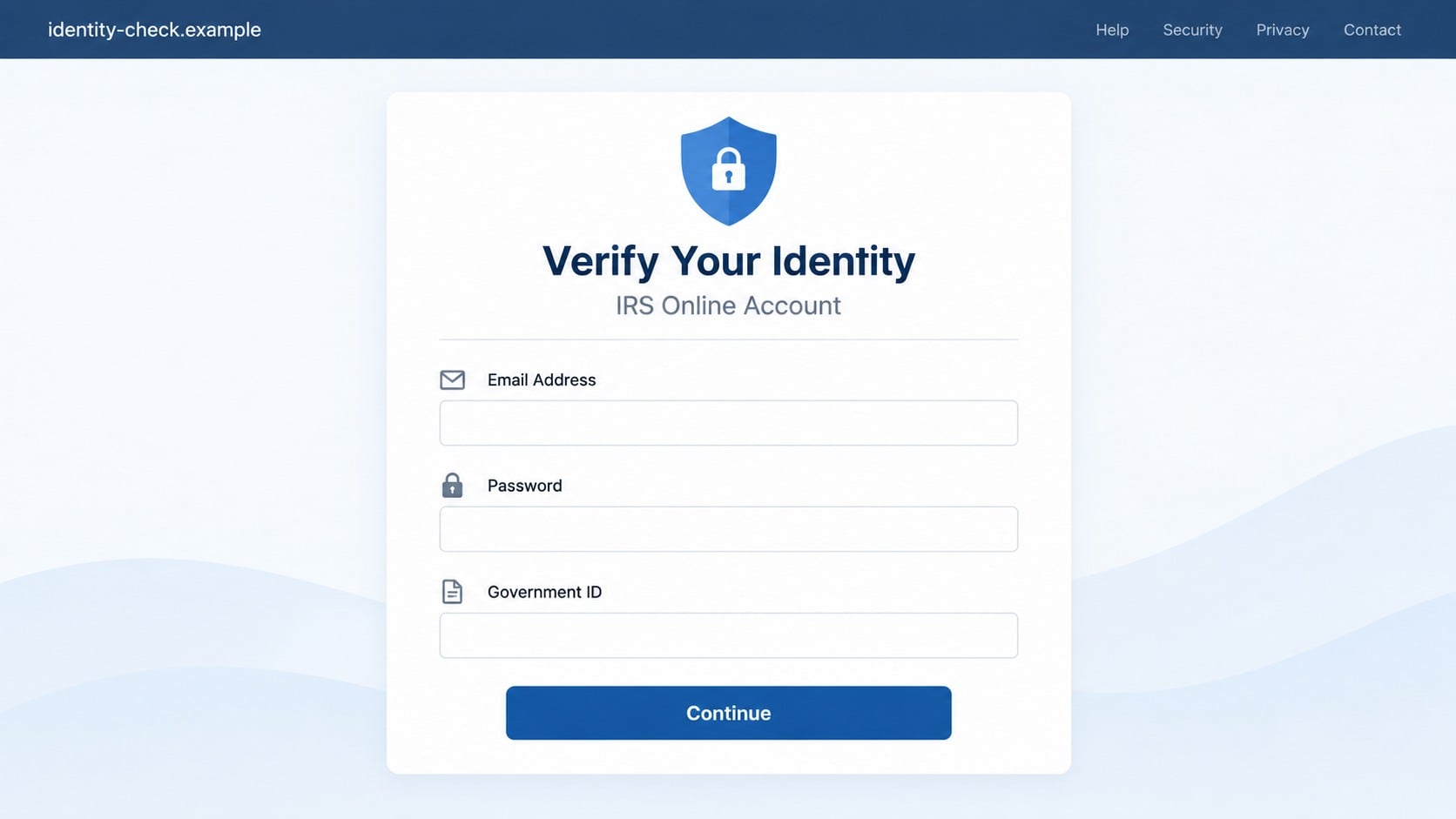
A copied sign-in page may first collect the ID.me email and password. It can then request the information normally associated with identity verification, giving the criminal material for account takeover and identity fraud.
The fake workflow may request:
- An ID.me or email password.
- A Social Security number or taxpayer identification number.
- A driver’s licence, passport, or state ID image.
- A selfie or short video.
- A home address, phone number, and date of birth.
- A multi-factor authentication code.
- Bank information for a supposed refund or identity confirmation.
Together, those details can support tax fraud, financial-account recovery attempts, new credit applications, and convincing follow-up impersonation.
The official route starts with IRS.gov
The IRS says users who need an account should select the relevant service on IRS.gov and follow the sign-in or creation process from there. Existing users can access services through the same independently opened route.
The IRS also warns that it does not unexpectedly email, call, or text people asking them to sign in to get a transcript or update a profile. Suspicious tax-related email can be sent to phishing@irs.gov.
If an email creates concern, do not test its button. Open a clean tab, type IRS.gov, and check the account or service directly.
Why the Message Looks Credible
The scam combines accurate terminology with a false deadline. It may mention tax season, an extension filing, transcript access, benefits, electronic filing, or a security upgrade. Tax professionals can be addressed differently from individual taxpayers.
The email may include privacy language, government footers, support links, and a professional design. The visible text can say IRS.gov or ID.me while the button points to an unrelated address.
Sender names are easy to forge. Inspecting the full address helps, but even a familiar-looking address does not make an unexpected identity request safe. A compromised legitimate mailbox can also send malicious links.
What Legitimate ID.me Verification Involves
A real IRS account can use ID.me to verify identity and protect access. The IRS explains that account creation begins from the IRS service, then moves through the identity provider’s official process.
Some sensitive information is normal inside a genuine verification session. That is why blanket advice such as “ID.me would never request an ID” is incorrect. The distinction is who initiated the session and whether the browser is on the official destination.
Never upload documents through an unsolicited email link. Begin at IRS.gov, confirm the address at every transition, and use support links reached through the official account.
How the ID.me IRS Verification Scam Works
Step 1: A targeted email announces an account problem
The victim receives a message saying IRS access will expire, verification must be renewed, or a security review is required. Tax professionals may be warned that services will be interrupted during a filing period.
The timing creates urgency. The email suggests that ignoring the request could delay a refund, block a transcript, suspend benefits, or interrupt professional access.
Step 2: The button disguises a fraudulent destination
The visible button says “Verify Now,” “Review Account,” or “Continue to ID.me.” Hovering or inspecting the link reveals a domain that is not IRS.gov or ID.me.
Some attacks use redirects and cloud-hosted pages so the first address looks less suspicious. The final sign-in page still belongs to the attacker.
Step 3: A cloned sign-in collects credentials
The page asks for an email address and password using familiar branding. When the victim submits the form, the credentials are sent to the criminal.
A false error may request the password again. That helps the attacker confirm the entry and capture alternative passwords.
Step 4: The fake identity check requests documents
The next screen asks for a Social Security number, address, phone number, government ID, and selfie. The sequence resembles a real verification process, which reduces suspicion.
Unlike a genuine session opened from IRS.gov, the fake page has no legitimate need for the data and may store every upload.
Step 5: A one-time code defeats account protection
The scammer may attempt to sign in to the real ID.me or email account while the victim is still on the phishing page. A genuine code arrives, and the fake page asks the victim to enter it.
Submitting the code can complete the attacker’s login. A real code does not mean the page requesting it is real.
Step 6: Stolen access supports tax and identity fraud
The attacker can review personal information, change recovery details, impersonate the victim, or use documents in other verification attempts. Follow-up messages may request bank data for a fake refund.
The victim may not notice immediately because the phishing page displays a success message or redirects to a genuine government page after collecting the data.
Company, Address, and Fulfillment Checks
The display name is not the sender’s identity
“IRS,” “ID.me Support,” or “Tax Services” can be typed into any display-name field. Inspect the complete sender address and the authentication warnings shown by the email provider.
Even then, do not use an unexpected identity-verification link. Start from the official government service.
The web address must survive a full inspection
Look for the registered domain, not a familiar word inside a long address. Criminals use misspellings, extra words, unrelated endings, subdomains, and URL shorteners.
A padlock shows encryption to that site. It does not confirm that the site is operated by the IRS or ID.me.
Support should be reached independently
Do not call or reply using contact information inside the suspicious email. Open IRS.gov or the ID.me help center separately and use the support path listed there.
An authentic support agent will not object if you close an email and begin again from the official account.
Every identity request needs a clear service context
A genuine verification is tied to a specific IRS service the user chose to access. The browser flow should explain why information is needed and remain on verified domains.
An unexpected demand to upload documents merely to prevent “expiration” lacks that context. Do not supply sensitive data to preserve an account through an unsolicited message.
Warning Signs in the Fake Email
- You did not recently request an IRS or ID.me action.
- The message says identity verification will expire or must be renewed immediately.
- The sender rushes you with a tax-season or benefits deadline.
- The button points somewhere other than an official IRS.gov or ID.me destination.
- The page asks for email credentials before explaining the service.
- A form requests passwords, documents, a selfie, and a security code in rapid succession.
- The email threatens suspension but the official account shows no matching notice.
- The message includes an attachment or asks you to install software.
Grammar and design quality are weak tests. Professional phishing emails can be nearly flawless. The independent route through IRS.gov is the stronger check.
Why Tax Professionals Are Especially Valuable Targets
A tax professional’s mailbox may contain client documents, filing records, identity details, and access to professional services. One compromised account can therefore expose more than the person who clicked the message.
Attackers may tailor the email to extension season, electronic filing, transcript access, or a supposed security review. A familiar professional deadline makes the request feel like routine compliance.
If a staff member entered credentials, the firm should treat the event as a possible organizational incident. Preserve the message and logs, involve the security provider, review mailbox access, and determine whether client information was viewed or exported.
The IRS provides separate reporting guidance for tax-professional phishing and data theft. Follow the current instructions, contact the appropriate stakeholder liaison when required, and document the response.
How a Stolen Selfie or ID Can Be Reused
A government ID image exposes a name, photograph, birth date, document number, address, and expiration information. A selfie can help an attacker create convincing profiles or attempt verification with other services.
Replacement documents may not erase copies already stolen. Recovery therefore includes account monitoring, credit protection, tax-account review, and careful handling of future verification prompts.
Be alert for follow-up calls that cite the uploaded document as proof of authority. The caller may know exact details because the phishing page collected them, not because the caller represents a government agency.
Save a record of which files and fields were submitted. The recovery steps for a password alone differ from those needed after a Social Security number, passport, selfie, and bank account were exposed together.
Future legitimate verification may feel uncomfortable after the incident. Do not avoid essential tax services. Restart from IRS.gov, confirm every domain, and contact official support when a request is unclear.
What to Do if You Have Fallen Victim to This Scam
- Secure the ID.me account from a trusted device. Open the official site independently, change the password, review multi-factor settings, and remove unfamiliar devices or recovery details.
- Protect the email account next. Change its password, revoke unknown sessions, check forwarding rules, and secure recovery addresses. Email control can let a criminal reset ID.me and financial accounts.
- Contact ID.me support through the official help center. Explain what information was entered and when. Ask what account-protection and identity-review steps apply to the incident.
- Report the email to the IRS. The IRS asks recipients to send suspicious tax-related email to phishing@irs.gov, preferably as an attachment when possible. Follow the current instructions on its fraud reporting page.
- Start an identity theft recovery plan. If a Social Security number, identity document, or selfie was uploaded, use IdentityTheft.gov, consider a credit freeze, and review credit reports and financial accounts.
- Contact the IRS about tax identity theft concerns. Review the official Identity Theft Central guidance and watch for rejected returns, unfamiliar transcripts, or notices about filings you did not make.
- Notify financial institutions if banking data was entered. Replace exposed cards, review transfers and payees, and explain that the information came from an identity phishing page.
- Scan the device if a file or program was opened. Use Malwarebytes for a full scan when the email delivered an attachment, download, browser extension, or remote-access tool. A credential-only page still requires password recovery even when the scan is clean.
- Reduce repeat phishing exposure. AdGuard can block many known malicious pages, advertising redirects, and tracking domains. Continue opening tax services from saved official bookmarks.
- Expect follow-up impersonation. The attacker may pose as ID.me, the IRS, a bank, or an investigator and refer to the earlier incident. Do not share codes or pay for recovery.
Frequently Asked Questions
Does the IRS really use ID.me?
Yes. ID.me is a legitimate identity provider used for many IRS online services. Its real role is what makes copied verification emails convincing.
Does an existing ID.me account need annual renewal?
An unexpected email saying routine verification is expiring should be treated as suspicious. Check the account by starting at IRS.gov or the official ID.me site.
Can a genuine ID.me process request identity documents?
Yes, legitimate verification can require government ID and identity information. Only provide it in a session you initiated through an official service and verified domain.
What if the phishing page used a real one-time code?
The code may be real because the attacker was attempting a real login. Entering it on the fake page can give the attacker access.
Should I reply to ask whether the email is genuine?
No. A reply goes back to the sender controlling the message. Verify through the IRS or ID.me using contact information obtained independently.
Where should a fake IRS email be reported?
Follow the current IRS instructions and send the suspicious email to phishing@irs.gov. Report identity and financial loss through the additional official channels the IRS lists.
The Bottom Line
The ID.me IRS verification scam is effective because it copies a genuine identity process and surrounds it with a false deadline. A realistic form can capture enough information to compromise accounts and support broader identity theft.
Do not verify tax access through an unexpected email button. Start at IRS.gov, follow the official sign-in path, and act quickly if a fake page received a password, security code, Social Security number, identity document, or selfie.








