

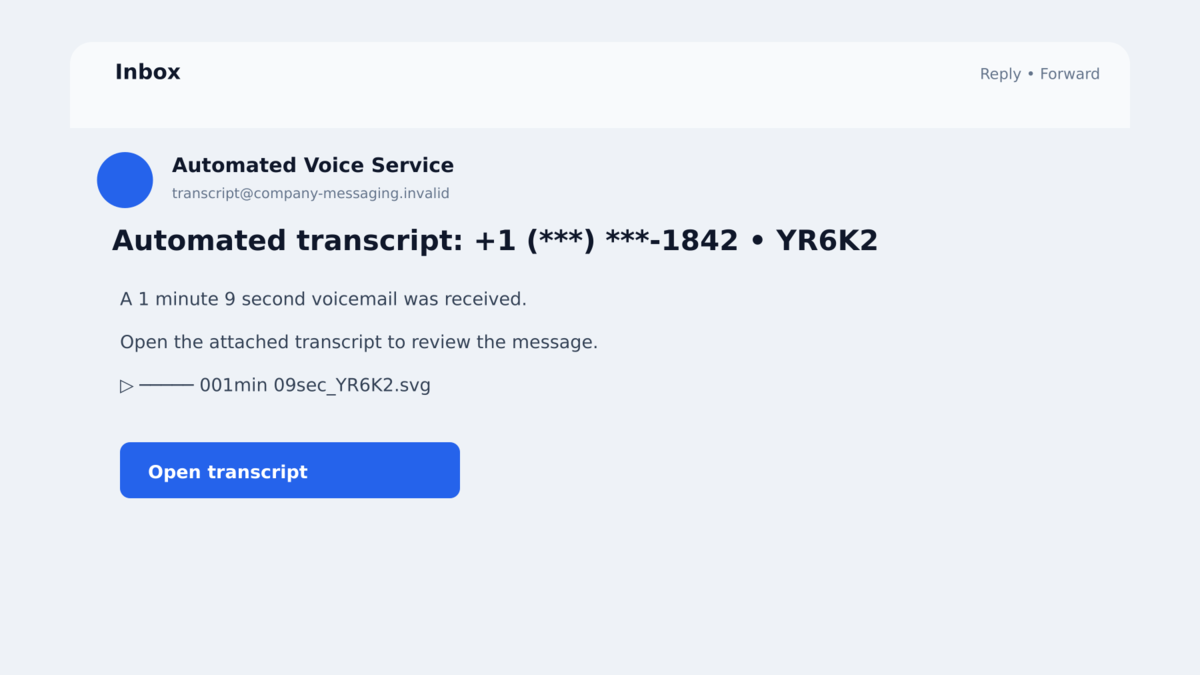
An email with the subject “Automated transcript” lands in a work inbox. It appears to come from the recipient’s own company and includes a file named like a short voicemail recording.
There is no dramatic warning and no obvious password request. It looks like the kind of routine notification an employee might open between meetings without thinking twice.
The attachment is not an audio file or a harmless transcript. These fake voicemail transcript emails are the first redirect in a large credential-theft campaign.
Overview
The campaign sent more than 58,000 phishing emails
Check Point researchers identified a large-scale operation that ran from at least August 17 through August 31, 2026. More than 58,000 messages targeted users at over 7,800 organizations.
The attackers used more than 38,400 spoofed sender addresses across over 9,300 spoofed domains. Those figures show a coordinated campaign designed to rotate identities and infrastructure, not a single employee receiving an accidental or isolated fake message.
The attachment is an active SVG file, not a recording
The emails impersonate automated voicemail-transcription services. Subjects begin with “Automated transcript,” followed by a partly hidden telephone number and a random tracking string. Attachment names resemble call recordings and may show a play symbol, a line of dashes, and a duration such as 001min 09sec.
The file actually uses the SVG format. SVG is often associated with images, but it can contain scripts and interactive content. When the attachment is opened, embedded code sends the browser to a phishing destination.
The fake login page is personalized for the victim
The email address of the target is encoded in the redirect. The phishing page can therefore display or prefill the victim’s address, making the login form feel connected to the company and the original voicemail notification.
Credentials entered on that page go to the attackers. A stolen work mailbox can expose confidential messages, cloud documents, password resets, customer information, and trusted access that can be used to reach coworkers or external partners.
- The operation sent more than 58,000 emails in roughly two weeks.
- Over 7,800 organizations were targeted.
- The senders were spoofed to resemble the recipient’s own domain.
- Subjects used the familiar phrase “Automated transcript.”
- Attachments looked like short voicemail recordings but used the .svg extension.
- The SVG contained script that redirected the browser.
- The victim’s email address was passed to the phishing page.
- The final page attempted to steal workplace credentials.
The scale also explains why the wording stays restrained. A dramatic threat would need more personalization and would trigger more suspicion. A bland transcript notice can be sent across industries because almost any employee might receive a short workplace call.
Organizations using genuine transcription tools should document exactly how those notices arrive, which file types they use, and where employees should sign in. That baseline gives staff something concrete to compare with an unexpected attachment.
A clear internal process also removes the curiosity that powers the lure. If employees know that genuine recordings are available only inside a named portal, an attachment claiming to be the recording becomes easier to reject.
Managers should avoid telling staff simply to “be careful.” A specific rule about voicemail file types and approved login domains is easier to remember and apply under pressure.
Why a Voicemail Transcript Is an Effective Workplace Lure
Automated call transcripts have become normal in workplaces that use cloud phone systems, meeting platforms, and AI assistants. The notifications are usually brief, system-generated, and light on context. That makes a vague message feel ordinary rather than suspicious.
An employee may also worry that the missed call came from a customer, manager, delivery company, doctor, or family member. Opening a one-minute recording feels like a low-risk way to find out.
The sender adds another powerful cue. By making the address resemble the recipient’s own organization, the attackers create the impression of an internal voicemail system. People tend to scrutinize an internal notification less than a message from an unknown public domain.
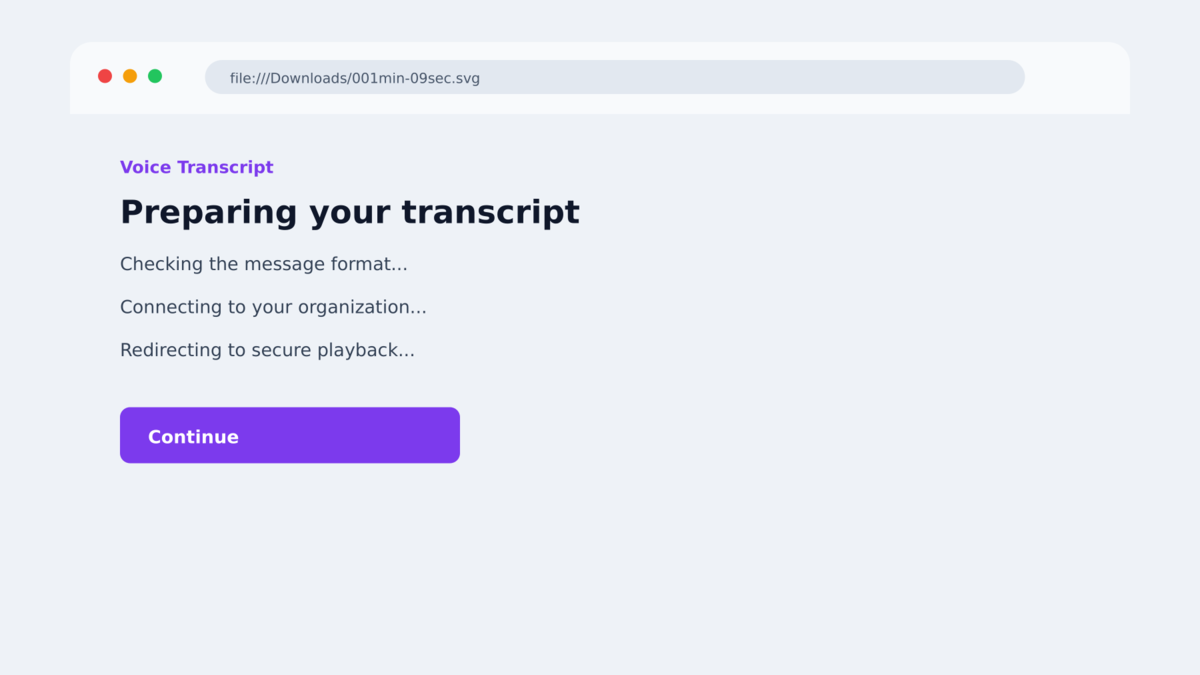
The use of SVG avoids the file types employees are trained to fear. An executable, macro-enabled document, or compressed archive may trigger caution. An SVG can look like a simple picture, even though browsers can process scripts inside it.
There is also no visible link in the message body for the user to inspect. The redirect begins only after the attachment opens, so a recipient who normally hovers over buttons does not get the same warning opportunity.
Finally, the prefilled email address on the destination makes the experience feel continuous. The page appears to know who received the transcript, although the attacker simply placed that address in the URL.
None of these tricks requires compromising the company’s real telephone platform. The criminals reproduce the appearance of an automated workflow and rely on the victim to connect the email, attachment, and login page in their own mind.
Company, Address, and Fulfillment Checks
The internal-looking sender is spoofed
The email may display the recipient’s own domain, but the campaign used tens of thousands of fabricated sender addresses and thousands of domain variations. A matching company name in the From line is not proof that the internal phone system sent the message.
Mail authentication results and message headers can help security teams identify the forgery. Employees should report the message rather than trying to investigate headers themselves on a potentially malicious attachment.
The SVG extension changes the risk
A real voicemail is normally delivered as an audio format, played through a known communications portal, or summarized directly in the email. A file ending in .svg is a scalable vector image, not a voicemail recording.
Because SVG can include script, organizations should treat unexpected SVG attachments as active content. Renaming an attachment to resemble a recording does not change what the browser will execute.
The redirect hides the real destination until the file opens
The email itself does not need to contain an obvious malicious URL. The SVG runs client-side logic that sends the victim to the credential-harvesting site after opening.
This helps the campaign evade filters that focus on links in the message body. It also prevents the recipient from comparing the destination with the company’s real login domain before interacting.
Check Point confirmed the campaign at scale
Check Point documented the 58,000 messages, 7,800 targeted organizations, spoofed senders, SVG attachments, and personalized phishing pages. The findings establish a coordinated credential-phishing campaign rather than a theory based on the file name alone.
The particular sender addresses and domains can change rapidly. The reusable pattern is an automated-transcript message, an attachment that is not audio, a browser redirect, and a login form reached outside the organization’s normal portal.
Security teams should search beyond the one reported message. Randomized senders and attachment names can make related copies look different, but the subject pattern, SVG behavior, redirect parameters, and destination templates can connect the wider campaign.
How the Fake Voicemail Transcript Scam Works
Step 1: Attackers generate internal-looking notifications
The campaign creates thousands of sender identities that resemble the companies being targeted. Each message is formatted like an automatic notification rather than a personal email.
A partially hidden phone number and random tracking code make the subject look unique to the recipient while allowing the attackers to generate many variations.
Step 2: The email offers a short voicemail attachment
The file name may include a play symbol, a visual progress line, and a brief duration. These details encourage the recipient to interpret the attachment as media before noticing the extension.
The message contains little context, which is normal for an automated system and useful to the attacker. Curiosity supplies the reason to open it.
Step 3: The victim opens an SVG file in the browser
The attachment is not audio. The browser renders the SVG and processes its embedded code. That code begins the redirect to attacker-controlled infrastructure.
Because the malicious address is inside the file, the original email may contain no conventional link for the victim or a basic scanner to inspect.
Step 4: The redirect carries the victim’s email address
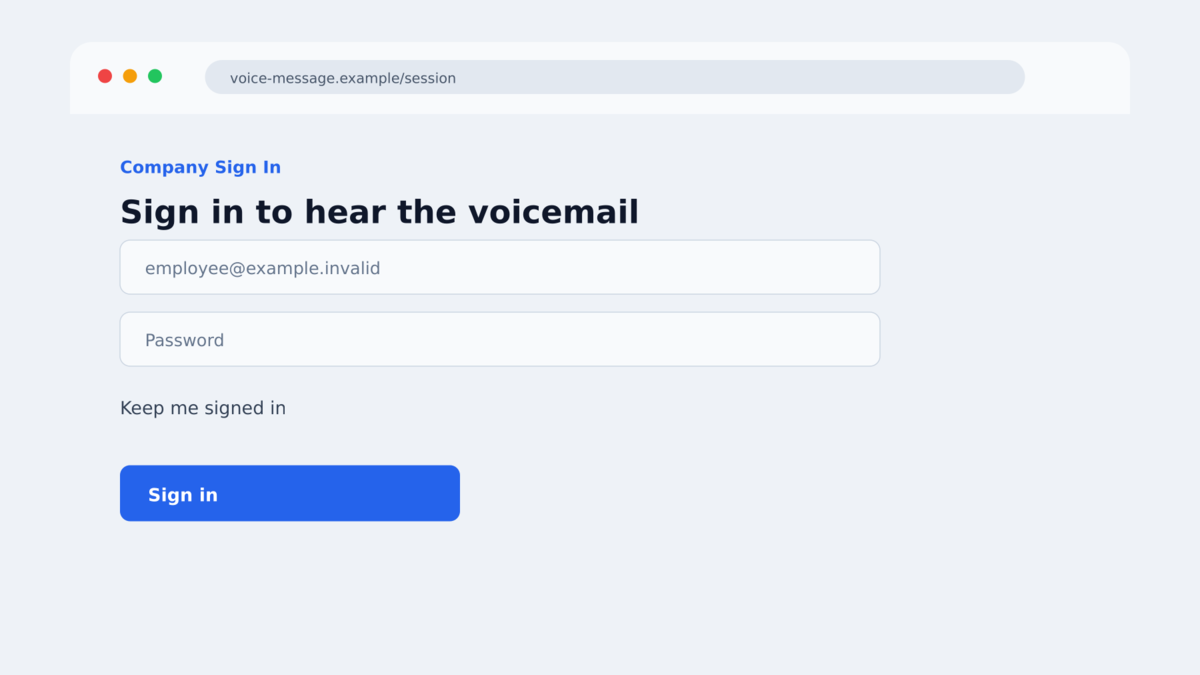
The campaign includes the recipient’s address as a parameter. The destination reads it and fills the login form automatically.
Personalization makes the page look as though it belongs to the user’s organization, even when its registered domain has no connection to the employer.
Step 5: The fake page collects workplace credentials
The page asks the victim to sign in to hear or retrieve the transcript. Any username, password, or verification code entered is captured by the phishing operator.
The site may show an error or redirect to a legitimate service afterward, leaving the employee unsure whether the password was accepted.
If the organization uses multifactor authentication, the page may immediately request a code or the attacker may trigger a real approval prompt. Entering a password and then approving that unexpected request can give the criminal a usable session.
Step 6: A stolen mailbox becomes the next point of trust
The attacker can search email, steal documents, create forwarding rules, reset other accounts, and send convincing messages from a real employee identity.
Coworkers, customers, and vendors may then receive invoice changes, file-sharing links, or new phishing messages from an account they genuinely know.
Warning Signs in an Automated Transcript Email
- The attachment ends in .svg rather than a normal audio format.
- The subject is generic and contains a random tracking string.
- The sender appears internal, but the message is unexpected.
- The file name uses symbols to imitate an audio progress bar.
- The message provides no caller identity or useful call context.
- Opening the attachment launches a browser instead of an audio player.
- The browser requests a workplace password to play a voicemail.
- The destination domain does not belong to the employer or phone provider.
- The login page already knows the recipient’s email address.
- The page asks for a verification code immediately after the password.
If the voicemail might be genuine, open the company’s approved phone or collaboration application directly. Do not use the attachment as the route to the account.
What to Do if You Have Fallen Victim to This Scam
- Stop interacting with the page. Close the browser tab and do not reopen the SVG. Disconnect the device from the network if any file was downloaded or unexpected command ran.
- Call the internal help desk using a known number. Report the message, attachment name, sender, and destination. Do not reply to the suspicious email to ask whether it is real.
- Change the work password from a clean device. If the same password was reused anywhere, replace it there as well. Follow company incident-response instructions before reconnecting.
- Revoke active sessions and authentication tokens. A password change may not end every session. Administrators should review sign-ins, device-code grants, MFA changes, and connected applications.
- Check the mailbox for persistence. Look for forwarding rules, hidden inbox rules, deleted warnings, new delegates, unfamiliar sent messages, and changes to recovery information.
- Warn affected contacts through a separate channel. If the account sent messages after compromise, tell coworkers, customers, and vendors not to trust recent links, files, or payment requests.
- Scan the endpoint. Malwarebytes can check for malicious files or additional payloads. AdGuard can block known phishing destinations and malicious advertising, but workplace controls and account containment remain essential.
- Preserve evidence. Save the original email with headers, the SVG, browser history, screenshots, and security alerts according to company policy. These details can help identify other recipients.
- Report the campaign. Notify the email provider and appropriate national cybercrime service. Be cautious of follow-up messages claiming to be investigators who need passwords or payment.
Frequently Asked Questions
Is an SVG file just an image?
SVG is an image format, but it can contain scripts and links. An unexpected SVG attachment should not be treated like a passive photograph.
How large was the voicemail phishing campaign?
Check Point identified more than 58,000 emails targeting over 7,800 organizations between August 17 and August 31, 2026.
Why did the sender look like my own company?
The attackers spoofed sender identities to resemble the recipient’s domain. The displayed From address was a trust signal created for the scam.
How did the fake login page know my email address?
The address was encoded in the redirect and passed to the page. Prefilling it does not prove that the site belongs to your employer.
What if I opened the attachment but entered no password?
Report it to your security team and provide the file and destination. The credential-theft risk is lower if nothing was entered, but the attachment still triggered an untrusted redirect.
Can I safely listen by forwarding the file to my phone?
No. The file is not a voicemail, and moving it to another device does not make it safe. Use the approved voicemail service directly.
The Bottom Line
The fake automated-transcript emails were part of a confirmed, large-scale phishing campaign. Their harmless appearance was deliberate: an internal-looking sender, a one-minute “recording,” and no visible link to inspect.
The .svg extension is the decisive clue. The attachment contains active content that redirects the browser to a personalized credential-stealing page.
Do not open unexpected voicemail attachments from the inbox. Use the official workplace phone or collaboration app, and report the message before a stolen mailbox is used to target someone else.








