

A message saying that $1,000 has been reserved for your child is difficult to ignore. It sounds official, time-sensitive, and connected to a real federal program that many families are only beginning to understand.
That uncertainty gives impersonators an opening. The real Trump Accounts program exists, but a link asking for a Social Security number, card payment, or immediate activation can still be a phishing scam.
Overview
Trump Accounts are real, but scammers can imitate them
Trump Accounts are a new type of individual retirement account for eligible children. The federal pilot contribution described by the IRS is $1,000 for qualifying children born from January 1, 2025, through December 31, 2028, subject to the program’s requirements.
The existence of a legitimate benefit does not authenticate an unexpected email, advertisement, text, or enrollment page. Criminals routinely borrow the names of real government programs before the public knows the normal process.
The fake message creates urgency around eligibility
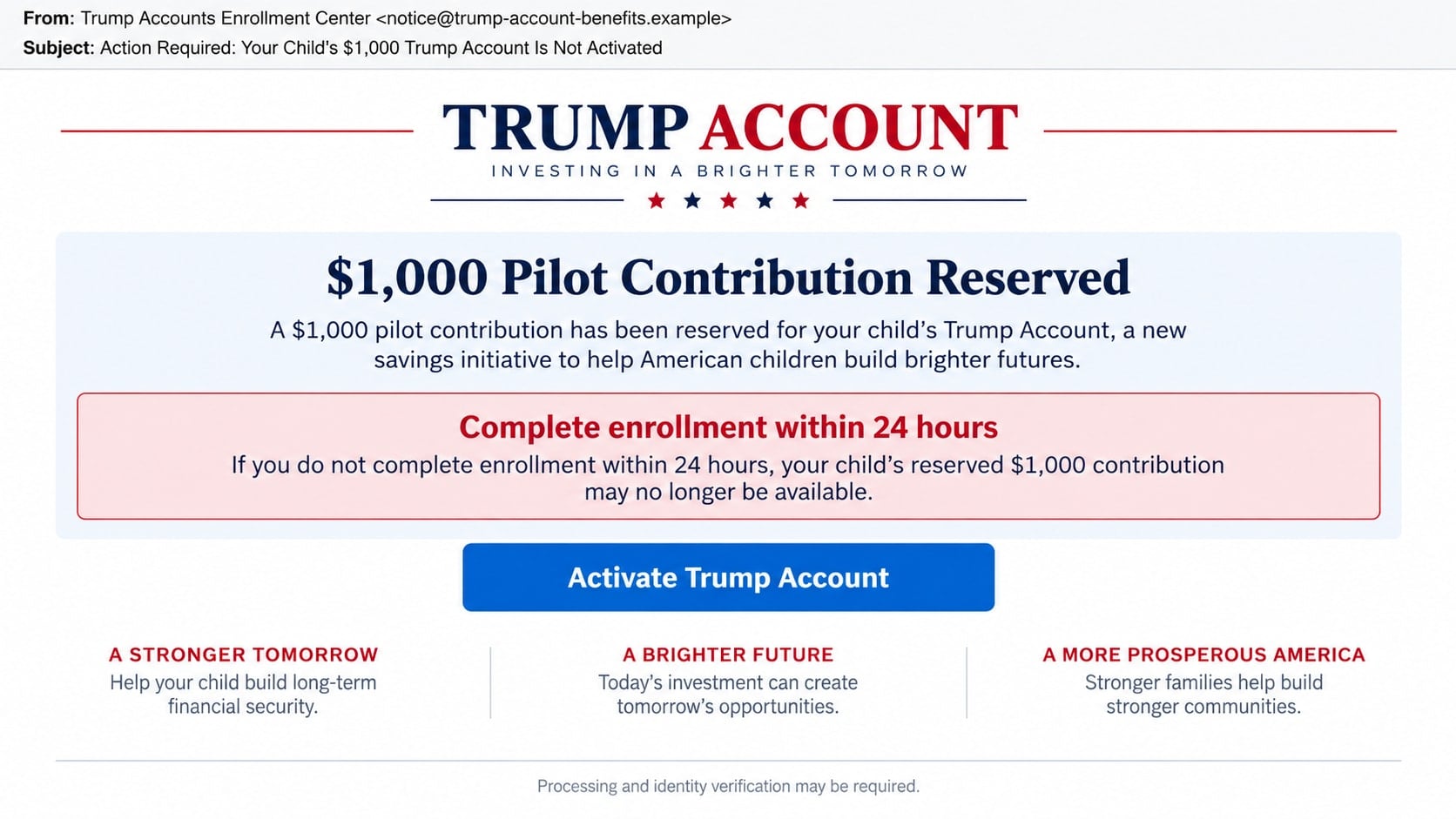
A fraudulent notice may claim that a child’s contribution is reserved, incomplete, suspended, or about to expire. It directs the parent to a lookalike portal and warns that waiting will forfeit the benefit.
The deadline is meant to prevent the family from finding the official program independently. A real eligibility process should be verified through an official government channel, not through the contact details in a surprise message.
The portal targets valuable family information
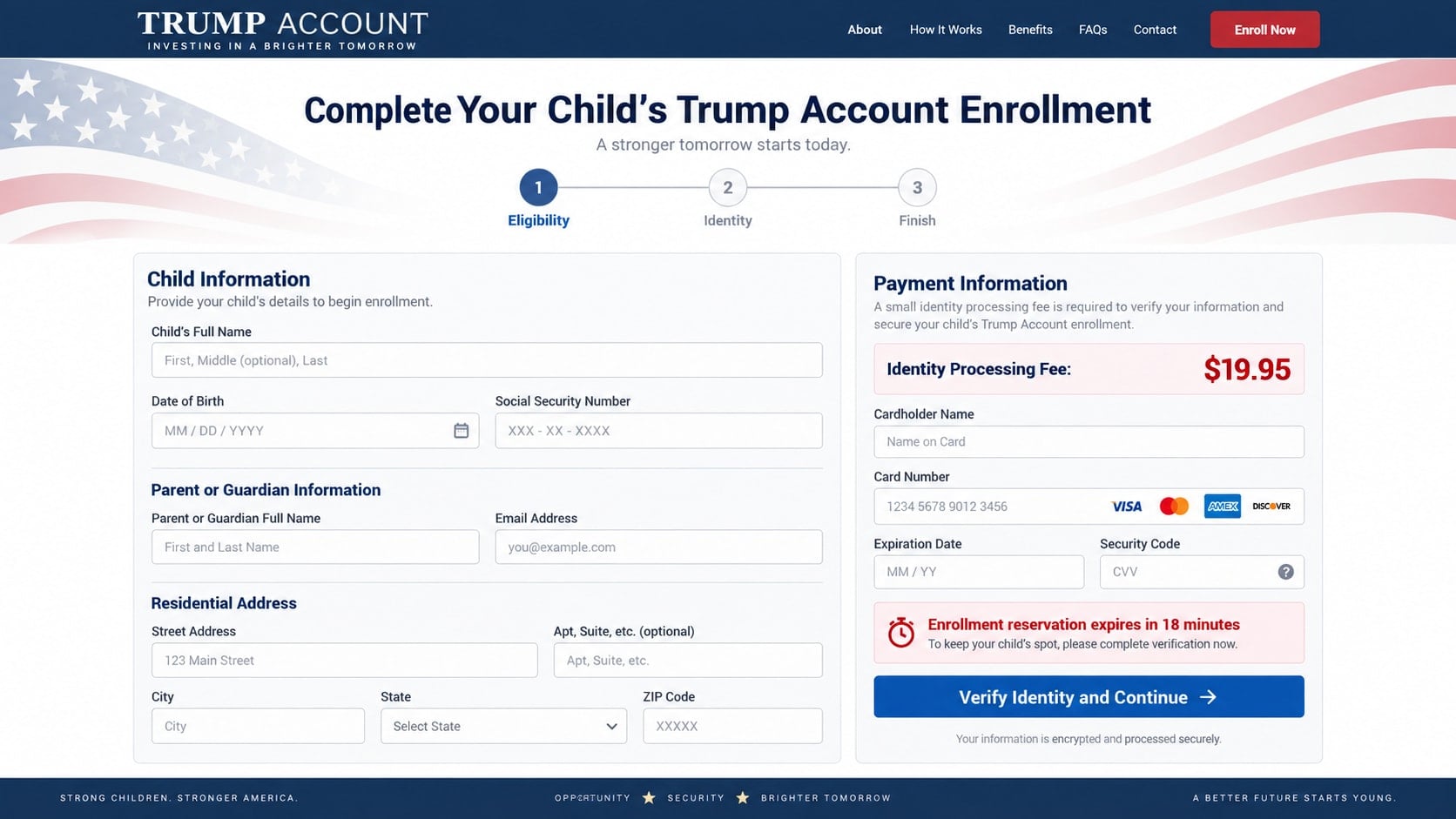
A fake enrollment form can request details about both a child and parent. That combination is useful for identity theft because a child’s credit file may go unchecked for years.
The scammers may seek:
- A child’s full name, date of birth, address, and Social Security number.
- A parent’s identity details, tax information, and contact information.
- Online account credentials or one-time verification codes.
- Card data for a supposed processing or identity fee.
- Copies of birth certificates, passports, or driver’s licenses.
- Bank details for a promised direct deposit or contribution match.
How the Real Trump Accounts Program Differs
The safest way to recognize an imitation is to understand the official starting point. IRS guidance describes Trump Accounts as traditional individual retirement accounts created for eligible children, with special rules governing contributions, investments, and access.
The $1,000 pilot contribution is not a general cash payment sent to a parent. It is a federal contribution to the eligible child’s Trump Account under the program’s conditions. A message promising an immediate $1,000 transfer to a checking account is changing the nature of the benefit.
IRS Publication 6181 directs families to TrumpAccounts.gov for program information and the official application. IRS guidance also identifies Form 4547 as part of the election process.
Program details and timelines can be updated. Families should read current instructions on the official government site instead of relying on a screenshot, forwarded post, or article that may become outdated.
Most importantly, a government benefit does not require a $19.95 card fee paid to an unknown website to preserve eligibility. A portal that combines a child Social Security number with an urgent card charge should be closed immediately.
How the Trump Account Scam Works
Step 1: The scammer identifies families likely to respond
The first contact may be a mass email, text, social media advertisement, mailed letter, or telephone call. Public posts about a new baby or purchased marketing data can make the approach more specific.
The message does not need to know whether the child qualifies. A broad campaign can reach enough families with children for the claim to feel personally relevant.
Step 2: The notice borrows official language and patriotic design
The message uses red, white, and blue graphics, formal eligibility wording, and references to the $1,000 pilot contribution. It may describe itself as an enrollment center, benefits office, or authorized partner.
A flag, seal-like graphic, or official-sounding title is not proof of government affiliation. The sender and destination domain matter more than the design.
Step 3: A deadline turns curiosity into action
The parent is told that enrollment is incomplete or the reserved contribution expires within 24 hours. Another version says only a limited number of families in the area can claim the benefit.
The real purpose of the deadline is to stop the recipient from typing TrumpAccounts.gov into a new browser tab and comparing the process.
Step 4: The fake portal collects child and parent identities
The form starts with ordinary eligibility questions, then asks for a child Social Security number, date of birth, and documents. Parent information is collected under the label guardian verification.
Because the page resembles a benefits application, intrusive questions may seem reasonable. The criminal receives a complete family identity package that can support credit, tax, and account fraud.
Step 5: A small fee captures the card
The portal may charge $9.95, $19.95, or another modest amount for processing, identity verification, shipping, or priority enrollment. The fee is small enough to feel like an administrative cost.
The payment form can store the card for unauthorized purchases or subscriptions. An error may prompt the parent to try another card, exposing more than one account.
Step 6: Follow-up contacts expand the fraud
After submitting the form, the victim may receive a call from a supposed caseworker. The caller asks for a one-time code, bank login, or remote access to finish enrollment.
Other follow-ups claim that a contribution match, tax refund, or direct deposit is waiting. Each new promise is built from the information the family already provided, which makes the caller sound informed.
Identity, Contact, and Payment Checks
Start at the official government website
Type TrumpAccounts.gov yourself. Do not use a button in an unexpected message, even when the visible text shows the official address. Links can display one destination while opening another.
Follow current instructions from the official site and IRS publications. Bookmark the page if you expect to return, so a later advertisement does not become your route back.
Read the complete sender and destination domains
Government domains generally end in .gov, but scammers can place gov, IRS, or Trump Accounts elsewhere in a longer address. For example, a name ending in account-help.example is not a government site.
Sender names can be forged. Expand the full email address and inspect where every button leads before clicking. When in doubt, do not click at all.
Compare the request with the official process
Check whether the message changes an account contribution into a cash grant, demands an immediate fee, or claims the program is available only through a private agent. Those changes are signs of impersonation.
Use a contact method published on the official government site if you need help. Do not call a number from the suspicious message to ask whether the message is real.
Protect child information more strictly than ordinary form data
A child’s Social Security number and birth certificate deserve the same care as a parent’s most sensitive documents. Submit them only through a verified process that clearly explains why they are needed and how they are handled.
No legitimate representative needs a one-time code from your email or bank. Codes approve access; they are not routine application numbers to be read over the phone.
Warning Signs in a Fake Trump Account Message
- The contribution supposedly expires within hours.
- The sender uses a commercial or lookalike domain.
- The message promises $1,000 cash paid directly to the parent.
- A processing, reservation, shipping, or identity fee is required.
- The form combines a child Social Security number with card details.
- The page claims enrollment must be completed through a private agent.
- A caller asks for an email, bank, or tax-account verification code.
- Remote-access software is described as enrollment assistance.
- The recipient is told not to contact the IRS or another official channel.
- A guaranteed contribution match requires an advance payment.
- The message threatens tax penalties for ignoring it.
Good grammar does not make a notice official. Criminals can copy language from public IRS documents and combine it with a false deadline or payment page.
How to Handle an Unexpected Enrollment Message
Do not reply or use its contact details. Take a screenshot and record the sender, date, complete link address, and telephone number. This preserves evidence without continuing the interaction.
Open a new browser tab and visit TrumpAccounts.gov. Compare the message with current eligibility and application instructions. If the site says the process is not open or uses a different method, the surprise notice does not override it.
Talk with other adults who handle the child’s records. A scammer may contact several relatives and hope that one provides the information without realizing someone else is already managing the account.
Do not upload documents to prove that a message is fraudulent. The scammer may claim a birth certificate or tax return is needed to close a case. Ending contact is safer.
If the message came through an advertisement, report both the ad and the landing page. Saving the ad account name and the final URL helps platforms connect multiple versions of the campaign.
Keep official program records separate from unsolicited messages. A dedicated folder for IRS notices, submitted forms, and confirmation details makes it easier to compare a later contact without relying on memory.
Parents should also explain the scam to grandparents and other relatives. A criminal may approach a family member who wants to help the child and is less familiar with the official enrollment process.
What to Do if You Have Fallen Victim to This Scam
- Stop the interaction and preserve evidence. Save the email or text, complete web address, form screenshots, documents requested, telephone numbers, payment receipt, and any case ID. Do not send another fee to cancel or secure the application.
- Contact the card issuer or bank. Report the processing charge and explain that card data was entered on a government-benefit impersonation page. Ask about blocking the card, disputing the payment, and monitoring for recurring transactions.
- Create an identity recovery plan. Visit IdentityTheft.gov and select the information that was exposed. The site provides steps tailored to Social Security numbers, documents, accounts, and tax identity theft.
- Protect the child’s credit file. Contact the three major credit bureaus about a protected consumer freeze for a minor. Requirements vary, and the parent or guardian may need to provide identity and relationship documents through verified bureau channels.
- Secure parent and guardian accounts. Change any password entered on the fake portal and every place it was reused. Review email forwarding rules, recovery methods, active sessions, tax-account access, and financial alerts.
- Respond to exposed tax information. Follow current IRS identity-theft guidance if a Social Security number or tax data was submitted. Watch for unexpected notices, rejected returns, or account changes and respond through official IRS channels.
- Remove anything installed during the process. Uninstall remote-support programs, browser extensions, or document viewers provided by the scammer. Run a full Malwarebytes scan to check for information stealers and persistent remote access.
- Block known phishing infrastructure. AdGuard can help stop many known malicious ads and domains from loading. A newly registered lookalike may still appear, so use it as an additional layer rather than proof that a page is safe.
- Report the impersonation. File a report at ReportFraud.ftc.gov and, when credentials or significant money were stolen online, at IC3.gov. Report the sender to the email, telephone, or social platform.
- Warn relatives and caregivers. Tell anyone who may have access to the child’s records not to answer follow-up enrollment calls. Scammers may use the details already collected to sound like a real caseworker.
Frequently Asked Questions
Are Trump Accounts a real government program?
Yes. IRS guidance describes Trump Accounts for eligible children and a $1,000 pilot contribution for qualifying children born during 2025 through 2028. Current details should be checked at TrumpAccounts.gov.
Is the $1,000 sent directly to parents?
No. The federal pilot contribution described by the IRS goes into an eligible child’s Trump Account under program rules. A message offering immediate cash or direct deposit is misrepresenting the benefit.
Does enrollment require a processing fee?
Do not pay a fee demanded by an unexpected site or caller to preserve eligibility. Verify the official process at TrumpAccounts.gov and follow only the payment or contribution rules described there.
How can I tell whether an enrollment link is official?
Avoid using the link. Type TrumpAccounts.gov into a new tab and begin there. Read the complete address carefully because scammers can place official words inside an unrelated domain.
Why is a child’s Social Security number valuable to scammers?
It can be used for identity, credit, employment, tax, and benefits fraud. Misuse may remain unnoticed because families do not normally review a young child’s credit file.
What if I paid only a small identity fee?
The card and identity data remain at risk even when the first charge was small. Contact the issuer, monitor for additional charges, and follow identity-theft steps for every piece of information submitted.
The Bottom Line
The Trump Account scam succeeds by attaching false urgency and a phishing form to a real federal program. The official $1,000 pilot contribution does not make every message using that figure legitimate.
Begin at TrumpAccounts.gov, compare the request with current IRS guidance, and never pay an unknown portal to preserve a child’s eligibility. Careful verification protects both the family’s money and an identity the child may depend on for decades.








