

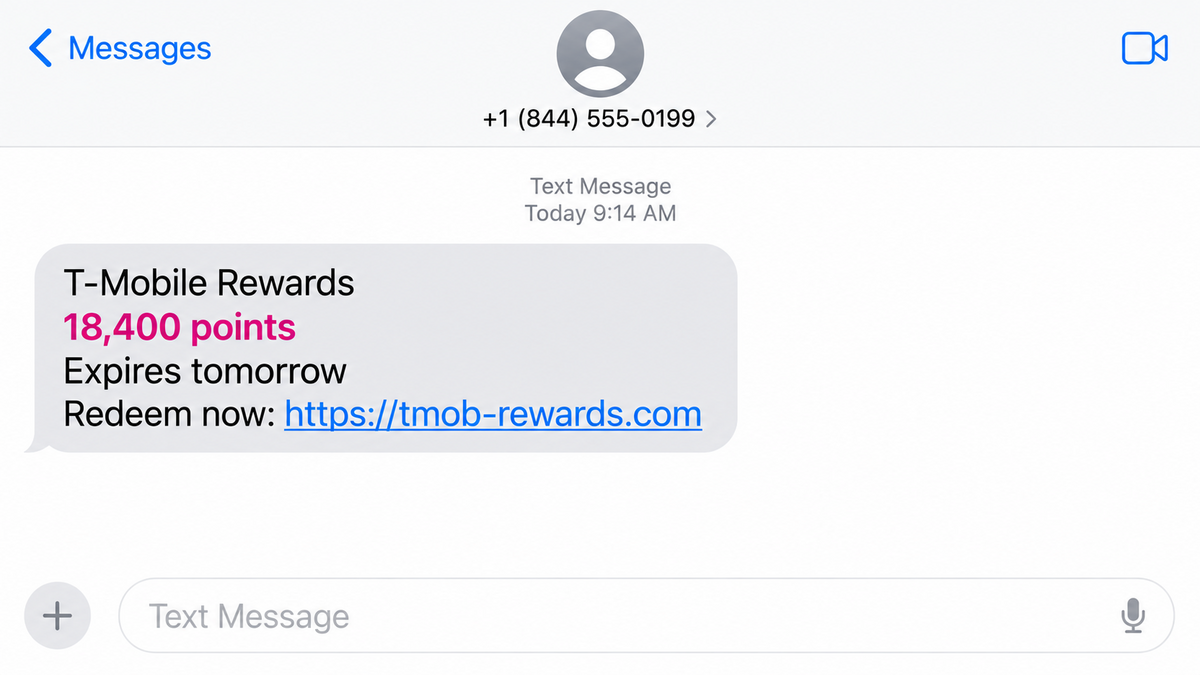
A text says your T-Mobile rewards balance is about to disappear. It even gives you a specific total, usually thousands of points, and a deadline that is only a day away.
That is just believable enough to make the link tempting. Nobody wants to lose a reward they have supposedly already earned, especially when redeeming it appears to take less than a minute.
The message is part of a large phishing campaign, and the points are only the opening move. The destination is built to collect information that is worth far more than any promised reward.
Overview
The text invents a valuable rewards balance
The T-Mobile rewards text scam tells recipients that a large balance is close to expiring. A commonly observed version claims that 18,400 points will be removed unless they are redeemed immediately.
The message may call itself a reminder, alert, or important update. Dates, greetings, and point totals can change, but the story stays the same: act now or lose something valuable.
The link uses a rotating lookalike domain
The web address is designed to include T-Mobile’s name while placing the real registration under an unrelated domain. Researchers saw dozens of short-lived addresses following this pattern, often ending in .top.
That structure matters. A link can begin with words such as “t-mobile” and still have no connection to the carrier. Scammers put the familiar name where hurried readers are most likely to notice it.
The reward page asks for valuable personal data
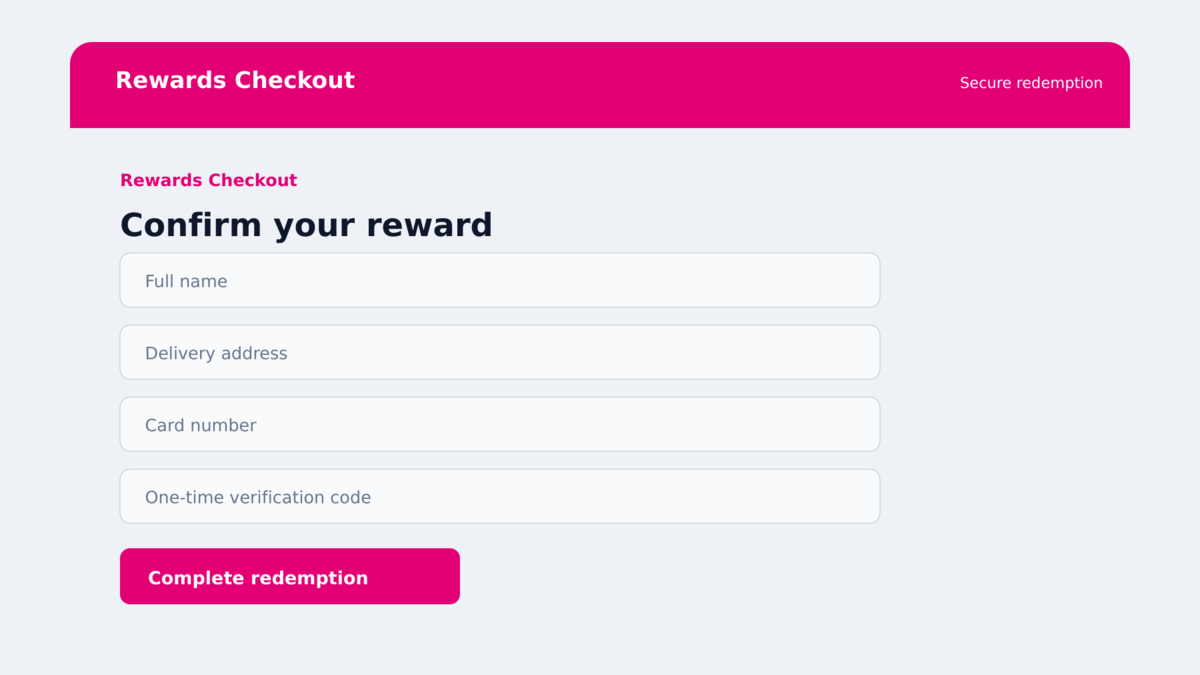
The destination may look like a mobile rewards portal, complete with a balance, redemption choices, and a checkout-style form. The prize is not the real product. The form is there to obtain login details, contact information, card data, or verification codes.
Once submitted, that information can be used for fraudulent purchases, account takeover attempts, identity fraud, or follow-up calls that sound more convincing because the caller already knows something about the victim.
- The campaign has been active since at least May 2026.
- Researchers identified more than 1,000 closely related message templates.
- A typical lure promises 18,400 points that expire today or tomorrow.
- The greeting is usually generic rather than tied to a verified account.
- The links rotate through many newly created or short-lived domains.
- The domain may contain “t-mobile” before an unrelated .top registration.
- The destination may request personal, payment, login, or verification data.
- T-Mobile is being impersonated and is not identified as the sender.
Why the Expiring Points Story Works
Loyalty points sit in an awkward place in most people’s minds. They feel valuable, but many customers do not know their exact balance, the program rules, or the normal expiration schedule. That uncertainty gives the scam room to invent details.
A balance such as 18,400 points sounds specific rather than random. The number suggests that the message came from an account database, even though the same total can be sent to thousands of unrelated phone numbers.
The deadline does the rest. If the points expire tomorrow, checking the sender, opening the official app, and comparing the account balance can feel like unnecessary delay. The scam is built around that moment of impatience.
The campaign also produces many small variations. A spam filter that blocks one exact sentence may not block a version with a new date, balance, greeting, or headline. The recipient sees a fresh message, while the criminals keep using the same basic script.
The message does not need to reach only T-Mobile customers. Sending it at scale is cheap. People who use another carrier may ignore it, but a real T-Mobile customer can interpret the coincidence as proof that the alert is genuine.
That is why the safest test happens outside the message. An account balance shown in the official T-Mobile app is evidence. A number printed inside an unsolicited text is only a claim.
Company, Address, and Fulfillment Checks
The message does not identify a real account
Observed templates use greetings such as “Dear Customer,” “Dear Valued Customer,” or “T-Mobile User.” Those phrases sound polite, but they do not prove that the sender knows who owns the phone number.
A genuine account notice should be consistent with information visible in the official app. If the text presents a large balance that does not exist there, the message has already failed the most important verification.
The registered domain is not T-Mobile’s domain
Addresses such as t-mobile followed by a random string and .top are not T-Mobile properties. The meaningful part of a domain is the registered name immediately before the suffix, not the brand-like word placed earlier in the address.
A padlock does not repair that mismatch. HTTPS only encrypts the connection to the site you opened. A phishing page can use encryption while stealing every detail entered into its form.
The real account can be checked without the link
Open the carrier’s official app from the phone’s home screen or type the known website address yourself. Do not search for a rewards login and click the first advertisement, since sponsored results can also be abused.
If the promotion is real, the same balance, deadline, and redemption option should appear after you sign in independently. If it does not, there is no reason to continue with the text.
Threat data confirms a large coordinated campaign
Malwarebytes documented the T-Mobile rewards phishing campaign using anonymized mobile protection data. Researchers found more than 1,000 related templates and at least 81 domains used over four months.
The evidence supports a broad phishing operation, not a dispute over how a legitimate rewards program works. The brand is the disguise, and the rotating infrastructure belongs to the criminals.
How the T-Mobile Rewards Text Scam Works
Step 1: Scammers send the lure to large lists of numbers
The campaign begins with bulk text delivery. The criminals do not need a verified list of T-Mobile subscribers. They can send enough messages that some land on the phones of real customers.
Templates are changed automatically or in batches. The point balance, expiration date, headline, and greeting may vary so the messages do not all look identical.
Step 2: The message creates fear of losing value
The recipient is told that a substantial reward balance will vanish today or tomorrow. The text presents the loss as final, sometimes adding that expired points cannot be recovered.
This is a classic loss-aversion tactic. The victim is not being asked to buy something yet. They are being told to protect something they supposedly already own.
Step 3: A brand-like link opens a copied portal
The link places “t-mobile” somewhere in the address, but the actual domain is unrelated. Because the sites are disposable, one address can disappear while another with the same layout takes its place.
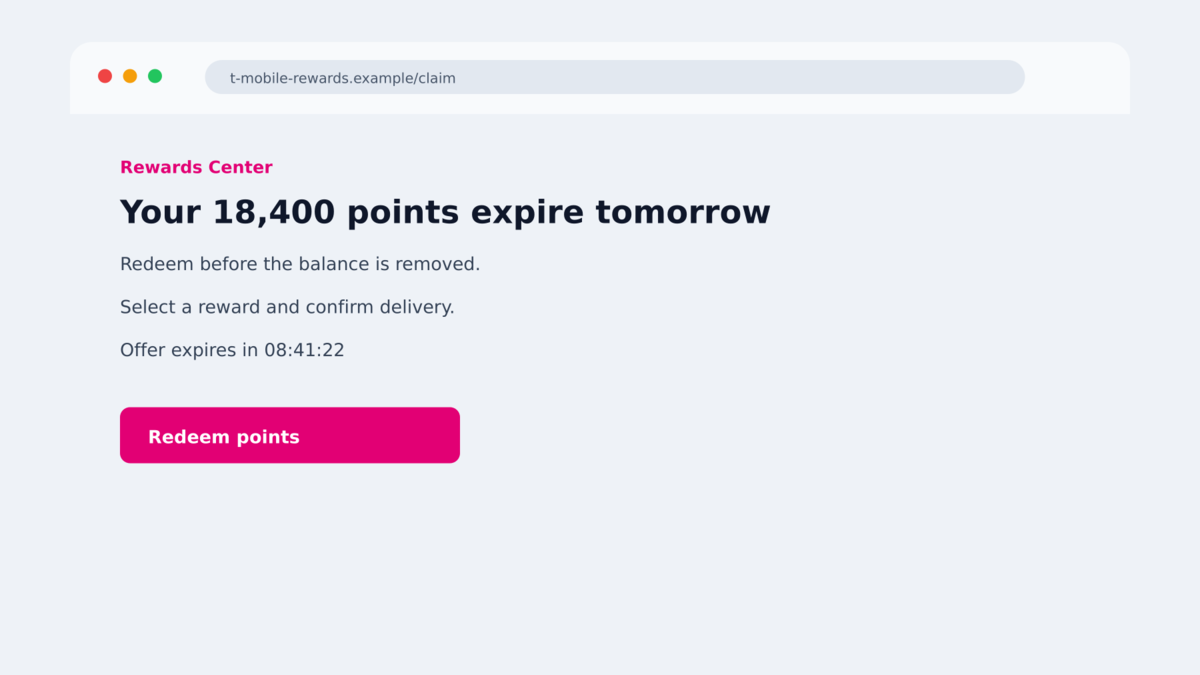
The landing page may display the same balance and deadline from the text. Matching details make the transition feel seamless, even though both screens were created by the same scam operation.
Step 4: The victim is offered an attractive reward
The page may show electronics, gift cards, account credits, or other high-value items that can supposedly be claimed with points. A small shipping or processing payment can be added to make the redemption feel normal.
The reward catalog keeps the victim focused on what they might receive. It also provides a believable reason for asking for a delivery address and card number.
Step 5: The form captures personal and financial details
The checkout can ask for a name, address, phone number, email, account password, card number, expiration date, CVV, or a one-time bank code. No legitimate reward requires all of those details through an unsolicited text link.
Some forms submit information one screen at a time. Even if the victim stops before the final button, earlier pages may already have sent data to the criminals.
Step 6: The stolen data is used for further fraud
Card details can be tested with small purchases or used quickly while they are still active. Credentials can be tried against T-Mobile, email, shopping, and financial accounts, especially when passwords have been reused.
The criminals may also call or text again. Knowing the victim’s name, carrier, address, and partial payment details makes the next impersonation much more persuasive.
What the Scammers Are Really Trying to Collect
The visible promise is points, but the most valuable target may be the victim’s primary email account. Email access can reset passwords for shopping, banking, cloud storage, and social media. That makes a single reused password a route into several services.
Payment card data has immediate value. A criminal who also captures the one-time code sent by the bank may be able to authorize a purchase while the victim is still looking at the fake redemption screen.
Personal details are useful even when no payment succeeds. A name, phone number, address, date of birth, and carrier relationship can be packaged into a profile for identity fraud or sold to other scammers.
A confirmed responsive number has value too. Clicking, completing a form, or replying tells the operator that a real person uses the number and may engage with urgent account messages. That can increase the volume of future scams.
Warning Signs in a Rewards Text
- The message arrives unexpectedly and gives you only hours to act.
- The greeting is generic and does not identify the account holder.
- The points balance is not visible in the official app.
- The link contains random letters or ends in an unrelated domain suffix.
- The brand name appears in a subdomain rather than the registered domain.
- The page asks for a card to redeem supposedly free points.
- The form requests a banking code, PIN, password, or full identity profile.
- The site claims that action cannot be completed through the official app.
- The reward looks far more valuable than the effort or payment required.
- The message discourages independent verification or contacting support.
Do not use the presence of your carrier’s name as proof. Bulk campaigns are designed to create convincing coincidences.
What to Do if You Have Fallen Victim to This Scam
- Close the page and stop all contact. Do not submit another form to correct information or claim a refund. Additional screens may collect additional data.
- Contact the card issuer immediately. Use the number printed on the card or the bank’s official app. Ask to freeze or replace the card and dispute any unfamiliar transactions.
- Change exposed passwords from a clean route. Start with the email account tied to your mobile service, then secure T-Mobile and every account that reused the same password.
- Revoke active sessions. Review signed-in devices, recovery addresses, forwarding rules, and account changes. Remove anything you do not recognize.
- Protect the mobile account. Contact T-Mobile through an official channel and ask whether the account needs a new PIN, port-out protection, or additional identity verification.
- Never provide a one-time code to a caller. A follow-up caller may claim to reverse a charge or secure the account. Banks and carriers do not need you to read back a code that authorizes their own access.
- Preserve evidence. Save the text, sender information, full web address, screenshots, bank alerts, and transaction details. Do not revisit the phishing site just to gather more.
- Scan the device if a file or app was installed. Malwarebytes can check for malicious software. AdGuard can help block known phishing pages and deceptive redirects, but neither can make submitted data private again.
- Report the campaign. Use the messaging app’s junk report, notify T-Mobile through its official fraud channel, and report financial loss to your bank and the appropriate national fraud authority.
Frequently Asked Questions
Does T-Mobile really send rewards messages?
A carrier may send legitimate promotions, but an unexpected text should not be trusted on appearance alone. Open the official app independently and verify the same offer there.
Why did the scam know I use T-Mobile?
It may not have known. Large campaigns send messages widely, and some recipients will happen to be customers. The match can feel personal even when it is random.
Is a .top website automatically malicious?
No domain suffix proves that a site is malicious by itself. In this campaign, however, unrelated .top domains containing T-Mobile-like wording were part of the documented phishing pattern.
Can clicking the link alone steal my account?
The main documented risk is information entered on the page. Still, close the tab, update the browser, and scan the device if anything downloaded or unusual permissions were requested.
What if I entered my card but no charge appears?
Contact the issuer anyway. Criminals may wait, sell the card data, or begin with a small test. Replacing the card is safer than waiting for a large fraudulent payment.
Can security software recover information I submitted?
No. It may block known domains or detect malware, but submitted passwords and card details must be treated as exposed. Change credentials and contact the financial provider.
The Bottom Line
The T-Mobile rewards text scam turns an invented points balance into a deadline. The precise number and familiar name are there to make a mass message feel like an account notice.
Do not redeem rewards through a link delivered by an unsolicited text. Open the official app, compare the balance there, and stop if the destination uses any unrelated domain.
If you entered information, act before the criminals can. Secure the connected email, protect the mobile account, and contact the card issuer immediately.








