

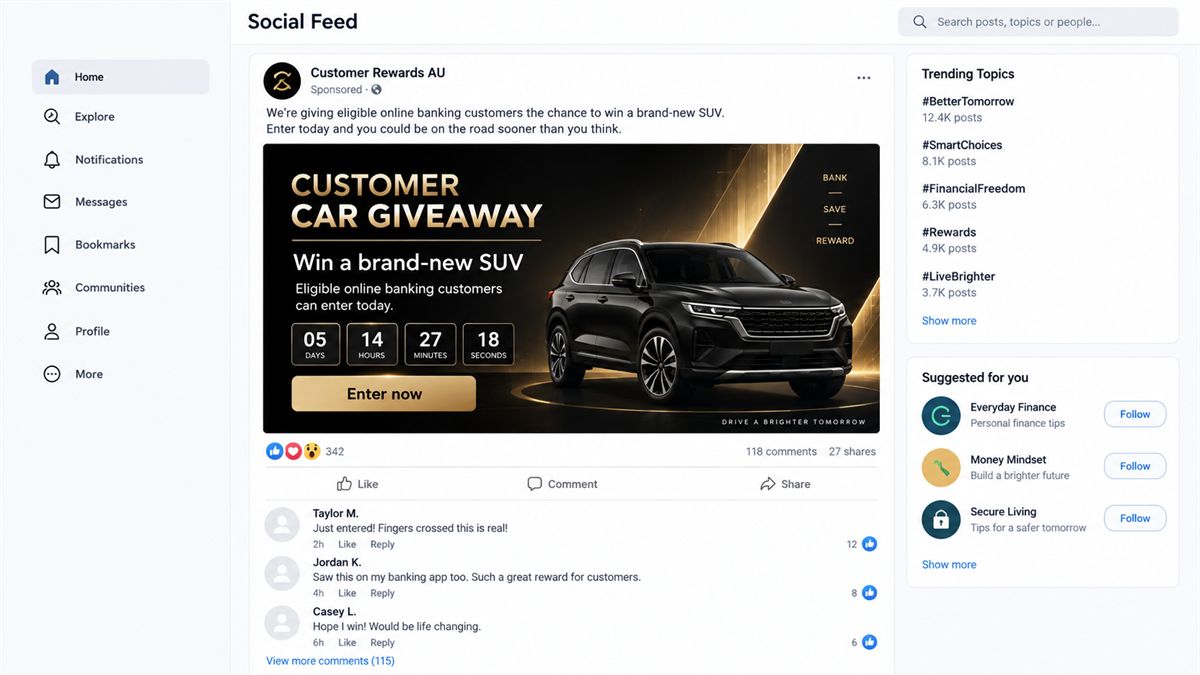
A sponsored post promises that CommBank customers can enter a draw for a new car. The bank’s colors are familiar, the prize is easy to understand, and the entry button appears to lead to NetBank.
There is no complicated investment pitch and no stranger asking for money in a private message. The ad offers a simple competition from a brand millions of Australians already recognize.
The car is bait. The form behind it is built to capture the information that protects a real bank account.
Overview
The advertisement invents a customer-only vehicle prize
In September 2026, Commonwealth Bank warned about social media advertisements that impersonated CommBank and promoted fake vehicle giveaways. The ads claimed eligible customers could enter a competition to win a new car.
The promise is designed to feel plausible rather than impossible. Banks run legitimate promotions, social platforms carry sponsored competitions, and a customer may already use NetBank every week. That familiarity can suppress the pause that an unknown prize sender would normally trigger.
CommBank’s alert is direct: the advertisements were not authorized by the bank. A real logo, polished car image, or sponsored placement does not connect the promotion to CommBank.
The entry page is a banking-login trap
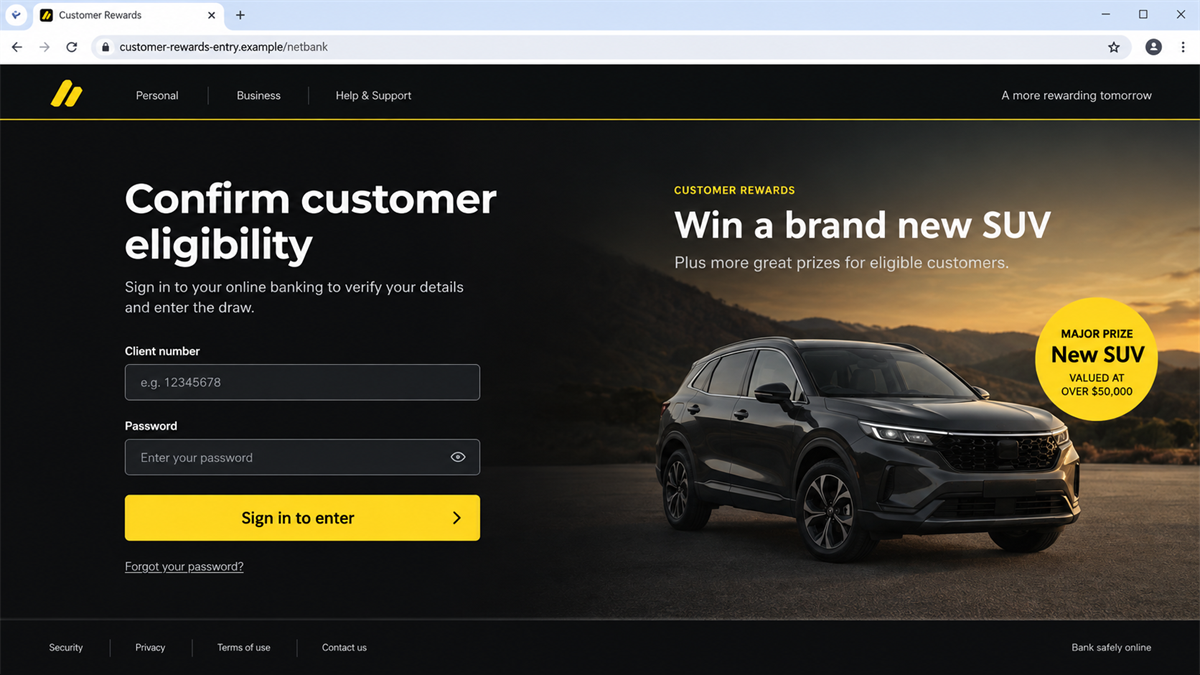
People who click are taken to a fake NetBank page. The page asks for login details, personal information, or other sensitive data under the pretext of entering the competition.
The scammer does not need to collect a large entry fee. Online banking credentials, card details, contact information, and security answers are more valuable because they can support account takeover, identity theft, and follow-up calls from fake bank staff.
A copied NetBank page can look especially convincing after the bank changes its real design. CommBank separately warned that scammers may imitate the updated NetBank appearance in fake login pages distributed through emails and text messages.
The campaign uses paid reach and trusted branding
Sponsored social posts can reach people who never followed a suspicious page. The platform inserts the advertisement into an ordinary feed, where it sits beside legitimate businesses and updates from friends.
The operators can replace the page, domain, vehicle, deadline, or prize amount while keeping the same basic funnel. Reports may remove one advertisement, but another account can reuse the artwork and fake login page.
- A sponsored social ad claims CommBank customers can win a vehicle.
- The offer creates urgency with a short entry window or limited places.
- The button opens a page that imitates NetBank.
- The form requests banking login or personal information to enter.
- Stolen details can support account access and convincing follow-up calls.
- The advertiser, social page, domain, and prize can rotate quickly.
Why a Bank Car Giveaway Can Feel Believable
The prize fits the image of a large bank promotion
A new car is exciting, but it is not so bizarre that everyone rejects it. Financial institutions sponsor events, advertise customer benefits, and run competitions. The scam borrows that real marketing context.
The post may also describe the draw as a reward for loyalty, an anniversary celebration, or an exclusive customer benefit. Those phrases turn an unknown advertisement into something that feels connected to an existing relationship.
Eligibility explains why the page asks for an account
The fake promotion needs a reason to request sensitive information. Saying that only CommBank customers qualify gives the login form a false purpose: “sign in so we can confirm eligibility.”
A legitimate competition should publish clear terms, eligibility rules, promoter identity, draw dates, permit details where required, and a privacy explanation. It should not require a full online banking login simply to prove that someone is a customer.
A sponsored label can look like platform approval
People often assume paid advertisements have been thoroughly verified. In reality, “Sponsored” describes how the post reached the feed. It does not certify the advertiser’s identity or guarantee that every destination remains safe.
Scammers can compromise existing pages, create lookalike profiles, or use shell pages that remain quiet until an ad campaign begins. The visible account name deserves the same scrutiny as the linked website.
Company and Checkout Checks
The social page is not Commonwealth Bank
Check the page’s creation date, name history, follower count, location, earlier posts, and transparency details. A bank-themed name and profile image can be copied, while a newly created page may have no genuine customer history.
Do not use a verification badge alone as proof. Compromised accounts can retain old signals of trust. Navigate to CommBank’s official site or app independently and look for the same promotion there.
The web address is not NetBank
A fake login can reproduce colors, labels, security messages, and button placement. The registered domain remains the most important clue. Extra words, hyphens, unusual endings, and a brand name placed inside a longer address do not make a site official.
CommBank advises customers to access NetBank through the CommBank app or by typing the official address themselves. Do not use a social advertisement as the doorway to online banking.
The competition support channel cannot be verified
Fraudulent promotions may provide a Messenger account, generic email, or comment reply as “support.” That person can reassure the victim, explain away security warnings, and request one-time codes.
Use the phone number on the back of the bank card, secure messaging inside the official app, or the contact page reached through commbank.com.au. Ask whether the named competition exists before entering anything.
The login form is the hidden checkout
The page may advertise a free entry, but the victim is asked to pay with credentials and identity data. NetBank details can be worth far more than a small competition fee.
No genuine giveaway needs an online banking password, card PIN, or one-time security code. If a later caller asks for a code to “confirm the prize,” the request is part of the theft, not verification.
How the CommBank Car Giveaway Scam Works
Step 1: A sponsored post announces the vehicle prize
The victim sees a professionally styled ad featuring a new car and CommBank branding. The copy says customers can enter, check eligibility, or claim a place in a limited draw.
Comments may appear enthusiastic, but reactions and testimonials can be fabricated, purchased, or posted by accounts controlled by the same network.
Step 2: Urgency turns curiosity into a click
The advertisement may show a deadline, a limited number of entries, or a countdown. The goal is to keep the person inside the social feed’s fast rhythm and prevent independent verification.
The prize image does most of the emotional work. A user who can already imagine winning the car may treat the entry form as routine administration.
Step 3: The link opens a copied NetBank page
The destination uses the bank’s visual identity and familiar login wording. It may display security icons, an encrypted-connection claim, or a customer notice to make the page feel official.
The padlock only shows that the connection to that particular domain is encrypted. It does not confirm that Commonwealth Bank owns the site.
Step 4: The form collects credentials and identity data
The fake page requests a client number, password, name, phone number, address, card information, or other details. Each field is framed as an eligibility or entry requirement.
The information may be sent to the operator as soon as a field is completed, so closing the page before pressing the final button does not guarantee that nothing was captured.
Step 5: A fake verification step captures a security code
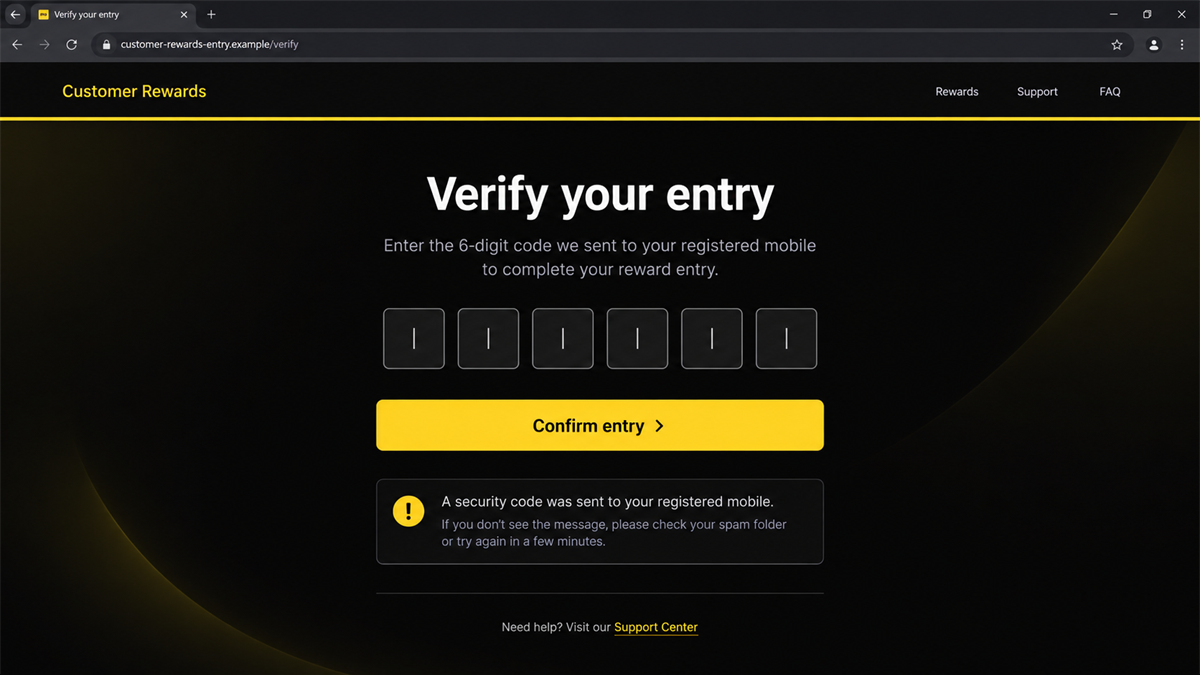
If the attackers attempt a real login, the bank may send a one-time code or approval notification. The fake page or a follow-up caller can ask the victim to repeat that code as part of “confirming the entry.”
The notification text usually states what the code authorizes. Reading it fully can expose the deception. A competition entry should never require approval for a new device, transfer, digital wallet, or password change.
Step 6: The scammers exploit the account or identity
With enough information, criminals may attempt account access, change contact details, register a device, make payments, or call while impersonating the bank’s fraud team.
Personal information can also fuel later scams. A caller who knows the victim’s name, bank, phone number, and recent “competition entry” can sound unusually credible.
How to Verify a Real Competition
Close the social post and start again from a trusted place. Open the official bank app, type commbank.com.au into the browser, or use the contact number printed on the card. Search the bank’s promotions and security alerts for the exact prize name.
Read the full competition terms. They should identify the promoter, eligibility, opening and closing times, prize details, draw procedure, notification method, privacy handling, and any required permit information. Missing or copied terms are a serious warning.
Search for a public announcement from the bank’s verified channels, but do not rely on one social profile. A scam page can copy an entire post history or operate from a compromised account.
Take a screenshot before reporting a suspicious promotion. Advertising pages and destination domains can disappear quickly, and the saved evidence helps the bank and platform connect later copies to the same campaign.
Warning Signs in the Ad and Entry Page
- The promotion exists only as a sponsored social post.
- The page was created recently or changed names several times.
- The ad claims only a few entries remain.
- The destination domain is not CommBank’s official domain.
- The form requests a NetBank password to enter a giveaway.
- A code is described as prize confirmation even though the bank message says login or payment.
- The terms do not clearly identify the promoter and draw process.
- Support is available only through social messages or an unrelated email address.
One clue is enough to stop. You do not need to prove who owns the page before refusing to enter banking details.
What to Do if You Have Fallen Victim to This Scam
- Contact CommBank immediately. Call the official number on the back of the card, use secure messaging in the app, or visit a branch. Explain exactly which details and codes you entered.
- Change the NetBank password from a clean device. Use the official app or type the bank address yourself. Do not return through the advertisement or browser history entry for the fake page.
- Review devices and security settings. Ask the bank to remove unfamiliar sessions, devices, payees, contact changes, digital wallets, and transfer instructions.
- Freeze affected cards and payments. If card data was entered, lock the card through the official app and ask the fraud team whether replacement is required.
- Preserve evidence. Save screenshots of the advertisement, social page, domain, forms, messages, transaction alerts, and the time you entered information.
- Check email and phone accounts. Change reused passwords, enable strong MFA, and protect the email address that receives bank notifications.
- Scan with Malwarebytes. If the page downloaded a file, requested an app, or opened repeated redirects, run a current Malwarebytes scan for known malicious software and browser changes.
- Block malicious advertising with AdGuard. AdGuard can reduce exposure to known scam domains and harmful ads. It cannot validate a competition, so independent bank verification is still necessary.
- Report the ad. Report it to the social platform and forward details to CommBank’s fraud or hoax reporting channel. Australian victims can also report to Scamwatch and ReportCyber where appropriate.
- Expect follow-up impersonation. A scammer may call as the bank, police, or prize team. Hang up and start a new call using a verified number.
Do not move money to a “safe account” and do not hand cash, cards, or a PIN to a courier. A real bank will secure the account through official processes, not secret transfers.
Frequently Asked Questions
Is the CommBank car giveaway real?
The social advertisements described in CommBank’s September 2026 alert were fraudulent and unauthorized. Verify any different promotion through the official app or website.
Why does the fake page ask me to log in?
The scam uses supposed customer eligibility as an excuse to collect NetBank credentials and personal information. A giveaway entry does not require a banking password.
Can a sponsored social media ad still be a scam?
Yes. Sponsored means the advertiser paid for distribution. It does not guarantee the identity behind the ad or the safety of every linked page.
What if I entered details but did not submit the form?
Assume the information may have been captured as you typed. Contact the bank, change credentials, and report exactly which fields were completed.
Does a padlock prove the NetBank page is genuine?
No. A padlock confirms encryption to the displayed domain. Scammers can obtain encryption certificates for their own fake domains.
Where should I report the advertisement?
Report it to the social platform and CommBank through official contact details. If money or identity information was lost, report to the relevant Australian fraud and cybercrime services.
The Bottom Line
The CommBank car giveaway scam turns an attractive social media prize into a banking credential trap. The vehicle, customer eligibility, and NetBank-style page are all parts of the same false story.
Do not log in to banking through a giveaway ad. Close the post, open CommBank independently, and verify the promotion before a free entry costs control of a real account.








