

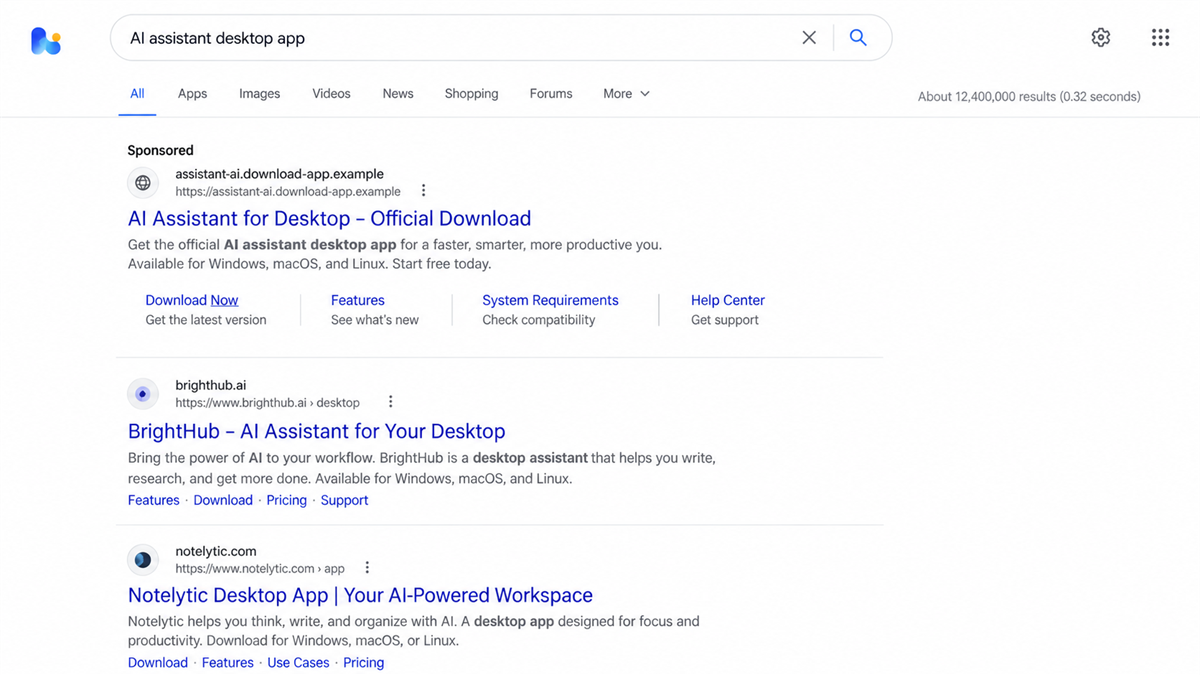
A search for the Claude desktop app should be simple. Type the name, choose a familiar result, download the installer, and get back to work.
In July 2026, the sponsored results included a page on the real Claude.ai domain. The address looked reassuring, and the page offered exactly what the searcher wanted.
The download was not Claude Desktop. It opened a carefully layered route to password-stealing malware.
Overview
A trusted AI platform hosted the first fake page
The FakeAgent campaign used a public Claude Artifact, a user-created page hosted on Claude.ai, to imitate a Claude Desktop download. Searchers could arrive through a sponsored Bing result and see the legitimate Claude domain in the address bar.
The Artifact itself did not contain the final malware. Its download button redirected visitors to attacker-controlled sites that served a file named ClaudeDesktop.exe. That handoff let the scam borrow trust from the real domain before moving the victim somewhere dangerous.
Claude Artifacts are designed for sharing user-created content such as demonstrations and lightweight web pages. Hosting on Claude.ai does not mean Anthropic created, reviewed, or endorsed every public Artifact.
The fake installer delivered SectopRAT
Huntress documented the FakeAgent campaign after detecting unusual ClaudeDesktop.exe activity, security exclusions, and persistence across 29 organizations between July 21 and July 22, 2026. The malicious Artifact received about 7,100 views before it was removed.
The installer used legitimate signed applications alongside altered library files, a technique known as DLL sideloading. It also used VMProtect, checks for virtual machines, graphics-hardware tests, and blockchain data to make investigation and takedown more difficult.
Huntress attributed the final payload to SectopRAT. The remote access and information-stealing malware can target browser logins, cookies, saved payment details, files, autofill data, messaging sessions, and other sensitive information.
The campaign attacked the whole search journey
This was not a random file posted on an obscure forum. The operators bought search visibility, copied a popular AI product, used a page on the real service’s domain, registered lookalike download domains, and named the executable after the software the victim expected.
The same trust-abuse pattern has appeared in related campaigns involving shared AI conversations and fake installation guides. A polished answer on a respected platform can still contain user-generated instructions that lead to an outside download or a command copied into Terminal.
- The victim searches for Claude Desktop rather than receiving an unsolicited attachment.
- A sponsored result appears above or near the official download page.
- The first destination is a public page on the legitimate Claude.ai domain.
- The download button redirects to an unrelated external domain.
- A file named ClaudeDesktop.exe imitates the expected installer.
- The installed payload creates persistence and steals sensitive data.

How the Trusted Domain Became Part of the Trap
User-generated pages are not official product pages
A public Artifact can appear under Claude.ai while being created by an ordinary user. That distinction is easy to miss when the page uses matching colors, familiar typography, product screenshots, and a large download button.
Huntress noted that the Artifact carried a general notice stating that the content was user-generated and unverified. A victim focused on the domain and the download call to action could overlook that warning.
Search advertising moves the scam ahead of safer results
Sponsored listings can appear before organic results. The label identifying an advertisement is often small, especially on a narrow screen. Criminals benefit when users equate first position with official status.
Search platforms review ads, but approval is not a permanent safety certificate. A campaign can use redirects, change its payload, show different content to investigators, or disappear before reports lead to removal.
The filename completes the illusion
Windows displays the name ClaudeDesktop.exe, which is exactly what the victim expects to see. A believable filename says nothing about who produced the file or what code it runs.
The campaign also wrote a file named DockerDesktop.exe for persistence. Huntress found that the supposed Claude and Docker programs were identical staging components, showing how easily attackers can rebrand the same loader for different software searches.
Company and Checkout Checks
The ad buyer is not Anthropic
A sponsored result that uses the Claude name does not prove Anthropic purchased it. Open the advertisement disclosure when available, inspect the advertiser identity, and compare the destination with the download path published by Anthropic.
Do not judge the listing only by its headline. Search ads can display a trusted-looking name while routing through tracking and redirect systems that eventually land on a different domain.
The Artifact creator is not the product publisher
The public page was hosted on Claude.ai, but its content was created by a user. The official software publisher, the hosting platform, and the person who built a public page are separate identities.
Look for the platform’s user-content label and official navigation. A real product download should be linked from the company’s main website, documentation, or verified app store, not only from a public mini-page found through an advertisement.
The external domain breaks the trust chain
The Artifact redirected victims to claude.ai.download-app[.]us and then to another download host. Reading from left to right can make the first address look like a Claude subdomain, but the registered domain is download-app[.]us.
Before downloading, identify the actual registered domain immediately before the top-level ending. Words placed to the left can be chosen by the owner and may imitate any brand.
The installer is the real transaction
No payment form was required. The victim paid with device access, saved credentials, browser sessions, and private files. The downloaded executable was the decisive step in the scam.
Check the digital signature, file origin, publisher name, hash reputation, and official release documentation before running software. If those checks are unclear, delete the file and obtain a fresh copy from the vendor’s verified site.
How the Fake Claude Desktop Scam Works
Step 1: The victim searches for the desktop app
The attack begins with a normal intent. Someone needs Claude Desktop, types a direct phrase into Bing, and expects the search engine to surface the correct installer.
This is more persuasive than an unsolicited email because the victim initiated the search. The result appears to answer an immediate need rather than create one.
Step 2: A sponsored result borrows a legitimate URL
The malicious advertisement points to a public Claude Artifact. The visible domain is real, the connection is encrypted, and the page can reproduce the product’s visual style.
Those facts prove only that the browser reached Claude.ai. They do not establish that the page is an official Anthropic download or that every link inside it is safe.
Step 3: The Download button crosses to attacker infrastructure
Clicking the button leaves the trusted platform. The victim is passed through domains chosen by the attacker, including an address designed to place “claude.ai” before the actual registered domain.
Redirects can happen quickly enough that the visitor notices only a download starting. On a busy desktop, the address bar may not receive another look.
Step 4: ClaudeDesktop.exe stages the malware
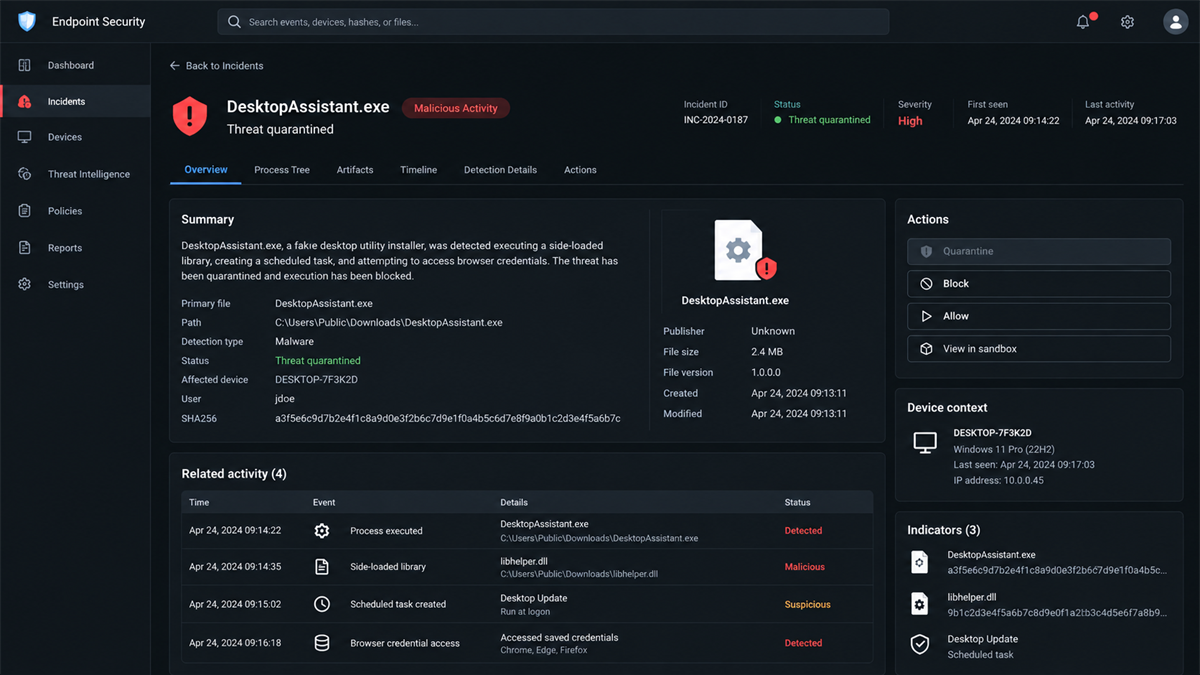
The downloaded file presents itself as the expected application. Underneath, it uses a legitimate executable with a tampered library placed beside it. Windows loads the malicious library in the context of the trusted program.
The first component downloads and prepares additional stages. A scheduled task using the fake DockerDesktop.exe name helps the infection return and reinfect the system.
Step 5: Anti-analysis checks hide the payload
The malware checks graphics hardware, video memory, and execution timing for signs of a virtual machine or security sandbox. It can withhold the harmful behavior when it suspects analysis.
Huntress also found command-and-control information stored through blockchain transactions. The operator could rotate server details without relying on one easy-to-remove configuration file.
Step 6: SectopRAT steals data and provides access
Once running on a real target, the final payload searches for valuable data. Browser passwords, cookies, payment autofill, files, FTP details, and messaging information can expose both personal and company accounts.
A stolen session cookie may let an attacker enter an account without the original password. Remote access can also support more malware, internal reconnaissance, fraud, and follow-up phishing from trusted systems.
A Similar Mac Trick Uses Fake Installation Commands
Huntress separately documented sponsored searches that led Mac users to a public Claude share page styled as an Apple Support guide. The page told visitors to paste a command into Terminal to install Claude.
The command launched a multi-stage chain that delivered MacSync stealer. This ClickFix pattern turns the victim into the person who starts the infection, often bypassing the warning that would accompany a conventional downloaded app.
The Windows FakeAgent campaign and the Mac guide were separate observed chains, so their payload details should not be merged. The shared lesson is that user-generated AI pages can be abused to lend trusted surroundings to unsafe downloads and commands.
Warning Signs Before an AI Tool Download
- The result is labeled Sponsored rather than appearing as the verified product page.
- The page is a public Artifact, shared conversation, paste, document, or community post.
- A download button sends the browser to a different registered domain.
- The address contains a brand name before an unrelated domain ending.
- The installer lacks a valid signature from the expected publisher.
- The page asks you to disable security software or add exclusions.
- An installation guide asks you to paste a command into Terminal or PowerShell.
- The site claims the manual process is required to bypass an error or verification step.
Use the vendor’s main site as the starting point. Navigate through its product menu or documentation, confirm the supported operating system, and compare the publisher shown by the installer before execution.
What to Do if You Have Fallen Victim to This Scam
- Disconnect the affected computer from the network. Turn off Wi-Fi or unplug Ethernet to interrupt remote control and data theft while you preserve the system for review.
- Do not keep testing the installer. Reopening the file or repeating the commands can trigger another stage. Record the filename and download location without executing it again.
- Alert the workplace security team. The confirmed campaign affected organizations, and browser or company credentials may be exposed. Report the search, URL, file, and approximate execution time.
- Scan with Malwarebytes. Update Malwarebytes on a clean connection when safe, then run a full scan for the fake installer, sideloaded libraries, persistence files, and known SectopRAT components.
- Change passwords from a clean device. Begin with email, password manager, financial, cloud, developer, and administrator accounts. Do not use the infected computer for password changes.
- Revoke active sessions. Sign out other sessions, remove unfamiliar devices, rotate API keys and SSH keys, and reset browser synchronization if those secrets were present on the computer.
- Review financial and business activity. Check saved cards, crypto wallets, bank accounts, invoices, and recent messages for changes or transactions that you did not authorize.
- Use AdGuard to block malicious ad routes. AdGuard can reduce exposure to known harmful advertising and redirect domains. It cannot guarantee that every sponsored result or shared page is safe.
- Preserve evidence and rebuild if advised. Save the URL, ad details, download hash, security alerts, and logs. A managed business device may require forensic collection or a clean rebuild.
- Report the pages and advertisement. Send the sponsored result to the search provider, report the user-generated page to the hosting platform, and report malicious domains to the relevant national cybercrime service.
Be suspicious of anyone who contacts you afterward and promises to recover stolen passwords, crypto, or files for an upfront fee. Recovery scammers often exploit the urgency created by the first infection.
Frequently Asked Questions
Was the page really hosted on Claude.ai?
Yes. Huntress found a malicious public Artifact on the legitimate Claude.ai domain. It was user-generated content, not an official Anthropic download page.
Was Claude Desktop itself compromised?
The evidence describes impersonation of Claude Desktop through ads, a public Artifact, lookalike domains, and a fake installer. It does not show that the legitimate Claude Desktop application was compromised.
What malware did the fake installer deliver?
Huntress attributed the Windows payload to SectopRAT after analyzing its behavior and command infrastructure. It targeted credentials, browser data, files, and other sensitive information.
Can a sponsored search result be malicious?
Yes. Advertising placement is not a safety guarantee. Verify the registered destination domain and reach software downloads through the vendor’s official navigation.
Is every public Claude Artifact dangerous?
No. Artifacts are a legitimate sharing feature. The risk is treating user-generated content as an official product page or following its outside downloads without verification.
What should I do with a ClaudeDesktop.exe file I did not run?
Delete it, empty the recycle bin, and run a security scan. If the file was never executed, the risk is lower, but report the source so the ad and page can be investigated.
The Bottom Line
The fake Claude Desktop scam joined a sponsored search, a real Claude.ai page, lookalike download domains, and a believable filename into one continuous trust trap. At least 29 organizations encountered the resulting malware campaign.
A legitimate host does not make every public page official. Start software downloads from the vendor’s verified site, inspect every redirect, and never run an installer or command simply because a search result looked familiar.

Join the discussion
0 commentsShare your experience or ask a question about this article.
Discussion
Start the conversation
Have a question or something useful to share? Add the first comment.