

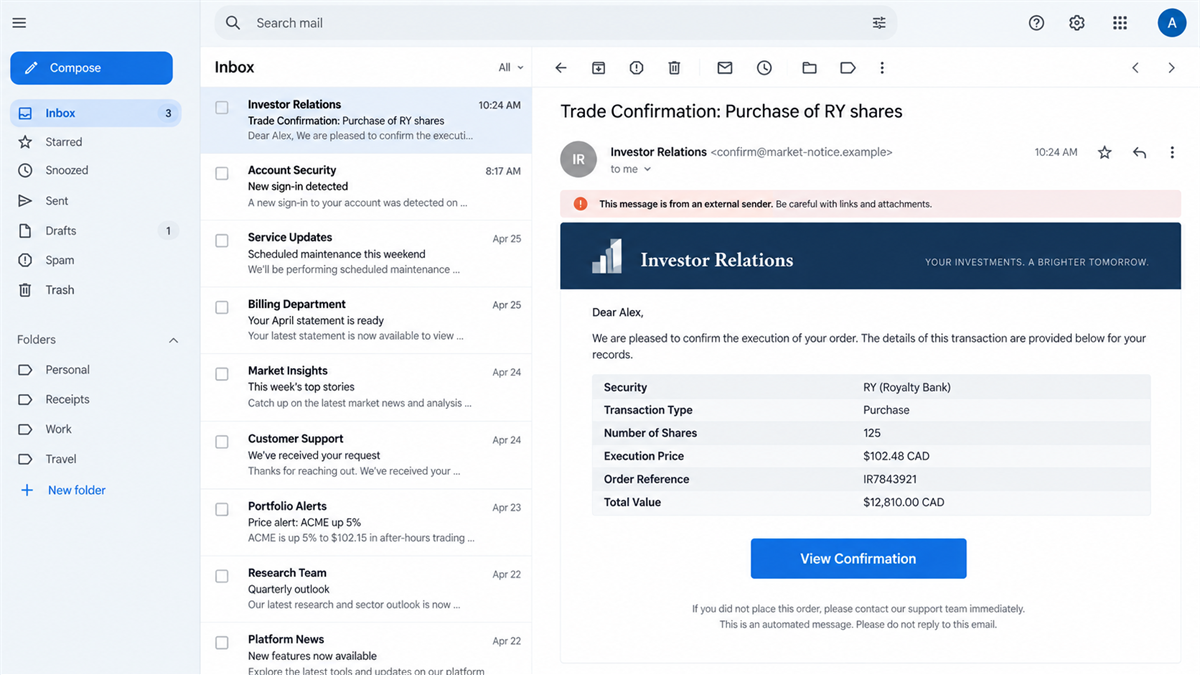
An email from “RBC Investor Relations” says a stock purchase has been completed. The recipient does not recognize the trade, and a prominent View Confirmation button offers the fastest way to find out what happened.
That moment creates two competing fears: money may already be gone, and waiting could make the problem worse.
The trade never happened. The urgent confirmation page is where the real theft begins.
Overview
The email reports a trade the recipient did not make
RBC published an active scam alert in August 2026 about emails impersonating RBC Investor Relations. The message claims to contain a trade confirmation and may reference the purchase of a security such as Royal Bank stock.
An unauthorized trade is the perfect panic button for an investor. The victim may click before opening the real RBC Direct Investing account because the email appears to provide an immediate explanation.
The message can use professional formatting, a bank logo, market terminology, and plausible quantities or prices. Those details are visual props. The unexpected transaction is invented to push the recipient toward the link.
The View Confirmation button opens a fake login
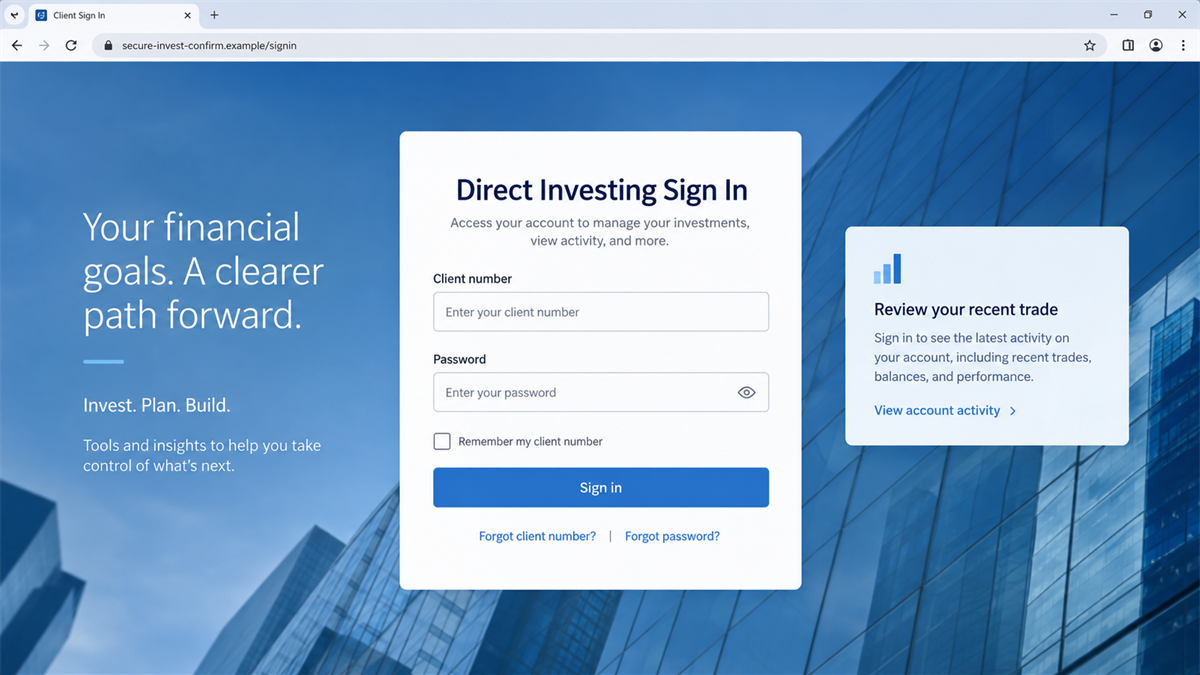
According to RBC’s official scam alert, the button directs victims to a fraudulent RBC Direct Investing sign-in page. Credentials entered there go to scammers, not the bank.
The phishing page may be a close visual copy of the real investing portal. It can include security language, market imagery, privacy links, and familiar form labels. The address bar, not the artwork, reveals whether the browser is actually on an RBC domain.
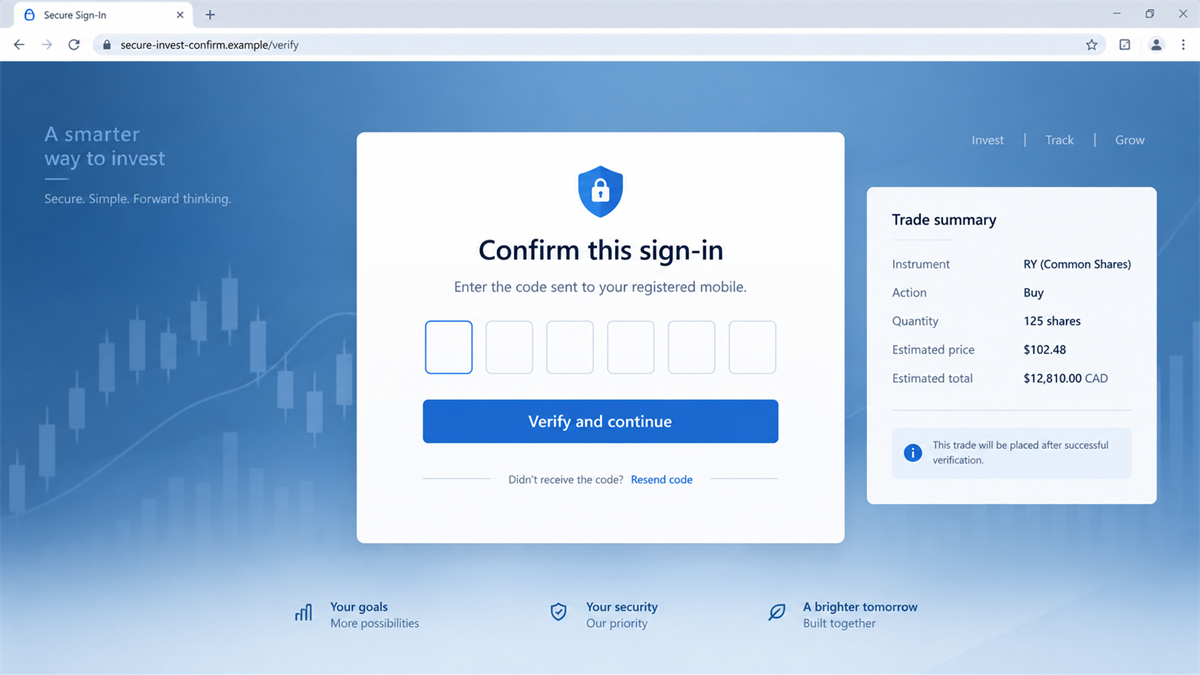
Once the attackers have a client identifier and password, they may attempt a real login. A second fake page or follow-up call can then request the one-time code needed to finish the takeover.
The account can expose cash, securities, and identity data
An investment account may hold cash, securities, linked banking details, tax documents, addresses, and identification data. Access can support unauthorized trades, transfers, account changes, or targeted impersonation.
The scam can also become more convincing after the first theft. A caller who knows which email was sent and what information the victim entered can pose as an RBC fraud specialist and claim to be reversing the fictional trade.
- The email announces a stock trade the recipient did not authorize.
- The sender display name uses RBC Investor Relations or another trusted label.
- A View Confirmation button hides the true destination.
- The linked page copies the RBC Direct Investing login.
- Credentials and security codes can be captured in separate stages.
- Attackers may exploit the account or continue with a fake fraud-support call.
Why the Fake Trade Creates Such Strong Pressure
It looks like evidence, not an offer
Many scam emails promise a prize or ask the reader to buy something. A trade confirmation claims an event has already happened. The recipient is not invited to consider an opportunity; they are pushed to investigate a loss.
That framing reduces skepticism. Even an experienced investor may click because an unfamiliar purchase appears to require immediate action.
The numbers can look specific without being personal
A ticker symbol, share quantity, execution price, total value, or order reference can make the message look tied to a real account. Scammers can insert realistic market data into thousands of emails without knowing the victim’s portfolio.
RBC warns that fraudulent messages may use vague or inconsistent trade details. A legitimate confirmation normally includes account-specific information and can be found independently inside the authenticated investing platform.
The button hides the most important clue
“View Confirmation” tells the reader what the link supposedly does, but not where it goes. On a phone, the destination may be difficult to inspect before tapping.
Shortened links and redirect services make the route even less obvious. The only safe approach is to ignore the button and open the investing account through the official app, a saved bookmark, or a manually typed address.
Company and Checkout Checks
The display name is not proof of an RBC sender
Email applications emphasize a friendly sender name, which criminals can set to “RBC Investor Relations.” Expand the sender details and inspect the full address, reply-to field, and authentication results when available.
RBC says scam messages arrive from non-official domains. Even a familiar-looking address should not be the basis for opening an investment account. Start a separate session with the bank.
The linked domain is not RBC Direct Investing
A phishing site may place “rbc,” “royal,” “invest,” or “secure” somewhere in its address. That word does not establish ownership. The registered domain must match the official service.
Hovering can reveal the destination on a desktop, but a redirect can change it after the click. The more reliable check is to avoid the email link entirely and type rbcdirectinvesting.com or use the official RBC application.
The message support route keeps you in the trap
The email may include a phone number or reply option for disputing the trade. Calling that number connects the victim to the same operation that sent the phishing page.
Use a number printed on an existing bank document or reached through RBC’s verified website. Tell the representative that you received a suspicious trade confirmation and ask them to check the real account activity.
The login is the real checkout
The scam does not need an upfront fee. The username, password, one-time code, and personal details are the valuable items being collected.
Never enter investment credentials to view a transaction from an email. A real confirmation should match an order already visible after you reach the account independently.
How the Fake RBC Trade Email Scam Works
Step 1: The email announces an unfamiliar purchase
The message claims that shares were bought or that a trade confirmation is ready. It may use a recognizable company, a plausible market price, and a reference number to mimic a routine brokerage notice.
The recipient’s lack of memory is intentional. Confusion and fear of account fraud provide the reason to click immediately.
Step 2: The sender and layout imitate RBC
The operator adds RBC branding, formal language, footer links, and a sender name such as RBC Investor Relations. A clean design helps the email survive the reader’s first glance.
The real sending address may belong to an unrelated or compromised domain. On mobile email apps, that address can remain hidden until the user taps the sender field.
Step 3: The confirmation button conceals a phishing link
The button promises order details. Instead, it opens a lookalike site controlled by the scammer, sometimes after a shortened link or redirect.
The destination may add a deadline or account-lock warning. That keeps attention on the invented emergency rather than the address bar.
Step 4: A copied login page collects credentials
The victim enters a client card number, username, password, or other sign-in details. The page can display an error afterward so the failed login feels like a temporary technical issue.
Information may be transmitted after each field, which means abandoning the page before the final submit action may not prevent theft.
Step 5: The attackers request an MFA code or approval
The stolen credentials are tested against the real service. If RBC sends a one-time code or app notification, the fake site or a caller asks the victim to provide it.
The message attached to that code may say it approves a login, device, or transaction. A code sent by the real bank does not make the person asking for it legitimate.
Step 6: The account and stolen data support further fraud
Attackers may attempt unauthorized access, changes, transfers, or securities fraud. Even when a transaction fails, the exposed identity data can be used for password resets and targeted impersonation.
The victim may also receive a second call from a fake bank investigator. The caller uses details from the phishing session to sound informed and may demand another code or transfer.
How to Check the Trade Safely
Do not use any button, attachment, number, or reply address in the unexpected email. Open a new browser window, use a saved official bookmark, or launch the RBC application. Review orders, activity, messages, and alerts from inside the authenticated account.
If no trade appears, preserve the email and report it. If a real unauthorized transaction appears, call RBC Direct Investing immediately through the official number and ask for the account to be secured.
Compare legitimate confirmations you already have. Differences in sender domains, account identifiers, wording, and delivery method can help the fraud team investigate, but do not interact with the fake message to collect more clues.
Why Independent Verification Stops the Funnel
The scammer controls every route supplied inside the email. The button, reply address, telephone number, and attached document can all lead back to the same operation. Using any one of them allows the attacker to continue defining what is happening.
An independent route breaks that control. When you open the official app yourself, the real account decides whether a trade exists. When you call a number from a statement, the bank decides whether an alert is genuine.
This approach also works when the email happens to contain accurate public market data. A correct stock price or company name does not prove access to your portfolio. Only authenticated account activity can establish that an order was placed.
Families should make this check a shared habit for older or less frequent investors. A calm second person can open the official account while the recipient preserves the suspicious email, without clicking its links.
Warning Signs in a Trade Confirmation Email
- You did not place the trade described in the message.
- The sender uses an unofficial or unrelated domain.
- The confirmation omits your normal account-specific details.
- Quantities, prices, dates, or totals are inconsistent.
- The button uses a shortened link or unfamiliar destination.
- The email threatens an account lock unless you sign in immediately.
- The page asks for multiple passwords or repeated security codes.
- A caller asks you to read back a code sent by the bank.
A legitimate-looking message can still be fraudulent. The decisive test is whether the trade exists after you access RBC through an independently verified route.
What to Do if You Have Fallen Victim to This Scam
- Contact RBC Direct Investing immediately. Use the official site or a verified account statement for the number. Explain that you entered credentials on a suspected phishing page.
- Change the account password from a clean device. Choose a unique password that is not used for email, banking, or another investment service.
- Revoke sessions and secure authentication. Ask RBC to remove unfamiliar devices, reset compromised security information, and review recent logins.
- Review trades, transfers, and profile changes. Check pending and completed activity, linked bank accounts, beneficiaries, contact information, and document access.
- Protect the email account. Change its password if reused, enable strong MFA, remove forwarding rules, and review recovery addresses. Email control can enable repeated account resets.
- Freeze affected cards or accounts. If banking or card information was entered, contact the appropriate fraud department and follow its instructions.
- Scan the device with Malwarebytes. A standard phishing page may not install malware, but attachments or redirects can. Malwarebytes can detect known malicious downloads and browser threats.
- Use AdGuard for malicious-link protection. AdGuard can block known phishing and advertising domains before they load. It does not replace direct account verification.
- Save and report the evidence. Preserve the email with headers, screenshots, URLs, text messages, call numbers, and transaction records. Forward the phishing email to RBC’s published reporting address.
- Reject recovery offers. Anyone promising to restore investment losses for an upfront fee or requesting remote access may be attempting a second scam.
If securities or money are missing, report the incident to RBC and local law enforcement promptly. Fast reporting may help stop pending activity and creates a record for the investigation.
Frequently Asked Questions
Are the RBC trade confirmation emails real?
The messages described in RBC’s August 2026 active alert are phishing emails. Check any separate notification by opening RBC Direct Investing independently.
Why would scammers invent a stock purchase?
An unfamiliar trade creates immediate fear of financial loss. That urgency makes recipients more likely to use the embedded confirmation button.
Does the RBC logo prove the email is genuine?
No. Logos, colors, sender names, and layouts can be copied. Inspect the actual sender and verify activity through the official account.
What if I clicked but entered nothing?
Close the page, report the link, and scan the device if anything downloaded. The risk is lower when no credentials, codes, or files were exchanged.
What if I entered my password but not the security code?
Change the password immediately and contact RBC. The password is compromised even if MFA prevented the first login attempt.
Should I call the number in the trade email?
No. Use contact information from the official RBC website, application, card, or existing statement. The number in a phishing email can belong to the scammers.
The Bottom Line
The fake RBC trade email scam fabricates an investment purchase, then offers a convenient button to investigate it. That button leads to the credential theft the message pretends to help prevent.
Do not sign in through an unexpected confirmation. Open RBC Direct Investing independently, check the real account, and report the email before panic turns a fictional trade into a genuine account compromise.

Join the discussion
0 commentsShare your experience or ask a question about this article.
Discussion
Start the conversation
Have a question or something useful to share? Add the first comment.