

A recruitment message can arrive at exactly the right moment. It mentions a recognizable employer, sounds as if someone has read your background, and offers the small relief every job seeker wants: a real person appears interested.
The latest ANZ impersonation campaign is built around that feeling. The sender may use the identity of someone who once recruited for the bank, which makes a search for the name appear to confirm the message instead of exposing it.
This report explains where that borrowed credibility ends, what the contact is trying to obtain, and how to verify an opportunity without handing a scammer your identity first.
Overview
What ANZ has detected
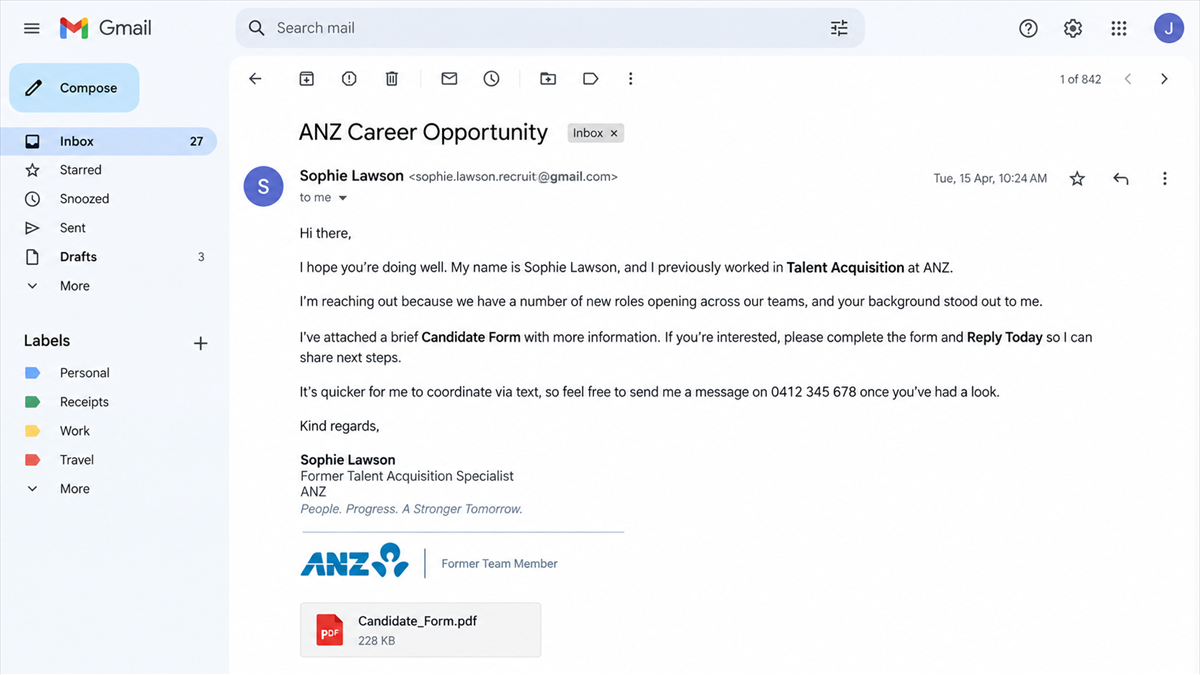
ANZ says threat actors are impersonating former ANZ recruiters and contacting job candidates. The messages use Gmail accounts and stolen identities to look legitimate. Contact can arrive through email, text messages, social media, websites, or phone calls.
The important detail is not simply that someone copied a bank logo. A scammer may use the name and career history of a real recruiter, so searching that person’s name can produce authentic profiles and old ANZ references.
What the scammer wants
Recruitment impersonation can be used to collect personal, financial, or identity information and to pressure candidates into sending money. A fake employer may request documents under the label of onboarding, ask for bank details for payroll, or introduce fees for equipment, training, background checks, or visa processing.
Not every message follows every stage. The safe rule is simpler: no unexpected contact earns access to sensitive information until the sender and vacancy have been verified through ANZ’s official channels.
The checks that matter most
A real person’s name, a professional signature, and knowledge of your work history are not enough. Check the route through which the offer arrived and the process it asks you to follow.
- The sender uses Gmail or another free mailbox instead of a verified corporate domain.
- The vacancy cannot be found through ANZ’s official careers channel.
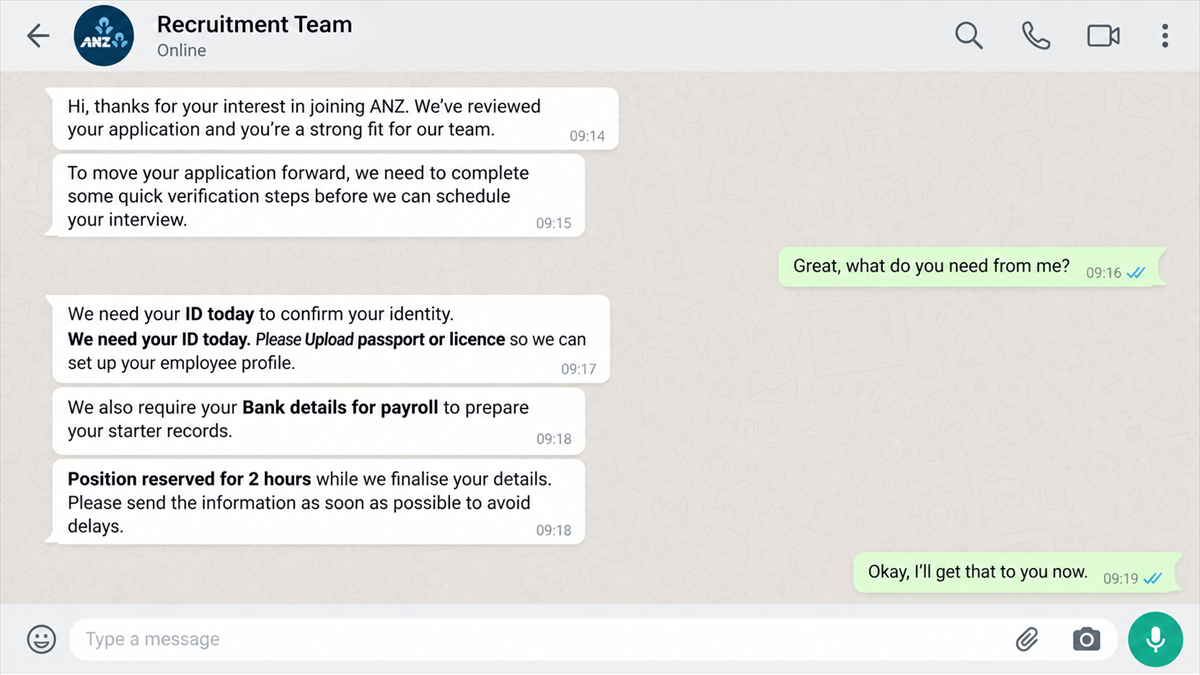
- The recruiter wants to move immediately to private messaging.
- Identity documents or banking details are requested before a verified interview and offer.
- The candidate must pay, buy equipment, deposit a check, or send money elsewhere.
Why a Former Recruiter’s Identity Is So Convincing
A basic fake job message collapses when the recipient searches the sender’s name and finds nothing. Stolen identity impersonation flips that check around. The person may exist, may have worked in recruitment, and may genuinely have been connected with ANZ.
What the search does not prove is that the real person controls the Gmail account, social profile, or phone number that contacted you. A scammer only needs public information from a professional profile, an old staff page, a conference biography, or a data breach to build a convincing signature.
The candidate’s details may also be public. Job boards, social networks, portfolio sites, and breached recruitment databases can reveal a name, role, location, email address, and recent search activity. Mentioning those facts can feel like evidence of a targeted opportunity when it may simply show that the scammer gathered available data.
ANZ published its recruiter impersonation warning on September 18, 2026. It specifically tells candidates to be cautious with free email services such as Gmail and to verify recruiter communications through official ANZ channels.
How the Fake ANZ Recruiter Scam Works
Step 1: The scammer chooses a credible identity
The operator copies the name, job title, photograph, or employment history of a real person who previously recruited for ANZ. A former employee can be especially useful because older references still look authentic while the person may no longer have a visible corporate email address.
The impersonator then creates a free mailbox, messaging profile, or social account that resembles the recruiter’s name. The address may include initials, a career-related word, or a year to explain why the exact name was unavailable.
Step 2: The message sounds personally selected
The opening contact may say that the recruiter’s team found your profile, reviewed your application, or believes your experience fits a role. The position can be broad enough to match many recipients while still sounding relevant.
A title such as operations analyst, customer support specialist, remote administrator, or project coordinator is easy to adjust. Salary and flexibility may be emphasized early because those details encourage a fast reply before the candidate checks the vacancy.
Step 3: The conversation moves away from official channels
The scammer may ask to continue by text, WhatsApp, Telegram, or another chat service. That move reduces the chance that a corporate mail filter, job platform, or genuine recruitment team will see the conversation.
The interview may take place entirely through messages, a short form, or a hurried call. A quick process is presented as efficiency, but it also avoids the face-to-face and organizational checks that could reveal the impersonation.
Step 4: Routine onboarding becomes data collection
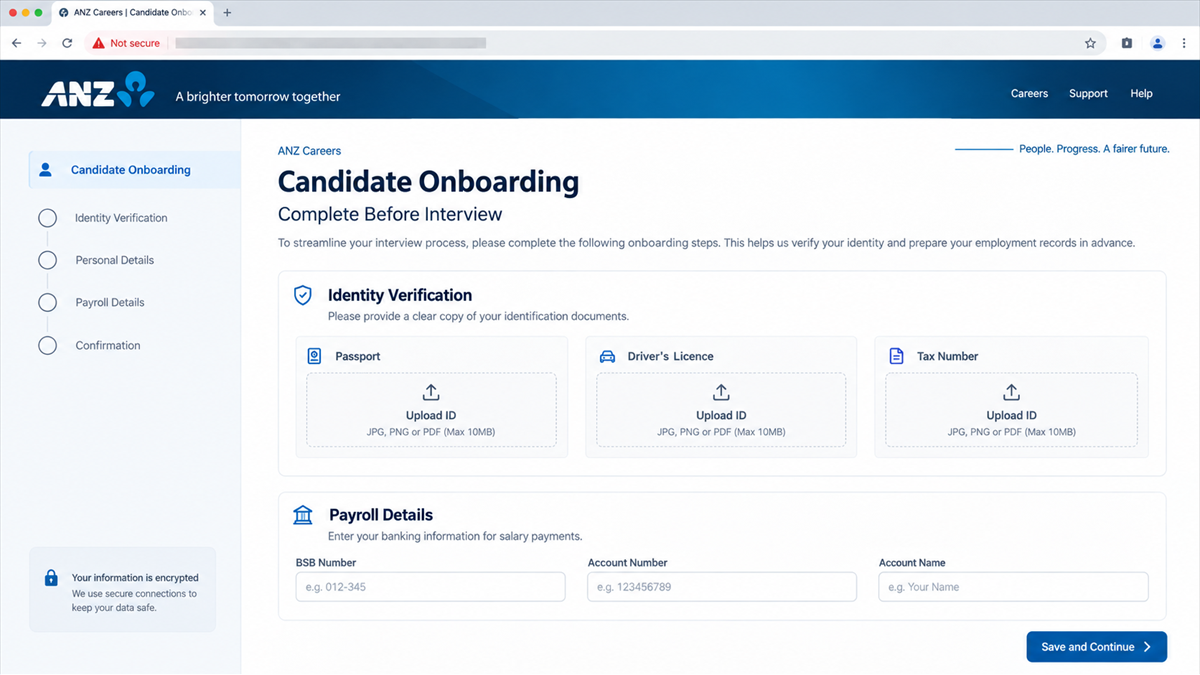
Once the candidate believes the role is real, the scammer can ask for information that employers commonly need at some point: a full address, date of birth, tax number, bank account, driver’s license, passport, or proof of residence.
The timing is the warning. A genuine employer has a documented hiring process, privacy notice, secure systems, and verified staff. A stranger using Gmail does not become entitled to identity documents because they place an ANZ logo above a form.
Step 5: Money may be introduced as a job requirement
Some recruitment scams turn toward payment. The candidate may be told to purchase equipment from an approved vendor, pay a refundable background-check fee, buy training materials, or deposit a check and forward part of the money to a supplier.
A job that requires the candidate to send money is not an employment opportunity. Fake checks can appear in an account before the bank later reverses them, leaving the candidate responsible for the real money sent to the scammer’s vendor.
Step 6: The stolen identity is reused
Even when no payment is made, the documents can be valuable. Scammers may use them to open accounts, pass identity checks, take over existing services, or build new impersonation profiles.
The information can also support highly tailored phishing. A later caller may know your date of birth, bank name, recent job search, and the fact that you expected an onboarding message. That second contact can look even more credible than the first.
A Real Recruiter Can Still Have a Fake Account
One of the easiest mistakes is verifying the person instead of the communication. Finding a LinkedIn profile with the same name only shows that the impersonated individual exists. It does not connect that person to the mailbox in your inbox.
Contact the organization through a path you selected yourself. Use the careers site reached from ANZ’s official domain, a main switchboard number, or an address published on an official vacancy. Ask whether the role exists and whether the named recruiter is involved.
Do not reply to the suspicious message to ask if it is genuine. The scammer will confirm their own story. Do not use a phone number in the signature for the same reason.
MalwareTips has seen the same verification mistake in fake job offer scams that borrow genuine company names. The company can be real while the person contacting you has no connection to it.
Red Flags in an ANZ Recruitment Message
ANZ specifically highlights free email services as a warning in this campaign. Combine that signal with the behavior of the sender and the stage of the hiring process.
- The sender claims to represent ANZ but writes from Gmail or another free account.
- The sender is a former recruiter whose current role does not match the claim.
- The job description is vague, unusually well paid, remote, and immediately available.
- The interview happens only by text or through a form with no verified ANZ participant.
- The offer arrives before a meaningful interview.
- The candidate is asked to upload ID to an unfamiliar site.
- Bank details are requested before the employer and offer are independently verified.
- The role requires a payment, crypto transfer, gift card, or purchase from a named vendor.
- The recruiter becomes impatient when you ask to verify the role through ANZ.
Company and Checkout Checks
Find the vacancy independently
Start from ANZ’s official website and navigate to careers. Search for the exact title, location, and reference number. A copied description on a third-party page is not enough if the position is absent from the employer’s own hiring system.
Verify the sender through ANZ
Use an official contact route that was not supplied by the recruiter. Ask whether the person works with the hiring team and whether the email address or phone number belongs to an authorized recruiter.
Inspect the document portal
Before uploading anything, check the complete domain, privacy notice, legal owner, and connection to the verified application. A padlock only means the connection is encrypted. It does not mean ANZ operates the page.
Refuse every candidate payment
Do not pay for equipment, software, training, checks, or account activation through an unsolicited recruiter. Never deposit a check and send money to a supplier. Stop and verify the request directly with the employer.
What to Do if You Have Fallen Victim to This Scam
- End the conversation. Do not send another document, payment, code, or explanation. Block the impersonating account after preserving the evidence.
- Contact ANZ through official channels. Report the identity and contact details used so the bank can investigate the impersonation and help if an ANZ account is affected.
- Notify your bank or payment provider. If money was sent, report the transfer as scam-related immediately and ask about a recall, dispute, or account protection.
- Protect exposed identity documents. Contact the issuing agency for any passport, license, tax identifier, or other document you shared. Follow local identity-theft and credit-monitoring guidance.
- Secure email and job accounts. Change reused passwords, enable multi-factor authentication, sign out unknown sessions, and review recovery addresses and forwarding rules.
- Scan downloaded files. If you opened an attachment, installed interview software, or used an unfamiliar onboarding app, run a full security scan. Malwarebytes can help check for stealers, remote-access tools, and other malware.
- Warn your references. If you supplied contact details for other people, tell them that a scammer may approach them using your name and the fake vacancy.
- Report the profiles. Report the Gmail account, social profile, job listing, website, and phone number to the relevant services and national fraud-reporting authority.
An ad and tracker blocker such as AdGuard can reduce exposure to malicious job ads and redirect pages. It cannot verify a recruiter, so the independent employer check remains essential.
How to Share Hiring Documents More Safely
Wait until you have verified the employer, vacancy, and person handling the application. Use the employer’s established applicant system, not a new upload link sent through private chat.
Read what is being requested and why. A recruiter may need a resume and basic contact information early. Passport, tax, and banking records belong much later in a formal process with a confirmed employer.
If a document must be shared, ask how it will be stored, who can access it, and how long it will be retained. Keep a record of what you submitted. Do not send more information than the stated purpose requires.
Consider adding a purpose-specific watermark to an identity copy when the receiving organization permits it. A note naming the employer, application, and date can make casual reuse harder. Never alter security features or rely on a watermark as your only protection.
Keep recruitment conversations inside the verified application portal whenever possible. If a recruiter suddenly changes addresses, platforms, or upload systems, pause and recheck the contact before continuing.
Frequently Asked Questions
Is ANZ really warning about fake recruiters?
Yes. ANZ says threat actors are impersonating former ANZ recruiters, using Gmail accounts and stolen identities to contact job candidates.
Does finding the recruiter’s real profile prove the email is genuine?
No. The campaign relies on real stolen identities. Verify the specific email address, vacancy, and contact through ANZ, not through information supplied in the message.
Would a real recruiter ever use Gmail?
Independent recruiters may use different business domains, but an unsolicited Gmail account claiming direct ANZ authority deserves verification. ANZ itself identifies free email services as a warning in this campaign.
When should an employer ask for bank details?
Bank details may be needed after a genuine hiring process for payroll. They should not be used as proof of interest before the vacancy, offer, employer, and secure onboarding system are verified.
What if I sent a copy of my passport?
Contact the passport authority and follow its compromised-document guidance. Also report the incident, monitor financial accounts and credit, and be alert for follow-up identity verification attempts.
What if I deposited the recruiter’s check?
Contact your bank immediately and do not spend or forward any of the funds. A deposited check can appear available before it is later identified as fraudulent and reversed.
The Bottom Line
The name behind a recruitment message may be real while the account contacting you is fake. ANZ has confirmed that scammers are using former recruiters’ identities and Gmail accounts to approach candidates.
Verify the vacancy and sender through ANZ before sharing documents or money. A legitimate hiring team will not object to a careful check, and a scammer’s urgency is not a reason to skip one.








