

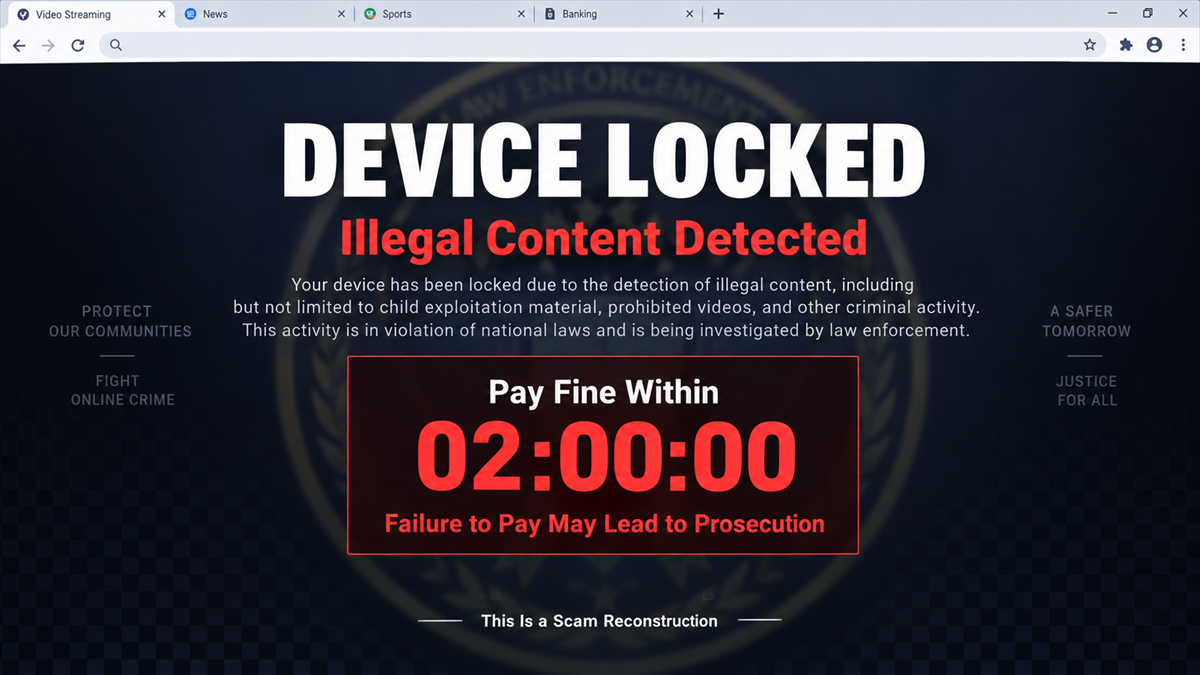
The page takes over the screen before you have time to understand where it came from. A police emblem appears, a countdown starts, and the browser says your device has been locked because of illegal activity.
The accusation is meant to feel private and humiliating. The timer makes closing the page feel dangerous, while the payment form offers what looks like the fastest way to make the problem disappear.
The screen is not a police action. It is a payment trap, and the browser itself contains several clues that the threat has no authority beyond the page.
Overview
What the pop-up claims
The fraudulent alert displays police branding and says the device was locked after repeatedly accessing websites containing illegal content. It demands payment of an outstanding fine within a short deadline.
The page threatens permanent device locking and prosecution if the recipient does not pay. A countdown timer keeps the accusation moving and discourages the person from closing the browser to check the story.
What Singapore Police confirmed
The Singapore Police Force issued a September 20, 2026 advisory about the re-emergence of these phishing pop-ups. Police state that the alerts are fraudulent and are not issued by the SPF.
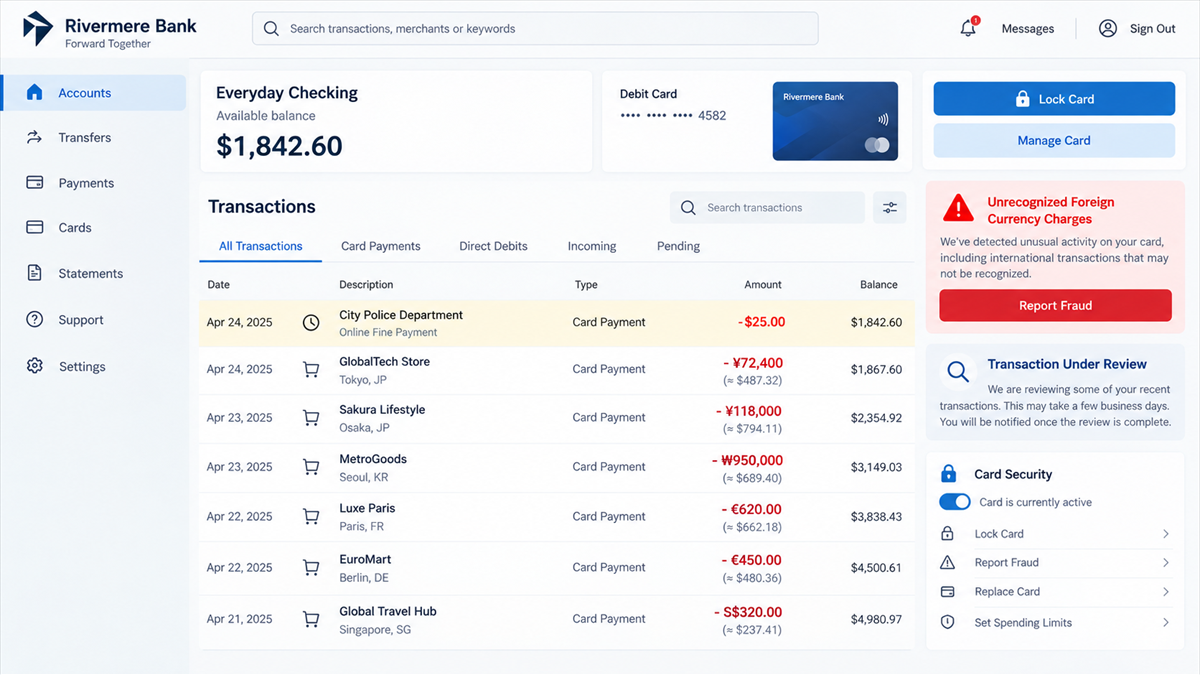
Victims entered bank card details to pay the supposed fine and later discovered unauthorized foreign-currency transactions, often larger than the amount shown on the warning.
What to do on sight
Do not pay, enter card information, call a number on the page, or install anything. Close the tab or browser. If the page resists, end the browser process or restart the device without restoring the suspicious session.
- Police do not remotely lock personal computers or laptops through browser pop-ups.
- Police do not collect fines through card forms placed on alarming web pages.
- A countdown is pressure created by the site, not an official deadline.
- Full-screen mode can hide familiar browser controls without controlling the computer.
- Card details entered into the form should be treated as compromised.
Why the Screen Feels More Powerful Than It Is
A browser page can imitate the visual language of law enforcement: dark colors, seals, legal references, case numbers, IP addresses, and formal warnings. It can also switch to full-screen mode, play an alarm, disable ordinary right-click behavior, or repeatedly reopen dialog boxes.
Those effects create friction, not legal authority. The website runs inside the browser. In many cases, the operating system, files, and other applications remain available even though the page claims the entire device is locked.
The accusation helps the scammer control the victim emotionally. A person who fears being judged may avoid asking a family member or technician for help. The payment form then appears to offer privacy: pay quietly, remove the warning, and tell no one.
The official Singapore Police pop-up scam advisory rejects that story. SPF does not remotely lock personal devices and does not demand payment through pop-up alerts.
How the Fake Police Pop-Up Scam Works
Step 1: A redirect opens the fraudulent page
The victim may reach the page through a malicious advertisement, compromised website, deceptive download button, mistyped address, push notification, or redirect from a low-quality streaming or download site.
The original page can disappear beneath the warning, making it difficult to remember what caused the alert. That sudden transition supports the idea that an external authority interrupted the browsing session.
Step 2: The page imitates a police notice
The scam page displays an emblem, agency name, legal language, and technical details. It may list the browser, operating system, location, or public IP address as proof that the visitor has been identified.
Websites can normally see basic browser information and a public IP address. Displaying those details does not mean police are monitoring the user or have opened a case.
Step 3: Full-screen tricks create the feeling of a lock
The page may cover browser controls, show repeated alerts, or warn that closing the window will trigger prosecution. Some versions play audio or use keyboard traps that make ordinary navigation frustrating.
A visual lock and a system lock are different. The victim may still be able to press the operating system’s task switcher, open a system menu, force the browser to close, or restart the computer.
Step 4: A countdown creates a false deadline
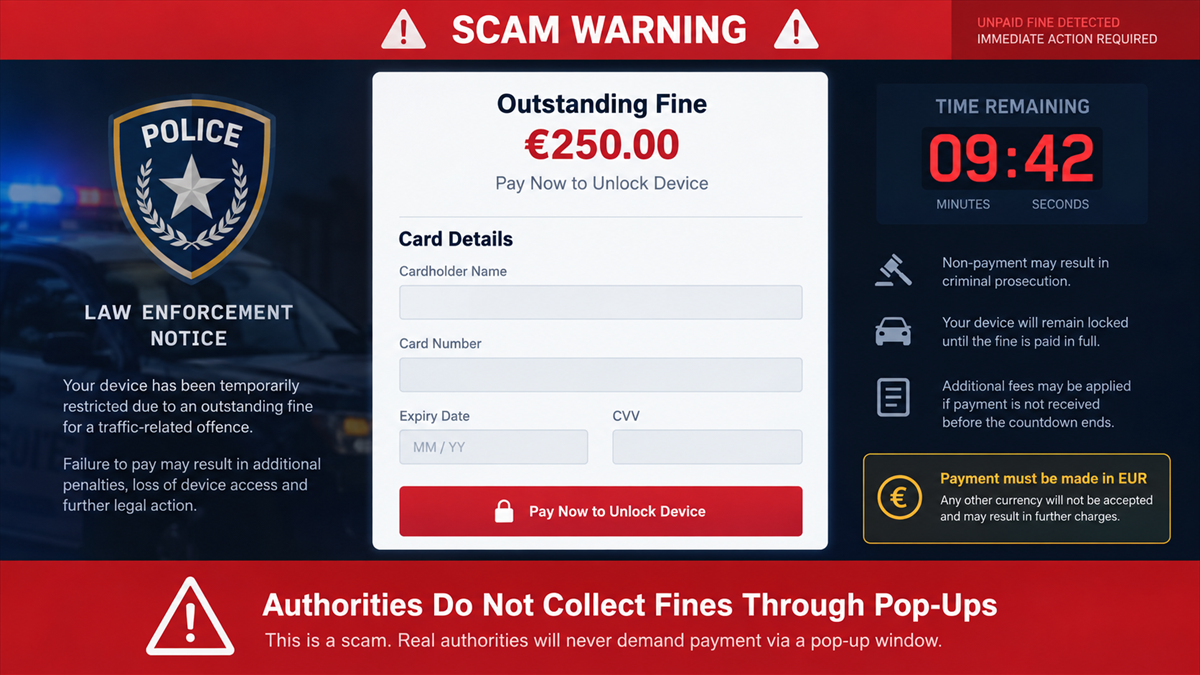
The timer claims the fine must be paid within minutes or hours. It may warn that evidence will be sent to prosecutors, the device will be permanently blocked, or the penalty will increase.
The timer belongs to the page and can be restarted or fabricated. Criminal cases and government penalties are not created, judged, and settled by an anonymous website countdown.
Step 5: The page collects card details
The victim is asked to enter a card number, expiration date, security code, and sometimes a name, address, phone number, or one-time bank code. The form may show a modest fine to make immediate payment feel easier than challenging the accusation.
Submitting the form gives criminals the information needed for unauthorized card use. If the page asks for a one-time code, that code may authorize a real transaction rather than verify a refund or unlock.
Step 6: Larger foreign charges appear
Singapore Police say victims noticed unauthorized transactions in foreign currency, often for more than the supposed fine. The first charge may be followed by additional attempts while the card remains active.
The pop-up may disappear after payment, but that does not mean a fine was settled. It means the page completed its purpose and no longer needs to keep the victim on screen.
A Browser Pop-Up Is Not a Police Notice
Real legal contact follows documented channels. It identifies the responsible agency, provides a verifiable process, and does not demand that a person type card credentials into a page reached through an accidental redirect.
A real agency also does not need a website to stop the user from leaving while a countdown runs. Any page that says closing a tab is a criminal offense is trying to prevent the exact action that would break its control.
Be careful with caller support as well. Some fake warnings include a number that connects to a person claiming to be police, a security company, or a payment department. That caller is part of the same scam and may ask for remote access or a different payment method.
MalwareTips has covered related fake warning pop-up scams that turn a browser message into a phone or remote-access trap. The police branding changes the accusation, not the underlying control tactic.
Red Flags in the Fake Police Alert
- The warning appeared while browsing and fills the page instead of arriving through a verified legal channel.
- A police logo is paired with a card form, countdown, or pay-now button.
- The page accuses you of illegal content but provides no independently verifiable case contact.
- Your IP address or approximate location is displayed as supposed evidence.
- The browser says that closing the page will cause arrest or prosecution.
- The fine must be paid immediately by card, crypto, voucher, or another unusual method.
- A phone number on the page offers help removing the lock.
- The site asks for a one-time code, banking login, remote-access app, or software download.
- The web address does not belong to an official government domain.
Company and Checkout Checks
Inspect the browser, not the badge
Leave full-screen mode if possible and look at the complete address. A logo inside the page can be copied. Official ownership must be verified through the agency’s published website, not through visual similarity.
Check the payment request independently
Do not use a number or link from the alert. Contact the named authority through an official channel and describe what appeared. Singapore Police have already confirmed that this pop-up variant is fraudulent.
Refuse browser-based fine payments
A surprise page reached through a redirect is not a legitimate payment portal. Do not enter a card, bank login, cryptocurrency address, voucher code, or one-time security code.
Check whether the browser is the only thing affected
Try switching applications or opening the system task manager. If the rest of the device works, close the browser without restoring the session. If the device remains unusable after a restart, seek trusted technical help.
What to Do if You Have Fallen Victim to This Scam
- Close the page without paying. Use the browser’s close command, force the application to quit, or restart the device. Do not restore the previous tabs.
- Call the card issuer immediately. If card details were entered, ask the bank to lock or replace the card and review pending and completed transactions.
- Dispute unauthorized charges. Identify foreign-currency and unfamiliar payments and follow the issuer’s fraud process. Do not wait for the scam page to issue a refund.
- Change exposed credentials. If you entered a banking login, email password, or one-time code, secure those accounts from a clean device and revoke unknown sessions.
- Scan the device. A page alone may not install malware, but downloads and remote-access requests add risk. Run a full scan with your security product. Malwarebytes can help check for unwanted programs and remote tools.
- Remove abusive browser permissions. Review notifications, extensions, startup pages, and site permissions. Clear data for the offending site and update the browser.
- Preserve evidence. Save the web address, screenshots, payment receipts, phone numbers, and charge details without reopening unsafe links.
- Report the page. Report it to the Singapore Police Force, ScamShield, your browser’s phishing-report system, and the advertising or website platform that delivered it.
AdGuard can block many malicious ad redirects, abusive pop-ups, and known phishing destinations before they load. Keep browser safe-browsing protection enabled as well, but continue to treat any police payment demand inside a random page as fraudulent.
How to Close a Stubborn Scam Page Safely
First, do not click buttons inside the warning, including buttons labeled close, cancel, back, or support. Those controls belong to the scam page and may open more prompts or downloads.
Use operating-system controls instead. On Windows, open Task Manager and end the browser. On macOS, use Force Quit. On a mobile device, close the browser from the app switcher. If necessary, restart the device.
When the browser opens again, decline any offer to restore the previous session. Review the browser’s notification and extension settings. If pop-ups return on unrelated sites, reset the browser or ask a trusted technician for help.
What the Page Can and Cannot Know
A website can see information normally shared during a connection. That can include your public IP address, browser type, operating system, language, approximate region, and the page that referred you.
Scammers place those details inside the warning because they feel personal. The information is closer to a caller reading your number from caller ID than to police presenting evidence from an investigation.
The page may also display your internet provider or a nearby city. IP-based location is often approximate and is available through ordinary lookup services. It does not show that the operator accessed private files or identified who was sitting at the device.
What the site usually cannot do by itself is impose a government fine, file a criminal case, or permanently lock the operating system. The threatening claims come from text and scripts chosen by the page operator.
The risk changes if you download a file, install an extension, grant notification access, or allow remote control. Those actions can extend the incident beyond a browser tab, which is why the cleanup steps should match what you actually allowed.
Frequently Asked Questions
Can police really lock my computer through a website?
Singapore Police say they do not remotely lock personal devices through pop-up alerts. A browser page can imitate a lock, but it has no authority to impose a fine or prosecution.
Why does the page know my IP address?
Websites routinely receive a visitor’s public IP address and browser information. Displaying those details is a scare tactic and does not prove a police investigation.
Will closing the tab make the fine worse?
No. The fine and deadline are fabricated by the scam page. Close the browser using system controls and do not interact with the payment form.
What if I entered my card but no charge appeared?
Contact the issuer anyway. The details may be stored and used later. Lock or replace the card as the bank advises and monitor the account closely.
Does the pop-up mean my computer has malware?
Not necessarily. A malicious redirect can display a fake warning without installing software. Scan the device if you downloaded anything, granted permissions, or continue seeing alerts after the browser restarts.
Should I call the support number on the page?
No. The number is controlled by the scam operation. Contact police, your bank, or a trusted technician using details you find independently.
The Bottom Line
The police pop-up is an accusation designed to collect card details. Singapore Police have confirmed that the alerts are fraudulent and that victims have suffered unauthorized foreign-currency charges larger than the displayed fine.
Close the browser, do not pay, and treat any entered card information as compromised. A government agency will not turn an accidental web redirect into a countdown to prosecution.

Join the discussion
0 commentsShare your experience or ask a question about this article.
Discussion
Start the conversation
Have a question or something useful to share? Add the first comment.