

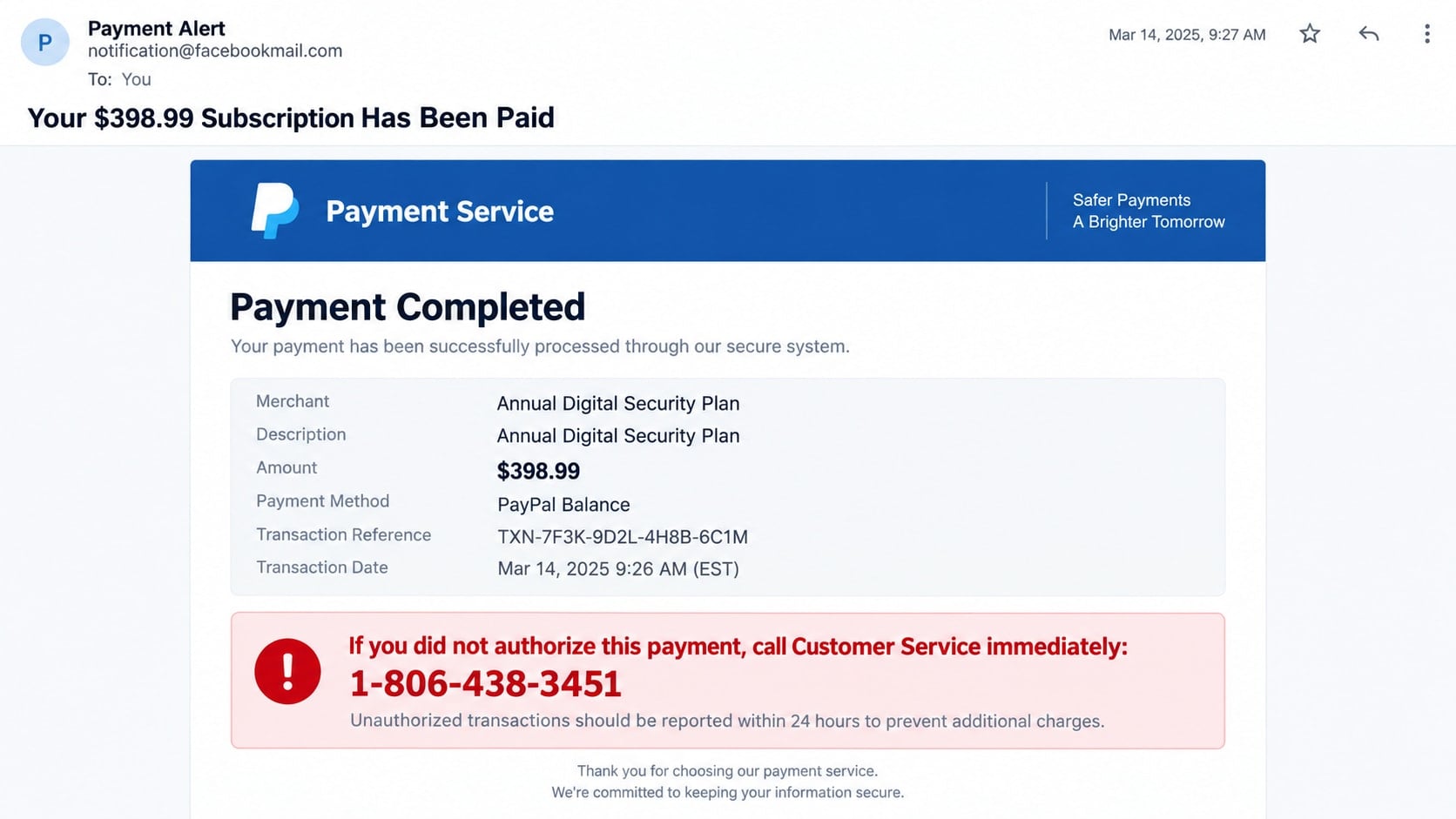
The email says a $398.99 subscription has been paid through PayPal. You do not recognize the plan, the sender address looks strange, and a bright warning says to call 1-806-438-3451 before the charge becomes final.
That phone number is not a rescue line. It is the most important part of a payment-alert scam built to make an invented purchase feel more urgent than your own account history.
Overview
The $398.99 charge is used to trigger a fast callback
The email claims an annual digital-security subscription, software plan, cryptocurrency purchase, or other unfamiliar item was paid through PayPal. A precise total such as $398.99 makes the fake receipt look like a real transaction record.
The message tells anyone who did not authorize the payment to call 1-806-438-3451 immediately. The goal is not to collect the invoice amount automatically; it is to persuade the recipient to contact a fraudulent support operation.
The sender address may misuse an unrelated notification service
Reported versions use notification@facebookmail.com or similar addresses that do not belong to PayPal. Criminals can abuse invitations, automated notifications, compromised accounts, or simple sender-name tricks to place scam content inside an unexpected email.
A message passing through a legitimate platform does not authenticate the telephone number or payment claim inside it. PayPal and Meta are not responsible for a scammer’s inserted support instructions.
The caller is targeted with a refund or account-security script
The person answering may claim to be PayPal billing support. The supposed agent offers to cancel the payment, then asks for account details, a one-time code, card information, a remote-access download, or a transfer needed to process the refund.
PayPal advises users not to call telephone numbers included in suspicious invoices or money requests. The account should be checked by opening PayPal directly, not by following the contact route selected by the sender.
- The email claims a $398.99 payment for something you never ordered.
- The sender address is unrelated to PayPal or does not match the displayed brand.
- A telephone number is presented as the only way to cancel the transaction.
- The message warns that the charge becomes irreversible within hours.
- The caller asks for remote access, passwords, security codes, or card details.
- You are told to send money to correct an accidental refund or account error.
Why the Email May Look Genuine Even When the Charge Is Fake
Payment services use standardized receipts, so their layouts are easy to imitate. A scammer can copy colors, buttons, transaction tables, privacy footers, and familiar phrases without accessing a PayPal account.
Some invoice scams also misuse legitimate money-request features. The notification itself may be delivered by PayPal, while the requestor, invoice note, seller name, and callback number belong to a criminal. Authentic delivery does not make an unwanted request payable.
The Facebookmail sender variation creates a different kind of confusion. A recipient may know that the domain is associated with Meta notifications and assume the content was reviewed. Automated systems can carry user-controlled text that should not be trusted as official billing support.
The decisive evidence is inside your PayPal activity and funding accounts. If no completed payment appears there, the email does not create one. If an unfamiliar request or invoice appears, it can be reported without calling the number in its note.
How the PayPal $398.99 Payment Alert Scam Works
Step 1: A fabricated payment notice reaches the inbox
The subject announces that a subscription was paid or an invoice was completed. The body lists $398.99, a transaction reference, and a product that sounds expensive enough to justify immediate concern.
The sender may be a lookalike address, a compromised mailbox, or an automated notification route abused by the scammer. The visible display name is chosen to emphasize “Payment Alert” rather than reveal who created the message.
Step 2: The fake receipt defines an urgent cancellation route
A red box says unauthorized payments must be reported within 24 hours. The prominent number, 1-806-438-3451, is described as PayPal customer service even though it is not a number the recipient obtained from PayPal’s official site.
The deadline discourages opening the real account or contacting the card issuer. Every minute spent with the fake agent is a minute in which the scammer controls what the victim believes is happening.
Step 3: The fake agent invents additional account damage
After the victim calls, the agent may claim several payments are pending, a foreign device entered the account, or a cryptocurrency wallet was added. The story grows beyond the original $398.99 charge.
The agent asks questions that sound like account verification. Names, email addresses, card digits, and balances are collected while the victim believes a cancellation case is being opened.
Step 4: A fake refund page or remote tool captures access
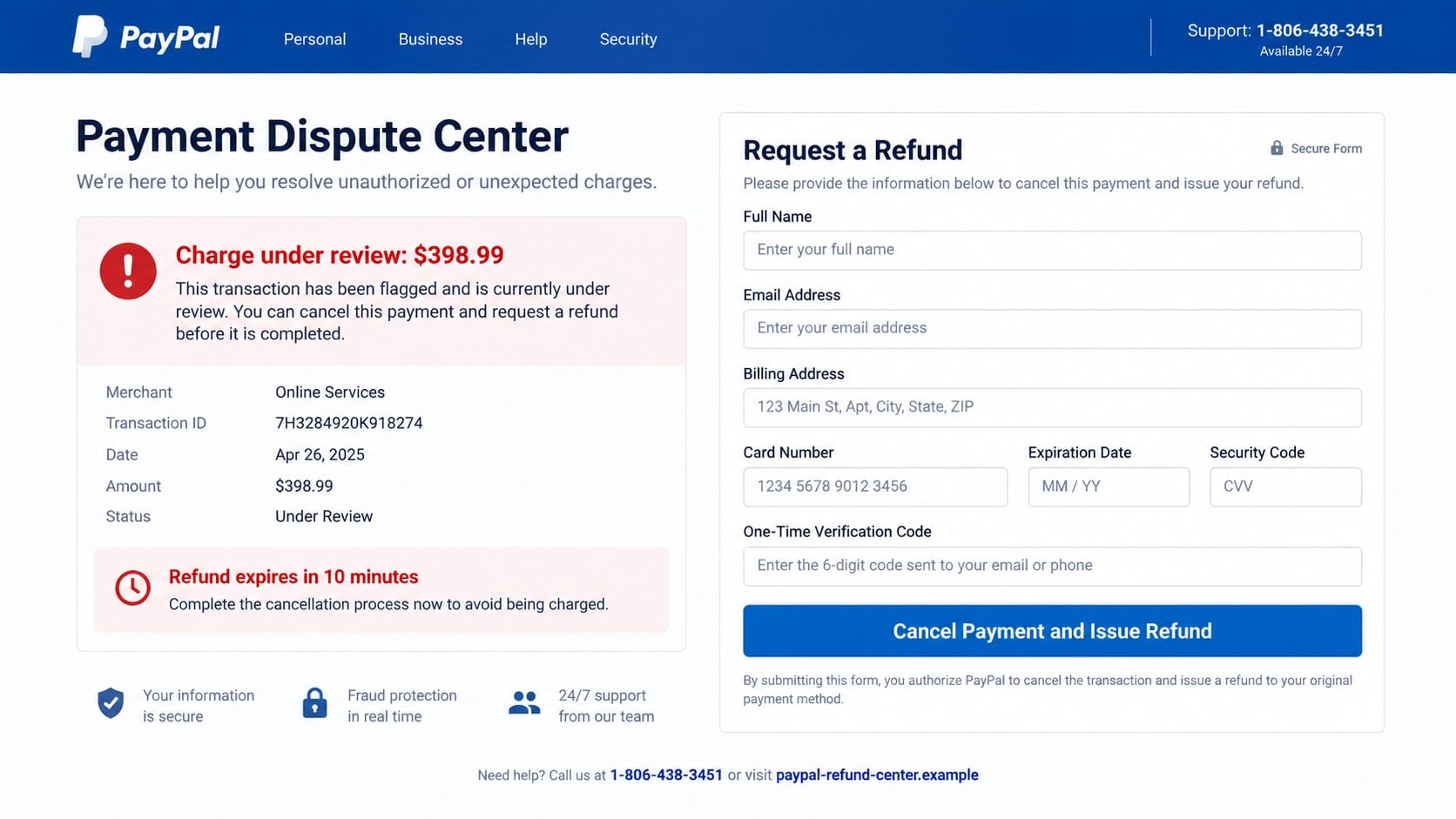
The caller may send a link to a cloned “Payment Dispute Center.” The page asks for a PayPal password, card data, billing address, and one-time verification code to cancel the supposed charge.
Another script asks the victim to install AnyDesk, TeamViewer, ScreenConnect, or similar software. These programs have legitimate uses, but the criminal uses them to view accounts, alter what appears on screen, and control transactions.
Step 5: The refund becomes a reason to send real money
A classic version makes the victim believe an employee refunded too much. Numbers on a webpage may be edited, or money may be moved between the victim’s own accounts to create a temporary balance change.
The caller begs or threatens the victim to return the excess through gift cards, cryptocurrency, cash, wire transfer, or a payment app. No genuine overpayment occurred; the victim is sending their own money.
Step 6: The criminal uses the stolen access again
Captured credentials may be tested against email, shopping, and financial accounts. Card details can be used for purchases, while remote access may allow the attacker to change passwords or watch future sign-ins.
The victim may also receive calls from a fake recovery department that promises to retrieve the loss for a fee. Information from the first scam makes the second caller sound unusually informed.
Identity, Contact, and Payment Checks
Check PayPal without using anything in the email
Open the installed PayPal app or type paypal.com into the browser yourself. Review completed activity, pending payments, invoices, money requests, messages, and automatic payments.
Do not use a button, QR code, link, attachment, or number in the suspicious message. If the claimed transaction is absent from the authenticated account, the email’s central claim is unsupported.
Inspect the full sender and reply details
Expand the message header enough to see the actual address, not only the display name. A Facebookmail address does not become PayPal support because the email body includes payment graphics.
Sender addresses can also be spoofed, so a familiar domain is not the only check. Unexpected replies, mismatched links, and telephone-first cancellation instructions remain dangerous.
Verify every payment in the funding account
If the email says a card or bank account funded the payment, check that account separately through its official app or website. Look for both posted and pending transactions.
Contact the card issuer using the number on the card if a real unauthorized charge appears. Do not let a fake PayPal agent mediate communication with your bank.
Use only PayPal’s official support path
Navigate to PayPal’s Contact page from the authenticated site or app. PayPal tells users to ignore suspicious invoice telephone numbers and forward phishing emails to phishing@paypal.com.
The number 1-806-438-3451 should not be trusted merely because it appears beside PayPal branding. Search results and caller claims do not replace contact information reached from the official service.
What Happens if You Call 1-806-438-3451
The exact script can change, and a number used in one campaign may later be disconnected or reassigned. The safe conclusion is not based on who answers today; it is based on the number arriving through a fraudulent payment alert.
A fake representative may answer with a generic “billing department” greeting and ask for the transaction reference. That reference was created by the scammer, so recognizing it proves nothing about access to PayPal.
The agent may ask you to visit a website, download a support tool, or sign in while screen sharing is active. Any of those steps can expose credentials and financial information far beyond PayPal.
If challenged, the caller may transfer you to a supervisor, quote a fake employee ID, or direct you to search for the number. None of those performances create a verified connection to PayPal.
Do not call to confront or investigate the operator. Contacting the number confirms that your address and telephone line reach a responsive person, which may increase follow-up attempts.
What to Do if You Have Fallen Victim to This Scam
- End the call and disconnect remote access. Close the session, unplug the network if necessary, and do not follow instructions to reconnect. Do not send a second payment to correct a supposed refund problem.
- Contact PayPal through the official app or website. Report the message, invoice, money request, or unauthorized activity. Review automatic payments, addresses, telephone numbers, devices, and recent account changes.
- Call your bank or card issuer. Use the number on the card or statement. Report transactions quickly, ask whether pending payments can be stopped, and replace exposed card or account details.
- Change passwords from a trusted device. Secure email first, then PayPal and any service where the same password was used. Enable multi-factor authentication and sign out sessions you do not recognize.
- Remove remote-control software and scan. Uninstall tools the scammer asked you to add, then run a full Malwarebytes scan. If the attacker had extensive control, consider professional cleanup before resuming financial activity.
- Add web and phishing protection. AdGuard can help block many known deceptive domains and trackers, although it cannot verify telephone callers or catch every new site. Keep browsers and the operating system updated.
- Preserve the evidence. Save the email with full headers, screenshots, the telephone number, downloaded filenames, payment receipts, and a timeline. Forward the suspicious email to phishing@paypal.com.
- Report the fraud. Submit details at ReportFraud.ftc.gov. Use IC3.gov when money, credentials, or remote access were involved online, and make a police report when needed for financial claims.
- Monitor for follow-up attacks. Watch email, PayPal, bank, credit, and mobile accounts. Be skeptical of anyone offering guaranteed recovery, because recovery scammers often target people whose details were already exposed.
How to Handle a Real Unfamiliar PayPal Invoice
An invoice or money request is not the same as a completed payment. A stranger can send a request, and the note may contain alarming language or a fake support number. Do not pay it merely to make it disappear.
Open PayPal independently and inspect the request inside the account. Use the platform’s report or cancel options where available. Do not communicate through telephone numbers or links placed in the requestor’s note.
If activity shows a completed payment you did not authorize, use PayPal’s official resolution process and notify the funding bank or card issuer. Keep case numbers and copies of each submission.
If the email exists but nothing appears in PayPal, treat it as phishing. Forward it to the official reporting address, delete it after preserving evidence, and avoid interacting with the sender.
This distinction removes much of the panic. A scary email is a claim. The authenticated account and funding institution show whether money actually moved.
Frequently Asked Questions
Is the $398.99 PayPal payment alert real?
The described message is a scam when it directs recipients to 1-806-438-3451 for cancellation. Check your PayPal activity and funding account independently to determine whether any real transaction exists.
Is 1-806-438-3451 a PayPal customer-service number?
Do not trust it as PayPal support. It is promoted by the suspicious payment alert. Reach PayPal’s Contact page through paypal.com or the official app instead of using telephone details supplied by an email sender.
Why did the email come from notification@facebookmail.com?
Scammers can misuse automated invitations or notification features and place fraudulent content inside them. An address associated with one platform does not authenticate a PayPal transaction or external telephone number.
Was I charged just because I received the email?
No. An email can claim anything. A real payment should appear in the authenticated PayPal account or the bank or card used to fund it. Check those records without clicking the message.
What if a PayPal invoice appears inside my account?
An unfamiliar invoice or money request can still be fraudulent. Do not pay it or call a number in its note. Report it through PayPal’s official controls and verify whether any completed payment occurred.
Should I forward the email to PayPal?
Yes. PayPal asks users to forward suspicious emails to phishing@paypal.com and then delete them. If account activity or money is involved, contact PayPal and the funding institution immediately as well.
The Bottom Line
The PayPal $398.99 payment alert scam is built around a phone call, not a purchase. The fake charge, unfamiliar sender, and urgent deadline all push the recipient toward 1-806-438-3451.
Do not call the number or use the message’s links. Open PayPal and your funding account independently, report unwanted invoices through official controls, and treat requests for codes, remote access, or refund payments as an attempt to deepen the fraud.








