

A page offering an IPTV app looks like an easy shortcut to live channels. The install button is large, the ratings look familiar, and the page feels routine.
For Android users, the source of that installer matters. A screen that resembles an app store can be only a webpage made to look like one.
Overview
The app name is bait, not the culprit
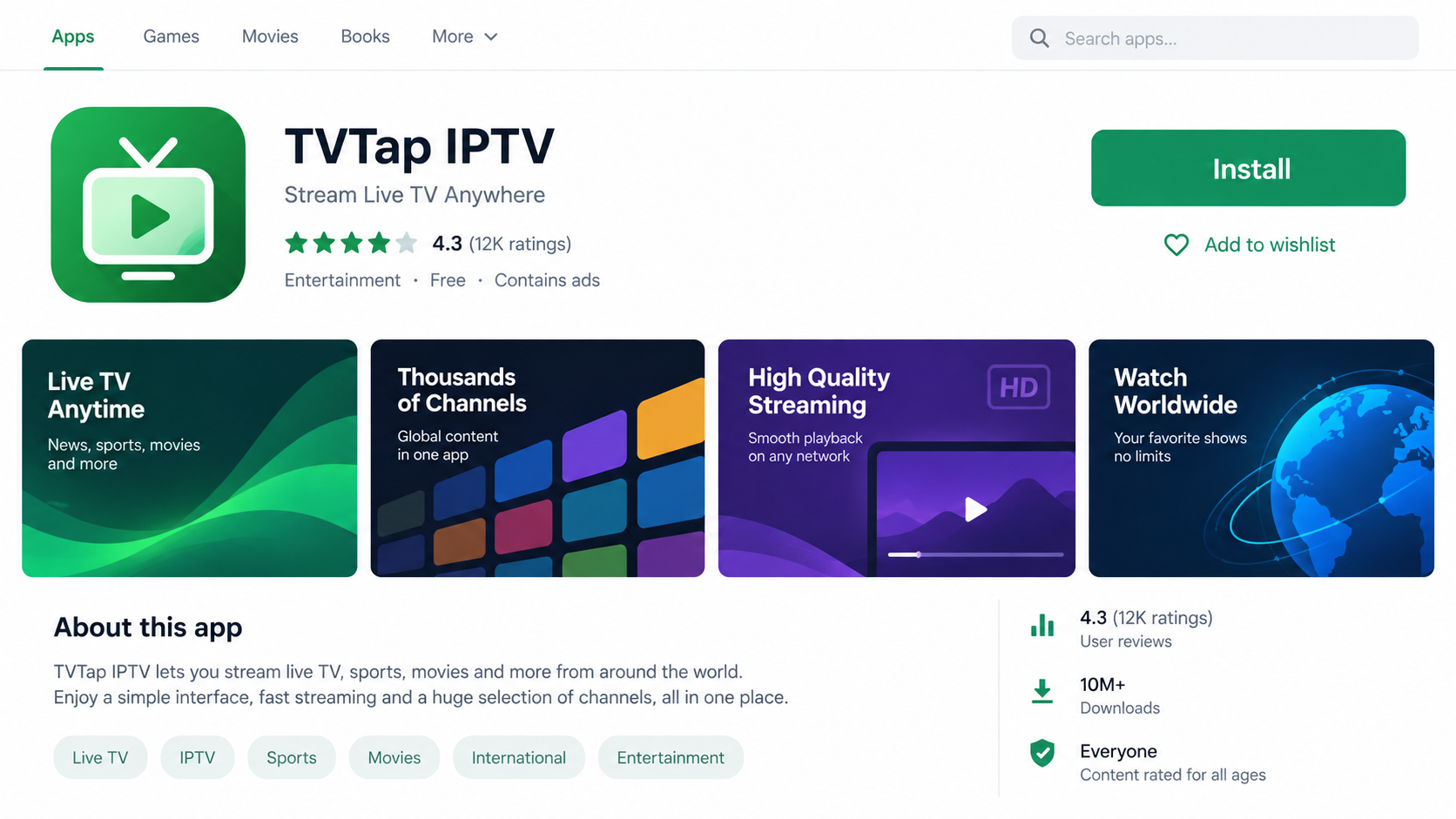
Group-IB documented malicious pages impersonating TVTap, a third-party IPTV app that is not available through the real Google Play Store.
That gap matters. People searching for the app may already expect to find a download somewhere else, making a fake store page seem less unusual.
The criminal pages used the TVTap name to distribute RemControl, an Android banking trojan. This does not mean the legitimate TVTap developers created the malware.
Our first image is a fictional reconstruction of the lure, not a capture of a specific active site. Its ratings and design are illustrative, not verified campaign facts.
- Fake app-store pages copied the appearance of a trusted download flow.
- Some observed pages targeted visitors using an Italian mobile connection.
- The downloaded file was an Android package, not a genuine Play Store installation.
- The installer attempted to suppress Play Protect checks and gain broad permissions.
- The final malware could display fake banking screens and enable remote control.
What researchers confirmed
Group-IB found six distribution URLs in one observed Italian campaign. The pages checked the visitor’s device and location before serving the malicious package.
The investigation also found Meta Pixel code on lure pages and confirmed advertising as a delivery channel. That does not mean every Meta ad led to this malware.
The researched family targeted more than 30 banking applications across several countries, including Italy, France, Spain, Poland, Portugal, and Canada.
Some Gulf-region institutions were also included. These are technical targets in the malware’s configuration, not a list of proven victims.
The dangerous behavior after installation
RemControl abuses Android Accessibility features to read what is on screen, interact with apps, and place a counterfeit screen over a real banking app.
Group-IB also documented screen streaming, keystroke capture, and remote-control capability. Those functions can expose credentials and allow fraudulent activity from the victim’s own phone.
The threat begins when a person installs and grants privileges to the malicious package. Merely viewing a fake listing is not the same as infection.
That distinction helps readers respond calmly. The next steps depend on whether the page was opened, an APK was downloaded, or permissions were actually granted.
Why a Fake Play Page Works
Many people recognize an app-store layout faster than they read its URL. A familiar icon, rating, and green install button can create the impression of vetting.
But a webpage can mimic a store listing. The real Google Play app installs through Google’s store infrastructure, not from an arbitrary downloaded APK.
TVTap’s absence from Google Play made this lure especially convenient for the operator. Searchers might already be willing to use a third-party site.
That does not make every off-store app malicious. It does make authenticity harder to verify and removes a layer of store screening.
The Italian pages Group-IB examined were selective. They served the payload only to certain mobile visitors, so a desktop investigator might see nothing suspicious.
This selective behavior explains conflicting anecdotes. One person can open a URL safely on a laptop while another receives a download prompt on a phone.
The operator also used advertising infrastructure to bring traffic to the pages. A social ad can create urgency without ever stating that banking information is the real target.
The app’s promise is entertainment. The hidden objective is access to the device and financial accounts, a much more serious outcome than a disappointing streaming service.
That contrast makes the attack effective. Users may judge the installer by whether channels play, not by whether it received Accessibility or VPN privileges.
How the Fake TVTap App Scam Works
Step 1: An ad or search result points to a store-like page
The operator promotes a TVTap download through pages that resemble app-store listings. Group-IB confirmed malvertising in the observed campaign.
A person seeking IPTV content sees a familiar app name and a straightforward install button. The page’s visual language encourages a quick decision.
Read the address before tapping. A web page that looks like Google Play is not necessarily part of Google Play.
If the app is not actually listed in the Play Store, a page claiming to be a Play listing deserves immediate skepticism.
Step 2: Device and location checks hide the download
In one Italian campaign, the pages checked the visitor’s IP location and mobile browser details. Only qualifying visits reached the malicious download.
Those checks help the operator avoid researchers and automated scanners. They also mean a friend may not reproduce the exact screen you saw.
Do not treat a harmless desktop view as proof the mobile page was safe. Save the URL and any screenshots from the affected phone.
Step 3: The APK presents itself as an update
The downloaded package displayed a TVTap-themed update screen. It asked the person to continue installing what looked like a streaming app component.
This is outside the normal Play Store installation path. Android may warn that the file came from an unknown source or request a special permission.
Stop at that point if you cannot verify the publisher. Entertainment software has no reason to override your device’s security checks.
Step 4: Permissions weaken the phone’s defenses
Group-IB found a dropper that requested VPN-related control and used it to interfere with Play Protect’s network access during installation.
It then moved toward the permissions needed for the banking trojan, including Accessibility access. That feature is intended to help users, not to give strangers control.
A malicious Accessibility service can observe text, tap controls, and draw deceptive screens. Granting it can turn a fake entertainment install into a banking risk.
Permission prompts are not boring formalities here. They are where the attack crosses from a webpage into device control.
Step 5: The banking app becomes a stage
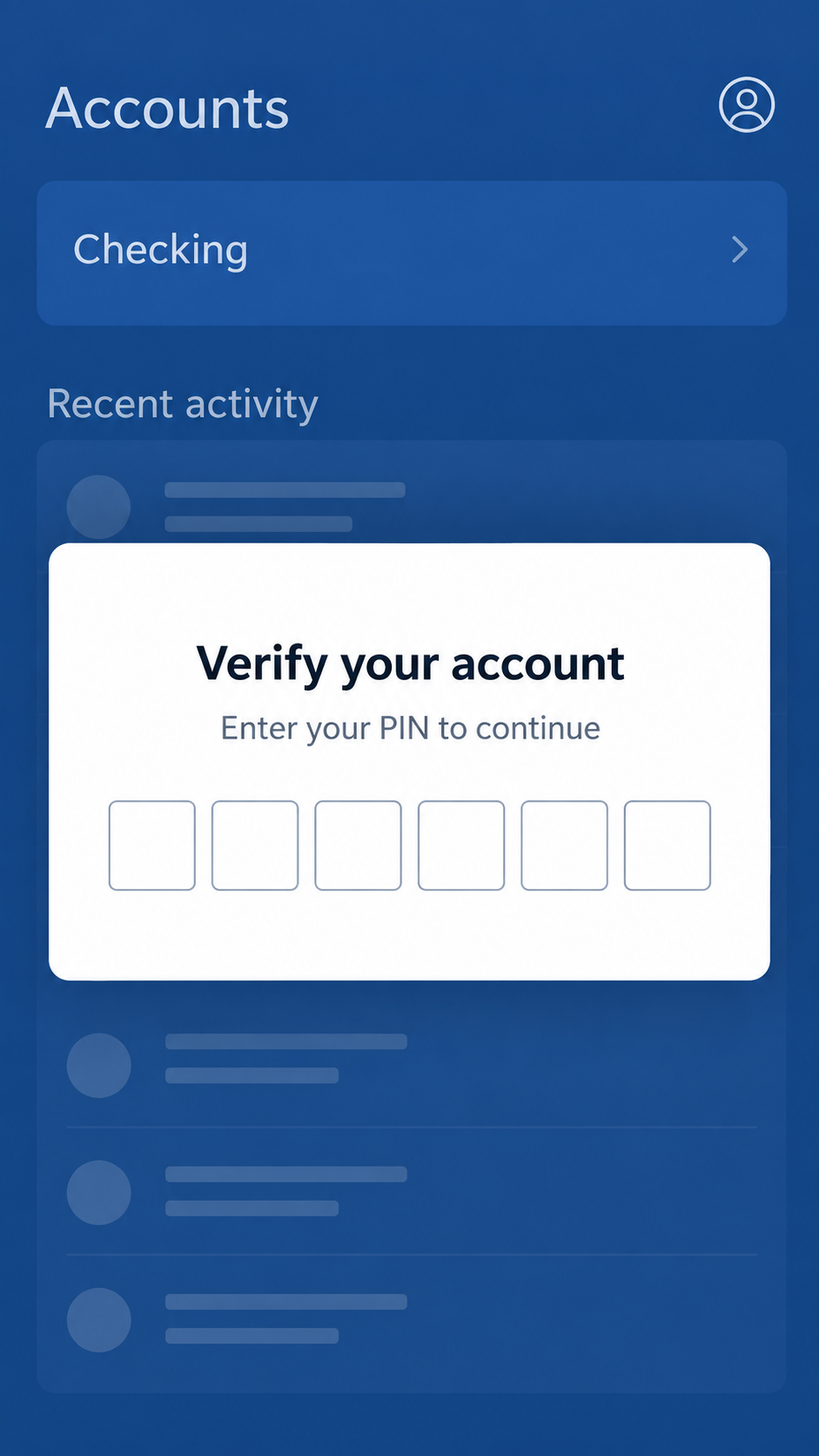
When a targeted banking application opens, RemControl can display its own screen over the legitimate app. The user may believe the request came from the bank.
The overlay may ask for a PIN, one-time code, or other account detail, depending on the targeted institution. The content can be fetched dynamically.
Our second image uses a brand-free banking interface to explain the trick. It is not an image of a real bank or an actual victim’s account.
If a login prompt appears unexpectedly, close the banking app and contact the bank through a number you already trust.
Step 6: The operator can act remotely
The malware can stream the screen and accept remote commands, according to Group-IB. A criminal may watch the session and interact with the phone.
That creates an especially hard-to-detect fraud path: activity can appear to originate from the customer’s own device.
Do not assume changing one password on the infected phone ends the problem. The device itself needs to be isolated and cleaned.
Financial institutions should be told about the possible device compromise, not just an unusual transaction.
What the Evidence Does Not Say
The report identifies malicious distribution pages and malware capabilities. It does not claim every person who viewed the page became infected.
The presence of more than 30 targeted banking apps does not mean those banks were compromised. Their customers were the intended targets.
Group-IB also found evidence that AI assistance was used in parts of the attack infrastructure. That describes the operator’s development process, not an AI-generated app.
It is easy to blur these points into a dramatic headline. The accurate story is already serious without suggesting a confirmed loss for every exposed person.
Another important distinction concerns TVTap itself. The investigated pages impersonated the app. A real product’s name can be abused without its developer participating.
Finally, the observed Italian targeting does not confine the malware to Italy forever. The configuration included banking overlays for several regions.
Company, Domain, Support, and App Checks
Identify the publisher, not just the icon
A green TV icon and familiar name do not establish who signed or distributed an Android package. Find the genuine developer’s official instructions independently.
Do not follow an ad’s “official download” claim without checking a trusted source. A stolen or imitated brand can appear on many changing domains.
The criminal websites in this campaign used TVTap’s name. That is different from proof that the app’s real publisher offered those pages.
A domain is not an app store
Group-IB identified multiple distribution URLs. Their web addresses were not Google’s Play Store, even when the layout suggested otherwise.
A hosting location or registered address would not turn a spoofed listing into an authorized store page. Verify the delivery channel itself.
Be wary of a “Play Store” page that immediately downloads an APK file to your browser. That is not how a normal Play installation feels.
Support promises cannot replace verification
A page can include help text, reviews, or contact buttons. None prove the software package matches the advertised app.
If you need help with a legitimate IPTV app, locate its developer through independent official channels. Do not use a number embedded in an unknown download page.
For a banking concern, speak to your bank through its app, card, or verified website, preferably from another device.
Trace the package and its permissions
The package’s source, signing details, requested permissions, and behavior matter more than its icon. A streaming app should not need control over banking screens.
Accessibility access, unusual VPN requests, and off-store installation together are urgent reasons to stop and seek help.
Do not try to test a suspicious APK on your primary phone. Security researchers use isolated equipment precisely because installation can create real exposure.
Warning Signs Before You Install
The page looks like a store but its address is a standalone website. Open the real Play Store app and search there instead.
The download arrives as an APK from an ad or unfamiliar domain. An installation prompt asks you to permit unknown sources.
The app requests Accessibility control, VPN access, or other powers unrelated to watching channels. Those requests are not routine for entertainment.
A page works only on a mobile connection or redirects differently depending on where you are. That can be a sign of targeted delivery.
Reviews shown only on the seller’s page are easy to fabricate. Do not treat a star rating inside a copied layout as independent evidence.
A “security update” inside the app requests another installation. Verify every update through the genuine provider, not a screen presented by the downloaded file.
A banking app later shows an unusual PIN prompt or behaves as if another screen sits on top. Stop entering information and contact the bank.
Unexpected one-time codes, transaction alerts, or new device notifications require immediate attention, even if the phone otherwise looks normal.
What to Do if You Installed the Fake TVTap App
- Stop banking on that phone. Turn off its network connection and use another trusted device to contact your bank. Explain that a banking trojan may have been installed.
- Ask the bank to protect accounts. Review recent transactions, new payees, device registrations, and transfer limits. Request temporary controls if the bank recommends them.
- Document the installer. Save the page URL, APK name, installation time, and screenshots without reopening the suspicious link. Do not upload private bank screens publicly.
- Review dangerous permissions. Check Accessibility, VPN, device administrator, and installed-app lists with guidance from a trusted technician. Removing one icon may not remove every component.
- Clean the device properly. A mobile Malwarebytes scan can help identify threats, but a confirmed banking trojan may warrant professional help or a factory reset after preserving essential evidence.
- Reset credentials from a clean device. Change banking and email passwords, review multifactor authentication, and revoke sessions that the bank or provider cannot recognize.
- Reduce future ad exposure. AdGuard can block many malicious ads and known scam pages, but it cannot validate an off-store APK or reverse an installed trojan.
- Report the lure. Send the exact URL to the advertising platform, your bank’s fraud team, and appropriate authorities. Avoid paid “recovery” helpers who contact you unexpectedly.
Frequently Asked Questions
Is TVTap itself banking malware?
The investigated pages impersonated TVTap to deliver RemControl. The report does not attribute the malware to the legitimate app’s developer.
Why is a fake Play page dangerous?
It can make an APK download look like a vetted store installation. The website’s appearance does not provide Google’s normal distribution safeguards.
Can opening the page alone infect my phone?
The documented infection path required a malicious package to be downloaded and installed. Viewing a page is not the same as granting permissions.
What is an overlay in a banking app?
It is a counterfeit screen placed over the real app. A victim may type a PIN or code into the attacker’s page while believing the bank requested it.
Were all 30-plus banks breached?
No. They were target applications for counterfeit screens. The finding does not mean their systems were compromised.
Should I change passwords on the affected phone?
Use a clean device first. Malware with screen and keystroke access may observe changes made on the infected phone.
The Bottom Line
The fake TVTap download is an entertainment lure for RemControl, a banking trojan. A store-like page and familiar app name do not establish the file’s safety.
If you installed it, move quickly but calmly: stop banking on that phone, contact your bank from elsewhere, and have the device properly assessed.








