

A bank email says your account has been restricted. You were not planning to sign in today, but the possibility of a frozen balance makes the message hard to leave alone.
That is the moment this Fifth Third Bank account restricted scam is built around. Before you touch the button, take a closer look at what the message is asking you to trust.
Overview
What the account restricted message claims
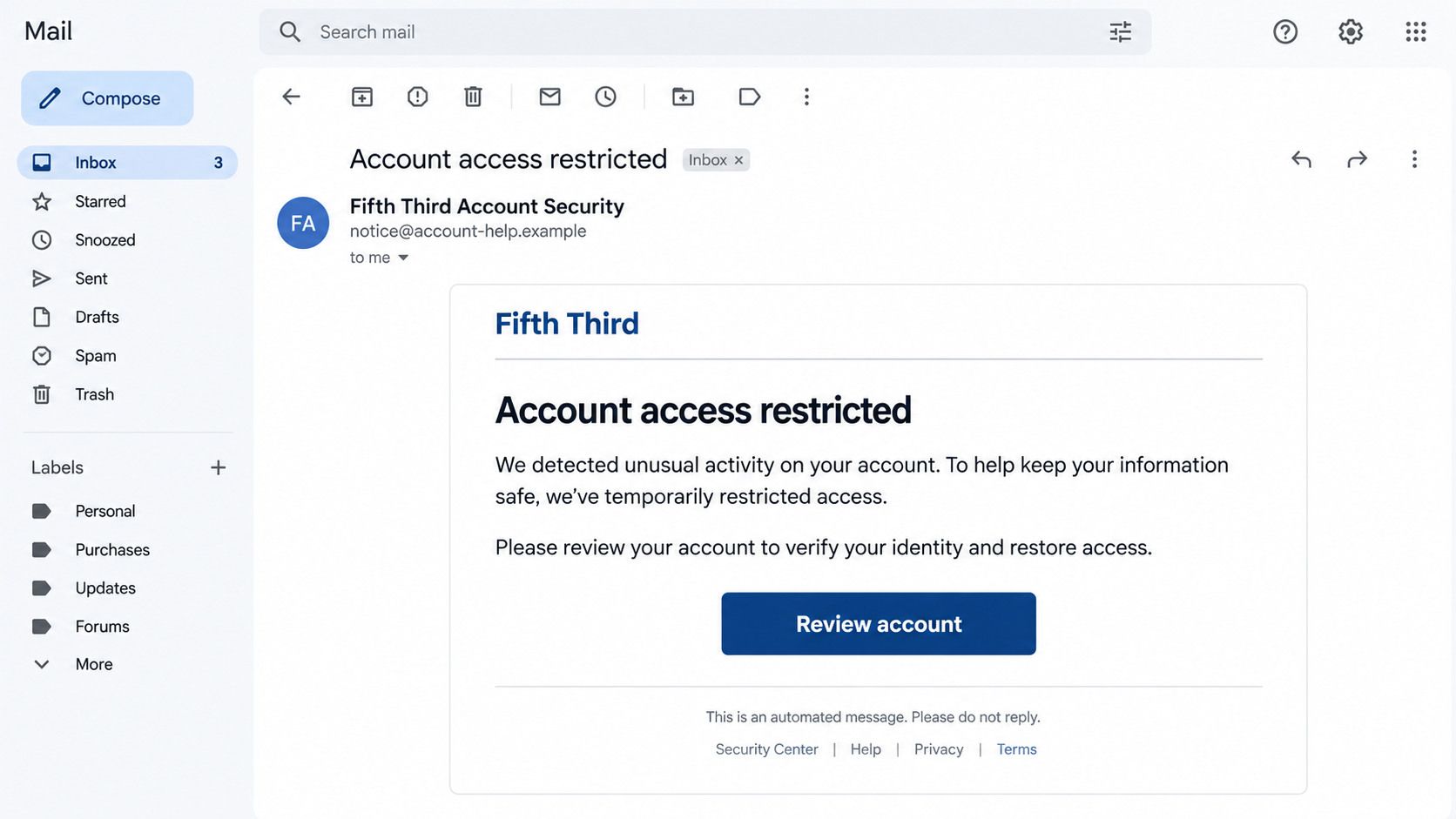
The message presents itself as an account-security notice from Fifth Third Bank. It may say suspicious activity was detected, online access was limited, or the customer must verify recent activity before the account can be used again. The apparent remedy is a button that promises to restore access.
A reported version tells recipients their accounts were restricted and urges them to follow a link within two business days. The exact wording can change. The recognizable pattern is a frightening account claim followed by an unsolicited path to sign in.
What the link is really trying to do
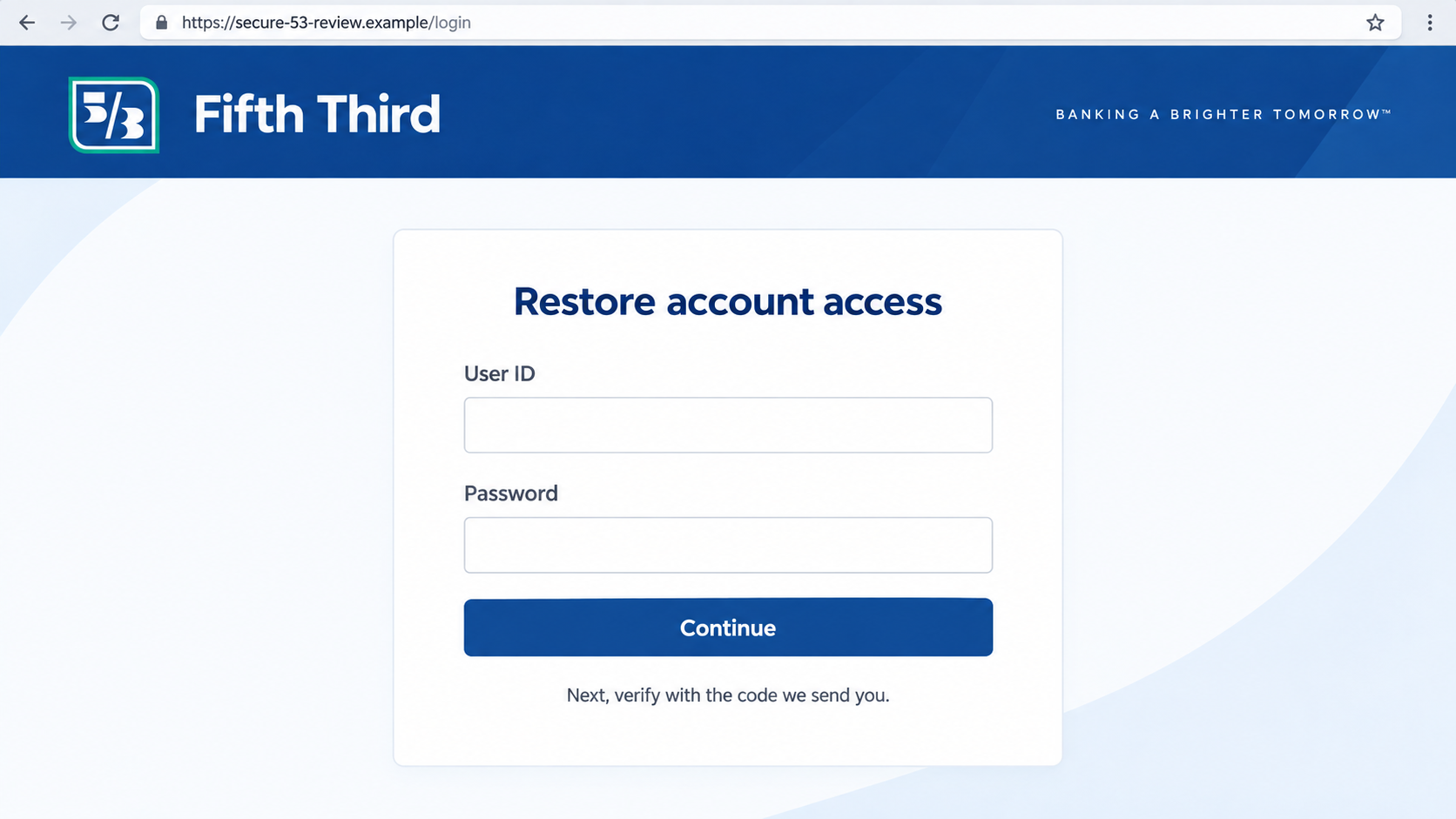
In this scam, the link leads away from the bank to a counterfeit sign-in page. The page can collect a user ID and password, and some variations may ask for a one-time code or other identifying information. The first image is an illustrative reconstruction, not an original message captured from a victim.
Fifth Third’s security guidance describes this exact broad tactic: an email that looks as though it came from the bank asks a customer to verify an account through a fake website. The bank also explains how to report a suspicious message through its app or by forwarding it to its phishing team.
Why an ordinary bank customer might hesitate
Real banks do send account alerts, and a real lockout is inconvenient. The scam works by borrowing that familiar situation, not by inventing a completely foreign one. A convincing logo, an automated-message footer, and a serious tone can make a bad link feel like routine maintenance.
Keep these facts separate while you assess the email:
- A real bank can restrict account access, but this message has not proved that it did.
- A sender display name can be forged; it does not establish who controls the link.
- A website can look polished and use HTTPS while still belonging to an attacker.
- A legitimate concern can be checked through the bank’s app or a number obtained independently.
- Entering a verification code on a lookalike page may expose a live login attempt.
Why the Wording Is Designed to Make You Move Fast
“Account restricted” is a compact threat. It hints that your card could fail at checkout, a bill could go unpaid, or your balance might be unavailable. The email does not need to prove any of those outcomes. Your own imagination fills in the consequences.
Some versions add a deadline, saying the account could be closed or funds frozen if you do not verify promptly. Treat that as pressure, not evidence. Banks have formal processes for account restrictions, and a deadline inside a surprise email does not identify the sender.
The scammer also gives you a simple task: click, enter credentials, and return to normal. That is more persuasive than a vague threat because it offers relief. The relief is false if the button leads to a page controlled by someone other than Fifth Third.
There is a second psychological trick in the phrase “suspicious activity.” The message makes the recipient feel responsible for fixing a security problem. People who would ignore a promotional offer may act quickly when they think they are protecting their money.
Modern phishing does not always contain spelling errors. A clean layout and grammatical English are cheap to reproduce. A badly written email is suspicious, but a well-written one is not automatically safe.
Scammers may use email, text, search ads, or a follow-up call in combination. If a caller repeats the same lockout story and asks for a code, the call is not independent confirmation. It may be the next stage of the same attempt.
How the Fifth Third Bank Account Restricted Scam Works
Step 1: The attacker sends a credible-sounding warning
The opening email may arrive under a sender name such as “Fifth Third Account Security.” It describes unusual activity, a temporary restriction, or a required account review. A displayed bank name is easy to type into an email header and should not be treated as authentication.
The message often avoids detailed transaction information. It needs to reach people who may or may not bank with Fifth Third. A generic warning has a better chance of fitting many recipients than a specific, verifiable account event.
Step 2: The message manufactures a deadline
A short window for “verification” is meant to reduce checking. The recipient is led to believe that delaying might close the account or interrupt access. The attacker wants the reader to solve the immediate problem before inspecting the destination.
Pause anyway. If you have a real account issue, it will be visible through a trusted banking channel. A legitimate customer-service representative can explain it after you contact the bank through its app, card, statement, or official website.
Step 3: The button opens a lookalike page
The landing page can imitate the bank’s colors, wordmark, login fields, and security language. Its address, however, is not the bank’s normal sign-in location. In the illustration above, the domain ends in .example so it cannot function as a real banking destination.
Do not judge ownership by a lock icon. HTTPS means the connection to that site is encrypted. It does not mean the site belongs to Fifth Third. The address itself and the route you used to reach it are the important checks.
Step 4: The form collects credentials or a one-time code
After a user ID and password, a counterfeit page may ask for a current verification code. An attacker could be attempting a simultaneous login on the genuine bank site and waiting to relay the code. That is why an unexpected code request is particularly urgent.
Other versions may ask for card details, Social Security information, or a phone number under the guise of identity verification. The request does not become legitimate because it follows a page that resembles the bank’s design.
Step 5: The attacker tries to use the information
Stolen credentials can be used to attempt account access, change contact details, inspect balances, or set up unauthorized transfers. Whether a particular attempt succeeds depends on the bank’s controls and what the victim entered.
Some phishing pages display an error and then redirect to the real bank. That can make the first page seem like a temporary glitch. A redirect after submission does not erase the information already sent to the attacker.
Step 6: A follow-up message may extend the deception
If the attacker obtained a phone number, they may call as a fraud specialist. They can refer to the same “restriction,” ask for another code, or instruct the victim to move funds into a supposed safe account. Those requests create a new risk, even if no money has yet left the account.
Never use a callback number from the suspicious email as the final authority. Start a new contact with the bank through the official app or a number on your card. Explain that you received a possible phishing message and ask the bank to review your account.
Four Checks Before You Trust a Fifth Third Alert
Open the bank independently
Close the email and launch the Fifth Third app you already use, or type 53.com into a new browser tab. Check whether there is a genuine notice after you sign in through your normal route. If you cannot sign in, use the official contact options you already have, not the email’s button.
Be cautious with search results too. Paid listings and lookalike domains can appear beside genuine results. A bookmark or the bank’s known app removes one more opportunity for an attacker to steer you.
Inspect the complete sender and destination
Expand the sender details. The visible name may say Fifth Third while the actual address belongs to an unrelated domain. On mobile, press and hold a button to preview its destination without opening it, then compare the full hostname with the bank’s official site.
A brand word inside a longer web address is not enough. A domain such as 53-review.example is not part of 53.com. Pay attention to the registered domain, not merely the first familiar characters you notice.
Question requests for secrets
Fifth Third says it will not ask for passwords, PINs, or Social Security numbers through an unexpected email, call, or text. A message that requires such information to “unlock” the account deserves to be treated as a phishing attempt until the bank says otherwise.
One-time codes are not a formality. They can authorize a sign-in or transaction. If a person who contacted you asks you to read a code aloud, end the conversation and contact the bank directly.
Use the bank’s reporting path
Fifth Third’s security page says you can report a suspicious message in the mobile app’s SmartShield Fraud Center or forward it to phishing@53.com. If you already shared information, the bank lists 800-972-3030 for help. Verify current contact details on the official site before calling.
Reporting does not require you to investigate the sender yourself. Save the message and its full headers if available, then let the bank assess it. Do not reply to the attacker asking whether the warning is real.
What a Real Account Problem Would Look Like
There are situations where a bank temporarily blocks access or asks a customer to confirm activity. The difference is not simply whether the topic sounds plausible. It is whether you can verify the issue using a channel you initiated independently.
If the app shows a legitimate alert, follow the instructions inside the authenticated app or call the bank directly. If the app shows no warning, that does not prove every part of your account is healthy, but it is a strong reason not to follow the email’s separate link.
A real service representative may ask questions after you call a verified number. That is different from a stranger contacting you and demanding a password or code. The direction of contact matters because the person who starts the call controls the story.
Pay attention to what the alleged solution would actually do. Entering a password on a new site does not verify a suspicious email; it gives that site’s operator your password. Sending money to a “safe” account does not protect funds; it transfers control away from you.
If you are helping a family member, avoid taking over their banking decisions. Sit with them while they open their usual app and place a call to the number they normally trust. A calm second person can make the deadline feel less urgent.
Finally, keep the bank’s legitimate alerts enabled. Turning off all notifications because of one phishing email can make it harder to notice real unauthorized activity later. The better response is to separate alerts from the actions they ask you to take.
What to Do if You Have Fallen Victim to This Scam
- Stop interacting with the email and preserve it. Do not enter more information or call its number. Save the message, sender address, full link, and time of interaction. If you opened the page, a screenshot of the URL can help the bank investigate, but do not revisit the site just to collect one.
- Contact Fifth Third through a trusted route immediately. Use the app, your card, or the official website. Say exactly what you entered: user ID, password, one-time code, card data, or personal details. Ask the fraud team to review sign-ins, transfers, and contact-information changes.
- Change the affected password and revoke access. Reset the password through the genuine banking site. If it was reused elsewhere, change those accounts too. Ask the bank whether active sessions, trusted devices, or transfer permissions need to be removed. Do not reset through a link in the suspicious email.
- Act quickly on any code you shared. A one-time code may have allowed a live login. Tell the bank what code you provided and when. Check for new payees, changed phone numbers, scheduled transfers, and security alerts that arrived around the same time.
- Protect your payment cards and identity. If you typed card data, ask the issuer whether to replace the card and dispute unauthorized charges. If you provided a Social Security number or identity documents, use IdentityTheft.gov for an individualized recovery plan and consider a credit freeze where appropriate.
- Check your device if you downloaded anything. A fake email may lead to an attachment or installer as well as a web form. Run a reputable scan such as Malwarebytes if you opened a file. AdGuard can help block known malicious pages and misleading ads in the future, but neither product can undo credentials already submitted.
- Report the attempt and watch for a second scam. Send the message through the bank’s phishing-reporting route and file a report at ReportFraud.ftc.gov if appropriate. Keep a record of case numbers and disputed transactions. Ignore anyone who contacts you later promising guaranteed recovery for an upfront fee.
Frequently Asked Questions
Is every Fifth Third account restricted email fake?
No. A real bank can notify customers about account issues. The unsafe part is trusting an unexpected email as the route to resolve one. Check independently through the official app or contact details you already know.
Can a scam email show a real-looking Fifth Third sender name?
Yes. A sender display name is just text, and spoofed or lookalike addresses can be persuasive at a glance. Expand the full address and verify the request outside the message.
Does the padlock mean a banking page is genuine?
No. A padlock shows the browser has an encrypted connection to that domain. It does not establish that Fifth Third owns it. Check the exact domain and use your usual sign-in route.
What if I clicked the link but typed nothing?
Close the page, do not download anything it offers, and check your bank account through a trusted route. A click alone is not the same as submitting credentials, although a malicious download or browser warning deserves further attention.
What if I gave the page a one-time code?
Call the bank’s fraud team immediately through its official contact channel. Treat the incident as a possible account compromise, even if the page later showed an error. Ask the bank to check current sessions and recent changes.
Where can I report a suspicious Fifth Third message?
Fifth Third provides a Report Phishing option in its mobile app and lists phishing@53.com on its security page. Check the current instructions on 53.com, especially if you are responding to an active account loss.
The Bottom Line
The Fifth Third Bank account restricted scam turns a plausible security worry into a reason to visit a counterfeit login page. The email’s urgency, branding, and deadline are part of the persuasion, not proof that the bank sent it.
Use the bank’s app or official website to check the claim. If you entered a password, code, or payment information, contact Fifth Third promptly through a trusted channel and let its fraud team help secure the account.








