

A short message says a routine account or vehicle record needs attention today. The link looks official enough to tempt a quick check.
For someone reading on the move, the easiest next step is to tap. That is precisely the moment this campaign is designed around.
Overview
One message, many possible disguises
The Outsider phishing kit is a collection of ready-made fraudulent pages used by criminals to impersonate transport authorities, delivery services, banks, and other familiar organizations.
It is not a single text with a single web address. Operators can choose a template and send a link that fits the target country or brand.
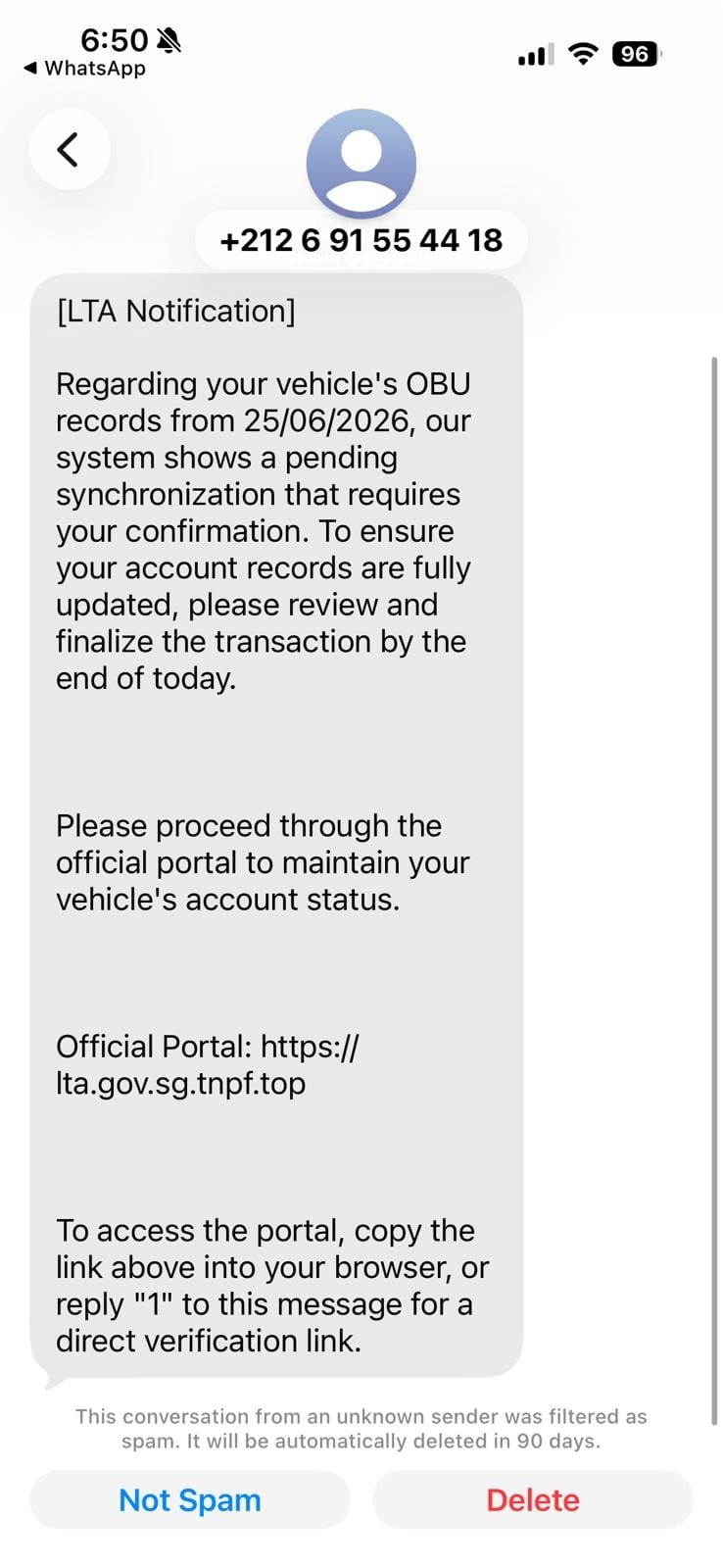
One documented example copied Singapore’s Land Transport Authority. It began with a vehicle-record warning and led toward personal details, payment data, and verification challenges.
What investigators counted
Group-IB researchers identified more than 100,000 related phishing pages from December 2025 through May 2026, using at least 267 templates across more than 54 countries.
They also observed more than 700 newly created pages within a month after a June 2026 legal and takedown effort. The kit remained active in their research.
Those are counts of pages and templates, not confirmed victims. The number of people who lost money or submitted details was not established by those figures.
The verified scam mechanism
Group-IB captured an SMS lure, a copied authority page, a false fee, a card-entry page, and operator controls that could present different verification requests.
The real organization named in a message is being impersonated. It is not responsible for the fraudulent page or payment demand.
For readers, the warning signs look like this:
- A surprise text presses you to settle a fee or account issue immediately.
- The link resembles an official address but ends under a different domain.
- The page asks for a card, phone number, or bank verification code.
- An error screen or loading loop keeps you engaged.
- A real-looking brand does not match the web address.
Why the Same Kit Can Reach So Many Countries
Outsider was built for reuse. Instead of creating a new scam site by hand each time, an operator can select a prepared page and adjust the impersonated organization.
That turns local-sounding stories into a repeatable business model. A road fee in one country can become a parcel charge or loyalty warning somewhere else.
The exact words and logos vary, so memorizing one version is not enough. The stable features are an unsolicited link, urgency, and a sensitive-data request.
Group-IB found ready-made templates across transport, telecom, logistics, financial, and fine-payment themes. These categories cover situations many people encounter routinely.
A person may not know whether a toll or package fee is outstanding. The message does not need to be certain; it only needs to make checking feel urgent.
The kit’s scale also explains why takedowns are a moving target. Removing one domain does not prevent an operator from publishing another copy.
That is not a reason to give up reporting. It is a reason to verify the claim through the real organization instead of trying to identify one dangerous URL.
How the Outsider Phishing Scam Works
Step 1: The text creates a deadline
In the captured Singapore example, the message claimed vehicle records needed confirmation by the end of the day. It presented a portal link as the solution.
Some phones had already flagged the conversation as spam. The text told recipients how to copy the address or reply in ways that could defeat a blocked link.
Instructions to bypass a phone’s warning are a serious red flag. An official agency does not need to teach people how to override spam protections.
Step 2: A copied page borrows official identity
The link opened a page styled to resemble Singapore’s transport authority. It asked for a vehicle registration number and phone number.
That first request felt related to the text. The page did not need to collect a card immediately to establish a false sense of normal procedure.
The authority’s name, colors, and portal language were props. The page was controlled by the scammers, not by the agency it copied.
Step 3: The page invents a payment problem
After the initial details, the victim was shown a supposed outstanding fee. Extra penalties created pressure to pay without checking through a separate channel.
This escalation matters. The original text was about records, but the website moved the visitor into a payment request after gaining attention.
A sudden fee inside an unfamiliar portal is not proof of a real obligation. The agency’s own site or phone line is the place to confirm it.
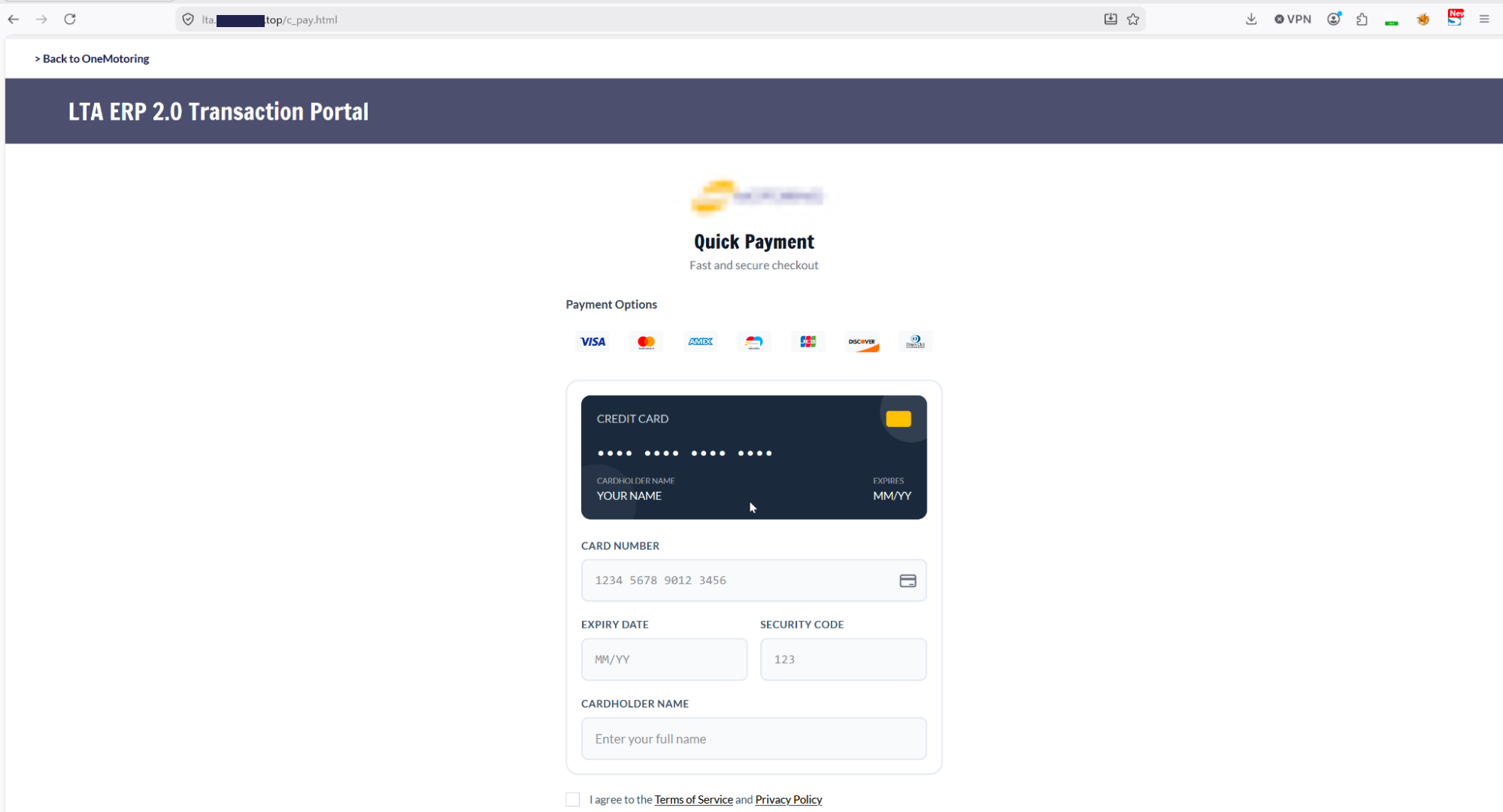
Step 4: The card form gathers financial details
The next page imitated a quick-payment checkout. It asked for a card number, expiration date, security code, and cardholder name.
Group-IB reported that the page’s script transmitted entered information to an operator panel in real time, even before a final form submission.
That detail changes the response. Closing the tab after typing a card number may not guarantee that the number stayed on your device.
Step 5: The operator chooses a verification challenge
After card entry, the page could show a fake payment gateway. The operator had controls to present an SMS code, email code, PIN, or app confirmation.
Those requests were not ordinary security checks. They were ways to capture whatever additional proof a real bank might demand for a payment.
Because the operator could adapt, one victim might see different prompts from another. A single screenshot cannot represent every version of the kit.
Step 6: The page can ask again
The research also showed controls that could send a visitor back to the payment screen. That could be used to seek another card if the first failed.
A failure message does not mean the previous details were rejected or erased. It may be a tactic to collect more data before the victim leaves.
Stop at the first unexpected card or code request. Do not keep retrying on the theory that a successful payment will resolve the notice.
What Happened After the Takedown Effort
In June 2026, Google took legal action against the group described in this ecosystem, alongside a coordinated effort with law enforcement and infrastructure partners.
Group-IB’s later observation of more than 700 new pages is important because it shows the activity did not simply end with that announcement.
It does not mean each new page attracted a victim. It means the infrastructure could still be created after public disruption.
The same distinction applies to the 100,000-page estimate. It is a measure of deployment scale, not a count of people defrauded.
For the public, a legal action is welcome news but not an all-clear. A new text can still arrive under a different name or domain.
Why the Next Screen Can Change While You Wait
Many scam pages are fixed. You enter information, click a button, and receive the same confirmation as everyone else. Outsider offered a more flexible experience.
Researchers described a live connection between the page and an operator panel. That meant the person running the campaign could watch activity and adjust the challenge.
A payment page might first request card details. Then it could ask for an SMS code because the real bank issued one during an attempted transaction.
Another visitor could see an email code or a request to approve something in a banking app. The exact prompt can depend on the institution’s rules.
That flexibility is why a victim may feel the page understands their case. The apparent personalization is not evidence that an authority found a real fine.
The operator can also show a loading screen while waiting for a real banking response. A pause that feels like processing may be part of the theft.
Do not assume an error means the attempted charge failed. It might mean the operator needs a fresh code or wants another payment method.
Group-IB found page naming conventions that corresponded to stages such as login, card payment, SMS verification, email, and PIN entry.
Those names were useful to investigators. Readers do not need to memorize them; they need to recognize the movement from surprise notice to sensitive-data collection.
The first request can be small. A registration number or phone number may feel harmless beside a card number, yet it prepares the next screen.
It can also make the page seem responsive. Once you have invested time entering details, abandoning a supposed final payment may feel inconvenient.
That is the point where a short pause helps. Ask whether you began this task yourself through an official channel or followed a stranger’s text.
If the answer is the text, leave the page. You can always return through the real agency’s website if the fee genuinely exists.
The real agency should be able to identify an actual case through its normal service channels. A page’s own case number proves nothing independently.
Likewise, a real bank notification may be triggered by an attacker trying your card. The bank message is genuine, but the surrounding website remains fraudulent.
Never tell the page a code just because it came from your bank. Call the bank and explain that an unexpected transaction or verification may be underway.
This campaign’s exact templates may change. The step that matters is consistent: a message you did not request steers you away from a known channel.
Keeping that distinction in mind is more durable than saving a list of bad domains, which can be replaced quickly.
How to Check a Fee or Account Warning
Ignore the link inside the message. Search for the authority’s official website yourself or use a saved app you already know is genuine.
For a road, parking, or toll claim, check whether the agency actually handles payments by text. Its published guidance may identify authorized channels.
Do not trust the first search advertisement blindly. Criminals can buy ads, and a sponsored result is not an official government seal.
Read the whole domain. A name containing an agency abbreviation may still end under a different, attacker-controlled address.
If a phone flags a message as spam, do not follow instructions to copy the link or reply to unlock it. That bypasses a protective warning.
If the page asks for a real bank code, stop. A fee notice should never need you to hand a fresh authentication code to an unfamiliar site.
Ask the agency through a verified channel whether any debt exists. A case number printed on the suspicious page is not independent evidence.
Talk to someone you trust if the threat feels urgent. A brief pause is useful when a text is designed to make you act before thinking.
What to Do if You Have Fallen Victim to This Scam
- Close the fraudulent page. Do not try another card or code. Save the text and address without opening the link again.
- Contact your card issuer. Say you entered details on a fake payment page. Ask about blocking the card, replacement, and disputed transactions.
- Tell the bank about any code or app approval. A submitted authentication code may have enabled a payment or account action even if no fee appeared.
- Review account activity now. Look for pending and completed charges, new payees, or changes to your profile and contact information.
- Secure exposed accounts. Change passwords if you entered them and revoke sessions or devices that you do not recognize.
- Keep proof of the sequence. Preserve the message, sender, domain, screenshots, and bank alerts. This can help an issuer or agency investigate.
- Report the impersonation. Notify the real agency named in the text and your mobile provider’s spam channel. Report financial fraud to local authorities.
- Check for other exposure. If the page asked you to download anything, scan the device with a reputable product such as Malwarebytes.
- Use link filtering as another layer. AdGuard may block some known malicious destinations, but it cannot make every unfamiliar text safe.
Even if the card has not been charged, tell the issuer that the details were entered. The page may have captured them before you pressed a button.
Recovery scammers sometimes contact victims after a report. Ignore anyone asking for a fee to unlock a refund or trace a card payment.
Frequently Asked Questions
Does 100,000 phishing pages mean 100,000 people were scammed?
No. Group-IB counted related pages over a defined period. The figure is not a verified count of victims, successful payments, or losses.
Was the Singapore Land Transport Authority behind the message?
No. The documented text and website impersonated the authority. Verify any real vehicle or fee issue through the agency’s own channels.
Why did the message tell me to copy the link?
In the captured example, it gave ways around a phone’s spam protections. Treat instructions to bypass a blocked link as a warning.
Can the page take a card number before I press Pay?
Group-IB found real-time transmission of entered card data in the analyzed page. If you typed details there, contact the issuer even without submitting.
Did the June 2026 action shut down Outsider completely?
No complete shutdown was established. Group-IB observed hundreds of new related pages in the month after the coordinated action.
Do all Outsider texts mention vehicles or tolls?
No. The kit included templates for several industries and countries. The Singapore vehicle example demonstrates one flow, not every campaign variation.
The Bottom Line
Outsider is a reusable phishing system, not one suspicious text. Its messages change names and countries, but the push toward a fake page remains familiar.
When a surprise notice asks you to pay through a link, step out of that conversation. Check the claim independently and act quickly if you entered card details.








