

You are buying an aquarium online when a checkout code prompt appears. A bank text arrives at exactly the right moment.
The timing makes the request feel routine. Before typing those six digits, read what the bank says they will authorize.
Overview
The checkout can ask for a code meant for something else
In this scam, a deceptive checkout presents a bank code as a purchase confirmation. The underlying bank message may instead concern adding a card to a digital wallet.
That difference is decisive. A card enrolled in a wallet controlled by someone else can create a route for unauthorized spending.
The digital-wallet service itself is legitimate. The fraud is the misleading checkout that persuades a cardholder to authorize the wrong action.
A reported aquarium purchase shows the confusing moment
One buyer described ordering an aquarium for a turtle, then noticing the bank’s code message referred to adding their card to Google Wallet.
The poster says a later bank email confirmed the card had been added. They contacted the issuer and obtained a replacement card.
The buyer did not identify the checkout site or report a confirmed fraudulent charge. The code message itself warranted a call to the bank.
Chase describes social-engineered card scams in which fraudsters obtain verification codes to add cards to digital wallets.
What to check while the code is still unused
- Read the complete bank text, including the action it names.
- Compare that action with what you intended to do on the site.
- Do not enter a wallet-enrollment code into a product checkout.
- Open your banking app independently if the message is unexpected.
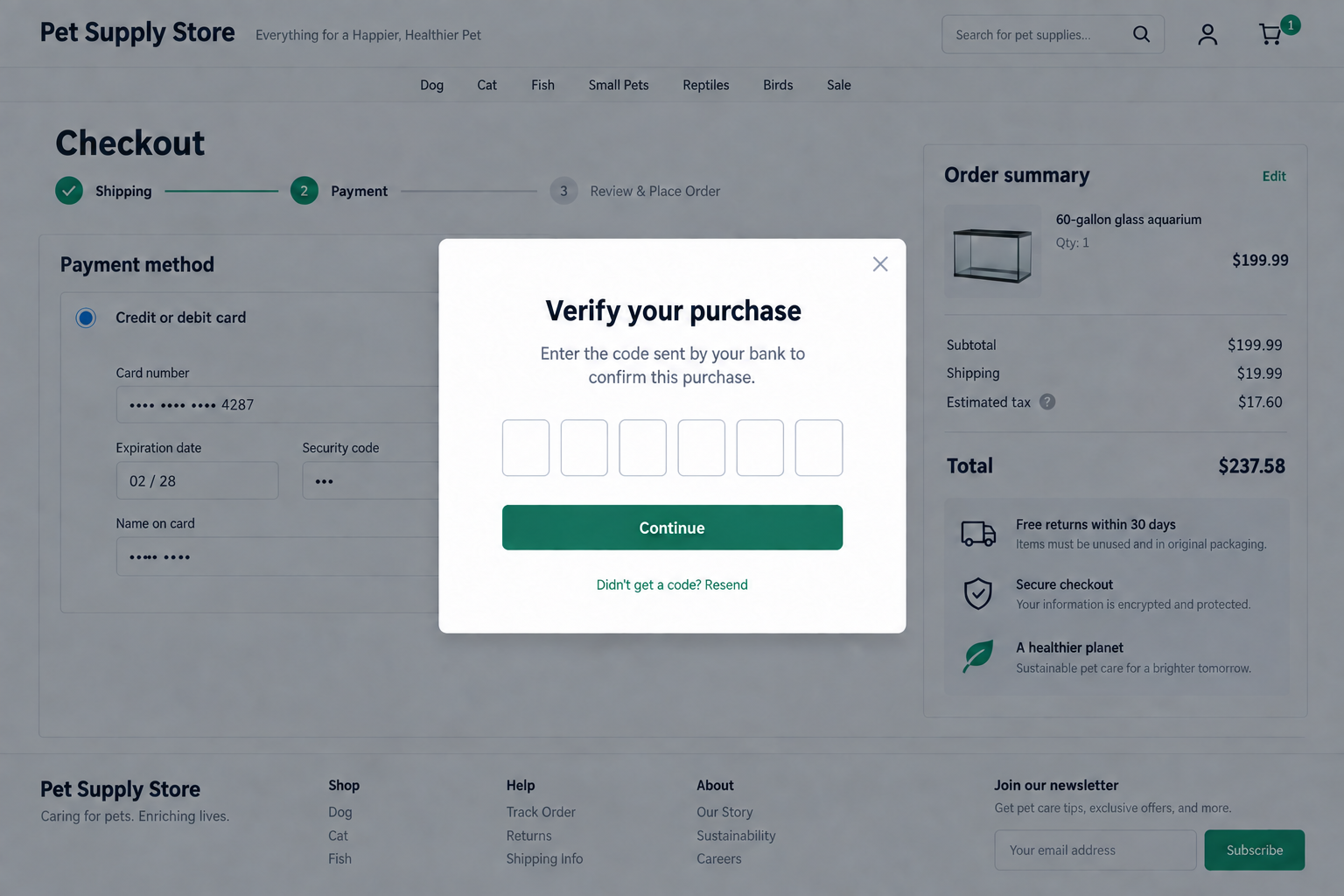
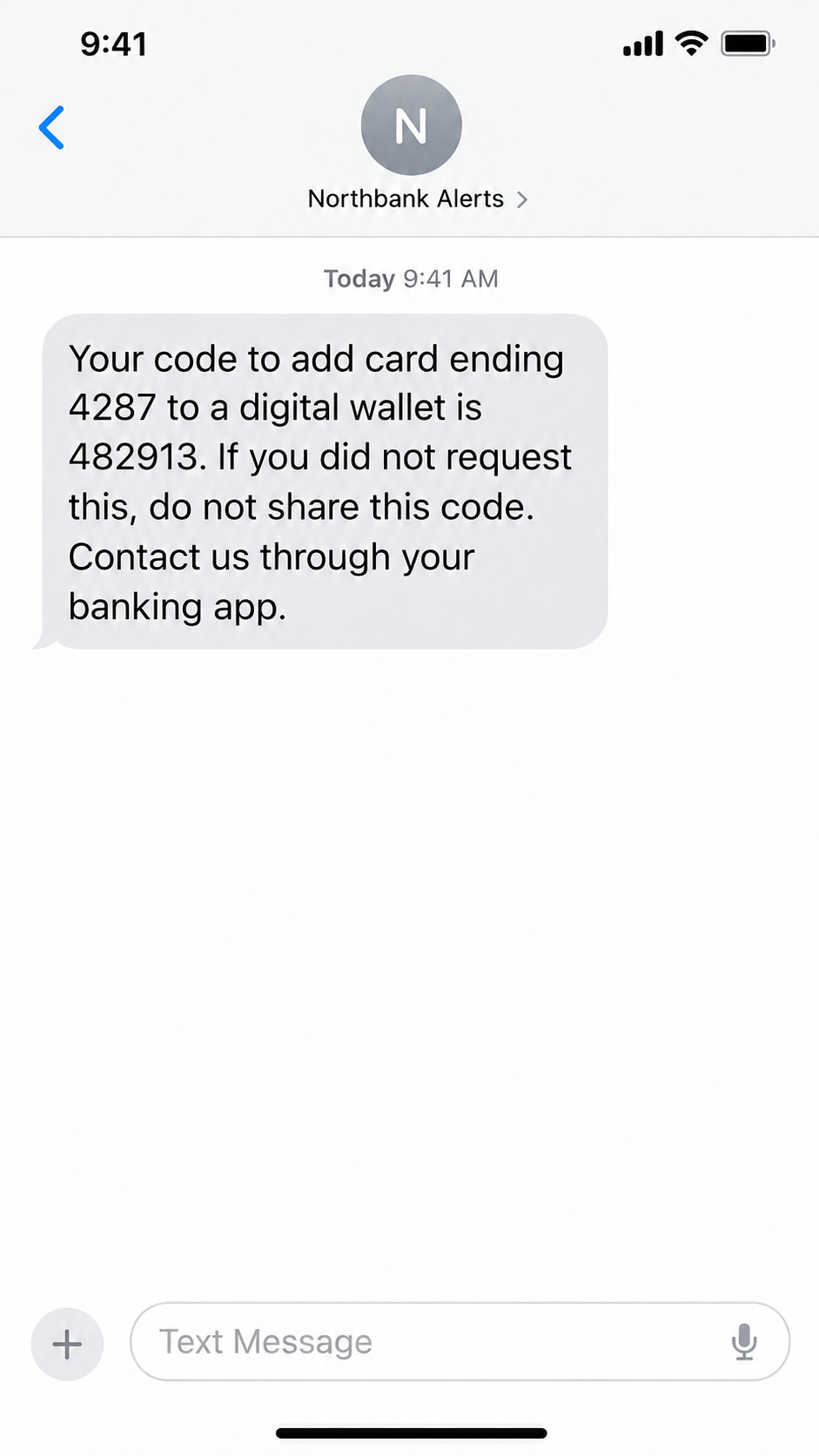
The two screens here recreate the sequence with fictional details: a checkout prompt and a bank message that authorize different things.
The store label, card digits, and bank name are illustrative. They do not identify the seller or institution in that report.
Why the Code Arrives at Such a Convincing Time
Online shoppers are used to security steps. A payment may require a banking-app approval, a one-time code, or a second confirmation.
Because these checks often happen during checkout, a code arriving right after a click can feel like confirmation that the merchant is legitimate.
It is not. The bank generated the code in response to an action, but the action may be different from the purchase shown on your screen.
Imagine an operator has the card number and submits a wallet-add request elsewhere. Your bank then sends a code describing that request.
The deceptive checkout asks you to paste the digits back into its form. If you do, the operator may use them to complete enrollment.
No public copy of that checkout is available, so its exact design and backend behavior remain unknown.
The screen in front of you is therefore not the authority on what the code means. The bank’s message is the more important text.
Read it literally. “Add this card to a wallet” does not mean “confirm an aquarium purchase,” even if both events happen seconds apart.
A checkout may show a timer or say the payment will fail if you do not enter the code. That pressure should not override the mismatch.
There is no need to solve the site’s problem before protecting your card. Leave the page and contact the issuer through a route you trust.
How the Fake Checkout Code Scam Works
Step 1: A shopper reaches a tempting checkout
The offer might be an aquarium, another product, or an ordinary online service. The fraudulent element is not necessarily visible on the first page.
A familiar product photo or plausible total can make the checkout feel routine. Neither proves who controls the payment form.
We do not know the domain used in the reported aquarium case. Avoid assuming any named legitimate pet supplier participated.
Step 2: Card information enters the wrong hands
A malicious form can collect the number, expiration date, and security details that a shopper believes are needed for payment.
Those details may be enough for an operator to try a separate transaction or request wallet enrollment, depending on the issuer’s controls.
The important risk is not limited to the displayed aquarium price. Once the information is copied, the operator can attempt actions elsewhere.
Step 3: A bank sends a real message for a different action
The bank text may be genuine, yet unrelated to the purchase you intended. Its wording tells you which operation needs approval.
The crucial words in the buyer’s bank text were about adding the card to Google Wallet. They did not describe the aquarium purchase.
Chase’s guidance explains why a fraudster would want such a code. It can help place a card in a wallet on another device.
The bank is not asking you to trust the checkout. It is giving you a chance to stop an action you did not initiate.
Step 4: The checkout relabels the code as purchase verification
A modal may say “verify your purchase” and offer six blank boxes. That language frames the code as the final normal step.
The label is part of the site controlled by the seller or attacker. It cannot change the purpose stated in the bank’s message.
Even a realistic design does not resolve the contradiction. Many phishing pages imitate ordinary payment screens with convincing progress bars and security icons.
If the message says “add card to wallet,” stop. Do not treat the store’s explanation as permission to reinterpret it.
Step 5: Entering the code may complete wallet enrollment
If the operator can use the code before it expires, the card may be added to a wallet that the cardholder does not control.
That can allow attempted purchases without the physical card. The exact transactions possible depend on the wallet, issuer, and fraud controls.
The poster reports confirmation that the card was added, but no completed fraudulent purchase. That is their account, not an independently verified bank record.
Even without a confirmed charge, the right response is prompt issuer contact. The bank can check tokens, attempted enrollments, and recent authorizations.
What the Bank Text Is Really Telling You
One-time codes are not interchangeable. A login code, purchase code, password-reset code, and wallet-add code authorize different things.
The digits alone do not carry visible meaning when copied into a web form. The surrounding bank text supplies that meaning.
Look for verbs: add, register, activate, sign in, reset, transfer, or approve. Compare the verb with the action you started.
If you are buying an aquarium, a message about a new wallet or device is a mismatch even if the amount on the site looks correct.
The sender name is not the only clue. Some fraudulent texts can imitate banks, so verify the event inside your official banking app.
A genuine bank message can still be part of a scam sequence when a criminal initiated the action that generated it.
Do not assume the code is harmless because you never disclosed your full password. Wallet enrollment can be a separate path to misuse.
If you receive repeated code messages while not shopping, someone may be trying card or account actions. Contact the issuer to investigate.
If the checkout says the bank’s wording is “generic,” do not accept that explanation without direct issuer confirmation.
A legitimate merchant should not need you to approve a digital wallet you did not choose to add.
Google Wallet Is Not the Scammer
Google Wallet lets people use payment cards on supported devices. Many consumers add their own cards safely through the intended process.
The scam depends on enrolling a card on an account or device the cardholder does not control, using a code obtained by deception.
That distinction matters for reporting. Tell your issuer you may have approved an unauthorized wallet addition, not merely that a website looked suspicious.
The bank may be able to remove or suspend wallet tokens associated with the card. Ask it to review this specifically.
Replacing the physical card may also be appropriate, but the issuer should explain how to address any tokenized versions already created.
Do not rely on deleting a text or closing a browser tab if the code was entered. Those actions do not necessarily undo enrollment.
If your own phone shows no new wallet card, that does not rule out a card added on somebody else’s device.
The issuer has the account-level view needed to check that possibility. Call the number printed on the card, not one displayed by the suspicious site.
Separate the Purchase You Wanted From the Request You Received
Write down the transaction you intended: the merchant, amount, time, and item. Then write down the action named in the bank message.
If the two descriptions differ, do not let the website collapse them into one event. The mismatch is the signal to investigate.
A product checkout may display an order summary while the bank text describes a new device. Those screens are describing different operations.
Sometimes a shopper assumes the bank used odd wording for a normal payment. That guess is dangerous when the message explicitly names wallet enrollment.
Look in your issuer’s app for a matching transaction or card-management alert. An app notification can provide context without trusting the checkout’s explanation.
If the app offers a deny or report option for an unrecognized wallet request, use it. Then still call the issuer if card details were exposed.
Do not use a phone number from the suspicious site. A fake support agent could ask for the same code and finish the attempt verbally.
Do not reply to a text unless you know it is an official bank channel. Start from the bank app or the number on your card.
The clock matters, but not in the way the checkout suggests. You do not need to race to submit the digits before a timer expires.
You need to stop the unauthorized request and protect the card. A failed purchase can be retried later through a trustworthy seller.
Keep the full message, not just the six digits. The wording gives your bank an important clue about what the operator tried to approve.
If several codes arrive, record their order and times. Repeated attempts may show that the operator is trying different routes or devices.
Tell the issuer whether you entered any code. That fact changes its response, but an honest account helps it protect you quickly.
What to Do if You Have Fallen Victim to This Scam
- Stop the checkout. Do not enter another code or try a second card when the site reports an error.
- Call the card issuer immediately. Use the number on the card or in your official banking app. Explain that the code may have added the card to someone else’s wallet.
- Ask about wallet tokens. Request review and removal of unfamiliar wallet enrollments, plus a hold or replacement if the bank recommends it.
- Review activity. Check pending and posted transactions, failed attempts, and alerts. Report anything you did not authorize.
- Preserve details. Save the checkout URL, page screenshots, the complete bank text, time, amount, and any receipt. Avoid revisiting the suspect page.
- Secure exposed accounts. If you created a password or signed in on that site, change reused passwords through the real services.
- Check the device if you downloaded anything. A trusted scan such as Malwarebytes is useful after an unexpected file or extension. AdGuard can help block known phishing destinations.
- Report the site. Notify the payment issuer, relevant browser or hosting abuse channel, and any legitimate pet-supply store whose name was impersonated.
If you read the code but never entered it, tell the bank about the unsolicited wallet request and ask whether any card data needs replacing.
If you entered card details but no code, the issuer still needs to know. The data may be used for other attempts.
If a charge appears, dispute it promptly. The bank will need the exact timeline to distinguish your intended purchase from the unauthorized action.
Do not accept an offer from the suspect checkout to “cancel” the wallet setup for another code or fee.
Frequently Asked Questions
Why did the bank send a real code during a fake checkout?
A criminal may have initiated a separate action with your card information. The bank text describes that action, not necessarily your intended purchase.
Does a Google Wallet message mean Google is operating the scam?
No. Google Wallet is a legitimate service. The scam is tricking you into authorizing a card addition you did not request.
What if the amount on the page matches what I planned to pay?
Still read the bank message. A matching price cannot turn a wallet-enrollment code into an aquarium-purchase code.
Can I fix this by deleting the card from my own phone?
Not necessarily. Ask your issuer to review wallet enrollments on other devices and remove any unfamiliar token.
Was money stolen in the reported aquarium case?
The poster reports that the card was added, but does not document a completed fraudulent charge. The bank-text wording required immediate attention.
Should I try the checkout again with a different card?
No. Leave the suspicious site and use an independently verified seller after discussing the first card with its issuer.
The Bottom Line
The fake checkout code scam turns a genuine bank security message into a tool for a different transaction. Timing is not authorization.
Read what the code is for. If it names a wallet or device you did not choose, stop and contact your card issuer independently.
Google Wallet is not the culprit. The deception is a checkout asking you to approve a card addition under the cover of an ordinary purchase.








